1
TRIPLER ( O P T I O N A L )
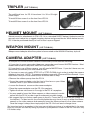
The additional lens for PS-14 transform it to 3X or 5X night
vision scope.
To install 3X lens screw it on the front lins of PS-14.
To install 5X lens screw it on the front lins of PS-14.
F100 Front Lens
HELMET MOUNT ( O P T I O N A L )
Helmet mount for attachment of ATN’s PS-14 to a standard PASGT helmet. Helmet mount fits
securely onto helmet via a rugged strapping device and grooved hooks. Whith helmet mount,
PS-14 can be positioned directly in front of user’s eyes or flipped.
WEAPON MOUNT ( O P T I O N A L )
Weapon mount adapter allow the system to be mounted on the M16/M4 Picatinny style rail.
CAMERA ADAPTER ( O P T I O N A L )
To use your PS-14 with a 35mm camera or camcorder you will need the following:
1) If you plan to use a camcorder then your camcorder must have a MACRO feature. Most
modern camcorders today have a MACRO feature builtin.
2) If you plan to use a 35mm camera, you will need a MACRO lens. If you don’t have one, we
advise that you contact your local camera store.
3) You may or may not need a STEP-UP or STEP-DOWN ring in order to adapt the camera
adapter to your lens. NOTE: The camera adapter comes with 37mm and 52mm threads. If you
need other sizes your local camera store should be able to help.
• Remove the rubber eyecup from the PS-14
• Screw the camera adapter onto the front of the lens on your Video
camera’s lens or your 35mm camera’s lens.
• Loosen the three set screws on the camera adapter.
• Place the camera adapter over the PS-14’s eyepiece.
• Tighten the three set screws to fit snugly to the PS-14’s eyepiece
• You may need to focus the 35mm camera or video camera in combination with the PS-14 in order to get the sharpest possible image.
• We suggest that you find an open space to work in. Focus the PS-14 so that the scene is at
its sharpest. For best results you should disable the auto focus (if any) on either the 35mm
camera or the video camera and manually focus the 35mm camera or the video camera.
Once the image is sharp, then simply adjust the PS-14’s front lens to change focus.
*An important part to remember is that you are not taking a picture of an object that is far away
from you, but you are actually taking a picture of a phosphorous screen of the PS-14 that is only
2-3 inches away.
4