1
Reviewer’s Guide: Lexmark T420d
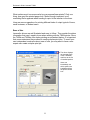
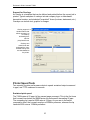
Here is the same
driver dialog as in
the previous
example, but with
the 500-sheet input
now installed. Note
that this optional
paper tray is shown
in the photo of the
printer.
Lexmark research
has shown that an
accurate image of
the printer and its
installed options is
crucial to
maximizing users’
comfort levels.
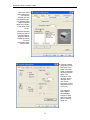
Creating a duplex
print job to print on
both sides of the
paper is a simple
matter of choosing
the correct duplex
option. The
illustration under
the word “duplex”
changes as the
user selects
long-edge or shortedge duplexing, or
none at all.
The multipage
option places
reduced page
images on each
side of the sheet,
further reducing
paper use.
9