1
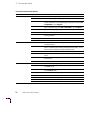
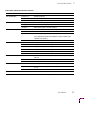
Release Note
Phaserª 140
Color Printer
Copyright © 1995 by Tektronix, Inc., Wilsonville, Oregon. Printed in the United States of America.
All rights reserved. Contents of this publication may not be reproduced in any form without
permission of Tektronix, Inc.
February 1995
Part Number 070-9069-IA
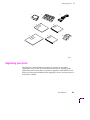
Shipping your printer
Follow these instructions for shipping a printer for servicing. These
instructions replace those given in Appendix C of the Phaser 140 Color Printer
User Manual.
Does the printer power up?
1.
Remove the interface cable.
2.
Make sure the printer is turned on (if the printer powers up). If
the printer does not power up, remove the power cord now.
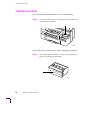
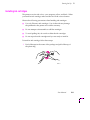
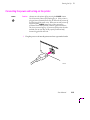
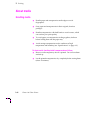
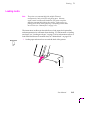
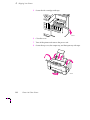
Park the carriage in the home position
1.
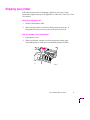
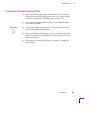
Open the top cover.
2.
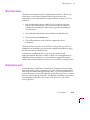
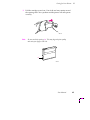
Make sure that the carriage is in its home position (at the right
front of the printer). If not, move it to the home position by hand.
9069-63
User Manual Release Note
1
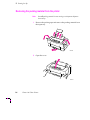
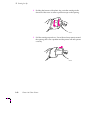
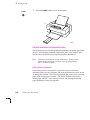
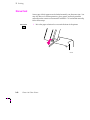
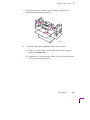
Remove all ink cartridges
1.
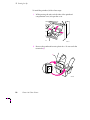
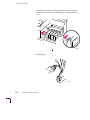
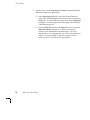
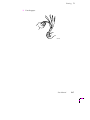
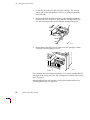
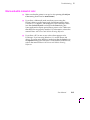
To remove an ink cartridge, lift the end of the cartridge, then pull
it out.
9069-41
2.
2
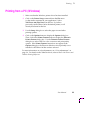
Store the cartridges individually in plastic bags to avoid spilling
ink. Do not ship the ink cartridges with the printer.
Phaser 140 Color Printer
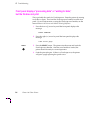
Clean the ink jets
If the front panel display is working, clean the ink jets as described in this
procedure. If the printer is damaged such that the ink jets cannot be cleaned,
go on to ÒRemove the print head.Ó
1.
Close the top cover.
2.
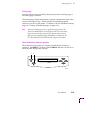
On the front panel, press the down arrow (ß) key until the front
panel displays this message:
CLEAN HEADS
3.
Press the right arrow (Þ) key until the front panel displays this
message:
clean heads
SELECT
4.
Press the SELECT button. The printer cleans the ink jets. During
the cleaning process, you cannot display other menus or menu
choices. When the cleaning is complete, the front panel continues
to display the clean heads message.
5.
Press the right (Þ) arrow key until the front panel displays this
message:
quit menu
6.
Press the SELECT button; the front panel displays this message:
ready
POWER
7.
Press the POWER button to turn off the printer.
User Manual Release Note
3
Remove the print head
Note
1.
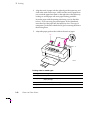
Remove the printhead with the printer plugged in and the power
turned off via the POWER button. Otherwise, a printhead error
may occur.
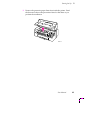
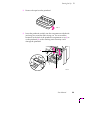
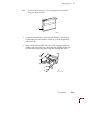
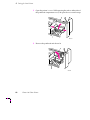
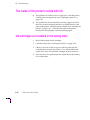
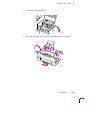
Open the printerÕs cover. While pressing the tabs on either side of
the printhead compartment cover, lift open the cover until it stops.
9069-48
2.
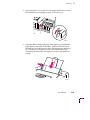
Remove the printhead. Store the print head in a plastic bag. Do
not ship the print head with the printer.
9069-49
4
Phaser 140 Color Printer
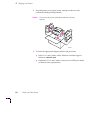
3.
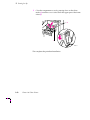
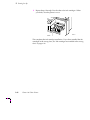
Close the compartment cover by pressing down on the white
marks (a) until the coverÕs sides reach the upper part of the frame
sides (b).
a
b
9069-13A
User Manual Release Note
5
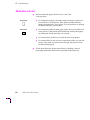
Pack the printer for shipment
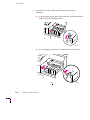
1.
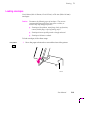
If you have not already done so, remove the power cord.
2.
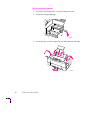
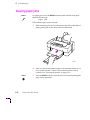
Secure the carriage with tape.
9069-64a
3.
Secure the top cover, the output tray, and the input tray with tape.
9069-61
6
Phaser 140 Color Printer
4.
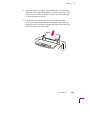
Place the printer in its original carton, making sure that it is well
cushioned with the packing materials.
9069-62
To obtain the appropriate shipping address and procedure:
■
In the U.S.A. and Canada, call the Tektronix Customer Support
Hotline at 1-800-835-6100.
■
Outside the U.S.A. and Canada, contact your local Tektronix dealer
or Tektronix sales representative.
User Manual Release Note
7
User Manual
Phaserª 140
Color Printer
First printing October 1994
070-9069-00
Copyright © 1994 by Tektronix, Inc., Wilsonville, Oregon. Printed in the United States of America.
All rights reserved. Contents of this publication may not be reproduced in any form without permission of
Tektronix, Inc.
This product, in whole or in part, may be protected by one or more U.S. or foreign patents or patent
applications. Information provided upon request from Tektronix, Inc., P.O. Box 1000, Wilsonville, Oregon
97070-1000.
If acquired subject to FAR or DFARS, the following shall apply:
■
Unpublished Ñ rights reserved under the copyright laws of the United States.
■
Restricted Rights Legend Ñ Use, duplication, or disclosures by the U.S. government is subject to restrictions
as set forth in subparagraph (c)(1)(ii) of the Rights in Technical Data and Computer Software clause at DFARS
252.227-7013, or in subparagraph (c) (2) of the Commercial Computer Software Ð Restricted Rights clause at
FAR 52.227-19, as applicable. Tektronix, Inc., P.O. Box 1000, Wilsonville, Oregon 97070-1000.
Tektronix¨ is a registered trademark of Tektronix, Inc. TekColorª, and Finepointª are trademarks of
Tektronix, Inc. Phaserª is a trademark of Tektronix, Inc. for color printers and related products.
Adobeª and PostScriptª are trademarks of Adobe Systems, Incorporated which may be registered in certain
jurisdictions.
Timesª, Helveticaª and Palatinoª are trademarks of Linotype-Hell AG and/or its subsidiaries.
Other marks are trademarks or registered trademarks of the companies with which they are associated.
PANTONE¨* Colors generated by the Phaser 140 are four-color process simulations and may not match
PANTONE-identiÞed solid color standards. Use current PANTONE Color Reference Manuals for accurate
colors.
PANTONE Color simulations are only obtainable on these products when driven by qualiÞed Pantone-licensed
software packages. Contact Pantone, Inc. for a current list of qualiÞed licensees.
* Pantone, Inc.Õs check-standard trademark for color reproduction and color reproduction materials.
© Pantone, Inc., 1988.
Warranty
Tektronix warrants that this product will be free from defects in materials and workmanship for a period of one
(1) year from the date of shipment. If this product proves defective during this warranty period, Tektronix, at its
option, will either repair the defective product without charge for parts and labor, or provide a replacement in
exchange for the defective product.
This warranty applies only to products returned to the designated Tektronix depot or the Tektronix authorized
representative from which the product was originally purchased. For products returned to other locations,
Customer will be assessed the applicable service charge. The above limitation shall not apply within the
European Economic Area, where products may be returned for warranty service to the nearest designated
service depot regardless of the place of purchase.
In order to obtain service under this warranty, Customer must provide the applicable ofÞce of Tektronix or its
authorized representative with notice of the defect before the expiration of the warranty period and make
suitable arrangements for the performance of service. Customer shall be responsible for packaging and
shipping the defective product to the service center designated by Tektronix or its representative, with shipping
charges prepaid. Tektronix or its representative shall pay for the return of the product to Customer. Customer
shall be responsible for paying any associated taxes or duties.
This warranty shall not apply to any defect, failure or damage caused by improper use or improper or
inadequate maintenance and care. Tektronix shall not be obligated to furnish service under this warranty a) to
repair damage resulting from attempts by personnel other than Tektronix representatives to install, repair or
service the product; b) to repair damage resulting from improper use or connection to incompatible equipment;
or c) to repair any damage or malfunction caused by the use of non-Tektronix supplies; d) to service a product
that has been modiÞed or integrated with other products when the effect of such modiÞcation or integration
increases the time or difÞculty of servicing the product; or e) to repair damage or malfunction resulting from
failure to perform user maintenance and cleaning at the frequency and as prescribed in the user manual.
THE ABOVE WARRANTIES ARE GIVEN BY TEKTRONIX WITH RESPECT TO THIS PRODUCT IN LIEU OF
ANY OTHER WARRANTIES, EXPRESS OR IMPLIED. TEKTRONIX AND ITS VENDORS DISCLAIM ANY
IMPLIED WARRANTIES OF MERCHANTABILITY OR FITNESS FOR A PARTICULAR PURPOSE.
TEKTRONIX' RESPONSIBILITY TO REPAIR OR REPLACE DEFECTIVE PRODUCTS IS THE SOLE AND
EXCLUSIVE REMEDY PROVIDED TO THE CUSTOMER FOR BREACH OF THIS WARRANTY. TEKTRONIX
AND ITS VENDORS WILL NOT BE LIABLE FOR ANY INDIRECT, SPECIAL, INCIDENTAL, OR
CONSEQUENTIAL DAMAGES IRRESPECTIVE OF WHETHER TEKTRONIX OR THE VENDOR HAS
ADVANCE NOTICE OF THE POSSIBILITY OF SUCH DAMAGES.
Users safety summary
Terms in manual:
CAUTION
WARNING
Conditions that can result in damage to the product.
Conditions that can result in personal injury or loss of life.
Power source: Do not apply more than 250 volts RMS between the supply conductors or between either supply
conductor and ground. Use only the speciÞed power cord and connector. Refer to a qualiÞed service technician
for changes to the cord or connector.
Operation of product: Avoid electric shock by contacting a qualiÞed service technician to replace fuses inside the
product. Do not operate without the covers and panels properly installed. Do not operate in an atmosphere of
explosive gases.
Safety instructions: Read all installation instructions carefully before you plug the product into a power source.
Terms on product:
CAUTION
DANGER
A personal injury hazard exists that may not be apparent. For example, a
panel may cover the hazardous area. Also applies to a hazard to property
including the product itself.
A personal injury hazard exists in the area where you see the sign.
Care of product: Disconnect the power plug by pulling the plug, not the cord. Disconnect the power plug if the
power cord or plug is frayed or otherwise damaged, if you spill anything into the case, if product is exposed to
any excess moisture, if product is dropped or damaged, if you suspect that the product needs servicing or repair,
and whenever you clean the product.
Ground the product: Plug the three-wire power cord (with grounding prong) into grounded AC outlets only. If
necessary, contact a licensed electrician to install a properly grounded outlet.
Symbols as marked on product:
DANGER high voltage:
Protective ground (earth) terminal:
Use caution. Refer to the manual(s) for information:
!
WARNING: If the product loses the ground connection, usage of knobs and controls (and other conductive parts)
can cause an electrical shock. Electrical product may be hazardous if misused.
Contents
1
Introduction
2
Getting Set Up
At a glance 2-1
Setting up the printer 2-2
What you get with your printer 2-2
Registering your printer 2-3
Removing the packing material from the printer 2-4
Installing the printhead 2-6
Installing ink cartridges 2-11
Loading plain paper 2-15
Connecting the printer 2-18
Printer ports 2-18
LocalTalk connection 2-19
Parallel connection 2-21
Ethernet connection 2-22
Connecting the power and turning on the printer 2-23
Printhead initialization (first-time power-up only) 2-24
Printer power-up sequence 2-24
Startup page 2-25
When the printer is ready for operation 2-25
Selecting a language for the front panel 2-26
Checking the printhead 2-27
Checking the registration 2-28
Installing a driver on your computer 2-30
Phaser 140 drivers and utilities diskettes 2-30
PC users: Microsoft Windows 2-30
PC users: DOS and setting up ports 2-32
Macintosh users 2-33
Workstation users 2-33
Turning off the startup page 2-34
What next? 2-34
User Manual
v
3
Printing
Printing from a Macintosh 3-1
Printing from a PC (Windows) 3-3
Printing from a PC (DOS) 3-4
Printing from a workstation 3-5
Getting information on printing from specific applications 3-5
Selecting printing features 3-6
Color adjustments 3-6
Finepoint 3-9
Selecting media type and print modes 3-10
Selecting page sizes 3-12
About media 3-14
Handling media 3-14
Loading media 3-15
Loading envelopes 3-19
Manual feed 3-22
Print area and margins 3-24
Fonts 3-26
Resident typefaces (PostScript) 3-26
Downloading fonts 3-27
Installing Macintosh screen fonts 3-27
Printing hints 3-28
Getting the largest printed picture 3-28
How long does it take to make a print? 3-28
vi
Phaser 140 Color Printer
4
Caring for Your Printer
Overview 4-1
Replacing an ink cartridge 4-2
Removing a used ink cartridge 4-3
Installing a new ink cartridge 4-4
Replacing the printhead 4-7
Removing the used printhead 4-7
Installing the new printhead 4-9
Cleaning the ink jets 4-10
Cleaning the printer 4-12
5
Supplies
Always use Tektronix supplies 5-1
Ordering information 5-1
Supplies kits 5-1
Printer supplies 5-2
6
Troubleshooting
If you can't make a print 6-1
Printer not operating 6-1
Test the printer by making a sample print 6-2
Verifying communication between your computer and the printer 6-2
Front panel displays Òprocessing dataÓ or Òwaiting for data,Ó but the file does
not print 6-4
Printer doesn't appear in the Chooser (Macintosh) 6-5
Print job does not finish (the printer times out) 6-6
Media problems 6-7
Frequent paper jams 6-7
Printing is skewed 6-7
Media does not load 6-8
If more than one sheet loads at a time 6-9
User Manual
vii
Problems with image size and position 6-10
Off-set images 6-10
Cut-off images 6-10
Image shifts or margins are incorrect (Macintosh) 6-10
Print quality problems 6-11
White streaks or missing dots 6-11
Smudges 6-11
Blurred or too light 6-12
Ink on paper edge 6-12
Prints are curled 6-12
Black-and-white instead of color 6-13
The inside of the printer is soiled with ink 6-14
Ink cartridges are installed in the wrong slots 6-14
Startup page prints even though it is disabled 6-15
Clearing paper jams 6-16
Printing the configuration page 6-17
Error messages displayed on the front panel 6-18
Whom to call for help 6-20
Using the automated fax systems 6-20
Use HAL to order a catalog or individual documents in the U.S.A. and Canada 6-21
Use EuroHAL to order a catalog or individual documents in Europe 6-22
7
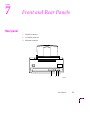
Front and Rear Panels
Rear panel 7-1
Front panel 7-2
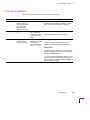
Front panel indicators 7-3
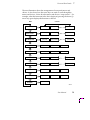
Making menu selections from the front panel 7-4
A
Technical Notes
Parallel port A-1
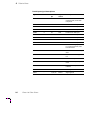
Specifications A-3
viii
Phaser 140 Color Printer
B
Expanding Your Printing System
Upgrade kits B-1
Advantages of adding memory B-2
C
Shipping Your Printer
If the printhead is operational C-1
If the printhead is not operational C-4
D
Regulatory Information
Index
User Manual
ix
x
Phaser 140 Color Printer
Chapter
1
Introduction
The Tektronix Phaser 140 is a compact color printer that provides quality
color prints on a variety of papers and transparencies.
You can make color prints from a variety of software applications, because
the Phaser 140 incorporates Adobe's PostScript Level 2 software (based on
Adobe PostScript code revision 2013).
The Phaser 140 provides great color on plain paper, coated paper, glossy
paper, back-print film, transparencies, and envelopes.
Apple Macintosh computers, IBM personal computers and compatibles, and
various workstations can all work with the printer at the same time because
the parallel, LocalTalk (AppleTalk) and optional Ethernet ports are
simultaneously active. The optional Ethernet interface provides Ethernet
connectivity with EtherTalk and Novell NetWare protocols. TCP/IP
(Transmission Control Protocol/Internet Protocol) is also available by
purchasing an additional option.
TekColor Dynamic Correction provides built-in color adjustment modes to
provide vivid color, simulate screen colors, and simulate the colors of a
printing press. A monochrome adjustment produces prints optimized for
photocopying.
Besides its 17 resident PostScript fonts, the printer accepts Adobe Type 1 and
Type 3 downloadable fonts, TrueType fonts, and a variety of user-deÞned
fonts.
The printer delivers 360 x 360 dots-per inch (dpi) color resolution and a color
printing speed up to 1 Letter-size page per minute on paper (actual speed
depends on the image and the print mode).
User Manual
1-1
1 Introduction
With the standard 8 Mbytes of memory, the printer produces color prints in
the following sizes:
■
Letter (8.5 x 11 ins.)
■
A4 (210 x 297 mm)
■
#10 Envelope (241 x 105 mm; 9.5 x 4.125 ins.)
■
DL Envelope (220 x 110 mm; 8.66 x 4.33 ins.)
■
Custom page sizes from 152 x 102 mm (6 x 4 ins.) to 216 x 279 mm
(8.5 x 11 ins.). (Custom page sizes are available through the
Tektronix Phaser 140 Windows driver; some PPD-driven
Macintosh drivers also support custom page sizes.)
With an additional 4 Mbytes of optional memory, you can also print on the
following page sizes:
■
Legal-size (8.5 x 14 ins.)
■
Custom page sizes larger than 216 x 279 mm or 8.5 x 11 ins. (up to
216 x 356 mm or 8.5 x 14 ins.).
With an additional 16 Mbytes of optional memory, you can print on custom
page sizes up to 216 x 559 mm or 8.5 x 22 ins.
To order supplies such as paper, transparencies, or ink, refer to the supplies
information sheet that is shipped with the printer and contact your local
dealer or, in the U.S.A., call Tektronix at 1-800-835-6100.
1-2
Phaser 140 Color Printer
Chapter
2
Getting Set Up
At a glance
To install your printer, perform the steps listed here. This chapter provides
detailed installation instructions.
1.
Setting up the printer
Putting all the pieces together: unpacking the printer and
accessories, checking the inventory, removing the packing
material, installing the printhead and ink, and loading paper.
2.
Connecting the printer
Connecting all necessary cables and turning on the printer.
3.
Selecting a language for the front panel
4.
Checking the printhead and the registration
5.
Installing a driver on your computer
Using the Phaser 140 driver diskettes to install a driver on your
computer (Macintosh or Windows).
User Manual
2-1
2 Getting Set Up
Setting up the printer
What you get with your printer
1.
Printhead
2.
Ink cartridges
3.
Power cord
4.
TekColor Care information
5.
Phaser 140 Color Printer User Manual
6.
Media sampler kit
7.
Phaser 140 Drivers and Utilities Printing Reference (manual)
8.
Tektronix Phaser 140 drivers and utilities diskettes
Note
2-2
This list is for the standard printer and accessories; extra memory
and Ethernet upgrades are packaged separately.
Phaser 140 Color Printer
Getting Set Up
2
5
7
8
R
M efe
an re
ua nc
l e
M
Sa ed
m ia
pl
er
6
U
M ser
an
ua
l
T
In ekC
f
E o ol
nc rm o
lo a rª
se tio
d n Ca
4
3
re
1
2
9069-01
Registering your printer
The TekColor Care information envelope (4) contains your product
registration card. Be sure to Þll out the card and mail it. Sending in the
registration card ensures that your printer is registered with Tektronix and
that you will be sent information about upgrades, service, and accessories as
it becomes available.
User Manual
2-3
2 Getting Set Up
Removing the packing material from the printer
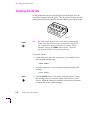
Note
Save all packing material in case moving or subsequent shipment
is necessary.
1.
Remove the packing tape and remove the packing material from
the input tray.
9069-02
2.
Open the cover.
9069-03
2-4
Phaser 140 Color Printer
Getting Set Up
3.
2
Remove the protective paper sheet from inside the printer. Read
the sheet and observe the precautions listed on the sheet as you
perform the installation.
9069-04
User Manual
2-5
2 Getting Set Up
Installing the printhead
You must install the printhead before you can start printing.
Caution
Do not move the carriage (1). Moving the carriage at this time
could damage the printer.
1
9069-05
Observe the following precautions when handling the printhead:
Caution
Avoid touching the terminals (1) ; static electricity from your
Þngers could damage the printhead.
1
9069-06
2-6
Phaser 140 Color Printer
Getting Set Up
Caution
2
Avoid touching the ink jets (1) and Þlters (2); they are delicate,
and damage or contamination could degrade print quality.
2
1
Caution
Note
9069-07
If you set the printhead down, make sure that the Þlters are
facing up.
For information on storage, refer to the printhead package.
User Manual
2-7
2 Getting Set Up
To install the printhead, follow these steps:
1.
While pressing the tabs on both sides of the printhead
compartment cover, lift open the cover.
9069-11
2.
Remove the printhead from its plastic box. Do not touch the
terminals (a).
a
9069-09
2-8
Phaser 140 Color Printer
Getting Set Up
3.
2
Remove the tape from the printhead.
9069-10
4.
Insert the printhead carefully into the compartment with the ink
jets facing down and the Þlters facing out. Do not touch the
terminals on the back of the printhead compartment cover (a) or
on the printhead (b), as the resulting static electricity could
damage the printhead.
a
b
9069-12
User Manual
2-9
2 Getting Set Up
5.
Close the compartment cover by pressing down on the white
marks (a) until the coverÕs sides reach the upper part of the frame
sides (b).
a
b
9069-13
This completes the printhead installation.
2-10
Phaser 140 Color Printer
Getting Set Up
2
Installing ink cartridges
The printer uses four ink colors: cyan, magenta, yellow, and black. When
you install an ink cartridge, make sure that it is in the correct location.
Observe the following precautions when handling ink cartridges:
■
Use only Tektronix ink cartridges. Use of other ink may damage
the printhead or the printer and void the warranty.
■
Do not attempt to disassemble or reÞll the cartridges.
■
To avoid spilling ink, do not tilt or shake the ink cartridges.
■
Do not unpack an ink cartridge until you are ready to install it.
To install an ink cartridge, follow these steps:
1.
Peel off the tape in the center of the package and pull off the top of
the plastic bag.
9069-14
User Manual
2-11
2 Getting Set Up
2.
Holding the bottom of the plastic bag, twist the cartridge in the
direction of the arrow to remove protective tape on the opening.
9069-15
3.
Pull the cartridge up and out. Part of the seal may remain around
the opening; this is not a problem and the printer will still operate
correctly.
9069-16
2-12
Phaser 140 Color Printer
Getting Set Up
Note
2
Do not touch the opening (a); this may degrade print quality and
stain your Þngers with ink.
a
9069-17
4.
Locate the slot marked for this color ink cartridge. The slots are
coded with colors and numbers: black (1), cyan (2), magenta (3),
and yellow (4).
5.
Make sure that the number and color on the cartridge match the
number and color on the slot. Then slide the cartridge all the way
into the slot and press the end to snap the cartridge into place.
9069-18
User Manual
2-13
2 Getting Set Up
6.
Repeat Steps 1 through 5 for the other color ink cartridges. When
you Þnish, close the printerÕs cover.
9069-19
This completes the ink cartridge installation. If you have installed the ink
cartridges in the wrong slots, see ÒInk cartridges are installed in the wrong
slotsÓ on page 6-14.
2-14
Phaser 140 Color Printer
Getting Set Up
2
Loading plain paper
The printer accepts plain paper, coated paper, glossy paper, envelopes,
back-print film, and transparencies. This procedure describes how to load
plain paper. For information on how to load all print media, see ÒAbout
mediaÓ on page 3-14.
Back position
1.
Set the paper selection lever toward the back of the printer.
2.
Pull out the paper support.
3.
Pull out the output tray and the extension. The Þrst position (a) is
for Letter- or A4-size paper; when fully extended, the tray accepts
Legal-size paper.
2
1
a
9069-20
3
User Manual
2-15
2 Getting Set Up
4.
Open the cover and move the paper thickness lever (near the
printhead) toward the front of the printer. Close the printerÕs
cover.
9069-21
5.
Fan the paper.
9069-22
2-16
Phaser 140 Color Printer
Getting Set Up
6.
2
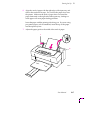
Align the stack of paper with the right edge of the input tray, and
slide in the stack until it stops. Do not force the paper down into
the printer. Make sure the stack of paper does not exceed the
paper limit mark on the right side of the input tray; loading too
much paper will cause paper feeding problems.
Insert the paper with the printing side facing you. If you are using
pre-printed paper, such as letterhead, insert the top of the paper
into the input tray first.
7.
Adjust the paper guide to the width of the stack of paper.
7
6
9069-23
User Manual
2-17
2 Getting Set Up
Connecting the printer
Printer ports
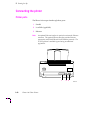
The Phaser 140 accepts data through these ports:
1.
Parallel
2.
LocalTalk (AppleTalk)
3.
Ethernet
Note
An optional Ethernet interface is required to activate the Ethernet
connector. The optional Ethernet interface provides Ethernet
connectivity with EtherTalk and Novell NetWare protocols. The
TCP/IP protocol is available by purchasing an additional
upgrade kit.
1
2
3
9069-24b
2-18
Phaser 140 Color Printer
Getting Set Up
2
LocalTalk connection
Note
LocalTalk is sometimes referred to as AppleTalk. LocalTalk refers
to the physical connection; AppleTalk is the protocol.
You can make LocalTalk connections between the printer and a single
computer or on a LocalTalk network using a daisy-chain setup. If your
LocalTalk installation is complex, or if you need assistance, contact your
network system administrator.
LocalTalk connectors and cables are available through your dealer. This
illustration shows two commonly used types of LocalTalk connectors:
1.
Self-terminating connector
2.
Connector that requires an external terminator, depending on
your network conÞguration
1
Note
2
9069-67
Depending on the type of LocalTalk cables you use and your
network conÞguration, you might need to use terminators at
certain points in the installation. Refer to the documentation for
your LocalTalk connectors and cables for details.
User Manual
2-19
2 Getting Set Up
Connecting the printer to a single computer using LocalTalk
You can use LocalTalk connectors and cables to connect the printer directly
to your computer, without connecting it to any other network. Make sure
that the printer is turned off before making any LocalTalk connections.
1.
Connect the short cable of a LocalTalk connector to the printer's
LocalTalk port.
2.
Connect the short cable of another LocalTalk connector to your
computer's LocalTalk port.
3.
Connect a LocalTalk cable from the LocalTalk connector that you
have just attached to your computer to the printer's LocalTalk
connector.
LocalTalk¨
1
2
3
9069-26
If you have no other connections to make, turn immediately to ÒConnecting
the power and turning on the printerÓ on page 2-23.
2-20
Phaser 140 Color Printer
Getting Set Up
2
Parallel connection
1.
Connect a parallel interface cable to your computer and to the
printer's parallel port.
1
9069-27
2.
If you have no other connections to make, turn immediately to
ÒConnecting the power and turning on the printerÓ on page 2-23.
User Manual
2-21
2 Getting Set Up
Ethernet connection
Ethernet is a communication standard that supports very high speed data
transmission. Make sure that you connect your printer to an EtherTalk
network before you turn on the printer.
To use the Ethernet connection, optional hardware must be installed in the
printer. The optional hardware is an upgrade kit that can be purchased
initially with the printer or added later.
To order the optional hardware, contact your local Tektronix reseller or call
Tektronix toll-free in the United States and Canada at 1-800-835-6100. Ask
for upgrade kit 4686FP1.
For complete information on installing the printer on Ethernet networks,
refer to the manual Network Utilities for Phaser Color Printers.
Note
2-22
For information on connecting your printer in VMS
environments, contact Tektronix Customer Support at
1-800-835-6100.
Phaser 140 Color Printer
Getting Set Up
2
Connecting the power and turning on the printer
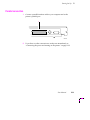
POWER
Caution
1.
Always turn the printer off by pressing the POWER button.
Do not turn the printer off by unplugging it. If the printer is
plugged into a switched power strip, do not turn the printer off
by switching off the power strip. When you turn the printer off
by pressing the POWER button, the printer returns the
printhead to the home position (extreme right) and seals the
ink-jets to prevent clogging. If you turn off the printer by other
methods, the ink jets may not be properly sealed and may
become clogged with dried ink.
Plug the power cord into the printer and into a grounded outlet.
9069-28
User Manual
2-23
2 Getting Set Up
POWER
2.
Press the POWER button to turn on the printer.
2
9069-29
Printhead initialization (first-time power-up only)
During the Þrst power-up after printhead installation, the printer purges the
ink jets. This Þrst-time printhead initialization takes a few minutes and is
executed only on the Þrst power-up after printhead installation.
Note
Do not turn off the printer during initialization. Turning off the
printer during initialization prevents it from printing properly
when it is turned on again.
Printer power-up sequence
Every time you turn on the printer, it executes a series of self-tests to
determine if there are any problems. The front panel indicators turn on and
off during the self-tests. After running self-tests, the printer prints a startup
page, if the startup page is enabled. (The factory default is to have the
startup page enabled.) After running self-tests and printing the startup
page, the printer is ready for operation.
2-24
Phaser 140 Color Printer
Getting Set Up
2
Startup page
After the self-tests run successfully, the printer produces a startup page, if
the startup page is enabled.
The startup page contains information on printer conÞguration, print count,
and error messages (if any). When enabled, the startup page prints
whenever you turn on the printer. For details on how to disable the startup
page, see ÒTurning off the startup pageÓ on page 2-34.
Note
After the startup page prints, a registration page prints if the
printer has made between six and eight prints since it was built.
If you have not already registered your printer, please do so by
Þlling out the registration page and mailing it to Tektronix, Inc.
P.O. Box 1000, MS 63-583, Wilsonville, Oregon 97070-1000.
When the printer is ready for operation
When the power-up sequence is complete and the printer is ready for
operation, the POWER (1 ) indicator and the SELECT indicator (2) and are on,
the front panel displays this message:
1
2
ready
9069-30
User Manual
2-25
2 Getting Set Up
Selecting a language for the front panel
You can set up the printer to display front panel messages in English, French,
German, Spanish, or Italian. The factory default is English. To select a
language for the front panel, follow these steps:
1.
Press the down (ß) arrow key until the front panel displays this
message:
SET LANGUAGE
2.
Press the right (Þ) arrow key until the front panel displays the
language you want:
English
fran•ais
Deutsch
espa–ol
italiano
SELECT
3.
Press the SELECT button; the front panel displays an asterisk (*)
after your selection.
4.
To return the printer to normal operation:
a. Press the right (Þ) arrow key until the front panel displays
this message:
quit menu
(in the selected language)
b. Press the SELECT button; the front panel displays this message:
ready
2-26
Phaser 140 Color Printer
(in the selected language)
Getting Set Up
2
Checking the printhead
Print the printhead test pattern to check for clogged ink jets:
1.
Press the down (ß) arrow key until the front panel displays this
message:
CLEAN HEADS
2.
Press the right (Þ) arrow key until the front panel displays this
message:
print head test
SELECT
3.
Press the SELECT button. The printer prints the head test pattern:
(Black)
(Cyan)
(Magenta)
(Yellow)
9069-31
4.
Inspect the test pattern. There should be four horizontal lines
between each pair of vertical lines. If any of the horizontal lines is
missing, clean the ink jets as described under ÒCleaning the ink
jetsÓ on page 4-10.
5.
Return the printer to normal operation:
a. Press the right (Þ) arrow key until the front panel displays
this message:
quit menu
b. Press the SELECT button; the front panel displays this message:
ready
User Manual
2-27
2 Getting Set Up
Checking the registration
Registration is the printerÕs ability to put the four colors on the page in
proper horizontal alignment. To check and adjust the registration, follow
these steps:
1.
Press the down (ß) arrow key until the front panel displays this
message:
PICK FILLED AREA
2.
Press the right (Þ) arrow key until the front panel displays this
message:
print fill test
SELECT
3.
Press the SELECT button. The printer prints the Þll test pattern:
1
2
3
4
5
6
7
8
9
10
11
12
13
9069-32
2-28
Phaser 140 Color Printer
Getting Set Up
SELECT
4.
Inspect the Þll test pattern. Determine which of the 13 patterns
looks the most like a solid band, and note its corresponding
number (1 Ð 13). (If several patterns look good, choose the
middle one.)
5.
Press the right (Þ) arrow key until the front panel displays the
number of the pattern you have chosen as best. Press the SELECT
button to enter the number of the pattern you have displayed on
the front panel.
6.
Return the printer to normal operation:
2
a. Press the right (Þ) arrow key until the front panel displays
this message:
quit menu
b. Press the SELECT button; the front panel displays this message:
ready
User Manual
2-29
2 Getting Set Up
Installing a driver on your computer
Phaser 140 drivers and utilities diskettes
Packaged with your printer are the Phaser 140 drivers and utilities diskettes
for PC and Macintosh.
For complete details on the contents of the Phaser 140 drivers and utilities
diskettes and how to use them, refer to the manual Phaser 140 Drivers and
Utilities Printing Reference, which is shipped with the diskettes.
PC users: Microsoft Windows
The Phaser 140 diskettes include a Microsoft Windows 3.1 driver for this
printer. If you want to use Microsoft Windows applications with this printer,
install the driver onto your PC.
2-30
1.
Start Windows on your PC.
2.
Insert the Tektronix Windows 3.1 Printer Driver diskette into your
computerÕs disk drive.
3.
Open the Control Panel. Double-click the Printers icon; the
Printers dialog box appears.
4.
Choose the Add button.
5.
In the List of Printers, select Install Unlisted or Updated Printer.
6.
Choose the Install button.
7.
Type in the drive that the PC diskette is in (for example, drive B:)
and click on the OK button.
8.
Select your printer and click OK.
9.
The driver software you need is automatically installed.
Phaser 140 Color Printer
Getting Set Up
2
10. Assign the printer to a port:
a. Select the printer from the list of installed printers.
b. Choose the Connect button to display the Connect dialog box.
c. Set the Transmission Retry value to 850. Refer to your
Windows documentation for details.
d. Select a port:
Interface
Parallel
Network
Select
LPT1 or LPT2
Network button
If you selected a parallel port, go on to Step e.
If you clicked on the Network button, the Printers Ð Network
Connections dialog box appears. Fill in each item according
to your conÞguration. Refer to your Windows documentation
for details or ask your network administrator for help.
Note
The printerÕs conÞguration page contains the information you
need to set up the printer port. For information on generating a
conÞguration page, see ÒPrinting the conÞguration pageÓ on
page 6-17.
e. Click OK in the Connect dialog box and close the Printers
dialog box.
Note
If you are using Windows 3.1, you can use the Phaser 140 with
the standard Microsoft Windows PostScript driver (by adding a
WPD speciÞc to the Phaser 140). With the standard driver, you
get the printer page size information, but you do not get color
corrections and other PostScript Level 2 features; those features
are only available through the Tektronix driver for Windows 3.1.
For details on updating the standard Microsoft Windows
PostScript driver, refer to the manual Phaser 140 Drivers and
Utilities Printing Reference.
The manual Phaser 140 Drivers and Utilities Printing Reference provides a
detailed driver installation procedure and complete information on using
the Tektronix driver or the standard Windows PostScript driver with the
printer.
User Manual
2-31
2 Getting Set Up
PC users: DOS and setting up ports
Check the list of supported printers in your DOS application for support of
the Phaser 140. If the list does not include the Phaser 140, use a generic color
PostScript driver.
Parallel port setup
If you are using the printer's parallel port, you should disable timeouts on
your computer's parallel port. Disabling timeouts ensures that large Þles
will print, even if data transmission is slow.
The DOS MODE command is used to disable timeouts on your computer's
parallel port. Type this command at the DOS prompt (if LPT1 is not
available, use LPT2):
MODE LPT1:,,P > NUL
See your DOS documentation for details on the MODE command.
You may want to add the MODE command to your AUTOEXEC.BAT Þle, so
that it takes effect every time you turn on your computer.
2-32
Phaser 140 Color Printer
Getting Set Up
2
Macintosh users
The Phaser 140 diskettes include a Macintsoh printer driver. The driver,
which allows you to select Tektronix Phaser page sizes and color
adjustments, works with Macintosh system software versions 6.0.7, 7.0.x,
and above.
1.
Before installing the driver, disable all virus protection software
that you may have running. Virus protection software interferes
with the driver installation. Refer to the programÕs documentation
for instructions.
2.
Insert the Macintosh Printer Driver diskette into the disk drive.
3.
Double-click on the Installer icon.
4.
Follow the directions on the screen to complete the driver
installation.
The manual Phaser 140 Drivers and Utilities Printing Reference provides a
detailed driver installation procedure and complete information on using
the Tektronix driver with the printer.
In addition to installing the driver, you may also need to install
application-speciÞc Þles (such as PPDs or PDFs) for such applications as
PageMaker and QuarkXpress. For more details on application-speciÞc
setups, refer to the manual Phaser 140 Drivers and Utilities Printing Reference.
Workstation users
Some of the Þles on the Phaser 140 utilities PC diskettes are in text format
and can be used by Unix workstations to control Tektronix printer features.
Files are also available through electronic mail. You can copy these Þles to
your workstation as you would other PC-format Þles (log on as root, mount
the drive, and use the cp command). For detailed information on accessing
and using these utility Þles, refer to the Phaser 140 Drivers and Utilities
Printing Reference.
User Manual
2-33
2 Getting Set Up
Turning off the startup page
To turn off the startup page, follow these steps:
1.
Press the down (ß) arrow key until the front panel displays this
message:
SET STARTPAGE
2.
Press the right (Þ) arrow key until the front panel displays this
message:
startpage off
SELECT
3.
Press the SELECT button.
4.
Return the printer to normal operation:
a. Press the right (Þ) arrow key until the front panel displays
this message:
quit menu
b. Press the SELECT button; the front panel displays this message:
ready
What next?
When you have set up all the hardware and connectors, installed the
software on your computer, and turned on the power, you are ready to print.
Chapter 3, ÒPrinting,Ó contains useful information on printing features such
as color adjustment, fonts, and printing hints. For detailed information on
printing options, refer to Phaser 140 Drivers and Utilities Printing Reference.
2-34
Phaser 140 Color Printer
Chapter
3
Printing
Printing from a Macintosh
1.
Make sure that the Tektronix printer driver for the Macintosh has
been installed.
2.
Select the driver:
a. Select Chooser from the Apple menu.
b. Select the Tektronix driver by clicking on the Phaser 140
printer icon. (If it did not appear in the list of drivers, restart
your Macintosh and repeat the driver installation procedure.)
A list of printers available in the current zone appears.
c. Select the zone where your Phaser 140 is connected.
d. Select the printer by name (default name is Phaser 140).
You can change the default printer name and EtherTalk zone
with the LaserWriter Utility, which is on the drivers and
utilities diskettes. See the Phaser 140 Drivers and Utilities
Printing Reference for instructions.
User Manual
3-1
3 Printing
3.
To print a Þle, use the Page Setup and Print commands from the
File menu within your application:
a. In the Page Setup dialog box, select the desired Tektronix
paper size so that the application uses the correct margins for
the printer. To see the Tektronix paper sizes in the Page Setup
dialog box, use the pop-up menu to the right of the standard
LaserWriter page sizes.
b. Click the TekColor button in the Print dialog box to open the
TekColor Options dialog box, in which you can select
TekColor color adjustments and media types. For more
information on color adjustments, see ÒColor adjustmentsÓ on
page 3-6. For more details on the driver options, refer to
Phaser 140 Drivers and Utilities Printing Reference.
3-2
Phaser 140 Color Printer
3
Printing
Printing from a PC (Windows)
1.
Make sure that the Windows printer driver has been installed.
2.
Click on the Printer Setup command from the File menu
(or the similar command in your application). Select
Tek Phaser 140 (TekColor) from the list. If you have
previously set the Phaser 140 as the default printer, it will
already be selected on the list.
3.
Use the Setup dialog box to select the paper size and other
printing options.
4.
Click on the Options button to display the Options dialog box.
Then, click on the Printer Features button to display the Tektronix
Printer Features dialog box. Use the Tektronix Printer Features
dialog box to select TekColor color corrections and print quality
options. If the Printer Features button does not appear in the
Options dialog box, the Tektronix Windows driver probably is not
installed or the Phaser 140 has not been selected.
For more information on color adjustments, see ÒColor adjustmentsÓ on
page 3-6. For details on the Tektronix driver, refer to Phaser 140 Drivers and
Utilities Printing Reference.
User Manual
3-3
3 Printing
Printing from a PC (DOS)
1.
Set up the printing options in your application software for a color
printer driver and a communications port. Refer to your
application software user manual for details on how to make these
selections.
2.
Select the printer driver for the Phaser 140, or a general color
PostScript driver.
a. Select an LPT port if you have the printer connected to the
parallel port.
b. Set the page margins in your application software as needed.
For details on the printer's paper and margin sizes, refer to
ÒPrint area and marginsÓ on page 3-24.
3.
3-4
Execute the application software's print command. Refer to the
software's user manual for details.
Phaser 140 Color Printer
3
Printing
Printing from a workstation
You send Þles to this printer as you would any PostScript printer such as the
Apple LaserWriter II NTX. Workstation users can print from any application
that generates PostScript (Level 1 or 2).
Tektronix offers raster Þles and screen copy printing solutions for Tektronix
PostScript printers. For more information, contact Tektronix Customer
Support at 1-800-835-6100.
For more information on setting up spooling systems and printing from
workstations, contact HAL, the Tektronix automated FAX system. Refer to
ÒWhom to call for helpÓ on page 6-20 for details on using the HAL system.
Getting information on printing from speciÞc applications
You can get information on printing from speciÞc applications by contacting
HAL or EuroHAL, the Tektronix automated information systems. HAL and
EuroHAL fax you information immediately on applications and other topics.
For complete information on HAL and EuroHAL, see ÒWhom to call for
helpÓ on page 6-20.
User Manual
3-5
3 Printing
Selecting printing features
You can control printing features from your computer using the Phaser 140
driver or you can use the printerÕs front panel. Selections made from the
driver override front panel selections on a job-by-job basis.
You can also select other printer control features from the front panel. For a
complete list of all front panel choices and instructions for controlling the
printer from the front panel , seeÒMaking menu selections from the front
panelÓ on page 7-4.
For complete instructions on installing and using the Phaser 140 drivers, see
the manual Phaser 140 Drivers and Utilities Printing Reference.
Color adjustments
Using a printer driver
For details on making color adjustments through a printer driver, refer to
Phaser 140 Drivers and Utilities Printing Reference.
Using the front panel
Note
3-6
Color adjustments are generally made from the printer driver,
rather than the front panel. The front panel is intended for use
when a Tektronix driver cannot be used.
Phaser 140 Color Printer
Printing
3
To make color adjustments using the printerÕs front panel, follow these
steps:
1.
Press the down (ß) arrow key until the front panel displays this
message:
ADJUST COLOR
2.
Press the right (Þ) arrow key until the front panel displays the
color adjustment you want to use.
no color adjust
vivid color
simulate screen
simulate press
monochrome
SELECT
3.
Press the SELECT button; the front panel displays an asterisk (*)
after your selection.
4.
To return the printer to normal operation:
a. Press the right (Þ) arrow key until the front panel displays
this message:
quit menu
a. Press the SELECT button; the front panel displays this message:
ready
User Manual
3-7
3 Printing
The following color adjustment choices are available from the front panel:
■
No color adjust. The printer does not perform any color
adjustment.
■
Vivid color. The printer adjusts some of the colors to achieve the
most vivid effect. In particular, the printerÕs blue appears less
purple. This is best for most presentation printing
(transparencies).
■
Simulate screen. The printer attempts to match the colors
displayed on a computer screen.
■
Simulate press. The printer adjusts the colors to more closely
match the colors produced by a commercial printing press.
■
Monochrome. This option produces gray scale prints. This is
useful when the prints are to be photocopied.
Using color sampler charts
The Phaser 140 utilities diskettes contain color sampler charts for CMYK,
RGB, HSB, and PANTONE Colors. The charts consist of colored rectangles
and coordinate values. Print out the appropriate chart for your application,
and use the coordinate values to select colors within an application. For
details on printing the charts, refer to the manual Phaser 140 Drivers and
Utilities Printing Reference.
When you use your printer with software applications that support
PANTONE Colors, the printer produces Pantone-approved process color
simulations. The software application selects the process color values used
to approximate PANTONE Colors.
For complete information on color adjustments, refer to the manual
Phaser 140 Drivers and Utilities Printing Reference.
3-8
Phaser 140 Color Printer
3
Printing
Finepoint
Finepoint uses a special halftoning technique to produce sharper images
with crisp edges and smooth color detail on scanned or bitmapped images.
Note
Finepoint affects only bitmaps whose orientation is parallel to the
edges of the paper. In other words, Finepoint does not affect
bitmaps that have been rotated, except for rotations that are
multiples of 90¡.
Using a printer driver
For details on using Finepoint through a printer driver, refer to the manual
Phaser 140 Drivers and Utilities Printing Reference.
Using the front panel
To control Finepoint using the printerÕs front panel, follow these steps:
1.
Press the down (ß) arrow key until the front panel displays this
message:
SET FINEPOINT
2.
Press the right (Þ) arrow key until the front panel displays this
message:
Finepoint on
or
Finepoint off
SELECT
3.
Press the SELECT button; the front panel displays an asterisk (*)
after your selection.
4.
To return the printer to normal operation:
a. Press the right (Þ) arrow key until the front panel displays
this message:
quit menu
b. Press the SELECT button; the front panel displays this message:
ready
User Manual
3-9
3 Printing
Selecting media type and print modes
Using a printer driver
For details on selecting media type and print modes through a printer driver,
refer to the manual Phaser 140 Drivers and Utilities Printing Reference.
Using the front panel
To select media type and print modes using the printerÕs front panel, follow
these steps:
1.
Press the down (ß) arrow key until the front panel displays this
message:
SET MEDIA TYPE
2.
Press the right (Þ) arrow key until the front panel displays the
media type and/or print mode you want to use.
plain (draft)
plain (standard)
plain (premium)
coated paper
glossy paper
transparency
back print film
SELECT
3.
Press the SELECT button; the front panel displays an asterisk (*)
after your selection.
4.
To return the printer to normal operation:
a. Press the right (Þ) arrow key until the front panel displays
this message:
quit menu
b. Press the SELECT button; the front panel displays this message:
ready
3-10
Phaser 140 Color Printer
Printing
3
The following media types and print modes are available from the front
panel:
■
Plain (draft). This mode provides the fastest plain-paper printing.
It uses less ink and produces less saturated (lighter) colors.
■
Plain (standard). This mode provides improved plain-paper print
quality, but print time is increased over draft mode.
■
Plain (premium). Provides the best plain-paper print quality;
print time is increased over standard mode.
■
Coated paper. Provides the best print quality on Tektronix coated
paper.
■
Glossy paper. Provides the best print quality on Tektronix glossy
paper.
■
Transparency. Provides the best print quality on Tektronix
transparencies.
■
Back-print film. Provides the best print quality on Tektronix
back-print film.
User Manual
3-11
3 Printing
Selecting page sizes
Using a printer driver
For details on selecting pages sizes through a printer driver, refer to the
Phaser 140 Drivers and Utilities Printing Reference.
Using the front panel
Note
To print on envelopes or custom page sizes, use the Phaser 140
driver. (Custom page sizes are available through the Phaser 140
Windows driver; some PPD-driven Macintosh drivers also
support custom page sizes.)
To select page sizes using the printerÕs front panel, follow these steps:
1.
Press the down (ß) arrow key until the front panel displays this
message:
SET PAGE SIZES
2.
Press the right (Þ) arrow key until the front panel displays the
page size you want.
Letter
A4
Legal
3-12
Phaser 140 Color Printer
Printing
SELECT
3.
Press the SELECT button; the front panel displays an asterisk (*)
after your selection.
4.
To return the printer to normal operation:
3
a. Press the right (Þ) arrow key until the front panel displays:
quit menu
b. Press the SELECT button; the front panel displays this message:
ready
Note
The Legal page size option is only displayed when the printer has
at least 4 Mbytes of optional additional memory installed
(required for printing on Legal-size paper).
User Manual
3-13
3 Printing
About media
Handling media
■
Handle paper and transparencies at the edges to avoid
Þngerprints.
■
Store paper and transparencies in their original, dust-free
packages.
■
Handle transparencies with both hands to avoid creases, which
can result in poor print quality.
■
To avoid paper or transparencies sticking together, fan them
before loading them into the paper tray.
■
Avoid storing transparencies under conditions of high
temperature and humidity (see ÒSpeciÞcationsÓ on page A-3).
For best results, handle printed transparencies as follows:
3-14
■
Remove each transparency after it is printed. Do not leave them
stacked up.
■
Let the printed transparencies dry completely before storing them
(about 15 minutes).
Phaser 140 Color Printer
Printing
3
Loading media
Note
The printer can automatically feed multiple Tektronix
transparencies, back-print film, and glossy paper. However,
under certain environmental conditions, the printer may have
difÞculty automatically feeding these media. If this occurs, try
putting fewer sheets in the input tray, or manually feed the sheets
one at a time (see ÒManual feedÓ on page 3-22).
The instructions in this topic describe how to load paper, back-print film,
and transparencies for automatic sheet feeding. For information on loading
envelopes, see ÒLoading envelopesÓ on page 3-19; for information on how to
load individual sheets for manual feed, see ÒManual feedÓ on page 3-22.
Back position
1.
Set the paper selection lever toward the back of the printer.
9069-33
User Manual
3-15
3 Printing
2.
Open the cover and set the paper thickness lever (near the
printhead):
■
For plain paper, glossy paper, back-print Þlm, and transparencies,
set the lever to the upright position.
9069-37
■
For coated paper, set the lever toward the front of the printer.
9069-21
3-16
Phaser 140 Color Printer
Printing
3.
3
Fan the paper.
9069-22
User Manual
3-17
3 Printing
4.
Align the stack of paper with the right edge of the input tray, and
slide in the stack until it stops. Make sure the stack of paper does
not exceed the paper limit mark on the right side of the input tray;
loading too much paper will cause paper feeding problems.
Insert the paper with the printing side facing you (see the table
below). If you are using pre-printed paper, such as letterhead,
insert the top of the paper into the input tray Þrst. The top of a
transparency is the side with the line of glue connecting the Þlm to
the backing sheet.
5.
Adjust the paper guide to the width of the stack of paper.
5
4
9069-65
Printing sides for media types
3-18
Media type
Printing side
Coated paper
Shiny side
Glossy paper
Slightly whiter and rougher (refer to the information sheet in the
paper package)
Transparency
Film side (not paper backing)
Back-print film
Dull side
Phaser 140 Color Printer
Printing
3
Loading envelopes
Use #10-size (241 x 105 mm; 9.5 x 4.125 ins.) or DL-size (220 x 110 mm)
envelopes.
Caution
Do not use the following types of envelopes. They are not
recommended because they may cause jams or smears, or
because they may damage the printer:
■
Envelopes with windows, metal clasps, holes, perforations,
cutouts, double ßaps, or peel-off sealing strips.
■
Envelopes that are specially coated or deeply embossed.
■
Envelopes with letters enclosed.
To load envelopes, follow these steps:
Front position
1.
Move the paper selection lever toward the front of the printer.
9069-36
User Manual
3-19
3 Printing
2.
Open the cover and move the paper thickness lever (near the
printhead) to the upright position.
Caution
Be sure to set the paper thickness lever to the upright position
when printing on envelopes. Otherwise, the printhead may
rub against the envelopes and be damaged.
9069-37
3.
Move the paper guide to match the envelopeÕs width.
9069-38
3-20
Phaser 140 Color Printer
Printing
4.
Prepare a stack of envelopes. Arrange the stack on a ßat surface
and press down Þrmly on the edges to make the folds crisp. Press
all the way around the envelopes to remove any curls and expel
air from inside the envelopes.
5.
Put the stack of envelopes into the tray with the top of the
envelopes entering the printer Þrst and printing side facing up.
Align the stack of envelopes with the right edge of the input tray,
and slide in the stack until it stops.
3
9069-39
User Manual
3-21
3 Printing
Manual feed
Some types of thick paper must be loaded manually, one sheet at a time. You
may also have to load transparencies, glossy paper, and back-print Þlm
manually under certain environmental conditions. To load media manually,
follow these steps:
Front position
1.
Move the paper selection lever toward the front of the printer.
9069-36
3-22
Phaser 140 Color Printer
Printing
2.
3
Open the printerÕs cover and move the paper thickness lever (near
the printhead) to the upright position. Close the cover.
9069-37
3.
Align the sheet with the right edge of the input tray, and adjust the
paper guide to the width of the sheet. Make sure that the top of
the sheet goes into the input tray Þrst, with the printing side facing
up. (The top of a transparency is the side with the line of glue
connecting the Þlm to the backing sheet.) Slide in the sheet until
it stops.
9069-40
User Manual
3-23
3 Printing
Print area and margins
When the printer places an image on paper, the image is a bit smaller than
the paper size. You may need to adjust the page margins in your application
software to match the print area.
Print areas
This table shows the largest print areas for the supported page sizes.
Page size
(width x height)
Print area
(width x height)
Letter
8.5 x 11 ins.
8.1 x 10.4 ins.
A4
210 x 297 mm
200 x 282 mm
Legal*
8.5 x 14 ins.
8.1 x 13.4 ins.
#10 Envelope
9.5 x 4.125 ins.
(241 x 105 mm)
8.1 x 3.43 ins.
(206 x 87 mm)
DL Envelope
8.66 x 4.33 ins.
(220 x 110 mm)
8.1 x 3.63 ins.
(206 x 92 mm)
Smallest custom page size
152 x 102 mm
(6 x 4 ins.)
142 x 86 mm
(5.6 x 3.4 ins.)
Largest custom page size*
216 x 559 mm
(8.5 x 22 ins.)
206 x 544 mm
(8.1 x 21.4 ins.)
* Sizes larger than 8.5 x 11 ins. require at least 4 Mbytes optional
additional memory. Custom page sizes are available through the
Phaser 140 Windows driver; some PPD-driven Macintosh drivers also
support custom page sizes.
3-24
Phaser 140 Color Printer
Printing
3
Margins
The following table lists the margins for all page sizes when the maximum
print area is used:
Page size
Left margin
Right margin
Top margin
Bottom margin
#10 Envelope
5 mm
(0.2 ins.)
31 mm
(1.2 ins.)
5 mm
(0.2 ins.)
13 mm
(0.5 ins.)
DL Envelope
5 mm
(0.2 ins.)
9 mm
(0.37 ins.)
5 mm
(0.2 ins.)
13 mm
(0.5 ins.)
All other page
sizes (including
custom sizes)
5 mm
(0.2 ins.)
8 mm
(0.3 ins.)
5 mm
(0.2 ins.)
10 mm
(0.4 ins.)
User Manual
3-25
3 Printing
Fonts
Resident typefaces (PostScript)
The Phaser 140 supports the 17 PostScript fonts shown here.
Courier
Courier Bold
Courier Oblique
Courier Bold Oblique
Helvetica
Helvetica Bold
Helvetica Oblique
Helvetica Bold Oblique
Helvetica Narrow
Helvetica Narrow Bold
Helvetica Narrow Oblique
Helvetica Narrow Bold Oblique
Times Roman
Times Bold
Times Italic
Times Bold Italic
Symbol ( S y m b o l )
9069-66
3-26
Phaser 140 Color Printer
Printing
3
Downloading fonts
The printer accepts Type 1 and TrueType downloadable fonts including
those from Adobe, AGFA, Bitstream, and many others. TrueType fonts are
scalable to any point size and look the same on the screen as they do when
printed.
You can use utilities on the Phaser 140 printer utilities diskettes to download
fonts to the printer. For details, see the manual Phaser 140 Drivers and
Utilities Printing Reference.
Installing Macintosh screen fonts
Phaser 140 Macintosh diskettes include screen fonts for these typeface
families: Times, Helvetica, Courier, Symbol, Helvetica Condensed,
Helvetica Narrow, Palatino, ITC Avant Garde Gothic, ITC Bookman, ITC
Zapf Chancery, ITC Zapf Dingbats, and New Century Schoolbook.
If they are not already installed, you must install these screen fonts if you
want to see the printerÕs resident typefaces on the Macintosh screen. For
information on how to install fonts, see the Phaser 140 Drivers and Utilities
Printing Reference or your Macintosh documentation.
User Manual
3-27
3 Printing
Printing hints
Getting the largest printed picture
Use the Tektronix Phaser 140 driver to get the largest print areas. You may
also have to adjust the margins in your application software.
How long does it take to make a print?
The total print time depends on the image complexity, the type of port used,
and the printer's paper-marking speed. The paper-marking speed is the
time it takes the printer to put ink on the paper, after it has received the
processed image.
All of these three elements can vary greatly depending on your system
conÞguration and the type of image you are printing. However, the
Phaser 140 combines very fast image processing and communication with
optimized printhead movement to keep the total print time to a minimum.
3-28
Phaser 140 Color Printer
Chapter
4
Caring for Your Printer
Overview
To ensure the best print quality and the most reliable printer operation,
follow these two simple guidelines:
■
If you are using coated paper, glossy paper, back-print film, or
transparencies, use only Tektronix media. Use only Tektronix ink
cartridges.
■
If print quality degrades, perform the ink jet cleaning described in
this chapter.
User Manual
4-1
4 Caring for Your Printer
Replacing an ink cartridge
If your prints show a missing or faded color, you may need to replace an ink
cartridge, or the printer may have a clogged ink jet. Open the printerÕs top
cover and look at the ink cartridges. If you can see ink in the cartridges, you
need to clean the ink jets (see ÒCleaning the ink jetsÓ on page 4-10). If the
cartridge looks empty, you need to replace it.
The printer reports an empty ink cartridge with a front panel message,
although the message may not appear immediately. The printer may
produce a few poor-quality prints before reporting the following message:
ink out: color
where color is replaced with cyan, magenta, yellow, or black, depending
on which cartridge is out of ink.
Observe the following precautions when handling ink cartridges:
4-2
■
Do not remove an ink cartridge unless the cartridge or the
printhead has to be replaced or you are shipping the printer for
repair.
■
Do not attempt to disassemble or reÞll the cartridges.
■
Do not unpack an ink cartridge until you are ready to install it.
■
To avoid spilling ink, do not tilt or shake the ink cartridges.
■
Use all the ink in the ink cartridge within 6 months from the date
of purchase to ensure the best print quality.
■
The ink in the cartridges has been carefully formulated to ensure
superior print quality and compatibility with the printer. For
optimum printing results, use only Tektronix ink cartridges.
Phaser 140 Color Printer
Caring for Your Printer
4
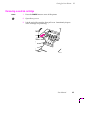
Removing a used ink cartridge
POWER
1.
Press the POWER button to turn off the printer.
2.
Open the top cover.
3.
Lift the end of the cartridge, then pull it out. Immediately dispose
of the cartridge in a plastic bag.
9069-41
User Manual
4-3
4 Caring for Your Printer
Installing a new ink cartridge
To install an ink cartridge, follow these steps:
1.
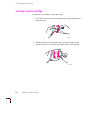
Peel off the tape in the center of the package and pull off the top of
the plastic bag.
9069-14
2.
Holding the bottom of the plastic bag, twist the cartridge in the
direction of the arrow to remove protective tape on the opening.
9069-15
4-4
Phaser 140 Color Printer
Caring for Your Printer
3.
4
Pull the cartridge up and out. Part of the seal may remain around
the opening; this is not a problem and the printer will still operate
correctly.
9069-16
Note
Do not touch the opening (a). This may degrade print quality
and stain your Þngers with ink.
a
9069-17
User Manual
4-5
4 Caring for Your Printer
4.
Locate the slot marked for this color ink cartridge. The slots are
coded with colors and numbers: black (1), cyan (2), magenta (3),
and yellow (4).
5.
Make sure that the number and color on the cartridge match the
number and color on the slot. Then slide the cartridge all the way
into the slot and press the end to snap the cartridge into place.
9069-18
6.
Repeat Steps 1 through 5 for the other color ink cartridges. When
you Þnish, close the printerÕs cover.
9069-19
This completes the ink cartridge installation. If you have installed the ink
cartridges in the wrong slots, see ÒInk cartridges are installed in the wrong
slotsÓ on page 14.
After installing a new ink cartridge, you should clean the ink jets. See
ÒCleaning the ink jetsÓ on page 4-10.
4-6
Phaser 140 Color Printer
Caring for Your Printer
4
Replacing the printhead
If the printhead becomes damaged or worn, the print quality deteriorates, as
evidenced by persistent appearances of irregular or missing dots on prints,
even after executing printhead cleaning several times. If this happens,
replace the printhead with a new one. To obtain a new printhead, contact
your dealer or Tektronix and order part number 118-9120-00.
Under normal usage, the printhead may last the life of the printer. However,
several factors can shorten the life of the printhead:
■
Dusty or dirty operating conditions.
■
Use of non-Tektronix inks or inks that have been stored more than
6 months.
■
Severe paper jams under the printhead.
Removing the used printhead
POWER
1.
Open the top cover (with the printer still turned on).
2.
Remove all ink cartridges installed in the printer and store them
away for later use (see ÒReplacing an ink cartridgeÓ on page 4-2).
To avoid spilling ink, place the ink cartridges on a clean sheet of
paper with the numbered label sides facing up.
3.
Close the top cover and perform the ink jet cleaning procedure to
empty all ink from the ink jets. See ÒCleaning the ink jetsÓ on
page 4-10.
4.
Press the POWER button to turn off the printer.
Note
Remove and install the printhead with the printer plugged in and
the power turned off via the POWER button. Otherwise, a
printhead error may occur.
User Manual
4-7
4 Caring for Your Printer
5.
Open the printerÕs cover. While pressing the tabs on either side of
the printhead compartment cover, lift open the cover until it stops.
9069-48
6.
Remove the printhead and discard it.
9069-49
4-8
Phaser 140 Color Printer
Caring for Your Printer
4
Installing the new printhead
1.
To install the printhead, follow the steps under ÒInstalling the
printheadÓ on page 2-6:
2.
After you have installed the printhead, re-install the ink cartridges
removed earlier (see ÒInstalling ink cartridgesÓ on page 2-11).
3.
Turn on the printer.
During the Þrst power-up after printhead installation, the printer purges the
ink jets. This Þrst-time printhead initialization takes a few minutes and is
executed only on the Þrst power-up after printhead installation.
Note
Do not turn off the printer during initialization. Turning off the
printer during initialization prevents it from printing properly
when it is turned on again.
Clean the ink jets as described in the next topic.
User Manual
4-9
4 Caring for Your Printer
Cleaning the ink jets
On the printhead are four ink jets through which individual color ink
droplets are propelled onto the paper. The ink jets must be kept free from
paper particles and dust in order to maintain a high degree of print quality.
9069-54
POWER
Note
The printer regularly performs the ink jet cleaning automatically
to clear away paper particles or dust accumulated on the four ink
jets. This automatic cleaning takes about 70 seconds. During
automatic cleaning, the POWER indicator blinks. The printer
may perform automatic cleaning during print jobs.
To clean the ink jets:
1.
On the front panel, press the down arrow (ß) key until the front
panel displays this message:
CLEAN HEADS
2.
Press the right arrow (Þ) key until the front panel displays this
message:
clean heads
SELECT
4-10
3.
Press the SELECT button. The printer cleans the ink jets. During
the cleaning process, you cannot display other menus or menu
choices. When the cleaning is complete, the front panel continues
to display the clean heads message.
Phaser 140 Color Printer
Caring for Your Printer
4
After the ink jets are cleaned, print the printhead test pattern to make sure
that no ink jets are still clogged:
1.
Press the left (Ü) arrow key until the front panel displays this
message:
print head test
While the test pattern is being printed, you cannot display other
menus or menu choices. When the test pattern is printed, the front
panel continues to display the print head test message
SELECT
2.
Press the SELECT button. The printer prints the print head test
pattern, which is shown here.
(Black)
(Cyan)
(Magenta)
(Yellow)
9069-31
3.
Inspect the test pattern. There should be four horizontal lines
between each pair of vertical lines. If any of the horizontal lines
are missing, clean the ink jets again.
4.
Return the printer to normal operation:
a. Press the right (Þ) arrow key until the front panel displays
this message:
quit menu
b. Press the SELECT button; the front panel displays this message:
ready
User Manual
4-11
4 Caring for Your Printer
Cleaning the printer
When cleaning the printer, observe the following precautions:
4-12
■
Do not clean the exterior of the printer with volatile liquids, such
as thinner or benzine, or any other spray-type or chemical
cleaners. Chemicals may damage the printerÕs Þnish.
■
Do not use any cleaning ßuids or water to clean inside the printer.
■
Use a soft, lint-free cloth to clean the printer; do not use paper
towels or tissues.
■
When cleaning inside the printer, avoid the area near the
printhead.
Phaser 140 Color Printer
Caring for Your Printer
4
To clean the printer
1.
Turn the printer off.
2.
Clean the inside of the printer, including the platen (a), using a
soft, lint-free cloth to remove any ink mist or paper debris.
Caution
Do not rub the gear wheels (b); they are easily damaged.
a
b
9069-56
3.
Clean the exterior of the printer with a soft, lint-free cloth
moistened with water. Remove any smudges or dust.
User Manual
4-13
4 Caring for Your Printer
4-14
Phaser 140 Color Printer
Chapter
5
Supplies
Always use Tektronix supplies
Tektronix supplies for the Phaser 140 printer are developed and tested as a
total system: printer, ink, and media. These components work together to
produce consistent, high-quality color images.
If you are using coated paper, glossy paper, back-print film, or
transparencies, use only Tektronix media. Use only Tektronix ink cartridges.
Ordering information
To order supplies or upgrade kits, refer to the supplies information sheet
that was shipped with the printer and contact your local dealer or, in the
U.S.A., call Tektronix at 1-800-835-6100.
Supplies kits
4686FSS
Supplies startup kit.
4686FSS01
Supplies startup kit, metric version.
User Manual
5-1
5 Supplies
Printer supplies
5-2
Item
Part number
Ink cartridges, cyan (package of six)
016-1334-00
Ink cartridges, magenta (package of six)
016-1335-00
Ink cartridges, yellow (package of six)
016-1336-00
Ink cartridges, black (package of six)
016-1333-00
Coated paper
Letter (8.5 x 11 ins.)
A4 (210 x 297 mm)
016-1346-00
016-1347-00
Glossy paper
Letter (8.5 x 11 ins.)
A4 (210 x 297 mm)
016-1348-00
016-1349-00
Transparencies
Letter (8.5 x 11 ins.)
A4 (210 x 297 mm)
016-1350-00
016-1351-00
Back-print Þlm
Letter (8.5 x 11 ins.)
A4 (210 x 297 mm)
016-1352-00
016-1353-00
Phaser 140 Color Printer
Chapter
6
Troubleshooting
If you can't make a print
Printer not operating
■
Make sure that you plugged in the printer and turned it on. Make
sure that you connected the interface cable properly.
■
Make sure that the sealing tape on the printhead unit has been
removed.
■
Make sure that the front panel displays this message:
ready
If the front panel displays another message, refer to ÒError
messages displayed on the front panelÓ on page 6-18. If the front
panel fails to display any message, the printer may require service.
Reset the printer by turning it off, then on again. If the problem
persists, call for service.
Note
You can call for service at 1-800-835-6100 in the U.S.A. and
Canada, or call your Tektronix dealer.
User Manual
6-1
6 Troubleshooting
Test the printer by making a sample print
1.
Press the down (ß) arrow key until the front panel displays this
message:
PRINT SAMPLES
2.
Press the right (Þ) arrow key until the front panel displays this
message:
print supplies
SELECT
3.
Press the SELECT button. The printer exits the menu and prints the
sample page (in this example, it is a list of printer supplies). After
the page is printed, the printer is ready for normal operation.
If the printer fails to produce a test print, make sure that paper and ink
cartridges are loaded. Check the front panel for any reported errors. If you
have paper and ink loaded and the printer does not produce a sample print,
the printer requires service.
Verifying communication between your computer and the printer
If the printer produces a sample print, the printer is functional, and the next
step is to verify that your computer can communicate with the printer.
To verify that your computer can communicate with the printer, use one of
these methods:
■
If you have a Macintosh, make sure that you have the correct
driver installed and that you have selected the printer in the
Chooser. If the printer's name does not appear in the Chooser,
your LocalTalk or EtherTalk connection may be faulty. See also
ÒPrinter doesn't appear in the Chooser (Macintosh)Ó on page 6-5.
You can use the Print Window or Print Desktop command to
send a Þle to the printer without using an application. If the
communication link between your computer and the printer is
working, the printer produces a directory listing of the active
window on the desktop.
6-2
Phaser 140 Color Printer
Troubleshooting
■
6
If you have a PC, type these DOS ECHO commands:
echo %! > port
echo showpage[CTRL-D] > port
Where [CTRL-D] indicates pressing the D key while holding
down the CTRL key. Substitute the name of the printer port (for
example, LPT1:, LPT2:) for the variable port in this command. For
example, if you are testing a parallel connection on LPT1, type:
echo %! > LPT1:
echo showpage[CTRL-D] > LPT1:
If the communication link between your computer and the printer
is working, the printer ejects a blank page. If this works, but you
cannot print from your application or through Windows, make
sure that the appropriate driver is installed and that you have
selected the printer correctly.
User Manual
6-3
6 Troubleshooting
Front panel displays Òprocessing dataÓ or Òwaiting for data,Ó
but the Þle does not print
This is probably the result of a PostScript error. Reset the printer by turning
it off, then on again. Then load the PostScript error handler from the front
panel. For more information on using the PostScript error handler, see the
manual Phaser 140 Drivers and Utilities Printing Reference.
1.
Press the down (ß) arrow key until the front panel displays this
message:
PRINT SAMPLES
2.
Press the right (Þ) arrow key until the front panel displays this
message:
load error page
SELECT
6-4
3.
Press the SELECT button. The printer exits the menu and loads the
PostScript error handler. After the error handler is loaded, the
printer should be ready for normal operation.
4.
Send the print job again. If there is a PostScript error, the printer
will print a page reporting the speciÞc error.
Phaser 140 Color Printer
Troubleshooting
6
Printer doesn't appear in the Chooser (Macintosh)
■
Make sure that the printer is turned on. Make sure that the front
panel displays ready. Make sure that the cables are correctly
attached.
■
Check the termination (refer to the documentation for your
Ethernet adapter or LocalTalk connector for information on
termination).
■
Reset the printer by turning it off, then on again.
■
Make sure that you have the correct zone selected in the Chooser
before looking for the printer's name in the list of printers. If you
have changed the printer's name, make sure that you have given it
a unique name (not the same as any other printer in the zone). If
two printers in the same zone are given the same name, one of the
names will appear in the Chooser with a sufÞx added.
To verify the printerÕs name, print the conÞguration page (see
ÒPrinting the conÞguration pageÓ on page 6-17). The
conÞguration page reports the printerÕs name and other useful
information.
User Manual
6-5
6 Troubleshooting
Print job does not Þnish (the printer times out)
Check your computerÕs timeout value
Windows. If you are using Windows 3.1, make sure the Transmission Retry
value for the printer's assigned port is set to 850. For more information, see
ÒPC users: Microsoft WindowsÓ on page 2-30.
DOS. If you are using the parallel port from a PC, make sure that you used
the MODE command to set the PC's communication parameters. For
example:
MODE LPT1:,,P > NUL
The P parameter in these commands sets the port timeout to InÞnite Retry
and must be part of the command.
Check the printerÕs timeout value
You may also need to adjust the printerÕs timeout values. The printerÕs
timeout values are reported on the conÞguration page (see ÒPrinting the
conÞguration pageÓ on page 6-17). For more information on the printerÕs
timeout values, see the Phaser 140 Drivers and Utilities Printing Reference.
6-6
Phaser 140 Color Printer
Troubleshooting
6
Media problems
Frequent paper jams
■
If you are using transparencies, make sure that you use the
Tektronix transparency Þlm listed in the supplies information
sheet.
■
If the printer is having difÞculty automatically feeding
transparencies, back-print Þlm, or glossy paper, try feeding the
sheets manually, one at a time.
■
Do not overÞll the paper tray.
■
Be sure to fan the paper before loading it into the input tray.
■
Make sure that the paper you are using is compatible with the
printer.
■
Make sure that the stack of paper is straight in the input tray.
■
Make sure that the right side of the stack of paper is aligned
against the right side of the input tray and the left side is aligned
against the paper guide.
Printing is skewed
User Manual
6-7
6 Troubleshooting
Media does not load
■
Back position
■
For automatic feeding of all media except envelopes, set the lever
toward the back of the printer. If the printer still has difÞculty
feeding transparencies, glossy paper, or back-print Þlm, try feeding
the sheets manually, one at a time.
Front position
■
For automatic feeding of thick paper, set the lever toward the front
of the printer. If the printer still has difÞculty feeding thick paper,
try feeding the sheets manually, one at a time.
■
For manual feed, set the lever toward the front of the printer.
■
For manual feed, be sure to insert a single sheet all the way into the
feeder. If the sheet is not inserted far enough, the printer cannot
feed the sheet properly.
■
6-8
Make sure that the paper selection lever is set to the
correct position:
If back-print Þlm jams during manual feed, try putting a sheet of
plain paper behind the sheet of back-print Þlm in the input tray.
Phaser 140 Color Printer
Troubleshooting
6
If more than one sheet loads at a time
Back position
■
Make sure that the paper guide on the input tray is set exactly to
width of the paper; if the paper guide is too loose, paper feeding
problems can result (see ÒLoading mediaÓ on page 3-15).
■
Be sure to fan the paper before loading it. This keeps the sheets
from sticking together.
■
Check that the paper selection lever is set toward the back of the
printer for automatic paper feeding.
■
Make sure that the stack of paper does not exceed the paper limit
mark in the right side of the input tray. If necessary, remove a few
sheets from the tray.
■
If the input tray contains several types of paper, try loading one
type of paper.
User Manual
6-9
6 Troubleshooting
Problems with image size and position
Off-set images
Check your application for correct image sizing.
Cut-off images
Check for correct page size setting in the driver.
Image shifts or margins are incorrect (Macintosh)
For details on how to print from a Macintosh, refer to ÒPrinting from a
MacintoshÓ on page 3-1. You should install the Phaser 140 printer driver
onto your Macintosh so that you can select the correct page sizes from the
driver. For details on the Phaser 140 drivers, refer to the manual Phaser 140
Drivers and Utilities Printing Reference.
6-10
Phaser 140 Color Printer
Troubleshooting
6
Print quality problems
White streaks or missing dots
■
An ink cartridge may be empty. If the printer senses that an ink
cartridge is empty, the front panel displays:
ink out: color
where color is replaced with cyan, magenta, yellow, or black,
depending on which cartridge is low on ink. The printer does not
always sense an out-of-ink condition immediately. The printer
may produce a few poor-quality prints before reporting the
out-of-ink message.
■
Ink jets may be clogged. Clean the ink jets (see ÒCleaning the ink
jetsÓ on page 4-10). If the clog is severe, it may be necessary to
perform the cleaning procedure several times.
■
The printhead may be installed incorrectly. Make sure that the
printhead is installed correctly and that there are no obstacles
around the printhead (see ÒInstalling the printheadÓ on page 2-6).
■
The printhead is defective.
■
The paper thickness lever (near the printhead) may be set
incorrectly. Make sure that the lever is set toward the front of the
printer for coated paper and to the to the upright position for
envelopes, thick paper, and other media.
■
If you are printing high-density graphics on coated paper and the
prints are smudged, try setting the paper thickness lever (near the
printhead) to the upright position.
■
Clean the printhead (see ÒCleaning the ink jetsÓ on page 4-10).
Smudges
User Manual
6-11
6 Troubleshooting
Blurred or too light
■
The selected print mode does not meet your needs, for example
you may be printing in draft mode (see ÒSelecting media type and
print modesÓ on page 3-10).
■
The print media is not compatible with the printer. If you are
using coated paper, glossy paper, back-print film, or
transparencies, use only Tektronix media.
■
You may be printing on the wrong side of the paper.
■
The inside of the printer may be soiled with ink (see ÒCleaning the
printerÓ on page 4-12).
■
Remove the print immediately and let it dry. Then roll it in the
direction opposite the curl.
Ink on paper edge
Prints are curled
6-12
Phaser 140 Color Printer
Troubleshooting
6
Black-and-white instead of color
■
Make sure that the printer is set up for color printing (the Adjust
Color setting should not be monochrome).
■
If you have a Macintosh, make sure that you are using the
Phaser 140 driver or the latest Apple LaserWriter printer driver
(version 6.0.7 or higher), which supports color PostScript. Make
sure that Color/Grayscale is selected in the Print dialog box.
Some applications require special Þles to print in color. Make sure
that these Þles are properly installed. For information, refer to the
manual Phaser 140 Drivers and Utilities Printing Reference.
■
If you have a PC, be sure to use a driver that supports color
PostScript. If you are using Windows 3.1, use the Phaser 140
driver. If you are using Windows, make sure that the Color box in
the Options dialog box is checked. For information on the drivers,
refer to the manual Phaser 140 Drivers and Utilities Printing
Reference.
User Manual
6-13
6 Troubleshooting
The inside of the printer is soiled with ink
■
This problem can be the result of a paper jam. Clean the printer
carefully after clearing the jam (see ÒCleaning the printerÓ on
page 4-12).
■
This problem can also be caused by selecting a paper size (from
the driver or the front panel) that does not match the size of the
paper in the printer. Clean the printer carefully (see ÒCleaning the
printerÓ on page 4-12). Check that the paper in the printer
matches the selected paper size before printing again.
Ink cartridges are installed in the wrong slots
6-14
1.
Remove the misplaced ink cartridges.
2.
Clean the ink jets (see ÒCleaning the ink jetsÓ on page 4-10).
3.
Check to see if any of the wrong color ink has gotten into the
cartridges that you removed in Step 1. If so, discard them and
obtain a new ones. Re-install the cartridges in the correct slots.
4.
If the incorrect color problem persists, repeat the ink jet cleaning
two or three times.
Phaser 140 Color Printer
Troubleshooting
6
Startup page prints even though it is disabled
The printer's power-up self-test can detect problems that do not necessarily
make the printer completely inoperable. Examples of these non-fatal errors
include faulty printer ports and some memory failures.
If the printer detects a non-fatal error at power-up, the startup page prints,
even if you have disabled it. In this case, the page contains one or more of
the error messages listed in the following table. Depending on your needs,
you may not need to call for service immediately.
Error messages on the startup page
Message
Description
Parallel Port failed
The named port is not working; the
other ports can still be used.
LocalTalk Port failed
Ethernet Port failed
DRAM SIMM failed
The additional optional memory SIMM
is not working. Since the printer's base
memory is still working, the printer can
still be used, but images larger than
Letter-size cannot be printed, and
throughput may suffer.
User Manual
6-15
6 Troubleshooting
Clearing paper jams
ERROR
If a paper jam occurs, the ERROR indicator blinks and the front panel
displays this message:
paper jam
Follow these steps to remove the jam:
1.
With one hand, press down on the input tray to release the sheet of
paper; gently pull out the sheet with your other hand.
9069-57
SELECT
6-16
2.
After you remove the jammed paper, look inside the printer to see
if it is soiled with ink. If there is ink inside the printer, clean it
carefully (see ÒCleaning the printerÓ on page 4-12).
3.
Press the SELECT button to clear the error and resume printing (the
page will be reprinted).
Phaser 140 Color Printer
Troubleshooting
6
Printing the conÞguration page
The Phaser 140 can print a conÞguration page that contains useful
information for installation and troubleshooting.
To print the conÞguration page, follow these steps:
1.
Press the down (ß) arrow key until the front panel displays this
message:
PRINT SAMPLES
2.
Press the right (Þ) arrow key until the front panel displays this
message:
print config
SELECT
3.
Press the SELECT button. The printer exits the menu and prints the
conÞguration page. After the page is printed, the printer is ready
for normal operation.
User Manual
6-17
6 Troubleshooting
Error messages displayed on the front panel
The following table provides a list of messages that can appear on the front
panel. The messages are also reported to the Macintosh driver in a slightly
different form.
Front panel
message
Macintosh driver
message
Description
ready
idle
There are no print jobs pending or printing and no errors.
not ready
printer is not ready
The printer is not ready to print, but no error exists (for example, during
power-up).
processing data
processing data
The printer is receiving and processing an image, but is not yet
printing.
printing
printing
Printing is in progress; this includes feeding and ejecting paper.
waiting for data
waiting for data
The printer is receiving an image, but the image is not being
transmitted as fast as the printer can accept it.
resetting
resetting printer
The controller is resetting the print engine because of a condition that
would not clear.
cleaning heads
cleaning heads
Head cleaning is in progress.
out of paper
out of paper
There is no paper in the input tray, or the paper is not inserted
correctly.
ink out: color
add ink: color
One or more ink cartridges are out of ink. The color that is out of ink
appears in the message.
paper jam
paper jam
The printer is reporting a media jam due to a media jam or an incorrect
page size.
empty waste ink
waste ink tank full
The waste ink tank is almost full. When it becomes full, the printer will
not operate until the waste ink tank is replaced (see ÒSpecial notes
regarding the empty waste ink messageÓ on page 6-19).
internal error
internal interface
error
The controller and print engine are not communicating correctly. Reset
the printer; if the error persists, the printer requires service.
service call: xx
service call: xx
The print engine has reported an unrecoverable error; the print engine
reports a two-digit hexadecimal error code. These codes are
described in the table ÒService call error codesÓ on page 6-19. Reset
the printer; if the error persists, the printer requires service.
6-18
Phaser 140 Color Printer
Troubleshooting
6
Service call error codes
Code
Description
01
LF error.
02
Abnormal temperature.
04
Carriage error.
08
Waste ink tank full.
10
Cleaning unit error.
20
Home position error.
40
Printhead error.
11
Reserved.
12
ASF sensor error.
14
Encoder error.
18
GA error.
90
EEPROM error.
A0
RAM error.
C0
ROM error.
Special notes regarding the empty waste ink message
This is a warning that the waste ink tank is almost full. This warning means
that the printer will eventually cease printing when that waste ink tank is
full. As soon as the printer displays this message, contact a Tektronix service
representative or your dealer for assistance. The waste ink tank is not
customer-replaceable.
Caution
Note
To avoid possible ink spillage, do not tip the printer when the
empty waste ink message is displayed.
The waste ink tank has a long life; most users will never see the
empty waste ink message.
User Manual
6-19
6 Troubleshooting
Whom to call for help
Call your dealer or a Tektronix sales representative for assistance, or in the
U.S.A. and Canada, call the Tektronix Customer Support Hotline at
1-800-835-6100. The Customer Support Hotline is staffed from 6:00 am to
5:00 pm PaciÞc Time. To avoid peak hours, call before 11:00 am or after
2:00 pm PaciÞc Time.
When calling for technical support, please note your printerÕs model
number and serial number. If possible, print out a startup page. The model
number, serial number, and the information on the startup page can help
technical support to assist you more quickly.
For technical support outside the United States and Canada, contact your
local Tektronix dealer or Tektronix sales representative.
Using the automated fax systems
As an alternative to the Customer Support Hotline, and to provide
up-to-date information quickly, Tektronix has set up HAL (Highly
Automated Library) and EuroHAL, two interactive, automated fax systems.
These automated fax systems provide Macintosh, PC, and workstation users
with the latest technical hints and tips (like color adjustments), solutions to
common technical problems, and application notes for software problems
(such as CorelDRAW! and QuarkXpress).
You may call HAL or EuroHAL from anywhere in the world. The fax
systems are available 24 hours a day, seven days a week.
6-20
Phaser 140 Color Printer
Troubleshooting
6
Use HAL to order a catalog or individual documents in the U.S.A.
and Canada
If you have a fax machine and a touch-tone voice telephone, you can order a
HAL catalog, listing all of the information offered by HAL, by calling
(503) 682-7450 (direct) or, in the U.S. and Canada, call 1-800-835-6100.
1.
Before you call, write down the area code and telephone number
for your fax machine. HAL will ask you to key this number
through the keypad on your voice telephone. If you are calling
from outside the United States or Canada, youÕll need to know the
international access code to reach your country from the United
States. Without a complete fax number, HAL cannot call your fax
machine.
2.
Call only from a touch-tone voice telephone.
3.
Follow through the voice-prompted menu.
4.
Order individual documents by entering the desired documentÕs
number as listed in the HAL catalog. Enter the number by using
the telephoneÕs keypad.
5.
You can order up to three documents per call.
6.
The HAL catalog or documents you request are faxed to you in a
matter of minutes.
User Manual
6-21
6 Troubleshooting
Use EuroHAL to order a catalog or individual documents in Europe
EuroHAL includes many documents, some in English and some in other
European languages. If a local version of the document you want is
available, EuroHAL will send it in your language. Otherwise, it will send
English documents.
If you have a tone-dial telephone and a fax machine, then you can use
EuroHAL. If your telephone has star (*) and hash mark (#) keys then it can
probably use tones; ask your local telephone supplier if you are not sure.
If your telephone does not have these keys or has a dial, you will need to buy
a tone dialer from your local telephone or electronics shop. This small box is
held to the phone and will send the standard tones that you need to talk to
EuroHAL.
6-22
Phaser 140 Color Printer
Troubleshooting
1.
To use EuroHAL, dial one of the numbers listed in the following
table.
Country
Number
Austria
00 44 1628 478 347
Belgium
00 44 1628 478 347
Denmark
00 44 1628 478 347
Finland
990 44 1628 478 347
France
05 90 81 86
Germany
0130 819 220
Holland
00 44 1628 478 347
Italy
00 44 1628 478 347
Norway
0 95 44 1628 478 347
Spain
07 44 1628 478 347
Sweden
0 09 44 1628 478 347
Switzerland
00 44 1628 478 347
UK
01628 478 347
Other countries
+44 1628 478 347 (where + is your countryÕs
International Access Code)
2.
EuroHAL answers and asks which language you want to use.
For English
For French
For German
3.
6
Press 1
Press 2
Press 3
The Þrst time you use EuroHAL, you should order a catalog. This
lists all the documents that are available and is constantly
updated.
User Manual
6-23
6 Troubleshooting
4.
EuroHAL asks you for your fax machine number. If you are
calling from outside the UK, add your country code Þrst, as
shown in the following table.
Country
Country code
Austria
00 43
area code fax number
#
Belgium
00 32
area code fax number
#
Denmark
00 45
area code fax number
#
Finland
00 358
area code fax number
#
France
00 33
area code fax number
#
Germany
00 49
area code fax number
#
Holland
00 31
area code fax number
#
Italy
00 39
area code fax number
#
Norway
00 47
area code fax number
#
Spain
00 34
area code fax number
#
Sweden
00 46
area code fax number
#
Switzerland
00 41
area code fax number
#
just enter your fax number
#
area code number
#
UK
Other countries
6-24
Press #
when
Þnished
Your area code and
fax number
Phaser 140 Color Printer
00 xx
Chapter
7
Front and Rear Panels
Rear panel
1.
Parallel connector
2.
LocalTalk connector
3.
Ethernet connector
1
2
3
9069-24b
User Manual
7-1
7 Front and Rear Panels
Front panel
1.
POWER button and indicator
2.
SELECT button and indicator
3.
ERROR indicator
4.
Display
5.
Arrow keys
1
23
4
5
ready
9069-58
7-2
Phaser 140 Color Printers
7
Front and Rear Panels
Front panel indicators
The following table describes the front panel indicators.
Indicator
On
Off
Blinking
ERROR
An error condition
exists that does not
prevent printing and
will correct itself.
See front panel
display for message.
Normal operation.
An error condition exists that prevents printing
and will not correct itself (for example, a paper
jam). See front panel display for message.
POWER
The POWER button is
on.
The POWER button is
off, the printer is
unplugged, or the
power supply has
failed.
Power up or reset is in progress.
Choices from the
displayed menu can
be viewed by
pressing the arrow
keys (Ü Þ Ý ß).
Blinking slowly:
SELECT
Normal operation;
printer is ready to
receive print jobs.
Automatic ink jet cleaning is in progress.
Printer is receiving data, waiting for data, or
printing. A PostScript print job is in progress.
Blinking fast:
If a menu choice is displayed on the front panel:
Displayed front panel choice can be selected by
pressing the SELECT button.
If no menu choice is displayed on the front panel:
An error condition exists involving media or ink.
When problem is corrected, press the SELECT
button to resume printing.
User Manual
7-3
7 Front and Rear Panels
Making menu selections from the front panel
SELECT
You can control some printer operations from the front panel. The front
panel display provides several menus from which you can select choices that
control the printer. You use the front panel arrow keys and SELECT button to
select menus and choices:
■
Press the down (ß) or up (Ý) arrow keys to scroll through the
menus.
■
Press the right (Þ) or (Ü) left arrow keys to see the choices
available in a menu. When choices are displayed on the front
panel, the Select indicator is on, indicating that you can select the
displayed option by pressing the SELECT button.
■
When the option you want is displayed, press the SELECT button
to select that option.
■
For choices that remain in effect after you resume printing (for
example, color adjustments) the currently selected option is
marked with an asterisk (*) on the display. For choices that
initiate immediate action by the printer (for example, sample
prints) no asterisks are displayed.
Note
7-4
Printer control choices selected through the printer driver
override those selected from the front panel.
Phaser 140 Color Printers
Front and Rear Panels
7
The next illustration shows the arrangement of front panel menus and
choices. It also shows how the arrow keys are used to scroll through the
menus and choices. Notice how the menus and choices Òwrap around.Ó For
example, when the last menu in the list is displayed, pressing the down (ß)
arrow key again displays the Þrst item on the list.
MENU
CHOICES
PRINT SAMPLES
print features
print specs
quit menu
ADJUST COLOR
no color adjust
vivid color
quit menu
SET MEDIA TYPE
plain (draft)
plain (standard)
quit menu
SET FINEPOINT
Finepoint on
Finepoint off
quit menu
SET STARTPAGE
startpage on
startpage off
quit menu
SET PAGE SIZE
letter
a4
quit menu
SET LANGUAGE
English
fran•ais
quit menu
CLEAN HEADS
print head test
clean heads
quit menu
PICK FILLED AREA
print fill test
set pattern n
quit menu
QUIT MENU
quit menu
9069-59
User Manual
7-5
7 Front and Rear Panels
Front panel menus and choices
Menu
Option
PRINT SAMPLES
ADJUST COLOR*
SET MEDIA TYPE*
Description
print features
Prints a sample page listing the printerÕs features and beneÞts.
print specs
Prints a sample page listing the printerÕs speciÞcations.
print color use
Prints a sample page that explains why and how color should be
used in documents. (This sample page is available only when SET
LANGUAGE is set to English.)
print supplies
Prints a sample page listing the printerÕs supplies. (This sample
page is available only when SET LANGUAGE is set to English.)
print startpage
Prints the startup page.
print conÞg
Prints the conÞguration page.
print limit test
Prints the limit test page, which exercises the printer and reveals
printing problems.
load error page
Loads the Tektronix error handler.
quit menu
Returns the printer to normal operation.
no color adjust
The printer performs no color adjustments. Blues appear
somewhat purple.
vivid color
The printer adjusts some of the colors to achieve the most vivid
effect. In particular, the printerÕs blue appears less purple. This is
best for most presentation printing (transparencies).
simulate screen
The printerÕs colors more nearly match your computerÕs screen.
simulate press
The printerÕs colors more nearly match a commercial printing
press.
monochrome
The printer prints in gray scale. This is useful when prints are to be
photocopied.
quit menu
Returns the printer to normal operation.
plain (draft)
Provides draft-quality plain-paper prints with the fastest print time.
plain (standard)
Provides improved plain-paper print quality; print time is increased
over draft mode.
plain (premium)
Provides the best plain-paper print quality; print time is increased
over standard mode.
coated paper
Provides the best print quality for Tektronix coated paper.
glossy paper
Provides the best print quality for Tektronix glossy paper.
transparency
Provides the best print quality for Tektronix transparencies.
back print film
Provides the best print quality for Tektronix back-print film.
quit menu
Returns the printer to normal operation.
*In these menus, the currently selected option is marked with an asterisk (*) on the front panel display.
7-6
Phaser 140 Color Printers
7
Front and Rear Panels
Front panel menus and choices (cont'd.)
Menu
SET FINEPOINT*
SET STARTUP PAGE*
SET PAGE SIZE*
Option
Description
Finepoint on
Enables Finepoint.
Finepoint off
Disables Finepoint.
quit menu
Returns the printer to normal operation.
startpage on
Enables the startup page.
startpage off
Disables the startup page.
quit menu
Returns the printer to normal operation.
letter
Use for Letter-size media (8.5 x 11 ins.).
a4
Use for A4-size media (210 x 297 mm).
legal
Use for Legal-size media (8.5 x 14 ins.).
(Only displayed when at least 4 Mbytes of optional memory are
installed in the printer.)
SET LANGUAGE*
CLEAN HEADS
PICK FILLED AREA
QUIT MENU
quit menu
Returns the printer to normal operation.
English
Displays all front-panel messages in English.
fran•ais
Displays all front-panel messages in French.
Deutsch
Displays all front-panel messages in German.
espa–ol
Displays all front-panel messages in Spanish.
italiano
Displays all front-panel messages in Italian.
quit menu
Returns the printer to normal operation.
print head test
Prints a test pattern that displays ink jet problems (ink jets clogged
with ink).
clean heads
Cleans all ink jets.
quit menu
Returns the printer to normal operation.
print Þll test
Prints registration test page containing 13 patterns.
set pattern n
Adjusts printhead registration according to selected pattern n
(1Ð13).
quit menu
Returns the printer to normal operation.
quit menu
Returns the printer to normal operation.
*In these menus, the currently selected option is marked with an asterisk (*) on the front panel display.
User Manual
7-7
7 Front and Rear Panels
7-8
Phaser 140 Color Printers
Appendix
A
Technical Notes
Parallel port
The printer has a standard unidirectional, byte-wide parallel, synchronous
port.
The table on the next page shows the parallel port's connected pins.
Other pins are not connected. Signal names ending with a dash (-) are
asserted low.
User Manual
A-1
A Technical Notes
Parallel port signal descriptions
A-2
Signal name
Pin #
Return
pin
Signal
source
Description
DSTRB-
1
19
Host
Pulsed low for .5
microseconds; clocks data
into printer
DATA1
2
20
Host
Positive true data input
DATA2
3
21
Host
Positive true data input
DATA3
4
22
Host
Positive true data input
DATA4
5
23
Host
Positive true data input
DATA5
6
24
Host
Positive true data input
DATA6
7
25
Host
Positive true data input
DATA7
8
26
Host
Positive true data input
DATA8
9
27
Host
Positive true data input
ACK-
10
28
Printer
Data acknowledge pulsed low
for 3-4 microseconds; ends
bus transaction
BUSY
11
29
Printer
Positive true = cannot accept
data
PE
12
-
Printer
Positive true = out of paper or
ink
SLCT
13
-
Printer
Positive true = printer selected
INPRIME-
31
30
Host
Negative true = printer port
reset
FAULT-
32
-
Printer
Negative true = printer fault
indicator
Frame Gnd
-
17
Printer
Frame ground
SGnd
-
14,16,33
Printer
Signal ground
Phaser 140 Color Printer
Technical Notes
A
SpeciÞcations
Temperature
o
o
o
o
Operating: 15 C to 30 C (59 F to 86 F)
o
o
o
o
Non-operating: 0 C to 35 C (32 F to 95 F)
Storage: (without media):
o
o
o
o
For 6 months: 0 C to 35 C (32 F to 95 F)
o
o
o
o
For 10 days: -30 C to 60 C (-22 F to 140 F)
Humidity
Operating:
Plain paper: 10% to 80% Relative Humidity
Transparency: 10% to 70% Relative Humidity
Non-operating: 5% to 95% Relative Humidity, non-condensing
Storage: (without media):
For 6 months: 35% to 85% Relative Humidity
For 10 days: 10% to 95% Relative Humidity
Altitude
Operating: 0.8942 kg/m. Minimum air density (about 0 to
o
o
10,000 feet at 25 F; -4 C)
Non-operating/Storage: 0 to 13,500 ft. pressure alt.
Primary voltage ranges
85 - 132 VAC, 110 VAC nominal
187 - 264 VAC, 220/240 VAC nominal
Frequency range
110 VAC, 57 to 63 Hz
220 VAC, 47 to 53
Primary fusing
110 VAC, 0.31 Amps
220 VAC, 0.2 Amps
(Not user-accessible)
Heat dissipation
Power off: 20 BTU/hour (6 Watts/hour)
Idle (Energy Star): 82 BTU/hour (45 Watts/hour)
Continuous printing: 147 BTU/hour (53 Watts/hour)
User Manual
A-3
A Technical Notes
Dimensions
Height: 19.1 cm (7.5 ins.)
Depth: 31.8 cm (12.5 ins.)
Width: 41.9 cm (16.5 ins.)
Weight
6.4 kg (14.2 lbs.)
Printing
Ink-jet on-demand
360 x 360 dots-per-inch
Ink cartridge capacity
Black: 14 ml (15.5 g) of ink
Other colors: 9 ml (10 g) of ink
Safety and emissions standards
FCC Part 15, Subpart J ÒClass BÓ veriÞed.
CISPR 22 Class B, veriÞed.
UL 1950, listed.
CSA 220, certiÞed.
EN60950/IEC 950, TUV licensed.
EN55022.
Vfg 243.
A-4
Phaser 140 Color Printer
Appendix
B
Expanding Your
Printing System
Upgrade kits
4690F4M
4-Mbyte SIMM for adding memory.
4685F16
16-Mbyte SIMM for adding memory.
4686FP1
Ethernet hardware upgrade kit; includes EtherTalk
and Novell NetWare protocols.
4680FP2
Add TCP/IP support (requires 4686FP1 already installed).
User Manual
B-1
B Expanding Your Printing System
Advantages of adding memory
The following table summarizes the memory conÞgurations for the
Phaser 140 printer:
Memory conÞguration
Total memory
Standard
8 Mbytes
Add one 4-Mbyte SIMM*
12 Mbytes
Add one 16-Mbyte SIMM*
24 Mbytes (max.)
* You can add either one 4-Mbyte SIMM or one 16-Mbyte SIMM, but
not both.
The total amount of memory installed in the printer is reported on the
startup page and on the conÞguration page.
In general, more memory improves throughput, provides more storage for
downloadable fonts, and allows printing of the most complex images.
Additional memory can also reduce ofßoad time by increasing the size of
input buffers for the parallel port. Adding a 4-Mbyte SIMM to a Phaser 140
provides the following speciÞc beneÞts:
B-2
■
Larger input buffer (128 Kbytes).
■
Improved imaging performance.
■
Improved network performance.
■
Ability to print on Legal-size media.
■
Ability to print custom page sizes larger than 216 x 279 mm or
8.5 x 11 ins. (up to 216 x 356 mm or 8.5 x 14 ins.). (Custom page
sizes are available through the Tektronix Phaser 140 Windows
driver; some PPD-driven Macintosh drivers also support custom
page sizes.)
Phaser 140 Color Printer
B
Expanding Your Printing System
Adding a 16-Mbyte SIMM to a Phaser 140 provides the following speciÞc
beneÞts:
■
Largest input buffer (512 Kbytes).
■
Best imaging performance.
■
Best network performance.
■
Ability to print custom page sizes up to 216 x 559 mm or
8.5 x 22 ins. (Custom page sizes are available through the
Tektronix Phaser 140 Windows driver; some PPD-driven
Macintosh drivers also support custom page sizes.)
■
Substantially increased virtual memory for complex PostScript
and downloaded fonts.
User Manual
B-3
B Expanding Your Printing System
B-4
Phaser 140 Color Printer
Appendix
C
Shipping Your Printer
If the printhead is operational
POWER
Follow these instructions if the printer is in working order. You should also
use these instructions for shipping a damaged printer for servicing, if the
carriage containing the printhead still returns to the far right position when you
turn off the printer using the POWER button. If the carriage containing the
printhead does not return to the far right position when you turn off the
printer, follow the instructions under the topic, ÒIf the printhead is not
operationalÓ on page C-4.
1.
Remove the interface cables and make sure the printer is turned
on.
2.
Open the cover and remove all ink cartridges (see ÒRemoving a
used ink cartridgeÓ on page 4-3). To avoid spilling ink, place the
ink cartridges on a sheet of clean paper with the numbered (1 to 4)
label sides facing up.
3.
Close the top cover and perform the ink jet cleaning procedure to
empty all ink from the printhead unit (ÒCleaning the ink jetsÓ on
page 4-10.
4.
Re-install the ink cartridges (see ÒInstalling a new ink cartridgeÓ
on page 4-4).
User Manual
C-1
C Shipping Your Printer
5.
Secure the ink cartridges with tape.
9069-60
6.
Close the cover.
7.
Turn off the printer and remove the power cord.
8.
Secure the top cover, the output tray, and the input tray with tape.
9069-61
C-2
Phaser 140 Color Printer
Shipping Your Printer
9.
C
Place the printer in its original carton, making sure that it is well
cushioned with the packing materials.
9069-62
10. To obtain the appropriate shipping address and procedure:
■
In the U.S.A. and Canada, call the Tektronix Customer Support
Hotline at 1-800-835-6100.
■
Outside the U.S.A. and Canada, contact your local Tektronix dealer
or Tektronix sales representative.
User Manual
C-3
C Shipping Your Printer
If the printhead is not operational
POWER
Follow these instructions for shipping a damaged printer for servicing, if the
carriage containing the printhead does not return to the far right position when you
turn off the printer using the POWER button.
1.
Press the POWER button to turn off the printer.
2.
Remove the power cable and the interface cable.
3.
Open the top cover and make sure that the carriage is in its home
position (at the right front of the printer). If not, move it to the
home position by hand.
9069-63
C-4
4.
Remove all ink cartridges (see ÒRemoving a used ink cartridgeÓ on
page 4-3).
5.
Wrap the ink cartridges individually with clear plastic wrap or
similar material. Pack them together in a plastic bag to avoid
spilling ink.
Phaser 140 Color Printer
Shipping Your Printer
6.
C
Secure the carriage with tape.
9069-64
7.
Secure the top cover, the output tray, and the input tray with tape.
9069-61
User Manual
C-5
C Shipping Your Printer
8.
Place the printer in its original carton, making sure that it is well
cushioned with the packing materials.
Caution
Do not turn the printer upside down; otherwise ink may
spill out.
9069-62
9.
C-6
To obtain the appropriate shipping address and procedure:
■
In the U.S.A. and Canada, call the Tektronix Customer Support
Hotline at 1-800-835-6100.
■
Outside the U.S.A. and Canada, contact your local Tektronix dealer
or Tektronix sales representative.
Phaser 140 Color Printer
Appendix
D
Regulatory Information
Canadian EMC (Electromagnetic Compatibility)
regulatory standards
■
This digital apparatus does not exceed the Class B limits for radio
noise emissions from digital apparatus set out in the Radio
Interference Regulations of the Canadian Department of
Communications.
■
Le prŽsent appareil numŽrique n'Žmet pas de bruits
radioŽlectriques dŽpassant les limits applicables aux appareils
numŽriques de la classe B prescrites dans le R•glement sur le
brouillage radioŽlectrique ŽdictŽ par le ministere des
Communications du Canada.
User Manual
D-1
D Regulatory Information
Declaration of conformity
Tektronix, Inc.
Graphics Printing and Imaging Division
P.O. Box 1000
Wilsonville, Oregon 97070-1000 U.S.A.
declares, under our sole responsibility, that the products
Phaser 140
to which this declaration relates, are in conformity with the following
standard(s) or other normative document(s):
For the
EC EN60950
Safety of Information Technology Equipment including
Electrical Business Equipment
For the
EC EN55022
Limits and methods of measurement of radio Interference
characteristics of Information Technology Equipment
For the
EC 50 0821-1
The Generic Immunity Standard for electrical and
electronic apparatus intended for use in the residential,
commercial, and light industrial environment.
For Germany
Vfg 243
Radio Interference suppression of Radio-Frequency
Equipment for Industrial, Scientific, Medical (ISM) and
similar purposes and Equipment used in Information
Processing Systems; General License
following the provision of the
Low Voltage Directive 73/23/EEC, the Electromagnetic Compatibility
Directive 89/336/EEC, Machinery Directive 89/392/EEC, and the law
governing the operation of radio-frequency equipment (HFfG)
9 August 1949.
D-2
Phaser 140 Color Printer
Regulatory Information
D
FCC Class B device (for 110 VAC equipment)
The equipment described in this manual generates and uses radio frequency
energy. If it is not installed and used properly in strict accordance with
Tektronix' instructions, it may cause interference with radio and television
reception.
This equipment has been tested and veriÞed to comply with the limits for a
Class B digital device, pursuant to Part 15 of the FCC Rules. These limits are
designed to provide reasonable protection against harmful interferences in a
residential installation. This equipment generates, uses and can radiate
radio frequency energy and, if not installed and used in accordance with the
instructions, may cause harmful interference to radio communications.
However, there is no guarantee that interference will not occur in a
particular installation. If this equipment does cause harmful interference to
radio or television reception, which can be determined by turning the
equipment off and on, the user is encouraged to try to correct the
interference by one of more of the following measures:
■
Reorient or relocate the receiving antenna.
■
Increase the separation between the equipment and receiver.
■
Connect the equipment into an outlet on a circuit different from
that to which the receiver is connected.
■
Consult the dealer or an experienced radio/TV technician
for help.
Warning
Changes or modiÞcations not expressly approved by Tektronix
can affect emission compliance and could void the user's
authority to operate this product.
User Manual
D-3
D Regulatory Information
Material Safety Data Sheet
Proper management of environmental resources protects the well-being of our
employees, customers, shareholders, and the communities we are a part of
worldwide.
Tektronix establishes and maintains sound environmental management practices to
accomplish this goal and to assure compliance with the laws, regulations, and orders
of the responsible governmental authorities wherever Tektronix and its subsidiaries
operate.
Tektronix, Incorporated is complying with government regulations by providing
Material Safety Data Sheets for our products.
Graphics Printing and Imaging Division
Tektronix, Incorporated
Section I Ð Product identiÞcation
Trade name and Tektronix part number:
Cyan Ink Cartridge
016-1334-20
Magenta Ink Cartridge
016-1335-20
Yellow Ink Cartridge
016-1336-20
Black Ink Cartridge
016-1333-20
Product use: Used in the Phaser 140 color printer.
Section II Ð Information on ingredients
Ingredients
CAS No.
Wt. %
Water
7732-18-5
60 Ð 80
Glycerin
56-81-5
5 Ð 10
Water-soluble Organic Solvent
10 Ð 15
Water-soluble Organic Pigment
5 Ð 10
Hazardous Ingredients: None.
D-4
Phaser 140 Color Printer
Regulatory Information
D
Section III Ð Hazards identiÞcation
Potential Health Effects:
Eyes: May cause slight irritation.
Skin: May cause temporary discoloration.
Inhalation: Not applicable in usual use and storage.
Ingestion: May be harmful if swallowed.
Section IV Ð First aid measures
Eyes: Flush with plenty of water. If irritation persists, get medical attention.
Skin: Wash with soap and water. Launder contaminated clothes
before wearing.
Inhalation: If person breathes large amounts, remove to fresh air. Get
medical attention.
Ingestion: Obtain immediate medical assistance. Call a physician.
Section V Ð Fire Þghting measures
Flammable Properties:
Flash point: Not applicable. Closed cup.
Fire & explosion hazards: None.
Section VI Ð Accidental release measures
Spill Or Leak: Wipe off with paper or wet cloth
Section VII Ð Handling and storage
Handling: Keep out of reach of children.
Storage: Store in a cool, dry area.
User Manual
D-5
D Regulatory Information
Section VIII Ð Exposure control Ð personal protection
Exposure Guidelines: Glycerin as mist.
OSHA (PEL) TWA: 10 mg/m3 (Total Dust).
5 mg/m3 (Respiration Fraction).
ACGIH (PEL) TWA: 10 mg/m3 (Total Dust).
Engineering Controls: No special controls necessary.
Eye Protection: Not required.
Skin Protection: Not required.
Inhalation: Not required.
Ventilation: Standard ventilation.
Section IX Ð Physical and chemical properties
Appearance: Cyan, magenta, yellow, or black liquid.
Odor: Mild.
Solubility in Water: Miscible.
Solubility in Organic Solvents: Glycerin.
Section X Ð Stability and reactivity
Stability: Stable.
Incompatibility With Other Materials: None.
Hazardous Decomposition Products: Ammonia.
Hazardous Polymerization: Will not occur.
Section XI Ð Toxicological information
Mutagenicity:
Negative (test strain: S. Typhimurium) Ames Test.
Section XII Ð Ecological information
No data available.
D-6
Phaser 140 Color Printer
D
Regulatory Information
Section XIII Ð Disposal considerations
Empty cartridge is mainly composed of plastic. The cartridge may be
discarded as plastic waste. Check federal, state, and local disposal
regulations.
Section XIV Ð Transport information
D.O.T.:
Not a hazardous material for DOT shipping.
Section XV Ð Regulatory information
SARA Title III:
311/312 Hazard Categories: None applicable.
313 Reportable Ingredients: None.
TSCA: All components are included in the Toxic Substances Control Act
inventory as veriÞed by our suppliers.
OSHA:
Not applicable.
Section XVI Ð Other information
Original preparation date: 6/10/94
Tektronix, Incorporated
P.O. Box 500
Chemical Documentation
Mail stop 22-069
Beaverton, Oregon 97077
Printer information: 1-800-835-6100
MSDS information: (503) 627-7255
Emergency: (503) 627-7255
User Manual
D-7
D Regulatory Information
D-8
Phaser 140 Color Printer
Index
A
E
AppleTalk 2-19
automatic cleaning 4-10
ERROR indicator 7-2
error messages
on the startup page 6-15
Ethernet 2-22
connector location 2-18
problems 6-5
upgrade kits B-1
EtherTalk 3-1
EuroHAL Ñ Highly Automated Library
for Europe 6-22
B
back-print Þlm 3-11
black and white 6-13
C
Chooser
printer doesn't appear 6-5
select printer 3-1
cleaning
automatic 4-10
ink jets 4-10
printer 4-12
coated paper 3-11
color adjustments 3-6
TekColor 3-2, 3-3
conÞguration page 6-17
connecting power 2-23
customer support 6-20
fax, automated fax system 6-20
Finepoint 3-9
fonts 3-26
front panel 7-2
indicators 7-3
making menu selections 7-4
D
H
DOS 2-32
downloading fonts 3-27
driver
Macintosh 2-33
Windows 2-30
HAL Ñ Highly Automated Library 6-20
F
G
glossy paper 3-11
User Manual
Index-1
I
M
image area 3-24, 3-28
image shifts 6-10
image size 3-24, 3-28
ink cartridges
installing 2-11
replacing 4-2
ink jets
checking for clogging 2-27
cleaning 4-10
installation
checking the printhead 2-27
checking the registration 2-28
connecting the printer 2-18
DOS parallel port setup 2-32
installing drivers 2-30
selecting a language for the front panel 2-26
setting up the printer 2-2
margins 3-25
incorrect 6-10
Material Safety Data Sheet D-4
media
handling 3-14
jams 6-16
loading 3-15
printing sides 3-18
media type 3-10
memory
advantages B-2
upgrade kits B-1
Microsoft Windows 2-30
modes 3-11
monochrome 3-8
moving the printer C-1
N
L
languages, front panel 2-26
LocalTalk
connecting 2-19
problems 6-5
LPT port, setting up 2-32
Index-2
Phaser 140 Color Printer
NetWare B-1
no color adjust 3-8
P
page sizes, selecting 3-12
paper, see media
parallel port, computer, see LPT port
parallel port, printer
connecting 2-21
signals A-2
Phaser 140 drivers and utilities diskettes 2-30
Macintosh driver 2-33
screen fonts 3-27
to download fonts 3-27
Windows driver 2-30
workstations 2-33
plain (draft) mode 3-11
plain (premium) mode 3-11
plain (standard) mode 3-11
ports, computer 2-32
ports, printer
Ethernet 2-18, 2-22
LocalTalk 2-19
parallel 2-21, A-1
PostScript fonts 3-26
POWER button and indicator 2-23, 7-2
power, connecting 2-23
power-up 2-24
print area 3-24, 3-28
print limit test 7-6
print modes 3-10, 3-11
print size 3-24, 3-28
printer name 3-1
printhead
checking and setting registration 2-28
checking for clogged ink jets 2-27
installing 2-6
replacing 4-7
printing
features 3-6
from a Macintosh 3-1
from a PC (DOS) 3-4
from a PC (Windows) 3-3
from a workstation 3-5
time 3-28
timeout 6-6
protective paper sheet 2-5
R
rear panel 7-1
registration page 2-25
registration, printhead 2-28
repacking the printer C-1
resident fonts 3-26
S
screen fonts, Macintosh 3-27
SELECT button and indicator 7-2
self-tests 2-24
service 6-20
simulate press 3-8
simulate screen 3-8
speciÞcations A-3
startup page 2-25
prints when disabled 6-15
reports error message 6-15
turning off 2-34
supplies 5-2
kits 5-1
ordering 5-1
User Manual
Index-3
T
TCP/IP B-1
technical support 6-20
TekColor 3-2, 3-3
test pattern
print Þll test (registration test) 2-28
print limit test 7-6
printhead test 2-27
timeout 6-6
transparencies, see media
transparency (SET MEDIA TYPE choice) 3-11
troubleshooting
black-and-white instead of color 6-13
computer-to-printer communication 6-2
curled prints 6-12
cut off images 6-10
frequent paper jams 6-7
front panel displays Òprocessing dataÓ or
Òwaiting for data,Ó but the Þle does
not print 6-4
image prints in black and white instead of
color 6-13
image shifts or margins incorrect
(Macintosh) 6-10
ink cartridges in the wrong slots 6-14
ink inside the printer 6-14
ink on paper edge 6-12
making a sample print 6-2
media does not load 6-8
more than one sheet of media loads 6-9
off-set images 6-10
print job does not Þnish 6-6
printer doesn't appear in the Chooser 6-5
printer not operating 6-1
printing is skewed 6-7
Index-4
Phaser 140 Color Printer
prints are blurred or too light 6-12
READY light blinks, but Þle does not
print 6-4
smudges 6-11
startup page prints when disabled 6-15
white streaks or missing dots 6-11
TrueType fonts 3-27
turning on the printer 2-23
U
upgrade kits B-1
V
vivid color 3-8
W
Windows 2-30
workstations 2-33,
Z
zone 3-1
3-5