1
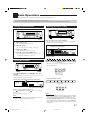
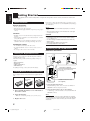
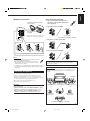
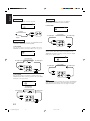
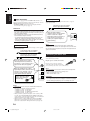
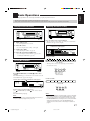
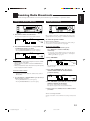
Video component connections
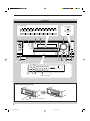
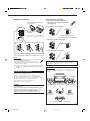
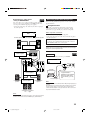
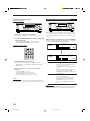
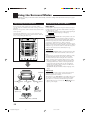
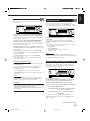
MD recorder
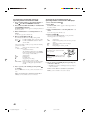
To listen to the sound after connection, press TAPE/MD (for RX8030VBK) or TAPE/CDR (for RX-7030VBK/RX-7032VSL).
For RX-8030VBK
You can connect either an MD recorder or a cassette deck to the
TAPE/MD jacks. When connecting a cassette deck, see page 12.
If your video components have an AV COMPULINK jack
See also page 42 for detailed information about the connection
and the AV COMPU LINK remote control system.
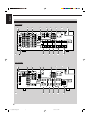
RX-8030VBK
IMPORTANT:
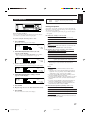
MD recorder
To audio input
R
L
To audio output
OUT
(REC)
TAPE
MD
L
IN
(PLAY)
Use the cables with RCA pin plugs (not supplied).
Connect the white plug to the audio left jack, the red plug to the
audio right jack, and the yellow plug to the video jack.
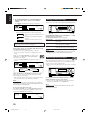
• If your video components have S-video (Y/C-separation) and/or
component video (Y, PB, PR) terminals, connect them using an Svideo cable (not supplied) and/or component video cable (not
supplied). By using these jacks, you can get better picture quality
in the order—Component video > S-video > Composite video.
R
Note:
This receiver is equipped with the following video jacks—composite
video, S-video and component video jacks. You can use any of the
three to connect a video component.
However, the video signals from one type of these input jacks are
transmitted only through the video output jacks of the same
type.
Therefore, if a recording video component and a playing video
component are connected to the receiver through the video jacks of
different type, you cannot record the picture. In addition, if the TV and
a playing video component are connected to the receiver through the
video jacks of different type, you cannot view the playback picture on
the TV.
When connecting an MD recorder to the TAPE/MD jacks, change the
source name to “MD,” which will be shown on the display when it is
selected as the source. See page 21 for details.
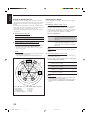
Video camera
For RX-7030VBK/RX-7032VSL
You can connect an MD recorder to the TAPE/CDR jacks if they are
not used for connecting another component such as a cassette deck
or CD recorder. When connecting an MD recorder to the TAPE/
CDR jacks, see page 12.
• Though your MD recorder is one of JVC products with the
COMPU LINK remote control system, you cannot use the
COMPU LINK remote control system to operate the connected
MD recorder.
RX-8030V
ONLY
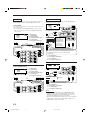
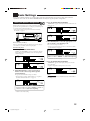
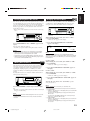
To listen to the sound after connection, press VIDEO.
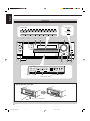
The VIDEO input jacks on the front panel (inside the front door) are
convenient when connecting and disconnecting the component
frequently.
To audio output
To composite video
output
To S-video output
L
DIGITAL
S-VIDEO
VIDEO
To optical digital output
R
L—AUDIO—R
VIDEO
Video camera
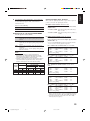
When using the digital input terminal
Select the digital input mode correctly.
For details, see “Selecting the Analog or Digital Input Mode” on
page 19.
13
01-16_8030&7030[J]10.pm6
13
03.2.13, 2:45 PM