1
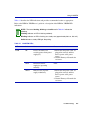
Troubleshooting Checklist
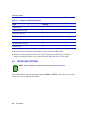
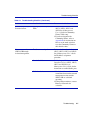
Table 4-2
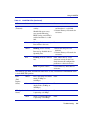
Troubleshooting Checklist (Continued)
Problem
Possible Cause
Recommended Action
Cannot navigate beyond
Password screen.
Improper Community Names
Table.
1. Refer to the SmartSwitch Series
2E253, 2H252, 2H253 and
2H258 Local Management
User’s Guide for Community
Names Table setup.
2. If you have forgotten the
Community Names, refer to
Appendix B for instructions on
how to set the mode switch to
reset the Community Names to
their default values.
Cannot contact the
2H252-25R through
in-band management.
IP address not assigned.
Refer to the SmartSwitch Series
2E253, 2H252, 2H253 and 2H258
Local Management User’s Guide
for IP address assignment
procedure.
Port is disabled.
Enable the port. Refer to the
SmartSwitch Series 2E253, 2H252,
2H253 and 2H258 Local
Management User’s Guide for the
instructions to enable/disable ports.
No link to device.
1. Verify that all network
connections between the network
management station and the
2H252-25R are valid and
operating.
2. If the problem continues, contact
Enterasys Networks for
assistance.
Troubleshooting
4-7