1
Control guide
LIGHT
SLEEP
CLOCK/
TIMER ADJ
TIMER
SET/CHECK
DISPLAY
OPEN/
CLOSE
1
2
3
4
5
6
7
8
9
0
>10
=
PGM/CLEAR
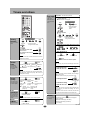
Standby/on switch [^, POWER ^/l] ...................................................... 3
Press to switch the unit from on to standby mode or vice versa.
In standby mode, the unit is still consuming a small amount of power.
Light button [LIGHT]
Turn on and off the light of display for better viewing in a darkened room.
The factory setting is ON.
SLEEP timer button [SLEEP] ............................................................... 5
Clock/timer adjust button [CLOCK/TIMER ADJ] ................................ 5
Timer set/check button [TIMER SET/CHECK]..................................... 5
CD program/clear, tuner preset button
[PGM/CLEAR, –AUTO PRESET] ....................................................... 3, 4
AUX button [AUX].................................................................................. 2
Tuner/band select button [TUNER/BAND] .......................................... 4
Volume buttons [VOL –, + VOL, – VOLUME +] .................................... 3
Extra D.Bass button [EXTRA D.BASS] ................................................ 5
Sound EQ button [SOUND EQ] ............................................................ 5
SC-EN17 Album skip, preset channel select buttons
[2, 1, u ALBUM i]..................................................................... 4, 6
-AUTO PRESET
AUX
CD
TUNER/
BAND
VOL
EXTRA
D.BASS
VOL
SOUND
LIVE
PLAY
VIRTUALIZER MODE
EQ
ALBUM
SC-EN17 SC-EN15
u ALBUM i
SC-EN15 Preset channel select buttons [2, 1, PRESET TUNE].... 4
CD open/close button [;, OPEN/CLOSE] ........................................... 3
Display button [DISPLAY]..................................................................... 5
Numbered buttons [1–9, 0, >
= 10]........................................................... 3
CD play/pause button [q/h CD]........................................................... 3
CD stop button [g]................................................................................ 3
Play mode button [PLAY MODE].................................................. 3, 4, 6
Live virtualizer button [LIVE VIRTUALIZER]....................................... 5
CD skip/search, frequency select, time adjust buttons
[u, i, –, +, u/–, +/i] ......................................................... 3, 4, 5
PRESET TUNE
The shaded buttons, such as
, function in the
same way as the buttons on the remote control.
Standby indicator
When the unit is connected to the AC mains supply, this indicator lights
up in standby mode and goes out when the unit is turned on.
Remote control signal sensor
Display
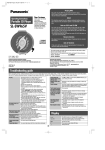
MP3 operations (SC-EN17 only)
Limitations on MP3
This unit can play MP3, a method of compressing audio without overtly
hurting audio quality.
• This unit is compatible with multi-session but if there are a lot of sessions it
takes more time for play to start. Keep the number of sessions to a
minimum to avoid this.
• This unit cannot play files recorded using packet write.
• If the disc includes both MP3 and normal audio data (CD-DA), the unit
plays the type recorded in the inner part of the disc.
If the disc includes both MP3 and other types of audio data (e.g. WMA or
WAV), the unit plays only the MP3.
• Depending on how you create MP3 files, they may not play in the order you
numbered them or may not play at all.
• Upper case alphanumeric characters and an underbar “_” can be displayed
on this unit. Lower case characters are converted to upper case.
When creating MP3 files to play on this unit
• Maximum number of tracks and albums: 999 tracks and 256 albums.
• Compatible compression rate: Between 64 kbps and 320 kbps (stereo).
128 kbps (stereo) is recommended.
• Disc formats: ISO9660 level 1 and level 2 (except for extended formats).
• It is better not to create folders (album) within folders (004album below).
Naming tracks and albums
CD-ROM drive
001album
001track.mp3
002track.mp3
003track.MP3
002album
004track.mp3
005track.mp3
004album
3
003album
008track.MP3
009track.MP3
006track.mp3
007track.MP3
LIGHT
DISPLAY
OPEN/
CLOSE
1
2
3
4
5
6
7
8
9
0
>10
=
SLEEP
CLOCK/
TIMER ADJ
TIMER
SET/CHECK
PGM/CLEAR
CD
TUNER/
BAND
VOL
EXTRA
D.BASS
VOL
SOUND
LIVE
PLAY
VIRTUALIZER MODE
EQ
001track.mp3 (or.MP3)
CD
q/h
PLAY MODE
ALBUM
Regarding CDs
Up to 31 characters for tracks and albums
Note on CD-R and CD-RW
If you created an album such as 004album on
the left, the files may not play in order.
The albums would play in the order À, Á, Â, Ã.
Album
play
-AUTO PRESET
AUX
Prefix with 3-digit numbers in the order you
want to play
Extension
You can
listen to
tracks within
albums.
u ALBUM i
PLAY MODE
This unit can play CD-R and CD-RW recorded with CD-DA or MP3 (MP3:
SC-EN17 only). Use an audio recording disc for CD-DA and finalize it when
you finish∗ recording. The unit may not be able to play some discs due to
the condition of the recording.
∗A process performed after recording that enables CD-R/CD-RW players
to play audio CD-R and CD-RW.
CD
q/h
Select the
Select
album
“ [ALBUM] ” or
Caution
Start
play
Choose discs with this mark:
Do not;
• use irregularly shaped CDs.
• attach extra labels and stickers.
• use CDs with labels and stickers that are coming off or with adhesive
exuding from under labels and stickers.
• attach scratch-proof covers or any other kind of accessory.
• write anything on the CD.
• clean CDs with liquids (Wipe with a soft, dry cloth.).
“ [ALBUM] &”
[ALBUM] :
Album play
u ALBUM i
[ALBUM] &:
Album
repeat
• Skip the
album
u ALBUM i
6