1
P4IBMS
Checking Jumper Settings
This section explains how to set jumpers for correct configuration of the mainboard.
Setting Jumpers
Use the mainboard jumpers to set system configuration options. Jumpers with more than one pin are numbered. When
setting the jumpers, ensure that the jumper caps are placed
on the correct pins.
Short
Open
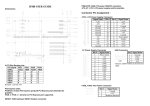
This illustration shows a 2-pin
jumper. When the jumper cap is
placed on both pins, the jumper is
SHORT. If you remove the jumper
cap, or place the jumper cap on
just one pin, the jumper is OPEN.
This illustration shows a 3-pin
jumper. Pins 1 and 2 are SHORT.
1 2
3
Checking Jumper Settings
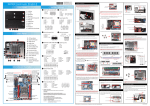
The following illustration shows the location of the mainboard
jumpers. Pin 1 is labeled.
Jumper Settings
Jumper
Type
Description
JP1
3-pin
Clear CMOS
Setting (default)
1-2: Normal
2-3: Clear
JP1 –
1
JP1
Enables you to clear the BIOS. Refer to the following instructions:
1. Turn the system off.
2. Remove all ATX power connectors (including ATX1, ATX2,
and ATX3).
3. Short pins 2 and 3 on JP1.
4. Return the jumper to the normal setting.
5. Plug in all ATX power connectors
2