1
Viewing Pictures on a Computer
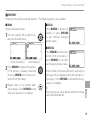
The supplied software can be used to copy pictures to a computer, where they can be stored, viewed,
organized, and printed. Before proceeding, install the software as described below. Do NOT connect the
camera to the computer until installation is complete.
Windows: Installing MyFinePix Studio
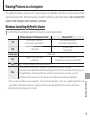
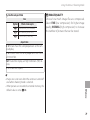
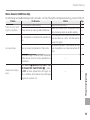
computer meets the following system requirements:
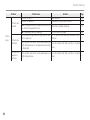
1 Confirm that theWindows
8/Windows 7 (SP 1)/Windows Vista (SP 2)
Windows XP (SP 3)
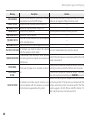
1
CPU
3 GHz Pentium 4 or better
(2.4 GHz Core 2 Duo or better) 2
RAM
1 GB or more
Free disk space
GPU
Video
Other
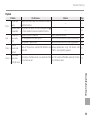
1
2 GHz Pentium 4 or better
(2.4 GHz Core 2 Duo or better) 2
512 MB or more
(1 GB or more) 2
2 GB or more
Supports DirectX 9 or later
Supports DirectX 7 or later
(recommended)
(required; performance not guaranteed with other GPUs)
1,024 × 768 pixels or more with 24-bit color or better
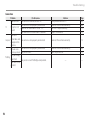
• Built-in USB port recommended. Operation is not guaranteed with other USB ports.
• Internet connection (broadband recommended) required to install .NET Framework (if necessary), to use
auto update feature, and when performing such tasks as sharing pictures on-line or via e-mail.
• Installation of .Net Framework 3.5 SP1 required to use upload picture feature and MapViewer.
Connections
1 Other versions of Windows are not supported. Only pre-installed operating systems are supported; operation is not
guaranteed on home-built computers or computers that have been upgraded from earlier versions of Windows.
2 Recommended when displaying HD movies.
71