1
S600(J).book
Page 6
Tuesday, April 23, 2002
2:07 PM
Getting started
Connections
*Before using the unit, you have to connect the unit to a TV and/or amplifier.
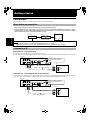
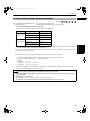
Before making any connections
• Do not connect the AC power cord until all other connections have been made.
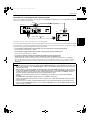
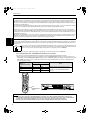
• Connect VIDEO OUT of the unit directly to the video input of your TV. Connecting VIDEO OUT of the unit to a TV via a
VCR may cause a monitor problem when playing back a copy-protected disc. You may also have a monitor problem
when connecting the unit to an integrated TV/Video system.
TV
VCR
Getting started
The unit
Connect directly
NOTES
• In the following description, “TV” may be substituted with “monitor” or “projector.”
• Terminal names used for other components may be different from those used in the following description.
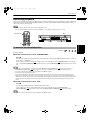
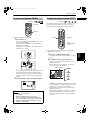
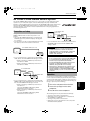
To connect to a TV
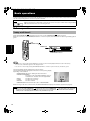
Connection to a conventional TV
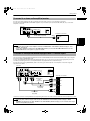
You can enjoy playback by simply connecting the unit to a TV.
Connect the unit to a TV equipped with stereo audio input and video input jacks using the supplied audio/video cables.
The unit
SUBWOOFER
CENTER RIGHT
REAR
RIGHT LEFT
PCM / STREAM
In this connection, set the
scanning mode selector to
“480i.”
LEFT
AV COMPU LINK
COMPONENT
VIDEO
Y
PB
480p
REMOTE
PR 480i
S-VIDEO
OPTICAL COAXIAL
DIGITAL OUT
AUDIO OUT
Red
TV
VIDEO OUT
Yellow
Scanning mode selector
Audio/video cable (supplied)
White
IN
Yellow
VIDEO
LEFT
White
AUDIO
RIGHT
Red
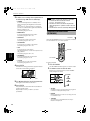
Connection to a TV equipped with an S-video jack
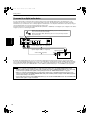
If your TV has an S-video input, you can get better picture quality by connecting it with the S-VIDEO output of the unit
using the S-video cable instead of connecting the video input of the TV to the VIDEO jack of the unit.
The unit
SUBWOOFER
CENTER RIGHT
PCM / STREAM
LEFT
REAR
RIGHT LEFT
In this connection, set the
scanning mode selector to
“480i.”
AV COMPU LINK
COMPONENT
VIDEO
Y
PB
480p
REMOTE
PR 480i
S-VIDEO
OPTICAL COAXIAL
DIGITAL OUT
AUDIO OUT
VIDEO OUT
Scanning mode selector
TV
IN
S-VIDEO
Red White
S-video cable (not supplied)
White
VIDEO
LEFT
AUDIO
Audio cable (supplied)
6
RIGHT
Red