1
The Ovens
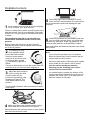
The clock must be set to the time of day before
the ovens will work. See ‘The Clock’ section of
these instructions for how to set the clock.
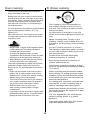
Before using for the first time, to dispel
manufacturing odours turn the ovens to
Mark 7 and run for an hour. Make sure the
room is well ventilated to the outside air, by
opening windows or turning on a cooker
hood for example. We recommend that
people with respiratory or allergy problems
should vacate the area for this brief period.
4
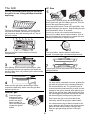
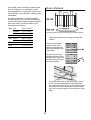
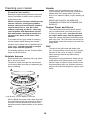
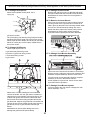
Dishes cooking on the central shelf will cook at the
gas mark indicated on the knob.
5
Dishes placed above the central position will be
cooked at approx. one gas Mark higher, dishes
cooked below approx. one gas Mark lower. You can
therefore cook dishes requiring different gas Marks
at the same time.
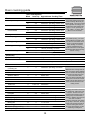
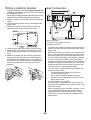
1
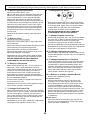
Push in and turn the knob controlling the oven to
Gas Mark 9. The oven will light automatically.
6
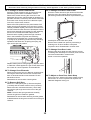
The ‘S’ setting is a very low temperature for slow
cooking, overnight or while you are out or at work.
The ‘S’ setting can also be used for keeping food
warm.
2
Turn the control knob back to the Mark you wish to
cook on and for best results pre-heat for 15 minutes
before placing your dishes in the oven.
The Clock
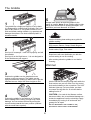
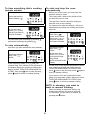
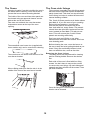
You can use the timer to turn the ovens on and
off. The clock must be set to the time of day
before the ovens will work.
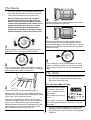
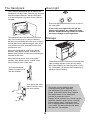
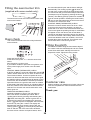
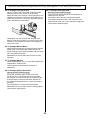
To set the time of day
3
Press and hold as shown.
At the same time, press
(-) or (+) until the correct
time shows.
The ovens use our special ‘Heatflow’ system.
Because the oven burner is not hidden under the
oven base you will see the burner flames at the back
of the oven - this is perfectly normal.
Don’t forget it’s a 24 hour
clock.
The oven is protected by a safety cut off, which
reduces the supply of gas to the oven if the flames
go out, e.g. an interruption to the mains supply.
Initially the gas will burn with a small flame but after
approximately one minute the flame will become
larger indicating that the oven is full on.
If you make a mistake or press the wrong button,
turn off the power supply for a minute or two and
start again.
7
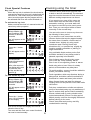
If the key symbol ( ) appears on the left of the
display you have accidentally turned on the
key lock feature. See the section ‘Clock Special
Features’.