1
Retrieving Information from the
Water Softener Management System
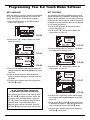
INFO (INFORMATION) BUTTON
The INFO button on the softener status screen is
used to look up the following information about the
softener and its operations:
=Current water flow
=Average daily water use
=Water used today
=Capacity remaining
=Days in use
=Total recharges
FIG. 51
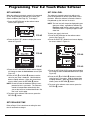
To display one of these screens:
1. Press the INFO button at the center of the softener
status screen (See Figure 50).
FIG. 52
FIG. 50
FIG. 53
2. Press the RIGHT ( ) or LEFT ( ) buttons to scroll
through the six information screens (Figures 51-56).
3. To return to the softener status screen, press the
RETURN ( ) button.
FIG. 54
FIG. 55
FIG. 56
18