1
4-169-142-11(1)
The software of this player may be updated in the future. To find out details on any
available updates, please visit: http://support.sony-europe.com/
z
To find out useful hints, tips and information about Sony products and services
please visit: www.sony-europe.com/myproduct/
Operating Instructions
Blu-ray Disc™ / DVD Player
BDP-S370/S373
4-169-142-11(1)
Printed in Hungary
© 2010 Sony Corporation
WARNING
To reduce the risk of fire or electric
shock, do not expose this apparatus
to rain or moisture.
To avoid electrical shock, do not
open the cabinet. Refer servicing to
qualified personnel only.
The mains lead must be changed
only at a qualified service shop.
Batteries or batteries installed
apparatus shall not be exposed to
excessive heat such as sunshine,
fire or the like.
Notice for customers in the
United Kingdom and
Republic of Ireland
A molded plug complying with
BS1363 is fitted to this equipment
for your safety and convenience.
Should the fuse in the plug
supplied need to be replaced, a fuse
of the same rating as the supplied
one and approved by ASTA or BSI
to BS1362, (i.e., marked with
or
mark) must be used.
If the plug supplied with this
equipment has a detachable fuse
cover, be sure to attach the fuse
cover after you change the fuse.
Never use the plug without the fuse
cover. If you should lose the fuse
cover, please contact your nearest
Sony service station.
CAUTION
The use of optical instruments with
this product will increase eye
hazard. As the laser beam used in
this Blu-ray Disc/DVD player is
harmful to eyes, do not attempt to
disassemble the cabinet.
Refer servicing to qualified
personnel only.
This label is located on the laser
protective housing inside the
enclosure.
This appliance is classified as a
CLASS 1 LASER product. The
CLASS 1 LASER PRODUCT
MARKING is located on the laser
protective housing inside the
enclosure.
Disposal of Old Electrical
& Electronic Equipment
(Applicable in the
European Union and
other European countries
with separate collection
systems)
This symbol on the product or on
its packaging indicates that this
product shall not be treated as
household waste. Instead it shall be
handed over to the applicable
collection point for the recycling of
electrical and electronic
equipment. By ensuring this
product is disposed of correctly,
you will help prevent potential
negative consequences for the
environment and human health,
which could otherwise be caused
by inappropriate waste handling of
this product. The recycling of
materials will help to conserve
natural resources. For more
detailed information about
recycling of this product, please
contact your local Civic Office,
your household waste disposal
service or the shop where you
purchased the product.
Disposal of waste
batteries (applicable in
the European Union and
other European countries
with separate collection
systems)
This symbol on the battery or on
the packaging indicates that the
battery provided with this product
shall not be treated as household
waste.
On certain batteries this symbol
might be used in combination with
a chemical symbol. The chemical
symbols for mercury (Hg) or lead
(Pb) are added if the battery
contains more than 0.0005%
mercury or 0.004% lead.
By ensuring these batteries are
disposed of correctly, you will help
prevent potentially negative
consequences for the environment
and human health which could
otherwise be caused by
inappropriate waste handling of the
battery. The recycling of the
materials will help to conserve
natural resources.
In case of products that for safety,
performance or data integrity
reasons require a permanent
connection with an incorporated
battery, this battery should be
replaced by qualified service staff
only.
To ensure that the battery will be
treated properly, hand over the
product at end-of-life to the
applicable collection point for the
recycling of electrical and
electronic equipment.
For all other batteries, please view
the section on how to remove the
battery from the product safely.
Hand the battery over to the
applicable collection point for the
recycling of waste batteries.
For more detailed information
about recycling of this product or
battery, please contact your local
Civic Office, your household
waste disposal service or the shop
where you purchased the product.
2
The manufacturer of this product is
Sony Corporation, 1-7-1 Konan
Minato-ku Tokyo, 108-0075
Japan. The Authorized
Representative for EMC and
product safety is Sony Deutschland
GmbH, Hedelfinger Strasse 61,
70327 Stuttgart, Germany. For any
service or guarantee matters please
refer to the addresses given in
separate service or guarantee
documents.
Precautions
• This unit operates on 220 V –
240 V AC, 50 Hz/60 Hz. Check
that the unit’s operating voltage
is identical with your local power
supply.
• To prevent fire or shock hazard,
do not place objects filled with
liquids, such as vases, on the
apparatus.
• Install this unit so that the mains
lead can be unplugged from the
wall socket immediately in the
event of trouble.
Notes About the Discs
• To keep the disc clean, handle
the disc by its edge. Do not
touch the surface.
Dust, fingerprints, or scratches
on the disc may cause it to
malfunction.
• Do not expose the disc to
direct sunlight or heat sources
such as hot air ducts, or leave it
in a car parked in direct
sunlight as the temperature
may rise considerably inside
the car.
• After playing, store the disc in
its case.
• Clean the disc with a cleaning
cloth. Wipe the disc from the
centre out.
Precautions
This equipment has been tested
and found to comply with the
limits set out in the EMC
Directive using a connection
cable shorter than 3 metres.
• Do not use solvents such as
benzine, thinner,
commercially available disc/
lens cleaners, or anti-static
spray intended for vinyl LPs.
• If you have printed the disc’s
label, dry the label before
playing.
• Do not use the following discs.
– A lens cleaning disc.
– A disc that has a nonstandard shape (e.g., card,
heart).
– A disc with a label or sticker
on it.
– A disc that has cellophane
tape or sticker adhesive on it.
• Do not resurface the playing
side of a disc to remove
surface scratches.
On placement
• Place the player in a location
with adequate ventilation to
prevent heat build-up in the
player.
• Do not place the player on a
soft surface such as a rug that
might block the ventilation
holes.
• Do not install this player in a
confined space, such as a
bookshelf or similar unit.
• Do not place the player in a
location near heat sources, or
in a place subject to direct
sunlight, excessive dust, or
mechanical shock.
• Do not place the player
outdoors, in vehicles, on ships,
or on other vessels.
• If the player is brought directly
from a cold to a warm location,
or is placed in a very damp
room, moisture may condense
on the lenses inside the player.
Should this occur, the player
may not operate properly. In
this case, remove the disc and
leave the player turned on for
about half an hour until the
moisture evaporates.
• Do not install the player in an
inclined position. It is
designed to be operated in a
horizontal position only.
• Do not place heavy or unstable
objects on the player.
• Do not place any objects other
than discs on the disc tray.
Doing so may cause damage to
the player or the object.
• Take out any discs when you
move the player. If you don’t,
the disc may be damaged.
• Disconnect the AC power cord
(mains lead) and all other
cables from the player when
you move the player.
,continued
3
On power sources
• The player is not disconnected
from the AC power source
(mains) as long as it is
connected to the wall outlet,
even if the player itself has
been turned off.
• Disconnect the player from the
wall outlet if you are not going
to use the player for a long
time. To disconnect the AC
power cord (mains lead), grasp
the plug itself; never pull the
cord.
• Observe following points to
prevent the AC power cord
(mains lead) being damaged.
Do not use the AC power cord
(mains lead) if it is damaged,
as doing so may result in an
electric shock or fire.
– Do not pinch the AC power
cord (mains lead) between
the player and wall, shelf,
etc.
– Do not put anything heavy
on the AC power cord
(mains lead) or pull on the
AC power cord (mains lead)
itself.
On connecting to the HDMI
OUT jack
Observe the following as
improper handling may damage
the HDMI OUT jack and the
connector.
• Carefully align the HDMI
OUT jack on the rear of the
player and the HDMI
connector by checking their
shapes. Make sure the
connector is not upside down
or tilted.
On cleaning
Clean the cabinet, panel, and
controls with a soft cloth. Do not
use any type of abrasive pad,
scouring powder or solvent such
as alcohol or benzine.
On cleaning discs, disc/
lens cleaners
Do not use cleaning discs or
disc/lens cleaners (including wet
or spray types). These may cause
the apparatus to malfunction.
On replacement of parts
In the events that this player is
repaired, repaired parts may be
collected for reuse or recycling
purposes.
4
Caution: This player is
capable of holding a still
video image or on-screen
display image on your
television screen
indefinitely. If you leave the
still video image or onscreen display image
displayed on your TV for an
extended period of time you
risk permanent damage to
your television screen.
Plasma display panel
televisions and projection
televisions are susceptible to
this.
If you have any questions or
problems concerning your
player, please consult your
nearest Sony dealer.
• Be sure to disconnect the
HDMI cable when moving the
player.
On adjusting volume
Do not turn up the volume while
listening to a section with very
low level inputs or no audio
signals. If you do, your ears and
the speakers may be damaged
when a peak level section is
played.
IMPORTANT NOTICE
• When connecting or
disconnecting, do not screw in
or rotate the HDMI connector.
Table of Contents
WARNING . . . . . . . . . . . . . . . . . . . . . . . . . . . . . . . . . . . . . . . . . . . . . . . . . . . . 2
Precautions . . . . . . . . . . . . . . . . . . . . . . . . . . . . . . . . . . . . . . . . . . . . . . . . . . . 3
Guide to Parts and Controls . . . . . . . . . . . . . . . . . . . . . . . . . . . . . . . . . . . . . . 6
Hookups and Settings
Step 1: Preparing the Player . . . . . . . . . . . . . . . . . . . . . . . . . . . . . . . . . . . . . . 9
Step 2: Connecting the Player . . . . . . . . . . . . . . . . . . . . . . . . . . . . . . . . . . . . 10
Step 3: Easy Setup . . . . . . . . . . . . . . . . . . . . . . . . . . . . . . . . . . . . . . . . . . . . 12
Connecting to the Network . . . . . . . . . . . . . . . . . . . . . . . . . . . . . . . . . . . . . . 12
Playback
Playing a Disc . . . . . . . . . . . . . . . . . . . . . . . . . . . . . . . . . . . . . . . . . . . . . . . . 14
Playing from a USB Device . . . . . . . . . . . . . . . . . . . . . . . . . . . . . . . . . . . . . . 15
Playing via a Network . . . . . . . . . . . . . . . . . . . . . . . . . . . . . . . . . . . . . . . . . . 16
Available Options . . . . . . . . . . . . . . . . . . . . . . . . . . . . . . . . . . . . . . . . . . . . . . 16
Settings and Adjustments
Using the Settings Displays . . . . . . . . . . . . . . . . . . . . . . . . . . . . . . . . . . . . . . 18
Network Update . . . . . . . . . . . . . . . . . . . . . . . . . . . . . . . . . . . . . . . . . . . . . . . 19
Screen Settings . . . . . . . . . . . . . . . . . . . . . . . . . . . . . . . . . . . . . . . . . . . . . . . 19
Audio Settings . . . . . . . . . . . . . . . . . . . . . . . . . . . . . . . . . . . . . . . . . . . . . . . . 20
BD/DVD Viewing Settings . . . . . . . . . . . . . . . . . . . . . . . . . . . . . . . . . . . . . . . 21
Parental Control Settings . . . . . . . . . . . . . . . . . . . . . . . . . . . . . . . . . . . . . . . . 22
Music Settings . . . . . . . . . . . . . . . . . . . . . . . . . . . . . . . . . . . . . . . . . . . . . . . . 22
System Settings . . . . . . . . . . . . . . . . . . . . . . . . . . . . . . . . . . . . . . . . . . . . . . . 23
Network Settings . . . . . . . . . . . . . . . . . . . . . . . . . . . . . . . . . . . . . . . . . . . . . . 24
Easy Setup . . . . . . . . . . . . . . . . . . . . . . . . . . . . . . . . . . . . . . . . . . . . . . . . . . 24
Resetting . . . . . . . . . . . . . . . . . . . . . . . . . . . . . . . . . . . . . . . . . . . . . . . . . . . . 24
Additional Information
Troubleshooting . . . . . . . . . . . . . . . . . . . . . . . . . . . . . . . . . . . . . . . . . . . . . . . 25
Specifications . . . . . . . . . . . . . . . . . . . . . . . . . . . . . . . . . . . . . . . . . . . . . . . . . 28
Index . . . . . . . . . . . . . . . . . . . . . . . . . . . . . . . . . . . . . . . . . . . . . . . . . . . . . . . 34
5
Guide to Parts and Controls
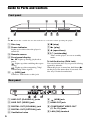
Front panel
z
The N button has a tactile dot. Use the tactile dot as a reference when operating the player.
A Disc tray
F x (stop)
B Power indicator
G N (play)
Lights up in white when the player is
turned on.
C Remote sensor
H Z (open/close)
I [/1 (on/standby)
Turns on the player, or sets to standby
mode.
D Front panel display
N, X: Lights up during playback or
pause.
: Lights up when enabling the repeat
setting.
: Lights up when outputting 720p/
1080i/1080p video signals.
E
(USB) jack
To lock the disc tray (Child Lock)
You can lock the disc tray to prevent it being
opened by mistake.
When the player is turned on, hold down N
on the player for more than 10 seconds. The
disc tray is locked or unlocked.
Connect a USB device to this jack.
Rear panel
6
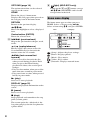
A LINE OUT (R-AUDIO-L) jacks
F
B LINE OUT (VIDEO) jack
G HDMI OUT jack
C DIGITAL OUT (COAXIAL) jack
D DIGITAL OUT (OPTICAL) jack
H COMPONENT VIDEO OUT
(Y, PB, PR) jacks
E Ventilation holes
I LAN (100) terminal
(USB) jack
Remote
The available functions of the remote differ
depending on the disc or the situation.
A Z (open/close)
Opens or closes the disc tray.
-TV- t (TV input select)
Switches between TV and other input
sources.
-TV- [/1 (TV on/standby)
Turns on the TV, or sets to standby mode.
[/1 (on/standby)
Turns on the player, or sets to standby
mode.
B Number buttons (0 - 9)
Enters the title/chapter numbers, etc.
2 (volume) +/–
Adjusts the TV volume.
THEATRE (page 30)
Switches to the optimum video mode for
watching movies automatically.
The THEATRE button functions only
when connected to a Sony Theatre
Mode-compatible AV amplifier
(receiver) or Sony Theatre Modecompatible TV.
AUDIO (page 21)
Selects the language track when multilingual tracks are recorded on BDROMs/DVD VIDEOs.
Selects the sound track on CDs.
SUBTITLE (page 21)
Selects the subtitle language when multilingual subtitles are recorded on BDROMs/DVD VIDEOs.
(favourites) (page 16)
z
Number 5, AUDIO, 2 +, and N buttons have a
tactile dot. Use the tactile dot as a reference when
operating the player.
Displays the Internet content added to the
Favourites List. You can save up to 18 of
your favourite Internet content
programmes.
C Colour buttons (red/green/
yellow/blue)
Short cut keys for interactive functions.
D TOP MENU
Opens or closes the BD’s or DVD’s Top
Menu.
POP UP/MENU
Opens or closes the BD-ROM’s Pop-up
Menu, or the DVD’s menu.
,continued
7
OPTIONS (page 16)
The options menu that can be selected
appears on the screen.
HOME
Enters the player’s home menu.
Displays the wall paper when pressed on
the category icon of the home menu.
RETURN
Returns to the previous display.
</M/m/,
Moves the highlight to select a displayed
item.
F
(light) (BDP-S373 only)
Lights up the 4 and 5 buttons (except
</M/m/, and ENTER) and is useful
for operation in the dark.
Home menu display
The home menu appears when you press
HOME. Select a category using </,.
Select an item using M/m, and press ENTER.
Item
Category
Centre button (ENTER)
Enters the selected item.
E ./> (previous/next)
Skips to the previous/next chapter, track,
or file.
/
(replay/advance)
Briefly replays the current scenes for
10 seconds/briefly fast forwards the
current scenes for 15 seconds.
m/M (fast reverse/fast
forward)
• Fast reverses/fast forwards the disc
when pressed during playback. Each
time you press the button during
playback of videos, the search speed
changes.
• Plays in slow motion, when pressed for
more than one second in pause mode.
• Plays one frame at a time, when pressed
briefly in pause mode.
N (play)
Starts or re-starts playback.
DISPLAY (page 15)
Displays the playback information on the
screen.
X (pause)
Pauses or re-starts playback.
x (stop)
Stops playback and remembers the stop
point (resume point).
The resume point for a title/track is the
last point you played or the last photo for
a photo folder.
8
(Setup): Adjusts the player settings.
(Photo): Displays photos.
(Music): Plays music.
(Video): Plays videos.
(Network): Displays network items.
Step 1: Preparing the
Player
Hookups and Settings
Checking the supplied
accessories
Check that you have the following items:
• Remote commander (remote) (1)
• R6 (size AA) batteries (2)
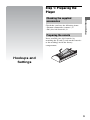
Preparing the remote
Insert two R6 (size AA) batteries by
matching the 3 and # ends on the batteries
to the markings inside the battery
compartment.
Hookups and
Settings
9
Step 2: Connecting the Player
Do not connect the mains lead until you have made all the connections.
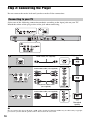
Connecting to your TV
Select one of the following connection methods according to the input jacks on your TV.
Match the colour of the plug to that of the jack when connecting.
HDMI cable (not supplied)
High quality
Audio/video cable (not supplied)
Component video cable
(not supplied)
Audio/video cable (not supplied)
Standard
quality
b
Do not connect the player through a VCR. Video signals fed through VCRs may be affected by copyright
protection systems and the picture will be distorted on the television.
10
Connecting to your AV amplifier (receiver)
Select one of the following connection methods according to the input jacks on your AV
amplifier (receiver). When you select A or B, make the appropriate settings in the “Audio
Settings” setup (page 20).
Hookups and Settings
HDMI cable (not supplied)
HDMI cable
(not supplied)
t Set “BD Audio MIX Setting” (page 20).
Coaxial digital cable (not supplied)
or
Optical digital cable (not supplied)
t Set “Dolby Digital (Coaxial / Optical)*1” (page 20)
and “DTS (Coaxial / Optical)*2” (page 20).
Audio/video cable (not supplied)
*1
*2
11
Step 3: Easy Setup
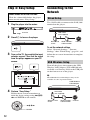
Connecting to the
Network
When turned on for the first time
Wait for a short while before the player
turns on and starts “Easy Setup.”
1
Plug the player into the mains.
Wired Setup
Use a LAN cable to connect to the LAN (100)
terminal on the player.
LAN cable
(not supplied)
to mains
2
Press [/1 to turn on the player.
Broadband
router
ADSL modem/
Cable modem
Internet
To set the network settings
3
Turn on the TV, then switch the input
selector on your TV so that the signal
from the player appears on your TV
screen.
Select “Network Settings,” “Internet
Settings,” then “Wired Setup” (page 24), and
follow the on-screen instructions to complete
the setup.
USB Wireless Setup
Turn off the player, then connect the USB
Wireless LAN Adapter (UWA-BR100 only
available as of January 2010) to the USB jack
on the front or rear of the player.
b
The USB Wireless LAN Adapter may not be
available in some regions/countries.
USB Wireless
LAN Adapter
4
Perform “Easy Setup.”
Follow the on-screen instructions to
make the basic settings using </M/m/
, and ENTER on the remote.
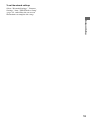
LAN cable
(not supplied)
Wireless LAN
router
</M/m/,
ENTER
12
ADSL modem/
Cable modem
Internet
To set the network settings
Select “Network Settings,” “Internet
Settings,” then “USB Wireless Setup”
(page 24), and follow the on-screen
instructions to complete the setup.
Hookups and Settings
13
Playing a Disc
For playable discs, see “Playable discs”
(page 29).
1
Switch the input selector on your TV so
that the signal from the player
appears on your TV screen.
2
Press Z, and place a disc on the disc
tray.
Playing side facing down
3
Press Z to close the disc tray.
appears on the home menu and
playback starts.
If playback does not start automatically,
select
in the
(Video),
(Music),
or
(Photo) category, and press
ENTER.
Playback
Enjoying BONUSVIEW/BD-LIVE
Some BD-ROMs with “BD-LIVE Logo*”
have bonus content and other data that can be
downloaded for enjoyment.
*
1
Connect a USB memory to the USB
jack on the rear of the player (page 6).
As your local storage, use a 1 GB or
larger USB memory.
2
Prepare for BONUSVIEW/BD-LIVE.
• Connect the player to a network
(page 12).
• Set “BD Internet Connection” to
“Allow” (page 21).
14
3
Insert a BD-ROM with BONUSVIEW/
BD-LIVE.
The operation method differs depending
on the disc. Refer to the instruction
manual supplied with the disc.
You can play video/music/photo files on the
connected USB device.
For playable USB devices, see “Playable
types of files” (page 29).
1
Connect the USB device to the USB
jack on the player.
Refer to the instruction manual supplied
with the USB device before connecting.
Displaying the play information
Playback
z
To delete data in the USB memory, select “Erase
BD Data” in the
(Video), and press ENTER.
All data stored in the buda/budb folder will be
erased.
Playing from a USB
Device
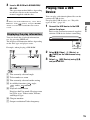
You can check the playback information,
etc., by pressing DISPLAY.
The displayed information differs depending
on the disc type and player status.
Example: when playing a BD-ROM
USB device
2
Select
(Video),
(Music), or
(Photo) on the home menu using
</,.
3
Select
(USB Device) using M/m,
and press ENTER.
A The currently selected angle
B Title number or name
C The currently selected audio setting
D Available functions (
angle,
audio,
subtitle)
E Playback information
Displays the Play mode, Playing status
bar, Disc type, Video codec, Bitrate,
and Repeat type.
F Chapter number
G Output resolution/Video frequency
15
Playing via a Network
Streaming BRAVIA Internet
Video
Serves as a gateway delivering the selected
Internet content and a variety of on-demand
entertainment straight to your player.
1
Prepare for BRAVIA Internet Video.
Connect the player to a network
(page 12).
Available Options
Various settings and playback operations are
available by pressing OPTIONS. The
available items differ depending on the
situation.
Common options
Items
Details
Playback
History
Displays a title in playback
history of BD-ROM/DVDROM/music CD based on
Gracenote technology.
Sets the repeat mode.
2
Select
(Video),
(Music), or
(Photo) on the home menu using
</,.
Repeat
Setting
3
Select an Internet content provider
icon using M/m, and press ENTER.
Play/Stop
When an Internet content list has not
been acquired, an unacquired icon or a
new icon is displayed.
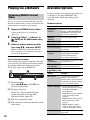
To use the control panel
The control panel appears when the video file
starts playing. The displayed items may differ
depending on Internet content providers.
To display again, press DISPLAY.
Favourites List Displays the Favourites List.
Starts or stops the playback.
Play from start Plays the item from the
beginning.
Information
Display
Displays information on the
BD-ROM/DVD-ROM/
music CD based on
Gracenote technology.
Add to
Favourites
Adds Internet content to the
Favourites List.
Remove from
Favourites
Removes Internet content
from the Favourites List.
(Video) only
A Control display
Press </M/m/, or ENTER for
playback operations.
B Playing status bar
Status bar, Cursor indicating the
current position, Playing time,
Duration of the video file
C The next video file name
D The currently selected video file name
and rating
Items
Details
AV SYNC
Adjusts the gap between
picture and sound, by
delaying the sound output in
relation to the picture output
(0 to 120 milliseconds).
Video Settings • Picture Quality Mode:
Selects the picture settings
for different lighting
environments.
• FNR: Reduces the random
noise appearing in the
picture.
• BNR: Reduces the mosaiclike block noise in the
picture.
• MNR: Reduces minor
noise around the picture
outlines (mosquito noise).
Play/Pause
16
Starts or pauses the
playback.
Details
Top Menu
Displays the BD’s or DVD’s
Top Menu.
Menu/Popup
Menu
Displays the BD-ROM’s
Pop-up Menu or DVD’s
menu.
Title Search
Searches for a title on BDROMs/DVD VIDEOs and
starts playback from the
beginning.
Chapter
Search
Searches for a chapter and
starts playback from the
beginning.
Angle
Switches to other viewing
angles when multi-angles
are recorded on BD-ROMs/
DVD VIDEOs.
Playback
Items
(Photo) only
Items
Details
Slideshow
Speed
Changes the slideshow
speed.
Slideshow
Plays a slideshow.
Rotate Left
Rotates the photo
counterclockwise by
90 degrees.
Rotate Right
Rotates the photo clockwise
by 90 degrees.
17
Using the Settings
Displays
Select
(Setup) on the home menu when
you need to change the settings of the player.
The default settings are underlined.
1
Select
(Setup) on the home menu
using </,.
2
Select the setup category icon using
M/m, and press ENTER.
Icon
Explanation
Network Update (page 19)
Updates the software of the
player.
Screen Settings (page 19)
Makes the video settings
according to the type of
connecting jacks.
Settings and
Adjustments
Audio Settings (page 20)
Makes the audio settings
according to the type of
connecting jacks.
BD/DVD Viewing Settings
(page 21)
Makes detailed settings for BD/
DVD playback.
Parental Control Settings
(page 22)
Makes detailed settings for the
Parental Control function.
Music Settings (page 22)
Makes detailed settings for
Super Audio CD playback.
System Settings (page 23)
Makes the player-related
settings.
Network Settings (page 24)
Makes detailed settings for the
Internet and network.
Easy Setup (page 24)
Re-runs the Easy Setup to make
the basic settings.
Resetting (page 24)
Resets the player to the factory
settings.
18
DVD Aspect Ratio
Network Update
Letter Box
Displays a wide picture with
black bands on the top and
bottom.
Pan & Scan
Displays a full-height
picture on the entire screen,
with trimmed sides.
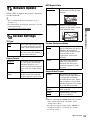
Select “OK” to update the player’s software
via the network.
z
• We recommend the network update every 2
months or so.
• For information about update functions, visit the
following website:
http://support.sony-europe.com/
TV Type
16:9
4:3
Select this when connecting
to a wide-screen TV or a TV
with a wide mode function.
Cinema Conversion Mode
Auto
Normally select this. The
player automatically detects
whether the material is
video-based or film-based,
and switches to the
appropriate conversion
method.
Video
The conversion method
suited for video-based
material will always be
selected regardless of the
material.
Select this when connecting
to a 4:3 screen TV without a
wide mode function.
Screen Format
Original
Select this when connecting
to a TV with a wide mode
function. Displays a 4:3
screen picture in 16:9 aspect
ratio even on a wide-screen
TV.
Fixed Aspect
Ratio
Changes the picture size to
fit the screen size with the
original picture aspect ratio.
Settings and Adjustments
Screen Settings
Output Video Format
HDMI
Normally select “Auto.”
Select “Original Resolution”
to output the resolution
recorded on the disc. When
the resolution is lower than
the SD resolution, it is scaled
up to the SD resolution.
Component
Video
Select the resolution that
suits your TV.
Video
Automatically sets the
lowest resolution.
z
• When connecting the HDMI OUT jack and other
video output jacks at the same time, select
“Component Video.”
• If no picture appears when setting “HDMI” or
“Component Video” resolution, try another
resolution setting.
,continued
19
BD/DVD-ROM 1080/24p Output
Auto
Off
Outputs 1920 × 1080p/
24 Hz video signals only
when connecting a 1080/
24p-compatible TV using
the HDMI OUT jack.
Audio Settings
Audio (HDMI)
Auto
Normally select this.
Outputs audio signals
according to the status of the
connected HDMI device.
PCM
Outputs PCM signals from
the HDMI OUT jack.
Select this when your TV is
not compatible with 1080/
24p video signals.
YCbCr/RGB (HDMI)
Auto
Automatically detects the
connected TV type, and
switches to the matching
colour setting.
DSD Output Mode
On
Outputs DSD signals from
the HDMI OUT jack when
playing a Super Audio CD.
When “On” is selected,
analogue signals are not
output when playing a Super
Audio CD.
Off
Outputs PCM signals from
the HDMI OUT jack when
playing a Super Audio CD.
YCbCr (4:2:2) Outputs YCbCr 4:2:2 video
signals.
YCbCr (4:4:4) Outputs YCbCr 4:4:4 video
signals.
RGB
Outputs RGB video signals.
HDMI Deep Colour Output
Auto
Normally select this.
12bit
Outputs 12bit/10bit video
signals when the connected
TV is compatible with Deep
Colour.
10bit
Off
Select this when the picture
is unstable or colours appear
unnatural.
BD Audio MIX Setting
On
Outputs the audio obtained
by mixing the interactive
and secondary audio to the
primary audio.
Off
Outputs the primary audio
only. Select this to output
HD audio signals to an AV
amplifier (receiver).
Pause Mode
Auto
Frame
Normally select this.
Dynamic moving pictures
appear without blurring.
Dolby Digital (Coaxial / Optical)
Downmix
PCM
Converts to output Linear
PCM signals. Select this
when connecting an audio
device without a built-in
Dolby Digital decoder.
Dolby Digital
Select this when connecting
an audio device with a builtin Dolby Digital decoder.
Displays static pictures at
high resolution.
DTS (Coaxial / Optical)
20
Downmix
PCM
Converts to output Linear
PCM signals. Select this
when connecting to an audio
device without a built-in
DTS decoder.
DTS
Select this when connecting
to an audio device with a
built-in DTS decoder.
Audio DRC
Auto
Performs playback at the
dynamic range specified by
the disc (BD-ROM only).
Other discs are played back
at the “Standard” level.
Standard
Performs playback at a
standard compression level.
Wide Range
No compression works. A
more dynamic sound is
produced.
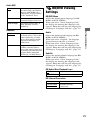
BD/DVD Viewing
Settings
BD/DVD Menu
Selects the default menu language for BDROMs or DVD VIDEOs.
When you select “Select Language Code,”
the display for entering the language code
appears. Enter the code for your language by
referring to “Language code list” (page 33).
Surround
Outputs audio signals with
surround effects. Select this
when connecting an audio
device that supports Dolby
Surround (Pro Logic) or
DTS Neo 6.
Stereo
Outputs audio signals
without surround effects.
Select this when connecting
an audio device that does not
support Dolby Surround
(Pro Logic) or DTS Neo 6.
Audio
Selects the default track language for BDROMs or DVD VIDEOs.
When you select “Original,” the language
given priority in the disc is selected.
When you select “Select Language Code,”
the display for entering the language code
appears. Enter the code for your language by
referring to “Language code list” (page 33).
Settings and Adjustments
Downmix
Subtitle
Selects the default subtitle language for BDROMs or DVD VIDEOs.
When you select “Select Language Code,”
the display for entering the language code
appears. Enter the code for your language by
referring to “Language code list” (page 33).
BD Hybrid Disc Playback Layer
BD
Plays BD layer.
DVD/CD
Plays DVD or CD layer.
BD Internet Connection
Allow
Normally select this.
Do not allow
Prohibits Internet
connection.
21
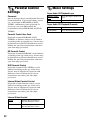
Parental Control
Settings
Password
Sets or changes the password for the Parental
Control function. A password allows you to
set a restriction on BD-ROM or DVD
VIDEO, and Internet video playback. If
necessary, you can differentiate the
restriction levels for BD-ROMs and DVD
VIDEOs.
Parental Control Area Code
Playback of some BD-ROMs, DVD
VIDEOs, or Internet videos can be limited
according to the geographic area. Scenes may
be blocked or replaced with different scenes.
Follow the on-screen instructions and enter
your four-digit password.
BD Parental Control
Playback of some BD-ROMs can be limited
according to the age of the users. Scenes may
be blocked or replaced with different scenes.
Follow the on-screen instructions and enter
your four-digit password.
DVD Parental Control
Playback of some DVD VIDEOs can be
limited according to the age of the users.
Scenes may be blocked or replaced with
different scenes. Follow the on-screen
instructions and enter your four-digit
password.
Internet Video Parental Control
Playback of some Internet videos can be
limited according to the age of the users.
Scenes may be blocked or replaced with
different scenes. Follow the on-screen
instructions and enter your four-digit
password.
Internet Video Unrated
22
Allow
Allows the playback of
unrated Internet videos.
Block
Blocks the playback of
unrated Internet videos.
Music Settings
Super Audio CD Playback Layer
Super Audio
CD
Plays the Super Audio CD
layer.
CD
Plays the CD layer.
Super Audio CD Playback Channels
DSD 2ch
Plays the 2ch area.
DSD Multi
Plays the multi-channel area.
Screen Saver
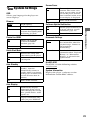
System Settings
On
Turns on the screen saver
function. The screen saver
image appears when you do
not use the player for more
than 10 minutes while an onscreen display is displayed.
Off
Turns off the function.
OSD
Selects your language for the player onscreen displays.
Dimmer
Bright
Bright lighting.
Dark
Low lighting.
On
Off
Turns off the lighting during
playback. Low lighting other
than during playback.
Sets the player to inform you
of newer software version
information (page 19).
Off
Turns off the function.
On
Allows you to use the
“Control for HDMI”
function (page 30).
Off
Turns off the function.
Quick Start Mode
On
Shortens the startup time
when turning on the player.
Off
Reduces standby power
consumption.
Gracenote Settings
Auto
Automatically downloads
disc information when disc
playback stops. Connect to
the network for
downloading.
Manual
Downloads the disc
information when “Playback
History” or “Information
Display” is selected in the
options menu.
Settings and Adjustments
Control for HDMI
Software Update Notification
DivX(R) VOD
Auto Standby
On
Off
Turns on the “Auto
Standby” function.
Automatically returns to
standby mode if any button
on the player or remote is not
pressed for more than 30
minutes.
For details, visit the following website:
vod.divx.com
System Information
Displays the player’s software version
information and the MAC address.
Turns off the function.
Auto Display
On
Automatically displays
information on the screen
when changing the viewing
titles, picture modes, audio
signals, etc.
Off
Displays information only
when you press DISPLAY.
23
Network Settings
Internet Settings
Connect the player to the network
beforehand. For details, see “Connecting to
the Network” (page 12).
View Network
Status
Displays the current
network status.
Wired Setup
Select this when you
connect to a broadband
router directly.
USB Wireless Select this when you use a
Setup
USB Wireless LAN
Adapter.
For further details, visit the
following website and check
the FAQ contents:
http://support.sonyeurope.com/
Network Connection Diagnostics
You can run the network diagnostic to check
if the network connection has been made
properly.
BD Remote Device Registration
Registers your “BD Remote” device.
Registered BD Remote Devices
Displays a list of the registered your “BD
Remote” devices.
24
Easy Setup
Re-runs the “Easy Setup” to make the basic
settings. Follow the on-screen instructions.
Resetting
Reset to Factory Default Settings
You can reset the player settings to the
factory default by selecting the group of
settings. All the settings within the group will
be reset.
Initialize Personal Information
You can erase your personal information
stored in the player.
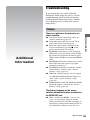
Troubleshooting
If you experience any of the following
difficulties while using the player, use this
troubleshooting guide to help remedy the
problem before requesting repairs. Should
any problem persist, consult your nearest
Sony dealer.
Picture
There is no picture or the picture is not
output correctly.
Additional Information
Additional
Information
, Check that all the connecting cables are
securely connected (page 10).
, Switch the input selector on your TV to
display the signal from the player.
, Reset the video output resolution to the
lowest resolution by pressing x on the
player for more than 10 seconds.
, For HDMI connections, try the following:
1Turn the player off and on again. 2Turn
the connected equipment off and on again.
3Disconnect and then reconnect the HDMI
cable.
, The HDMI OUT jack is connected to a DVI
device that does not support copyright
protection technology.
, For HDMI connections, check the “Output
Video Format” settings in the “Screen
Settings” setup (page 19).
, When the analogue signals are also output,
set “BD/DVD-ROM 1080/24p Output” to
“Off” in the “Screen Settings” setup
(page 20).
, For BD-ROMs, check the “BD/DVD-ROM
1080/24p Output” setting in the “Screen
Settings” setup (page 20).
The display language on the screen
switches automatically when connected to
the HDMI OUT jack.
, When “Control for HDMI” is set to “On”
(page 23), the display language on the
screen automatically switches according to
the language setting of the connected TV (if
you change the setting on your TV, etc.).
,continued
25
Sound
There is no sound or the sound is not
output correctly.
, Check that all the connecting cables are
securely connected (page 10).
, Switch the input selector on your AV
amplifier (receiver) so that the audio signals
of the player are output from your AV
amplifier (receiver).
, If the audio signal does not come through
the DIGITAL OUT (OPTICAL/
COAXIAL)/HDMI OUT jack, check the
audio settings (page 20).
, For HDMI connections, try the following:
1Turn the player off and on again. 2Turn
the connected equipment off and on again.
3Disconnect and then reconnect the HDMI
cable.
, For HDMI connections, if the player is
connected to a TV through an AV amplifier
(receiver), try connecting the HDMI cable
directly to the TV. Refer also to the
instruction manual supplied with the AV
amplifier (receiver).
, The HDMI OUT jack is connected to a DVI
device (DVI jacks do not accept audio
signals).
, The device connected to the HDMI OUT
jack does not support the audio format of
the player. Check the audio settings
(page 20).
The HD Audio (Dolby Digital Plus, Dolby
TrueHD, DTS-HD High Resolution Audio,
and DTS-HD Master Audio) is not output
by bitstream.
26
Disc
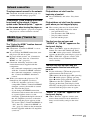
The disc does not play.
, The disc is dirty or skewed.
, The disc is upside down. Insert the disc with
the playback side facing down.
, The disc has a format that cannot be played
back by this player (page 29).
, The player cannot play a recorded disc that
is not correctly finalised.
, The region code on the BD or DVD does
not match the player.
USB device
The player does not detect a USB device
connected to the player.
, Make sure that the USB device is securely
connected to the USB jack.
, Check if the USB device or a cable is
damaged.
, Check if the USB device is on.
, If the USB device is connected via a USB
hub, connect the USB device directly to the
player.
BRAVIA Internet Video
The picture/sound is poor/certain
programmes display a loss of detail,
especially during fast-motion or dark
scenes.
, Set “BD Audio MIX Setting” to “Off” in
the “Audio Settings” setup (page 20).
, Check that the connected AV amplifier
(receiver) is compatible with each HD
Audio format.
, Picture/sound quality may be poor
depending on Internet content providers.
, Picture/sound quality may be improved by
changing the connection speed. We
recommend the connection speed of at least
2.5 Mbps for standard definition video
(10 Mbps for high definition video).
, Not all videos will contain sound.
The interactive audio is not output.
The picture is small.
, Set “BD Audio MIX Setting” to “On” in the
“Audio Settings” setup (page 20).
, Press M to zoom in.
Network connection
The player cannot connect to the network.
, Check the network connection (page 12)
and the network settings (page 24).
The message “A new software version has
been found on the network. Perform
update under "Network Update."” appears
on the screen when turning the player on.
, See “Network Update” (page 19) to update
the player to a newer software version.
The “Control for HDMI” function does not
work (BRAVIA Sync).
, Check that “Control for HDMI” is set to
“On” (page 23).
, If you change the HDMI connection, turn
the player off and on again.
, If power failure occurs, set “Control for
HDMI” to “Off,” then set “Control for
HDMI” to “On” (page 23).
, Check the following and refer to the
instruction manual supplied with the
component.
– the connected component is compatible
with the “Control for HDMI” function.
– the connected component’s setting for
the “Control for HDMI” function is
correct.
, When you connect the player to a TV
through an AV amplifier (receiver),
– if the AV amplifier (receiver) is not
compatible with the “Control for HDMI”
function, you may be unable to control
the TV from the player.
– if you change the HDMI connection,
disconnect and reconnect the mains lead,
or a power failure occurs, try the
following: 1Switch the input selector of
the AV amplifier (receiver) so that the
picture from the player appears on the
TV screen. 2Set “Control for HDMI” to
“Off,” then set “Control for HDMI” to
“On” (page 23). Refer to the instruction
manual supplied with the AV amplifier
(receiver).
Playback does not start from the
beginning of content.
, Press OPTIONS, and select “Play from
start.”
Playback does not start from the resume
point where you last stopped playing.
, The resume point may be cleared from
memory depending on the disc when
– you open the disc tray.
– you disconnect the USB device.
– you play other content.
– you turn off the player.
The disc tray does not open and
“LOCKED” or “TLK ON” appears on the
front panel display.
, When “LOCKED” appears, the player is
locked. To cancel the Child Lock, hold
down N on the player until “UNLOCK”
appears on the front panel display (page 6).
, When “TLK ON” appears, contact your
Sony dealer or local authorised Sony
service facility.
Additional Information
BRAVIA Sync (“Control for
HDMI”)
Others
The disc tray does not open and you
cannot remove the disc even after you
press Z.
, Try the following: 1Turn the player off,
and disconnect the mains lead.
2Reconnect the mains lead while pressing
down Z on the player. 3Keep pressing
down Z on the player until the tray opens.
4Remove the disc. 5When “WAIT”
appears on the front panel display, hold
down [/1 on the player for more than 10
seconds until the player turns on again.
“Exxxxx” or “FAN ERR” appears on the
front panel display.
, When “Exxxxx” appears, contact your
nearest Sony dealer or local authorised
Sony service facility and give the error
code.
,continued
27
, When “FAN ERR” appears, try the
following: 1Check that the ventilation
holes on the rear of the player are not
blocked. 2Place the player in a location
with adequate ventilation to prevent heat
build-up in the player.
The player does not respond to any button.
, Moisture has condensed inside the player
(page 3).
, Hold down [/1 on the player for more than
10 seconds until the indicators on the front
panel display turn off.
If the player still does not respond to any
button, disconnect then reconnect the mains
lead.
Specifications
System
Laser: Semiconductor laser
Inputs and outputs
(Jack name:
Jack type/Output level/Load impedance)
LINE OUT R-AUDIO-L:
Phono jack/2 Vrms/10 kilohms
DIGITAL OUT (OPTICAL):
Optical output jack/–18 dBm
(wave length 660 nm)
DIGITAL OUT (COAXIAL):
Phono jack/0.5 Vp-p/75 ohms
HDMI OUT:
HDMI 19-pin standard connector
COMPONENT VIDEO OUT
(Y, PB, PR):
Phono jack/Y: 1.0 Vp-p/
PB, PR: 0.7 Vp-p/75 ohms
LINE OUT VIDEO:
Phono jack/1.0 Vp-p/75 ohms
LAN (100):
100BASE-TX Terminal
USB:
USB jack Type A (For connecting a USB
memory, memory card reader, digital still
camera, and digital video camera)
General
Power requirements:
220–240 V AC, 50/60 Hz
Power consumption:
22 W
Dimensions (approx.):
430 mm × 219 mm × 36 mm
(width/depth/height) incl. projecting parts
Mass (approx.):
2.0 kg
Operating temperature:
5 ºC to 35 ºC
Operating humidity:
25 % to 80 %
Supplied accessories
See page 9.
Specifications and design are subject to
change without notice.
28
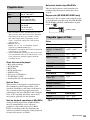
Playable discs
Blu-ray
Disc*1
BD-ROM
BD-R*2/BD-RE*2
DVD*3
DVD-ROM
DVD-R/DVD-RW
DVD+R/DVD+RW
CD*3
CD-DA (Music CD)
CD-ROM
CD-R/CD-RW
Super Audio CD
Note about double-layer BDs/DVDs
The playback pictures and sound may be
momentarily interrupted when the layers
switch.
Region code (BD-ROM/DVD VIDEO only)
Your player has a region code printed on the
rear of the unit and will only play BD-ROMs/
DVD-ROMs labelled with identical region
codes or ALL
.
Region code
*1
Discs that cannot be played
•
•
•
•
•
•
•
•
BDs with cartridge
DVD-RAMs
HD DVDs
DVD Audio discs
PHOTO CDs
Data part of CD-Extras
VCDs/Super VCDs
Audio material side on DualDiscs
Note on Discs
This product is designed to playback discs
that conform to the Compact Disc (CD)
standard. DualDiscs and some of the music
discs encoded with copyright protection
technologies do not conform to the Compact
Disc (CD) standard, therefore, these discs
may not be playable by this product.
Playable types of files
Video
File format
MPEG-1 Video/PS
MPEG-2 Video/PS,
TS*1
“.mpg,” “.mpeg,”
“.m2ts,” “.mts”
DivX*2
“.avi,” “.divx”
MPEG-4 AVC*1
“.mkv,” “.mp4,”
“.m4v,” “.m2ts,”
“.mts”
WMV9*1
“.wmv,” “.asf”
AVCHD
*3
Music
File format
Extensions
MP3 (MPEG-1 Audio “.mp3”
Layer III)
AAC*1*4
“.m4a”
WMA9 Standard*1*4
“.wma”
LPCM
“.wav”
Photo
File format
Extensions
JPEG
“.jpg,” “.jpeg”
*1
Note on playback operations of BDs/DVDs
Extensions
*1
Additional Information
Since the Blu-ray Disc specifications are new
and evolving, some discs may not be playable
depending on the disc type and the version.
The audio output differs depending on the
source, connected output jack, and selected
audio settings.
*2 BD-RE: Ver.2.1
BD-R: Ver.1.1, 1.2, 1.3 including organic
pigment type BD-R (LTH type)
The BD-Rs recorded on a PC cannot be played if
postscripts are recordable.
*3 A CD or DVD disc will not play if it has not been
correctly finalised. For more information, refer
to the instruction manual supplied with the
recording device.
The player does not play coded files such as
DRM.
Some playback operations of BDs/DVDs
may be intentionally set by software
producers. Since this player plays BDs/
DVDs according to the disc contents the
software producers designed, some playback
features may not be available.
,continued
29
*2
ABOUT DIVX VIDEO: DivX® is a digital
video format created by DivX, Inc. This is an
official DivX Certified device that plays DivX
video. Visit www.divx.com for more
information and software tools to convert your
files into DivX video.
ABOUT DIVX VIDEO-ON-DEMAND: This
DivX Certified® device must be registered in
order to play DivX Video-on-Demand (VOD)
content. To generate the registration code, locate
the DivX VOD section in the device setup menu.
Go to vod.divx.com with this code to complete
the registration process and learn more about
DivX VOD.
*3 The player plays AVCHD format files that are
recorded on a digital video camera, etc. The
AVCHD format disc will not play if it has not
been correctly finalised.
*4 The player does not play coded files such as
Lossless.
b
• Some files may not play depending on the format,
the encoding, or recording condition.
• Some files edited on a PC may not play.
• The player can recognise the following files or
folders in BDs, DVDs, CDs and USB devices:
– up to folders in the 5th tree
– up to 500 files in a single tree
• Some USB devices may not work with this
player.
• The player can recognise Mass Storage Class
(MSC) devices (such as flash memory or an
HDD) that are FAT-compatible and nonpartitioned, Still Image Capture Device (SICD)
class devices and 101 keyboard (front USB jack
only).
• To avoid data corruption or damage to the USB
memory or devices, turn the player off when
connecting or removing the USB memory or
devices.
• The player may not play high bit rate video files
on DATA CDs smoothly. You are recommended
to play such files using DATA DVDs.
About the BRAVIA Sync
features (for HDMI connections
only)
By connecting Sony components that are
compatible with the “Control for HDMI”
function with an HDMI cable (not supplied),
operation is simplified as below:
• One-Touch Play
With one touch of the following buttons, the
connected TV turns on and the input
selector on the TV is switched to the player
automatically.
– [/1
– HOME: The home menu appears
automatically (page 8, 14, 18).
– N: Playback starts automatically.
• System Power-Off
When you turn off the TV using -TV- [/1
or the power button on the TV’s remote, the
player and HDMI-compatible components
turn off automatically.
• Theatre
When you press THEATRE, the player
automatically switches to the optimum
video mode for watching movies. When
connected with a Sony AV amplifier
(receiver) using the HDMI cable, the
speaker output also switches automatically.
When connected with a Theatre Modecompatible TV using the HDMI cable, the
TV’s video mode switches to Theatre
Mode. Press the button again to return to the
original setting.
• Language Follow
When you change the language for the onscreen display on your TV, the player’s
language for the on-screen display is also
changed after turning the player off and on.
To prepare for the BRAVIA Sync features
Set “Control for HDMI” to “On” in the
“System Settings” setup (page 23).
For details on settings of your TV or other
connected components, refer to the
instruction manual supplied with the TV or
components.
30
z
• When connecting the Sony TV that is compatible
with the “Control for HDMI” Easy Setting
function using the HDMI cable, the “Control for
HDMI” setting of the player automatically
switches to “On” if the “Control for HDMI”
setting on the connected TV is set to “On.” Refer
to the instruction manual supplied with the TV.
• When connecting the Sony TV that is compatible
with the BRAVIA Sync features using the HDMI
cable, you can control the basic functions of the
player with the TV’s remote if the “Control for
HDMI” setting on the connected TV is set to
“On.” Refer to the instruction manual supplied
with the TV.
b
About wireless LAN security
Since communication via the wireless LAN
function is established by radio waves, the
wireless signal may be susceptible to
interception. To protect wireless
communication, this player supports various
security functions. Be sure to correctly
configure the security settings in accordance
with your network environment.
No Security
Although you can easily make settings,
anyone can intercept wireless
communication or intrude into your wireless
network, even without any sophisticated
tools. Keep in mind that there is a risk of
unauthorized access or interception of data.
WEP
WEP applies security to communications to
prevent outsiders from intercepting
communications or intruding into your
wireless network. WEP is a legacy security
technology that enables older devices, which
do not support TKIP/AES, to be connected.
WPA-PSK (TKIP), WPA2-PSK (TKIP)
TKIP is a security technology developed to
correct for the deficiencies of WEP. TKIP
assures a higher security level than WEP.
Copyrights and Trademarks
• This product incorporates copyright protection
technology that is protected by U.S. patents and
other intellectual property rights.
Use of this copyright protection technology must
be authorized by Macrovision, and is intended for
home and other limited viewing uses only unless
otherwise authorized by Macrovision.
Reverse engineering or disassembly is prohibited.
• “AVCHD” and the “AVCHD” logo are
trademarks of Panasonic Corporation and Sony
Corporation.
• Java and all Java-based trademarks and logos are
trademarks or registered trademarks of Sun
Microsystems, Inc.
•
, “XMB,” and “xross media bar” are
trademarks of Sony Corporation and Sony
Computer Entertainment Inc.
• This product incorporates High-Definition
Multimedia Interface (HDMI™) technology.
HDMI, the HDMI logo and High-Definition
Multimedia Interface are trademarks or registered
trademarks of HDMI Licensing LLC.
• “Blu-ray Disc” is a trademark.
• “Blu-ray Disc,” “DVD+RW,” “DVD-RW,”
“DVD+R,” “DVD-R,” “DVD VIDEO,” and
“CD” logos are trademarks.
• “BD-LIVE,” “BD-LIVE” logo, and
“BONUSVIEW” are trademarks of Blu-ray Disc
Association.
• “x.v.Colour” and “x.v.Colour” logo are
trademarks of Sony Corporation.
• “BRAVIA” is a trademark of Sony Corporation.
• “PhotoTV HD” and the “PhotoTV HD” logo are
trademarks of Sony Corporation.
• MPEG Layer-3 audio coding technology and
patents licensed from Fraunhofer IIS and
Thomson.
• DivX®, DivX Certified® and associated logos are
registered trademarks of DivX, Inc. and are used
under license.
,continued
Additional Information
Depending on the connected component, the
“Control for HDMI” function may not work. Refer
to the instruction manual supplied with the
component.
WPA-PSK (AES), WPA2-PSK (AES)
AES is a security technology that uses an
advanced security method that is distinct
from WEP and TKIP.
AES assures a higher security level than
WEP or TKIP.
31
• Music and video recognition technology and
related data are provided by Gracenote®.
Gracenote is the industry standard in music
recognition technology and related content
delivery. For more information, please visit
www.gracenote.com.
CD, DVD, Blu-ray Disc, and music and videorelated data from Gracenote, Inc., copyright ©
2000-present Gracenote. Gracenote Software,
copyright © 2000-present Gracenote. One or
more patents owned by Gracenote apply to this
product and service. See the Gracenote website
for a nonexhaustive list of applicable Gracenote
patents. Gracenote, CDDB, MusicID,
MediaVOCS, the Gracenote logo and logotype,
and the “Powered by Gracenote” logo are either
registered trademarks or trademarks of Gracenote
in the United States and/or other countries.
• Other system and product names are generally
trademarks or registered trademarks of the
manufacturers. ™ and ® marks are not indicated
in this document.
Code numbers of controllable
TVs
If more than one code number is listed, try
entering them one at a time until you find the
one that works with your TV.
Manufacturer
Code number
Sony
01 (default)
Grundig*1
11
Hitachi
24
ITT*1
15, 16
JVC
*1
33
LG/Goldstar
76
Loewe
45
Nokia*1
15, 16, 69, 73
Panasonic
17, 49
Philips*2
06, 07, 08, 72
Saba*1
12, 13, 74
Samsung*3
22, 23, 71
Sanyo
*1
25
Sharp
29
Telefunken*1
36
Thomson*1
43, 75
Toshiba
38
*1
*2
BDP-S373 only
Only 06, 08, or 72 can be selected for BDPS370.
*3 Only 71 can be selected for BDP-S370.
32
Language code list
For details, see “BD/DVD Viewing Settings” (page 21).
The language spellings conform to the ISO 639: 1988 (E/F) standard.
Code Language
Additional Information
not specified
Parental control/area code
For details, see “Parental Control Area Code” (page 22).
Number, Area (Code)
2044, Argentina (ar)
2047, Australia (au)
2046, Austria (at)
2057, Belgium (be)
2070, Brazil (br)
2090, Chile (cl)
2092, China (cn)
2093, Colombia (co)
2115, Denmark (dk)
2165, Finland (fi)
2174, France (fr)
2109, Germany (de)
2200, Greece (gr)
2219, Hong Kong (hk)
2248, India (in)
2238, Indonesia (id)
2239, Ireland (ie)
2254, Italy (it)
2276, Japan (jp)
2304, Korea (kr)
2333, Luxembourg (lu)
2363, Malaysia (my)
2362, Mexico (mx)
2376, Netherlands (nl)
2390, New Zealand (nz)
2379, Norway (no)
2427, Pakistan (pk)
2424, Philippines (ph)
2428, Poland (pl)
2436, Portugal (pt)
2489, Russia (ru)
2501, Singapore (sg)
2149, Spain (es)
2499, Sweden (se)
2086, Switzerland (ch)
2543, Taiwan (tw)
2528, Thailand (th)
2184, United Kingdom (gb)
33
Index
S
“Easy Setup” 12, 24
“Screen Settings” 19
“Setup” 18
Software update 19, 23
SUBTITLE 7
System Power-Off 30
“System Settings” 23
Words in quotations appear
in the on-screen displays.
G
Symbols
H
(favourites) 7
A
“Gracenote Settings” 23
HDMI 19, 20
HOME 8, 18
Home menu 18
AUDIO 7
“Audio Settings” 20
“Auto Standby” 23
I
B
L
Batteries 9
“BD/DVD Viewing
Settings” 21
BD-LIVE 14
BD-R 29
BD-RE 29
Bitstream 26
Blu-ray Disc 29
BONUSVIEW 14
BRAVIA Internet Video
16
BRAVIA Sync 27, 30
Language Follow 30
C
CD 29
Child Lock 6, 27
Colour buttons 7
Connecting
AV amplifier
(Receiver) 11
Network 12
TV 10
“Control for HDMI” 23,
27, 30
D
Deep Colour 20
“Dimmer” 23
DISPLAY 8
Dolby Digital 20
“DSD Output Mode” 20
DTS 20
DVD 29
34
E
Internet content 7, 16
M
MAC address 23
“Music Settings” 22
N
“Network Settings” 24
“Network Update” 19
O
One-Touch Play 30
OPTIONS 8
“OSD” 23
P
Parental Control 22
“Parental Control Settings”
22
Play information 15
Playable discs 29
POP UP/MENU 7
Q
“Quick Start Mode” 23
R
Region code 29
Remote 7, 9
“Resetting” 24
Resetting the player 24
Resume 8, 27
T
THEATRE 7, 30
TOP MENU 7
Troubleshooting 25
“TV Type” 19
U
Update 19
USB 15
W
WEP 31
WPA2-PSK (AES) 31
WPA2-PSK (TKIP) 31
WPA-PSK (AES) 31
WPA-PSK (TKIP) 31
35