1
Paper type................................................... 15, 19, 20
Paper weight ........................................................... 15
Part names and functions
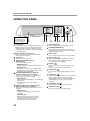
- Operation panel ............................................... 10
Peripheral devices................................................... 75
Photoconductive drum ........................................ 9, 65
Plain paper .............................................................. 15
Points to note when making copies......................... 24
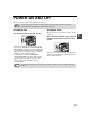
Power off ................................................................. 13
Power on ................................................................. 13
Power outlet .............................................................. 4
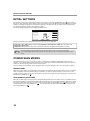
Power save modes
- Auto power shut-off mode................................ 14
- Preheat mode .................................................. 14
Power switch ....................................................... 8, 13
Preset enlargement ratios ....................................... 31
PRINT JOB key....................................................... 12
PRINT key
- DATA indicator................................................. 10
- ONLINE indicator ............................................. 10
Print server card...................................................... 75
Printer expansion kit................................................ 75
PRIORITY key......................................................... 12
PS3 expansion kit ................................................... 75
Q
QWERTY configuration........................................... 52
R
READ-END key..................................... 36, 38, 45, 46
Recycled paper ....................................................... 15
Reduction key ......................................................... 31
Reduction/enlargement/zoom ................................. 30
Release roller .......................................................... 64
Replacing the toner cartridge .................................. 71
Reversing tray ..................................................... 8, 64
Roller rotating knob ....................................... 9, 65, 66
Rotation copying ..................................................... 25
RSPF ...........................................8, 23, 24, 64, 75, 78
S
SCAN key
- DATA indicator................................................. 10
Selecting the original image type ............................ 29
Setting the paper type in the bypass tray
- CUSTOM SETTINGS key ................................ 20
- PAPER SELECT key ....................................... 20
Shift direction .......................................................... 41
Side cover ........................................................... 9, 66
Side cover handle ..................................................... 9
Sort copy ................................................................. 35
SORT key................................................................ 36
Special modes
- Cover copy....................................................... 48
- Dual page copy ................................................ 43
- Erase copy ....................................................... 42
- Job build mode................................................. 45
- Margin shift copy .............................................. 41
- Multi shot copy ................................................. 46
- Original size ..................................................... 47
- Pamphlet copy ................................................. 44
SPECIAL MODES key ............................... 21, 39, 40
Special papers
- Envelope ......................................................... 16
- Letterhead paper............................................. 16
special papers ........................................................ 26
Specifications ......................................................... 79
Staple box .............................................................. 72
Staple cartridge ...................................................... 72
Staple cartridge replacement ................................. 72
Staple cover ..................................................... 73, 76
Staple jam removal ................................................ 73
Staple sort .............................................................. 37
STAPLE SORT key ................................................ 38
Stapler compiler ..................................................... 70
Stapler compiler cover ........................................... 69
Stapler cover .......................................................... 72
Stapling positions ................................................... 37
START key ................................................. 10, 22, 23
STOP/DELETE key ................................................ 12
Storage of supplies ................................................ 78
STORE/DELETE key ....................................... 53, 54
Stream feeding mode ............................................. 23
T
Thin paper .............................................................. 15
Toner cartridge................................................... 9, 71
Toner cartridge lock release lever ...................... 9, 71
Top cover ............................................................... 76
Top tray ............................................................ 70, 76
Total count ....................................................... 50, 52
Total number of copies and printed pages ............. 52
Total output count .................................................. 73
Touch panel ..................................................... 10, 11
Transparency film....................................... 15, 16, 27
Tray number ..................................................... 15, 19
Tray settings......................................... 19, 20, 50, 52
TRAY SETTINGS key ...................................... 19, 20
Troubleshooting ..................................................... 59
U
Upper exit area....................................................... 69
Upper right side cover ........................................ 9, 69
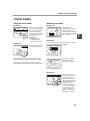
Using the touch panel ............................................ 11
W
warm-up ................................................................. 13
X
X key ...................................................................... 33
XY ZOOM copying ................................................. 32
XY ZOOM key ........................................................ 32
Y
Y key ...................................................................... 33
91