1
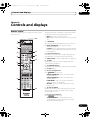
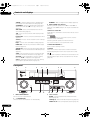
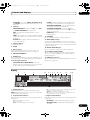
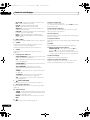
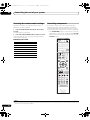
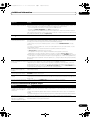
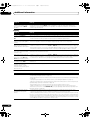
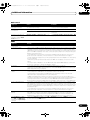
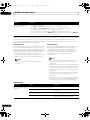
VSX-33_UXJCB.book 11 ページ 2010年3月9日 火曜日 午前10時39分 Controls and displays 02 Chapter 2: Controls and displays Remote control This section explains how to operate the remote control for the receiver. The remote has been conveniently color-coded according to component control using the following system: • White – Receiver control, TV control • Blue – Other controls (See page 41, 42, 45, 46, 50 and 70.) 10 RECEIVER MULTI OPERATION 1 2 SOURCE 1 RECEIVER This switches between standby and on for this receiver. R.SETUP BD DVD TV CD DVR/BDR HDMI 2 NET RADIO ADAPTER 3 iPod USB TUNER INPUT SELECT SIRIUS XM TV CTRL RECEIVER 11 4 MASTER VOLUME INPUT 12 TV CONTROL 5 VOL CH MUTE AUDIO PARAMETER 6 7 13 TUNE TOOLS TOP MENU BAND T.EDIT GUIDE ENTER PRESET RETURN HOME MENU iPod CTRL TUNE 6 Receiver setting buttons Press RECEIVER first to access: AUTO / ALC / PGM MEMORY MENU DIRECT STEREO STANDARD ADV SURR HDD DVD THX PHASE CTRL TV / DTV 8 MPX 1 2 SIGNAL SEL MCACC 4 5 CH LEVEL A.ATT 7 8 D.ACCESS / CLR 9 ZONE 2 VIDEO PARAMETER – Use to access the Video options (page 61). AUDIO 3 SLEEP INFO 6 DISP HOME MENU – Use to access the Home Menu (pages 37, 39, 56, 73, 82 and 85). DIMMER RETURN – Press to confirm and exit the current menu screen. 9 CLASS 0 AUDIO PARAMETER – Use to access the Audio options (page 59). STATUS PQLS HDMI OUT Use INPUT SELECT to select the input function (page 41). 5 TV CONTROL buttons These buttons are dedicated to control the TV assigned to the TV CTRL button. PRESET CATEGORY 3 Input function buttons Press to select control of other components (page 66). (The XM button can only be used with the VSX-33.) 4 TV CTRL Set the preset code of your TV’s manufacturer when controlling the TV (page 66). VIDEO PARAMETER LIST MULTI OPERATION – Use to perform multi operations (page 68). R.SETUP – Use to input the preset code when making remote control settings and to set the remote control mode (page 66). CH ENTER ZONE 3 LIGHT 14 RECEIVER 7 ////ENTER Use the arrow buttons when setting up your surround sound system (see page 73) and the Audio or Video options (page 59 or 61). 8 Receiver Control buttons Press RECEIVER first to access: AUTO/ALC/DIRECT – Switches between Auto Surround (page 52), Auto Level Control mode and Stream Direct mode (page 54). 11 En