1
ASCII OPERATING COMMANDS
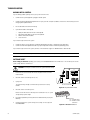
ASCII protocol uses the ASCII character set to transmit and receive commands between an ASCII device (such as a personal computer (PC)
or ASCII keyboard) and the CM6800.
The ASCII protocol communicates in a standard asynchronous, byte-oriented protocol that includes: 1 start bit, 8 data bits, 1 parity bit (odd
parity), and 1 stop bit. The default communication rate is 9600 baud.
A lowercase “a” ends each command. The ASCII translator acknowledges accepted commands and rejected commands with the following
responses:
AKa
NAa
command accepted
command rejected or the ASCII translator does not recognize the command
If the command requires a numeric value, enter the number first.
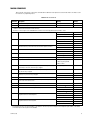
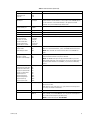
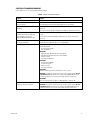
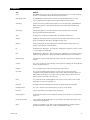
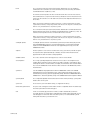
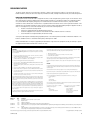
Table I provides examples of ASCII commands. Table J lists all of the commands.
Table I. Examples of ASCII Commands
Functional Procedure
Commands
Result
Select a pan and tilt device labeled “CAMERA # 16”
and switch it to monitor # 3.
3Ma16#a
Switch camera 16 to currently selected monitor 3.
Manipulate the pan and tilt device.
1Ma3#a
Switch camera 3 to monitor 1.
5Ma2#a3\a
Go to camera 2, preset 3, on monitor 5.
47Ra33Da
Pan right at speed 47, tilt down at speed 33.
sa
Stop all image motion.
Switch a camera.
1Ma3#a
Switch camera 3 to monitor 1.
Call a preset.
5Ma2#a3\a
Go to camera 2, preset 3, on monitor 5.
Pan and tilt.
47Ra33Da
Pan right at speed 47, tilt down at speed 33.
C1522M-C (2/05)
67