1
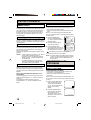
SETTING THE TIMER RECORDING
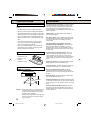
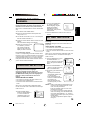
While setting, press the ENTER button to flash the item
to correct, then re-enter the setting with the TRACKING/
SET + or – button.
When finished, press the ENTER button.
NOTES: • The VCR cannot be used while the T.REC
indicator is lit.
• After a power failure or disconnection of the
power plug, all programmed recording
settings must be reset upon resumption of
power. In this case, reset the clock (see page
15) and reprogram any timer recordings.
• Press the CANCEL button to move cursor
backward for correction.
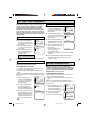
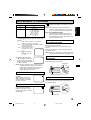
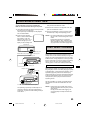
TO SET DAILY/WEEKLY TIMER
When setting the date in step 3, press the TRACKING/
SET – button repeatedly.
The setting changes as follows:
Example
The current day (Friday)
One month later
minus one day
WKL-WE
(Weekly Wednesday)
IF THE PROGRAM OVERLAPS
ANOTHER
NOTE: Do not overlap programs as portions of the
conflicting programs will be lost. The first
recording time has priority over the next recording
time as shown in the diagram.
8 : 00
11 : 00
Deleted Parts
Program 3
Non Recorded Portion Parts
Recording
Control Settings
Prog.2
Prog.1
Prog.3
NOTES: • The everyday/every week recording can be
made continuously until the recording is
canceled or the tape reaches the end.
• During timer recording, the automatic
rewinding mechanism does not function.
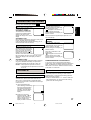
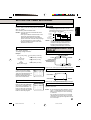
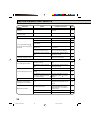
ON-SCREEN FUNCTION
DISPLAY
WHILE WATCHING TV
CLOCK
MO-SA (Monday to Saturday)
10 : 00
Program 2
Press the CALL button.
SU-SA (Sunday to Saturday)
9 : 00
Program 1
DAY OF THE WEEK
8 : 30 AM THU
STEREO SAP
CH 125
CHANNEL
STEREO AND
SEPARATE AUDIO
PROGRAM (SAP)
MO-FR (Monday to Friday)
WKL-TH (Weekly Thursday)
TAPE
SPEED
REAL TIME COUNTER
00 : 00 : 00 SP
Press the CALL button again to make the display disappear.
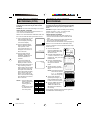
TO CONFIRM THE SETTINGS
Press the TRACKING/SET + or
– button to select the TIMER
REC SET option in the MENU.
Then press the ENTER button to
display the timer program list.
Press the MENU button twice to
return to the normal screen.
DATE START END CH
26 (WE) 11:00PM 11:30PM 125SLP
–––––
–––––
–––––
–––––
–––––
–––––
–––––
–:––
–:––
–:––
–:––
–:––
–:––
–:––
–:––
–:––
–:––
–:––
–:––
–:––
–:––
––
––
––
––
––
––
––
〈+/–/ENTER/CANCEL/MENU〉
–
–
–
–
–
–
–
WHILE OPERATING A TAPE
Press the CALL button.
HI-FI STEREO
OPERATING MODE
8 : 30 AM THU
HI-FI
CH 125
AUTO REPEAT
TAPE IN
00 : 00 : 00 SP
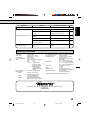
TO CANCEL A PROGRAM
Press the TRACKING/SET + or –
button to select the TIMER REC
SET option in the MENU. Then
press the TRACKING/SET + or –
button to select the unnecessary
program, and press the CANCEL
button to cancel the program.
Press the CALL button again to make the display disappear.
DATE
START
–––––
–––––
–––––
–––––
–––––
–––––
–––––
–––––
–:––
–:––
–:––
–:––
–:––
–:––
–:––
–:––
END
CH
–:––
–:––
–:––
–:––
–:––
–:––
–:––
–:––
––
––
––
––
––
––
––
––
〈+/–/ENTER/CANCEL/MENU〉
–
–
–
–
–
–
–
–
TO SET THE COUNTER TO '00:00:00'
Press the COUNTER RESET button. The counter will
appear on the screen.
NOTES: • If you rewind the tape from "00:00:00", a minus
sign ("–") will be displayed in front of the time.
• When you load a tape, the counter will change
to "00:00:00".
• The counter does not function on nonrecorded
(blank) sections of the tape. When you rewind,
fast forward or play tapes through blank sections,
the counter stops.
21
4E40401A E P20-25
21
4/1/01, 5:04 PM
ENGLISH
TO CORRECT THE SETTINGS