1
LG9250
Ellipse
Printed in Korea
P/NO : MMBB0370601(1.0) H LG9250
Copyright ©2010 LG Electronics, Inc. All rights reserved.
LG and the LG logo are registered trademarks of LG
Group and its related entities. All other trademarks are
the property of their respective owners.
Important Safety Precautions
Read these instructions. Breaking the rules may be dangerous or
illegal. Further detailed information is given in this user guide.
WARNING! Violation of the instructions may cause serious injury or
death.
2. Never place your phone in a microwave oven as it will
cause the battery to explode.
3. Never store your phone in temperatures less than
-4°F or greater than 122°F.
4. Do not dispose of your battery by fire or with
hazardous or flammable materials.
5. When riding in a car, do not leave your phone or set
up the hands-free kit near to the air bag. If wireless
equipment is improperly installed and the air bag is
deployed, you may be seriously injured.
I m p o r ta n t S a f ety P re c a u t i o n s
1. Never use an unapproved battery since this could
damage the phone and/or battery and could cause
the battery to explode.
6. Do not use a hand-held phone while driving.
7. Do not use the phone in areas where its use is
prohibited. (For example: aircraft)
1
Important Safety Precautions
1. Do not expose the battery charger or adapter to direct
sunlight or use it in places with high humidity, such as
a bathroom.
2. Do not use harsh chemicals (such as alcohol, benzene,
thinners, etc.) or detergents to clean your phone. This
could cause a fire.
I m p o r ta n t S a f ety P re c a u t i o n s
3. Do not drop, strike, or shake your phone severely. It
may harm the internal circuit boards of the phone.
4. Do not use your phone in high explosive areas as the
phone may generate sparks.
5. Do not damage the power cord by bending, twisting,
pulling, or heating. Do not use the plug if it is loose as
it may cause a fire or electric shock.
6. Do not place any heavy items on the power cord. Do
not allow the power cord to be crimped as it may
cause electric shock or fire.
7. Do not handle the phone with wet hands while it is
being charged. It may cause an electric shock or
seriously damage your phone.
8. Do not disassemble the phone.
2
1. Do not place or answer calls while charging the phone as it may
short-circuit the phone and/or cause electric shock or fire.
2. Do not hold or let the antenna come in contact with your body
during a call.
3. Make sure that no sharp-edged items such as animal’s teeth or
nails, come into contact with the battery. This could cause a fire.
6. Unplug the power cord and charger during lightning storms to
avoid electric shock or fire.
7. Only use the batteries and chargers provided by LG. The
warranty will not be applied to products provided by other
suppliers.
8. Only authorized personnel should service the phone and its
accessories. Faulty installation or service may result in accidents
and consequently invalidate the warranty.
9. Your service provider programs one or more emergency phone
numbers, such as 911, that you can call under any
circumstances, even when your phone is locked. Your phone’s
preprogrammed emergency number(s) may not work in all
locations, and sometimes an emergency call cannot be placed
due to network, environmental, or interference issues.
I m p o r ta n t S a f ety P re c a u t i o n s
4. Store the battery out of reach of children.
5. Be careful that children do not swallow any parts (such as
rubber plugs, earphone, connection parts of the phone, etc.)
This could cause asphyxiation or suffocation resulting in serious
injury or death.
3
Table of Contents
Important Safety
Precautions
1
Table of Contents
4
Welcome
11
Technical Details
12
Important Information
Ta b l e o f C o n te n ts
Technical Details
12
FCC RF Exposure Information
13
The Battery
24
Installing the Battery
24
Removing the Battery
24
Charging the Battery
25
Charging with USB
26
How to Install Your microSD™
Card
26
Bodily Contact During Operation 13
How to Remove Your microSD™
Card
27
Vehicle-Mounted External Antenna 15
Battery Temperature Protection 28
FCC Notice and Cautions
15
Battery Charge Level
Part 15.105 statement
16
Turning the Phone On and Off 28
Phone Overview
Menus Overview
4
12
Getting Started with Your
Phone
24
17
22
28
Turning the Phone On
28
Turning the Phone Off
29
Signal Strength
29
Making Calls
29
Redialing Calls
30
Receiving Calls
30
Quick Access to Convenient
Features
32
Adding Additional Phone Number(s)
to Existing Contact
38
Changing the Default Number 39
Deleting
40
Speed Dialing
41
32
Mute Function
32
Using Phone Menus
43
Quick Volume Adjustment
32
MESSAGING
43
Call Waiting
32
Shortcuts
33
Voice Commands
34
Contacts in Your Phone’s
Memory
35
1. New Message
44
1.1 Text Message
44
1.2 Picture Message
46
1.3 Video Message
49
1.4 Voice Message
51
Storing Basics
35
2. Messages
51
Editing Individual Entries
36
3. Drafts
55
Speed Dial
36
4. Voicemail
56
Storing a Number with Pauses
37
5. Settings
57
6. Erase All
60
Ta b l e o f C o n te n ts
Vibrate Mode
5
Table of Contents
RECENT CALLS
61
1.2 My Sounds
2. Pictures & Videos
1. Missed
61
2. Received
61
2.1 My Pictures
72
3. Dialed
62
2.2 My Videos
73
4. All
63
2.3 Take Picture
75
5. View Timers
63
2.4 Record Video
76
BREW
CONTACTS
65
1. BREW Apps
78
78
Ta b l e o f C o n te n ts
1. New Contact
65
2. Contact List
65
3. Favorites
66
4. Groups
67
5. Speed Dials
68
Playing Your Music
81
6. My Name Card
69
Controlling the Music Player
82
MY STUFF
1. Ringtones & Sounds
1.1 My Ringtones
6
71
72
70
70
70
Web
1. Start Browser
My Music
Tools
1. Voice Commands
1.1 Call <Name or Number>
80
80
81
83
83
84
1.2 Send Msg to <Name or
Number>
84
1.3 Go to <Menu>
84
1.4 Check <Item>
85
1.5 Contacts <Name>
85
1.6 Help
85
9. Notepad
95
10. USB Mass Storage
96
Settings
1. Sounds Settings
1.1 Easy Set-up
97
97
97
85
1.2 Master Volume
97
2.1 Add New Device
86
1.3 Call Sounds
98
My Phone Name
88
2. Bluetooth Menu
89
Discovery Mode
89
Supported Profiles
90
98
1.3.2 Call Vibrate
98
1.3.3 Call ID Announcement
98
1.4 Alert Sounds
99
1.5 Keypad Volume
99
3. Calculator
91
4. Ez Tip Calculator
92
1.6 Digit Dial Readout
100
5. Calendar
92
1.7 Service Alerts
100
6. Alarm Clock
93
1.8 Power On/Off
101
7. Stopwatch
94
1.9 Voice Clarity
101
8. World Clock
95
2. Display Settings
2.1 Easy Set-up
Ta b l e o f C o n te n ts
Turn On/Off
1.3.1 Call Ringtone
102
102
7
Table of Contents
2.2 Banner
2.2.1 Personal Banner
3.3.4 Prompts
103
3.3.5 CLR Key Activation
111
111
Ta b l e o f C o n te n ts
2.3 Backlight
103
3.4 Language
111
2.4 Brightness
104
3.5 Location
112
2.5 Wallpaper
104
3.6 Security
113
2.6 Charging Screen
105
3.6.1 Edit Codes
2.7 Font Size
106
3.6.2 Restrictions
113
2.8 Menu Font Type
106
3.6.3 Phone Lock
114
2.9 Clock Format
107
3.6.4 Lock Phone Now
115
3. Phone Settings
108
3.6.5 Reset Default
115
3.1 Airplane Mode
108
3.6.6 Emergency numbers
3.2 Set Shortcuts
3.2.1 Set My Shortcuts
3.2.2 Set QwertyShortcut
3.3 Voice Commands
113
116
108
3.7 System Select
116
108
3.8 NAM Select
117
109
109
3.9 BREW & Web
4. Call Settings
117
118
110
4.1 Answer Options
118
3.3.2 Sensitivity
110
4.2 End Call Options
118
3.3.3 Adapt Voice
110
4.3 Auto Retry
119
3.3.1 Confirm Choices
8
102
119
Antenna Care
127
4.5 One Touch Dial
121
Phone Operation
128
4.6 Voice Privacy
122
Tips on Efficient Operation
128
122
Driving
128
123
Electronic Devices
128
123
Pacemakers
128
123
Persons with Pacemakers:
129
6.2 Phone Memory
124
Hearing Aids
129
6.3 Card Memory
125
Other Medical Devices
129
125
Health Care Facilities
129
Vehicles
130
Posted Facilities
130
4.7 DTMF Tones
5. USB Mode
6. Memory
6.1 Save Options
7. Phone Info
7.1 My Number
125
7.2 ESN/MEID
126
7.3 SW/HW Version
7.4 Icon Glossary
Safety
TIA Safety Information
Exposure to Radio Frequency
Signal
126
126
127
127
Aircraft
130
Blasting Areas
130
Potentially Explosive
Atmosphere
130
For Vehicles Equipped with
an Air Bag
131
Ta b l e o f C o n te n ts
4.4 TTY Mode
127
9
Table of Contents
Safety Information
131
Charger and Adapter Safety
131
Battery Information and Care
132
Explosion, Shock, and Fire
Hazards
132
General Notice
133
Warning! Important safety
information
135
Using your phone safely
135
Ta b l e o f C o n te n ts
Avoiding hearing damage
135
Using headsets safely
135
FDA Consumer Update
136
10 Driver Safety Tips
146
FCC Hearing-Aid Compatibility
(HAC) Regulations for Wireless
Devices
153
Accessories
156
Limited Warranty
Statement
157
Index
161
Consumer Information on
SAR
150
Some content in this user guide may
differ from your phone depending on
the phone software. Features and
specifications are subject to change
without prior notice.
10
Welcome
Thank you for choosing the
Ellipse cellular phone - designed
to operate with the latest digital
mobile communication
technology, Code Division
Multiple Access (CDMA). Along
with the many advanced features
of the CDMA system, such as
greatly enhanced voice clarity,
this compact phone offers:
54-key internal keypad.
●
21-key external keypad and
screen with auto screen lock.
●
Customizable display themes
and screensavers.
●
Built-in 3.0 Megapixel digital
camera.
●
External, easy-to-read, LCD
screen with status icons.
●
Internal, easy-to-read, backlit
LCD with status icons.
●
Messaging and Voicemail
capabilities.
HTML Web Browser
●
Long battery standby and talk
time.
●
Any key answer, auto answer
with hands-free accessories,
auto retry, one-touch and
speed dialing with 999
memory locations.
●
Bilingual (English and Spanish)
capability.
●
Bluetooth® wireless
technology.
Note
The Bluetooth® word mark and
logos are owned by the Bluetooth
SIG, Inc. and any use of such marks
by LG Electronics is under license.
Other trademarks and trade names
are those of their respective owners.
We l c o m e
●
●
11
Technical Details
Technical Details
Spread Spectrum) that enables
the phone to keep
communication from being
crossed and to use one
frequency channel by multiple
users in the same specific area.
This results in a 10-fold capacity
increase when compared with
analog mode. In addition,
features such as soft/softer
handoff, hard handoff, and
dynamic RF power control
technologies combine to reduce
call interruptions.
The Ellipse is an all digital phone
that operates on both Code
Division Multiple Access (CDMA)
frequencies: cellular services at
800 MHz and Personal
Communication Services (PCS)
at 1.9 GHz.
The Cellular and PCS CDMA
networks consist of MSO
(Mobile Switching Office), BSC
(Base Station Controller), BTS
(Base Station Transmission
System), and MS (Mobile
Station).
CDMA technology uses a feature
called DSSS (Direct Sequence
1xRTT system receives twice as
many subscribers in the wireless
Important Information
Te c h n i c a l D eta i l s
12
This user’s guide provides
important information on the use
and operation of your phone.
Please read this guide carefully
prior to using the phone to be
able to use your phone to its
greatest advantage and to
prevent any accidental damage
or misuse. Any unapproved
changes or modifications will
void your warranty.
section as IS-95. Its battery life is
twice as long as IS-95. Highspeed data transmission is also
possible. EV-DO system is
optimized for data service and is
much faster than 1xRTT system
in applicable area.
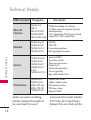
The table on the following page
lists some major CDMA
standards.
WARNING! Read this
information before operating
the phone.
In August 1996, the Federal
Communications Commission
(FCC) of the United States, with
its action in Report and Order
FCC 96-326, adopted an
updated safety standard for
human exposure to Radio
Frequency (RF) electromagnetic
Bodily Contact During
Operation
This device was tested for typical
use with the back of the phone
kept 0.79 inches (2.0 cm) from
the body. To comply with FCC RF
exposure requirements, a
minimum separation distance of
0.79 inches (2.0 cm) must be
maintained between the user’s
body and the back of the phone,
including the antenna, whether
extended or retracted. Thirdparty belt-clips, holsters, and
Te c h n i c a l D eta i l s
FCC RF Exposure Information
energy emitted by FCC regulated
transmitters. Those guidelines are
consistent with the safety
standard previously set by both
U.S. and international standards
bodies. The design of this phone
complies with the FCC guidelines
and these international
standards.
13
Technical Details
CDMA Standard
Designator
Te c h n i c a l D eta i l s
Basic Air
Interface
TIA/EIA-95A
TSB-74
ANSI J-STD-008
TIA/EIA-IS2000
ANSI TIA/EIA 553A
CDMA Dual Mode Air Interface
14.4kbps radio link protocol and interband operations
IS-95 adapted for PCS frequency band
cdma2000 1xRTT AirInterface
Network
TIA/EIA/IS-634
TIA/EIA/IS/651
TIA/EIA/IS-41-C
TIA/EIA/IS-124
MAS-BS
PCSC-RS
Intersystem operations
Non-signaling data comm.
Service
TIA/EIA/IS-96-B
TIA/EIA/IS-99
TIA/EIA/IS-637
TIA/EIA/IS-657
IS-801
TIA/EIA/IS-707-A
Speech CODEC
Sync Data and Fax
Short message service
Packet Data
Position Determination
Service (gpsOne)
High Speed Packet Data
Performance
TIA/EIA/IS-97
TIA/EIA/IS-98
ANSI J-STD-018
ANSI J-STD-019
TIA/EIA/IS-125
Cellular base station
Cellular mobile station
PCS personal station
PCS base station
Speech CODEC
similar accessories containing
metallic components should not
be used. Avoid the use of
14
Description
accessories that cannot maintain
0.79 inches (2.0 cm) distance
between the user’s body and the
back of the phone and have not
been tested for compliance with
FCC RF exposure limits.
Vehicle-Mounted External
Antenna
(Optional, if available.)
FCC Notice and Cautions
This device and its accessories
comply with part 15 of FCC
rules. Operation is subject to the
following two conditions: (1)
This device and its accessories
may not cause harmful
interference, and (2) this device
Any changes or modifications
not expressly approved in this
user guide could void your
warranty for this equipment. Use
only the supplied antenna. Use
of unauthorized antennas (or
modifications to the antenna)
could impair call quality, damage
the phone, void your warranty
and/or violate FCC regulations.
Don't use the phone with a
damaged antenna. A damaged
antenna could cause a minor skin
burn. Contact your local dealer
for a replacement antenna.
Te c h n i c a l D eta i l s
To satisfy FCC RF exposure
requirements, keep 8 inches (20
cm) between the user /
bystander and vehicle-mounted
external antenna. For more
information about RF exposure,
visit the FCC website at
www.fcc.gov.
and its accessories must accept
any interference received,
including interference that
causes undesired operation.
15
Technical Details
Te c h n i c a l D eta i l s
16
Part 15.105 statement
the following measures:
This equipment has been tested
and found to comply with the
limits for a class B digital device,
pursuant to Part 15 of the FCC
Rules. These limits are designed
to provide reasonable protection
against harmful interference in a
residential installation. This
equipment generates, uses, and
can radiate radio frequency
energy and, if not installed and
used in accordance with the
instructions, may cause harmful
interference to radio
communications. However, there
is no guarantee that interference
will not occur in a particular
installation. if this equipment
does cause harmful interference
or television reception, which can
be determined by turning the
equipment off and on, the user is
encouraged to try to correct the
interference by one or more of
- Reorient or relocate the
receiving antenna.
- Increase the separation between
the equipment and receiver.
- Connect the equipment into an
outlet on a circuit different from
that to which the receiver is
connected.
- Consult the dealer or an
experienced radio/TV
technician for help.
Phone Overview
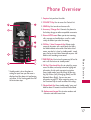
1. Earpiece Lets you hear the caller.
2. CONTACTS Key Use to access the Contact List.
3. SEND Key Use to make and answer calls.
4. Accessory/ Charger Port Connects the phone to
the battery charger, or other compatible accessories.
5. External LCD Screen Allows you to view incoming
calls, messages and notifications as well as a wide
variety of content you select for viewing.
6. CLR Key / Voice Commands Key Deletes single
spaces or characters with a quick touch, but press
and hold to delete entire words. Also backs out of
menus, one level at a time. In standby mode*, simply
press the key to start Voice Commands or press and
hold to start recording a new sound.
* Standby mode is when the phone is
waiting for input from you. No menu is
displayed and the phone isn’t performing
any action. It’s the starting point for all of
the instruction steps.
8. OK Key/ Directional Keys Use to unlock the screen,
access the Menu, and accept entered or highlighted
information. Use for quick, convenient navigation.
From standby mode, access My Music (by pressing
Up), My Pictures (Left), Messaging (Down), and the
Bluetooth Menu (Right). You can view more
information on page 33. When navigating menus, use
the Directional Keys to scroll to choices and settings.
P h o n e O ve r v i ew
7. PWR/END Key Use to turn the power on/off and to
end a call. Also returns to standby mode.*
9. Vibrate Mode Key From standby mode*, press and
hold for about 3 seconds to activate Vibrate Mode.
10. Alphanumeric keypad Use to enter numbers and
characters and select menu items
17
Phone Overview
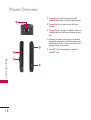
11. Camera Lens Used for taking pictures and
recording video. Keep it clean for optimal quality.
12. Camera Key Use for quick access to Camera
function.
13. Volume Keys Use to adjust the Master Volume in
standby mode and the Earpiece Volume during a
call.
14. Headset Jack Allows you to plug in an optional
headset for convenient, hands-free conversations.
Plug headset into the 2.5mm jack located at the
top right corner of the device.
15. microSD™ Slot Accommodates an optional
microSD™ card.
P h o n e O ve r v i ew
18
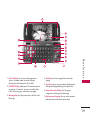
2. FAVORITES Key Add up to 10 favorite contacts
or groups as Favorites, so you can easily make
calls, send messages, and review messages.
3. Message Key Use for quick access to New Text
Message.
4. Shift Key Use to change letter case when
typing.
P h o n e O ve r v i ew
1. Left Soft Key Use to access Message menu
when in Standby mode, or other function
displayed at the bottom left of the LCD.
5. Sym Key Use to insert symbols (displayed at
the top of designated keys) into your text.
6. Game Directional Keys Use for game
navigation and for general browsing.
7. Alphanumeric Keypad Use to enter numbers
and characters and select menu items.
19
Phone Overview
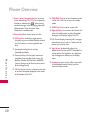
8. Space/ Voice Commands Key Use to enter a
space while editing. The TTS (Text to Speech)
function is available with
when viewing
received messages in the Messaging Inbox and
Notepad notes. Press to activate Voice
Commands in standby mode.
9. Return Key Moves cursor to the next line.
10. CLR Key Press to delete a single space or
character, or press and hold to delete entered
text. Press once in a menu to go back one
level.
11. Speakerphone Key Use to activate
Speakerphone Mode.
P h o n e O ve r v i ew
20
12. Directional Keys Use for quick, convenient
navigation. From standby mode, access the
Browser, Calendar, My Shortcuts and BREW
(you can change any of these to other menus
in the Settings menu).
13. OK Key Use to activate a selected screen item
or to select the option displayed in the center
of the bottom of the LCD.
14. PWR/END Key Use to turn the power on/off
and to end a call. Use to return to standby
mode.
15. SEND Key Use to make or answer calls.
16. Right Soft Key Use to access the Contact List
when in Standby mode, or select the option
displayed at the bottom right of the LCD.
17. LCD Screen Displays incoming calls, messages
and indicator icons as well as a wide variety of
content you select to view.
18. Light Sensor Automatically adjusts the
brightness of the internal LCD. To disable this
sensor and set the brightness to a fixed level,
use the Brightness submenu in the Display
menu.
19. Speakers Let you hear the caller's voice while
in speakerphone mode. Also let you hear
music and video sounds.
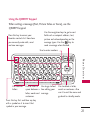
Using the QWERTY Keypad
When writing a message (Text, Picture Video or Voice), use the
QWERTY keypad.
Press this key to access your
Favorites contacts list. From here
you can easily make calls, send
and view messages.
Use the navigation keys to go to next
field such as recipient address, text,
picture and video depending on the
message types. Use the
Key to
send a message when finished.
Use to enter numbers.
P h o n e O ve r v i ew
Use to enter
letters.
Use to insert a Use to go to next
space between a line editing your
letter, words and message.
sentences.
Use to delete a letter,
words or sentences. Also
use it to exit the menu and
go back to standby mode.
Press this key first and then any key
with a symbol on it to insert that
symbol in your message.
21
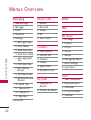
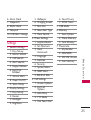
Menus Overview
M e nu s O ve r v i ew
22
Messaging
Recent Calls
1.
2.
3.
4.
5.
1.
2.
3.
4.
5.
New Message
Messages
Drafts
Voicemail
Settings
1. Messages View
2. Entry Mode
3. Auto Save Sent
4. Auto Erase Inbox
5. Messaging Font
Size
6. Text Auto View
7 Text Delivery
Receipt
8. Text Auto Scroll
9. Multimedia Auto
Receive
10. Quick Text
11. Voicemail #
12. Callback #
13. Signature
6. Erase All
Missed
Received
Dialed
All
View Timers
Contacts
1.
2.
3.
4.
5.
6.
New Contact
Contact List
Favorites
Groups
Speed Dials
My Name Card
BREW
Web
My Music
1.
2.
3.
4.
5.
6.
7.
8.
All Songs
Playlists
Artists
Genres
Albums
Manage My Music
Music Settings
Sync Music
Tools
My Stuff
1. Ringtones &
Sounds
2. Pictures & Videos
1.
2.
3.
4.
5.
Voice Commands
Bluetooth Menu
Calculator
Ez Tip Calculator
Calendar
6. Alarm Clock
7. Stopwatch
8. World Clock
9. Notepad
10. USB Mass Storage
Settings
6. Voice Privacy
7. DTMF Tones
5. USB Mode
6. Memory
1. Save Options
2. Phone Memory
3. Card Memory
7. Phone Info
1. My Number
2. ESN/MEID
3. SW/HW Version
4. Icon Glossary
M e nu s O ve r v i ew
1. Sounds Settings
1. Easy Set-up
2. Master Volume
3. Call Sounds
4. Alert Sounds
5. Keypad Volume
6. Digit Dial
Readout
7. Service Alerts
8. Power On/Off
9. Voice Clarity
2. Display Settings
1. Easy Set-up
2. Banner
3. Backlight
4. Brightness
5. Wallpaper
6. Charging Screen
7. Font Size
8. Menu Font Type
9. Clock Format
3. Phone Settings
1. Airplane Mode
2. Set Shortcuts
3. Voice
Commands
4. Language
5. Location
6. Security
7. System Select
8. NAM Select
9. BREW & Web
4. Call Settings
1. Answer Options
2. End Call
Options
3. Auto Retry
4. TTY Mode
5. One Touch Dial
23
Getting Started with Your Phone
The Battery
Note
It is important to fully charge the
battery before initial use of the
phone.
G ett i n g S ta r te d w i t h Yo u r P h o n e
24
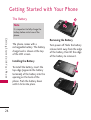
Removing the Battery
The phone comes with a
rechargeable battery. The battery
charge level is shown at the top
of the LCD screen.
Installing the Battery
To install the battery, insert the
top edge (opposite the battery
terminals) of the battery into the
opening on the back of the
phone. Push the battery down
until it clicks into place.
Turn power off. Slide the battery
release latch away from the edge
of the battery, then lift the edge
of the battery to remove it.
Charging the Battery
Notice
Please use only an approved
charging accessory to charge your
LG phone.
Improper handling of the charging
port, as well as the use of an
incompatible charger, may cause
damage to your phone and void the
warranty.
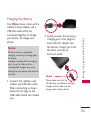
2. Gently uncover the accessory
charging port, then plug the
end of the AC adapter into
the phone’s charger port and
the other end into an
electrical outlet.
Notice
1. Connect the cableless wall
adapter and USB data cable.
When connecting as shown
below, the LG logo on the
USB cable should face toward
you.
G ett i n g S ta r te d w i t h Yo u r P h o n e
Your Ellipse device comes with a
cableless travel adapter and a
USB data cable which are
connected together to charge
your phone. To charge your
phone:
Please make sure that the
'B' Side faces up before inserting a
charger or data cable into the
charger port of your phone.
25
Getting Started with Your Phone
Charging with USB
G ett i n g S ta r te d w i t h Yo u r P h o n e
26
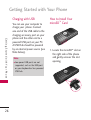
You can use your computer to
charge your phone. Connect
one end of the USB cable to the
charging accessory port on your
phone and the other end to a
powered USB port on your PC.
A USB Hub should be powered
by an external power source (see
Note below).
Note
●
Low-power USB ports are not
supported, such as the USB port
on your keyboard or bus-powered
USB hub.
How to Install Your
microSD™ Card
1. Locate the microSD™ slot on
the right side of the phone
and gently uncover the slot
opening.
How to Remove Your
microSD™ Card
1. Push the card in to release the
exposed edge of the
microSD™ card to eject it.
2. Remove the microSD™ card
from the slot and replace the
cover.
Note
●
Do not attempt to remove the
microSD™ card while reading or
writing to the card.
●
Users wishing to transfer music
onto a MicroSD™ card inserted
into this phone (through MTP
Sync) should format the MicroSD™
card on this handset before using
it through(Menu -> Settings ->
Memory -> Card Memory ->
Options -> Format). Warning:
Formatting the MicroSD™ card will
erase all contents on the card. In
the event the MicroSD™ card is
used on this phone without first
formatting it, errors may occur.
Song files stored on a microSDTM
card that are downloaded or
otherwise purchased from third
party providers, may be protected
by DRM and may not be playable
on this phone.
G ett i n g S ta r te d w i t h Yo u r P h o n e
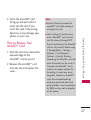
2. Insert the microSD™ card
facing up and push until it
clicks into the slot. If you
insert the card in the wrong
direction, it may damage your
phone or your card.
27
Getting Started with Your Phone
Battery Temperature
Protection
G ett i n g S ta r te d w i t h Yo u r P h o n e
28
Though extremely rare, if the
battery becomes overheated, the
phone will automatically turn off.
When you turn the phone back
on, a message will notify you
that the phone was powered off
for your safety.
Battery Charge Level
You can find the battery charge
level at the top right of the LCD
screen. When the charge level
becomes low, the battery sensor
sounds a warning tone, blinks the
battery icon, and displays a
warning message. As the charge
level approaches empty, the
phone automatically switches off,
unsaved items may be lost or
erased as a result.
Turning the Phone On and
Off
Turning the Phone On
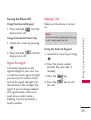
Using the Internal Keypad
1. Install a charged battery or
connect the phone to external
power source.
2. Open the flip and press
for a few seconds until the
LCD screen lights up.
Using the External Power Key
1. Install a charged battery or
connect the phone to external
power source.
2. Press
for a few seconds
until the LCD screen lights up.
Turning the Phone Off
Making Calls
Using the Internal Keypad
1. Press and hold
display turns off.
until the
Note
1. Unlock the screen by pressing
.
until the
Signal Strength
Call quality depends on the
signal strength in your area. You
can tell how much signal strength
you have by the number of bars
next to the signal strength icon;
the more bars, the stronger the
signal. If you’re having problems
with signal quality, move to an
open area or, when inside a
building, try moving towards a
nearby window.
To activate the speakerphone during
a call, simply open the flip.
Using the External Keypad
1. Unlock the screen by pressing
.
2. Enter the phone number
(include the area code, if
needed).
3. Press the
key.
4. Press the
the call.
key to end
G ett i n g S ta r te d w i t h Yo u r P h o n e
Using the External Power Key
2. Press and hold
display turns off.
Make sure the phone is turned
on.
29
Getting Started with Your Phone
G ett i n g S ta r te d w i t h Yo u r P h o n e
Using the Internal Keypad
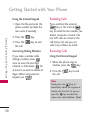
Redialing Calls
1. Open the flip and enter the
phone number (include the
area code, if needed).
Press and hold the external
key or the internal
key to redial the last number you
dialed, received or missed. The
last 270 calls are stored in the
call history list and you can
select any of these to redial.
2. Press the
key.
3. Press the
the call.
key to end
Correcting Dialing Mistakes
Receiving Calls
If you make a mistake while
dialing a number, press
once to erase the last digit
entered, or hold down
for
at least 2 seconds to delete all
digits. When using external
keypad, use
.
Using the External Keypad
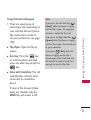
1. When the phone rings or
vibrates, press the
key.
2. Press the
the call.
key to end
Note
Simply press the
key to
immediately silence the ringtone or
vibration for that call. Or, you can
press the
key to unlock the
screen, then select Options > Quiet.
30
Note
1. There are several ways of
answering a call, depending on
your selected Answer Options
(for instructions on how to
set your preferences, see page
124):
If you press the Left Soft Key
[Quiet] while the phone is ringing
and the flip is open, the ringing or
vibration is muted for that call.
●
Flip Open: Open the flip to
answer.
●
Any Key: Press the
key
or, with the phone unlocked,
press any other key except the
key.
●
Auto with Handsfree: The call
automatically connects when
connected to a handsfree
device.
If you press the Right Soft Key
[Ignore] while the phone is ringing
and the flip is open, the call will end
or go to voicemail.
If you press
[Text] while the
phone is ringing and the flip is
already open, the call will end and
will be able to select a Quick Text
message to send to the caller.
G ett i n g S ta r te d w i t h Yo u r P h o n e
Using the Internal Keypad
If none of the Answer Option
boxes are checked, only the
SEND Key will answer a call.
31
Quick Access to Convenient Features
Q u i c k Ac c es s to C o nve n i e n t Fe at u res
32
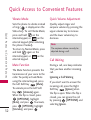
Vibrate Mode
Quick Volume Adjustment
Sets the phone to vibrate instead
of ring (
is displayed on the
Status bar). To set Vibrate Mode,
press and hold
on the
internal keypad, or
on the
external keypad (after unlocking
the phone if locked).
To return to Normal Mode, press
and hold
again on the
internal keypad, or
on the
external keypad.
Quickly adjust ringer and
earpiece volumes by pressing the
upper volume key to increase
and the lower volume key to
decrease.
Mute Function
During a call, one beep indicates
that you have another incoming
call.
The Mute Function prevents the
transmission of your voice to the
caller. To quickly activate Mute
using the internal keypad, press
[Mute].
the Left Soft Key
To unmute press the Left Soft
[Unmute] again.
Key
When the flip is closed, press
[OPTIONS], highlight
[Mute], and press
. To unmute,
[OPTIONS], highlight
press
[Unmute], and press
.
Note
The earpiece volume can only be
adjusted during a call.
Call Waiting
Ignoring a Call Waiting
If you don't want to answer the
incoming call, press the Right
[Ignore] when
Soft Key
the flip is open. When the flip is
closed, you can ignore the call
[OPTIONS] and
by pressing
selecting Ignore.
Answering a Call Waiting
2. Press the internal
key /
external
key again to
put the second call on hold
and return to the first call.
Shortcuts
Your Ellipse device has shortcut
keys built in to allow quick and
convenient access to phone
features.
Note
The preset shortcuts for the internal
keypad can be changed to suit your
needs.
1. Unlock the screen by pressing
.
2. Press the Navigation Key:
●
Up Navigation Key
accesses My Music
●
Down Navigation Key
accesses Messaging
●
Left Navigation Key
accesses My Pictures
●
Right Navigation Key
accesses Bluetooth Menu
Internal Directional Keys
Shortcut Access
Q u i c k Ac c es s to C o nve n i e n t Fe at u res
1. Press the internal
key /
external
key to
automatically put the first call
on hold and answer the new
call.
External Directional Keys
Shortcut Access
1. Open the flip.
2. Press the Navigation Key:
33
Quick Access to Convenient Features
Q u i c k Ac c es s to C o nve n i e n t Fe at u res
●
Up Navigation Key
accesses Web
●
Down Navigation Key
accesses My Shortcuts
●
Left Navigation Key
accesses Calendar
●
Right Navigation Key
accesses BREW
Voice Commands
Voice Commands allow you to
do things by verbal command
(for example, make calls, call
voicemail and more).
1. Access the Voice Commands
feature:
●
34
With the flip open, press
.
●
With the flip closed and the
screen unlocked, give the
a quick press (an
extended press activates the
Voice Recorder feature
instead).
2. Follow the prompts to use
your voice command(s).
Note
Voice Commands can also be started
with the designated key on your
Bluetooth® device. Please check the
manual of the Bluetooth® device for
further instructions.
Contacts in Your Phone’s Memory
Storing Basics
Using the External Keypad
Using the Internal Keypad
1. Unlock the screen by pressing
.
1. Open the flip.
3. Press
3. Use the Directional Key
to scroll to Add New
Contact/ Update Existing,
then press
.
4. Use the Directional Key
to scroll to Mobile 1/ Home/
Work/ Mobile 2/ Fax, then
press
.
5. Enter a name (max. 32
characters), then press
save.
to
6. Press
to exit,
to
call, or the Right Soft Key
[Options] for other
options.
to Save.
4. Use the Directional Key
to scroll to Mobile 1/ Home/
Work/ Mobile 2/ Fax, then
press
.
5. Enter a name (max. 32
characters), then press
save.
to
C o n ta c ts i n Yo u r P h o n e ’s M e m o r y
2. Enter a number (max. 48
digits), then press
[Options].
2. Enter a number (max. 48
digits), then press the Left
[Save].
Soft Key
Using the External Keypad with
the Contacts Menu
1. Unlock the screen by pressing
once or twice.
2. Press
[MENU].
35
Contacts in Your Phone’s Memory
3. Use the Directional Key
to scroll to Contacts,
then press
.
4. Press
New Contact.
C o n ta c ts i n Yo u r P h o n e ’s M e m o r y
5. Enter the name, then use the
Directional Key
to scroll
down to the phone number
type you want to enter.
6. Enter the number, then press
to save.
Editing Individual Entries
Using the Internal Keypad
1. Press the Right Soft Key
[Contacts], then use the
Directional Key
to scroll
to an entry.
2. Press the Left Soft Key
[Edit].
3. Use the Directional Key
to scroll to the information to
customize.
4. Change the entry as you
want, then press
to save
your changes.
Note
The external keypad cannot be used
to customize an existing Contact
entry.
Speed Dial
Allows you to set up your Speed
Dials.
Using the Internal Keypad
1. Press the Right Soft Key
[Contacts], then use the
Directional Key
to scroll
to an entry.
2. Press the Left Soft Key
[Edit].
36
3. Use the Directional Key
to scroll to a phone number,
then press the Right Soft Key
[Options].
5. Assign a Speed Dial digit.
●
Use the keypad to enter a
digit, then press
to set.
●
You can also use the
Directional Key
to
scroll to the Speed Dial
digit, then press
to set.
6. Screen prompt appears Assign
Speed Dial to Contact? Press
to select Yes, then press
again to save.
Pauses allow you to enter
additional series of numbers to
access automated systems such
as Voicemail or credit billing
numbers. Pause types are:
Wait (W) -- the phone stops
dialing until you press the Left
[Release] to
Soft Key
advance to the next number.
2-Sec Pause (P) -- the phone
waits two seconds before
sending the next string of digits.
Using the Internal Keypad
1. Enter a number, then press the
Right Soft Key
[Options].
C o n ta c ts i n Yo u r P h o n e ’s M e m o r y
4. Use the Directional Key
to scroll to Set Speed Dial,
then press
.
Storing a Number with
Pauses
2. Use the Directional Key
to scroll to Add 2-Sec
Pause or Add Wait, then
press
.
37
Contacts in Your Phone’s Memory
3. Enter additional number(s)
(e.g., pin number, credit card
number, etc.).
C o n ta c ts i n Yo u r P h o n e ’s M e m o r y
4. Press the Left Soft Key
[Save].
Adding Additional Phone
Number(s) to Existing
Contact
5. Complete the Contact entry
as necessary.
From Standby Mode Using the
Internal Keypad
Using the External Keypad
1. Enter a phone number, then
press the Left Soft Key
[Save].
1. Unlock the screen by pressing
.
2. Enter a number, then press
[Options].
3. Use the Directional Key
to scroll to Add 2-Sec Pause
or Add Wait, then press
.
4. Enter additional number(s)
(e.g., pin number, credit card
number, etc.).
[Options] and
5. Press
select Save.
38
6. Complete the Contact entry
as necessary.
2. Use the Directional Key
to scroll to Update Existing,
then press
.
3. Use the Directional Key
to scroll to an existing entry,
then press
.
4. Use the Directional Key
to scroll to Mobile 1/ Home/
Work/ Mobile 2/ Fax, then
press
to save.
From the Contact List Screen
Using the Internal Keypad
1. Press the Right Soft Key
[Contacts].
3. Use the Directional Key
to scroll to the phone number
field to add, then enter the
number and press
to
save.
Changing Saved Information
Using the Internal Keypad
1. Press the Right Soft Key
[Contacts].
2. Use the Directional Key
to scroll to a Contact entry,
then press the Left Soft Key
[Edit].
4. Make the changes, then press
to save.
Changing the Default
Number
The Default Number is the first
phone number you entered when
you created the Contact.
Another number can be saved as
the Default Number.
Using the Internal Keypad
1. Press the Right Soft Key
[Contacts].
C o n ta c ts i n Yo u r P h o n e ’s M e m o r y
2. Use the Directional Key
to scroll to an entry, then
press the Left Soft Key
[Edit].
3. Use the Directional Key
to scroll to the field you want
to change.
2. Use the Directional Key
to scroll to an entry.
3. Press the Left Soft Key
[Edit].
39
Contacts in Your Phone’s Memory
4. Use the Directional Key
to highlight a phone number,
then press the Right Soft Key
[Options].
C o n ta c ts i n Yo u r P h o n e ’s M e m o r y
5. Use the Directional Key
to highlight Set As Default,
then press
.
6. A confirmation message is
displayed. Press
to set
the new number as the
default.
7. Press
again to save.
Deleting
Deleting a Phone Number
Using the Internal Keypad
1. Press the Right Soft Key
[Contacts].
2. Use the Directional Key
to scroll to an entry.
40
3. Press the Left Soft Key
[Edit].
4. Use the Directional Key
to scroll to a phone number.
5. Press and hold
it.
6. Press
to delete
to save.
Note
This will only work when you have
more than one number listed per
contact.
Deleting a Contact Entry Using
the Internal Keypad
1. Press the Right Soft Key
[Contacts].
2. Use the Directional Key
to scroll to an entry.
3. Press the Right Soft Key
[Options], then press
Erase.
4. Press
[Yes].
Removing a Speed Dial
Using the Internal Keypad
2. Use the Directional Key
to highlight a Contact entry
[VIEW].
to edit and press
3. Select the phone number with
the Speed Dial, then press
[EDIT].
4. Press the Right Soft Key
[Options].
5. Press
Dial.
Remove Speed
6. Press
[Yes].
7. Press
to save.
Allows you to make phone calls
quickly and easily to numbers
stored in Contacts. You need to
set Speed Dials in your Contacts
before using this feature.
Note
Speed Dial 1 is for Voicemail.
Single Digit Speed Dials
From the Standby screen, press
and hold the Speed Dial digit.
Your phone recalls the phone
number from your Contacts,
displays it, and dials it for you.
C o n ta c ts i n Yo u r P h o n e ’s M e m o r y
1. Press the Right Soft Key
[Contacts].
Speed Dialing
41
Contacts in Your Phone’s Memory
Multiple Digit Speed Dials
C o n ta c ts i n Yo u r P h o n e ’s M e m o r y
42
When you press and hold a
number key, it signals the phone
to attempt a Speed Dial
transmission. To dial Speed Dials
with multiple digits, press the
first digit(s) as necessary, then
press and hold the last digit. For
example, to Speed Dial 25, press
, then press and hold
.
Note
You can also enter the Speed Dial
digit(s), then press the internal
key / external
key.
Using Phone Menus
MESSAGING
Shortcut
From standby mode with the flip
open, pressing the Message Key
is a shortcut key to a NEW
TEXT MESSAGE.
●
When in Standby mode, with
the flip open, you can open
the Messaging Menu by
pressing the Left Soft Key
[Message].
You can call the person that
sent you a message by simply
highlighting the received
message and pressing the
internal Send key
or the
external Send key
when
the message is highlighted.
New Message Alert
Your phone will alert you when
you have new messages.
1. The phone displays a message
on the screen and the
message alert ringtone will
sound (depending on the
Master Volume settings).
2. The message icon ( ) is
displayed on the display
screen. In the case of a high
priority message, the icon
(
) is displayed on the
screen.
M E S SAG I N G
The phone can store over 690
different messages (including a
maximum of 300 SMS and 100
MMS messages). The
information stored in the
message is determined by phone
model and service capability.
Other limits to available
characters per message may
exist. Please check with your
service provider for system
features and capabilities.
●
43
MESSAGING
1. New Message
7. Type your message.
Allows you to send messages
(Text, Picture, Video, and Voice).
Options are dependent upon the
type of message you want to
send.
[SEND].
8. Press
A sending screen is displayed.
1.1 Text Message
Using the Internal Keypad
1. Open the flip and press
[MENU].
M E S SAG I N G
2. Press
Messaging.
3. Press
New Message.
4. Press
Text Message.
5. Enter the phone number of
the recipient or the email
address for an email message.
You can enter up to 10
addresses for a single
message.
6. Press
44
.
Customizing the Message Using
Options
1. Create a new Text Message
(follow steps 1-4 from the
previous section).
2. Go to the To field and press
the Right Soft Key
[Add].
3. Select the option(s) to
customize.
From Contacts/ From Recent
Calls/ Favorites/ Groups
4. Go to the Text field and press
the Right Soft Key
[Options].
5. Select the option(s) to
customize.
Insert Quick Text Allows you
to insert a Quick Text saved
on the phone.
Cancel Message Cancels
message editing and goes to
Message menu.
Save As Draft Saves the
message into the Drafts folder.
6. Complete and send by
pressing
, or
.
Add Allows you to add
Singnature or Contact
Number/Email.
Using the External Keypad
1. Unlock the screen by pressing
once or twice.
Copy Text Allows you to copy
text that has been entered.
2. Press
Paste Allows you to paste
copied text.
3. Use the Directional Key
to scroll to Messaging,
then press
.
Priority Level Allows you to
set the message priority.
High/ Normal
New Text
4. Press
Message.
Save Quick Text Allows you to
save entered text as a Quick
Text for future use.
M E S SAG I N G
Callback # Inserts a preprogrammed callback number
with your message.
On/ Off/ Edit
[MENU].
5. Enter the phone number of
the recipient or the email
address for an email message.
NOTE
You can only enter to 1 address for
the message.
45
MESSAGING
6. Press
[OPTIONS] to
change the entry mode or
enter the address from your
Contacts or group.
7. Press
.
8. Type your message (text or
email).
[OPTIONS] and
9. Press
select Send.
A sending screen is displayed.
M E S SAG I N G
1.2 Picture Message
Sending a Message Using the
Internal Keypad
1. Press the Left Soft Key
[Message].
2. Press
New Message.
3. Press
Picture Message.
4. Enter the cellular phone
number or email address of
the recipient.
46
5. Press
.
6. Type your message.
7. Use the Directional Key
to highlight the Picture field
and press the Left Soft Key
[My Pictures]. Use the
Directional Key
to scroll
to the image you want to
send, then press
.
8. Use the Directional Key
to highlight the Sound
field, then press the Left Soft
[Sounds]. Use the
Key
Directional Key
to scroll
to the audio file you want to
send then press
.
9. Use the Directional Key
to highlight the Name Card
field, then press the Left Soft
[Contacts]. Use the
Key
Directional Key
to
choose My Name Card/
From Contacts, and press
.
10. Use the Directional Key
to highlight the Subject field
and enter the subject.
11. Press
[SEND].
A confirmation message is
displayed.
Customizing the Message Using
Options
1. Create a new Picture Message
(follow steps 1-4 from the
previous section).
Preview Displays the Picture
message as it would be seen
by the recipient.
Save As Draft Saves the
message into the Drafts folder.
Insert Quick Text Allows you
to insert quick text
customized on phone.
Copy Text Allows you to copy
text that has been entered.
Paste Allows you to paste
copied text.
3. Select the option(s) to
customize.
From Contacts/ From Recent
Calls/ Favorites/ Groups
Add Slide Insert multiple
pictures into a picture
message.
4. With the Text field
highlighted, press the Right
[Options].
Soft Key
Priority Level Allows you to
set the message priority.
High/ Normal
M E S SAG I N G
2. With the To: field highlighted,
press the Right Soft Key
[Add] .
5. Select the option(s) to
customize.
47
MESSAGING
Delivery Notice
Cancel Message Cancels
message editing and goes to
Message menu.
6. With the Picture, Sounds or
Name Card field highlighted,
press the Right Soft Key
[Options].
7. Select the options to
customize.
M E S SAG I N G
Preview/ Save As Draft/ Add
Slide*/ Priority Level/
Delivery Notice/ Cancel
Message
8. Complete and send by
pressing
, or save the
message.
* Add Slides to Your Picture
Message
When you want to send multiple
pictures, use the Add Slide
option. This allows you to create
one picture message with
multiple pictures attached to it.
Adding Slides Using the
Internal Screen
1. Create a picture message
(follow steps 1-4 from the
Picture Message section in
page 46).
2. Add a multimedia item to your
message.
3. Highlight one of the fields and
press the Right Soft Key
[Options].
4. Press
48
Add Slide.
5. Continue adding slides and
text as desired. Use the
Directional Key
to scroll
to the following (or previous)
slides.
6. Use the Directional Key
to highlight Video and press
the Left Soft Key
[Videos].
6. Complete and send by
pressing
, or
.
7. Use the Directional Key
to scroll to the video file you
want to send, then press
.
1.3 Video Message
8. Press
Sending a Video Message Using
the Internal Keypad
Customizing the Message Using
Options
1. Press the Left Soft Key
[Message].
1. Create a new Video Message
(follow steps 1-4 from the
previous section).
New Message.
3. Press
Video Message.
4. Enter the cellular phone
number or email address of
the recipient.
5. Press the Directional Key
downward and fill in the
fields as necessary.
2. With the To: field highlighted,
press the Right Soft Key
[Add] .
M E S SAG I N G
2. Press
[SEND] to send.
3. Select the option(s) to
customize.
From Contacts/ From Recent
Calls/ Favorites/ Groups
49
MESSAGING
4. With the Text field
highlighted, press the Right
[Options].
Soft Key
Priority Level Allows you to
set the message priority.
High/ Normal
5. Select the option(s) to
customize.
Delivery Notice
Preview Displays the Picture
message as it would be seen
by the recipient.
Save As Draft Saves the
message into the Drafts folder.
M E S SAG I N G
Insert Quick Text Allows you
to insert quick text
customized on phone.
Copy Text Allows you to copy
text that has been entered.
Paste Allows you to paste
copied text.
Add Slide Insert multiple
pictures into a picture
message.
50
Cancel Message Cancels
message editing and goes to
Message menu.
6. With the Picture, Sounds or
Name Card field highlighted,
press the Right Soft Key
[Options].
7. Select the options to
customize.
Preview/ Save As Draft/ Add
Slide*/ Priority Level/
Delivery Notice/ Cancel
Message
8. Complete and send by
pressing
, or save the
message.
2. Messages
Sending a Voice Message Using
the Internal Keypad
The phone can store several
hundred messages (including a
maximum of 300 received SMS
and 100 received MMS
messages). The information
stored in the message is
determined by the phone mode
and service capability. Other
limits to available characters per
message may exist. Please check
with your service provider for
system features and capabilities.
When your phone receives a
message, you are alerted by:
1. Press the Left Soft Key
[Message].
2. Press
New Message.
3. Press
Voice Message.
4. Press
to start recording.
5. Record your voice message.
6. Press
to stop recording.
7. Enter the cellular phone
number or email address of
the recipient.
8. Press the Directional Key
downward
and fill in the
fields as necessary.
9. Press
●
a notification message on the
screen.
●
an alert tone or vibration,
depending on your Master
Volume settings.
M E S SAG I N G
1.4 Voice Message
[SEND].
51
MESSAGING
Sorting Your Messages
Viewing Your Messages
You can choose to view your
messages by Time (sorted into
Inbox and Sent folders) or by
Contact (all messages in one
folder, sorted by address).
Using the Internal Keypad
2. Press
Messaging.
To change the message view:
3. Press
Messages.
1. Open the flip, then press the
Left Soft Key
[Message].
4. Use the Directional Key
to scroll to a message entry.
2. Press
5. Options from here:
M E S SAG I N G
●
Press the Left Soft Key
[Reply].
●
Press
[OPEN] to
open the message.
●
Press the Right Soft Key
[Options].
3. Press
Messages View,
then choose:
●
●
52
Settings.
1. Open the flip and press
[MENU].
TIME - to view messages
separated into Inbox and Sent
folders.
CONTACT - to view all
messages in a single Messages
folder. Sent and received
messages are organized by
Contact, alphabetically.
Erase/ Add to Contacts/
Manage Messages/
Messages View
Message options are different
when using the 'Time' Messages
View option. While viewing
messages in the Inbox and Sent
folders, highlight a message and
press the Right Soft Key
for the options below:
Inbox folder Options
Reply Replies to the message
sender.
Forward Forwards a received
message to other destination
address(es).
Add To Contacts Stores the
callback number, email
address, and numbers from
the address of the received
message into your Contacts.
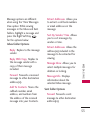
Sort By Sender/ Time Allows
you to sort messages by
sender or time.
Extract Addresses Allows the
address(es) included in the
message to be extracted for
viewing.
Manage Inbox Allows you to
select multiple messages for
deletion or locking.
Message Info Displays
information about the
selected Inbox message.
M E S SAG I N G
Reply With Copy Replies to
the message sender with a
copy of their message
included.
Extract Addresses Allows you
to extract a call back numbers
or email addresses in the
message.
Sent folder Options
Forward Forwards a sent
message to other destination
address(es).
53
MESSAGING
Send/Resend Allows you to
retransmit the selected
message. For multimedia
messages, ‘Resend’ is
displayed.
Add To Contacts Stores the
callback number, email
address, and numbers from
the address of the received
message into your Contacts.
M E S SAG I N G
Sort By Recipients/ Time
Allows you to sort messages
by recipients or time.
Messages View Allows you to
change the messages view
setting (see page 53).
Manage Sent Allows you to
select multiple messages for
deletion or locking.
Message Info Displays
information about the
selected Sent message.
54
NOTE
Options may vary depending on the
type of message.
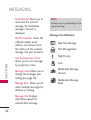
Message Icon Reference
New Text Message
Text Message Read
High Priority
Lock
Multimedia Message
Unread
Multimedia Message
Read
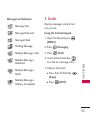
Message Icon Reference
3. Drafts
Displays messages started, but
not yet sent.
Message Delivered
Using the Internal Keypad
Message Failed
1. Open the flip and press
[MENU].
Pending Message
2. Press
Messaging.
Multiple Messages Sent
3. Press
Drafts.
Multiple Messages
Delivered
4. Use the Directional Key
to scroll to a message entry.
Multiple Messages
Failed
Multiple Messages
Delivery Incomplete
5. Options from here:
●
Press the Left Soft Key
[Erase].
●
Press
M E S SAG I N G
Message Sent
[EDIT].
55
MESSAGING
●
Press the Right Soft Key
[Options].
Send Sends the selected
message to the recipient.
Add To Contacts Stores the
callback number, email
address, and numbers from
the address included in the
Draft message into your
Contacts.
M E S SAG I N G
Manage Drafts Allows you to
erase, lock, or unlock your
Draft messages.
Message Icon Reference
Text Message Draft
Multimedia Message
Draft
56
4. Voicemail
Allows you to view the number of
new voice messages recorded in
the Voicemail box. Once you
exceed the storage limit, old
messages are overwritten. When
you have a new voice message,
your phone will alert you.
Checking Your Voicemail Box
Using the Internal Keypad
1. Open the flip and press
[MENU].
2. Press
Messaging.
3. Press
Voicemail.
4. Options from here:
●
Press the Left Soft Key
[Clear] to clear the Voicemail
counter, if you have a new
voicemail.
●
Press
or
[CALL] to
listen to the message(s).
Checking Your Voicemail Box
1. Dial your wireless phone
number, then press
from
your phone or dial your
wireless phone number from
any touch-tone phone.
3. Enter your password/security
code. Once entered, you will
be able to access your
voicemail box.
Allows you to configure settings for
Messaging:
1. Open the flip and press
[MENU].
2. Press
Messaging.
3. Press
Settings.
4. Use
to highlight
Messages View/ Entry
Mode/ Auto Save Sent/
Auto Erase Inbox/
Messaging Font Size/ Text
Auto View/ Text Delivery
Receipt/ Text Auto Scroll/
Multimedia Auto Receive/
Quick Text/ Voicemail #/
Callback #/ Signature then
press
.
M E S SAG I N G
2. When the recorded
announcement begins, press
# to interrupt the recorded
message.
5. Settings
5. Use
to highlight one
of the settings and press
to select it.
57
MESSAGING
Messaging Settings Sub-Menu
Descriptions
1. Messages View
Select Time to display messages
chronologically in the Inbox and
Outbox. Select Contact to sort
all messages alphabetically in
one folder.
Select On to automatically
delete read messages when you
exceed the storage limit. Or,
select Off.
5. Messaging Font Size
Select Normal or Large for the
size of messaging characters.
M E S SAG I N G
2. Entry Mode
6. Text Auto View
Select T9Word , Abc , ABC or
123 to be your default input
method.
Select On to automatically
display message content on the
screen. Select On+Readout to
automatically display content
and read it aloud.
Select Off for more privacy by
requiring the message to be
opened to view it.
3. Auto Save Sent
Select On to automatically save
sent messages. Select Off if
you don't want to save them.
Select Prompt to be asked after
every message.
58
4. Auto Erase Inbox
7. Text Delivery Receipt
11. Voicemail #
Select On to display the
Message Delivered icon (see
page 55) to Sent messages that
were delivered successfully. Or,
select Off.
Allows you to manually enter the
access number for Voicemail
Service. This number should be
only used when a VMS
(Voicemail Service) access
number is not provided from the
network.
8. Text Auto Scroll
Select On to automatically scroll
text down while viewing
messages. Or, select Off.
Select On to automatically
download attachments in
received multimedia messages.
Or, select Off.
10. Quick Text
Displays your list of text phrases
to help you to reduce manual
input into messages. Use this
menu to edit and add text.
Select On to automatically send
a designated callback number
with your messages. Or, select
Off.
13. Signature
M E S SAG I N G
9. Multimedia Auto Receive
12. Callback #
Select Custom to create/edit a
signature to automatically send
with your messages. Select
None for no signature.
59
MESSAGING
6. Erase All
You can erase messages stored in
your Inbox, Sent, or Drafts
folders. You can also erase all
messages at the same time.
●
Press
Erase Sent
Messages to erase all
unlocked messages stored in
the Sent folder.
●
Press
Erase Drafts to
erase all unlocked messages
stored in the Drafts folder.
●
Press
Erase All to erase
all messages from the Inbox,
Sent, and Drafts folders
(except locked messages).
You can choose whether or
not unread messages will
also be erased.
Using the Internal Keypad
1. Open the flip and press
[MENU].
2. Press
Messaging.
M E S SAG I N G
3. Press
Erase All for the
following options:
●
Press
Erase Received
Messages to erase All (read
and unread) Messages or
Only read Messages in the
Inbox.
NOTE
The Message View setting (Time or
Contact), affects the Erase All
submenu names, but nonetheless
they function the same.
4. Select Yes to erase the
messages selected.
60
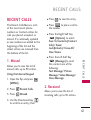
RECENT CALLS
RECENT CALLS
●
Press
The Recent Calls Menu is a list
of the most recent phone
numbers or Contact entries for
calls you placed, accepted, or
missed. It's continually updated
as new numbers are added to the
beginning of the list and the
oldest entries are removed from
the bottom of the list.
●
Press
to place a call to
the number.
●
Press the Right Soft Key
[Options] to select:
Save To Contacts (Contact
Info)/ Erase/
Lock(Unlock)/ Erase All/
View Timers
●
Press the Left Soft Key
[Message] to send
this contact one of the
following:
Text Message/ Picture
Message/ Video Message/
Voice Message
Allows you to view the list of
missed calls; up to 90 entries.
Using the Internal Keypad
1. Open the flip and press
[MENU].
2. Press
Recent Calls.
3. Press
Missed.
RECENT CALLS
1. Missed
to view the entry.
2. Received
Allows you to view the list of
incoming calls; up to 90 entries.
4. Use the Directional Key
to scroll to an entry, then
61
RECENT CALLS
Using the Internal Keypad
Text Message/ Picture
Message/ Video Message/
Voice Message
1. Open the flip and press
[MENU].
2. Press
Recent Calls.
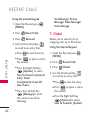
3. Dialed
3. Press
Received.
Allows you to view the list of
outgoing calls; up to 90 entries.
4. Use the Directional Key
to scroll to an entry, then
RECENT CALLS
●
Press
●
Press
to place a call to
the number.
●
●
62
to view the entry.
Press the Right Soft Key
[Options] to select:
Save To Contacts (Contact
Info)/ Erase/
Lock(Unlock)/ Erase All/
View Timers
Press the Left Soft Key
[Message] to send
this contact one of the
following:
Using the Internal Keypad
1. Open the flip and press
[MENU].
2. Press
Recent Calls.
3. Press
Dialed.
4. Use the Directional Key
to scroll to an entry, then
●
Press
to view the entry.
●
Press
to place a call to
the number.
●
Press the Right Soft Key
[Options] to select:
Save To Contacts (Contact
Info)/ Erase/
Lock(Unlock)/ Erase All/
View Timers
●
Press the Left Soft Key
[Message] to send
this contact one of the
following:
Text Message/ Picture
Message/ Video Message/
Voice Message
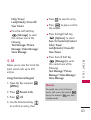
Allows you to view the list of the
most recent calls; up to 270
entries.
Using the Internal Keypad
1. Open the flip and press
[MENU].
2. Press
Recent Calls.
3. Press
All.
Press
to view the entry.
●
Press
to place a call to
the number.
●
Press the Right Soft Key
[Options] to select:
Save To Contacts (Contact
Info)/ Erase/
Lock(Unlock)/ Erase All/
View Timers
●
Press the Left Soft Key
[Message] to send
this contact one of the
following:
Text Message/ Picture
Message/ Video Message/
Voice Message
RECENT CALLS
4. All
●
Shortcut
To quickly view a list of all your
recent calls, press the internal
key or the external
key from
standby mode.
4. Use the Directional Key
to scroll to an entry, then
63
RECENT CALLS
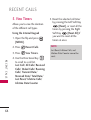
5. View Timers
Allows you to view the duration
of the different call types.
Using the Internal Keypad
1. Open the flip and press
[MENU].
RECENT CALLS
64
5. Reset the selected call timer
by pressing the Left Soft Key
[Reset], or reset all the
timers by pressing the Right
[Reset All] if
Soft Key
you want to reset all the
timers at once.
2. Press
Recent Calls.
NOTE
3. Press
View Timers.
Last Reset, Lifetime Calls, and
Lifetime Data Counter cannot be
reset.
4. Use the Directional Key
to scroll to a call list.
Last Call/ All Calls/ Received
Calls/ Dialed Calls/ Roaming
Calls/ Transmit Data/
Received Data/ Total Data/
Last Reset/ Lifetime Calls/
Lifetime Data Counter
CONTACTS
CONTACTS
Using the Internal Keypad
The Contacts Menu allows you
to store names, phone numbers
and other information in your
phone’s memory.
1. Open the flip and press
[MENU].
Shortcut
With the flip open, the Right Soft
Key
[Contacts] is a shortcut
to the Contact List.
Pressing the Favorites Key
is a
shortcut to the Favorites menu.
Allows you to add a new entry to
your Contact List.
NOTE
Using this submenu, the number is
saved as a new Contact. To save the
number into an existing Contact,
edit the Contact entry.
Contacts.
3. Press
New Contact.
4. Enter the name.
5. Use the Directional Key
to scroll to the phone number
type.
6. Enter the number and press
to save.
NOTE
For more detailed information, see
page 35.
C O N TAC T S
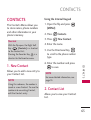
1. New Contact
2. Press
2. Contact List
Allows you to view your Contact
List.
65
CONTACTS
Using the Internal Keypad
1. Open the flip and press
[MENU].
2. Press
Contacts.
3. Press
Contact List.
4. Press the Directional Key
to scroll through your
Contacts alphabetically.
●
C O N TAC T S
●
Press the Right Soft Key
[Options] to select
one of the following:
New Contact/ Erase/
New Text Message/
New Picture Message/
New Video Message/
New Voice Message/ Call/
Manage Contacts/ Set As
Favorite/ Send Name Card
Press the Left Soft Key
[Edit] to edit the
entry.
●
Press
[VIEW] to view
the entry.
NOTE
You can also use the External Keypad
to access your Contacts List:
1. Press
to unlock the screen.
[Menu].
2. Press
3. Use
to scroll to
[CONTACTS] and press
.
4. Press
Contact List.
3. Favorites
Allows you to add to and view
your Favorites contact list.
SHORTCUT
From standby mode, with the flip
open, pressing
is a shortcut to
the Favorites menu.
Using the Internal Keypad
1. Open the flip and press
[MENU].
2. Press
66
Contacts.
3. Press
Favorites.
TIP
You can add up to 10 contacts
and/or contact groups as Favorites
to easily make calls, send messages,
and view messages.
4. With the ADD square
selected, press
to add a
Favorite.
6. Use the Directional Key
to scroll through your
Contacts or Groups
alphabetically and press
[MARK].
Left Soft Key
: View
OK Key : MESSAGES
Right Soft Key
: Options
Move Position/ Remove/
Remove All
4. Groups
Allows you to view your grouped
Contacts, add a new group,
change the name of a group,
delete a group, or send a
message to everyone in the
selected group.
C O N TAC T S
5. Select whether you want to
add a favorite from your
Contacts / Group.
7. Press the Left Soft Key
[Done]. Once you have
added Contacts to the
Favorites list, the following
options will become available
in the Favorites menu:
67
CONTACTS
Using the Internal Keypad
1. Open the flip and press
[MENU].
2. Press
Contacts.
3. Press
Groups.
4. Use the Directional Key
to highlight a group.
●
C O N TAC T S
68
●
●
Press
[VIEW] to view
the Group information.
5. Speed Dials
Allows you to view your list of
Speed Dials or designate Speed
Dials for numbers entered in
your Contacts.
Press the Left Soft Key
[New] to add a new
group to the list.
Using the Internal Keypad
Press the Right Soft Key
[Options] to select
one of the following:
New Text Message/ New
Picture Message/ New
Video Message/ New
Voice Message/ Edit/
Erase Group / Add/ Set
As Favorite/ Send Name
Card
2. Press
Contacts.
3. Press
Speed Dials.
1. Open the flip and press
[MENU].
4. Use the Directional Key
to scroll to a Speed Dial
position, or enter the Speed
Dial digit, and press
[SET].
Edit Using the Internal Keypad
2. Press
Contacts.
5. Use the Directional Key
to scroll to a Contact entry,
then press
. If the contact
has more than one phone
number saved, you will need
to highlight the number you
want to set as a Speed Dial
and press
.
3. Press
My Name Card.
4. Press
[EDIT].
[Yes].
6. My Name Card
Allows you to view and edit your
own Contact information
including name, phone numbers,
and email addresses.
5. Use the Directional Key
to scroll to information fields,
enter your information as
necessary, then press
[SAVE].
TIP
You may send your name card using
[Options]
the Right Soft Key
(after step 3).
C O N TAC T S
6. Press
1. Open the flip and press
[MENU].
69
MY STUFF
MY STUFF
1. Ringtones & Sounds
1.1 My Ringtones
Allows you to set a ringtone as
your phone's ringer or alert
sounds, and download new
ringtones.
5. Use
to scroll to a
ringtone and press
[PLAY] to preview the
ringtone or press the Left Soft
Key [Set As] to set the
ringtone as one of the
following:
●
Ringtone: Sets the
selected ringtone as your
phone's default ringtone.
●
Contact ID: Scroll and
select the Contact to be
identified by the ringtone you
selected.
●
Alert Sounds: Press the
corresponding number key to
set the ringtone for one of the
following:
Using the Internal Keypad
1. Open the flip and press
[MENU].
M Y ST U F F
2. Press
My Stuff.
3. Press
Sounds.
Ringtones &
4. Press
My Ringtones.
All Messages/ Text Message/
Multimedia Message/
Voicemail
70
1.2 My Sounds
Allows you to select a desired
sound or record a new sound.
Using the Internal Keypad
1. Open the flip and press
[MENU].
2. Press
My Stuff.
3. Press
Sounds.
Ringtones &
4. Press
My Sounds.
●
Press the Left Soft Key
[Set As].
3. Alert Sounds: Press the
corresponding number key
to set the ringtone for one
of the following: All
Messages/ Text Message/
Multimedia Message/
Voicemail
[PLAY].
●
Press
●
Press the Right Soft Key
[Options] for one of
the following options:
Send/ Rename/ Move/
Copy/ Lock(Unlock)/
Erase/ Erase All/ File Info
M Y ST U F F
5. Press
Record New or
scroll and select a sound using
the Directional Key
.
Options with a sound file
highlighted are:
2. Contact ID: Scroll and
select the Contact to be
identified by the ringtone
you selected.
1. Ringtone: Sets the selected
ringtone as your phone's
default ringtone.
71
MY STUFF
2. Pictures & Videos
Using the Internal Keypad
View, take, and trade your digital
pictures and videos right from
your wireless phone.
1. Open the flip and press
[MENU].
Using the Internal Keypad
1. Open the flip and press
[MENU].
2. Press
My Stuff.
3. Press
Pictures & Videos.
M Y ST U F F
4. Use the Directional Key
to highlight an option and
press
, or press the
corresponding number key.
2.1 My Pictures
Allows you to view and manage
the pictures stored in your
phone. You can also take new
photos and download new
pictures.
72
2. Press
My Stuff.
3. Press
Picture & Videos.
4. Press
My Pictures.
5. Use the Directional Key
to highlight a picture and
press the Left Soft Key
[Erase] to erase the selected
[VIEW] to
picture. Press
view the selected picture.
Press the Right Soft Key
[Options] to access
the following options.
Send As Picture Message/
Via Bluetooth
Set As Internal Wallpaper/
External Wallpaper/ Picture
ID
Take Picture Turns on the
camera function.
Slide Show Allows you to
play all your pictures.
Edit Allows you to edit the
picture.
Manage My Pictures Allows
you to send, erase, move,
copy, lock and unlock
pictures.
Rename Allows you to
rename the selected picture.
You can still access Options by
pressing the Right Soft Key
while viewing a picture in full screen.
NOTE
Not all options are available for
images protected by DRM (Digital
Rights Management). Also,
Bluetooth options are available only
when you select a Bluetooth device.
2.2 My Videos
Allows you to view and manage
the videos stored in your phone.
You can also record and
download new videos.
Lock(Unlock)
NOTE
Erase All Allows you to erase
all pictures at once.
File storage varies according to the
size of each file as well as memory
allocation of other applications.
File Info Name/ Date/ Time/
Resolution/ Size
M Y ST U F F
Print Print via Bluetooth/
Print Preferences
NOTE
Using the Internal Keypad
1. Open the flip and press
[MENU].
73
MY STUFF
2. Press
My Stuff.
3. Press
Pictures & Videos.
4. Press
My Videos.
5. Select a video with the
Directional Key
and
press the Right Soft Key
[Options].
Select one of the following
options (Options are
dependent on file types):
M Y ST U F F
Send Send a Video
Message/ Via Bluetooth
Record Video Turns on the
video camera function.
Manage My Videos Allows
you to play, erase, move,
copy, lock and unlock the file.
Set As Wallpaper Displays
the selected video file as the
background for your phone.
74
Rename Allows you to
rename the selected video.
File Info Name/ Date/ Time/
Duration/ Size
6. Press
[PLAY] to play.
Options available while
playing a video are:
●
●
●
: To adjust the volume.
Left Soft Key
Unmute.
: Mute/
: Pause/ Play.
●
Up Directional Key
:
Expands to full screen.
●
Down Directional Key
To stop the video.
:
●
Right Directional Key
To fast forward.
:
●
Left Directional Key
To rewind the video.
:
2.3 Take Picture
Using the Internal Keypad
Take pictures straight from your
phone.
1. Open the flip and press
[MENU].
Camera Lens
Camera Key
Tips
Use the Up/Down Directional
Keys to change the brightness
level before taking the picture.
●
Avoid jolting the camera.
●
Wipe the camera lens with a soft
cloth.
●
Take care not to cover the lens
with your finger.
My Stuff.
3. Press
Pictures & Videos.
4. Press
Take Picture.
5. Set the brightness by pressing
the Directional Key
,
zoom by pressing the
Directional Key
, and
press the Right Soft Key
[Options] to change the
following options:
RESOLUTION 2048X1536/
1600X1200/ 1280X960/
640X480/ 320X240
M Y ST U F F
●
2. Press
FLASH On/ Off
SELF TIMER Off/ 3 Seconds/
5 Seconds/ 10 Seconds
75
MY STUFF
SHOT MODE Off/ Smile
Shot/ Panorama/ Intelligent
Shot/ Dual Display
●
Press the Left Soft Key
[Save] to store it in My
Pictures.
WHITE BALANCE Auto/
Sunny/ Cloudy/ Fluorescent/
Glow
●
Press
[SEND] to send a
picture message.
●
Press the Right Soft Key
[Erase] to delete it.
COLOR EFFECTS Normal/
Negative/ Aqua/ Sepia/
Black&White
M Y ST U F F
76
2.4 Record Video
SHUTTER SOUND Shutter/
No Sound /Say “Cheese”/
Smile
Lets you record a video with
sound.
SAVE OPTION Internal/
External
1. Open the flip and press
[MENU].
CAPTURE Camera/ Video
2. Press
My Stuff.
6. Take a picture by pressing
or located above the
Right Soft Key
.
3. Press
Pictures & Videos.
4. Press
Record Video.
7. Save, send, or erase the
picture.
5. Hold the phone horizontally
to record videos.
Using the Internal Keypad
6. Set the brightness by pressing
the Directional Key
,
zoom by pressing the
Directional Key
or press
the Right Soft Key
[Options] to change other
the following options:
RECORDING TIME For
Send/ For Save
RESOLUTION 320X240/
176X144
SAVE OPTION Internal/
External
COLOR EFFECTS Normal/
Negative/ Aqua/ Sepia/
Black&White
CAPTURE Camera/ Video
[REC] to begin
7. Press
recording, and again to stop.
8. Save, send, or erase the
video.
●
Press the Left Soft Key
[Save] to store it in My
Videos.
●
Press
[SEND] to send a
video message.
●
Press the Right Soft Key
[Erase] to delete it.
M Y ST U F F
FLASH On/ Off
WHITE BALANCE Auto/
Sunny/ Cloudy/ Fluorescent/
Glow
77
BREW
BREW
78
BREW
Downloading Applications
Brew allows you to do more than
just talk on your phone. Brew is a
technology and service that
allows you to download and use
applications on your phone. With
Brew, it is quick and easy to
personalize your phone to suit
your lifestyle and tastes. Just
download the applications that
appeal to you. With a wide range
of software available, from
ringtones to games to
productivity tools, you can be
assured that you will find
something useful, practical, or
down right entertaining.
You can download applications
and use Brew anywhere on the
network, as long as your handset
has a digital signal available.
Incoming Calls
While downloading an
application, incoming calls will
automatically be sent to your
voicemail, if available. If you do
not have voicemail, downloading
will not be interrupted by an
incoming call, and the caller will
receive a busy signal.
When using applications, an
incoming call will automatically
pause the application and allow
you to answer the call. When you
complete your call, you can
resume using the application.
1. BREW Apps
Allows you to download
applications from the many fun
and available options.
1. Open the flip and press
.
2. Use
option:
,
to highlight an
Browse Catalog/ Search
Note
BREW
If you attempt to download an
application when the file memory is
full, the following error message will
occur: "Sorry, not enough space to
complete the download. Would you
like to make space available and try
again?"
79
Web
Web
Numbered options
The Web feature allows you to
view Internet content.
Accessibility and selections
within this feature are dependent
upon your service provider. For
specific information on Web
contact your service provider.
You can use your numeric
keypad to access those links and
options.
1. Start Browser
,
We b
Ending an Web Session
End an Web session by pressing
.
Navigating Through the
Browser
On-screen items may be
presented in one of the following
ways:
80
Use
to scroll through the
content if the current page does
not fit on one screen.
Fast Scrolling
Allows you to initiate an Web
session.
1. Open the flip and press
.
Scrolling
Press and hold
to quickly
move the cursor up and down on
the current screen.
Clearing Out Text/Numbers
Entered
When entering text, numbers or
symbols in a text entry field,
press
to clear the last
number, letter, or symbol. Press
and hold
to clear the input
field completely.
My Music
My Music
Playing Your Music
Allows you to listen to music on
your phone. You can transfer
music between your phone and
your PC, manage and organize
your music files, and more.
It’s easy to find and play the music
you’ve stored in your phone.
Shortcut
Unlock the exterior screen by
pressing
then press the Music
shortcut key
.
NOTE
Using the Internal Keypad
1. Open the flip and press
[MENU].
2. Press
My Music.
2. Use the Directional Key
to scroll to a category, then
press
.
Using the External Keypad
1. Unlock the exterior screen by
pressing
, press
[MENU], scroll to MY MUSIC
then press
.
with
2. Use the Directional Key
to select Play All Songs/ All
Songs/ Playlists/ Artists/
Genres/ Albums/ Music
Settings and press
.
While playing music
My Music
File storage varies according to the
size of each file as well as memory
allocation of other applications.
Access My Music
Use the Directional Key
to scroll through the songs
and press
to play a song.
Press Right on the Directional
Key
to skip to the next song
or press and hold the same
Directional Key to fast forward.
81
My Music
Press Left on the Directional
Key
to go back to
previous songs or press and
hold the same Directional Key
to rewind.
3. Press
to pause the song.
following to control the Music
Player:
●
Left Soft Key
[Mute/Unmute] Mute or
unmute the song.
●
Right Soft Key
[Options] allows you to
choose:
Home Screen/ Exit Player/
Go to My Music/ Repeat/
Shuffle/ Sound Effect/ Add
Song to Playlist/ Music
Only/ Song Info
Using the Internal Keypad
1. Open the flip and press
[MENU].
2. Press
My Music
82
My Music.
3. Scroll to one of the following
options, then press
.
Play All Songs/ All Songs/
Playlists/ Artists/ Genres/
Albums/ Manage My Music/
Music Settings/ Sync Music
●
Side Volume Keys : Adjust the
volume.
●
/
Scroll through
the song list.
4. Scroll to a song and press
to start the Music Player.
●
Play / Pause the current
song.
Controlling the Music Player
●
Play the previous song.
If you have the flip open while
listening to your music, use the
●
Play the next song.
Tools
Tools
Your phone tools include Voice
Commands, Bluetooth Menu,
Calculator, Ez Tip Calculator,
Calendar, Alarm Clock,
Stopwatch, World Clock,
Notepad and USB Mass Storage.
1. Voice Commands
Voice Commands Settings
Using the Internal Keypad
1. Open the flip and press
[MENU].
2. Press
Tools.
3. Press
Voice Commands.
Confirm Choice Automatic/
Always Confirm/ Never Confirm
Sensitivity More Sensitive /
Automatic/ Less Sensitive.
Adapt Voice If the phone asks
you to repeat your voice
command too often, train the
phone to recognize your voice
patterns. Train Words/ Train
Digits
Prompts Mode/ Audio
Playback/ Timeout
- For Mode, set to Prompts/
Readout + Alerts/ Readout/
Tones Only.
- For Audio Playback,
set to Speakerphone or
Earpiece.
- For Timeout, set to 5 seconds
or 10 seconds.
To o l s
This feature provides you with
the following options equipped
with AVC (Advanced Voice
Commands) technology. Each
option has its detailed
information on the phone and
you can check it out by pressing
[Info].
the Left Soft Key
4. Press the Right Soft Key
[Settings].
83
Tools
CLR Key Activation If set to On,
this setting allows you to
activate Voice Command feature
with CLR key from external
screen. On/ Off
1.1 Call <Name or
Number>
To o l s
Say "Call" and then call someone
simply by saying the phone
number or name. Please speak
clearly and say the contact
names exactly as they're saved in
your Contacts list. When you
have more than one number for a
contact, you can state the name
and then the number type of the
contact (for example, 'Call John
Work').
1.2 Send Msg to <Name or
Number>
Say 'Send Message' and the
voice command will prompt you
for the type of message. After
84
choosing the message type, you
will be asked for the contact
name or number; the phone will
automatically create a new
message. If you say a fullsentence command, such as
'Send Text Message to Bob', it
will automatically start a text
message. Remember to say the
contact name exactly as it is
entered in your Contacts list.
1.3 Go to <Menu>
The 'Go to' command allows you
to access a menu within the
phone (for example, 'Go to
Contacts List’).
If no menu option is stated, a list
of options will be provided.
Please note that the options
available with the Flip closed are
different from those available
with the Flip open.
1.4 Check <Item>
NOTE
The "Check" command allows
you to check out a wide range of
items such as Phone Status,
Voicemail, Messages, Missed
Calls, Time, Signal Strength,
Battery Level and Volume.
When saying phone numbers in a
Voice Command, say the numbers
continuously (e.g., avoid pausing
between numbers).
1.5 Contacts <Name>
You can look up names in your
Contacts (for example, 'Contacts
John') as well as manage your
Contact List by calling, creating,
erasing or modifying.
1.6 Help
Provides a general guideline for
using Voice Commands.
The Ellipse is compatible with
devices that support the
Bluetooth® Headset, Handsfree,
Dial Up Networking, Stereo,
Phonebook Access, Basic
Printing, Object Push, File
Transfer, Basic Imaging and
Human Interface profiles.
You may create and store 20
pairings within the Ellipse and
connect to one device at a time.
The approximate communication
range for Bluetooth® wireless
technology is up to 30 feet (10
meters).
To o l s
Call/ Read out/ Create New/
Modify/ Erase
2. Bluetooth Menu
Bluetooth QD ID B015118
85
Tools
NOTE
Your phone is based on the
Bluetooth® specification, but it is not
guaranteed to work with all devices
enabled with Bluetooth® wireless
technology.
Phone does not support ALL
Bluetooth® OBEX Profiles.
2.1 Add New Device
Pairing is the process that allows
a handset to locate, establish,
and register 1-to-1 connection
with a target device.
To o l s
86
NOTE
Read the user guide of each
Bluetooth® accessory that you are
trying to pair with your phone
because the instructions may be
different.
To Pair with a New Bluetooth®
Device Using the Internal
Keypad
1. Follow the other device’s
Bluetooth® instructions to set
that device to pairing mode.
2. Open the flip and press
[MENU].
3. Press
Tools.
4. Press
Bluetooth Menu.
5. Press
Add New Device.
6. If Bluetooth® power is set to
off, you will be prompted to
turn power on. Select Yes and
press
then press
again.
7. The device will appear in Add
New Device menu once it has
been located. Highlight the
device and press
.
8. The handset may prompt you
for the passkey in BT. Consult
the Bluetooth® accessory
instructions for the
appropriate passkey in BT
(typically “0000” - 4 zeroes).
Enter the passkey and press
.
9. Once pairing is successful,
select either Always Ask or
Always Connect (except for
audio devices) and press
.
When the Bluetooth® wireless
connection is started and paired
devices are found, the following
icons will display to demonstrate
the type of device found (see
below).
When an audio device is
found by your Ellipse
device
When a PC is found by
your Ellipse device
When a PDA is found by
your Ellipse device
When another phone
device is found by your
Ellipse device
To o l s
10. Once connected, you will
see the device listed in the
BLUETOOTH MENU.
Icon Reference in the Add New
Device List
87
Tools
When a printer is found by
your Ellipse device
When other undefined
devices are found by your
Ellipse device
When a keyboard is found
by your Ellipse device
When Car kit or Handsfree
device is searched by your
Ellipse device
●
Icon References When
Successfully Connected
When an only mono
headset is connected with
your Ellipse device
To o l s
When an only stereo
headset is connected with
your Ellipse device
When stereo headsets and
mono headsets are all
connected with your
Ellipse device
When Car kit or Handsfree
device is connected with
your Ellipse device
88
My Phone Name
Allows you to edit the name of
your phone as it appears to
other Bluetooth devices, when
Add New Device menu is
highlighted.
Using the Internal Keypad
1. Open the flip and press
[MENU].
2. Press
Tools.
3. Press
Bluetooth Menu.
4. Press the Right Soft Key
[Options].
5. Press
My Device Info.
6. Press
to clear the
existing name or edit it.
7. Use the keypad to enter a
new custom name.
8. Press
to save and exit.
Turn On/Off
Discovery Mode
Allows you to set the phone's
Bluetooth® power On/Off.
Allows you to set whether your
device is able to be found by
other Bluetooth® devices in the
area.
Using the Internal Keypad
1. Open the flip and press
[MENU].
2. Press
Tools.
3. Press
Bluetooth Menu.
4. Press the Left Soft Key
[Turn On]/ [Turn Off].
Using the Internal Keypad
1. Open the flip and press
[MENU].
2. Press
Tools.
3. Press
Bluetooth Menu.
4. Press the Right Soft Key
[Options].
By default, your device’s Bluetooth®
functionality is turned off.
5. Press
Discovery Mode.
To o l s
NOTE
6. Select On/Off.
89
Tools
Supported Profiles
Allows you to see profiles that
your Ellipse phone can support.
TIPS
●
The Headset and Handsfree
profiles support voice calls with a
compatible Bluetooth® headset or
car kit. Bluetooth® Stereo profiles
supported by Ellipse provides you
with the ability to use the
integrated music player (and
optional Bluetooth® stereo
headset) to listen to music,
providing you with lots of listening
enjoyment.
●
The Object Push profile allows
you to transfer a contact entry
(vCard) and/or transfer a calendar
event (vCal) to another OPPenabled Bluetooth® device.
●
The Phonebook Access profile
allows your car kit and your phone
to share information. By pairing
the devices and connecting with
this profile, you can access and
use your phone book data while in
your vehicle.
Using the Internal Keypad
1. Open the flip and press
[MENU].
2. Press
Tools.
3. Press
Bluetooth Menu.
4. Press the Right Soft Key
[Options].
To o l s
5. Press
Profiles.
TIPS
●
90
Supported
The Human Interface Design
(HID) profile is supported only for
keyboard input and available when
the flip is open or closed.
3. Calculator
TIPS
●
The File Transfer profile allows
sending or receiving nonprotected data files to a
compatible Bluetooth® device.
●
The Basic Printing profile allows
you to transfer user-generated
images to a printer and print them
out.
1. Open the flip and press
and
.
,
2. Highlight the picture you want to
print.
3. Press the Right Soft Key
Options.
.
5. Select Print via Bluetooth.
Using the Internal Keypad
1. Open the flip and press
[MENU].
,
2. Press
Tools.
3. Press
Calculator.
4. Enter numbers and appropriate
operation key(s) to perform
desired calculations. To cancel a
calculation, press the Left Soft
[Clear].
Key
To o l s
4. Scroll to Print and press
Allows you to perform simple
mathematical calculations.
6. Select Search New Device.
7. Complete the pairing process.
8. Scroll to the device and press
[PRINT].
91
Tools
5. Press the Right Soft Key
[Operators] to add parenthesis
or power for exponential numbers.
5. Press the Left Soft Key
[Reset] for another
calculation.
4. Ez Tip Calculator
5. Calendar
Allows you to quickly and easily
calculate bill amount(s) using
the bill total, tip % and number
of people as variables.
Allows you to keep your agenda
convenient and easy to access.
Simply store your appointments,
and your phone will alert you
with reminders.
Using the Internal Keypad
1. Open the flip and press
[MENU].
To o l s
2. Press
Tools.
3. Press
Ez Tip Calculator.
4. Enter values for all variable
fields (Total bill, Tip (%),
Split) and the corresponding
calculation fields (tip and total
for each person) are updated
automatically.
92
Using the Internal Keypad
Shortcut
With the flip open, the Directional
Key
is a Shortcut to Calendar
in standby mode by default.
1. Open the flip and press
[MENU].
2. Press
Tools.
3. Press
Calendar.
4. Use the Directional Key
to scroll to the scheduled day.
Left
Moves cursor to the
previous day.
Right
next day.
Moves cursor to the
Up
week.
Moves to the previous
Down
week.
Moves to the next
[SAVE] to save the
8. Press
Calendar item.
6. Alarm Clock
Allows you to set up to ten
alarms. At the alarm time, a
notification can be displayed on
the LCD screen and the alarm
will sound(depending on your
Master Sound settings).
Using the Internal Keypad
1. Open the flip and press
[MENU].
6. Enter a Subject.
2. Press
Tools.
7. Scroll to a Calendar setting
field, then press the Left Soft
[Set]. For each
Key
Calendar event you can set:
3. Press
Alarm Clock.
●
●
●
●
Start Time
Repeat
Alerts
Vibrate
●
●
●
To o l s
5. Press the Left Soft Key
[Add].
4. Press the Left Soft Key
[Add].
End Time
Until
Tones
93
Tools
5. Enter the alarm information
including:
●
Turn On/Off
●
Set Time
Allows you to use your phone as
a stopwatch.
●
Repeat
●
Ringtone
Using the Internal Keypad
Use the Directional Key
to scroll to the information
you want to set, then press
[Set]
the Left Soft Key
to enter your choices.
1. Open the flip and press
[MENU].
6. Press
[SAVE] after setting
all of the Alarm fields as
necessary.
To o l s
94
7. Stopwatch
When the alarm sounds, the
alarm notification includes the
option to "snooze" or
"dismiss" the alarm, but you
can quickly turn it off by
pressing
, the volume keys,
any of the alphanumeric keys,
or the vibrate mode key.
Opening and closing the flip
will also end the alarm.
3. Press
Tools.
4. Press
Stopwatch.
5. Press
[START], then
options from here:
●
Press the Left Soft Key
[Lap].
●
Press
[STOP] to stop.
6. Press the Right Soft Key
[Reset] to reset the
stopwatch.
8. World Clock
NOTE
Allows you to determine the
current time in another time
zone or country by navigating
with the left or right Directional
Key.
[Set
With the Left Soft Key
D S T ] set to daylight saving time.
Using the Internal Keypad
1. Open the flip and press
[MENU].
9. Notepad
Allows you to add, read, edit,
and erase notes to yourself.
Using the Internal Keypad
2. Press
Tools.
1. Open the flip and press
[MENU].
3. Press
World Clock.
2. Press
Tools.
3. Press
Notepad.
5. Select a city from the list,
then press
. The display
shows the position of the city
on a global map.
4. Press the Left Soft Key
[Add] to write a new note.
To o l s
4. Press the Right Soft Key
[Cities] to choose from
a list of available cities.
5. After filling in the note, press
to save it.
6. Press
again to zoom in
on the city and view its date
and time infomation.
95
Tools
10. USB Mass Storage
Using the Internal Keypad
This menu allows you to transfer
content from your phone to
your Windows® XP, Windows 7
or Windows Vista™ PC (or vice
versa) when your phone is
connected to your Windows® XP,
Windows 7 or Windows Vista™
PC with a compatible USB
cable. Mac OS operating system
is not supported.
1. Open the flip and press
[MENU].
To o l s
You can only access this menu
when a microSD™ card is
inserted in your phone (see
page 26 for more information)
and the phone is connected to
your PC with a USB cable.
NOTE
Do not insert or remove the
microSD™ card while playing,
deleting or downloading
Pictures/Videos/Music/Sounds.
96
2. Press
Tools.
3. Press
USB Mass
Storage.
Settings
Settings
NOTE
1. Sounds Settings
Set each alert separately with Ring
Only, Vibrate Only, Ring and Vibrate,
Be Silent, and ringtone as necessary.
1.2 Master Volume
1.1 Easy Set-up
Allows you to set volume
settings.
Allows you quickly set the main
Sounds Settings.
Using the Internal Keypad
Using the Internal Keypad
1. Open the flip and press
[MENU].
1. Open the flip and press
[MENU].
2. Press
Settings.
Settings.
3. Press
Sounds Settings.
3. Press
Sounds Settings.
4. Press
Master Volume.
4. Press
Easy Set-up.
5. Adjust the volume with the
Directional Key
then
press
to save the setting.
2. Press
5. Quickly and easily set your
phone sounds settings for
keypad volume as well as
incoming calls and messages.
●
S ett i n g s
Provides options to customize
the phone’s sounds.
You can test the volume at
each master volume level with
the Left Soft Key
[Play].
97
Settings
1.3 Call Sounds
1.3.2 Call Vibrate
Allows you to set how the
phone alerts you for various
types of incoming calls. The Call
Sounds menu has three
submenus that are set
independently.
Using the Internal Keypad
1.3.1 Call Ringtone
2. Press
Settings.
3. Press
Sounds Settings.
S ett i n g s
4. Press
Call Sounds.
Using the Internal Keypad
5. Press
Call Vibrate.
1. Open the flip and press
[MENU].
6. Use the Directional Key
to scroll to a setting, then
.
press
2. Press
Settings.
3. Press
Sounds Settings.
4. Press
Call Sounds.
1.3.3 Call ID Announcement
5. Press
Call Ringtone.
Using the Internal Keypad
6. Use the Directional Key
to scroll to a ringtone then
press
to save the sound.
98
1. Open the flip and press
[MENU].
On/ Off.
1. Open the flip and press
[MENU].
2. Press
Settings.
3. Press
Sounds Settings.
4. Press
Call Sounds.
5. Press
Call ID
Accouncement.
6. Use the Directional Key
to scroll to a setting, then
.
press
Ring Only/ Caller ID + Ring/
Name Repeat
5. Select Text Message/
Multimedia Message/
Voicemail/Emergency Tone/
Missed Call.
For Text Message,
Multimedia Message,
Voicemail and Missed Call
choose:
Tone / Vibrate / Reminder
1.4 Alert Sounds
For Emergency Tone choose:
Allows you to select the alert
type for a new message.
Alert / Vibrate / Off
1.5 Keypad Volume
1. Open the flip and press
[MENU].
Allows you to set the keypad
volume.
2. Press
Settings.
3. Press
Sounds Settings.
4. Press
Alert Sounds.
S ett i n g s
Using the Internal Keypad
Using the Internal Keypad
1. Open the flip and press
[MENU].
2. Press
Settings.
99
Settings
3. Press
Sounds Settings.
1.7 Service Alerts
4. Press
Keypad Volume.
Allows you to set any of the
Alert options to either On or
Off.
5. Adjust the volume with the
Directional Key
then
press
to save the setting.
1.6 Digit Dial Readout
1. Open the flip and press
[MENU].
Allows you to set the Digit Dial
Readout.
2. Press
Settings.
Using the Internal Keypad
3. Press
Sounds Settings.
1. Open the flip and press
[MENU].
4. Press
Service Alerts.
S ett i n g s
2. Press
Settings.
3. Press
Sounds Settings.
4. Press
Digit Dial Readout.
5. Use the Directional Key
to scroll to a setting, then
.
press
On/Off.
100
Using the Internal Keypad
5. Select an alert option.
Minute Beep Alerts you 10
seconds before every minute
during a call.
Call Connect Alerts you when
the call is connected.
Charge Complete Alerts you
when the battery is completely
charged.
6. Use the Directional Key
to scroll to a setting, then press
.
On/Off.
6. Use the Directional Key
to scroll to a setting, then press
.
On/Off.
1.8 Power On/Off
1.9 Voice Clarity
Allows you to set the phone to
sound a tone when the phone is
powered on/off.
Allows you to activate the Voice
Clarity feature on your phone.
Using the Internal Keypad
1. Open the flip and press
[MENU].
Settings.
3. Press
Sounds Settings.
4. Press
Power On/Off.
5. Select Power On/Power Off.
1. Open the flip and press
[MENU].
2. Press
Settings.
3. Press
Sounds Settings.
4. Press
Voice Clarity.
S ett i n g s
2. Press
Using the Internal Keypad
5. Press the Left Soft Key
Help for more information or
use the Directional Key
to scroll to a setting, then
.
press
On/Off
101
Settings
●
Provides options to customize
the phone’s display screen.
●
2.1 Easy Set-up
●
Set the dial fonts.
Allows you quickly set the main
Display Settings.
●
Select the format of the
internal clock.
Using the Internal Keypad
●
Select the format of the
external clock.
1. Open the flip and press
[MENU].
S ett i n g s
102
Set the keypad backlight.
2. Display Settings
2. Press
Settings.
3. Press
Display Settings.
4. Press
Easy Set-up.
5. Customize the following
display settings:
●
Enter the Banner text to be
displayed on your screen.
●
Set the Backlight duration
for internal display, external
display and keypad.
Set Internal and External
Wallpapers.
2.2 Banner
Allows you to enter text to
display on the internal screen.
2.2.1 Personal Banner
2.3 Backlight
Using the Internal Keypad
Allows you to set the duration
for illuminating the backlight.
Backlights for the screens and
the Keypad are set separately.
1. Open the flip and press
[MENU].
2. Press
Settings.
Using the Internal Keypad
3. Press
Display Settings.
4. Press
Banner.
1. Open the flip and press
[MENU].
5. Press
Personal Banner.
2. Press
Settings.
3. Press
Display Settings.
4. Press
Backlight.
7. Scroll down to Select Color
and select the color for the
banner text, then press
or press the Right Soft Key
[Options] to preview
the banner.
5. Choose a Backlight submenu
and press
.
S ett i n g s
6. Enter up to 23 characters for
the banner text you want to
display on the internal LCD.
Internal Backlight/ External
Backlight/ Keypad Backlight.
●
Internal Backlight: 7
Seconds/15 Seconds/30
Seconds/Always On/ Always
Off
103
Settings
●
●
External Backlight: 7
Seconds/
15 Seconds/ 30 Seconds
Keypad: 7 Seconds/15
Seconds/30 Seconds/Always
On/ Always Off
Brightness.
5. Choose a Brightness
submenu and press
.
Auto Brightness/ Brightness
Level
NOTE
NOTE
If the phone's internal backlight is
set to Always On, the battery may
deplete more quickly and shorten
battery life because it deactivates
power save mode.
S ett i n g s
2.4 Brightness
Allows you to set the backlight
levels.
Using the Internal Keypad
1. Open the flip and press
[MENU].
104
4. Press
2. Press
Settings.
3. Press
Display Settings.
Brightness Level cannot be adjusted
when Auto Brightness is activated.
Brightness level can be 1 to 7.
2.5 Wallpaper
Allows you to choose the type of
background wallpaper displayed
on the phone. The possibilities
are endless; Fun Animations, in
particular, provides you with flash
screens for your background
wallpaper.
Using the Internal Keypad
2.6 Charging Screen
1. Open the flip and press
[MENU].
Allows you to set the screen
displayed when you are charging
the battery.
2. Press
Settings.
3. Press
Display Settings.
4. Press
Wallpaper.
5. Select the wallpaper location.
Internal Wallpaper/
External Wallpaper
My Pictures / My Videos /
Fun Animations
1. Open the flip and press
[MENU].
2. Press
Settings.
3. Press
Display Settings.
4. Press
Charging Screen.
5. Scroll to a setting and press
.
Off/ Desk Clock/ Calendar
NOTE
NOTE
External Wallpaper can only select an
image from My Pictures.
Press the Left Soft Key
[ P r e v i e w ] to view the options
before setting it.
S ett i n g s
6. For Internal Wallpaper select a
submenu.
Using the Internal Keypad
7. Select from the available
options then press
.
105
Settings
2.7 Font Size
Allows you to set the font size.
This setting is helpful for those
who need the text to display a
little bit larger.
Using the Internal Keypad
1. Open the flip and press
[MENU].
7. Use the Directional Key
to scroll to a setting, then press
.
Dial Digits: Normal/ Large
Menu & Lists: Small/ Normal
Message: Normal/ Large
2.8 Menu Font Type
S ett i n g s
2. Press
Settings.
Allows you to set the Menu
Fonts.
3. Press
Display Settings.
Using the Internal Keypad
4. Press
Font Size.
1. Open the flip and press
[MENU].
5. Use the Directional Key
to scroll to Dial Digits/ Menu
& Lists/ Message.
2. Press
Settings.
3. Press
Display Settings.
6. Press the Left Soft Key
[Set].
4. Press
Menu Font Type.
5. Use the Directional Key
to scroll to a setting, then
press
.
LG Gothic/ LG Secret/ LG
Mint
106
NOTE
Press the Left Soft Key [Preview] to
preview the Menu Font Type.
2.9 Clock Format
Allows you to choose the kind of
clock to be displayed on the LCD
screen.
Using the Internal Keypad
1. Open the flip and press
[MENU].
6. Use the Directional Key
to scroll to a setting, then press
.
Internal Clock : Small Digital
12/ Small Analog/ Large
Analog/ Large Digital 12/
Large Digital 24/ Dual City/
Off
External Clock : Large Digital
12(Time Only)/Large Digital
12/ Small Digital 12 / Off
Settings.
NOTE
3. Press
Display Settings.
Press the Left Soft Key
[ P r e v i e w ] to preview the
selected clock format.
4. Use the Directional Key
to scroll to Clock Format.
S ett i n g s
2. Press
5. Press
Internal Clock or
External Clock.
107
Settings
4. Press
The Phone Settings Menu allows
you to designate specific settings
to customize how you use your
phone.
5. Use the Directional Key
to scroll to a setting, then
.
press
3.1 Airplane Mode
S ett i n g s
Allows you to use the nonwireless handset functions when
radio transmission is restricted.
Activating Airplane Mode will
disable all wireless
communications. When in
Airplane Mode, services
supporting Location On
functionality will be suspended.
Using the Internal Keypad
1. Open the flip and press
[MENU].
108
Airplane mode.
3. Phone Settings
On/Off
3.2 Set Shortcuts
Allows you to set shortcuts to
the phone menus using the
down, up, left and right
Directional Keys.
3.2.1 Set My Shortcuts
To access My Shortcuts, press
the Directional Key
from
Standby mode with the flip open.
To configure My Shortcuts,
follow the instructions below:
2. Press
Settings.
1. Open the flip and press
[MENU].
3. Press
Phone Settings.
2. Press
Settings.
3. Press
Phone Settings.
4. Press
Set Shortcuts.
5. Press
Set My Shortcuts.
6. Use the Directional Key
to scroll to a shortcut key you
want to set and press
.
Shortcut 1/ Shortcut 2/
Shortcut 3/ Shortcut 4
7. Use the Directional Key
to scroll to the new shortcut,
then press
.
This Shortcut allows you to
initiate either a Contact Search,
New Text Message or New Note
by simply pressing any key on
the internal Qwerty keypad.
To configure the desired Qwerty
shortcut function, follow the
instructions below:
2. Press
Settings.
3. Press
Phone Settings.
4. Press
Set Shortcuts.
5. Press
Set Qwerty
Shortcut.
6. Use the Directional Key
to scroll to a setting, then press
.
Off/ Search Contact/ New
Text Message/ New Note
3.3 Voice Commands
S ett i n g s
3.2.2 Set Qwerty Shortcut
1. Open the flip and press
[MENU].
This menu allows you to
configure your Voice Commands
preferences and settings. For
more Voice Commands
information, see page 83.
109
Settings
3.3.1 Confirm Choices
5. Press
1. Open the flip and press
[MENU].
6. Use the Directional Key
to scroll to a setting, then press
.
2. Press
Settings.
3. Press
Phone Settings.
4. Press
Voice Commands.
5. Press
Confirm Choices.
6. Use the Directional Key
to scroll to a setting, then press
.
S ett i n g s
110
Sensitivity.
More Sensitive/ Automatic/
Less Sensitive
3.3.3 Adapt Voice
1. Open the flip and press
[MENU].
2. Press
Settings.
3. Press
Phone Settings.
4. Press
Voice Commands.
3.3.2 Sensitivity
5. Press
Adapt Voice.
1. Open the flip and press
[MENU].
6. Use the Directional Key
to scroll to a setting, then press
to select:
Automatic/ Always Confirm/
Never Confirm
2. Press
Settings.
3. Press
Phone Settings.
4. Press
Voice Commands.
Train Words/ Train Digits
3.3.4 Prompts
1. Open the flip and press
[MENU].
2. Press
Settings.
3. Press
Phone Settings.
4. Press
Voice Commands.
5. Press
Prompts.
6. Use the Directional Key
to scroll to a setting, then press
.
Mode: Prompts/ Readout +
Alerts/ Readout/ Tones Only
●
Audio Playback:
Speakerphone/ Earpiece
●
Timeout: 5 seconds/ 10
seconds
Settings.
3. Press
Phone Settings.
4. Press
Voice Commands.
5. Press
CLR Key
Activation.
6. Use the Directional Key
to scroll to a setting, then press
.
On/ Off
3.4 Language
Allows you to set the language
mode (English or Spanish)
according to your preference.
S ett i n g s
●
2. Press
Using the Internal Keypad
1. Open the flip and press
[MENU].
3.3.5 CLR Key Activation
2. Press
Settings.
1. Open the flip and press
[MENU].
3. Press
Phone Settings.
111
Settings
4. Press
Language.
5. Use the Directional Key
to scroll to a setting, then press
.
English/ Español
3.5 Location
Allows you to set GPS (Global
Positioning System: Satellite
assisted location information
system) mode.
5. Use the Directional Key
to scroll to a setting, then press
.
Location On/ E911 Only
NOTE
●
GPS satellite signals are not always
received by the phone under bad
atmospheric and environmental
conditions, indoors, etc.
●
You can restrict the Location On
option through the Security Menu
(use the Restrictions submenu).
●
When in Airplane Mode, services
supporting Location On
functionality (such as Chaperone)
will be suspended.
Using the Internal Keypad
S ett i n g s
112
1. Open the flip and press
[MENU].
2. Press
Settings.
3. Press
Phone Settings.
4. Press
Location.
3.6 Security
Using the Internal Keypad
The Security menu allows you to
secure the phone electronically.
1. Open the flip and press
[MENU].
Using the Internal Keypad
2. Press
Settings.
1. Open the flip and press
[MENU].
3. Press
Phone Settings.
4. Press
Security.
2. Press
Settings.
3. Press
Phone Settings.
4. Press
Security.
6. Press
Edit Codes.
7. Select Phone Only or Calls
& Services.
8. Enter your new lock code,
then enter it again to confirm.
For Calls & Services, you will
be asked to first enter the
current Service Lock code
before changing it.
S ett i n g s
5. Enter the four-digit lock code.
The lock code is the last 4
digits of your mobile phone
number if it is set. The lock
code is the last 4 digits of
your MEID if your mobile
phone number is not set.
5. Enter the four-digit lock code.
3.6.1 Edit Codes
Allows you to enter a new fourdigit lock code.
3.6.2 Restrictions
Allows you to set separate
restrictions for Location Setting,
Calls, Messages, and Dial-up
Modem.
113
Settings
Using the Internal Keypad
1. Open the flip and press
[MENU].
2. Press
Settings.
3. Press
Phone Settings.
4. Press
Security.
5. Enter the four-digit lock code.
6. Press
Restrictions.
7. Enter the four-digit service
lock code.
S ett i n g s
8. Scroll to a Restrictions
submenu then press
.
Location Setting/ Calls/
Messages/ Dial-up Modem
9. Use the Directional Key
to set the restriction then
press
.
Location Setting Lock
Setting/ Unlock Setting
114
Calls Incoming Calls/
Outgoing Calls
Messages Incoming
Messages/ Outgoing
Messages
Dial-up Modem Allow All/
Block All
3.6.3 Phone Lock
Keeps your phone from
unauthorized use. Once the
phone is locked, it's in restricted
mode until the lock code is
entered. You can receive phone
calls and still make emergency
calls. You can modify the lock
code using the Edit Codes
submenu within the Security
menu.
Using the Internal Keypad
1. Open the flip and press
[MENU].
2. Press
Settings.
3. Press
Phone Settings.
4. Press
Security.
5. Enter the four-digit lock code.
6. Press
Phone Lock.
7. Scroll to an option then press
.
2. Press
Settings.
3. Press
Phone Settings.
4. Press
Security.
5. Enter the four-digit lock code.
6. Press
Lock Phone Now.
3.6.5 Reset Default
Allows you to reset your phone
to the factory default settings.
Using the Internal Keypad
1. Open the flip and press
[MENU].
On Power Up The phone
locks when it is turned on.
2. Press
Settings.
3. Press
Phone Settings.
3.6.4 Lock Phone Now
4. Press
Security.
Using the Internal Keypad
5. Enter the four-digit lock code.
1. Open the flip and press
[MENU].
6. Press
S ett i n g s
Unlocked The phone is not
locked.
Reset Default.
115
Settings
7. Press
after reading the
warning message.
8. Press
to select Revert.
A confirmation message is
displayed briefly before the
phone resets itself.
3.6.6 Emergency Numbers
Using the Internal Keypad
1. Open the flip and press
[MENU].
S ett i n g s
2. Press
Settings.
3. Press
Phone Settings.
4. Press
Security.
5. Enter the four-digit lock code.
6. Press
Emergency
Numbers.
7. Press
to edit the
emergency numbers.
116
NOTE
Even if you edit the '911' Emergency
Number, you will still be able to dial
911 while your phone is locked.
8. When you are finished editing
the number, press
SAVE
to save or Right Soft Key
Cancel to cancel
editing.
3.7 System Select
Allows you to set up the phone
management environment. Leave
this setting as the default unless
you want to alter system
selection as instructed by your
service provider.
Using the Internal Keypad
1. Open the flip and press
[MENU].
2. Press
Settings.
3. Press
Phone Settings.
4. Press
System Select.
5. Use the Directional Key
to scroll to a setting, then
press
.
Home Only/ Automatic A/
Automatic B
3.8 NAM Select
Allows you to select the phone’s
NAM (Number Assignment
Module) if the phone is
registered with multiple service
providers.
Using the Internal Keypad
2. Press
Settings.
3. Press
Phone Settings.
4. Press
NAM Select.
Allows you to configure Brew and
Web notifications.
Using the Internal Keypad
1. Open the flip and press
[MENU].
2. Press
Settings.
3. Press
Phone Settings.
4. Press
BREW & Web.
5. Use the Directional Key
to scroll to a setting, then press
.
BREW Access Prompt On/ Off
S ett i n g s
1. Open the flip and press
[MENU].
3.9 BREW & Web
Web Access Prompt At Start/
At End/ Both/ None
5. Use the Directional Key
to scroll to a setting, then press
.
NAM1/ NAM2
117
Settings
4. Call Settings
The Call Settings Menu allows
you to designate how the phone
handles both incoming and
outgoing calls.
4.1 Answer Options
Allows you to determine how the
phone can answer an incoming
call.
5. Use the Directional Key
to scroll to a setting, then
press
to place a
checkmark next to each
setting you want to activate
(choose as many as you
want).
Flip Open (Speakerphone)/
Any Key/ Auto with
Handsfree
S ett i n g s
Using the Internal Keypad
NOTE
1. Open the flip and press
[MENU].
Auto with Handsfree is available only
when Handsfree device is connected
to your phone.
2. Press
Settings
3. Press
Call Settings.
4. Press
Answer Options.
4.2 End Call Options
Allows you to determine how the
phone can end a call.
Using the Internal Keypad
1. Open the flip and press
[MENU].
2. Press
118
Settings.
3. Press
Call Settings.
4. Press
End Call Options.
5. Use the Directional Key
to scroll to a setting, then
press
.
Flip Close/ End Key Only
4.3 Auto Retry
Allows you to set the length of
time the phone waits before
automatically redialing a number
when the attempted call fails.
1. Open the flip and press
[MENU].
Off/ Every 10 Seconds/
Every 30 Seconds/ Every 60
Seconds
4.4 TTY Mode
Allows you to attach a TTY
device enabling you to
communicate with parties also
using a TTY device. A phone
with TTY support is able to
translate typed characters to
voice. Voice can also be
translated into characters and
then displayed on the TTY.
2. Press
Settings.
Using the Internal Keypad
3. Press
Call Settings.
1. Open the flip and press
[MENU].
4. Press
Auto Retry.
2. Press
Settings.
3. Press
Call Settings.
S ett i n g s
Using the Internal Keypad
5. Use the Directional Key
to scroll to a setting, then press
.
119
Settings
4. Press
TTY Full:
TTY Mode.
- Users who cannot talk and
hear send and receive a text
message through TTY
equipment.
An notification message is
displayed.
5. Press
to continue.
6. Use the Directional Key
to scroll to a setting, then press
.
TTY Full/ TTY + Talk/ TTY +
Hear/ TTY Off
TTY + Talk:
- Users who can talk but
cannot hear receive a text
message and send voice
through TTY equipment.
TTY Mode (Tele Type writer)
S ett i n g s
When
communicating with
a non-TTY terminal
text message transmission,
text message receiving
Operator
required
For hearing- able to
voice transmission, text
impaired
message receiving
talk
For verballytext message transmission,
audible
voice receiving
impaired
Operator
required
User
TTY Full
For hearing-/
verballyimpaired
TTY + Talk
TTY +
Hear
TTY Off
120
Transmission/
Receiving Mode
Menu
Feature
voice transmission, voice
receiving
Operator
required
TTY + Hear:
- Users who can hear but
cannot talk send a text
message and receive voice
through TTY equipment.
TTY Off:
- Users send and receive voice
without TTY equipment.
5. Make a phone connection to
the desired number.
6. When connection is made,
use the TTY equipment to
type in and send a text
message or send voice.
7. The voice or text message
from the receiver displays on
the TTY equipment display.
4.5 One Touch Dial
1. Connect a TTY cable to TTY
connection on the terminal
(TTY connection location is
the same as a headset jack).
Allows you to initiate a speed
dial call by pressing and holding
the speed dial digit. If set to Off,
designated Speed Dial numbers
will not function.
2. Enter the phone menu and
set the desired TTY mode
(see page 119).
3. After setting a TTY mode,
check the LCD screen of the
phone for the TTY icon.
4. Connect the TTY equipment to
the power source and turn it on.
S ett i n g s
Connecting TTY Equipment to
a Terminal
Using the Internal Keypad
1. Open the flip and press
[MENU].
2. Press
Settings.
3. Press
Call Settings.
4. Press
One Touch Dial.
121
Settings
5. Use the Directional Key
to scroll to a setting, then
press
.
On/ Off
Allows you to set the voice
privacy feature for CDMA calls.
CDMA already offers inherent
voice privacy. Check with your
service provider for availability.
Using the Internal Keypad
S ett i n g s
1. Open the flip and press
[MENU].
2. Press
Settings.
3. Press
Call Settings.
4. Press
Voice Privacy.
5. Use the Directional Key
to scroll to a setting, then press
.
122
Allows you to set the DTMF tone
length.
Using the Internal Keypad
4.6 Voice Privacy
On/ Off
4.7 DTMF Tones
1. Open the flip and press
[MENU].
2. Press
Settings.
3. Press
Call Settings.
4. Press
DTMF Tones.
5. Use the Directional Key
to scroll to a setting, then press
.
Normal/ Long
5. USB Mode
6. Memory
Your phone automatically
detects a USB device when it is
connected to your phone and
automatically establishes a Music
Sync or Modem Mode connection.
If the option is set to Ask On
Plug, you are asked to choose
whenever a connection is made.
Allows you to check your Ellipse
internal phone memory as well
as the microSDTM external
memory.
The Ellipse can access the
following file types stored on
the removable microSDTM card.
Using the Internal Keypad
My Pictures: png, jpg, bmp, gif,
wbmp, svg
1. Open the flip and press
[MENU].
My Sounds: mid, qcp, midi, aac,
mp3, wav, amr
Settings.
3. Press
USB Mode.
4. Use the Directional Key
to scroll to a setting, then
press
.
Media Sync Mode/ Modem
Mode/ Ask On Plug
My Videos: 3g2, 3gp, mp4,
wmv
My Music: mp3, m4a
S ett i n g s
2. Press
6.1 Save Options
Allows you to select which
memory (phone or memory
card) to use to save your files.
123
Settings
Using the Internal Keypad
6.2 Phone Memory
1. Open the flip and press
[MENU].
Shows the memory information
saved in your phone.
2. Press
Settings.
Using the Internal Keypad
3. Press
Memory.
4. Press
Save Options.
1. Open the flip and press
[MENU].
5. Scroll to Pictures/ Videos/
Sounds then press .
6. Scroll to Phone Memory/
Card Memory then
press
.
S ett i n g s
124
Store on
Ellipse
mp3/ WMA Songs (DRM Free)
W
Ringtones
W
Sound
W
Downloaded Picture/ Video
W
Picture/ Video (user-generated or
received via MMS)
W
2. Press
Settings.
3. Press
Memory.
4. Press
Phone Memory.
Store on microSD Transfer Phone to Transfer PC to
Card
PC via Card
Phone via Card
W
W
W
W
W
W
W
W
W
5. Scroll to Memory Usage/ My
Pictures/ My Videos/ My
Music/ My Sounds then
press
.
NOTE
The option Memory Usage shows
the total used memory and memory
space remaining.
6.3 Card Memory
Shows the memory information
saved in the card.
Using the Internal Keypad
1. Open the flip and press
[MENU].
Settings.
3. Press
Memory.
4. Press
Card Memory.
5. Scroll to Memory Usage/ My
Pictures/ My Videos/ My
Music/ My Sounds then
press
.
Allows you to view the
information specific to your
phone and software.
Using the Internal Keypad
1. Open the flip and press
[MENU].
2. Press
Settings.
3. Press
Phone Info.
S ett i n g s
2. Press
7. Phone Info
7.1 My Number
Allows you to view your phone
number.
1. Open the flip and press
[MENU].
2. Press
Settings.
125
Settings
3. Press
Phone Info.
4. Press
My Number.
Settings.
3. Press
Phone Info.
7.2 ESN/MEID
4. Press
SW/HW Version.
1. Open the flip and press
[MENU].
7.4 Icon Glossary
2. Press
Settings.
Allows you to view all the icons
and their meanings.
3. Press
Phone Info.
Using the Internal Keypad
4. Press
ESN/MEID.
1. Open the flip and press
[MENU].
7.3 SW/HW Version
S ett i n g s
Allows you to view the versions
of various applications such as
SW, SCR, PRL, Browser, BREW,
AVR, MMS, Bluetooth, HW
Version.
Using the Internal Keypad
1. Open the flip and press
[MENU].
126
2. Press
2. Press
Settings.
3. Press
Phone Info.
4. Press
Icon Glossary.
Safety
TIA Safety Information
The following is the complete
TIA Safety Information for
wireless handheld phones.
Exposure to Radio Frequency
Signal
Your wireless handheld portable
phone is a low power radio
transmitter and receiver. When
ON, it receives and sends out
Radio Frequency (RF) signals.
ANSI C95.1 (1992) *
NCRP Report 86 (1986)
Those standards were based on
comprehensive and periodic
evaluations of the relevant
scientific literature. For example,
over 120 scientists, engineers,
and physicians from universities,
government health agencies, and
industry reviewed the available
body of research to develop the
ANSI Standard (C95.1).
S a f ety
In August, 1996, the Federal
Communications Commissions
(FCC) adopted RF exposure
guidelines with safety levels for
handheld wireless phones. Those
guidelines are consistent with
the safety standards previously
set by both U.S. and
international standards bodies:
ICNIRP (1996)
* American National Standards
Institute; National Council on
Radiation Protection and
Measurements; International
Commission on Non-Ionizing
Radiation Protection.
The design of your phone
complies with the FCC guidelines
(and those standards).
Antenna Care
Use only the supplied or an
127
Safety
approved replacement antenna.
Unauthorized antennas,
modifications, or attachments
could damage the phone and
may violate FCC regulations.
Phone Operation
NORMAL POSITION: Hold the
phone as you would any other
telephone with the antenna
pointed up and over your
shoulder.
Tips on Efficient Operation
S a f ety
128
For your phone to operate
most efficiently:
Check the laws and regulations
on the use of wireless phones in
the areas where you drive and
always obey them. Also, if using
your phone while driving, please
observe the following:
●
Give full attention to driving -driving safely is your first
responsibility;
●
Use hands-free operation, if
available;
●
Pull off the road and park
before making or answering a
call if driving conditions or the
law require it.
Don’t touch the antenna
unnecessarily when the phone is
in use. Contact with the antenna
affects call quality and may cause
the phone to operate at a higher
power level than otherwise
needed.
Electronic Devices
Driving
Pacemakers
Most modern electronic
equipment is shielded from RF
signals. However, certain
electronic equipment may not be
shielded against the RF signals
from your wireless phone.
The Health Industry
Manufacturers Association
recommends that a minimum
separation of six (6) inches be
maintained between a handheld
wireless phone and a pacemaker
to avoid potential interference
with the pacemaker. These
recommendations are consistent
with the independent research
by and recommendations of
Wireless Technology Research.
Persons with Pacemakers:
●
●
●
Hearing Aids
Some digital wireless phones may
interfere with some hearing aids.
In the event of such interference,
you may want to consult your
service provider (or call the
customer service line to discuss
alternatives).
Other Medical Devices
If you use any other personal
medical device, consult the
manufacturer of your device to
determine if it is adequately
shielded from external RF energy.
Your physician may be able to
assist you in obtaining this
information.
S a f ety
●
Should ALWAYS keep the
phone more than six (6)
inches from their pacemaker
when the phone is turned ON;
Should not carry the phone in
a breast pocket;
Should use the ear opposite
the pacemaker to
minimize the potential for
interference;
Should turn the phone OFF
immediately if there is any
reason to suspect that
interference is taking place.
Health Care Facilities
Turn your phone OFF in health
care facilities when any
129
Safety
regulations posted in these areas
instruct you to do so. Hospitals
or health care facilities may use
equipment that could be
sensitive to external RF energy.
Vehicles
S a f ety
RF signals may affect improperly
installed or inadequately
shielded electronic systems in
motor vehicles. Check with the
manufacturer or its
representative regarding your
vehicle. You should also consult
the manufacturer of any
equipment that has been added
to your vehicle.
Posted Facilities
Turn your phone OFF in any
facility where posted notices so
require.
Aircraft
FCC regulations prohibit using
130
your phone while in the air.
Switch OFF your phone before
boarding an aircraft.
Blasting Areas
To avoid interfering with blasting
operations, turn your phone OFF
when in a “blasting area” or in
areas posted: “Turn off two-way
radio”. Obey all signs and
instructions.
Potentially Explosive
Atmosphere
Turn your phone OFF when in
any area with a potentially
explosive atmosphere and obey
all signs and instructions. Sparks
in such areas could cause an
explosion or fire resulting in
bodily injury or even death.
Areas with a potentially explosive
atmosphere are often, but not
always marked clearly. Potential
areas may include: fueling areas
(such as gasoline stations);
below deck on boats; fuel or
chemical transfer or storage
facilities; vehicles using liquefied
petroleum gas (such as propane
or butane); areas where the air
contains chemicals or particles
(such as grain, dust, or metal
powders); and any other area
where you would normally be
advised to turn off your vehicle
engine.
For Vehicles Equipped with an
Air Bag
Please read and observe the
following information for safe
and proper use of your phone
and to prevent damage. Also,
keep the user guide in an
accessible place at all times after
reading it.
C a u t i o n! Violation of the
instructions may cause minor
or serious damage to the
product.
Charger and Adapter Safety
●
The charger and adapter are
intended for indoor use only.
●
Insert the battery pack
charger vertically into the wall
power socket.
●
Use the correct adapter for
your phone when using the
battery pack charger abroad.
●
Only use the approved battery
charger. Otherwise, you may
cause serious damage to your
phone.
S a f ety
An air bag inflates with great
force. DO NOT place objects,
including either installed or
portable wireless equipment, in
the area over the air bag or in
the air bag deployment area. If
in-vehicle wireless equipment is
improperly installed and the air
bag inflates, serious injury could
result.
Safety Information
131
Safety
Battery Information and Care
●
●
●
S a f ety
132
Please dispose of your battery
properly or take it to your
local wireless carrier for
recycling.
The battery doesn't need to
be empty before recharging.
Use only LG-approved
chargers specific to your
phone model since they are
designed to maximize battery
life.
●
Do not disassemble or shortcircuit the battery.
●
Keep the battery’s metal
contacts clean.
●
Replace the battery when it no
longer provides acceptable
performance. The battery can
be recharged several hundred
times before replacement.
●
Recharge the battery after
long periods of non-use to
maximize battery life.
●
Battery life will vary due to
usage patterns and
environmental conditions.
●
Use of extended backlighting,
Browser, and data connectivity
kits affect battery life and
talk/standby times.
●
The self-protection function of
the battery cuts the power of
the phone when its operation
is in an abnormal state. In this
case, remove the battery from
the phone, reinstall it, and turn
the phone on.
Explosion, Shock, and Fire
Hazards
●
Do not put your phone in a
place subject to excessive dust
and keep the minimum required
distance between the power
cord and heat sources.
Unplug the power cord prior
to cleaning your phone, and
clean the power plug pin when
it’s dirty.
●
When using the power plug,
ensure that it’s firmly
connected. If not, it may cause
excessive heat or fire.
●
If you put your phone in a
pocket or bag without
covering the receptacle of the
phone (power plug pin),
metallic articles (such as a
coin, paperclip or pen) may
short-circuit the phone.
Always cover the receptacle
when not in use.
●
Don’t short-circuit the battery.
Metallic articles such as a
coin, paperclip or pen in your
●
Do not disassemble or crush
the battery. It may cause a
fire.
General Notice
●
Using a damaged battery or
placing a battery in your
mouth may cause serious
injury.
●
Do not place items containing
magnetic components such as
a credit card, phone card,
bank book, or subway ticket
near your phone. The
magnetism of the phone may
damage the data stored in the
magnetic strip.
S a f ety
●
pocket or bag may shortcircuit the + and – terminals
of the battery (metal strips on
the battery) upon moving.
Short-circuit of the terminal
may damage the battery and
cause an explosion.
133
Safety
●
When the phone is not used
for a long period time, store it
in a safe place with the power
cord unplugged.
●
Using the phone in proximity
to receiving equipment (i.e.,
TV or radio) may cause
interference to the phone.
●
Do not use the phone if the
antenna is damaged. If a
damaged antenna contacts
skin, it may cause a slight
burn. Please contact an LG
Authorized Service Center to
replace the damaged antenna.
S a f ety
●
●
134
Talking on your phone for a
long period of time may
reduce call quality due to heat
generated during use.
Do not immerse your phone
in water. If this happens, turn
it off immediately and remove
the battery. If the phone does
not work, take it to an LG
Authorized Service Center.
●
Do not paint your phone.
●
The data saved in your phone
might be deleted due to
careless use, repair of the
phone, or upgrade of the
software. Please backup your
important phone numbers.
(Ring tones, text messages,
voice messages, pictures, and
videos could also be deleted.)
The manufacturer is not liable
for damage due to the loss of
data.
●
When you use the phone in
public places, set the ringtone
to vibration so you don't
disturb others.
●
Do not turn your phone on or
off when putting it to your ear.
●
Use accessories, such as
earphones and headsets, with
caution. Ensure that cables are
tucked away safely and do not
touch the antenna
unnecessarily.
Warning! Important
safety information
Using your phone safely
Use of your phone while
operating a vehicle is not
recommended and is illegal in
some areas. Be careful and
attentive while driving. Stop
using your phone if you find it
disruptive or distracting while
operating any type of vehicle or
performing any other activity
that requires your full attention.
Permanent hearing loss may
occur if you use your headset at
a high volume. Set the volume to
a safe level. You can adapt over
time to a higher volume of sound
that may sound normal but can
be damaging to your hearing. If
you experience ringing in your
●
Limit the amount of time you
use headset at high volume.
●
Avoid turning up the volume
to block out noisy
surroundings.
●
Turn the volume down if you
can’t hear people speaking
near you.
For information about how to set
a maximum volume limit on your
handset, please refer to the
features guide for your handset.
S a f ety
Avoiding hearing damage
ears or muffled speech, stop
listening and have your hearing
checked. The louder the volume,
the less time is required before
your hearing could be affected.
Hearing experts suggest that to
protect your hearing:
Using headsets safely
Use of headsets to listen to
music while operating a vehicle is
135
Safety
not recommended and is illegal
in some areas. Be careful and
attentive while driving. Stop
using this device if you find it
disruptive or distracting while
operating any type of vehicle or
performing any other activity
that requires your full attention.
FDA Consumer
Update
S a f ety
The U.S. Food and Drug
Administration’s Center for
Devices and Radiological Health
Consumer Update on Mobile
Phones:
1. Do wireless phones pose a
health hazard?
136
The available scientific evidence
does not show that any health
problems are associated with
using wireless phones. There is
no proof, however, that wireless
phones are absolutely safe.
Wireless phones emit low levels
of Radio Frequency (RF) energy
in the microwave range while
being used. They also emit very
low levels of RF when in standby
mode. Whereas high levels of RF
can produce health effects (by
heating tissue), exposure to low
level RF that does not produce
heating effects causes no known
adverse health effects. Many
studies of low level RF exposures
have not found any biological
effects. Some studies have
suggested that some biological
effects may occur, but such
findings have not been confirmed
by additional research. In some
cases, other researchers have had
difficulty in reproducing those
studies, or in determining the
reasons for inconsistent results.
2. What is the FDA's role
concerning the safety of
wireless phones?
Under the law, the FDA does not
Although the existing scientific
data do not justify FDA
regulatory actions, the FDA has
urged the wireless phone
industry to take a number of
steps, including the following:
●
Support needed research into
possible biological effects of
RF of the type emitted by
wireless phones;
●
Design wireless phones in a
way that minimizes any RF
exposure to the user that is
not necessary for device
function; and
●
Cooperate in providing users
of wireless phones with the
best possible information on
possible effects of wireless
phone use on human health.
The FDA belongs to an
interagency working group of the
federal agencies that have
responsibility for different
aspects of RF safety to ensure
coordinated efforts at the federal
level. The following agencies
belong to this working group:
●
National Institute for
Occupational Safety and
Health
●
Environmental Protection
S a f ety
review the safety of radiationemitting consumer products such
as wireless phones before they
can be sold, as it does with new
drugs or medical devices.
However, the agency has
authority to take action if
wireless phones are shown to
emit Radio Frequency (RF)
energy at a level that is
hazardous to the user. In such a
case, the FDA could require the
manufacturers of wireless phones
to notify users of the health
hazard and to repair, replace, or
recall the phones so that the
hazard no longer exists.
137
Safety
Agency
●
Occupational Safety and
Health Administration
●
National Telecommunications
and Information
Administration
The National Institutes of Health
participates in some interagency
working group activities, as well.
S a f ety
The FDA shares regulatory
responsibilities for wireless
phones with the Federal
Communications Commission
(FCC). All phones that are sold
in the United States must comply
with FCC safety guidelines that
limit RF exposure. The FCC relies
on the FDA and other health
agencies for safety questions
about wireless phones.
The FCC also regulates the base
stations that the wireless phone
networks rely upon. While these
base stations operate at higher
138
power than do the wireless
phones themselves, the RF
exposures that people get from
these base stations are typically
thousands of times lower than
those they can get from wireless
phones. Base stations are thus
not the subject of the safety
questions discussed in this
document.
3. What kinds of phones are
the subject of this update?
The term “wireless phone” refers
here to handheld wireless phones
with built-in antennas, often
called “cell”, “mobile”, or “PCS”
phones. These types of wireless
phones can expose the user to
measurable Radio Frequency
(RF) energy because of the short
distance between the phone and
the user’s head.
These RF exposures are limited
by FCC safety guidelines that
were developed with the advice
of the FDA and other federal
health and safety agencies. When
the phone is located at greater
distances from the user, the
exposure to RF is drastically
lower because a person's RF
exposure decreases rapidly with
increasing distance from the
source. The so-called “cordless
phones,” which have a base unit
connected to the telephone
wiring in a house, typically
operate at far lower power levels,
and thus produce RF exposures
far below the FCC safety limits.
The research done thus far has
produced conflicting results, and
many studies have suffered from
flaws in their research methods.
Animal experiments investigating
the effects of Radio Frequency
(RF) energy exposures
characteristic of wireless phones
S a f ety
4. What are the results of the
research done already?
have yielded conflicting results
that often cannot be repeated in
other laboratories. A few animal
studies, however, have suggested
that low levels of RF could
accelerate the development of
cancer in laboratory animals.
However, many of the studies
that showed increased tumor
development used animals that
had been genetically engineered
or treated with cancer-causing
chemicals so as to be predisposed to develop cancer in
the absence of RF exposure.
Other studies exposed the
animals to RF for up to 22 hours
per day. These conditions are
not similar to the conditions
under which people use wireless
phones, so we do not know with
certainty what the results of such
studies mean for human health.
Three large epidemiology studies
have been published since
December 2000. Between them,
139
Safety
S a f ety
the studies investigated any
possible association between the
use of wireless phones and
primary brain cancer, glioma,
meningioma, or acoustic
neuroma, tumors of the brain or
salivary gland, leukemia, or other
cancers. None of the studies
demonstrated the existence of
any harmful health effects from
wireless phone RF exposures.
However, none of the studies can
answer questions about longterm exposures, since the
average period of phone use in
these studies was around three
years.
5. What research is needed to
decide whether RF exposure
from wireless phones poses a
health risk?
A combination of laboratory
studies and epidemiological
studies of people actually using
wireless phones would provide
140
some of the data that are
needed. Lifetime animal exposure
studies could be completed in a
few years. However, very large
numbers of animals would be
needed to provide reliable proof
of a cancer promoting effect if
one exists. Epidemiological
studies can provide data that is
directly applicable to human
populations, but ten or more
years follow-up may be needed
to provide answers about some
health effects, such as cancer.
This is because the interval
between the time of exposure to
a cancer-causing agent and the
time tumors develop — if they
do — may be many, many years.
The interpretation of
epidemiological studies is
hampered by difficulties in
measuring actual RF exposure
during day-to-day use of wireless
phones. Many factors affect this
measurement, such as the angle
at which the phone is held, or
which model of phone is used.
6. What is the FDA doing to
find out more about the
possible health effects of
wireless phone RF?
The FDA has been a leading
participant in the World Health
Organization International
Electro Magnetic Fields (EMF)
Project since its inception in
1996. An influential result of this
work has been the development
of a detailed agenda of research
needs that has driven the
The FDA and the Cellular
Telecommunications & Internet
Association (CTIA) have a formal
Cooperative Research And
Development Agreement
(CRADA) to do research on
wireless phone safety. The FDA
provides the scientific oversight,
obtaining input from experts in
government, industry, and
academic organizations. CTIAfunded research is conducted
through contracts with
independent investigators. The
initial research will include both
laboratory studies and studies of
wireless phone users. The
CRADA will also include a broad
assessment of additional
research needs in the context of
the latest research developments
S a f ety
The FDA is working with the U.S.
National Toxicology Program and
with groups of investigators
around the world to ensure that
high priority animal studies are
conducted to address important
questions about the effects of
exposure to Radio Frequency
(RF) energy.
establishment of new research
programs around the world. The
project has also helped develop
a series of public information
documents on EMF issues.
141
Safety
around the world.
7. How can I find out how much
Radio Frequency energy
exposure I can get by using my
wireless phone?
S a f ety
142
All phones sold in the United
States must comply with Federal
Communications Commission
(FCC) guidelines that limit Radio
Frequency (RF) energy exposures.
The FCC established these
guidelines in consultation with
the FDA and the other federal
health and safety agencies. The
FCC limit for RF exposure from
wireless phones is set at a
Specific Absorption Rate (SAR)
of 1.6 watts per kilogram (1.6
W/kg). The FCC limit is
consistent with the safety
standards developed by the
Institute of Electrical and
Electronic Engineering (IEEE) and
the National Council on
Radiation Protection and
Measurement. The exposure limit
takes into consideration the
body’s ability to remove heat
from the tissues that absorb
energy from the wireless phone
and is set well below levels known
to have effects. Manufacturers of
wireless phones must report the
RF exposure level for each model
of phone to the FCC. The FCC
website
(http://www.fcc.gov/oet/rfsafety)
gives directions for locating the
FCC identification number on
your phone so you can find your
phone’s RF exposure level in the
online listing.
8. What has the FDA done to
measure the Radio Frequency
energy coming from wireless
phones?
The Institute of Electrical and
Electronic Engineers (IEEE) is
developing a technical standard
for measuring the Radio
energy absorbed in tissue, either
by the whole body or a small
part of the body. It is measured
in watts/kg (or milliwatts/g) of
matter. This measurement is used
to determine whether a wireless
phone complies with safety
guidelines.
9. What steps can I take to
reduce my exposure to Radio
Frequency energy from my
wireless phone?
If there is a risk from these
products — and at this point we
do not know that there is — it is
probably very small. But if you
are concerned about avoiding
even potential risks, you can take
a few simple steps to minimize
your exposure to Radio
Frequency (RF) energy. Since
time is a key factor in how much
exposure a person receives,
reducing the amount of time
S a f ety
Frequency (RF) energy exposure
from wireless phones and other
wireless handsets with the
participation and leadership of
FDA scientists and engineers.
The standard, “Recommended
Practice for Determining the
Spatial-Peak Specific Absorption
Rate (SAR) in the Human Body
Due to Wireless Communications
Devices: Experimental
Techniques”, sets forth the first
consistent test methodology for
measuring the rate at which RF is
deposited in the heads of
wireless phone users. The test
method uses a tissue-simulating
model of the human head.
Standardized SAR test
methodology is expected to
greatly improve the consistency
of measurements made at
different laboratories on the
same phone. SAR is the
measurement of the amount of
143
Safety
S a f ety
spent using a wireless phone will
reduce RF exposure. If you must
conduct extended conversations
by wireless phone every day, you
could place more distance
between your body and the
source of the RF, since the
exposure level drops off
dramatically with distance. For
example, you could use a
headset and carry the wireless
phone away from your body or
use a wireless phone connected
to a remote antenna. Again, the
scientific data do not
demonstrate that wireless
phones are harmful. But if you
are concerned about the RF
exposure from these products,
you can use measures like those
described above to reduce your
RF exposure from wireless phone
use.
10. What about children using
wireless phones?
144
The scientific evidence does not
show a danger to users of
wireless phones, including
children and teenagers. If you
want to take steps to lower
exposure to Radio Frequency
(RF) energy, the measures
described above would apply to
children and teenagers using
wireless phones. Reducing the
time of wireless phone use and
increasing the distance between
the user and the RF source will
reduce RF exposure.
Some groups sponsored by
other national governments have
advised that children be
discouraged from using wireless
phones at all. For example, the
government in the United
Kingdom distributed leaflets
containing such a
recommendation in December
2000. They noted that no
evidence exists that using a
wireless phone causes brain
tumors or other ill effects. Their
recommendation to limit wireless
phone use by children was
strictly precautionary; it was not
based on scientific evidence that
any health hazard exists.
11. What about wireless phone
interference with medical
equipment?
The FDA has tested hearing aids
for interference from handheld
wireless phones and helped
develop a voluntary standard
sponsored by the Institute of
Electrical and Electronic
Engineers (IEEE). This standard
specifies test methods and
performance requirements for
hearing aids and wireless phones
so that no interference occurs
when a person uses a
“compatible” phone and a
“compatible” hearing aid at the
same time. This standard was
approved by the IEEE in 2000.
S a f ety
Radio Frequency (RF) energy
from wireless phones can interact
with some electronic devices. For
this reason, the FDA helped
develop a detailed test method
to measure Electro Magnetic
Interference (EMI) of implanted
cardiac pacemakers and
defibrillators from wireless
telephones. This test method is
now part of a standard
sponsored by the Association for
the Advancement of Medical
Instrumentation (AAMI). The
final draft, a joint effort by the
FDA, medical device
manufacturers, and many other
groups, was completed in late
2000. This standard will allow
manufacturers to ensure that
cardiac pacemakers and
defibrillators are safe from
wireless phone EMI.
145
Safety
The FDA continues to monitor
the use of wireless phones for
possible interactions with other
medical devices. Should harmful
interference be found to occur,
the FDA will conduct testing to
assess the interference and work
to resolve the problem.
S a f ety
146
12. Where can I find additional
information?
For additional information, please
refer to the following resources:
FDA web page on wireless
phones
(http://www.fda.gov/ForConsumer
s/ByAudience/ForWomen/FreePu
blications/ucm126356.htm)
Federal Communications
Commission (FCC) RF Safety
Program
(http://www.fcc.gov/oet/rfsafety)
International Commission on
Non-lonizing Radiation
Protection
(http://www.icnirp.de)
World Health Organization
(WHO) International EMF
Project
(http://www.who.int/emf)
National Radiological Protection
Board (UK)
(http://www.hpa.org.uk/radiation/)
10 Driver Safety Tips
Your wireless phone gives you
the powerful ability to
communicate by voice almost
anywhere, anytime. An important
responsibility accompanies the
benefits of wireless phones, one
that every user must uphold.
When operating a car, driving is
your first responsibility. When
using your wireless phone behind
the wheel of a car, practice good
common sense and remember
the following tips:
1. Get to know your wireless
phone and its features such as
speed dial and redial. Carefully
read your instruction manual
and learn to take advantage of
valuable features most phones
offer, including automatic
redial and memory. Also, work
to memorize the phone
keypad so you can use the
speed dial function without
taking your attention off the
road.
3. Make sure you place your
wireless phone within easy
4. Suspend conversations during
hazardous driving conditions
or situations. Let the person
you are speaking with know
you are driving; if necessary,
suspend the call in heavy
traffic or hazardous weather
conditions. Rain, sleet, snow,
and ice can be hazardous, but
so is heavy traffic. As a driver,
your first responsibility is to
pay attention to the road.
S a f ety
2. When available, use a handsfree device. A number of
hands-free wireless phone
accessories are readily
available today. Whether you
choose an installed mounted
device for your wireless phone
or a speaker phone accessory,
take advantage of these
devices if available to you.
reach and where you can
reach it without removing
your eyes from the road. If
you get an incoming call at an
inconvenient time, if possible,
let your voicemail answer it for
you.
5. Don’t take notes or look up
phone numbers while driving.
If you are reading an address
book or business card, or
147
Safety
writing a “to-do” list while
driving a car, you are not
watching where you are going.
It is common sense. Do not
get caught in a dangerous
situation because you are
reading or writing and not
paying attention to the road
or nearby vehicles.
S a f ety
6. Dial sensibly and assess the
traffic; if possible, place calls
when you are not moving or
before pulling into traffic. Try
to plan your calls before you
begin your trip or attempt to
coincide your calls with times
you may be stopped at a stop
sign, red light, or otherwise
stationary. But if you need to
dial while driving, follow this
simple tip -- dial only a few
numbers, check the road and
your mirrors, then continue.
7. Do not engage in stressful or
148
emotional conversations that
may be distracting. Stressful
or emotional conversations
and driving do not mix; they
are distracting and even
dangerous when you are
behind the wheel of a car.
Make people you are talking
with aware you are driving and
if necessary, suspend
conversations which have the
potential to divert your
attention from the road.
8. Use your wireless phone to call
for help. Your wireless phone is
one of the greatest tools you
can own to protect yourself
and your family in dangerous
situations -- with your phone
at your side, help is only three
numbers away. Dial 911 or
other local emergency number
in the case of fire, traffic
accident, road hazard, or
medical emergency. Remember,
it’s a free call on your wireless
phone!
10. Call roadside assistance or a
special wireless nonemergency assistance
number when necessary.
Certain situations you
encounter while driving may
require attention, but are not
urgent enough to merit a call
for emergency services. But
S a f ety
9. Use your wireless phone to
help others in emergencies.
Your wireless phone provides
you a perfect opportunity to
be a “Good Samaritan” in
your community. If you see an
auto accident, crime in
progress or other serious
emergency where lives are in
danger, call 911 or other local
emergency number, as you
would want others to do for
you.
you can still use your
wireless phone to lend a
hand. If you see a brokendown vehicle posing no
serious hazard, a broken
traffic signal, a minor traffic
accident where no one
appears injured or a vehicle
you know to be stolen, call
roadside assistance or other
special non-emergency
wireless number.
The above tips are meant as
general guidelines. Before
deciding to use your mobile
device while operating a vehicle,
it is recommended that you
consult your applicable
jurisdiction’s local laws or other
regulations regarding such use.
Such laws or other regulations
may prohibit or otherwise
restrict the manner in which a
driver may use his or her phone
while operating a vehicle.
149
Safety
Consumer Information
on SAR
(Specific Absorption Rate)
S a f ety
150
This Model Phone Meets the
Government’s Requirements for
Exposure to Radio Waves. Your
wireless phone is a radio
transmitter and receiver. It is
designed and manufactured not
to exceed the emission limits for
exposure to radiofrequency (RF)
energy set by the Federal
Communications Commission
(FCC) of the U.S. Government.
These FCC exposure limits are
derived from the
recommendations of two expert
organizations, the National
Counsel on Radiation Protection
and Measurement (NCRP) and
the Institute of Electrical and
Electronics Engineers (IEEE). In
both cases, the
recommendations were
developed by scientific and
engineering experts drawn from
industry, government, and
academia after extensive reviews
of the scientific literature related
to the biological effects of RF
energy.
The exposure Limit for wireless
mobile phones employs a unit of
measurement known as the
Specific Absorption Rate, or SAR.
The SAR is a measure of the rate
of absorption of RF energy by
the human body expressed in
units of watts per kilogram
(W/kg). The FCC requires
wireless phones to comply with a
safety limit of 1.6 watts per
kilogram (1.6 W/kg). The FCC
exposure limit incorporates a
substantial margin of safety to
give additional protection to the
public and to account for any
variations in measurements.
Before a phone model is available
for sale to the public, it must be
tested and certified to the FCC
that it does not exceed the limit
established by the governmentadopted requirement for safe
exposure. The tests are
performed in positions and
locations (e.g., at the ear and
worn on the body) as required
by the FCC for each model.
This device was tested for typical
body-worn operations with the
back of the phone kept 0.79
inches (2.0 cm) between the
user’s body and the back of the
phone. To comply with FCC RF
exposure requirements, a
minimum separation distance of
0.79 inches (2.0 cm) must be
maintained between the user s
body and the back of the phone.
Third-party belt-clips, holsters,
and similar accessories
containing metallic components
should not be used. Body-worn
accessories that cannot maintain
0.79 inches (2.0 cm) separation
distance between the user's
body and the back of the phone,
and have not been tested for
typical body-worn operations
S a f ety
Tests for SAR are conducted
using standard operating
positions specified by the FCC
with the phone transmitting at its
highest certified power level in all
tested frequency bands.
Although SAR is determined at
the highest certified power level,
the actual SAR level of the phone
while operating can be well below
the maximum value. Because the
phone is designed to operate at
multiple power levels to use only
the power required to reach the
network, in general, the closer
you are to a wireless base station
antenna, the lower the power
output.
151
Safety
may not comply with FCC RF
exposure limits and should be
avoided.
The FCC has granted an
Equipment Authorization for this
model phone with all reported
SAR levels evaluated as in
compliance with the FCC RF
emission guidelines.
S a f ety
The highest SAR value for this
model phone when tested for
use at the ear is 1.31 W/kg and
when worn on the body, as
described in this user’s manual, is
1.07 W/kg. While there may be
differences between SAR levels of
various phones and at various
positions, they all meet the
government requirement for safe
exposure.
SAR information on this model
phone is on file with the FCC
and can be found under the
Display Grant section of
152
http://www.fcc.gov/oet/fccid
after searching on FCC ID.
To find information that pertains
to a particular model phone, this
site uses the phone FCC ID
number which is usually printed
somewhere on the case of the
phone. Sometimes it may be
necessary to remove the battery
pack to find the number. Once
you have the FCC ID number for
a particular phone, follow the
instructions on the website and
it should provide values for
typical or maximum SAR for a
particular phone.
Additional information on
Specific Absorption Rates (SAR)
can be found on the Cellular
Telecommunications Industry
Association (CTIA) website at
http://www.ctia.org/
*In the United States and
Canada, the SAR limit for mobile
phones used by the public is 1.6
watts/kg (W/kg) averaged over
one gram of tissue. The standard
incorporates a substantial margin
of safety to give additional
protection for the public and to
account for any variations in
measurements.
FCC Hearing-Aid
Compatibility (HAC)
Regulations for Wireless
Devices
While some wireless phones are
used near some hearing devices
(hearing aids and cochlear
implants), users may detect a
buzzing, humming, or whining
noise. Some hearing devices are
more immune than others to this
interference noise, and phones
also vary in the amount of
interference they generate.
The wireless telephone industry
has developed a rating system
for wireless phones, to assist
hearing device users find phones
that may be compatible with
their hearing devices. Not all
phones have been rated.
Phones that are rated have the
rating on their box or a label
located on the box.
S a f ety
On July 10, 2003, the U.S.
Federal Communications
Commission (FCC) Report and
Order in WT Docket 01-309
modified the exception of
wireless phones under the
Hearing Aid Compatibility Act of
1988 (HAC Act) to require
digital wireless phones be
compatible with hearing-aids.
The intent of the HAC Act is to
ensure reasonable access to
telecommunications services for
persons with hearing disabilities.
The ratings are not guarantees.
Results will vary depending on
the user’s hearing device and
153
Safety
hearing loss. If your hearing
device happens to be vulnerable
to interference, you may not be
able to use a rated phone
successfully. Trying out the
phone with your hearing device
is the best way to evaluate it for
your personal needs.
S a f ety
M-Ratings: Phones rated M3 or
M4 meet FCC requirements and
are likely to generate less
interference to hearing devices
than phones that are not
labeled. M4 is the better/higher
of the two ratings.
T-Ratings: Phones rated T3 or
T4 meet FCC requirements and
are likely to generate less
interference to hearing devices
than phones that are not
labeled. T4 is the better/higher
of the two ratings.
Hearing devices may also be
rated. Your hearing device
manufacturer or hearing health
154
professional may help you find
this rating. Higher ratings mean
that the hearing device is
relatively immune to interference
noise. The hearing aid and
wireless phone rating values are
then added together. A sum of 5
is considered acceptable for
normal use. A sum of 6 is
considered for best use.
M3
+
M2 = 5
T3
+
T2 = 5
In the above example, if a hearing
aid meets the M2 level rating
and the wireless phone meets
the M3 level rating, the sum of
the two values equal M5. This is
synonymous for T ratings. This
should provide the hearing aid
user with “normal usage” while
using their hearing aid with the
particular wireless phone.
“Normal usage” in this context is
defined as a signal quality that is
acceptable for normal operation.
The M mark is intended to be
synonymous with the U mark.
The T mark is intended to be
synonymous with the UT mark.
The M and T marks are
recommended by the Alliance for
Telecommunications Industries
Solutions (ATIS). The U and UT
marks are referenced in Section
20.19 of the FCC Rules. The
HAC rating and measurement
procedure are described in the
American National Standards
Institute (ANSI) C63.19
standard.
S a f ety
For information about hearing aids and digital wireless
phones
Wireless Phones and Hearing Aid Accessibility
http://www.accesswireless.org/hearingaid/
FCC Hearing Aid Compatibility and Volume Control
http://www.fcc.gov/cgb/consumerfacts/hac_wireless.html
155
Accessories
There are a variety of accessories available for your mobile phone.
Consult your local dealer for availability. Optional items are sold
separately.
Wall/USB Charger
USB Cable
Battery
Charger
Standard battery is available.
Ac c es s o r i es
156
Holster
Bluetooth Headset
Limited Warranty Statement
1. WHAT THIS WARRANTY
COVERS:
(1) The limited warranty for the
product extends for TWELVE
(12) MONTHS beginning on
the date of purchase of the
product with valid proof of
purchase, or absent valid
proof of purchase, FIFTEEN
(15) MONTHS from date of
manufacture as determined
by the unit’s manufacture
date code.
(2) The limited warranty extends
only to the original
purchaser of the product
and is not assignable or
(3) This warranty is good only
to the original purchaser of
the product during the
warranty period as long as it
is in the U.S, including
Alaska, Hawaii, U.S.
Territories and Canada.
(4) The external housing and
cosmetic parts shall be free
of defects at the time of
shipment and, therefore,
shall not be covered under
these limited warranty terms.
L i m i te d Wa r ra n ty S tate m e n t
LG offers you a limited warranty
that the enclosed subscriber unit
and its enclosed accessories will
be free from defects in material
and workmanship, according to
the following terms and
conditions:
transferable to any
subsequent purchaser/end
user.
(5) Upon request from LG, the
consumer must provide
information to reasonably
prove the date of purchase.
(6) The customer shall bear the
cost of shipping the product
to the Customer Service
157
Limited Warranty Statement
Department of LG. LG shall
bear the cost of shipping
the product back to the
consumer after the
completion of service under
this limited warranty.
L i m i te d Wa r ra n ty S tate m e n t
158
2. WHAT THIS WARRANTY
DOES NOT COVER:
(1) Defects or damages
resulting from use of the
product in other than its
normal and customary
manner.
(2) Defects or damages from
abnormal use, abnormal
conditions, improper
storage, exposure to
moisture or dampness,
unauthorized modifications,
unauthorized connections,
unauthorized repair, misuse,
neglect, abuse, accident,
alteration, improper
installation, or other acts
which are not the fault of
LG, including damage caused
by shipping, blown fuses,
spills of food or liquid.
(3) Breakage or damage to
antennas unless caused
directly by defects in
material or workmanship.
(4) That the Customer Service
Department at LG was not
notified by consumer of the
alleged defect or
malfunction of the product
during the applicable limited
warranty period.
(5) Products which have had the
serial number removed or
made illegible.
(6) This limited warranty is in
lieu of all other warranties,
express or implied either in
fact or by operations of law,
statutory or otherwise,
including, but not limited to
any implied warranty of
marketability or fitness for a
particular use.
(8) All plastic surfaces and all
other externally exposed
parts that are scratched or
damaged due to normal
customer use.
(9) Products operated outside
published maximum ratings.
(10)Products used or obtained
in a rental program.
(11)Consumables (such as
fuses).
3. WHAT LG WILL DO:
“LG will, at its sole option, either
repair, replace or refund the
4. STATE LAW RIGHTS:
L i m i te d Wa r ra n ty S tate m e n t
(7) Damage resulting from use
of non-LG approved
accessories.
purchase price of any unit that
does not conform to this limited
warranty. LG may choose at its
option to use functionally
equivalent re-conditioned,
refurbished or new units or parts
or any units. In addition, LG will
not re-install or back-up any
data, applications or software
that you have added to your
phone. It is therefore
recommended that you back-up
any such data or information
prior to sending the unit to LG
to avoid the permanent loss of
such information.”
No other express warranty is
applicable to this product. THE
DURATION OF ANY IMPLIED
WARRANTIES, INCLUDING THE
IMPLIED WARRANTY OF
MARKETABILITY, IS LIMITED TO
THE DURATION OF THE
EXPRESS WARRANTY HEREIN.
159
Limited Warranty Statement
L i m i te d Wa r ra n ty S tate m e n t
160
LG SHALL NOT BE LIABLE FOR
THE LOSS OF THE USE OF THE
PRODUCT, INCONVENIENCE,
LOSS OR ANY OTHER
DAMAGES, DIRECT OR
CONSEQUENTIAL, ARISING
OUT OF THE USE OF, OR
INABILITY TO USE, THIS
PRODUCT OR FOR ANY
BREACH OF ANY EXPRESS OR
IMPLIED WARRANTY,
INCLUDING THE IMPLIED
WARRANTY OF MARKETABILITY
APPLICABLE TO THIS
PRODUCT.
Some states do not allow the
exclusive limitation of incidental
or consequential damages or
limitations on how long an
implied warranty lasts; so these
limitations or exclusions may not
apply to you. This warranty gives
you specific legal rights and you
may also have other rights which
vary from state to state.
5. HOW TO GET WARRANTY
SERVICE:
To obtain warranty service,
please call or fax to the following
telephone numbers from
anywhere in the continental
United States:
Tel. 1-800-793-8896 or Fax.
1-800-448-4026
Or visit http://us.lgservice.com.
Correspondence may also be
mailed to:
LG Electronics Service- Mobile
Handsets
P.O. Box 240007, Huntsville, AL
35824
DO NOT RETURN YOUR
PRODUCT TO THE ABOVE
ADDRESS. Please call or write
for the location of the LG
authorized service center nearest
you and for the procedures for
obtaining warranty claims.
Index
1
10 Driver Safety Tips
146
A
B
Backlight 103
Banner 102
Battery Charge Level
28
Battery Temperature
C
Calculator 91
Calendar 92
Call <Name or
Number> 84
Call ID Announcement
98
Call Ringtone 98
Call Settings 118
Call Sounds 98
Call Vibrate 98
Call Waiting 32
Card Memory 125
Changing the Default
Number 39
Charging Screen 105
Charging the Battery
25
Charging with USB 26
Check <Item> 85
Clock Format 107
CLR Key Activation 111
Confirm Choices 110
Consumer Information
on SAR 150
Contact List 65
CONTACTS 65
Contacts <Name> 85
Contacts in Your
Phone’s Memory 35
D
Deleting 40
Dialed 62
Digit Dial Readout 100
Discovery Mode 89
Display Settings 102
Drafts 55
DTMF Tones 122
I n d ex
Accessories 156
Adapt Voice 110
Add New Device 86
Adding Additional
Phone Number(s) to
Existing Contact 38
Airplane Mode 108
Alarm Clock 93
Alert Sounds 99
All 63
Answer Options 118
Auto Retry 119
Protection 28
Bluetooth Menu 85
BREW & Web 117
Brightness 104
E
Easy Set-up 97, 102
Edit Codes 113
161
Index
I n d ex
Editing Individual
Entries 36
Emergency Numbers
116
End Call Options 118
Erase All 60
ESN/MEID 126
Ez Tip Calculator 92
H
F
Icon Glossary 126
Important Information
12
Important Safety
Precautions 1
Index 161
Installing the Battery
24
Favorites 66
FCC Hearing-Aid
Compatibility (HAC)
Regulations for
Wireless Devices 153
FDA Consumer Update
136
Font Size 106
G
Getting Started with
Your Phone 24
Go to <Menu> 84
Groups 67
162
Help 85
How to Install Your
microSD™ Card 26
How to Remove Your
microSD™ Card 27
I
K
Keypad Volume 99
L
Language 111
Limited Warranty
Statement 157
Location 112
Lock Phone Now 115
M
Making Calls 29
Master Volume 97
Memory 123
Menu Font Type 106
Menus Overview 22
Messages 51
MESSAGING 43
Messaging Settings
Sub-Menu
Descriptions 58
Missed 61
Mute Function 32
My Name Card 69
My Number 125
My Phone Name 88
My Pictures 72
My Ringtones 70
My Sounds 71
MY STUFF 70
My Videos 73
N
Q
NAM Select 117
New Contact 65
New Message 44
Notepad 95
Quick Access to
Convenient Features
32
Quick Volume
Adjustment 32
O
One Touch Dial 121
P
Received 61
Receiving Calls 30
RECENT CALLS 61
Record Video 76
Redialing Calls 30
Removing the Battery
24
Reset Default 115
Restrictions 113
Ringtones & Sounds
70
S
Safety 127
Safety Information 131
Save Options 123
I n d ex
Personal Banner 103
Phone Info 125
Phone Lock 114
Phone Memory 124
Phone Overview 17
Phone Settings 108
Picture Message 46
Pictures & Videos 72
Power On/Off 101
Prompts 111
R
Security 113
Send Msg to <Name or
Number> 84
Sensitivity 110
Service Alerts 100
Set My Shortcuts 108
Set Qwerty Shortcut
109
Set Shortcuts 108
Settings 57, 97
Shortcuts 33
Signal Strength 29
Sorting Your Messages
52
Sounds Settings 97
Speed Dial 36
Speed Dialing 41
Speed Dials 68
Stopwatch 94
Storing a Number with
Pauses 37
Storing Basics 35
Supported Profiles 90
SW/HW Version 126
System Select 116
163
Index
I n d ex
164
T
V
Table of Contents 4
Take Picture 75
Technical Details 12
Text Message 44
The Battery 24
TIA Safety Information
127
Tools 83
TTY Mode 119
Turn On/Off 89
Turning the Phone On
and Off 28
TXT Message 44
Vibrate Mode 32
Video Message 49
View Timers 64
Viewing Your Messages
52
Voice Clarity 101
Voice Commands 34,
83, 109
Voice Message 51
Voice Privacy 122
Voicemail 56
U
USB Mass Storage 96
USB Mode 123
Using Phone Menus
43
Using the QWERTY
Keypad 21
W
Wallpaper 104
Warning! Important
safety information 135
Welcome 11
World Clock 95
MEMO
MEMO
LG9250
Ellipse
Printed in Korea
P/NO : MMBB0370601(1.0) H LG9250