1
6
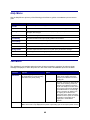
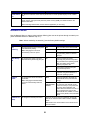
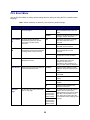
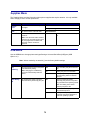
Understanding printer messages
The printer operator panel displays messages describing the current state of the printer and indicates
possible printer problems you must resolve. This topic provides a list of all printer messages, explains what
they mean, and tells you how to clear the messages.
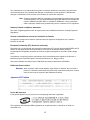
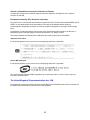
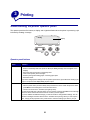
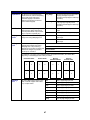
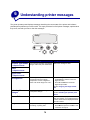
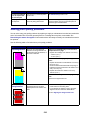
Ready
1 Menu 2
Select 3
Go5
Return4
Stop 6
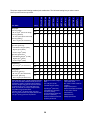
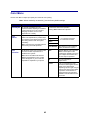
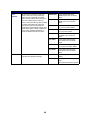
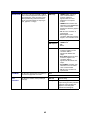
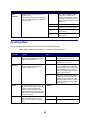
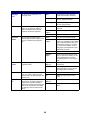
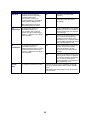
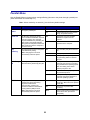
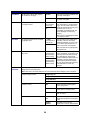
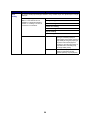
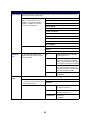
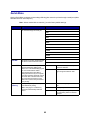
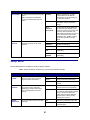
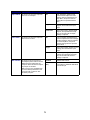
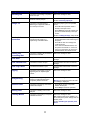
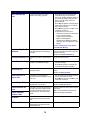
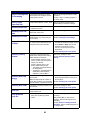
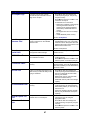
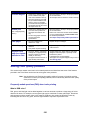
Message
What this message means
What you can do
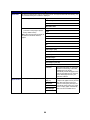
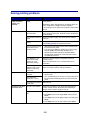
<Custom Type Name>
in <input source>
A tray has been inserted, and contains
the type and/or size print media listed.
Wait for the message to clear.
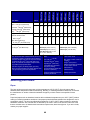
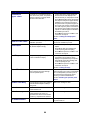
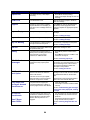
A color alignment procedure is in
progress and the user is being
prompted for a series of alignment
values. The values range from A to L.
• Enter the alignment value, and then
press Select to continue to the next
alignment value.
• Press Go or Return to cancel the
alignment procedure.
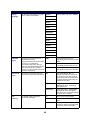
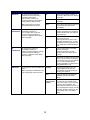
<size>
in <input source>
<type><size>
in <input source>
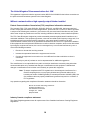
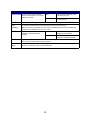
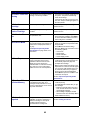
<x> Alignment
See also: Aligning the image transfer
unit
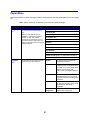
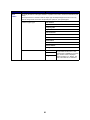
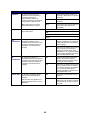
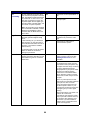
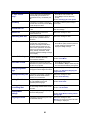
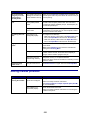
Activating Menu
Changes
The printer is activating changes made
to the printer settings.
Wait for the message to clear.
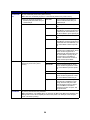
Bin <x> Full
The specified bin is full.
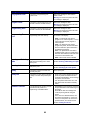
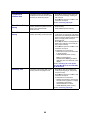
Remove the stack of paper from the bin to
clear the message. If you assigned the bin
a name, the bin name is displayed instead
of the bin number.
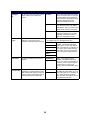
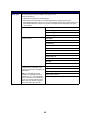
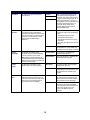
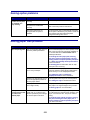
Busy
The printer is busy receiving,
processing, or printing data.
• Wait for the message to clear.
• Press Menu to open the Job Menu and
cancel the current job.
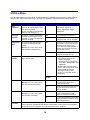
76
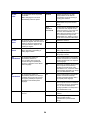
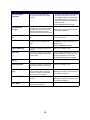
See also: Disabling the operator panel
menus