1
Phone at a Glance
All the pictures in this guide are for your reference only. Your
phone's actual display features may be different to those
described here, depending on its software version.
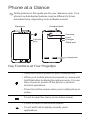
Earpiece
Headset jack
Camera
Flash
Volume
key
Charger
/Data port
Loudspeaker
Key Functions at Your Fingertips
• Press and hold to power on your mobile phone.
• When your mobile phone is powered on, press and
hold this button to display the options menu. You can
then choose to power off the phone or perform
shortcut operations.
• Press to lock the screen when your mobile phone is
active.
Touch to open the menu on an active screen.
• Touch to return to the Home screen.
• Touch and hold to display recently used
applications.