1
The clock must be set for the automatic oven timing
functions to work properly. The time of day cannot be
changed during a timed baking or self-cleaning cycle.
To Set the Clock:
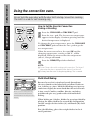
1 Press the CLOCK pad.
2 Press the + and – pads.
3 Press the CLOCK pad to start.
To Set the Timer:
The timer is a minute timer only.
The timer does not control oven
operations. The maximum setting on
the timer is 9 hours and 55 minutes.
1 Press the TIMER ON/OFF pad.
Press the + and – pads until the amount of time
2 you
want shows in the display. The timer will start
automatically within a few seconds of releasing
the pad.
To Reset the Timer:
If the display is still showing the time remaining, you
may change it by pressing the the + and – pads until the
time you want appears in the display.
To Cancel the Timer:
Press the TIMER ON/OFF pad once. To cancel the
timer press the TIMER ON/OFF pad again and hold
for 4 seconds.
or
Clear the tones by pressing the pad of the function you
are using.
If you would like to remove the signal that beeps every 6
seconds, press and hold the CLEAR/OFF pad for 10
seconds.
To return the signal, press and hold the CLEAR/OFF pad
for 10 seconds.
21
Customer Service
End of Cycle Tones
Troubleshooting Tips
If the remaining time is not in the display, recall the
remaining time by pressing the TIMER ON/OFF pad and
then pressing the the + and – pads until the new time
you want shows in the display.
Operating Instructions Installation Instructions
Make sure the clock is set to the
correct time of day.
Safety Information
Using the clock and timer.