1
7210 Server
System Manual
8505945.book Page i Thursday, March 9, 2000 2:13 PM
Contents
Preface . . . . . . . . . . . . . . . . . . . . . . . . . . . . . . . . . . . . . . . . . . . . . . . . . . . . . . . . . . . . . . v
Conventions used in this manual . . . . . . . . . . . . . . . . . . . . . . . . . . . . . . . . . . . . . . . v
Getting additional information . . . . . . . . . . . . . . . . . . . . . . . . . . . . . . . . . . . . . . . . . . vi
1 System Features . . . . . . . . . . . . . . . . . . . . . . . . . . . . . . . . . . . . . . . . . . . . . . . . 1
Standard features . . . . . . . . . . . . . . . . . . . . . . . . . . . . . . . . . . . . . . . . . . . . . . . . . . . 1
Front panel . . . . . . . . . . . . . . . . . . . . . . . . . . . . . . . . . . . . . . . . . . . . . . . . . . . . . . . . 2
Back panel . . . . . . . . . . . . . . . . . . . . . . . . . . . . . . . . . . . . . . . . . . . . . . . . . . . . . . . . . 4
Interior of system . . . . . . . . . . . . . . . . . . . . . . . . . . . . . . . . . . . . . . . . . . . . . . . . . . . . 6
System board . . . . . . . . . . . . . . . . . . . . . . . . . . . . . . . . . . . . . . . . . . . . . . . . . . . . . . 8
Hot-plug backplane . . . . . . . . . . . . . . . . . . . . . . . . . . . . . . . . . . . . . . . . . . . . . . . . . 11
Front panel board . . . . . . . . . . . . . . . . . . . . . . . . . . . . . . . . . . . . . . . . . . . . . . . . . . 13
2 System Setup . . . . . . . . . . . . . . . . . . . . . . . . . . . . . . . . . . . . . . . . . . . . . . . . . . 15
Setting up the server . . . . . . . . . . . . . . . . . . . . . . . . . . . . . . . . . . . . . . . . . . . . . . . .
Installing the outriggers and castors . . . . . . . . . . . . . . . . . . . . . . . . . . . . . . . . . . . .
Starting the server . . . . . . . . . . . . . . . . . . . . . . . . . . . . . . . . . . . . . . . . . . . . . . . . . .
Understanding the Power-On Self-Test . . . . . . . . . . . . . . . . . . . . . . . . . . . . . .
Setting up the operating system . . . . . . . . . . . . . . . . . . . . . . . . . . . . . . . . . . . .
Turning off the server . . . . . . . . . . . . . . . . . . . . . . . . . . . . . . . . . . . . . . . . . . . . . . .
Resetting the server . . . . . . . . . . . . . . . . . . . . . . . . . . . . . . . . . . . . . . . . . . . . . . . .
15
16
17
18
18
19
20
3 Case Access . . . . . . . . . . . . . . . . . . . . . . . . . . . . . . . . . . . . . . . . . . . . . . . . . . . 21
Preventing static electricity discharge . . . . . . . . . . . . . . . . . . . . . . . . . . . . . . . . . . .
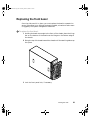
Opening the case . . . . . . . . . . . . . . . . . . . . . . . . . . . . . . . . . . . . . . . . . . . . . . . . . .
Opening the bezel door . . . . . . . . . . . . . . . . . . . . . . . . . . . . . . . . . . . . . . . . . .
Removing the front bezel . . . . . . . . . . . . . . . . . . . . . . . . . . . . . . . . . . . . . . . . .
Removing the side panel . . . . . . . . . . . . . . . . . . . . . . . . . . . . . . . . . . . . . . . . .
Closing the case . . . . . . . . . . . . . . . . . . . . . . . . . . . . . . . . . . . . . . . . . . . . . . . . . . .
Replacing the side panel . . . . . . . . . . . . . . . . . . . . . . . . . . . . . . . . . . . . . . . . .
Replacing the front bezel . . . . . . . . . . . . . . . . . . . . . . . . . . . . . . . . . . . . . . . . .
Closing the bezel door . . . . . . . . . . . . . . . . . . . . . . . . . . . . . . . . . . . . . . . . . . .
22
23
24
25
26
27
27
29
30
4 Replacing and Adding Internal Devices . . . . . . . . . . . . . . . . . . . . . . . . 31
Drives . . . . . . . . . . . . . . . . . . . . . . . . . . . . . . . . . . . . . . . . . . . . . . . . . . . . . . . . . . . .
Preparing to replace or add a drive . . . . . . . . . . . . . . . . . . . . . . . . . . . . . . . . .
Drive cabling information . . . . . . . . . . . . . . . . . . . . . . . . . . . . . . . . . . . . . . . . .
Replacing the diskette drive . . . . . . . . . . . . . . . . . . . . . . . . . . . . . . . . . . . . . . .
32
32
33
33
i
8505945.book Page ii Thursday, March 9, 2000 2:13 PM
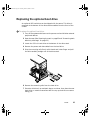
Replacing the optional boot drive . . . . . . . . . . . . . . . . . . . . . . . . . . . . . . . . . . .35
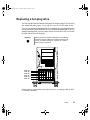
Replacing a hot-plug drive . . . . . . . . . . . . . . . . . . . . . . . . . . . . . . . . . . . . . . . . .37
Adding a hot-plug drive . . . . . . . . . . . . . . . . . . . . . . . . . . . . . . . . . . . . . . . . . . .41
Replacing the CD drive . . . . . . . . . . . . . . . . . . . . . . . . . . . . . . . . . . . . . . . . . . .46
Adding additional 5.25-inch devices . . . . . . . . . . . . . . . . . . . . . . . . . . . . . . . . .48
Memory . . . . . . . . . . . . . . . . . . . . . . . . . . . . . . . . . . . . . . . . . . . . . . . . . . . . . . . . . . .50
Replacing memory . . . . . . . . . . . . . . . . . . . . . . . . . . . . . . . . . . . . . . . . . . . . . . .50
Adding memory . . . . . . . . . . . . . . . . . . . . . . . . . . . . . . . . . . . . . . . . . . . . . . . . .52
Processors . . . . . . . . . . . . . . . . . . . . . . . . . . . . . . . . . . . . . . . . . . . . . . . . . . . . . . . .53
Replacing a processor . . . . . . . . . . . . . . . . . . . . . . . . . . . . . . . . . . . . . . . . . . . .53
Adding a processor . . . . . . . . . . . . . . . . . . . . . . . . . . . . . . . . . . . . . . . . . . . . . .56
Replacing the battery . . . . . . . . . . . . . . . . . . . . . . . . . . . . . . . . . . . . . . . . . . . . . . . .58
Expansion cards . . . . . . . . . . . . . . . . . . . . . . . . . . . . . . . . . . . . . . . . . . . . . . . . . . . .61
Replacing an expansion card . . . . . . . . . . . . . . . . . . . . . . . . . . . . . . . . . . . . . .61
Adding an expansion card . . . . . . . . . . . . . . . . . . . . . . . . . . . . . . . . . . . . . . . . .63
Power supplies . . . . . . . . . . . . . . . . . . . . . . . . . . . . . . . . . . . . . . . . . . . . . . . . . . . . .65
Replacing a redundant power supply module . . . . . . . . . . . . . . . . . . . . . . . . . .65
Replacing the redundant power supply . . . . . . . . . . . . . . . . . . . . . . . . . . . . . . .67
Replacing the PS/2 power supply . . . . . . . . . . . . . . . . . . . . . . . . . . . . . . . . . . .70
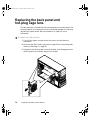
Replacing the back panel and hot-plug cage fans . . . . . . . . . . . . . . . . . . . . . . . . .72
Replacing the control panel board . . . . . . . . . . . . . . . . . . . . . . . . . . . . . . . . . . . . . .74
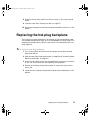
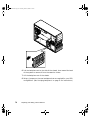
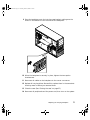
Replacing the hot-plug backplane . . . . . . . . . . . . . . . . . . . . . . . . . . . . . . . . . . . . . .75
Replacing the system board . . . . . . . . . . . . . . . . . . . . . . . . . . . . . . . . . . . . . . . . . . .78
5 Using the BIOS Setup Utility . . . . . . . . . . . . . . . . . . . . . . . . . . . . . . . . . . . .83
About the BIOS Setup utility . . . . . . . . . . . . . . . . . . . . . . . . . . . . . . . . . . . . . . . . . . .83
Updating the BIOS . . . . . . . . . . . . . . . . . . . . . . . . . . . . . . . . . . . . . . . . . . . . . . . . . .85
Setting the system board jumpers . . . . . . . . . . . . . . . . . . . . . . . . . . . . . . . . . . . . . .86
The CMOS Clear jumper . . . . . . . . . . . . . . . . . . . . . . . . . . . . . . . . . . . . . . . . . .86
Password Clear jumper . . . . . . . . . . . . . . . . . . . . . . . . . . . . . . . . . . . . . . . . . . .86
Recovery Boot jumper . . . . . . . . . . . . . . . . . . . . . . . . . . . . . . . . . . . . . . . . . . . .87
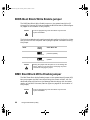
BIOS Boot Block Write Enable jumper . . . . . . . . . . . . . . . . . . . . . . . . . . . . . . .88
BMC Boot Block Write Enable jumper . . . . . . . . . . . . . . . . . . . . . . . . . . . . . . . .88
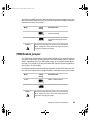
FRB Enable jumper . . . . . . . . . . . . . . . . . . . . . . . . . . . . . . . . . . . . . . . . . . . . . .89
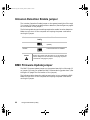
Intrusion Detection Enable jumper . . . . . . . . . . . . . . . . . . . . . . . . . . . . . . . . . . .90
BMC Firmware Update jumper . . . . . . . . . . . . . . . . . . . . . . . . . . . . . . . . . . . . .90
WOL Enable jumper . . . . . . . . . . . . . . . . . . . . . . . . . . . . . . . . . . . . . . . . . . . . . .91
6 Managing the Server . . . . . . . . . . . . . . . . . . . . . . . . . . . . . . . . . . . . . . . . . . . .93
Avoiding power source problems . . . . . . . . . . . . . . . . . . . . . . . . . . . . . . . . . . . . . . .93
Surge suppressors . . . . . . . . . . . . . . . . . . . . . . . . . . . . . . . . . . . . . . . . . . . . . . .93
Line conditioners . . . . . . . . . . . . . . . . . . . . . . . . . . . . . . . . . . . . . . . . . . . . . . . .94
Uninterruptible power supplies . . . . . . . . . . . . . . . . . . . . . . . . . . . . . . . . . . . . . .94
ii
8505945.book Page iii Thursday, March 9, 2000 2:13 PM
Maintain and manage your hard drive . . . . . . . . . . . . . . . . . . . . . . . . . . . . . . . . . . 94
Hard drive maintenance utility . . . . . . . . . . . . . . . . . . . . . . . . . . . . . . . . . . . . . 94
Hard drive management practices . . . . . . . . . . . . . . . . . . . . . . . . . . . . . . . . . . 95
Protecting the server against viruses . . . . . . . . . . . . . . . . . . . . . . . . . . . . . . . . . . . 98
System administration and control . . . . . . . . . . . . . . . . . . . . . . . . . . . . . . . . . . . . . 99
Intel Server Control (ISC) . . . . . . . . . . . . . . . . . . . . . . . . . . . . . . . . . . . . . . . . . 99
ManageX Event Manager . . . . . . . . . . . . . . . . . . . . . . . . . . . . . . . . . . . . . . . . . 99
Direct Platform Control (DPC) Console . . . . . . . . . . . . . . . . . . . . . . . . . . . . . 100
System security . . . . . . . . . . . . . . . . . . . . . . . . . . . . . . . . . . . . . . . . . . . . . . . . 100
System recovery . . . . . . . . . . . . . . . . . . . . . . . . . . . . . . . . . . . . . . . . . . . . . . . . . . 104
Creating a startup diskette . . . . . . . . . . . . . . . . . . . . . . . . . . . . . . . . . . . . . . . 104
Using your Server Companion CD . . . . . . . . . . . . . . . . . . . . . . . . . . . . . . . . . 104
7 Troubleshooting . . . . . . . . . . . . . . . . . . . . . . . . . . . . . . . . . . . . . . . . . . . . . . . 105
Introduction . . . . . . . . . . . . . . . . . . . . . . . . . . . . . . . . . . . . . . . . . . . . . . . . . . . . . .
Troubleshooting checklist . . . . . . . . . . . . . . . . . . . . . . . . . . . . . . . . . . . . . . . . . . .
Verifying your configuration . . . . . . . . . . . . . . . . . . . . . . . . . . . . . . . . . . . . . .
Troubleshooting guidelines . . . . . . . . . . . . . . . . . . . . . . . . . . . . . . . . . . . . . . .
CD problems . . . . . . . . . . . . . . . . . . . . . . . . . . . . . . . . . . . . . . . . . . . . . . . . . . . . .
Hard drive problems . . . . . . . . . . . . . . . . . . . . . . . . . . . . . . . . . . . . . . . . . . . . . . .
Memory and processor problems . . . . . . . . . . . . . . . . . . . . . . . . . . . . . . . . . . . . .
Modem problems . . . . . . . . . . . . . . . . . . . . . . . . . . . . . . . . . . . . . . . . . . . . . . . . . .
Peripheral/Adapter problems . . . . . . . . . . . . . . . . . . . . . . . . . . . . . . . . . . . . . . . . .
Printer problems . . . . . . . . . . . . . . . . . . . . . . . . . . . . . . . . . . . . . . . . . . . . . . . . . .
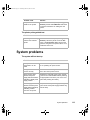
System problems . . . . . . . . . . . . . . . . . . . . . . . . . . . . . . . . . . . . . . . . . . . . . . . . . .
Video problems . . . . . . . . . . . . . . . . . . . . . . . . . . . . . . . . . . . . . . . . . . . . . . . . . . .
Error messages . . . . . . . . . . . . . . . . . . . . . . . . . . . . . . . . . . . . . . . . . . . . . . . . . . .
105
105
105
106
106
108
109
110
110
112
113
115
118
A Safety, Regulatory, and Notices . . . . . . . . . . . . . . . . . . . . . . . . . . . . . . . 123
B System Specifications . . . . . . . . . . . . . . . . . . . . . . . . . . . . . . . . . . . . . . . . 133
Environmental specifications . . . . . . . . . . . . . . . . . . . . . . . . . . . . . . . . . . . . . . . . .
System I/O addresses . . . . . . . . . . . . . . . . . . . . . . . . . . . . . . . . . . . . . . . . . . . . . .
Memory map . . . . . . . . . . . . . . . . . . . . . . . . . . . . . . . . . . . . . . . . . . . . . . . . . . . . .
Interrupts . . . . . . . . . . . . . . . . . . . . . . . . . . . . . . . . . . . . . . . . . . . . . . . . . . . . . . . .
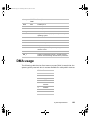
DMA usage . . . . . . . . . . . . . . . . . . . . . . . . . . . . . . . . . . . . . . . . . . . . . . . . . . . . . .
134
134
138
138
139
Index . . . . . . . . . . . . . . . . . . . . . . . . . . . . . . . . . . . . . . . . . . . . . . . . . . . . . . . . . . . . . . 141
iii
8505945.book Page iv Thursday, March 9, 2000 2:13 PM
iv
8505945.book Page v Thursday, March 9, 2000 2:13 PM
Preface
Conventions used in this manual
Throughout this manual, you will see the following conventions:
Convention
Description
ENTER
Keyboard key names are printed in small capitals.
CTRL+ALT+DEL
A plus sign means to press the keys at the same time.
Setup
Commands to be entered, options to select, and messages that
appear on your monitor are printed in bold.
User’s Guide
Names of publications are printed in italic.
Viewpoint
All references to front, rear, left, or right on the computer are based
on the computer being in a normal, upright position, as viewed from
the front.
Important
A note labeled important informs you of special
circumstances.
Caution
A caution warns you of possible damage to equipment or
loss of data.
Warning
A warning indicates the possibility of personal injury.
Conventions used in this manual
v
8505945.book Page vi Thursday, March 9, 2000 2:13 PM
Getting additional information
Log on to the Gateway technical support at www.gateway.com/support to find
information about your system or other Gateway products. Some types of
information you can access are:
vi
■
Hardware driver and program updates
■
Technical tips
■
Service agreement information
■
Technical documents and component information
■
Frequently asked questions (FAQs)
■
Documentation for peripherals or optional components
■
Online technical support
Preface
8505945.book Page 1 Thursday, March 9, 2000 2:13 PM
1
System
Features
Standard features
■
As many as two Intel® Pentium III processors with 100 MHz Front Side
Bus (FSB) in Slot 1 processor sockets
■
Four Dual Inline Memory Module (DIMM) sockets, that support up to
2.0 GB of PC100 Synchronous Dynamic Random Access Memory
(SDRAM).
■
Intel 440GX chipset
■
Integrated Intel 82559 network controller providing 10/100 LAN support
■
Integrated Super Vector Graphics Array (SVGA) video support with 2 MB
of Synchronous Graphics RAM (SGRAM)
■
Six PCI slots and one ISA slot for expansion cards
■
ATX form factor system board and convertible tower/rack-mount chassis
■
One 3.5 inch 1.44 MB diskette drive, one CD drive, and at least one hard
drive
■
Integrated voltage regulator modules (VRMs) for both processors
■
Integrated Adaptec AIC 7896 dual function controller providing both
low-voltage differential (LVD) Ultra2 small computer systems interface
(SCSI) and Ultra Wide single-ended (SE) SCSI support
■
Six drive hot-plug cage
■
Keyboard port (PS/2), mouse port (PS/2), two serial ports, parallel port,
video port, RJ-45 LAN port, and two Universal Serial Bus (USB) ports
Standard features
1
8505945.book Page 2 Thursday, March 9, 2000 2:13 PM
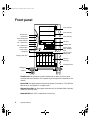
Front panel
5.25” drive bay
5.25” drive bay
Chassis lock
Power LED
Disk activity LED
Reserved LED
PS 1 status LED
PS 2 status LED
Reset button
Power button
Reserved
5.25” drive bay
CD drive
Diskette drive
Power supply
alarm speaker
reset
Hot-plug drive
activity LED
Hot-plug drive lock
Hot-plug
drive bay
Front panel door
Outriggers
Castors
Chassis lock that prevents unauthorized access to both the front panel
controls and to the interior of the system by locking the front bezel onto the
chassis.
Power LED that glows green whenever the system is turned on. The LED also
flashes when the system is in sleep mode.
Disk activity LED that glows green whenever any of the hard disks is actively
reading or writing data.
Reserved LED this LED is reserved for future use.
2
System Features
8505945.book Page 3 Thursday, March 9, 2000 2:13 PM
PS1 status LED that glows green when the first power supply module in the
redundant power supply is installed and working correctly. It flashes green if
the power supply module fails or one of its power levels goes out of bounds.
If the power supply module is not installed, this LED is off. The LED is only
active on systems using the Redundant N+1 power supply.
PS2 status LED that glows green when the second power supply module in
the redundant power supply is installed and working correctly. It flashes green
if the power supply module fails or one of its power levels goes out of bounds.
If the power supply module is not installed, this LED is off. The LED is only
active on systems using the Redundant N+1 power supply.
System reset button is a recessed button that lets you reset the server if it
has become nonresponsive.
Power button turns the server on and off. In an ACPI-enabled operating
system like Windows 2000, you can set the power button to enter sleep mode
rather than turning the system off.
Reserved LEDs these LEDs are reserved for future use.
Hot-plug drive lock secures the drive in place to prevent unauthorized or
accidental removal.
The outriggers provide support for the castors.
Castors let you roll the server around for ease of service.
5.25-inch drive bays (3) to let you install additional 5.25-inch devices such
as tape drives or an additional CD drive.
CD drive plays data or audio CDs
Diskette drive writes to and reads from 3.5-inch, 1.44 MB diskettes.
Power alarm speaker reset disables the power supply alarm speaker. The
alarm is not cleared and the appropriate LED continues to flash until the failed
power supply module is replaced. The alarm is only active on systems using
the N+1 redundant power supply.
Hot-plug drive activity LED that indicates when the hot-plug drive
immediately below it is reading or writing data.
Hot-plug drives up to six hot-swappable hot-plug drives connected to a
hot-plug backplane.
Front panel door covers the front panel controls to prevent unauthorized or
accidental access.
Front panel
3
8505945.book Page 4 Thursday, March 9, 2000 2:13 PM
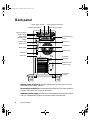
Back panel
Power supply module
Module power switch
Power connector
Power supply
cable clamp
Module power
switch
Keyboard port
Power supply module LED
Power supply module
Redundant power
supply
Mouse port
Serial port A
Parallel port
Serial port B
Network port
USB ports
Video port
Expansion
card slots
Expansion card
retention clips
Kensington
lock slot
Module power switches (2) provide independent power control for each
redundant power supply module.
Power supply modules (2) provide redundant power and hot-swap capability
to power the server with minimal downtime.
Redundant power supply provides two hot-swappable power supply modules
that can independently support the server’s power requirements.
4
System Features
8505945.book Page 5 Thursday, March 9, 2000 2:13 PM
PS/2 power supply (not shown) provides sufficient power to run the server
at a reduced cost.
Mouse port connects a PS/2-compatible mouse.
Parallel port connects a printer or other parallel device.
Network port lets you connect to a network. The adjacent indicator LEDs
show LAN activity (yellow) and 100 Mbit speed (green).
Expansion card slots (7) allow you to install up to four 32-bit, 33 MHz PCI
expansion cards, two 32-bit, 66 MHz PCI expansion cards, and one ISA
expansion card.
Expansion card retention clips (7) allow screwless retention of the
expansion cards for ease of maintenance and installation.
Kensington lock slot lets you install a security cable and lock.
Video port connects the first (or only) monitor interface cable. The video
controller is integrated in the system board.
USB ports connect external Plug-and-Play devices, such as printers and
pointing devices, that are automatically configured when they are plugged
into the computer through one of these ports. USB keyboards and mice are
not supported.
Serial ports (2) connect to serial devices.
Keyboard port connects a PS/2-compatible keyboard.
Power supply cable clamp secures the power supply cords so that they are
not accidentally pulled from the power supply.
Power connector connects the computer power cord. The other end of the
power cord plugs into an AC outlet or power strip.
Back panel
5
8505945.book Page 6 Thursday, March 9, 2000 2:13 PM
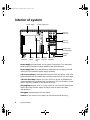
Interior of system
Power supply
Power supply fans
5.25-inch
drive bays
3.25-inch
drive bays
Hot-plug bays
(Hot-plug cage)
Outriggers
Castors
Back
panel fan
System
board
System
board
tray
Hot-plug
cage fan
Hot-plug
backplane
Power supply provides power to the system components. The redundant
power supply provides hot-swap capability and fault tolerance.
Power supply fans (only available with redundant power supply) provide
cooling for the redundant power supply modules.
5.25-inch drive bays provide space for up to four 5.25-inch drives. A CD drive
comes standard with the system and occupies one of the 5.25-inch drive bays.
3.25-inch drive bays support up to two 3.25-inch drives. A diskette drive
comes standard with the system and occupies one 3.25-inch drive bay. A hard
drive is typically installed in the second drive bay.
Hot-plug bays support up to six 1-inch high 3.25-inch SCA SCSI hard drives.
Empty drive bays contain empty carriers to control airflow and EMC
characteristics.
Outriggers provide support for the castors.
Castors let you move the unit easily for maintenance and servicing.
6
System Features
8505945.book Page 7 Thursday, March 9, 2000 2:13 PM
Hot-plug backplane provides the control for the hot-plug drives.
Hot-plug cage fan provides cooling for the hot-plug drives and other internal
components.
System board tray supports the system board and makes it easier to remove
and install.
System board see “System board” on page 8.
Back panel fan provides cooling for system board components and additional
cooling for the power supply.
Interior of system
7
8505945.book Page 8 Thursday, March 9, 2000 2:13 PM
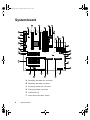
System board
B
D
F
C
A
E
H
G
AL
AK
J
AJ
I
L
K
AI
AH
AG
M
AF
N
AE
O
AD
P
AC
Q
R
AB
S
T
Y
AA
Z
W
X
A Secondary processor fan connector
B Secondary processor connector
C Primary processor fan connector
D Primary processor connector
E DIMM slots (4)
F
8
Main power connector, 24-pin
System Features
U
V
8505945.book Page 9 Thursday, March 9, 2000 2:13 PM
G Auxiliary power connector, 10-pin (not used)
H ATX auxiliary power connector, 6-pin
I
Fan connector (not used)
J
Diskette drive connector
K Primary IDE connector
L
Secondary IDE connector
M ATX front panel connector
N Front panel connector, 16-pin
O Battery
P Isolated server management (ISOL) intelligent management bus
(IMB) connector (not used)
Q Jumper J4J2 (BMC boot block write enable)
R Jumper block (jumper J3J1)
S Jumper block (jumper J2J1)
T
Fan connector (hot-plug drive bay fan)
U Server monitor module (SMM) feature connector
V Ultra wide SCSI connector
W Ultra2 SCSI connector
X Hard drive LED connector
Y ISA connector
Z
Intelligent chassis management bus (ICMB) connector (not used)
AA Chassis intrusion connector (not used, chassis intrusion is
communicated through the front panel connector)
AB PCI 32-bit, 33 MHz connectors
AC Fan connector (back panel fan)
AD PCI 32-bit, 66 MHz connectors
AE Wake on LAN jumper
System board
9
8505945.book Page 10 Thursday, March 9, 2000 2:13 PM
AF Video connector
AG Dual USB connectors
AH RJ-45 Ethernet LAN connector and LEDs
AI
Serial Port A
AJ
Parallel port
AK Serial port B
AL Stacked keyboard and mouse ports
10
System Features
8505945.book Page 11 Thursday, March 9, 2000 2:13 PM
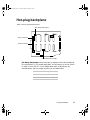
Hot-plug backplane
Back of the hot-plug backplane board
JP5: Delay start jumper
Power connector
SCSI connector
JP6: Termination jumper
JP5: Delay start jumper controls the spin-up sequence of the drives attached
to the backplane. If you enable delay start, the drives spin up one at a time
in order of their SCSI ID. If you disable delay start, all drives spin up
simultaneously. Set the jumper according to the table below.
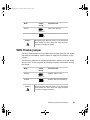
Position
Description
On (default)
Enables delay start
Off
Disables delay start
Hot-plug backplane
11
8505945.book Page 12 Thursday, March 9, 2000 2:13 PM
JP6: Termination jumper enables or disables termination for the backplane.
The backplane is designed to occupy one end of the bus and is usually
terminated. If you configure the SCSI bus so the backplane is not at the end
of the bus, disable termination. Set the jumper according to the table below.
Position
Description
On
Termination is disabled
Off (default)
Termination is enabled
SCSI connector provides the point of connection for the SCSI cable from the
RAID controller.
Power connector provides the point of connection for the power cable from
the power supply.
Front of the hot-plug backplane board
Reserved LED (6) Drive activity LED (6)
SCA SCSI drive connector (6)
SCSI ID 2
SCSI ID 5
SCSI ID 1
SCSI ID 4
SCSI ID 0
SCSI ID 3
Reserved LED (6) reserved for future use.
Drive activity LED (6) glows green when the drive is actively reading or
writing data.
SCA SCSI drive connector (6) provides the single point of connection for
the six SCA SCSI drives.
12
System Features
8505945.book Page 13 Thursday, March 9, 2000 2:13 PM
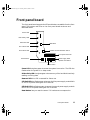
Front panel board
The front panel board supports the LEDs and buttons accessible from the front
panel. The buttons and LEDs on the front panel board are shown and
described below.
Power LED
Disk activity LED
Reserved LED
NMI button
PS 1 status LED
PS 2 status LED
Chassis intrusion detection switch
Front panel connector
Power supply alarm
speaker reset button
Reset button
Power button
Power LED that glows green whenever the system is turned on. The LED also
flashes when the system is in sleep mode.
Disk activity LED that glows green whenever any of the hard disks is actively
reading or writing data.
Reserved LED this LED is reserved for future use.
PS1 fault LED that flashes green whenever the first power supply module fails
or one of its power levels goes out of bounds.
PS2 fault LED that flashes green whenever the second power supply module
fails or one of its power levels goes out of bounds.
Reset button lets you reset the server if it has become nonresponsive.
Front panel board
13
8505945.book Page 14 Thursday, March 9, 2000 2:13 PM
Power button turns the server on and off. In an ACPI-enabled operating
system like Windows 2000, you can set the power button to enter sleep mode
rather than turning the system off.
Power supply alarm speaker reset button disables the power supply alarm
speaker. The alarm is not cleared and the appropriate LED continues to glow
until the failed power supply module is replaced. The alarm is only active on
systems using the N+1 redundant power supply.
NMI button allows a technician servicing the server to generate a
non-maskable interrupt (NMI) to help debug server errors.
Chassis intrusion detection switch sends a message to the system
management hardware logging an event when the front bezel is removed.
Front panel connector connects the controls on the front panel with the
system board.
14
System Features
8505945.book Page 15 Thursday, March 9, 2000 2:13 PM
2
System Setup
Setting up the server
Use the instructions on the quick guide poster that came with the server to
assemble the server.
You can prepare a safer working environment before assembling the server
by following these guidelines:
■
Use a clean, flat, and stable surface for the server. Allow at least 12 inches
at the rear of the computer for cabling and air circulation.
■
Obtain an adequately rated uninterruptible power supply (UPS). A UPS
protects against AC line spikes, power interruptions, and other power
fluctuations that may damage the server.
■
Protect the server from extreme temperature and humidity. Do not
expose it to direct sunlight, heater ducts, or other heat-generating objects.
■
Keep the computer away from equipment that generates magnetic fields,
such as unshielded stereo speakers. Even a telephone placed too close to
the computer may cause interference.
■
Plug the computer into a wall outlet, power strip, or uninterruptible
power supply (UPS). Make sure the power cords are secured in the power
supply cable clamp on the back panel.
Important
Keep the boxes and packing material. If you need to send
the computer to Gateway for repairs, you must use the
original packaging or your warranty may be voided.
Setting up the server
15
8505945.book Page 16 Thursday, March 9, 2000 2:13 PM
Installing the outriggers and castors
The tower chassis is shipped with small rubber feet to prevent it from slipping
and to minimize vibrations when the chassis is placed on a desktop. However,
if you intend to place the chassis on the floor, you may find it easier to
maintain the system if it has castors and can be rolled out for easier access.
To install the outriggers and castors:
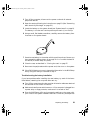
1 Gently turn the chassis upside down, placing it on the top panel.
2 Align the outriggers and castors with the slots on the bottom panel of
the chassis.
16
System Setup
8505945.book Page 17 Thursday, March 9, 2000 2:13 PM
3 Place the tabs on the outriggers into the corresponding slots on the
bottom panel and slide the outriggers toward the ends of the chassis.
4 Carefully return the chassis to the upright position.
Starting the server
Before you start the server for the first time:
■
The redundant power supply is autosensing. It automatically determines
the voltage of the incoming power source and compensates accordingly.
The optional PS/2 power supply has a voltage selector switch. Make sure
that the voltage selector switch on the PS/2 power supply is set to the
correct voltage for your area.
■
Make sure all cables are firmly connected to the proper ports on the back
panel of the computer.
Caution
Electricity can flow from connected peripherals into the
system causing a shock. Make sure the server and
peripherals are turned off and unplugged from the power
outlet when you connect peripherals to the computer.
■
Make sure that both power supply modules in the redundant power
supply are turned on. (The PS/2 power supply does not need to be turned
on separately.)
■
Make sure the computer and monitor are plugged into an AC outlet,
power strip, or UPS and that the power strip or UPS is turned on.
To start the system:
1 If you have connected the system components to a power strip or UPS,
make sure all the system components are turned off, then turn on the
power strip or UPS.
2 Turn on the monitor.
3 Turn on the computer. Make sure the individual power buttons on the
power supply modules are turned on. The light-emitting diodes (LED) in
the power button and on each power supply module are on when the
power is on.
Starting the server
17
8505945.book Page 18 Thursday, March 9, 2000 2:13 PM
4 Turn on any other components connected to the computer, such as
speakers, a printer, or a scanner.
If nothing happens when you turn on the system:
■
Make sure that the power cables are securely plugged in and that
the power strip or UPS (if you are using one) is plugged in and
turned on.
■
Make sure the monitor is connected to the computer, plugged into
the power strip, AC outlet, or UPS, and turned on. You may also
need to adjust the brightness and contrast controls on the monitor.
Understanding the Power-On Self-Test
When you turn on your computer, the power-on self-test (POST) routine
checks the system memory and components. To see this information on the
screen, press ESC during POST. Press SPACEBAR to bypass the remaining memory
count.
The system displays an error message if POST finds any problems. Write down
any error messages that you see. If you continue to have problems, these error
messages may help you or Gateway technical support diagnose the cause.
Setting up the operating system
The first time you start the server, the operating system takes a few minutes
to set up.
Refer to your operating system documentation for specific questions regarding
the operating system.
To complete the operating system setup:
1 After the computer starts, the start-up wizard opens. Continue by clicking
Next.
2 Type the requested information in the appropriate text boxes. When you
have finished typing the information, continue by clicking Next.
3 Continue following the instructions and selecting options in the start-up
wizard dialog boxes, clicking Next to move through the dialog boxes, until
the wizard tells you to restart your computer.
18
System Setup
8505945.book Page 19 Thursday, March 9, 2000 2:13 PM
4 If you need to return to the previous dialog box to change any of your
entries, click Back.
5 Restart the server. The setup is complete.
Important
For other operating systems, such as Windows® 2000 or
Novell® Netware, refer to the appropriate operating system
software manual.
Turning off the server
Every time you turn off the server, shut down the operating system first. You
may lose data if you do not follow the proper procedure.
To turn off the server in Windows NT:
1 Click Start, then select Shut down the computer?, then Shut Down.
2 Click OK. The operating system shuts down. When you see a message
saying It is now safe to turn off your computer, turn off the computer by
pressing the power button.
3 Turn off the monitor and peripherals.
Important
For other operating systems, such as Windows 2000 or
Novell Netware, refer to the appropriate operating system
software manual.
Warning
When you turn the computer off, some electric current still
flows through it. Before opening the computer case or
connecting or removing any peripherals, turn off the
computer, then unplug the power cord.
Turning off the server
19
8505945.book Page 20 Thursday, March 9, 2000 2:13 PM
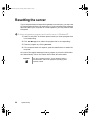
Resetting the server
If your computer does not respond to keyboard or mouse input, you may have
to close programs that are not responding. If closing unresponsive programs
does not restore your computer to normal operation, you may have to reset
the system.
To close unresponsive programs and reset the server in Windows NT:
1 Press CTRL+ALT+DEL. A window opens that lets you close a program that
is not responding.
2 Click Task Manager, then select the program that is not responding.
3 Close the program by clicking End Task.
4 If the computer does not respond, press the reset button to restart the
computer.
As a part of the regular startup process, a program to check the disk status
runs automatically. When the checks are finished, Windows starts.
Important
20
System Setup
For other operating systems, such as Windows 2000 or
Novell Netware, refer to the appropriate operating system
software manual.
8505945.book Page 21 Thursday, March 9, 2000 2:13 PM
Case Access
3
The Gateway 7210 Server is designed as a toolless chassis. None of the normal
user-serviceable parts require a tool of any kind to remove, install, or replace.
In some cases, where the pieces fit very tightly, a tool may make the job easier.
The various clips, tabs, thumbscrews, and other devices that allow toolless
construction are color-coded in green to show you where they are. Most of
these devices are either self-explanatory or very easy to figure out.
When in doubt, the steps and illustrations provided in this manual show you
the way to remove any device you may need to replace.
21
8505945.book Page 22 Thursday, March 9, 2000 2:13 PM
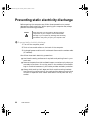
Preventing static electricity discharge
Before opening the computer case, follow these precautions to prevent
damage from static electricity. When opening your computer case, always
perform the following procedure.
Caution
Static electricity can permanently damage electronic
components in your computer. Prevent electrostatic
damage to your computer by following static electricity
precautions every time you open your computer case.
To prevent static electricity discharge:
1 Turn off the computer power.
2 Touch a bare metal surface on the back of the computer.
3 Unplug all power cords from AC outlets and disconnect the modem cable
(if installed).
Also follow these static electricity precautions:
22
■
Avoid static-causing surfaces such as plastic and packing foam in your
work area.
■
Remove the parts from their antistatic bags or containers only when you
are ready to use them. Do not lay parts on the outside of an antistatic
bag or container because only the inside provides antistatic protection.
■
Always hold cards by their edges and their metal mounting brackets.
Avoid touching components on the cards and the edge connectors that
connect to expansion slots. Never slide cards or other parts over any
surface.
Case Access
8505945.book Page 23 Thursday, March 9, 2000 2:13 PM
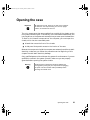
Opening the case
Important
All references to front, back, left, or right on the computer
are based on the computer being in a normal, upright
position, as viewed from the front.
The only components that are accessible from outside of the chassis are the
front panel indicator lights. To access any of the removable media drives, the
hot-plug drives, or the power and reset switches you must open the bezel door.
To work on the internal components of the computer, you must open the
chassis, which has two removable parts:
■
A bezel that covers the front of the chassis
■
A side panel that permits access to the interior of the case
Because the components inside the computer are extremely sensitive to static
electricity, make sure you follow the precautions at the beginning of this
chapter to avoid static electricity damage.
Only qualified personnel should open the system for maintenance. If you are
qualified to maintain the system yourself, make sure you are properly
grounded before opening the system chassis.
Warning
Avoid exposure to dangerous electrical voltages and
moving parts by turning off your computer and unplugging
the power cord and modem cable (if installed) before
removing the chassis cover.
Opening the case
23
8505945.book Page 24 Thursday, March 9, 2000 2:13 PM
Opening the bezel door
The bezel door covers the removable media drives, the hot-plug drives, and
the front panel controls. To access these components, you must open the bezel
door.
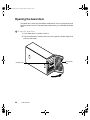
To open the bezel door:
1 If the bezel door is locked, unlock it.
2 Grip the bezel door handle next to the front panel indicator lights and
pull the door open.
Chassis lock
24
Case Access
Front panel
door
8505945.book Page 25 Thursday, March 9, 2000 2:13 PM
Removing the front bezel
The locking front bezel provides secure access to the system components. You
must unlock and remove the front bezel before you can remove the side panel
and access the interior of the system.
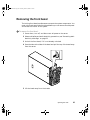
To remove the front bezel:
1 Power down, turn off, and disconnect all power to the server.
2 Observe all safety and static electricity precautions, see “Preventing static
electricity discharge” on page 22.
3 Unlock the front bezel, if it is not already unlocked.
4 Press the tabs at the sides of the bezel and pull the top of the bezel away
from the server.
5 Lift the bezel away from the chassis.
Opening the case
25
8505945.book Page 26 Thursday, March 9, 2000 2:13 PM
Removing the side panel
The side panel cannot be removed unless the front bezel has already been
removed. The side panel provides access to all of the internal components of
the server.
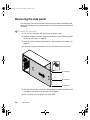
To remove the side panel:
1 Turn off the computer and disconnect all power cords.
2 Observe all safety and static electricity precautions, see “Preventing static
electricity discharge” on page 22.
3 Remove the front bezel as described in “Removing the front bezel” on
page 25.
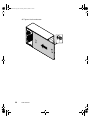
4 Loosen the three thumbscrews from the left side of the front panel.
Thumbscrew
Thumbscrew
Thumbscrew
5 Slide the side panel to the front, disengaging the retaining tabs on the
top edge of the panel from the top of the chassis.
6 Lift the panel out and away from the chassis.
26
Case Access
8505945.book Page 27 Thursday, March 9, 2000 2:13 PM
Closing the case
Close the chassis as soon as you finish installing or removing components
so that dust and dirt do not collect inside the computer.
Replacing the side panel
Closing the side panel covers the internal components. You must close the
side panel and replace the front bezel before you can operate the server. If
you do not, a system intrusion event is logged by the system management
hardware. Be careful not to pinch any cables in the panel as you replace it.
To replace the side panel:
1 Hold the side panel at an angle to the chassis and 3/4-inch forward.
Engage the retaining tabs on the bottom edge of the panel with the slots
at the bottom edge of the chassis.
2 Swing the top of the panel toward the chassis, engaging the retaining
tabs on the top edge of the side panel with the slots on the chassis.
3 Slide the panel toward the back of the chassis 3/4-inch, securing it in
place.
Closing the case
27
8505945.book Page 28 Thursday, March 9, 2000 2:13 PM
4 Tighten the thumbscrews.
28
Case Access
8505945.book Page 29 Thursday, March 9, 2000 2:13 PM
Replacing the front bezel
Once the side panel is in place, you must replace the bezel to operate the
server. If the server is run without the bezel installed, a chassis intrusion event
is logged by the system management hardware.
To replace the front bezel:
1 Holding the bezel at an angle to the front of the chassis, place the hinge
slot on the bottom of the bezel over the flange on the bottom edge of
the chassis.
2 Swing the top of the bezel toward the chassis until the retaining tabs snap
into place.
3 Lock the front panel lock, if necessary.
Closing the case
29
8505945.book Page 30 Thursday, March 9, 2000 2:13 PM
Closing the bezel door
Close the bezel door to prevent accidental or unauthorized access to the server
controls, hot-plug drives, and removable media drives.
To close the bezel door:
1 Swing the bezel door to the left and press it firmly into place.
2 Lock it if necessary.
30
Case Access
8505945.book Page 31 Thursday, March 9, 2000 2:13 PM
Replacing and
Adding Internal
Devices
4
The Gateway 7210 Server is designed as a toolless chassis. None of the normal
user-serviceable parts require a tool of any kind to remove, install, or replace.
In some cases, where the pieces fit very tightly, a tool may make the job easier.
The various clips, tabs, thumbscrews, and other devices that allow toolless
construction are color-coded in green to show you where they are. Most of
these devices are either self-explanatory or very easy to figure out.
When in doubt, the steps and illustrations provided in this manual show you
the way to remove any device you may need to replace.
31
8505945.book Page 32 Thursday, March 9, 2000 2:13 PM
Drives
There are several types of drives and similar devices that can be installed in
the server. All drives are easy to install and require no tools to replace.
Preparing to replace or add a drive
One 3.5-inch diskette drive, one 3.5-inch hot-plug hard drive, and one CD
drive are included with the computer. You can add additional drives of the
following types:
■
1-inch high, 3.5-inch hot-plug drives.
■
Half-height 3.5-inch hard drives - The system board has two IDE
connectors that support as many as two drives each. IDE drives include
the IDE CD drive.
■
Half-height 5.25-inch devices.
As you prepare to install drives, keep the following in mind:
32
■
If you remove a drive, place it in an antistatic bag or container.
■
Before you install a drive, see the drive documentation for information
on configuring the drive, setting any jumpers on the drive, and attaching
cables to the drive.
■
If you are installing a drive that uses an add-in controller, install the
expansion card before you install the drive.
■
IDE hard drives can be configured as single, master, or slave. IDE
CD drives can be configured as master or slave. Configure the drives by
using the drive-select jumpers located on the drives.
■
If only one drive is attached to a controller cable, configure the drive as
single if it is a hard drive or master if it is a CD-ROM drive. If two drives
of any type are attached to the cable, configure one as master and one
as slave.
■
You may need to configure the drives you install using the BIOS Setup
utility. Select F2 at start up to open the BIOS Setup utility.
Replacing and Adding Internal Devices
8505945.book Page 33 Thursday, March 9, 2000 2:13 PM
Drive cabling information
The system includes five different types of drive cables. Each drive cable is
clearly labeled, indicating the cable type and showing which end to connect
to the appropriate connector on the system board and which end to connect
to the drive.
■
Use the diskette drive connector cable to connect the diskette drive.
■
Use the standard IDE connector cable to connect IDE devices such as
CD drives and standard IDE hard drives.
■
Use the IDE DMA-66 cable to connect DMA-66-compatible hard drives.
■
Use the SCSI SE cable to connect single-ended SCSI devices. This cable
requires termination, either on the device or as a plug-in terminator on
the cable.
■
Use the SCSI LVD cable to connect the hot-plug backplane to the
integrated SCSI controller on the system board.
Replacing the diskette drive
The diskette drive is near the bottom of the stack of drive bays. If the diskette
drive included with the system fails, replace the drive.
To replace the diskette drive:
1 Turn off the system and disconnect the power cord and all other external
peripheral devices.
2 Open the case. (See “Opening the case” on page 23 and “Preventing static
electricity discharge” on page 22.)
3 Locate the 3.5-inch diskette drive.
4 Remove the power and data cables from the back of the drive, noting
their locations and orientations. (You will reconnect these cables after you
install the new drive.)
The 3.5-inch diskette drive is secured in the chassis by a set of removable
rails. The rails let the drive slide into and out of the guides in the front
bay.
Drives
33
8505945.book Page 34 Thursday, March 9, 2000 2:13 PM
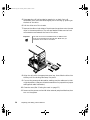
5 Disengage the rail locking tabs by pressing in on both front rail
extensions, then move the drive slightly out of the bay by pushing on
the back of the drive.
6 Pull the drive out of the chassis.
7 Remove the rails on both sides of the drive and snap them onto the new
drive in the same positions. The rails are labeled. Make sure the front
rail extensions are towards the front of the drive.
Important
The rails on the 3.5-inch diskette drive are different from
those on the hard drive and the CD drive. Make sure you
install the correct rails on each drive.
8 Align the rails with the appropriate open bay, then slide the drive into
the bay until the locking tabs snap into place.
9 Connect the power and data cables, making sure the cables are in their
original positions. (See your drive documentation for proper drive jumper
settings and cable orientation.)
10 Close the case. (See “Closing the case” on page 27.)
11 Reconnect the power cord and all other external peripheral devices, then
turn on the system.
34
Replacing and Adding Internal Devices
8505945.book Page 35 Thursday, March 9, 2000 2:13 PM
Replacing the optional boot drive
An optional IDE hard drive can be shipped with the server. This drive is
mounted at the bottom of the drive stack accessible from the front of the
chassis.
To replace the optional boot drive:
1 Turn off the system and disconnect the power cord and all other external
peripheral devices.
2 Open the case. (See “Opening the case” on page 23 and “Preventing static
electricity discharge” on page 22.)
3 Locate the 3.5-inch hard drive at the bottom of the drive stack.
4 Remove the power and data cables from the hard drive.
5 Grip the mounting rails firmly with thumb and index finger and pull
the drive carefully straight out of the drive stack.
6 Remove the mounting rails from the hard drive.
7 Place the old drive in an antistatic bag or container, then place the new
hard drive on a static-free surface with the top up and the connectors
facing you.
Drives
35
8505945.book Page 36 Thursday, March 9, 2000 2:13 PM
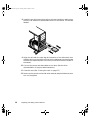
8 Install the two drive mounting rails to the new hard drive, making sure
the front rail extensions are towards the front of the device. The rails are
labeled.
9 Align the rails with the open bay at the bottom of the drive stack, then
slide the drive into the stack until the locking tabs snap into place (make
sure that the data and power connectors on the drive face the inside of
the server).
10 Connect the power and data cables to the drive. (See the drive
documentation for proper cable orientation.)
11 Close the case. (See “Closing the case” on page 27.)
12 Reconnect the power cord and all other external peripheral devices, then
turn on the system.
36
Replacing and Adding Internal Devices
8505945.book Page 37 Thursday, March 9, 2000 2:13 PM
Replacing a hot-plug drive
The hot-plug drives are located at the bottom of the front panel. The hot-plug
bay supports as many as six 1-inch high 3.5-inch SCA-II SCSI hard drives.
The hot-plug drives are assigned SCSI ID numbers by the hot-plug backplane
with the drive at the far left side of the hot-plug bay assigned SCSI ID 0. The
backplane assigns SCSI IDs to the other drives in order up to SCSI ID 5 at the
far right side of the hot-plug bay.
Important
SCSI
SCSI
SCSI
SCSI
SCSI
SCSI
ID
ID
ID
ID
ID
ID
Gateway tests and verifies the operation and compatibility
of the drives we sell. Additional or replacement drives must
conform to Gateway standards, especially in a RAID or
mission-critical environment.
0
1
2
3
4
5
Install drive in the left-most drive bay first and in increasing order by SCSI
ID number thereafter.
Drives
37
8505945.book Page 38 Thursday, March 9, 2000 2:13 PM
To replace a failed drive:
1 Before you remove the failed drive, use the appropriate software and
utilities installed on the system to stop all activity on the failed drive.
Instructions for using the software are provided by the software
manufacturer.
2 Use the utilities to determine which drive needs to be replaced.
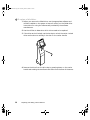
3 If the drive carrier is locked, use the hex key to unlock the carrier. Locked
drive carriers show a red flag in the slot on the carrier handle.
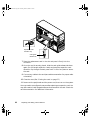
4 Remove the drive from the drive bay by pressing down on the carrier
handle and rotating the handle out and down from the front of the server.
38
Replacing and Adding Internal Devices
8505945.book Page 39 Thursday, March 9, 2000 2:13 PM
5 Continue pulling outward until the drive is entirely out of the system.
Drives
39
8505945.book Page 40 Thursday, March 9, 2000 2:13 PM
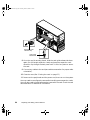
6 Remove the four screws that secure the drive to the carrier, then remove
the drive.
7 Install the new drive in the carrier using the four screws you removed
in Step 6.
8 Align the drive rails with the slots at the top and bottom of the drive
bay. Leave the handle in the down position.
9 Push the drive all of the way into the drive bay until the handle starts
to close because of contact with the front of the chassis. Make sure the
hooks on the bottom of the handle latch over the edge of the drive bay
and firmly close the handle.
10 Lock the drive carrier with the hex key.
40
Replacing and Adding Internal Devices
8505945.book Page 41 Thursday, March 9, 2000 2:13 PM
11 Run any necessary utilities to inform the system that the new drive is
installed and ready for use. See the utility software documentation for
details.
Adding a hot-plug drive
The hot-plug drives are located at the bottom of the front panel. The hot-plug
bay supports up to six 1-inch high 3.5-inch SCA LVD SCSI hard drives.
The hot-plug drives are assigned SCSI ID numbers by the hot-plug backplane
with the drive at the far left side of the hot-plug bay assigned SCSI ID 0. The
backplane assigns SCSI IDs to the other drives in order up to SCSI ID 5 at the
far right side of the hot-plug bay.
SCSI
SCSI
SCSI
SCSI
SCSI
SCSI
ID
ID
ID
ID
ID
ID
0
1
2
3
4
5
Install drive in the left-most drive bay first and in increasing order by SCSI
ID number thereafter.
Drives
41
8505945.book Page 42 Thursday, March 9, 2000 2:13 PM
Removing an empty drive carrier
If the system ships with less than six drives installed, the empty drive bays
contain drive carriers. To remove a drive carrier, follow the instructions to
remove a drive in “Replacing a hot-plug drive” on page 37.
Purchase additional SCSI drives through your Gateway sales representative.
Specify the system into which you will install the drive to ensure that the
correct drive is delivered.
Important
Gateway tests and verifies the operation and compatibility
of the drives we sell. Additional or replacement drives must
conform to Gateway standards, especially in a RAID or
mission-critical environment.
If you need to replace an empty drive carrier in the system, make sure it slides
straight into place until the plastic handle begins to move upward, then close
the handle.
To remove an empty drive carrier:
1 If the drive carrier is locked, use the hex key to unlock the carrier. Locked
drive carriers show a red flag in the slot on the carrier handle.
2 Remove the drive carrier from the drive bay by pressing down on the
carrier handle and rotating the handle out and down from the front of
the server.
42
Replacing and Adding Internal Devices
8505945.book Page 43 Thursday, March 9, 2000 2:13 PM
3 Continue pulling outward until the drive carrier is entirely out of the
system.
Drives
43
8505945.book Page 44 Thursday, March 9, 2000 2:13 PM
Installing a SCSI drive in the server
You do not need to configure individual drives before you install them in the
server.
To install a SCSI drive in the server:
1 Remove the empty drive carrier as described in “Removing an empty
drive carrier” on page 42.
2 Remove the four screws that secure the support bracket and front
assembly to the rails. The two screws that secure the front assembly are
threaded through small nuts. The nuts are not used when you install a
drive.
Nuts
Front
assembly
Rails
Support
bracket
44
Replacing and Adding Internal Devices
8505945.book Page 45 Thursday, March 9, 2000 2:13 PM
3 Install the drive into the carrier using the four screws you removed in
Step 2.
4 Align the drive rails with the slots at the top and bottom of the drive bay.
Drives
45
8505945.book Page 46 Thursday, March 9, 2000 2:13 PM
5 Leave the handle down and push the drive all of the way into the drive
bay until the handle begins to close because of contact with the front
edge of the server.
6 Make sure the hooks on the bottom of the handle latch over the edge
of the drive bay, then firmly close the handle.
7 Secure the drive by locking the drive carrier with the hex key.
Replacing the CD drive
The CD drive is located in one of the 5.25-inch drive bays at the top of the
drive stack in the front of the chassis.
To replace the CD drive:
1 Turn off the system and disconnect the power cord and all other external
peripheral devices.
2 Open the case. (See “Opening the case” on page 23 and “Preventing static
electricity discharge” on page 22.)
3 Locate the 5.25-inch CD drive.
46
Replacing and Adding Internal Devices
8505945.book Page 47 Thursday, March 9, 2000 2:13 PM
4 Remove the power and data cables from the back of the drive, noting
their locations and orientations. (You will reconnect these cables after you
install the new drive.)
5 Disengage the rail locking tabs by pressing in on both front rail
extensions, then move the drive slightly out of the bay by pushing on
the back of the drive.
6 Pull the drive out of the chassis.
7 Remove the rails on both sides of the drive and snap them onto the new
drive in the same positions. The rails are labeled. Make sure the front
rail extensions are towards the front of the drive.
Important
The rails on the CD drive are different from those on the
3.5-inch drives. Make sure you install the correct rails on
the CD drive.
8 Align the rails with the open bay, then slide the drive into the bay until
the locking tabs snap into place.
9 Connect the power and data cables, making sure the cables are in their
original positions. (See your drive documentation for proper cable
orientation.)
10 Close the case. (See “Closing the case” on page 27.)
11 Reconnect the power cord and all other external peripheral devices, then
turn on the system.
Drives
47
8505945.book Page 48 Thursday, March 9, 2000 2:13 PM
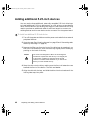
Adding additional 5.25-inch devices
You can use the three additional, externally accessible 5.25-inch drive bays
to install additional 5.25-inch devices such as a CD writer or a tape backup
drive. Use the rails from the existing filler trays to install new drives. You may
need to purchase an additional cable of sufficient length to connect the
existing devices and the new device to the connector on the system board.
To install an additional 5.25-inch device:
1 Turn off the system and disconnect the power cord and all other external
peripheral devices.
2 Open the case. (See “Opening the case” on page 23 and “Preventing static
electricity discharge” on page 22.)
3 Remove the filler tray from the front of the drive bay, by pressing in on
both front rail extensions, then move the tray slightly out of the bay by
pushing on the back of the tray.
Caution
The server was designed to adhere to electromagnetic
interference requirements and the tray is an integral part
of the system. Installing an approved device should
continue to maintain those standards. If you remove the
device you must reinstall the tray.
4 Snap the rails onto the drive, making sure the front rail extensions are
towards the front of the device. The rails are labeled.
5 Align the rails with the bay, and slide the drive into the chassis until the
locking tabs snap into place.
48
Replacing and Adding Internal Devices
8505945.book Page 49 Thursday, March 9, 2000 2:13 PM
6 Connect the power and data cables, making sure the cables are in their
original positions. (See the drive documentation for proper cable
orientations.)
7 Close the case. (See “Closing the case” on page 27.)
8 Reconnect the power cord and all other external peripheral devices, then
turn on the system.
9 Run the configuration software, if required.
Drives
49
8505945.book Page 50 Thursday, March 9, 2000 2:13 PM
Memory
Four DIMM sockets on the system board support up to 2.0 Gigabytes (GB) of
PC/100 SDRAM.
Replacing memory
The DRAM DIMMs supported by the system board conform to the following
standards:
■
64 MB, 128 MB, 256 MB, and 512 MB ECC DIMMs
■
PC/100-compliant, unbuffered, ECC SDRAM
■
64 MB minimum system memory
■
2.0 GB maximum system memory
When you select and install DIMMs, keep the following in mind:
■
Registered DIMMs should not be combined with unbuffered DIMMs
■
Memory should be added in order, from DIMM 1 to DIMM 4.
■
There can be no empty slots between installed DIMMs.
■
No jumper settings are required for the memory size or type because the
BIOS automatically detects this information.
To replace DIMMs:
1 Turn off the system and disconnect the power cord and all other external
peripheral devices.
2 Open the case. (See “Opening the case” on page 23 and “Preventing static
electricity discharge” on page 22.)
3 Pull open the socket clamps on each side of the DIMM socket, then lift
the DIMM out of the socket. Store the DIMM in an anti-static container.
50
Replacing and Adding Internal Devices
8505945.book Page 51 Thursday, March 9, 2000 2:13 PM
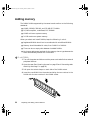
4 Insert the new DIMM into the socket and align the two notches in the
DIMM with the two notches in the DIMM socket.
5 Gently press the DIMM into the socket until it is firmly seated. Inserting
the DIMM automatically locks the socket clamps on each end of the
DIMM.
6 Close the case. (See “Closing the case” on page 27.)
7 Reconnect the peripherals and the power cord, then turn on the system.
Memory
51
8505945.book Page 52 Thursday, March 9, 2000 2:13 PM
Adding memory
The DRAM DIMMs supported by the server board conform to the following
standards:
■
64 MB, 128 MB, 256 MB, and 512 MB ECC DIMMs
■
PC/100-compliant, unbuffered, ECC SDRAM
■
64 MB minimum system memory
■
2.0 GB maximum system memory
When you select and install DIMMs, keep the following in mind:
■
Registered DIMMs should not be combined with unbuffered DIMMs
■
Memory should be added in order, from DIMM 1 to DIMM 4.
■
There can be no empty slots between installed DIMMs.
■
No jumper settings are required for the memory size or type because the
BIOS automatically detects this information.
To add DIMMs:
1 Turn off the system and disconnect the power cord and all other external
peripheral devices.
2 Open the case. (See “Opening the case” on page 23 and “Preventing static
electricity discharge” on page 22.)
3 Pull open the socket clamps on each side of the DIMM socket.
4 Insert the new DIMM into the socket and align the two notches in the
DIMM with the two notches in the DIMM socket.
52
Replacing and Adding Internal Devices
8505945.book Page 53 Thursday, March 9, 2000 2:13 PM
5 Gently press the DIMM into the socket until it is firmly seated. Inserting
the DIMM automatically locks the socket clamps on each end of the
DIMM.
6 Close the case. (See “Closing the case” on page 27.)
7 Reconnect the peripherals and the power cord, then turn on the system.
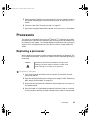
Processors
The system is compatible with the Intel® Pentium® III 600 MHz and faster
processors with 100 MHz front-side bus (FSB). As many as two processors may
be installed in the system. The voltage regulator modules for both processors
are built into the system board and you do not need to install additional
VRMs.
Replacing a processor
When replacing a processor, order a processor upgrade kit from Gateway. The
kit includes the processor, a fansink or heatsink, and a disposable grounding
wrist strap.
Caution
A heatsink or fansink must be installed on each processor.
Installing a processor without a heatsink or fansink could
result in damage to, or failure of, the processor.
To replace a processor:
1 Turn off the system and disconnect the power cord and all external
peripheral devices.
2 Open the case by following the instructions on page 23. (See “Preventing
static electricity discharge” on page 22.)
3 Disconnect the processor fan cable from the processor fan connector on
the system board.
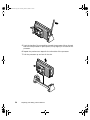
4 Place the head of a flat-bladed screwdriver behind the tab on one side
of the processor retention bracket holding the processor to be removed.
Processors
53
8505945.book Page 54 Thursday, March 9, 2000 2:13 PM
5 Push the handle of the screwdriver toward the processor. When the tab
that locks the processor in place opens, lift up slightly on the side of the
processor.
6 Repeat the previous two steps for the other side of the processor.
7 Pull the processor up and out of the slot.
54
Replacing and Adding Internal Devices
8505945.book Page 55 Thursday, March 9, 2000 2:13 PM
8 Align the new processor with the processor slot (note that the processor
slot is keyed so the processor can only be installed one way) and press
firmly to install it.
9 Reconnect the processor fan cable to the processor fan connector on the
system board.
10 Close the case. (See “Closing the case” on page 27.)
11 Reconnect the power cord and all other cords you removed, then turn
on the system.
Important
Gateway recommends that you run a processor retest from
the BIOS Setup utility whenever you replace or add a
processor.
Processors
55
8505945.book Page 56 Thursday, March 9, 2000 2:13 PM
Adding a processor
The system is compatible with the Intel® Pentium® III 600 MHz and faster
processors with 100 MHz front-side bus (FSB). As many as two processors may
be installed in the system. The second processor must match the first processor
in speed or the system functions at the speed of the slowest processor.
When adding a second processor order a processor upgrade kit from Gateway.
The kit includes the processor, a fansink or heatsink, and a disposable
grounding wrist strap.
Caution
You must install a heatsink or fansink on each processor.
Installing a processor without a heatsink or fansink could
result in damage to, or failure of, the processor.
To add a second processor:
1 Turn off the system and disconnect the power cord and all external
peripheral devices.
2 Open the case. (See “Opening the case” on page 23 and “Preventing static
electricity discharge” on page 22.)
3 Remove the terminator card from the second processor slot to make room
for the additional processor.
56
Replacing and Adding Internal Devices
8505945.book Page 57 Thursday, March 9, 2000 2:13 PM
4 Align the new processor with the processor slot. Note that the processor
slot is keyed so the processor can only be installed one way. Press it firmly
to install it.
5 Connect the processor fan cable to the second processor fan connector
on the system board (See “System board” on page 8 for location).
6 Close the case. (See “Closing the case” on page 27.)
7 Reconnect the power cord and all other cords you removed, then turn
on the system.
Important
Gateway recommends that you run a processor retest from
the BIOS Setup utility whenever you replace or add a
processor.
Processors
57
8505945.book Page 58 Thursday, March 9, 2000 2:13 PM
Replacing the battery
The battery provides power for the system real-time clock and CMOS memory,
which holds the system configuration information.
If your battery is failing you may notice the server clock slowing down and
giving you the incorrect time.
Open the BIOS Setup utility and write down all the values in the various
menus before replacing the battery. Replacing the battery resets the BIOS Setup
utility to its default values.
Warning
Danger of explosion if battery is incorrectly replaced.
Replace only with the same or equivalent type
recommended by manufacturer.
Dispose of used batteries according to manufacturer’s
instructions.
Warnung
Explosionsgefahr bel falsch eingebautter batterie.
Ersetzen der batterien nur mit batterien des gleichen typs
oder mit batterien vom hersteller empfohlenen typs.
Entsorgen gebrauchter batterien entsprechned
herstellerangaben.
Attention
Il y a danger d’explosion s’il y a replacement incorrect de
la batterie.
Remplacer uniquement avec une batterie du même type
ou d’un type équivalent recommandé par le constructeur.
Mettre au rebut les batteries usagées conformément aux
instructions du fabricant.
To replace the battery:
1 Restart the computer and start the BIOS Setup utility.
2 Write down the CMOS values from each tab in the BIOS Setup utility so
you can reenter them after you replace the battery. For more information
about the BIOS Setup utility, see “About the BIOS Setup utility” on
page 83.
58
Replacing and Adding Internal Devices
8505945.book Page 59 Thursday, March 9, 2000 2:13 PM
3 Turn off the computer, disconnect the power cord and all external
peripheral devices.
4 Open the case by following the instructions on page 23. (See “Preventing
static electricity discharge” on page 22.)
5 Locate the battery on the system board (see “System board” on page 8).
The battery is circular and has the positive pole mark (+) on the top.
6 Using a small, flat-bladed screwdriver, carefully remove the battery from
its socket on the system board.
7 Press the new battery in the socket with the positive pole up. Be sure you
have pressed the battery down far enough for it to contact the base of
the socket (it should snap into place).
8 Close the case, as described in “Closing the case” on page 27.
9 Reconnect the peripherals and the power cord, then turn on the system.
10 If the CMOS data is not correct, change the information in the BIOS Setup
utility using the data you recorded in Step 2.
Troubleshooting the battery installation
If you have problems after installing the new battery, try each of the items
listed below, restarting the computer after each try.
■
Turn off the computer and make sure that all exterior cables are attached
and secured to the correct connectors.
■
Make sure that all power switches are on. If the computer is plugged into
a power strip or surge protector, make sure it is turned on also.
■
Enter the BIOS Setup utility and compare the settings on the screen with
your notes or the system hardware manuals. Correct any discrepancies.
Replacing the battery
59
8505945.book Page 60 Thursday, March 9, 2000 2:13 PM
60
■
Turn off the computer, remove the cover, and make sure that all cables
inside the case are attached securely. Also, make sure that the colored
cable edges are aligned correctly and that the connectors did not miss
any pins. Disconnect and reconnect the cables. Close the case as described
in “Closing the case” on page 27, reconnect the modem and power cords,
then turn on the computer.
■
Turn off the computer, remove the cover and, if you have the proper test
equipment, make sure that the new battery has power. (Although
unlikely, your new battery may be defective.) Close the case as described
in “Closing the case” on page 27, reconnect the power cord, then turn
on the computer.
Replacing and Adding Internal Devices
8505945.book Page 61 Thursday, March 9, 2000 2:13 PM
Expansion cards
The server has seven expansion slots on the system board that may be used
for a variety of expansion cards. Four slots support 32-bit, 33 MHz PCI cards,
two slots support 32-bit, 66 MHz PCI cards, and one slot supports an ISA card.
All slots support the installation of full-length cards.
Replacing an expansion card
To replace an expansion card:
1 Set any jumpers and switches on the replacement card, if required in the
card instructions.
2 Turn off the computer, disconnect the power cord and all external
peripheral devices.
3 Open the case. (See “Opening the case” on page 23 and “Preventing static
electricity discharge” on page 22.)
4 Disconnect any cables attached to the card.
5 Remove the existing card by pressing gently on the expansion card
retention clip and sliding the retention clip back through the back panel
and pressing upwards on the card guide release tab (for full-length
expansion cards).
Important
The card guide release tab is held in place during shipping
by a cotter pin. Remove the cotter pin before moving the
release tab. You can replace the cotter pin or leave it out.
6 Pull the card out of the slot.
Expansion cards
61
8505945.book Page 62 Thursday, March 9, 2000 2:13 PM
Expansion card
retention clip
Card guide
release tab
7 Place the replacement card in the slot and press it firmly into the
connector.
8 Once the card is securely placed, slide the card guide release tab down
again (for full-length expansion cards) and press the expansion card
retention clip through the back panel until it clicks into place to secure
the card.
9 Connect any cables to the card (see card documentation for proper cable
orientation).
10 Close the case. (See “Closing the case” on page 27.)
11 Reconnect the peripherals and the power cord, then turn on the system.
You may need to reconfigure the server after replacing an expansion card. You
may also need to install upgrade software that came with the card. Check the
card documentation for additional information.
62
Replacing and Adding Internal Devices
8505945.book Page 63 Thursday, March 9, 2000 2:13 PM
Adding an expansion card
To add an expansion card:
1 Set any jumpers and switches on the card, if required in the card
instructions.
2 Turn off the computer, disconnect the power cord and all external
peripheral devices.
3 Open the case. (See “Opening the case” on page 23 and “Preventing static
electricity discharge” on page 22.)
4 Locate an available slot and remove the slot cover by pressing the
expansion card retention clip back through the back panel.
5 Pull out the slot cover.
6 Press the card guide release tab upward to release the cards and allow the
new card to be inserted into the card guide (for full-length expansion
cards).
Important
The card guide release tab is held in place during shipping
by a cotter pin. Remove the cotter pin before moving the
release tab. You can replace the cotter pin or leave it out.
7 Insert the bottom edge of the expansion card (the keyed edge with the
contacts) into the slot on the system board and push in firmly to seat
the card.
Expansion cards
63
8505945.book Page 64 Thursday, March 9, 2000 2:13 PM
Expansion card
retention clip
Card guide
release tab
8 Once the card is securely placed, slide the card guide release tab down
again (for full-length expansion cards) and press the expansion card
retention clip through the back panel until it clicks into place to secure
the card.
9 Connect any cables to the card (see card documentation for proper cable
orientation).
10 Close the case. (See “Closing the case” on page 27.)
11 Reconnect the peripherals and the power cord, then turn on the system.
You may need to reconfigure the server after installing some expansion cards.
You may also need to install software that came with the card. Check the card
documentation for additional information.
64
Replacing and Adding Internal Devices
8505945.book Page 65 Thursday, March 9, 2000 2:13 PM
Power supplies
The Gateway 7210 Server supports two power supplies. The basic model uses
a single power supply of the same size and type as those used in most desktop
PCs. The optional upgrade provides an N+1 redundant power supply that
offers fault tolerance and hot-swap capability. This section describes replacing
both power supplies and also describes the procedure for hot-swapping a
power supply module in the N+1 redundant power supply.
Replacing a redundant power supply module
The redundant power supply offers fault tolerance and hot-swap capabilities.
If one of the two modules fails, the other module can support the system while
the failed module is replaced. A failed module is indicated by an audible alarm
and the corresponding power supply status LED will begin to flash. See “Front
panel” on page 2 for the location and complete information on the function
of the power supply status LEDs. You do not have to turn off the system to
replace the failed module.
To replace a failed power supply module:
1 Determine which power supply module has failed. The module power
LED turns off when the module fails.
2 Loosen the thumbscrew that secures the power supply module to the back
panel.
Power supplies
65
8505945.book Page 66 Thursday, March 9, 2000 2:13 PM
3 Press the locking tab toward the center of the module while carefully
pulling the failed module out of the power supply.
Locking tab
A
B
Thumbscrew
4 Carefully insert the new power supply module into the vacant slot,
pressing firmly to seat the connector at the back.
5 Tighten the thumbscrew to secure the new module in position.
66
Replacing and Adding Internal Devices
8505945.book Page 67 Thursday, March 9, 2000 2:13 PM
A
B
Replacing the redundant power supply
The redundant power supply offers fault tolerance and hot-swap capabilities.
However, if the power distribution board at the base of the power supply or
some other shared component fails, the entire power supply and its housing
must be replaced. A failure of a shared component is indicated by both power
supply status LEDs flashing and an audible alarm, or the system will fail to
power up.
To replace the redundant power supply:
1 Turn off the system and disconnect the power cord and all peripherals.
2 Open the case. (See “Opening the case” on page 23 and “Preventing static
electricity discharge” on page 22.)
3 Disconnect the power supply connectors from all internal devices,
including the 3.5-inch diskette drive, the CD drive, and all hard drives.
4 Disconnect the main and auxiliary power supply signal connectors from
the system board, by pressing on the tab to release the connector, then
gently pull the connector from the board.
Power supplies
67
8505945.book Page 68 Thursday, March 9, 2000 2:13 PM
5 While supporting the power supply by the handle with one hand, remove
the screws securing the power supply to the back panel.
Handle
6 Carefully lift the power supply out of the chassis using the handle
attached to the power supply. Move the power supply forward to clear
the support bracket, then tilt the left side of the power supply down to
clear the side cover mounting rail as you pull it out.
7 Make sure that the new power supply matches the one you removed. The
mounting holes should line up correctly, and the specifications and
power output connectors should be the same.
68
Replacing and Adding Internal Devices
8505945.book Page 69 Thursday, March 9, 2000 2:13 PM
8 Place the new power supply in the proper position in the chassis and line
up the mounting holes with the holes in the chassis.
Handle
9 Replace the screws securing the power supply to the back panel.
10 Reconnect the power connectors to the system board and to all internal
devices.
11 Close the case. (See “Closing the case” on page 27.)
12 Reconnect the power cord and all external peripherals, then turn on the
system.
Power supplies
69
8505945.book Page 70 Thursday, March 9, 2000 2:13 PM
Replacing the PS/2 power supply
The PS/2 power supply does not support fault tolerance or hot-swapping. If
the power supply fails, you must replace it.
To replace the PS/2 power supply:
1 Turn off the system and disconnect the power cord and all peripherals.
2 Open the case. (See “Opening the case” on page 23 and “Preventing static
electricity discharge” on page 22.)
3 Disconnect the power supply connectors from all internal devices,
including the 3.5-inch diskette drive, the CD drive, and all hard drives.
4 Disconnect the main power supply connector to the system board, by
pressing on the tab to release the connector, then gently pull the
connector from the board.
5 While supporting the power supply with one hand, remove the screws
securing the power supply to the back panel and the top panel.
70
Replacing and Adding Internal Devices
8505945.book Page 71 Thursday, March 9, 2000 2:13 PM
6 Carefully lift the power supply out of the chassis, moving it forward to
clear the support bracket and dropping it down slightly to clear the side
mounting rail.
7 Make sure that the new power supply matches the one you removed. The
mounting holes should line up correctly, and the specifications and
power output connectors should be the same.
8 Place the new power supply in the proper position in the chassis and line
up the mounting holes with the holes in the chassis.
9 Replace the screws securing the power supply to the back panel and top
panel.
10 Reconnect the power connectors to the system board and to all internal
devices.
11 Close the case. (See “Closing the case” on page 27.)
12 Reconnect the power cord and all external peripherals, then turn on the
system.
Power supplies
71
8505945.book Page 72 Thursday, March 9, 2000 2:13 PM
Replacing the back panel and
hot-plug cage fans
The back panel fan is located below the power supply on the back panel. The
hot-plug cage fan is located behind the hot-plug cage, between the hot-plug
cage and the system board. See the illustration on page 6 for more
information.
To remove the back panel fan:
1 Turn off the system and disconnect the power cord and external
peripherals.
2 Open the case. (See “Opening the case” on page 23 and “Preventing static
electricity discharge” on page 22.)
3 Depress the two locking tabs on the fan bracket, then disengage the two
retaining tabs from the back panel of the chassis.
72
Replacing and Adding Internal Devices
8505945.book Page 73 Thursday, March 9, 2000 2:13 PM
4 Carefully remove the fan from the chassis.
5 Disconnect the fan power cable from the connector on the system board.
Note the connector it was attached to.
6 Place the new fan bracket unit into the chassis by engaging the two
retaining tabs with the tabs on the back panel of the chassis and the
release tabs with the slots in the back panel.
7 Connect the fan power cable to the appropriate connector on the system
board.
8 Close the case. (See “Closing the case” on page 27.)
9 Reconnect the power cord and external peripherals, then turn on the
system.
Replacing the back panel and hot-plug cage fans
73
8505945.book Page 74 Thursday, March 9, 2000 2:13 PM
Replacing the control panel board
The control panel board is mounted on the front of the chassis, behind the
front bezel.
To replace the control panel board:
1 Turn off the system and disconnect the power cord and all external
peripherals.
2 Open the case. (See “Opening the case” on page 23 and “Preventing static
electricity discharge” on page 22.)
3 Disconnect the front panel connector from the control panel board.
4 Remove the screw that secures the board to the front of the chassis.
5 Lift the control panel board off of the hooks on the front panel and
remove it.
6 Install the new control panel board by placing the mounting slots of the
control panel board on the tabs on the front of the chassis, then slide
the board down until it locks into place. Be careful to keep the front panel
cable out of the way as you install the board.
7 Replace the screw you removed in Step 4.
74
Replacing and Adding Internal Devices
8505945.book Page 75 Thursday, March 9, 2000 2:13 PM
8 Plug the control panel cable into the connector on the control panel
board.
9 Close the case. (See “Closing the case” on page 27.)
10 Reconnect the power cord and the external peripherals, then turn on the
system.
Replacing the hot-plug backplane
The six drive hot-plug backplane is at the back of the hot-plug drive cage.
The backplane supports as many as six hot-swappable LVD SCSI drives. The
backplane provides activity LEDs for each drive. If the backplane fails, you
must replace it.
To replace the hot-plug backplane:
1 Turn off the system and disconnect the power cord and all external
peripheral devices.
2 Open the case. (See “Opening the case” on page 23 and “Preventing static
electricity discharge” on page 22.)
3 Disconnect all cables to the hot-plug backplane, noting the connectors
so you can reconnect them after replacing the backplane.
4 Remove all hot-plug drives, being careful to note which drive was in
which slot.
5 Loosen the two captive thumbscrews that secure the backplane in the
bracket.
Replacing the hot-plug backplane
75
8505945.book Page 76 Thursday, March 9, 2000 2:13 PM
6 Pull the backplane out to the side of the chassis, then toward the back
of the system to remove it from the retention hooks.
7 Lift the backplane out of the chassis.
8 Set any jumpers on the new backplane that are required for your SCSI
configuration. (See “Hot-plug backplane” on page 11 for instructions.)
76
Replacing and Adding Internal Devices
8505945.book Page 77 Thursday, March 9, 2000 2:13 PM
9 Place the backplane onto the hot-plug cage bracket, making sure the
hooks on the bracket fit into the slots on the backplane.
10 When the backplane is securely in place, tighten the two captive
thumbscrews.
11 Reconnect all cables on the backplane to the correct connectors.
12 Replace all hot-plug drives. Be careful to replace them in the same slots
that they were in before you removed them.
13 Close the case. (See “Closing the case” on page 27.)
14 Reconnect all peripherals and the power cord, then turn on the system.
Replacing the hot-plug backplane
77
8505945.book Page 78 Thursday, March 9, 2000 2:13 PM
Replacing the system board
The system board is the heart of the computer, which integrates the other
elements of the system, such as the processor, memory, storage, networking,
and communications, and lets them operate in a coordinated and useful way.
Important
All references to front, rear, left, or right on the computer
are based on the computer being in a normal, upright
position, as viewed from the front.
To replace the system board:
1 Turn off the system and disconnect the power cord and all external
peripheral devices.
2 Open the case. (See “Opening the case” on page 23 and “Preventing static
electricity discharge” on page 22.)
3 Place the chassis gently on its right side.
4 Remove all expansion cards from the system (see “Replacing an
expansion card” on page 61.)
5 Remove the back panel fan (see “Replacing the back panel and hot-plug
cage fans” on page 72.)
6 Disconnect all cables from the system board, including the power cables
from the power supply. Note where the cables are connected.
78
Replacing and Adding Internal Devices
8505945.book Page 79 Thursday, March 9, 2000 2:13 PM
7 Loosen the retaining thumbscrew securing the board support tray to the
right side of the chassis.
Retaining
thumbscrew
8 Slide the board support tray toward the front of the chassis slightly to
disengage it from the stand-off retention hooks.
Replacing the system board
79
8505945.book Page 80 Thursday, March 9, 2000 2:13 PM
9 Using the handle at the bottom of the board support tray, pull the back
edge of the system board (the edge against the back panel) out of the
chassis.
10 Remove the system board from the support tray by removing the seven
screws and snapping it off of the two snap-on standoffs, then place the
board in an anti-static bag or container.
11 Install the replacement system board on the tray.
80
Replacing and Adding Internal Devices
8505945.book Page 81 Thursday, March 9, 2000 2:13 PM
12 Holding the board support tray by the handles, place it in the chassis
right edge first as shown in the illustration below. Arrange the cables
carefully to prevent tangling as you install the board and tray assembly.
13 Holding the board support tray in place, tighten the retaining screw on
the right edge of the board support tray.
14 Replace the back panel fan (see “Replacing the back panel and hot-plug
cage fans” on page 72).
15 Replace any expansion cards that you removed in Step 4 (see “Replacing
an expansion card” on page 61).
16 Reconnect all cables on the system board to the correct connectors.
17 Close the case. (See “Closing the case” on page 27.)
18 Reconnect all peripherals and the power cord, then turn on the system.
Replacing the system board
81
8505945.book Page 82 Thursday, March 9, 2000 2:13 PM
82
Replacing and Adding Internal Devices
8505945.book Page 83 Thursday, March 9, 2000 2:13 PM
5
Using the BIOS
Setup Utility
About the BIOS Setup utility
The server BIOS has a built-in setup utility that lets you configure several basic
system characteristics. The settings are stored in battery-backed RAM and are
retained even when the power is off.
Enter the BIOS Setup utility by restarting the computer, then pressing F2 when
prompted during the startup process. The Main BIOS Setup utility screen
opens. It may not look exactly like the screen shown below.
BIOS Setup Utility
Main
Advanced
Security
Server
Boot
Exit
Item Specific Help
System Time: [xx:xx:xx]
System Date: [xx/xx/xxxx]
Legacy Diskette A:
Legacy Diskette B:
Hard Disk Pre-Delay:
Primary IDE Master:
Primary IDE Slave:
Secondary IDE Master:
Secondary IDE Slave:
[
[
]
]
[enabled]
[auto]
[
]
[
]
[
]
Processor Settings:
Language:
F1 Help
ESC Exit
[English (US)]
↑↓ Select Item
←→ Select Menu
-/+ Change Values
F9 Setup Defaults
ENTER Select > Sub-Menu
F10 Save & Exit
About the BIOS Setup utility
83
8505945.book Page 84 Thursday, March 9, 2000 2:13 PM
As you select items on the Main menu or in submenus, you see specific
information related to the current selection in the Item Specific Help box.
The command bar shows the keystrokes necessary to access help, navigate
through the menus, and perform other functions.
■
F1 opens the Help screen, providing general help for using the BIOS Setup
utility.
■
The ↑ (up arrow) and ↓ (down arrow) keys select items in the menu.
■
The ← (left arrow) and → (right arrow) keys move you between the
menus.
■
ENTER either moves you to a submenu screen when a selected item is
preceded by > or activates a selected field.
■
ESC closes the screen you are in and returns you to the previous screen
or exits you from the BIOS Setup utility.
■
F9 opens a screen that lets you return all values to their default settings.
■
F10 opens a screen that lets you save all settings, then exit the BIOS Setup
utility.
The main screen has the following menu selections at the top of the screen:
■
Main gives you access to basic information and settings related to your
system hardware and configuration.
■
Advanced gives you access to information and settings for system
resources, hardware, and system configuration.
■
Security gives you access to settings related to system access passwords.
■
Server gives you access to information and options for server
management features.
■
Boot gives you access to information and settings for boot features and
boot sequences.
■
Exit gives you access to options for exiting the BIOS Setup utility.
Refer to the Help box on the right side of the BIOS Setup screens for
information about menu items.
84
Using the BIOS Setup Utility
8505945.book Page 85 Thursday, March 9, 2000 2:13 PM
Updating the BIOS
If you need a new version of the BIOS, you can download the BIOS update
from technical support on the Gateway Web site (www.gateway.com) and
install the new version from a diskette.
To update the BIOS you need to perform the following tasks in sequence:
■
Create a bootable diskette
■
Note the current BIOS settings
■
Create the BIOS update diskette
■
Update the BIOS
■
Restore the BIOS settings
Follow the detailed instructions for updating the BIOS that are included in
the self-extracting file that you can download from the technical support area
of Gateway’s Web site.
Important
Whenever the BIOS is updated, the microcode table is returned
to the default setting. To update the table to the proper settings
for your processor, you must run the MULOADER.EXE program,
which is available from the same site where you obtain the BIOS
update files.
Updating the BIOS
85
8505945.book Page 86 Thursday, March 9, 2000 2:13 PM
Setting the system board jumpers
The system board has three jumpers. Each of these jumpers has a specific
function described in the sections below.
The CMOS Clear jumper
The CMOS Clear jumper on the system board (pins 1 through 3 of jumper
J2J1) lets you clear all BIOS Setup settings. (See the figure on page 8 for the
location of the jumper.)
The following table shows the settings required to perform this task. Make
sure you turn off the computer and unplug the power cord before moving
the jumper.
Mode
Jumper
Setting
CMOS protected
Action When Set
Normal operation (default)
Pins 1-2
Clear CMOS
Pins 2-3
Caution
Causes computer to clear all
BIOS settings and return to
defaults
Moving the jumper while the power is on can damage the
server. Always turn off the server and unplug the power
cord before changing the jumper.
Password Clear jumper
The Password Clear jumper on the system board (pins 5 through 7 of jumper
J2J1) lets you clear the passwords. (See the figure on page 8 for the location
of the jumper.)
86
Using the BIOS Setup Utility
8505945.book Page 87 Thursday, March 9, 2000 2:13 PM
The following table shows the settings required to perform this task. Make
sure you turn off the computer and unplug the power cord before moving
the jumper.
Mode
Jumper
Setting
Protect
Action When Set
Normal operation (default)
Pins 5-6
Clear
Clears all passwords at bootup
Pins 6-7
Caution
Moving the jumper while the power is on can damage the
server. Always turn off the server and unplug the power
cord before changing the jumper.
Recovery Boot jumper
The Recovery Boot jumper on the system board (pins 9 through 11 of jumper
J2J1) lets you recover from a failed BIOS update by booting from diskette and
loading the correct BIOS update if your BIOS code has become corrupted. (See
the figure on page 8 for the location of the jumper.)
The following table shows the settings required to perform this task. Make
sure you turn off the computer and unplug the power cord before moving
the jumper.
Mode
Jumper
Setting
Normal boot
Action When Set
Normal boot from BIOS (default)
Pins 9-10
Recovery boot
Pins 10-11
Caution
Boot from diskette and correct
the BIOS code
Moving the jumper while the power is on can damage the
server. Always turn off the server and unplug the power
cord before changing the jumper.
Setting the system board jumpers
87
8505945.book Page 88 Thursday, March 9, 2000 2:13 PM
BIOS Boot Block Write Enable jumper
The BIOS Boot Block Write Enable jumper on the system board (pins 13
through 15 of jumper J2J1) lets you update the BIOS boot block. (See the figure
on page 8 for the location of the jumper.)
Caution
Incorrect programming of the boot block may leave the
system unbootable.
The following table shows the settings required to perform this function. Make
sure you turn off the computer and unplug the power cord before moving
the jumper.
Mode
Jumper
Setting
Normal
Pins 13-14
BIOS update
Pins 14-15
Caution
Action When Set
BIOS boot block is write
protected (default)
Allows the BIOS boot block to be
updated
Moving the jumper while the power is on can damage the
server. Always turn off the server and unplug the power
cord before changing the jumper.
BMC Boot Block Write Enable jumper
The BMC Boot Block Write Enable jumper on the system board (jumper J4J2)
lets you program the BMC boot block using the correct utilities. You can
download these utilities from the Gateway Web site along with the latest
version of the BMC firmware. (See the figure on page 8 for the location of
the jumper.)
Caution
88
Incorrect programming of the boot block may leave the
system unbootable.
Using the BIOS Setup Utility
8505945.book Page 89 Thursday, March 9, 2000 2:13 PM
The following table shows the settings required to allow programming of the
BMC boot block. Make sure you turn off the computer and unplug the power
cord before moving the jumper..
Mode
Jumper
Setting
Normal
Pins 1-2
Writes enabled
Pins 2-3
Caution
Action When Set
BMC boot block is write
protected (default)
Allows BMC boot block to be
programmed through the correct
utilities.
Moving the jumper while the power is on can damage the
server. Always turn off the server and unplug the power
cord before changing the jumper.
FRB Enable jumper
The 7210 server supports fault resilient booting (FRB) which causes the second
processor to take over the boot process if the first processor fails to respond
within a specified time. The FRB Enable jumper on the system board (pins 1
through 3 on jumper J3J1) lets you enable FRB. (See the figure on page 8 for
the location of the jumper.)
The following table shows the settings required to enable FRB. Make sure you
turn off the computer and unplug the power cord before moving the jumper.
Mode
Jumper
Setting
Enable
Action When Set
FRB is enabled (default)
Pins 1-2
Disable
FRB is disabled
Pins 2-3
Caution
Moving the jumper while the power is on can damage the
server. Always turn off the server and unplug the power
cord before changing the jumper.
Setting the system board jumpers
89
8505945.book Page 90 Thursday, March 9, 2000 2:13 PM
Intrusion Detection Enable jumper
The Intrusion Detection Enable jumper on the system board (pins 5 through
7 on jumper J3J1) lets you enable intrusion detection. (See the figure on page 8
for the location of the jumper.)
The following table shows the settings required to enable intrusion detection.
Make sure you turn off the computer and unplug the power cord before
moving the jumper.
Mode
Jumper
Setting
Enable
Pins 5-6
Disable
Action When Set
Intrusion detection is enabled
(default)
Intrusion detection is disabled
Pins 6-7
Caution
Moving the jumper while the power is on can damage the
server. Always turn off the server and unplug the power
cord before changing the jumper.
BMC Firmware Update jumper
The BMC Firmware Update jumper on the system board (pins 9 through 11
on jumper J3J1) lets you update the BMC firmware during system boot. (See
the figure on page 8 for the location of the jumper.)
The following table shows the settings required to let you update the BMC.
Make sure you turn off the computer and unplug the power cord before
moving the jumper.
90
Using the BIOS Setup Utility
8505945.book Page 91 Thursday, March 9, 2000 2:13 PM
Mode
Jumper
Setting
Normal
Action When Set
Normal boot (default)
Pins 9-10
Update BMC
System updates BMC
Pins 10-11
Caution
Moving the jumper while the power is on can damage the
server. Always turn off the server and unplug the power
cord before changing the jumper.
WOL Enable jumper
The WOL Enable jumper on the system board (jumper J5A2) lets you enable
the wake-on-LAN feature. (See the figure on page 8 for the location of the
jumper.)
The following table shows the settings required to perform this task. Make
sure you turn off the computer and unplug the power cord before moving
the jumper.
Mode
Jumper
Setting
Disabled
Action When Set
Disables wake-on-LAN
Pins 1-2
Enabled
Enables wake-on-LAN (default)
Pins 2-3
Caution
Moving the jumper while the power is on can damage the
server. Always turn off the server and unplug the power
cord before changing the jumper.
Setting the system board jumpers
91
8505945.book Page 92 Thursday, March 9, 2000 2:13 PM
92
Using the BIOS Setup Utility
8505945.book Page 93 Thursday, March 9, 2000 2:13 PM
Managing the
Server
6
Avoiding power source problems
Surge suppressors, line conditioners, and uninterruptible power supplies can
help protect the server against power source problems.
Surge suppressors
During a power surge, the voltage level of electricity coming into the server
can increase far above normal levels and cause data loss or system damage.
Protect you computer and peripherals by connecting them to a surge
suppressor, which will absorb voltage surges and prevent them from reaching
your computer.
When purchasing a surge suppressor:
■
Make sure the surge suppressor meets the appropriate product safety
certification for your location, such as Underwriters Laboratories (UL) or
Conformite European (CE).
■
Check the maximum amount of voltage the suppressor allows to pass
through the line. The lower the voltage that the suppressor allows to pass
through, the better the protection for the server.
■
Check the energy absorption (or dissipation) rating. The higher the energy
absorption rating, the better the protection for the server.
■
Check line-conditioner capabilities. A line conditioner smooths out some
normal line noise (small voltage fluctuations) of an electrical supply.
Avoiding power source problems
93
8505945.book Page 94 Thursday, March 9, 2000 2:13 PM
Line conditioners
A line conditioner protects the server from the small fluctuations in voltage
from an electrical supply. Most systems can handle this variation (or line noise)
without problems. However, some electrical sources include more line noise
than normal. Line noise can also be a problem if the server is located near,
or shares a circuit with, a device that causes electromagnetic interference, such
as a television or a motor.
Some surge suppressors and uninterruptible power supplies include simple
line-conditioning capabilities.
Uninterruptible power supplies
Use a standby uninterruptible power supply (UPS) to protect your computer
from data loss during a total power failure. A UPS uses a battery to keep your
computer running temporarily during a power failure and lets you save your
work and shut down your computer. You cannot run your computer for an
extended period of time while using only the UPS.
Maintain and manage your hard drive
Regular maintenance can keep your hard drive operating efficiently and good
file management can keep the server free of unwanted files while making
important files secure and easier to find.
Hard drive maintenance utility
If you are using the Windows NT operating system, you can help maintain
the performance of your hard drive by regularly using Check Disk.
Important
For other operating systems, such as Windows 2000 or
Novell Netware, refer to the appropriate operating system
manual.
Using Check Disk in Windows NT
Bad sectors are parts of a hard drive or diskette that will not hold data. Check
Disk checks the hard drive for bad sectors or lost allocation units and lets you
fix them. A lost allocation unit is a group of sectors that has lost its place in
the table that the operating system uses to locate files.
94
Managing the Server
8505945.book Page 95 Thursday, March 9, 2000 2:13 PM
Use Check Disk from once a week to once a month, depending on how often
you use the server. Also use Check Disk if you have any hard drive problems.
To use Check Disk:
1 Double-click the My Computer icon. The My Computer window opens.
2 Right-click the drive you want to check.
3 Select Properties. The drive’s properties window opens.
4 Click the Tools tab.
5 At Error-checking, click Check Now. The Check Disk window opens.
6 Scan the entire hard drive by selecting Scan for and attempt recovery of bad
sectors.
7 Click Start. Check Disk checks the drive for errors.
8 Follow any on-screen instructions for completing the scan.
Hard drive management practices
By deleting unneeded files from your hard drive and managing the space that
is automatically allocated for saving certain files, you can help maintain the
performance of the hard drive. We suggest that you first check your hard drive
for available space, then back up important files prior to deleting unneeded
files, in case you delete important files by mistake.
Checking hard drive space
In Windows, you can see a chart of the available hard drive space.
To check hard drive space:
1 Double-click on the My Computer icon on the desktop. The My Computer
window opens.
2 Right-click the drive you want to check.
3 Select Properties. The drive’s properties window opens. The General tab
shows you the available and used space on the drive.
Maintain and manage your hard drive
95
8505945.book Page 96 Thursday, March 9, 2000 2:13 PM
Backing up files
Regularly backing up your files protects you from losing data and lets you
keep fewer files on your hard drive. Back up old files to a large capacity disk
drive or tape drive and delete the files from your hard drive. You can use the
software that came with your tape backup drive or your large capacity disk
drive to back up the files.
You can also back up files by running the Backup utility that came with your
operating system. In Windows NT, Backup copies files to a tape drive.
To run Backup in Windows NT:
1 Click Start, then select Programs, Administrative Tools, then Backup.
2 Follow the on-screen instructions.
Deleting unneeded files
By deleting unneeded files from the hard drive, you free up space on the hard
drive and help improve hard-drive performance. The following sections give
you some simple ways to delete unneeded files.
Deleting Windows temporary files
During normal operation, Windows constantly creates new temporary (.tmp)
files. You can safely delete all but the most recent .tmp files.
To delete .tmp files:
1 Open Windows Explorer, then select Tools, Find, then Files and Folders.
2 In the Named text box, type *.tmp
3 In the Look in drop down list, select your drive letter.
4 Click Find Now. The list of .tmp files appears.
5 Click Modified above the list. To see the Modified button, you may need
to maximize the Find window. The list is sorted by date.
6 Highlight all the files in the list except those with the current date.
7 Press SHIFT + DELETE. A dialog box opens asking if you want to delete the
files.
8 Click Yes. The files are deleted.
96
Managing the Server
8505945.book Page 97 Thursday, March 9, 2000 2:13 PM
Deleting temporary Internet files
As you visit Web sites, your browser stores temporary Internet files on your
hard drive in a memory cache and a disk cache. Files in the memory cache are
removed when you turn off your computer. Files are saved in the disk cache
until the space designated for the cache is full. See your browser’s Help files
for instructions on emptying the disk cache.
You can save space on the hard drive by decreasing the size of the Internet
file disk cache. See your browser’s Help files for instructions.
Emptying the Recycle Bin
When you delete a file from your hard drive in Windows, it is not immediately
removed from the hard drive. Instead, the file is moved into the Recycle Bin.
Because files are stored in the Recycle Bin and not deleted from the hard drive
immediately, you can retrieve a file that you accidentally delete from the hard
drive.
To delete all the files from the Recycle Bin, right-click the Recycle Bin icon
on the desktop, then click Empty Recycle Bin.
You can save space on the hard drive by decreasing the size of the Recycle Bin.
To decrease the size of the Recycle Bin:
1 Right-click the Recycle Bin, then select Properties.
2 At the Global tab, select either Configure drives independently or Use one
setting for all drives.
3 If you are configuring drives independently, click the tab for the drive
you want to configure.
4 Move the slider to set the size of the Recycle Bin. A good initial setting
is 5%.
5 Click OK.
Maintain and manage your hard drive
97
8505945.book Page 98 Thursday, March 9, 2000 2:13 PM
Protecting the server against viruses
A virus is a program that attaches itself to a program or data file on a computer,
then spreads from one computer to another. Viruses can damage data, cause
computers to malfunction, and can display annoying or offensive messages.
Some viruses can go unnoticed for long periods of time because they are
activated by a certain date or time. Protect your computer from viruses by:
■
Using an anti-virus program to check files and programs that are on
diskettes, attached to e-mail messages, or downloaded from the Internet.
After you run the anti-virus program you can back up your files to
diskettes, a separate hard drive, or a high-capacity storage drive.
■
Keeping your anti-virus program updated.
■
Obtaining all software from reputable sources and checking the software
for viruses before installing it.
■
Disabling macros on suspicious Microsoft Word and Excel files. These
programs will warn you if a document that you are opening contains a
macro that might have a virus.
To remove a virus:
1 Find and remove the virus immediately using Norton AntiVirus.
2 Turn off your computer and leave it off for at least 30 seconds.
3 Turn on the computer and rescan for the virus.
4 If the virus is still present, contact Gateway Client Care.
98
Managing the Server
8505945.book Page 99 Thursday, March 9, 2000 2:13 PM
System administration and control
The server has three server-management tools included to enable
administration and control of Windows NT environments. These tools are
Intel® Server Control (ISC), ManageX Event Manager, and the Direct Platform
Control (DPC) Console.
Intel Server Control (ISC)
Using a graphical user interface, ISC can locally or remotely provide real-time
monitoring and alerting for server hardware sensors. ISC monitors and records
system status indicators such as temperature, voltage, cooling, chassis
intrusion, processor status, cooling fan status, and power supply status. You
can establish a threshold or range of accepted values for each of these
indicators and you can configure ISC to respond to variances in a number of
ways, from an entry in the event log, to a displayed message or audio alarm,
or even a complete server shutdown.
ISC also provides a system hardware inventory, SCSI controller status, LAN
adapter status, and BIOS and system slot information.
You can find additional information about Intel Server Control under
Documentation on the 7210 Companion CD which came with the system.
ManageX Event Manager
ManageX lets the system administrator manage multiple systems on a
Windows NT, Windows 2000, or Novell Netware network from a single
window, and implement commands and policies across the network with a
single action. With this tool you can automate system management tasks,
which can be triggered by specific events or at specified thresholds.
You can find additional information about the ManageX Event Manager
under Documentation on the 7210 Companion CD which came with the system.
System administration and control
99
8505945.book Page 100 Thursday, March 9, 2000 2:13 PM
Direct Platform Control (DPC) Console
The Direct Platform Control (DPC) Console provides remote emergency
management of servers. The DPC Console is independent of the server
operating system and provides a means to remotely diagnose problems or
verify the state of the server. It will also turn the server on or off.
You can find additional information about DPC Console under Documentation
on the 7210 Companion CD which came with the system.
System security
To help prevent unauthorized entry or use of the system, the system includes
key locks on the chassis (to prevent entry) and the bezel door (to prevent use).
You can also set security measures in the BIOS Setup utility which establishes
passwords and automatic system lockouts. The system also includes server
management software that monitors the chassis intrusion switch.
Mechanical locks and monitoring
The system includes a chassis intrusion switch. When the access cover is
opened, the switch transmits an alarm signal to the system board, where server
management software processes the signal. You can program a response to
an intrusion, for example, the system may power down or lock the keyboard.
Software locks through the BIOS Setup utility
The BIOS Setup utility provides several security features to prevent
unauthorized or accidental access to the system. Once the security measures
are enabled, access to the system is allowed only after you enter the correct
password(s). For example, the utility lets you:
100
■
Enable the keyboard lockout timer so the server requires a password to
reactivate the keyboard and mouse after a specified time-out period of 1
to 120 minutes
■
Set and enable administrator and user passwords
■
Set secure mode to prevent keyboard or mouse input and to prevent use
of the front panel reset and power switches
■
Activate a hot-key combination to enter secure mode quickly
■
Disable writing to the diskette drive when secure mode is set
Managing the Server
8505945.book Page 101 Thursday, March 9, 2000 2:13 PM
Using passwords
If you set and enable a user password but not an administrator password, enter
the user password to boot the system with limited BIOS Setup access.
If you set and enable both a user and an administrator password:
■
Enter either one to boot the server and enable the keyboard and mouse
■
Enter the administrator password to gain full access to the BIOS Setup
to change the system configuration
Secure mode
Configure and enable the secure boot mode by using the BIOS Setup. When
secure mode is in effect, you:
■
Can boot the system and run the OS, but you must enter the user
password to use the keyboard or mouse
■
Cannot turn off system power or reset the system from the front panel
switches
Taking the system out of secure mode does not change the state of system
power. That is, if you press and release the power switch while secure mode
is in effect, the system will not power off when secure mode is later removed.
However, if the front panel power switch remains depressed when secure
mode is removed, the system will power off.
System administration and control
101
8505945.book Page 102 Thursday, March 9, 2000 2:13 PM
Summary of software security features
The following table lists the software security features and describes what
protection each offers. In general, to enable or set the features listed here, you
must run the BIOS Setup utility and go to the Security Menu. The table also
refers to other Setup utility menus. For more information on setting the
security features, see “About the BIOS Setup utility” on page 83.
Feature
Description
Secure boot mode
To enter secure mode; set and enable a password to
automatically put the system into secure mode.
If you set a hot-key combination, you can secure the system
by pressing the key combination. This means you do not have
to wait for the inactivity time-out period.
When the system is in secure mode; the system boots and runs
the OS, but does not accept mouse or keyboard input until you
enter the user password.
At bootup, if the system detects a CD in the CD-ROM drive or
a diskette in drive A, it requests a password. When you enter
the password, the system boots from CD or diskette and
disables secure mode.
If you have not installed a CD-ROM drive or if there is no CD
in the drive or diskette in drive A, the system boots from drive
C and automatically enters secure mode. All enabled secure
mode features go into effect at bootup.
To leave secure mode; enter the correct password(s).
102
Disable writing to
diskette
In secure mode, the system will not boot from or write to a
diskette unless a password is entered. To set these features,
see “About the BIOS Setup utility” on page 83.
Disable the power
and reset buttons
If you enable this protection feature, the system disables the
power and reset buttons when in secure mode.
Set a time-out period
so that keyboard and
mouse input are not
accepted.
You can specify and enable an inactivity time-out period from
1 to 120 minutes. If no keyboard or mouse action occurs for the
specified period, keyboard and mouse input is not accepted. To
set this feature, see “About the BIOS Setup utility” on page 83.
Managing the Server
8505945.book Page 103 Thursday, March 9, 2000 2:13 PM
Feature
Description
Control access to
the BIOS Setup (set
administrator
password)
To control access to the system configuration, set an
administrator password and enable it through Setup.
If both the administrator and user passwords are enabled, either
can be used to boot the system or enable the keyboard and/or
mouse, but only the administrator password allows changes to
Setup.
Once set, passwords can be disabled by setting the password
to a null string or by changing the Clear Password jumper. See
“Password Clear jumper” on page 86.
Control access to
the system other
than BIOS Setup
(set user password)
To control access to the system, set a user password and
enable the Password on Boot option using the BIOS Setup
utility.
Once set, passwords can be disabled by deleting the password
or by changing the Password Clear jumper. See “Password
Clear jumper” on page 86.
Boot without
keyboard
The system can boot with or without a keyboard. During POST
and before the system boots, the BIOS automatically detects
and tests the keyboard, if present, and displays a message. Do
not plug in a keyboard while the system is on.
Specify the boot
sequence
The sequence you specify in the BIOS (see “About the BIOS
Setup utility” on page 83) determines the boot order. If secure
mode is enabled (user password is set), you are prompted for
a password before the system boots fully. If secure mode is
enabled and the Secure Mode Boot option is also enabled, the
system boots fully but requires a password before accepting any
keyboard or mouse input.
System administration and control
103
8505945.book Page 104 Thursday, March 9, 2000 2:13 PM
System recovery
Take precautions that allow you to recover damaged files and recover your
system in the event that your hard drive is damaged, or if your BIOS or system
files get corrupted.
Creating a startup diskette
If your computer hard drive is damaged, you may not be able to start the
computer from the hard drive. A startup diskette is a bootable diskette that
lets you start the computer and attempt to fix the problem.
When you set up Windows NT you are prompted to create a startup diskette.
If you did not choose to create a startup diskette at that time, you may create
one later by running the Windows NT upgrade/installation program. Perform
this process by going to the DOS Command Prompt, changing to the C:\I386
subdirectory and typing “winnt32/ox”. Press ENTER and follow the prompts.
Using your 7210 Companion CD
The 7210 Companion CD included with your system can be used to:
■
Install hardware drivers for Windows NT
■
Reinstall selected utilities
■
Access system documentation
Instructions for each operating system are provided with the
7210 Companion CD.
104
Managing the Server
8505945.book Page 105 Thursday, March 9, 2000 2:13 PM
7
Troubleshooting
Introduction
If the server does not operate correctly, re-read the instructions for the
procedures you have performed. If an error occurs within an application, refer
to the documentation supplied with the software. This section identifies
solutions to some possible problems.
Troubleshooting checklist
Before turning on the system, make sure that:
■
The power cord is connected to the AC power-in connector and an AC
outlet.
■
The AC outlet is supplying power.
■
If a power strip is used it is turned on, setting the circuit breaker.
■
The voltage selection switch on the system power supply reflects the
proper voltage.
Verifying your configuration
If the server is not operating correctly, the BIOS may contain an invalid
configuration parameter. Open the BIOS Setup utility and check your
configuration settings. (See “About the BIOS Setup utility” on page 83.)
Introduction
105
8505945.book Page 106 Thursday, March 9, 2000 2:13 PM
Troubleshooting guidelines
As you troubleshoot the server, keep the following guidelines in mind:
■
Never remove the chassis cover while the computer is turned on.
■
Do not attempt to open the monitor; it is extremely dangerous. Even if
the power is disconnected, stored energy in the components can be
dangerous.
■
If a peripheral does not work, make sure that all connections are secure.
■
If you see an error message on the screen, write it down, word for word.
You may be asked about it when calling Gateway Client Care.
■
Only qualified personnel should open the system for maintenance.
■
If you are qualified to maintain the system yourself, make sure you are
properly grounded before opening the system chassis. See Chapter 3, Case
Access, for more information on preventing electrostatic damage to the
system.
CD problems
An audio CD produces no sound
106
Probable cause
Solution
The CD is loaded
incorrectly
Make sure that the label is facing up, then try
again.
The speakers are not
connected
Make sure that the speaker cables are
connected properly and securely.
The speaker volume is
turned down
Make sure the volume control is properly
adjusted.
The speakers may be
muted via the Multimedia
volume control
Click the speaker icon on the task bar. Make
sure the Mute checkbox is not selected.
The speakers may be
faulty
Connect a set of headphones to the line-out
jack on the rear of the computer to test the
output. If they work, replace the speakers.
Troubleshooting
8505945.book Page 107 Thursday, March 9, 2000 2:13 PM
Probable cause
Solution
The sound card may not
be installed correctly
Open the system, then reseat the sound card.
Make sure that the cables are connected
properly. Some systems do not have sound
cards because sound capabilities are built into
the system board.
The CD drive audio
cable may be installed
incorrectly
Open the system and make sure that the
cables are connected properly. Some systems
do not have sound cards because sound
capabilities are built into the system board.
The system does not recognize the CD drive
Probable cause
Solution
The CD is not intended
for PC use
Make sure that the disc is PC compatible.
The CD is loaded
incorrectly
Make sure that the label is facing up, then try
again.
The CDD is scratched or
dirty
Try cleaning the CD with a lint-free cloth. Make
sure the disk is not scratched.
The CD drive needs to
be added as new
hardware
In the Control Panel window (Start |
Settings | Control Panel), double-click Add
New Hardware. Follow the on-screen
instructions for adding the drive. If you are not
experienced with this procedure, call Gateway
Client Care.
The secondary IDE
device may be disabled
Restart your computer, then press F1 to enter
the BIOS Setup utility program. From the
Advanced | IDE Configuration menu, set the
IDE Controller to Both and the Secondary
IDE Master to Auto.
The CD drive cables are
not installed correctly
Open the system, then make sure all cables
between the IDE controller and the CD drive
are correctly connected.
The CD drive may be
defective
Replace the CD drive.
CD problems
107
8505945.book Page 108 Thursday, March 9, 2000 2:13 PM
Hard drive problems
The system does not recognize the SCSI drive
Probable cause
Solution
SCSI hot-plug drive is
not seated correctly
Open the system and reseat the hot-plug
drive(s). This problem is most common
immediately after shipping.
The SCSI bus is not
properly terminated
Open the system and make sure that the last
device on the SCSI chain is properly
terminated.
The drive is configured
with a conflicting SCSI
address
Change the device’s SCSI address to one that
is not currently being used by the system.
The cables are not
connected correctly
Open the system, then make sure the cables
are connected properly.
The system does not recognize the IDE drive
108
Probable cause
Solution
The primary IDE device
may be configured
incorrectly
Restart your computer, then press F1 to open
the BIOS Setup utility. From the Advanced |
IDE Configuration menu, set the IDE
Controller to Both and the Primary IDE
Master to Auto.
The drive may not be
configured properly
Consult the hard drive user’s guide for
instructions on how to configure the drive.
The drive cables are not
connected properly
Open the system, then make sure all cables
are properly connected to the controller card.
Some systems do not have IDE controller
cards because the IDE controller is built into
the system board.
The drive controller is not
seated properly
Open the system, then reseat the drive
controller. Some systems do not have IDE
controller cards because the IDE controller is
built into the system board.
Troubleshooting
8505945.book Page 109 Thursday, March 9, 2000 2:13 PM
Memory and processor problems
The system detected memory errors during start up
Probable cause
Solution
Memory was added or
removed, and the new
configuration was not
saved in the BIOS Setup
utility
Open the BIOS Setup utility and save the new
memory configuration.
The memory was
installed incorrectly
Make sure that the memory is proper seated
and oriented.
A memory chip is faulty
Replace the card with the faulty chip.
Third-party diagnostic programs can help
determine which chip or memory segment is
failing.
The system does not recognize a new or second processor
Probable cause
Solution
The processor was
installed incorrectly
Check the installation. The processor should
be recognized automatically if it was installed
correctly.
The processor speed
was not set correctly in
the BIOS Setup utility
If the server BIOS lets you select the processor
speed, make sure that you have selected the
proper speed.
The processor was not
seated correctly in the
socket
Make sure that the processor is fully seated in
its socket.
The system only
detected one processor
Enable the processor retest in the BIOS Setup
utility.
Memory and processor problems
109
8505945.book Page 110 Thursday, March 9, 2000 2:13 PM
Modem problems
The system does not recognize the modem
Probable cause
Solution
The modem has not
been added as new
hardware
Add the modem as new hardware.
The modem is not
connected to a live
phone jack
Make sure that the line connected to the
modem is working and plugged into the
appropriate port on the modem (line port).
The phone jack is shared
by another modem or
telephone
If the modem shares the jack with another
device, make sure that the other device does
not have the port open (for example, someone
is on the phone, or another modem is in use).
The modem is not
configured with a valid
interrupt or address
Check the system settings for possible
conflicts. If one exists, correct the problem by
selecting an available interrupt and address.
Peripheral/Adapter problems
The system does not recognize a SCSI device
110
Probable cause
Solution
The device needs to be
added as new hardware
From the Control Panel window (Start |
Settings | Control Panel), double-click Add
New Hardware. Follow the on-screen
instructions for adding the device. If you are
not experienced with this procedure, call
technical support.
The SCSI ID may be
invalid
Assign an available SCSI ID to the device.
The SCSI chain is not
terminated
Make certain the last device on the SCSI chain
is terminated.
The device cables are
not installed correctly
Open the system, then check all cables
between the controller and the device.
Troubleshooting
8505945.book Page 111 Thursday, March 9, 2000 2:13 PM
The system does not recognize the diskette drive
Probable cause
Solution
The diskette drive may
be configured incorrectly
Restart your computer, then press F1 to enter
the BIOS Setup utility. In the Boot |
Removable Devices menu, make sure that
the diskette drive parameters are set correctly.
The drive cables are not
connected properly
Open the system, then make sure all cables
are properly connected to the controller card.
Some systems do not have a floppy controller
card because the floppy controller is built into
the system board.
The drive controller is not
seated properly
Open the system, then reseat the drive
controller. Some systems do not have a floppy
controller card because the floppy controller is
built into the system board.
The diskette drive will not read, write, or format
Probable cause
Solution
The diskette is not
IBM-formatted
Make sure that the diskette you are trying to
format is IBM compatible. If it is, try
reformatting it. If not, get another diskette.
The disk is write
protected
Make sure that the write-protection window on
the upper-right corner of the diskette is closed
(unprotected).
The diskette is corrupted
Run ScanDisk on the diskette. If errors are
detected and corrected, try accessing the
diskette again.
The diskette drive LED illuminates continuously
Probable cause
Solution
The diskette is corrupted
Remove the diskette from the drive. If the light
remains on, try restarting the system.
The cable to the drive is
not connected properly
Open the system, then make sure the cable
between the diskette drive and its controller is
properly connected. Make sure that the pins
are not bent or misaligned.
Peripheral/Adapter problems
111
8505945.book Page 112 Thursday, March 9, 2000 2:13 PM
The system does not recognize an expansion card
Probable cause
Solution
The interrupt or I/O
address is set incorrectly
Check the address configuration of the adapter
card and make sure that it does not conflict
with another card in the system.
The card has not been
configured through the
software
Configure the card with the appropriate
software.
The card was not
installed correctly
Make sure the card jumpers are set correctly
and reseat the card.
Printer problems
The printer will not turn on
Probable cause
Solution
The printer is not turned
on
Make sure that the power switch is depressed
or set to the On position. If power is applied
to the printer, the green power LED should be
illuminated.
The printer is not
plugged in
Make sure that the power cable is plugged into
a live power source.
The printer is defective
Try another printer, if one is available.
The printer is turned on but will not print
112
Probable cause
Solution
The printer is not
connected to the system
Make sure the data cable between the printer
and the system is properly connected. Make
sure that it is connected to the proper port.
Make sure the connector and cable have no
bent or broken pins.
The printer is not
designated as the default
printer
If the printer that you are trying to print to is
not the default printer, make sure that you have
selected it through the program printer setup
function.
Troubleshooting
8505945.book Page 113 Thursday, March 9, 2000 2:13 PM
Probable cause
Solution
The printer has not been
added to the system
In the Printers window (Start | Settings |
Printers), double-click Add Printer. Follow the
on-screen instructions for adding the new
printer.
The printer prints garbled text
Probable cause
Solution
The wrong driver is being
used for the selected
printer
In the Printers window (Start | Settings |
Printers), select the printer. From the File
menu, click Properties. Make sure that the
printer is using the correct printer driver. If not,
install the correct one.
System problems
The system will not start up
Probable cause
Solution
The system is not
connected to an AC
outlet
Make sure that the power cable is connected
to an operating AC power source.
Voltage selection switch
not set correctly
Make sure that the voltage selection switch is
set to the correct power source.
Power supply alarm
buzzes and power
supply status LED blinks
indicating a failed power
supply module
Replace the indicated power supply module.
(You can turn off the audible alarm by inserting
an appropriate tool into the port on the front
panel and pressing the switch.)
Power supply alarm
buzzes and both power
supply status LEDs blink,
indicating a failed
common component
Replace the entire power supply housing.
(One or both of the power supply modules may
also be bad.)
System problems
113
8505945.book Page 114 Thursday, March 9, 2000 2:13 PM
The system is non-responsive
Probable cause
Solution
An error occurs during
an application or the
server may be out of
memory
Restart your computer by pressing the reset
button. If the system is still non-responsive,
press and hold in the power button for 4
seconds to turn the system off. Turn the
system back on, then follow the on-screen
instructions.
Keyboard, mouse, and
front panel are locked
out when the password
is set
Enter the password.
The keyboard does not work
Probable cause
Solution
Keyboard is locked out
when the password is set
Enter the password.
A key was depressed
while the system was
starting up
Clear the sticking key, then turn off the system,
wait for a few seconds, then turn the system
back on.
The keyboard is not
plugged in or connected
properly
Make sure the cable is properly connected.
Something spilled into
the keyboard
Turn off the system. Turn the keyboard upside
down to drain it, then turn is right-side up to
let it dry before turning the system back on.
The keyboard is
defective
Try a keyboard that you know is working.
The mouse does not work
114
Probable cause
Solution
Mouse is locked out
when the password is set
Enter the password.
Troubleshooting
8505945.book Page 115 Thursday, March 9, 2000 2:13 PM
Probable cause
Solution
The mouse is not
plugged in or connected
properly
Make sure that the cable is plugged in
correctly.
The mouse driver did not
load when the system
started
Load the appropriate mouse driver manually or
contact technical support.
The mouse is defective
Try a mouse that you know is working.
The system power and reset buttons are not responsive:
Probable cause
Solution
The front panel is locked
out when password is set
Enter the password.
Video problems
The system is running but the screen is blank
Probable cause
Solution
The terminator card or
the second processor is
not seated properly
Open the system and reseat the terminator
card or the second processor.
The monitor is not turned
on
Make sure that the monitor is plugged in and
turned on. If power is applied to the monitor,
the green power LED should illuminate.
The monitor data cable is
not connected
Make sure that the monitor data cable is
connected to the video controller on the back
of the system.
The connector or cable is
damaged
Check the connector and cable for bent or
damaged pins.
The monitor brightness
and contrast controls are
turned down
Adjust the brightness and contrast knobs to the
center position.
The monitor is defective
Connect a working monitor to the computer.
Video problems
115
8505945.book Page 116 Thursday, March 9, 2000 2:13 PM
Probable cause
Solution
The video card is not
seated correctly
Open the system and reseat the video card.
The server board may have a built-in video
adapter, so there may not be a video adapter
to remove and replace.
The video card is not
compatible with the
system
Check the documentation or technical support
to make sure that the video card is compatible
with the system. If not, obtain a compatible
video card. The server board may have a
built-in video adapter, so there may not be a
video adapter to remove and replace.
The image on the screen is dim or difficult to read
Probable cause
Solution
The monitor brightness
and contrast controls are
turned down
Adjust the brightness and contrast knobs until
the text becomes clear.
Sunlight is glaring off the
display
Position the monitor away from the sun or a
window.
The monitor may be old
Replace the monitor.
The color monitor displays everything in black and white
Probable cause
Solution
The system was turned
on before the monitor
Make sure that the monitor is turned on, then
restart the system.
The display type is set
incorrectly
In the Control Panel window (Start | Settings |
Control Panel), double-click Display, set the
display to the appropriate monitor type, then
restart the system.
The displayed characters are garbled
116
Probable cause
Solution
The video cable is
damaged
Make sure the connector and cable have no
bent or damaged pins.
Troubleshooting
8505945.book Page 117 Thursday, March 9, 2000 2:13 PM
Probable cause
Solution
The display setup is
incorrect
In the Control Panel window (Start | Settings |
Control Panel), double-click Display and
check the settings. The correct video type
should be selected, along with a supported
resolution. Check your monitor and video
controller documentation for details.
The video card has failed
Try another video card.
The video is distorted
Probable cause
Solution
The monitor controls are
not properly adjusted
Adjust the monitor controls until the text
becomes clear. (See your monitor
documentation for more information.)
The connector or cable is
damaged
Check the connector and cable for bent or
damaged pins.
The surge protector or
UPS is damaged
Disconnect the monitor power cable, then
connect it directly to the power source.
The monitor is too close
to a source of electrical
interference
Move the monitor away from sources of
electrical interference, such as televisions,
unshielded speakers, microwave ovens,
fluorescent lights, and metal beams or
shelves.
The monitor needs to be
degaussed
Turn off the computer and monitor and leave
them off for at least a half hour, then restart the
system.
Video problems
117
8505945.book Page 118 Thursday, March 9, 2000 2:13 PM
Error messages
This section lists common error messages that you may see. These messages
often indicate procedural errors such as an incorrect keystroke or a
write-protected diskette. Some messages, however, may indicate a problem
that requires you to consult the troubleshooting section of this manual.
Error message
Solutions
Access denied
Try saving to a new file or diskette.
Move the write-protection tab over the hole on
the back of the diskette.
Bad command or file name
Make certain you entered the right command.
Verify the specified drive, then try it again.
If you are trying to exit MS-DOS to return to
Windows, type exit, then press ENTER.
Base memory [xxx]
expansion
This is an informational message only. No
action is required.
Checking RAM on disk
controller
Your BIOS configuration is incorrect. Open the
BIOS Setup utility, then make sure the settings
are correct.
CD-ROM is not recognized
See “The system does not recognize the CD
drive” on page 107 for a possible solution.
Data error
Use ScanDisk on the drive with the error.
Decreasing available
memory
Your BIOS configuration is incorrect. Enter the
BIOS Setup utility, then make sure the settings
are correct.
Diskette drive is not
recognized
See “The system does not recognize the
diskette drive” on page 111 for a possible
solution.
Diskette drive 0 seek to
track 0 failed
Enter the BIOS Setup utility, then make sure
the settings are correct.
Check the diskette drive cables. Make sure
that Pin 1 on the cable aligns with Pin 1 on the
connector.
118
Troubleshooting
8505945.book Page 119 Thursday, March 9, 2000 2:13 PM
Error message
Solutions
Diskette drive reset failed
Open the BIOS Setup utility, then make sure
the settings are correct.
Check the diskette drive cables. Make sure
Pin 1 on the cable aligns with Pin 1 on the
connector.
Diskette read failed - strike
F1 to retry boot
Make sure that the boot disk contains the
Command.com file.
Use the configuration utility (if necessary) to
make sure that your drive or controller
configuration is correct.
Press F1 to try to restart the computer.
Gate A20 failure
You may have an XT keyboard connected to
an AT system or vice versa. Make sure that the
keyboard is configured to work with the
appropriate system. Some keyboards have a
switch to select either AT or XT.
Hard disk controller failure
Make sure that the hard disk cable is properly
connected.
Open the BIOS Setup utility, then make sure
that the correct drive type is selected.
Hard disk controller failure press F1 to try reboot
The drive controller may be defective. Press F1
to try to restart the computer.
Try running Fdisk and DOS Format. For more
information, refer to your DOS documentation.
Insert bootable media
device
See “The system does not recognize the IDE
drive” on page 108 for a possible solution.
See “The system does not recognize the SCSI
drive” on page 108 for a possible solution.
Backup your files as soon as possible.
Insufficient disk space
Check the free space on the disk volume. If the
volume is full or almost full, remove
unnecessary files.
Invalid configuration
information
Open the BIOS Setup utility, then make sure
the settings are correct.
Error messages
119
8505945.book Page 120 Thursday, March 9, 2000 2:13 PM
Error message
Solutions
Invalid password
Enter your password again, making certain to
enter it correctly.
If you do not know the password, you may
need to reinstall the software you are trying to
access.
Startup passwords are stored in BIOS. If this
password has been set and is unknown, you
may be able to reset the password via system
board jumper settings.
Keyboard clock line failure
Try a working keyboard.
Make sure that the keyboard is compatible with
the system. You may have to change the
switch setting to AT.
Keyboard controller failure
Try a working keyboard.
Make sure that the keyboard is compatible with
the system. You may have to change the
switch setting to AT.
Keyboard controller failure
Try a working keyboard.
Make sure that the keyboard is compatible with
the system. You may have to change the
switch setting to AT.
Keyboard not detected
See “The keyboard does not work” on
page 114 for a possible solution.
Turn off the system, then check the keyboard
cable.
Keyboard stuck key failure
Remove any objects that may be resting on the
keyboard, then restart the system.
Check for sticking keys. Clean the keyboard if
necessary.
120
Memory errors were
detected while the system
powered up
See “The system detected memory errors
during start up” on page 109 for a possible
solution.
Memory size error
Enter the BIOS Setup utility and save the
memory configuration.
Non-system disk or disk
error
Eject the diskette, then press ENTER.
Troubleshooting
If the diskette is bootable, check it for errors.
8505945.book Page 121 Thursday, March 9, 2000 2:13 PM
Error message
Solutions
Not enough memory
Close all programs that are not currently in
use.
Print queue is full
Wait until the current print job has completed
before sending another print job.
If you receive this error often, you need to add
memory to the printer.
Printer is out of paper
Add paper to the printer.
Make sure that the printer is online.
Required parameter
missing
Make sure that you entered the right
command.
If you are trying to exit MS-DOS to return to
Windows, type exit, then press ENTER.
Syntax error
Make sure that you entered the right
command.
If you are trying to exit MS-DOS to return to
Windows, type exit, then press ENTER.
Time and date not set
Open the BIOS Setup utility, then set the
system date and time.
Write protect error
Move the write-protection tab over the hole on
the back of the diskette.
Error messages
121
8505945.book Page 122 Thursday, March 9, 2000 2:13 PM
122
Troubleshooting
8505945.book Page 123 Thursday, March 9, 2000 2:13 PM
Safety,
Regulatory, and
Notices
A
The Gateway 7210 Server originally shipped with a Class A rating according
to FCC rules part 15. Later modifications may have improved the rating to
Class B. To check the rating of the system as shipped to you, check the FCC
label at the back of the chassis for the rating.
Important safety information
Your Gateway system is designed and tested to meet the latest standards for safety of information
technology equipment. However, to ensure safe use of this product, it is important that the safety
instructions marked on the product and in the documentation are followed.
Warning
Always follow these instructions to help guard against
personal injury and damage to your Gateway system.
Setting up your system
■
Read and follow all instructions marked on the product and in the documentation before you
operate your system. Retain all safety and operating instructions for future use.
■
Do not use this product near water or a heat source such as a radiator.
■
Make sure you set up the system on a stable work surface.
■
The product should only be operated from the type of power source indicated on the rating
label.
■
If your computer has a voltage selector switch, make sure that the switch is in the proper
position for your area. The voltage selector switch is set at the factory to the correct voltage.
Safety, Regulatory, and Notices
123
8505945.book Page 124 Thursday, March 9, 2000 2:13 PM
■
Openings in the computer case are provided for ventilation. Do not block or cover these
openings. Make sure you provide adequate space, at least 6 inches (15 cm), around the system
for ventilation when you set up your work area. Never insert objects of any kind into the
computer ventilation openings.
■
Some products are equipped with a three-wire power cord to make sure that the product is
properly grounded when in use. The plug on this cord will only fit into a grounding-type outlet.
This is a safety feature. If you are unable to insert the plug into an outlet, contact an electrician
to install the appropriate outlet.
■
If you use an extension cord with this system, make sure that the total ampere rating on the
products plugged into the extension cord does not exceed the extension cord ampere rating.
■
If your system is fitted with a TV Tuner, cable, or satellite receiver card, make sure that the
antenna or cable system is electrically grounded to prevent against voltage surges and build
up of static charges.
Care during use
■
Do not walk on the power cord or allow anything to rest on it.
■
Do not spill anything on the system. The best way to avoid spills is to avoid eating and drinking
near your system.
■
Some products have a replaceable CMOS battery on the system board. There is a danger of
explosion if the CMOS battery is replaced incorrectly. Replace the battery with the same or
equivalent type recommended by the manufacturer. Dispose of batteries according to the
manufacturer’s instructions.
■
When the computer is turned off, a small amount of electrical current still flows through the
computer. Always unplug all power cables and modem cables from the wall outlets before
cleaning the system.
■
Unplug the system from the wall outlet and refer servicing to qualified personnel if:
■
The power cord or plug is damaged.
■
Liquid has been spilled into the system.
■
The system does not operate properly when the operating instructions are followed.
■
The system was dropped or the cabinet is damaged.
■
The system performance changes.
Replacement parts and accessories
Use only replacement parts and accessories recommended by Gateway.
Important
124
Do not use Gateway products in areas classified as
hazardous locations. Such areas include patient care
areas of medical and dental facilities, oxygen-laden
environments, or industrial facilities.
Safety, Regulatory, and Notices
8505945.book Page 125 Thursday, March 9, 2000 2:13 PM
Regulatory compliance statements
American users
FCC Part 15
This device has been tested and found to comply with the limits for a Class A digital device,
pursuant to Part 15 of the FCC rules. These limits are designed to provide reasonable protection
against harmful interference in a residential installation. This equipment generates, uses, and can
radiate radio frequency energy and, if not installed and used in accordance with the instructions,
may cause harmful interference to radio or television reception. However, there is no guarantee
that interference will not occur in a particular installation. If this equipment does cause
interference to radio and television reception, which can be determined by turning the equipment
off and on, the user is encouraged to try to correct the interference by one or more of the following
measures:
■
Reorient or relocate the receiving antenna
■
Increase the separation between the equipment and receiver
■
Connect the equipment into an outlet on a circuit different from that to which the receiver
is connected
■
Consult the dealer or an experienced radio/TV technician for help.
■
Use only shielded cables to connect peripherals to the system.
Accessories: This equipment has been tested and found to comply with the limits of a Class A
digital device. The accessories associated with this equipment are: shielded video cable. These
accessories are required to be used in order to ensure compliance with FCC rules.
Caution
Changes or modifications not expressly approved by
Gateway could void the user’s authority to operate the
equipment.
FCC Part 68 (applicable to products fitted with USA modems)
Your modem complies with Part 68 of the Federal Communications Commission (FCC) rules.
On the computer or modem card is a label that contains the FCC registration number and Ringer
Equivalence Number (REN) for this device. If requested, this information must be provided to
the telephone company.
An FCC compliant telephone line cord with a modular plug is required for use with this device.
The modem is designed to be connected to the telephone network or premises wiring using a
compatible modular jack which is Part 68 compliant. See installation instructions for details.
The Ringer Equivalence Number (REN) is used to determine the number of devices which may
be connected to the telephone line. Excessive REN’s on a telephone line may result in the devices
not ringing in response to an incoming call. In most areas, the sum of REN’s should not exceed
five (5.0). To be certain of the number of devices that may be connected to a line, as determined
by the total REN’s, contact the local telephone company.
If this device causes harm to the telephone network, the telephone company will notify you in
advance that temporary discontinuance of service may be required. The telephone company may
request that you disconnect the equipment until the problem is resolved.
Safety, Regulatory, and Notices
125
8505945.book Page 126 Thursday, March 9, 2000 2:13 PM
The telephone company may make changes in its facilities, equipment, operations or procedures
that could affect the operation of this equipment. If this happens the telephone company will
provide advance notice in order for you to make necessary modifications to maintain
uninterrupted service.
This equipment cannot be used on telephone company provided coin service. Connection to
party line service is subject to state tariffs. Contact the state public utility commission or public
service commission for information.
When programming or making test calls to emergency numbers:
■
Remain on the line and briefly explain to the dispatcher the reason for the call.
■
Perform such activities in the off-peak hours such as early morning or late evenings.
The United States Telephone Consumer Protection Act of 1991 makes it unlawful for any person
to use a computer or other electronic device to send any message via a telephone fax machine
unless such message clearly contains in a margin at the top or bottom of each transmitted page
or on the first page of the transmission, the date and time it is sent and an identification of the
business or other entity, or other individual sending the message and the telephone number of
the sending machine or such business, other entity, or individual. Refer to your fax
communication software documentation for details on how to comply with the fax-branding
requirement.
Canadian users
ICES-003
This digital apparatus does not exceed the Class A limits for radio noise emissions from digital
apparatus as set out in the radio interference regulations of Industry Canada.
Le présent appareil numérique n’émet pas de bruits radioélectriques dépassant les limites
applicables aux appareils numériques de Classe A prescrites dans le règlement sur le brouillage
radioélectrique édicté par Industrie Canada.
DOC Notice (for products fitted with an IC-compliant modem)
The Industry Canada label identifies certified equipment. This certification means that the
equipment meets certain telecommunications network protective, operation, and safety
requirements. The Department does not guarantee the equipment will operate to the users’
satisfaction.
Before installing this equipment, users should ensure that it is permissible to be connected to
the facilities of the local telecommunications company. The equipment must also be installed
using an acceptable method of connection. In some cases, the inside wiring associated with a
single-line individual service may be extended by means of a certified connector assembly. The
customer should be aware that compliance with the above conditions may not prevent
degradation of service in some situations.
Repairs to certified equipment should be made by an authorized Canadian maintenance facility
designated by the supplier. Any repairs or alterations made by the user to this equipment, or
equipment malfunctions, may give the telecommunications company cause to request the user
to disconnect the equipment.
126
Safety, Regulatory, and Notices
8505945.book Page 127 Thursday, March 9, 2000 2:13 PM
Users should ensure for their own protection that the electrical ground connections of the power
utility, telephone lines, and internal metallic water pipe system, if present, are connected together.
This precaution may be particularly important in rural areas.
Warning
To avoid electrical shock or equipment malfunction you
should not attempt to make electrical ground connections
by yourself, but should contact the appropriate inspection
authority or an electrician, as appropriate.
The Ringer Equivalence Number (REN) assigned to each terminal device provides an indication
of the maximum number of terminals allowed to be connected to a telephone interface. The
termination on an interface may consist of any combination of devices subject only to the
requirement that the sum of the Ringer Equivalence Numbers of all the devices does not exceed 5.
European users
European directives
This Information Technology Equipment has been tested and found to comply with the following
European directives:
■
EMC Directive 89/336/EEC amending directive 92/31/EEC & 93/68/EEC as per
- EN 55022:1995 Class A
- EN 55024:1998 according to
EN 61000-4-2:1995
EN 61000-4-3:1996
EN 61000-4-4:1995
EN 61000-4-5:1995
EN 61000-4-6:1996
EN 61000-4-8:1994
EN 61000-4-11:1994
■
Low Voltage Directive (Safety) 73/23/EEC as per EN 60950: 1992(A1/A2/A3/A4/A11)
Safety, Regulatory, and Notices
127
8505945.book Page 128 Thursday, March 9, 2000 2:13 PM
European Telecommunication Information (for products fitted with EU approved
modems)
Marking by the symbol
indicates compliance of this equipment to the Telecom
Terminal Equipment and Satellite Earth Stations Directive 98/13/EEC. Such marking is indicative
that this equipment meets or exceeds the following technical standards:
CTR 21 (1998) - Attachment requirements for pan-European approval for connection to the
analogue Public Switched Telephone Networks (PSTNs) of TE (excluding TE supporting voice
telephony services) in which network addressing, if provided, is by means of Dual Tone Multi
Frequency (DTMF) signaling.
Warning
Although this equipment can use either loop disconnect
(Pulse) or DTMF (Tone) signaling, only the performance
of the DTMF signaling is subject to regulatory
requirements for correct operation. It is therefore strongly
recommended that the equipment is set to use DTMF
signaling for access to public or private emergency
services. DTMF signaling also provides faster call set up.
This equipment has been approved to Council Decision 98/482/EEC--“CTR 21” for Pan-European
single terminal connection to the Public Switched Telephone Network (PSTN). However, due to
differences between the individual PSTNs provided in different countries, the approval does not,
of itself, give an unconditional assurance of successful operation on every PSTN termination
point. In the event of problems, you should contact Gateway customer support.
Japanese users
VCCI statement
This equipment is in the Class A category (Information Technology Equipment to be used in a
residential area or an adjacent area thereto) and conforms to the standards set by the Voluntary
Control Council for Interference by Information Technology Equipment aimed at preventing
radio interference in such residential area. When used near a radio or TV receiver, it may become
the cause of radio interference. Read instructions for correct handling.
128
Safety, Regulatory, and Notices
8505945.book Page 129 Thursday, March 9, 2000 2:13 PM
Australia and New Zealand users
EMI statement
This device has been tested and found to comply with the limits for a Class A digital device,
pursuant to the Australian/New Zealand standard AS/NZS 3548 set out by the Australian
Communications Authority and Radio Spectrum Management Agency.
New Zealand Telecommunication statement (for products fitted with Telepermit
approved modems)
The grant of a Telepermit for any item of terminal equipment indicates only that Telecom has
accepted that the item complies with minimum conditions for connection to its network. It
indicates no endorsement of the product by Telecom, nor does it provide any sort of warranty.
Above all, it provides no assurance that any item will work correctly in all respects with another
item of Telepermitted equipment of a different make or model, nor does it imply that any product
is compatible with all of Telecom’s network services.
This equipment shall not be set up to make automatic calls to the Telecom ‘111’ Emergency
Service
Important
Under power failure conditions, this telephone may not
operate. Please ensure that a separate telephone, not
dependent on local power, is available for emergency use.
Some parameters required for compliance with Telecom’s Telepermit requirements are dependent
on the equipment (PC) associated with this device. The associated equipment shall be set to
operate within the following limits for compliance with Telecom’s Specifications:
(a)
There shall be no more than 10 calls to the same number within any 30 minute period for
any single manual call initiation, and
(b) The equipment shall go on-hook for a period of not less than 30 seconds between the end
of one attempt and the beginning of the next attempt.
The equipment shall be set to ensure that automatic calls to different numbers are spaced such
that there is no less than 5 seconds between the end of one call attempt and the beginning of
another.
The equipment shall be set to ensure that calls are answered between 3 and 30 seconds of receipt
of ringing.
Safety, Regulatory, and Notices
129
8505945.book Page 130 Thursday, March 9, 2000 2:13 PM
Laser safety statement
All Gateway systems equipped with CD and DVD drives comply with the appropriate safety
standards, including IEC 825. The laser devices in these components are classified as “Class 1 Laser
Products” under a US Department of Health and Human Services (DHHS) Radiation Performance
Standard. Should the unit ever need servicing contact an authorized service location.
Warning
Use of controls or adjustments or performance of
procedures other than those specified in this manual may
result in hazardous radiation exposure. To prevent
exposure to laser beams, do not try to open the enclosure
of a CD or DVD drive.
Television antenna connectors
protection (for systems fitted with
TV/cable TV tuner cards)
External television antenna grounding
If an outside antenna or cable system is to be connected to your Gateway PC, make sure that
the antenna or cable system is electrically grounded to provide some protection against voltage
surges and built up static charges.
Article 810 of the National Electrical Code, ANSI/NFPSA 70, provides information with regard to
proper grounding of the mast and supporting structure, grounding of the lead-in wire to an
antenna discharge unit, size of grounding conductors, location of antenna discharge unit,
connection to grounding electrodes, and requirements for the grounding electrode.
Lightning protection
For added protection of any Gateway product during a lightning storm or when it is left
unattended or unused for long periods of time, unplug the product from the wall outlet and
disconnect the antenna or cable system.
Power lines
Do not locate the antenna near overhead light or power circuits, or where it could fall into such
power lines or circuits. When installing or re-aligning an outside antenna system, extreme care
should be taken to keep from touching such power lines or circuits. Contact with them could
be fatal.
Warning
130
When installing or realigning an outside antenna system,
extreme care should be taken to keep from touching such
power lines or circuits. Contact with them could be fatal.
Safety, Regulatory, and Notices
8505945.book Page 131 Thursday, March 9, 2000 2:13 PM
7
6
5
4
3
1
2
Antenna and satellite grounding
Reference
Grounding component
1
Electric service equipment
2
Power service grounding electrode system (NEC Art 250, Part H)
3
Ground clamps
4
Grounding conductors (NEC Section 810-21)
5
Antenna discharge unit (NEC Section 810-20)
6
Ground clamp
7
Antenna lead-in wire
Safety, Regulatory, and Notices
131
8505945.book Page 132 Thursday, March 9, 2000 2:13 PM
Notices
Copyright © 2000 Gateway, Inc.
All Rights Reserved
4545 Town Centre Court
San Diego, CA 92121 USA
All rights reserved
This publication is protected by copyright and all rights are reserved. No part of it may be reproduced or
transmitted by any means or in any form, without prior consent in writing from Gateway.
The information in this manual has been carefully checked and is believed to be accurate. However, changes
are made periodically. These changes are incorporated in newer publication editions. Gateway may improve
and/or change products described in this publication at any time. Due to continuing system improvements,
Gateway is not responsible for inaccurate information which may appear in this manual. For the latest product
updates, consult the Gateway Web site at www.gateway.com. In no event will Gateway be liable for direct, indirect,
special, exemplary, incidental, or consequential damages resulting from any defect or omission in this manual,
even if advised of the possibility of such damages.
In the interest of continued product development, Gateway reserves the right to make improvements in this manual
and the products it describes at any time, without notices or obligation.
Trademark acknowledgments
AnyKey, black-and-white spot design, CrystalScan, Destination, EZ Pad, EZ Point, Field Mouse, Solo, TelePath,
Vivitron, stylized “G” design, and “You’ve got a friend in the business” slogan are registered trademarks and
GATEWAY, Gateway Profile, Gateway Solo, Gateway Astro, green stylized GATEWAY, green stylized Gateway
logo, and the black-and-white spotted box logo are trademarks of Gateway, Inc. Intel, Intel Inside logo, and
Pentium are registered trademarks and MMX is a trademark of Intel Corporation. Microsoft, MS, MS-DOS, and
Windows are trademarks or registered trademarks of Microsoft Corporation. All other product names mentioned
herein are used for identification purposes only, and may be the trademarks or registered trademarks of their
respective companies.
132
Safety, Regulatory, and Notices
8505945.book Page 133 Thursday, March 9, 2000 2:13 PM
B
System
Specifications
The following specifications are for the standard configuration. The server
may contain optional equipment. All specifications are subject to change.
Case size
Width: 8.6-inch
Depth: 28.8-inch
Height: 17.4-inch with feet
20.0-inch with outriggers and castors
Processors
As many as two Intel® Pentium III™ processors operating at 600
MHz and faster
Cache
256K on processor
RAM
Four DIMM sockets support up to 2.0 GB of PC/100 SDRAM
BIOS
Flash BIOS for easy updates from diskette
IDE interfaces
Two PCI IDE controllers support as many as two ATAPI/IDE
devices each (hard drives or CDs) for a total of as many as four
IDE devices
Diskette drive interface
Diskette drive controller is integrated on the system board
I/O ports
One parallel port, two serial ports, two USB ports, one PS/2
keyboard port, one PS/2 mouse port, one RJ-45 network port
Power supply
320 W PS/2 power supply or 350 W redundant power supply
SCSI interfaces
Integrated Adaptec AIC 7896 SCSI controller
Network interface
Intel 82559 PCI ethernet controller
Server management
Monitoring, alerting, and logging of critical system information
obtained from embedded sensors on the system board, including
thermal levels, voltage levels, fan speeds, and chassis intrusion
monitoring.
System Specifications
133
8505945.book Page 134 Thursday, March 9, 2000 2:13 PM
Expansion slots
Four 32-bit, 33 MHz PCI slots, two 32-bit, 66 MHz PCI slots, and
one ISA slot
Drive Bays
Four 5.25-inch drive bays (one occupied by CD drive), one
external 3.5-inch drive bay (occupied by diskette drive), one
3.5-inch internal drive bay (occupied by optional hard drive), and
six hot-plug bays (at least one is occupied by a 1-inch high
hot-plug drive).
Environmental specifications
The following specifications identify maximum environmental conditions. At
no time should the server run under conditions which violate these
specifications.
Temperature, operating
10° to 35° Celsius or
50° to 95° Fahrenheit.
Humidity, operating
20% to 80%
Altitude
-200 feet to 10,000 feet
Voltage, AC input
90 to 135 VAC, 180 to 265 VAC
Frequency
47 to 63 Hz
Certification
FCC Class B, ETL Listed to UL 1950, CAN/CSA STD
C22.2 No. 950, CE Mark, VCCI Class A, CB scheme
System I/O addresses
The following table shows the location in I/O space of all directly
I/O-accessible registers.
Address
Resource
0000h - 000Fh
DMA Controller 1
0010h - 001Fh
DMA Controller 1
0020h - 0021h
Interrupt Controller 1
0022h - 0023h
0024h - 0025h
Interrupt Controller 1
0026h - 0027h
0028h - 0029h
134
System Specifications
Interrupt Controller 1
8505945.book Page 135 Thursday, March 9, 2000 2:13 PM
Address
Resource
002Ah - 002Bh
002Ch - 002Dh
Interrupt Controller 1
002Eh - 002Fh
Super I/O Index and Data Ports
0030h - 0031h
Interrupt Controller 1
0032h - 0033h
0034h - 0035h
Interrupt Controller 1
0036h - 0037h
0038h - 0039h
Interrupt Controller 1
003Ah - 003Bh
003Ch - 003Dh
Interrupt Controller 1
003Eh - 003Fh
0040h - 0043h
Programmable Timers
0044h - 004Fh
0050h - 0053h
Programmable Timers
0054h - 005Fh
0060h, 0064h
Keyboard Controller
0061h
NMI Status and Control Register
0063h
NMI Status and Control Register
0065h
NMI Status and Control Register
0067h
NMI Status and Control Register
0070h
NMI Mask (bit 7) and RTC Address (bits 6::0)
0072h
NMI Mask (bit 7) and RTC Address (bits 6::0)
0074h
NMI Mask (bit 7) and RTC Address (bits 6::0)
0076h
NMI Mask (bit 7) and RTC Address (bits 6::0)
0071h
RTC Data
0073h
RTC Data
0075h
RTC Data
0077h
RTC Data
0080h - 008Fh
DMA Low Page Register
0090h - 0091h
DMA Low Page Register
0092h
System Control Port A (PC-AT control Port)
System Specifications
135
8505945.book Page 136 Thursday, March 9, 2000 2:13 PM
136
Address
Resource
0093h - 009Fh
DMA Low Page Register
0094h
Video Display Controller
00A0h - 00A1h
Interrupt Controller 2
00A4h - 00A15
Interrupt Controller 2
00A8h - 00A19
Interrupt Controller 2
00Ach - 00Adh
Interrupt Controller 2
00B0h - 00B1h
Interrupt Controller 2
00B2h
Advanced Power Management Control
00B3h
Advanced Power Management Status
00B4h - 00B5h
Interrupt Controller 2
00B8h - 00B9h
Interrupt Controller 2
00BCh - 00BDh
Interrupt Controller 2
00C0h - 00DFh
DMA Controller 2
00F0h
Clear NPX error
00F8h - 00FFh
x87 Numeric Coprocessor
0102h
Video Display Controller
0170h - 0177h
Secondary Fixed Disk Controller (IDE)
01F0h - 01F7h
Primary Fixed Disk Controller (IDE)
0200h - 0207h
Game I/O Port
0220h - 022Fh
Serial Port A
0238h - 023Fh
Serial Port B
0278h - 027Fh
Parallel Port 3
02E8h - 02Efh
Serial Port B
02F8h - 02FFh
Serial Port B
0338h - 033Fh
Serial Port B
0370h - 0375h
Secondary Diskette
0376h
Secondary IDE
0377h
Secondary IDE/Diskette
0378h - 037Fh
Parallel Port 2
03B4h - 03Bah
Monochrome Display Port
03BCh - 03BFh
Parallel Port 1 (Primary)
System Specifications
8505945.book Page 137 Thursday, March 9, 2000 2:13 PM
Address
Resource
03C0h - 03CFh
Video Display Controller
03D4h - 03DAh
Color Graphics Controller
03E8h - 03EFh
Serial Port A
03F0h - 03F5h
Diskette Controller
03F6h - 03F7h
Primary IDE - Sec. Diskette
03F8h - 03FFh
Serial Port A (Primary)
0400h - 043Fh
DMA Controller 1, Extended Mode Registers
04D0h - 04D1h
Interrupt Controllers 1 and 2 Control Register
0678h - 067Ah
Parallel Port (ECP)
0778h - 077Ah
Parallel Port (ECP)
07BCh - 07BEh
Parallel Port (ECP)
0CA0 - CA3h
BMC Registers
0CF8h
PCI CONFIG_ADDRESS Register
0CF9h
NBX Turbo and Reset control
0CFCh
PCI CONFIG_DATA Register
46E8h
Video Display Controller
System Specifications
137
8505945.book Page 138 Thursday, March 9, 2000 2:13 PM
Memory map
Address Range (hex)
Amount
Function
0 to 07FFFFh
640 KB
DOS region, base system memory
0A0000h to 0BFFFFh
128 KB
Video or SMM memory
0C0000h and 0DFFFFh
128 KB
Expansion card BIOS and buffer
area
0F0000h to 0FFFFFh
128 KB
System BIOS
0E0000h to 0EFFFFh
64 KB
Extended system BIOS
FC000000h to FFFFFFFFh
64 MB
PCI memory space
Interrupts
The following table suggests a logical interrupt mapping of interrupt sources;
it reflects a typical configuration, but you can change these interrupts. Use
the information to determine how to program each interrupt. The actual
interrupt map is defined using configuration registers in the I/O controller.
I/O Redirection Registers in the I/O APIC are provided for each interrupt
signal. The signals define hardware interrupt signal characteristics for APIC
messages sent to local APIC(s).
Important
138
If you disable either IDE controller to free the interrupt for
that controller, you must physically unplug the IDE cable
from the system board. Simply disabling the drive by
configuring the SSU option does not make the interrupt
available.
Interrupt
I/O APIC
Level
Description
INTR
INT0
Processor interrupt
NMI
N/A
NMI from PIC to processor
IRQ1
INT1
Keyboard interrupt
Cascade
INT2
Interrupt signal from second 8259
IRQ3
INT3
Serial port A or B interrupt from SIO device (you can
configure either)
IRQ4
INT4
Serial port A or B interrupt from SIO device (you can
configure either)
System Specifications
8505945.book Page 139 Thursday, March 9, 2000 2:13 PM
Interrupt
I/O APIC
Level
Description
IRQ5
INT5
Parallel port II
IRQ6
INT6
Diskette port
IRQ7
INT7
Parallel port
IRQ8_L
INT8
RTC interrupt
IRQ9
INT9
Signal control interrupt (SCI) used by ACPI-compliant
operating system
IRQ10
INT10
IRQ11
INT11
IRQ12
INT12
Mouse interrupt
IRQ13
INT13
Co-processor interrupt
IRQ14
INT14
Compatibility IDE interrupt from primary channel IDE
devices 0 and 1
IRQ15
INT15
SMI_L
System management interrupt - general purpose
indicator sourced through the PID to the processors
DMA usage
The following table lists the direct memory access (DMA) channels that the
system typically uses and which ones are available for use by add-in devices.
DMA
Resource
0
Cascade
1
Available
2
Floppy Controller
3
Available
4
Redirect
Cascade
5
Available
6
Available
7
Available
System Specifications
139
8505945.book Page 140 Thursday, March 9, 2000 2:13 PM
140
System Specifications
8505945.book Page 141 Thursday, March 9, 2000 2:13 PM
Index
Numerics
5.25-inch device, installing
additional 48
A
accessories, safety precautions 124
adapter cards
adding 63
replacing 61
troubleshooting 110, 112
add-in cards
adding 63
replacing 61
troubleshooting 112
adding
adapter cards 63
add-in cards 63
CPU 56
drives
hot-plug 42
preparing 32
SCA 42
SCSI 42
expansion cards 63
processor 56
additional information, getting vi
addresses, I/O 134
administrator password, access 101
Advanced menu, Setup utility 84
altitude, operating 134
B
back panel
fan, replacing 72
features 4
backing up files 96
backplane
hot-plug, features 11
replacing 75
battery
replacing 58
troubleshooting 59
bezel
removing 25
replacing 29
bezel door
closing 30
opening 24
BIOS
Setup utility 83
updating 85
BIOS Boot Block Write Enable jumper,
setting 88
BMC Boot Block Write Enable jumper,
setting 88
BMC Firmware Update jumper,
setting 90
Boot menu, Setup utility 84
boot sequence, setting 103
buttons
disabling power and reset
buttons 102
front panel board, location 13
NMI 14
power 3, 14, 17
power supply alarm speaker reset 14
system reset 3, 13
C
cabling, drives 33
case
closing 27
opening 23
size 133
castors, installing 16
CD drive
problems 106
replacing 46
CD, Server Companion 104
Index
141
8505945.book Page 142 Thursday, March 9, 2000 2:13 PM
certifications, in brief 134
chassis
intrusion switch 100
lock, front panel 2
toolless 21
checking hard drive space 95
checklist, troubleshooting 105
closing
bezel door 30
case 27
CMOS Clear jumper, setting 86
components, front panel board 13
components, system board 8
conditioner, line 94
Console, Direct Platform Control 100
control panel board
features 13
replacing 74
CPU
adding additional 56
heatsink 53, 56
replacing 53
specifications 133
speed 133
troubleshooting 109
creating a startup diskette 104
D
deleting files 96
deleting temporary files 96
DIMMs
adding 52
installing 52
replacing 50
Direct Platform Control (DPC)
Console 100
diskette drive
replacing 33
troubleshooting
LED always on 111
not recognized 111
will not read, write, format 111
write protection summary 102
142
Index
DMA usage 139
DPC (direct platform control) 100
drive carrier
removing 42
unlocking 38, 42
drives
5.25-inch device, installing
additional 48
cabling 33
CD drive, replacing 46
checking available space 95
disk activity LED 2, 13
diskette, replacing 33
hard drive, replacing non-SCSI 35
hot-plug
activity LEDs 3
adding 42
drive activity LEDs 12
drive locks 3
installing 44
replacing 37
reserved LEDs 12
troubleshooting 108
IDE, replacing 35
IDE, troubleshooting 108
preparing to add 32
preparing to replace 32
reserved LED 3
SCA
adding 42
installing 44
replacing 37
troubleshooting 108
SCSI
adding 42
installing 44
replacing 37
troubleshooting 108
troubleshooting 108
troubleshooting CD drive 106
unlocking 38, 42
8505945.book Page 143 Thursday, March 9, 2000 2:13 PM
E
G
emptying the recycle bin 97
environmental specifications 134
error messages 118
Exit menu, Setup utility 84
expansion cards
adding 63
replacing 61
troubleshooting 112
getting additional information vi
guidelines, troubleshooting 106
F
fans, replacing 72
FAQ (frequently asked questions),
accessing vi
FCC notice
American users 125
Australian users 129
Canadian users 126
European users 127
Japanese users 128
New Zealand users 129
features
back panel 4
control panel board 13
front panel 2
front panel board 13
hot-plug backplane 11
interior 6
software security 102
system 1
feet, removing 16
files
backup 96
deleting unneeded 96
FRB Enable jumper, setting 89
front panel
chassis lock 2
features 2
front panel board
components 13
features 13
replacing 74
H
hard drive
maintenance 94
maintenance utilities 94
management 95
troubleshooting 108
hardware status 99
hot-plug
backplane features 11
backplane, replacing 75
delay start jumper, setting 11
drive activity LEDs 3, 12
drive locks 3
fan, replacing 72
replacing the cage fan 72
reserved LEDs 12
termination jumper, setting 12
humidity, operating 134
I
I/O addresses, system 134
I/O ports 133
IDE drive
maintenance 94
troubleshooting 108
indicators
100 Mbit speed LED 5
disk activity LED 2, 13
drive activity LED 12
hot-plug drive activity LEDs 3
LAN activity LED 5
power LED 2, 13, 17
PS1 status LED 3, 13
PS2 status LED 3, 13
reserved LED 2, 3, 12, 13
information, getting more vi
installing
additional 5.25-inch device 48
battery, troubleshooting 59
Index
143
8505945.book Page 144 Thursday, March 9, 2000 2:13 PM
castors 16
DIMMs 52
drive, hot-plug 44
drive, SCA 44
drive, SCSI 44
memory 52
outriggers 16
integrity, system 98
Intel Server Control 99
interior features 6
interrupts, system 138
Intrusion Detection Enable jumper,
setting 90
ISC (Intel server control) 99
J
jumpers
BIOS Boot Block Write Enable
setting 88
system board 9
BMC Boot Block Write Enable
setting 88
system board 9
BMC Firmware Update
setting 90
system board 9
CMOS Clear
setting 86
system board 9
FRB Enable
setting 89
system board 9
Intrusion Detection Enable
setting 90
system board 9
JP5 setting 11
JP6 setting 12
Password Clear
setting 86
system board 9
Recovery Boot
setting 87
system board 9
144
Index
setting 86
delay start, hot-plug 11
termination, hot-plug 12
system board, location 8
Wake on LAN Enable
setting 91
system board 9
K
keyboard
booting without one 103
port location 5
troubleshooting 114
L
LAN
100 Mbit speed LED 5
activity LED 5
port location 5
LEDs
100 Mbit speed 5
disk activity 2, 13
drive activity 12
front panel board, location 13
hot-plug drive activity 3
LAN activity 5
power 2, 13, 17
PS1 status 3, 13
PS2 status 3, 13
reserved 2, 3, 12, 13
line conditioners 94
locks
mechanical, security 100
software, security 100
M
Main menu, Setup utility 84
management, hard drive 95
ManageX Event Manager 99
manual conventions v
memory
adding 52
installing 52
8505945.book Page 145 Thursday, March 9, 2000 2:13 PM
map, system 138
replacing 50
specifications 133
troubleshooting 109
messages, error 118
modem, troubleshooting 110
module, power supply, replacing 65
monitor, adjusting 18
mouse
port location 5
troubleshooting 114
N
N+1 power supply, replacing 67
network, port location 5
NMI, button location 14
O
opening
bezel door 24
case 23
operating
altitude 134
humidity 134
temperature 134
operating system, setup 18
outriggers, installing 16
P
parallel port, location 5
password
administrator 103
both user and administrator
passwords set 101
only user password set 101
system access control 103
using 101
Password Clear jumper, setting 86
peripheral devices, troubleshooting 110
ports
I/O 133
keyboard 5
LAN 5
mouse 5
network 5
parallel 5
serial 5
USB 5
video 5
POST (power-on self-test), explained 18
power
alarm speaker reset button 14
button 17
button location 3, 14
disabling power button 102
indicator LED 2, 13
input specifications 134
LED 17
module switches 4
replacing a power supply module 65
replacing N+1 power supply 67
replacing, PS/2 power supply 70
replacing, redundant power
supply 67
source problems 93
supply specifications 133
uninterruptible supplies 94
Power menu, Setup utility 84
preventing static electricity 22
printer, troubleshooting 112
processor
adding additional 56
heatsink 53, 56
replacing 53
specifications 133
speed 133
troubleshooting 109
protecting system against power source
problems 93
protecting the server from viruses 98
PS/2 power supply, replacing 70
PS1 status LED 3, 13
PS2 status LED 3, 13
R
Recovery Boot jumper, setting 87
Index
145
8505945.book Page 146 Thursday, March 9, 2000 2:13 PM
recovery, system 104
recycle bin
emptying 97
resizing 97
redundant power supply, replacing 67
regulatory compliance
American users 125
Australian users 129
Canadian users 126
European users 127
Japanese users 128
New Zealand users 129
removing
bezel 25
drive carrier 42
feet 16
side panel 26
system board 78
replacing
adapter cards 61
add-in cards 61
back panel fan 72
backplane, hot-plug 75
battery 58
bezel 29
control panel board 74
CPU 53
DIMMs 50
drives
CD drive 46
diskette 33
hot-plug 37
non-SCSI hard drive 35
preparing 32
SCA 37
SCSI 37
expansion cards 61
fans 72
front panel board 74
hot-plug backplane 75
hot-plug cage fan 72
hot-plug fan 72
IDE hard drive 35
146
Index
memory 50
N+1 power supply 67
power supply module 65
processor 53
PS/2 power supply 70
redundant power supply 67
side panel 27
system board 78
reserved LED 2, 3, 13
reset
alarm speaker button location 14
button location 3, 13
button, disabling 102
resetting the system, Windows NT 20
resources
DMA usage 139
I/O addresses 134
interrupts 138
memory map 138
S
safety
accessories 124
general precautions 123
precautions, static electricity 22
SCSI device, troubleshooting 110
SCSI drives
maintenance 94
troubleshooting 108
secure boot mode, summary 102
security
administrator password 103
BIOS setup 84
boot without keyboard 103
both user and administrator
passwords set 101
chassis intrusion switch 100
chassis lock 2
disable diskette writes 102
disabling power and reset
buttons 102
hot-plug drive locks 3
Kensington lock slot 5
8505945.book Page 147 Thursday, March 9, 2000 2:13 PM
mechanical locks 100
only user password set 101
secure boot mode 102
secure mode 101
set user password 103
setting the boot sequence 103
setting up in BIOS 100
software features 102
software locks 100
timeout 102
using passwords 101
Security menu, Setup utility 84
serial port location 5
server
setting up 15
startup 17
Server Companion CD 104
setting
BIOS Boot Block Write Enable
jumper 88
BMC Boot Block Write Enable
jumper 88
BMC Firmware Update jumper 90
CMOS Clear jumper 86
delay start jumper, hot-plug 11
FRB Enable jumper 89
Intrusion Detection Enable
jumper 90
jumpers 86
Password Clear jumper 86
Recovery Boot jumper 87
termination jumper, hot-plug 12
Wake on LAN Enable jumper 91
setting up
operating system 18
safety precautions 123
server 15
setting up, Windows NT 18
Setup utility
Advanced menu 84
BIOS 83
Boot menu 84
Exit menu 84
Main menu 84
menus 84
navigating through 84
Power menu 84
Security menu 84
shut-down procedures 19
side panel
removing 26
replacing 27
software, security features 102
space, hard drive 95
specifications
altitude 134
CPU 133
environmental 134
humidity 134
input power 134
memory 133
power supply 133
processor 133
system 133
temperature 134
starting the system 17
startup diskette, creating 104
static electricity, preventing 22
surge suppressors 93
switch
chassis intrusion 100
front panel board, location 13
NMI 14
power 3, 14
power modules 4
power supply alarm speaker reset 14
reset 3, 13
system
access control 103
administration 99
control 99
error messages 118
features 1
I/O addresses 134
integrity 98
interior features 6
Index
147
8505945.book Page 148 Thursday, March 9, 2000 2:13 PM
interrupts 138
management 99
memory map 138
NMI button 14
recovery 104
reset button 3, 13
specifications 133
startup 17
troubleshooting 105, 113
turning off 19
system board
BIOS Boot Block Write Enable
jumper 9
BMC Boot Block Write Enable
jumper 9
BMC Firmware Update jumper 9
CMOS Clear jumper 9
components 8
FRB Enable jumper 9
Intrusion Detection Enable jumper 9
Password Clear jumper 9
Recovery Boot jumper 9
removing 78
replacing 78
Wake on LAN Enable jumper 9
system reset, Windows NT 20
system shut down, Windows NT 19
T
temperature, operating 134
temporary files, deleting 96
timeout, security 102
toolless chassis 21
troubleshooting
adapter cards 112
adapters 110
add-in cards 112
battery 59
CD drive 106
checklist 105
CPU 109
diskette drive LED always on 111
148
Index
diskette drive will not read, write,
format 111
diskette drive, not recognized 111
error messages 118
expansion cards 112
guidelines 106
hard drive 108
IDE drives 108
keyboard 114
memory 109
modem 110
mouse 114
peripheral devices 110
printer 112
processor 109
SCSI device 110
SCSI drives 108
system 113
video 115
turning off the system, Windows NT 19
U
uninterruptible power supplies 94
unlocking a drive 38, 42
unlocking a drive carrier 38, 42
updating the BIOS 85
USB port location 5
user password, access 101
using
passwords 101
safety precautions 124
utilities, hard drive maintenance 94
utility, BIOS Setup 83
V
video
port location 5
troubleshooting 115
viruses, protecting the computer 98
W
Wake on LAN Enable jumper, setting 91
8505945.book Page 149 Thursday, March 9, 2000 2:13 PM
Windows NT
setup 18
shut-down procedures 19
Index
149
A MAN US 7210 SYS GDE R0 2/00