1
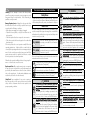
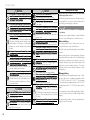
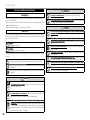
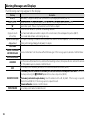
Warning Messages and Display
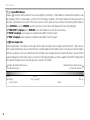
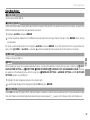
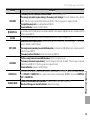
Warning
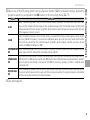
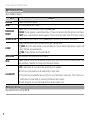
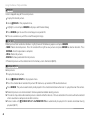
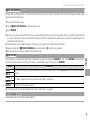
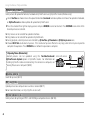
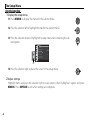
CARD ERROR
b MEMORY FULL
NO CARD
WRITE ERROR
READ ERROR
TOO MANY FRAMES
Troubleshooting
FRAME NO. FULL
Description
• The memory card is not formatted for use in the camera
camera:: Format the card (P
(P 94).
• The memory card contacts require cleaning or the memory card is damaged
damaged:: Clean the contacts with a soft, dry
cloth. If the message is repeated, format the card (P
(P 94). If the message persists, replace the card.
• Incompatible memory card:
card: Use a compatible card ((P
P 16).
• Camera malfunction:
malfunction: Contact a FUJIFILM dealer.
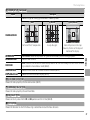
The memory card is full and pictures can not be recorded. Delete pictures (P
(P 30) or insert a memory card with
more free space ((P
P 14).
The shutter can only be released when a memory card is inserted. Insert a memory card.
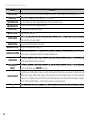
• Memory card error or connection error:
error: Reinsert the card or turn the camera off and then on again. If the message
persists, contact a FUJIFILM dealer.
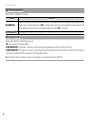
• Not enough memory remaining to record additional pictures
pictures:: Delete pictures (P
(P 30) or insert a memory card with
more free space ((P
P 14).
• The memory card is not formatted
formatted:: Format the memory card (P
(P 94).
• The file is corrupt or was not created with the camera
camera:: The file can not be viewed.
• The memory card contacts require cleaning
cleaning:: Clean the contacts with a soft, dry cloth. If the message is repeated,
format the card (P
(P 94). If the message persists, replace the card.
• Camera malfunction:
malfunction: Contact a FUJIFILM dealer.
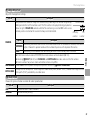
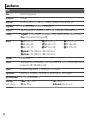
The camera has run out of frame numbers (current frame number is 999-9999). Format the memory card and
select RENEW for FRAME NO.
NO..Take
.Take a picture to reset frame numbering to 100-0001, then select CONTINUOUS for FRAME NO.
NO...
• A search has returned more than 30,000 results:
results: Choose a search that returns fewer results.
• More than 999 images are selected for deletion
deletion:: Choose fewer images.
123