1
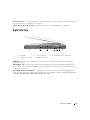
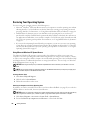
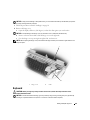
Left Side View
1
1
air vent
4
optical-drive-tray eject
button
2
2
3
security cable slot
4
3
optical drive bay
CAUTION: Do not block, push objects into, or allow dust to accumulate in the air vents. Do not store your
computer in a low-airflow environment, such as a closed briefcase, while it is running. Restricting the airflow
can damage the computer or cause a fire.
A I R V E N T — The computer uses fans to create airflow through the vents, which prevents the computer from
overheating.
NOTICE: Before you buy an antitheft device, ensure that it will work with the security cable slot.
SECURITY CABLE SLOT
— Lets you attach a commercially available antitheft device to the computer. For more
information, see the instructions included with the device.
20
About Your Computer