1
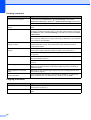
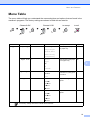
Menu and Features
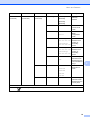
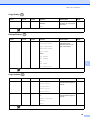
Copy Quality (
)
Level1
Level2
Level3
Options
Descriptions
Page
—
—
—
Fast
Choose the Copy
resolution for your type of
document.
23
Normal*
Best
The factory settings are shown in Bold with an asterisk.
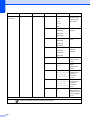
Enlarge/Reduce (
)
Level1
Level2
Level3
Options
Descriptions
Page
—
—
—
Fit to Page
You can choose the
enlargement and
reduction ratio for your
type of document.
24
Custom(25-400%)
198% 10x15cmiA4
186%10x15cmiLTR
142% A5iA4
100%*
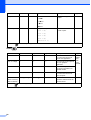
97% LTRiA4
93% A4iLTR
83%
C
69% A4iA5
47% A4i10x15cm
The factory settings are shown in Bold with an asterisk.
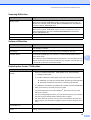
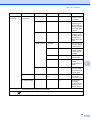
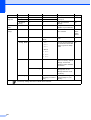
Copy Options (
)
Level1
Level2
Level3
Options
Descriptions
Page
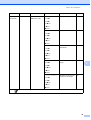
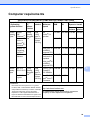
Paper Type
—
—
Plain Paper*
Choose the paper type
that matches the paper in
the tray.
27
Choose the paper size
that matches the paper in
the tray.
28
Inkjet Paper
Brother BP71
Other Glossy
Transparency
Paper Size
—
—
A4*
A5
10(W) x 15(H)cm
Letter
Legal
The factory settings are shown in Bold with an asterisk.
85