1
Section 8–Saving Site Report/Configurations
ATC200-Lite Teletilt® Remote Control Downtilt System
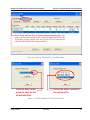
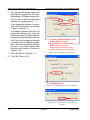
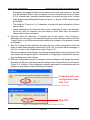
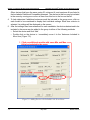
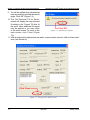
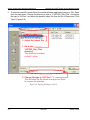
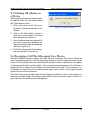
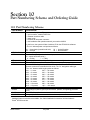
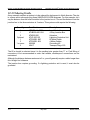
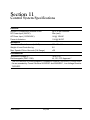
5. To view the saved file, launch Excel (or a similar software application) and go to ‘File, Open‘
from the main menu. Change the directory to look in ‘C:\ATC200_Site_Files’, change the
file type to ‘All Files’, and select the desired ‘tabrpt’ file from the list of files shown. Click
‘Open’ (Figure 8-6).
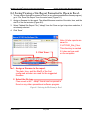
3. Select the ‘tabrpt’ file..
1. Go to the
‘ATC200_Site_Files’
directory.
This directory is located
on the C:\ drive.
2. Change file type to ‘All Files (*.*)’.
This will allow the file saved as a report for Excel
to be seen for selection .
Figure 8-6. Opening the Report in Excel.
8-
May 2005
Bulletin 639510