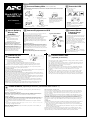
1
Status Indicators
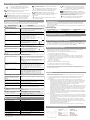
There are four indicator lights (numbered for easy
identification below) and a speaker grille on the front
panel to indicate UPS status, as folllows:
① On Line (green): This indicator is lit when conditioned
utility power is powering the Battery Backup outlets.
Single Beep: The alarm sounds when the On/Test button is pressed.
② On Battery (yellow): This indicator is lit when utility power is
outside safe limits and the UPS battery is powering the Battery Backup
outlets. If the outage is extended, APC software can close software
applications, and then shut down the operating system and the UPS.
Four Beeps Every 30 Seconds: This alarm is sounded whenever
the UPS is running On Battery.
Continuous Beeping: This alarm is sounded whenever a low battery
condition is reached. Battery runtime is very low. Promptly save your
data, exit all applications, and then shut down the operating system.
③ Overload (red): This indicator is lit when equipment
connected to Battery Backup outlets is drawing more power than the UPS
can provide. Move one or more pieces of equipment to the Surge
Protection outlets.
Continuous Tone: This alarm is sounded whenever the Battery
Backup outlets are overloaded.
Use the table below to solve minor UPS installation or operation problems. Consult APC Online Technical Support or
call APC Technical Support for assistance with problems that cannot be solved using the table below:
Possible Cause
Procedure
UPS will not turn on
Check the battery connections. Consult “Connect battery
wire” under “Setup” on the front page which shows how to
access the battery and connect the wire.
UPS not connected to AC power supply. Check that the UPS power plug is securely connected to the
wall outlet.
UPS circuit breaker “tripped”.
Very low or no utility voltage.
Utility overvoltage.
Disconnect non-essential equipment from the UPS. Reset the
circuit breaker (on back of UPS) by pushing the button back
in. If the breaker resets, switch the UPS On
and reconnect equipment one at a time. If
the breaker trips again it is likely that one
of the connected devices is responsible for
the overload.
Check the wall outlet, that supplies power
to the UPS, with a table lamp. If the lamp
is very dim, have the utility voltage checked
by a qualified electrician.
Connect the UPS to another wall outlet or have a qualified
electrician check the building wiring.
UPS operates on battery although normal utility voltage exists
UPS’s circuit breaker “tripped”.
The specific wall outlet the UPS is
connected to does not supply utility
voltage.
Disconnect non-essential equipment from
the UPS. Reset the circuit breaker (on back
of UPS) by pushing the button back in.
Connect the UPS to another wall outlet or have a
qualified electrician check the building wiring.
UPS does not provide expected backup time
The UPS is excessively loaded.
The UPS’s battery is weak due to
recent outage and has not had time to
recharge.
Battery requires replacement.
Unplug non-essential Battery Back-Up connected equipment,
such as printers. They can be plugged into Surge Protection
outlets.
Note: Devices that have motors or dimmer switches (laser
printers, heaters, fans, lamps, and vacuum cleaners for example)
should not be connected to the Battery Backup Plus Surge
Protection outlets.
Charge the battery. The battery charges whenever it is
connected to utility power. Typically, six to eight hours are
needed to fully charge the battery from total discharge. UPS
runtime is reduced until the battery is fully charged. You can
perform a self test after the battery is fully recharged by
pressing and holding the On/Test button for more than 1 second,
then releasing it.
If the Replace Battery LED is lit, the battery should be promptly
replaced. If the UPS is operated with a weakened battery,
runtime will be significantly reduced. Battery capacity
decreases with frequent power outages or when the UPS is
operated at elevated temperatures. Batteries typically last 3-6
years.
An indicator is lit or flashing
The Overload indicator is lit if equipment
connected to Battery Backup outlets is
drawing more power than the UPS can
provide.
Move one or more pieces of equipment to the Surge Protection
outlets.
The Replace battery indicator is lit if the
battery is near the end of its useful life.
The battery should be replaced within two weeks (see Order
Replacement Battery). Failure to replace the battery may result
in insufficient runtime during a power outage.
The Overload indicator may flash briefly
when the UPS is switched on.
This is a normal occurrence.
The On Line and Overload indicators are
flashing alternately.
The UPS has entered sleep mode and battery power is
switched off. This lasts for 16 seconds during a power outage
and is normal when software shuts down a UPS.
All indicator lights are flashing
UPS failure
Call APC for service.
UPS does not power the Computer/Monitor during an outage
Battery is not connected.
Check the battery connections. (See “Connect battery wire”
under “Setup” on the front page.)
Computer and/or monitor is plugged
into a Surge Protection outlet.
Move computer and/or monitor to the Battery Backup plus
Surge Protection outlets.
Specifications
Acceptable Input Voltage
Input Voltage (on line)
Output Voltage
Frequency Limits (on line)
Maximum Load (350, 500, 700)
Typical Recharge Time
Operating Temperature
Storage Temperature
Operating and Storage Relative Humidity
Size (H x W x D)
Weight (350, 500, 700)
Shipping Weight (350, 500, 700)
EMI Classification
④ Replace Battery (red): This indicator is lit whenever the
automatic diagnostic test has determined the battery is near the end of its
useful life. The battery should be replaced within two weeks (see Order
Replacement Battery). Failure to replace the battery may result in
insufficient runtime during a power outage.
Chirps for 1 Minute Every 5 Hours: This alarm is sounded
whenever the battery has failed the automatic diagnostic test.
UPS Storage
Troubleshooting
Battery is not connected properly.
Circuit Breaker: The circuit breaker button will stick out if
an overload condition forces the UPS to disconnect itself
from utility power. If this happens, disconnect non-essential equipment
and reset the circuit breaker by pushing the button in.
0 - 160 Vac, Single Phase
90 - 133 Vac
103 -133 Vac
47 - 63 Hz (autosensing)
350 VA - 220 W; 500 VA - 315 W; 700 VA - 410W.
6 to 8 hours from total discharge
32 to 104(F (0 to 40(C)
5 to 113(F (-15 to 45(C)
0 to 95%, non-condensing
9.4 x 5.0 x 7.9 in (23.9 x 12.7 x 20.0 cm)
350 VA -14.8 lb (6.7 kg); 500 VA - 15.8 lb (7.2 kg);
700 VA - 17.0 lb (7.7 kg).
350 VA - 16.8 lb (7.6 kg); 500 VA - 17.8 lb (8.1 kg);
700 VA - 19.0 lb (8.6 kg).
FCC/DOC Class B certified
Note: Detailed UPS product specifications are available online at the APC web site or through the APC faxback
system (800-347-3299).
If the UPS needs to be stored for extended periods of time, the battery needs to be charged periodically to
maximize battery capacity. Before storing, charge the UPS for at least 10 hours. Store the UPS covered and
upright in a cool, dry location.
The recommended period of time the unit can be stored without periodic charging is dependent on the
storage temperature:
Extended Storage
Storage Temperature
Recharge Frequency
5 to 86oF
(-15 to 30oC)
86 to 113oF (30 to 45oC)
Every 6 Months
Charging Duration
10 Hours
Every 3 Months
10 Hours
Ventilation Clearance
The recommended clearance for proper ventilation is one inch on each side and one inch at the back.
Order Replacement Battery
The typical battery lifetime is 3–6 years (depending on number of discharge cycles and operating
temperature). A replacement battery can be ordered from local retailers, APC, or the APC web site. The
APC part number for the Back-UPS LS (350 or 500) Replacement Battery Cartridge is RBC2. The APC
part number for the Back-UPS LS 700 Replacement Battery Cartridge is RBC17.
Battery Replacement
Battery replacement is a safe procedure. You may leave the UPS On and equipment connected during this
procedure. Do not replace the battery when the UPS is On Battery.
Please consult Setup, section 1, “Connect Battery Wire”, overleaf during this procedure.
1. Set the UPS at the edge of a table (diagram a).
2. Slide the battery compartment cover down (diagram b).
3. Grasp the tab attached to the battery and slide the battery partially out. Then grab the battery
firmly and pull it out. The battery wires will disconnect as the battery is pulled out (diagram c).
4. Carefully insert the new battery halfway into the UPS, avoid pinching the wires (diagram d).
5. Connect the wires to the new battery:
Red wire - to red terminal
Black wire - to black terminal
Small sparks at the battery terminals are normal during connection.
6. Carefully insert the battery fully into the UPS (diagram d).
7. Slide the battery compartment cover back into place (diagram e).
The old battery must be recycled. Deliver the battery to an appropriate recycling facility or return it to
APC in the packing carton that came with your new battery. Additional recycling information is
provided with your new battery.
Service
If the unit arrived damaged, please notify the carrier. If the UPS requires service, do not return it to the
dealer: instead try the steps below in order.
1. Consult the Troubleshooting section in the left column to find and eliminate common problems.
2. Verify that the circuit breaker is not tripped. A tripped circuit breaker is the most common
UPS problem.
3. If the problem persists, consult APC Online Technical Support or call APC Technical Support.
• When calling APC Technical Support, have the model number of the UPS, the serial number
and the date purchased ready. Be prepared to troubleshoot the problem over the telephone
with an APC Technical Support representative. If this is not successful, APC will issue a
Return Merchandise Authorization number (RMA#) and a shipping address.
• A UPS under warranty will be repaired at no cost.
The standard warranty is 2 years from date of purchase. APC’s standard procedure is to replace the
original unit with a factory reconditioned unit. APC will ship out the replacement unit once the
defective unit has been received by the repair department or cross ship upon the receipt of a valid
credit card number. The customer pays for the shipping to APC and APC pays ground freight
transportation costs back to the customer.
• Customers who must have the original unit back due to assigned asset tags and set depreciation
schedules must declare such a need at first contact with an APC Technical Support representative.
• If the warranty has expired, there is a repair charge.
4. To return the unit:
• Disconnect the black wire from the UPS battery. Department of Transportation (DOT) regulations
require that the black battery wire be disconnected before shipping the UPS back to APC. Refer to
“Connect battery wire” instructions and graphics on the front page for how to disconnect the black
wire from the battery.
• Pack the UPS in its original packaging. If the original packing is not available, contact APC
Technical Support to obtain a new set. Pack the UPS properly to avoid damage in transit. Never
use Styrofoam™ beads for packaging. Damage sustained in transit is not covered under warranty
(insuring the package for full value is recommended).
• Write the RMA# on the outside of the package.
• Return the UPS by insured, prepaid carrier to the address given to you by Technical Support.
APC Contact Information
USA/Canada …………….
Mexico……………………
Brazil …………………….
Worldwide ………………
Web site……………………
Online Technical Support…
1.800.800.4272
292.0253 / 292.0255
0800.12.72.1
1.401.789.5735
http://www.apc.com
http://support.apc.com