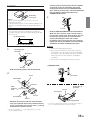
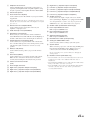
1
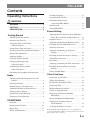
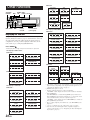
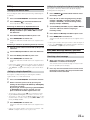
9 f UP Button
Remote Control
1
2
3
4
Radio mode: SEEK (UP) button
CD mode: Press this button to advance to the beginning
of the next track.
! 9 Button
Radio mode: Pressing this button will select, in
descending order, stations programmed into the radio's
presets as shown below.
5
6
7
8
9
!
"
#
6 → 5 ... 1 → 6
CD Changer mode: DISC Select (DN) button
Press this button to select a disc in descending order.
MP3/WMA mode: Folder or Playlist Select (DN) button
Press this button to select the folder or playlist.
" Mute Button
Press this button to lower the volume by 20 dB instantly.
Press this button again to cancel.
# Audio Processor Button
Each press of the button changes the audio processor
mode.
For details, refer to "Operating the Audio Processor" as
shown below.
Press the button to call the external audio processor
mode when the external audio processor is connected.*1
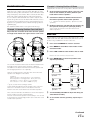
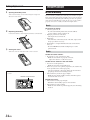
Controls on Remote Control
1 Power Button
Press this button to turn the power on/off.
2 Source Button
Press this button to select the audio source.
3 -/J Button
Press this button to switch between the Play and Pause
modes for CD.
4 TILT 98 Buttons
Press this button to adjust the angle of the movable
display.
*1 For the operation of external audio processor, refer to the Owner's
Manual of the external audio processor you purchased.
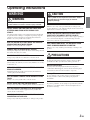
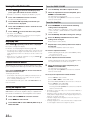
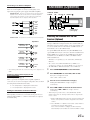
Operating the Audio Processor
1
Normal mode → EQ mode (Equalizer Presets) → Time
Correction mode (Recalling the Stored Time Correction) →
Crossover mode (Recalling the Stored Crossover) → Normal
mode
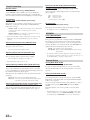
5 Band/Program Button
Radio mode: BAND Button
Press this button and the band will change.
CD/Changer mode: To switch the disc mode.
6 Volume Adjustment Buttons
To increase the volume level:
Press the L button
To decrease the volume level:
Press the K button
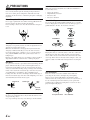
Press A.PROC to select the mode.
2
Press 8 or 9 to select the item.
EQ mode:
Select from FLAT, ROCK, POPS, NEWS and USER'S 1 to 6.
Time Correction mode/Crossover mode:
Select from MEMORY 1 through 6.
7 8 Button
Radio mode: Pressing this button will select, in ascending
order, stations programmed into the radio's presets as
shown below.
1 → 2 ... 6 → 1
CD Changer mode: DISC Select (UP) button
Press this button to select a disc in ascending order.
MP3/WMA mode: Folder or Playlist Select (UP) button
Press this button to select the folder or playlist.
8 g DN Button
Radio mode: SEEK (DN) Button
CD mode: Press this button to go back to the beginning of
the current track.
33-EN