1
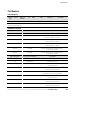
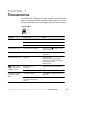
Troubleshooting
Condition
Possible Cause
Action
Communications do not
function properly.
Incorrect communications
cabling.
Verify cable integrity (see page 64).
Incorrect baud rate.
Select a new baud rate (see page 63).
Incorrect communication mode.
Select a new communication mode
(see Chapter 5).
Load plug(s) not fully seated.
Verify load plug(s) are fully seated.
Load circuit protectors tripped.
Reset load protectors.
Power requirements exceed UPS
capacity. If overload is greater
than 105%, the alarm beeps
every second and the UPS may
switch to Bypass mode.
Your UPS continues to operate.
Reduce load.
The UPS switched to Bypass
mode because the overload
increased (above 105%). The
alarm beeps.
Reduce load.
If the Overload indicator remains lit,
reset the UPS by pressing the
Output | On button until the alarm
beeps.
You may need to obtain a larger
capacity UPS.
The utility line voltage and
frequency are out of
specification.
The inverter remains online, deriving
power from the utility until it is no
longer acceptable.
Check the unit configuration.
Refer to the product specifications
(see page 67).
UPS internal temperature is too
high. The alarm beeps and the
UPS switches to Bypass mode for
approximately 10 minutes,
allowing the UPS to cool down.
Shut down the UPS. Clear vents.
Remove any heat sources. Wait
approximately 5 minutes and retry.
Contact your service representative if
condition persists.
Weak battery while in Normal
mode. The alarm beeps.
Allow the battery to charge for
24 hours, then retest. Have batteries
replaced if condition persists.
Battery breaker is open (O).
Verify that the battery cabinet breaker
is in the ON ( | ) position.
Battery cabinet is not properly
connected to the UPS.
Verify that the battery cords are
connected.
No output load voltage.
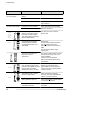
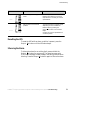
OVERLOAD
SITE FAULT
OVERTEMP
BATTERY
SELF TEST
OVERLOAD
OVERTEMP
BATTERY
72
Powerware® Prestige Series Installation and Operator’s Manual for IBM Applications (3000 VA) Uncontrolled Copy