1
Document Revision 1
Dterm Cordless DECT
___________________________________________________________________________________
SECTION 2
TURNING ON THE VERIFICATION TONE
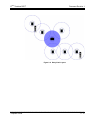
The verification tone is a useful tool for troubleshooting installation problems. If you
activate the verification tone, a handset beeps whenever it moves into the extended
coverage area of the repeater. The handset will beep every few seconds as long as it
is connected to the repeater. This lets you use the verification tone to map the
coverage area of each repeater.
SECTION 3
1.
Disconnect the power.
2.
Reconnect the power for 1 to 5 seconds, and disconnect it again.
3.
Reconnect the power and wait for the LED on front of the repeater to start a
slow flash.
4.
Disconnect the power, and immediately reconnect it. The verification tone is
then activated.
5.
To turn the verification tone off again, repeat the procedure.
MAINTENANCE
Unplug the repeater from the wall outlet before cleaning!
T
Wipe the front of the repeater front with a damp cloth or an antistatic wipe.
T
Do not apply liquid cleaners directly on the repeater.
T
Never use aerosol cleaners or solvents.
T
To avoid static discharge, never use a plain dry cloth.
___________________________________________________________________________________
3-2
Troubleshooting and Maintenance