1
5.
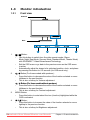
Power button/power indicator
•
Press this button to turn the monitor on/off
•
The color definition of the power indicator is as the below table.
Status
Blue
Amber
OFF
1.3.2
Description
ON
Standby mode
OFF
Back view
Stereo
speaker
(For some
models)
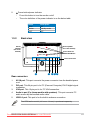
Stereo speaker
(For some models)
Screw holes for
VESA Wall Mount
AC-IN
DVI
VGA
AUDIO IN
1
2
3
4
USB
Rear connectors
5
Rear connectors
1.
AC-IN port. This port connects the power connector from the bundled power
cord.
2.
DVI port. This 24-pin port is for PC (Personal Computer) DVI-D digital signal
connection.
3.
VGA port. This 15-pin port is for PC VGA connection.
4.
Audio-in port (For those models with speakers). This port connects PC
audio source by the bundled audio cable.
5.
USB 2.0 port. This port is for the built-in webcam connection.
The VESA wall mount kit (100 mm x 100 mm) is purchased separately.
ASUS VK192
Series
LCD Monitor
Downloaded
from
ManualMonitor.com
Manuals
1-3