1
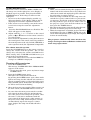
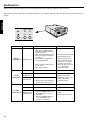
Indicators
The projector has three indicators each of which shows the working condition of the projector.
ENGLISH
The following offers solutions to possible problems. If a problem persists, turn the projector off and consult your
dealer.
LAMP TEMP
RGB
INDICATOR
TEMP
INDICATOR
VIDEO
SHOWS
blinking red
CONDITION
• Unusual temperature
The power is turned off
and the POWER indicator
lights up red.
• The ventilation slots or air
filter is clogged with dust
or debris.
• The fan has stopped due
to an impediment.
• The location temperature
is too high.
• The filter is dirty.
Steady green
LAMP
INDICATOR
Normal
Blinking red/green Lamp is almost used up.
or Blinking red
Steady red
• Lamp is used up.
• The power is not turned on.
POSSIBLE SOLUTIONS
• Remove the object from
the ventilation slot.
• Pull out the power
plug and remove the
object. If you cannot,
consult your dealer.
• Relocate the projector
to a cooler place.
• Clean the filter.
-
Replace the lamp.
Exchange with a new
lamp if the same
problem recurs.
(Power indicator lights up red.)
Steady red
Standby
-
Steady green
Power-on
-
• The filter cover is not closed.
POWER
(When the TEMP indicator and
INDICATOR Blinking red/green
the LAMP indicator are off.)
or Blinking red
• Abnormal
(When the TEMP indicator
or the LAMP indicator
steady on or blinking.)
44
• Close the cover correctly.
• Contact your dealer.