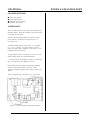
1
GRAPHIC DISPLAY PORT
CHAPTER 15
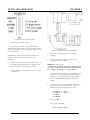
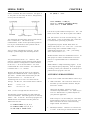
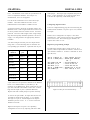
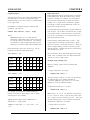
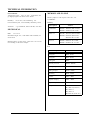
starts pr inting the char acter on the 3rd pixe l to the right,
and 4th pixel down from the top (coordinates start at
0,0).
largest fon t is 32 pixels wide by 48 tall.
Small charac ters are pr inted on its own plane. Thus,
small text can be turned off if desired. The larger sizes
are considered graphics and are printed on the graphics
plane.
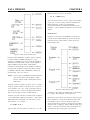
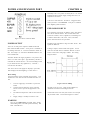
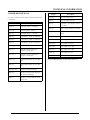
The largest character is positioned based on pixel and
small character resolution. T he X position starts on the
column based on the small character set. Its range is 034. The Y position sets the top of the chara cter. Its
range is 0 to 192. Thus, you have 19 2 vertical p oints
and 35 horizontal points to position a large character.
Printing small characters is much like printing to a
terminal. U nless there is a semi-colon (;) at the end of a
PRIN T or D ISPL AY state ment, the curso r advan ces to
the beginning of the next line simulating a
< CR> < LF> sequence.
Medium and large char acters are d rawn as gr aphics.
This m eans they app ear on the graphics layer. The fonts
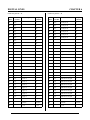
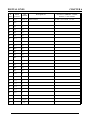
for these characters are stored in F lash EPROM , U 3. If
this EPROM is missing or W11 is removed, the larger
characters will display garbage. Fonts can be modified
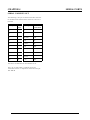
as desired . Se e "C hanging and loading fonts" later in this
chapter.
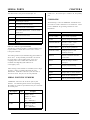
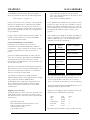
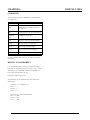
Text is printed using a number of CAM BASIC
commands. Some of them are listed below.
PRIN T #10, ”T ext”
PR I NT # 10 , U S IN G “# #. # # ## ”;A
DISP LAY “T ext”
DISP LAY (Row, Colum n); ” Text”
DISP LAY L (Row , C olumn); ”T ext” ;
DISP LAY M (Ro w, Colum n);” Text” ;
DI SPL AY M, R(R o w , Colum n );" T ext" ;
Printing normal and reverse characters
Medium and large characters may be printed in normal
(white on bla ck backgr ound) and r everse (black on w hite
background). This is done by specifying the "R"
parameter in the DISP LAY com mand.
PRINT #10 can write formatted number s and text in the
same way as PRINT. PRINT uses small text. Larger
characters must use DISP LAY. PRINT USING is not
available for large r chara cters.
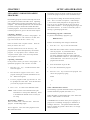
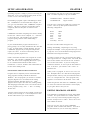
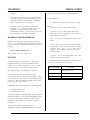
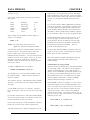
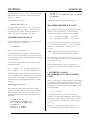
DISPLAY M,R(0,0)"REVERSE";
DISPLAY M(0,16)"NORMAL";
The semi-colon (;)
You may (or may not) notice a semi-colon (;) after
some, but not all DISPL AY and P RINT #10 statements.
A (;) suppresses a < CR> < LF> sequence to the
display (and serial ports). A comm a (,) wor ks in a
similar fashion except a number of spaces are printed
while it tabs to the next location..
Medium and large char acters are form ed in CAM BASIC
and are treated as graphics . P rinting these charac ters is
much the same as sm all ones. The m ajor differ ence is
CAM BASIC does not re -position text on the next line if
you run out of room on the current line.
Positioning text
Small character text is positioned using the DISPLAY
command. Text begins in the upper left corner at (0,0).
The lower r ight corner is (29,39). Text is autoincremented to the next position. When small text is at
the end of the line, it is positioned at the next line. An
entire screen of small text will scroll up one line when
the b ot to m li ne is printed fo llow ed b y a < L F >
character.
The displa y driver was design ed so whe n printing sm all
characters, the screen acted like a terminal display.
Thus, a < CR> < LF> sequence simply moved the
cursor down one line.
Medium and large char acters do not operate this way. A
< CR> or < LF> are simply tr eated as spaces. Unless
you include a ";" at the end of a DISPLAY M or
DISPLAY L type line, you will effectively print two
mor e blocks of ch aracter s. T his is especially notic eable
in the reverse display mode.
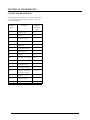
Medium sized character s are positioned based on
graphical X and Y pixel position. When printing a
string, character s automatically advance to the right by
10 pixels.
Scrolling
Small text automatically scrolls up 1 line when it reaches
the bottom of the screen. Thus, the display acts like a
term inal.
The X, Y coordinates in the DISPLA Y comm and for
medium character s specify the upper right corner of the
character block. Thus, a D ISPLAY M(2, 3) command
15-4