1
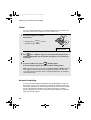
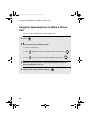
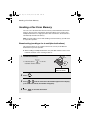
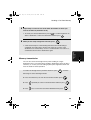
UX-BS60H_ENGLISH_E4448
UX-BS60
MODEL
UX-BS60
FACSIMILE
FACSIMILE
OPERATION MANUAL
1. Installation
2. SMS Text Messaging
3. Using the Answering Machine
4. Sending Faxes
5. Receiving Faxes
6. Making Copies
7. Special Functions
8. Printing Lists
9. Maintenance
10. Troubleshooting
IMPORTANT
PLEASE KEEP THE EXTERNAL & INTERNAL PACKAGING SAFE.
PLEASE DO NOT THROW IT AWAY.
IN THE UNLIKELY EVENT OF A HARDWARE FAILURE, OUR
REPAIR CENTRE WILL ASK YOU TO PUT YOUR SHARP
FACSIMILE IN THIS BOX.
THANK YOU FOR YOUR ASSISTANCE.
all.book
Page 1
Tuesday, March 29, 2005
9:08 AM
MAINS PLUG WIRING INSTRUCTIONS
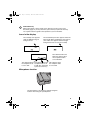
This equipment is fitted with a moulded type mains plug which incorporates a detachable
fuse cover, under no circumstances should the plug be used without the fuse cover fitted.
In the unlikely event of the socket outlet in your home not being compatible with the plug
supplied, cut off the mains plug and fit an appropriate type observing the wiring code
below.
DANGER: The fuse from the cut-off plug should be removed and the plug should be
disposed of in a safe manner. Under no circumstances should the cut-off plug be
inserted into a socket outlet as a serious electric shock may occur.
If you are not sure how to do this, get help from a qualified electrician.
IMPORTANT
The wires in this mains lead are coloured in accordance with the following code:
GREEN-AND-YELLOW:
Earth
BLUE:
Neutral
BROWN:
Live
As the colours of the wires in the mains lead of this apparatus may not correspond with
the coloured markings identifying the terminals in your plug, proceed as follows:The wire
which is coloured GREEN-AND-YELLOW must be connected to the terminal in the plug
which is marked by the letter E, or by the safety earth symbol
or coloured green or
green-and-yellow.The wire which is coloured BLUE must be connected to the terminal
which is marked with the letter N or coloured black.The wire which is coloured BROWN
must be connected to the terminal which is marked with the letter L or coloured red.
This apparatus must be protected by a 13A fuse in the mains plug or distribution board.
"WARNING: THIS APPARATUS MUST BE EARTHED"
This equipment complies with the requirements of Directive 1999/5/EC.
Dieses Gerät entspricht den Anforderungen der EU-Richtlinie 1999/5/EG.
Cet appareil est conforme aux exigences de la directive 1999/5/CE.
Este aparato satisface las exigencias de las Directiva 1999/5/CE.
Quest’apparecchio è conforme ai requisiti delle direttiva 1999/5/CE.
Dit apparaat voldoet aan de eisen van de richtlijn 1999/5/EG.
Este equipamento obedece às exigências da directiva 1999/5/CE.
Η συσκευή αυτή ανταποκρίνεται στις απαιτήσεις των οδηγια 1999/5/ΕK.
Denna utrustning uppfyller kraven enligt direktiv 1999/5/EC.
Dette udstyr overholder kravene i direktiv 1999/5/EF.
Dette produktet oppfyller kravene i direktiv 1999/5/EC.
Tämä laite täyttää direktiivi 1999/5/EY.
This is a facsimile product operating in British and Irish analogue public switched telephone networks which
follow the TBR21 Standard.
The Declaration of Conformity can be viewed at the following URL address.
http://www.sharp.de/doc/UX-BS60.pdf
all.book
Page 1
Tuesday, March 29, 2005
9:08 AM
Introduction
Welcome, and thank you for
choosing a SHARP inkjet
fax machine! The features
and specifications of your
inkjet fax are shown below.
This Sharp fax supports SMS messaging. To use this feature, see page 35.
Print cartridge yield*
(at 4% coverage**)
Initial cartridge
Quality mode OFF: Approx. 300 A4 pages
Quality mode ON: Approx. 200 A4 pages
Replacement cartridge: SHARP UX-C70B
Quality mode OFF: Approx. 600 A4 pages
Quality mode ON: Approx. 400 A4 pages
Paper tray capacity
Approx. 50 A4-size sheets
(at room temperature; maximum stack height
should not be higher than the line on the tray)
Recording system
Thermal inkjet
Print resolution
600 × 600 dpi
Effective printing width
203 mm max.
Memory size**
448 KB (approx. 24 average pages with ECM
turned off; 20 minutes of voice messages
(including OGMs))
Modem speed
14,400 bps with auto fallback to lower speeds.
Transmission time**
Approx. 6 seconds (only when ECM is on)
Compatibility
ITU-T (CCITT) G3 mode
Compression scheme
MR, MH, MMR
*Quality mode is initially turned off. To turn on Quality mode, see page 21.
**Based on Sharp Standard Chart at standard resolution, excluding time for protocol signals
(i.e., ITU-T phase C time only).
1
all.book
Page 2
Tuesday, March 29, 2005
9:08 AM
Automatic dialling
30 numbers
Telephone function
Yes (cannot be used if power fails)
Applicable telephone line Public switched telephone network (TBR21) / PBX
Reception modes
TEL/FAX, TEL, FAX, A.M.
Automatic document
feeder
10 sheets max. (A4, 80 g/m2 paper)
Input document size
Automatic feeding:
Width: 148 to 216 mm
Length: 140 to 297 mm
Manual feeding:
Width: 148 to 216 mm
Length: 140 to 600 mm
Effective scanning width 210 mm max.
2
Scanning Resolution
Horizontal: 8 lines/mm
Vertical:
Standard: 3.85 lines/mm
Fine /Halftone: 7.7 lines/mm
Super fine: 15.4 lines/mm
Halftone (grayscale)
64 levels
Contrast control
Automatic/Dark selectable
Copy function
Single/Multi/Sort (99 copies/page)
Display
16-digit LCD display, 2 lines
Power requirements
230 V AC, 50 Hz
Power consumption
Standby: 5.6 W
Maximum: 35 W
Operating temperature
15 - 32°C
Humidity
25 - 80% RH
Dimensions (without
attachments)
Width: 354 mm
Depth: 247 mm
Height: 138 mm
Weight (without
attachments)
Approx. 3.2 kg
all.book
Page 3
Tuesday, March 29, 2005
9:08 AM
As a part of our policy of continuous improvement, SHARP reserves the right to make design
and specification changes for product improvement without prior notice. The performance
specification figures indicated are nominal values of production units. There may be some
deviations from these values in individual units.
Important:
This fax machine is not designed for use on a line which has call waiting, call
forwarding, or certain other special services offered by your telephone company. If
you attempt to use the fax machine in conjunction with any of these services, you
may experience errors during transmission and reception of facsimile messages.
The fax machine is not compatible with digital telephone systems.
Important safety information
Do not disassemble this machine or attempt any procedures not described in this
manual. Refer all servicing to qualified service personnel.
Do not install or use the machine near water, or when you are wet. For example, do
not use the machine near a bath tub, wash bowl, kitchen sink or laundry tub, in a wet
basement, or near a swimming pool. Take care not to spill any liquids on the
machine.
Unplug the machine from the power outlet and telephone socket and consult a
qualified service representative if any of the following situations occur:
- Liquid has been spilled into the machine or the machine has been
exposed to rain or water.
- The machine produces odors, smoke, or unusual noises.
- The power cord is frayed or damaged.
- The machine has been dropped or the housing damaged.
Do not allow anything to rest on the power cord, and do not install the machine
where people may walk on the power cord.
This machine must only be connected to a 230 V, 50 Hz, earthed (3-prong) outlet.
Connecting it to any other kind of outlet will damage the machine.
Never insert objects of any kind into slots or openings on the machine. This could
create a risk of fire or electric shock. If an object falls into the machine that you
cannot remove, unplug the machine and consult a qualified service representative.
Do not place this machine on an unstable cart, stand or table. The machine could be
seriously damaged if it falls.
Never install telephone wiring during a lightning storm.
Never install telephone sockets in wet locations unless the socket is specifically
designed for wet locations.
3
all.book
Page 4
Tuesday, March 29, 2005
9:08 AM
Never touch bare telephone wires or terminals unless the telephone line has been
disconnected at the network interface.
Use caution when installing or modifying telephone lines.
Avoid using a telephone (other than a cordless type) during an electrical storm.
There may be a remote risk of electric shock from lightning.
Do not use a telephone to report a gas leak in the vicinity of the leak.
The power outlet must be installed near the equipment and must be easily
accessible.
4
all.book
Page 5
Tuesday, March 29, 2005
9:08 AM
Table of Contents
A Look at the Operation Panel
1. Installation
Unpacking Checklist . . . . . . . . . . . . . . . . . . . . . . . . . . . . . . . . . . . . .
Attachments . . . . . . . . . . . . . . . . . . . . . . . . . . . . . . . . . . . . . . . . . . .
Loading Printing Paper . . . . . . . . . . . . . . . . . . . . . . . . . . . . . . . . . . .
Connecting the Power Cord . . . . . . . . . . . . . . . . . . . . . . . . . . . . . . .
Installing the Print Cartridge . . . . . . . . . . . . . . . . . . . . . . . . . . . . . . .
Connecting the Telephone Line Cord. . . . . . . . . . . . . . . . . . . . . . . .
Entering Your Name and Fax Number . . . . . . . . . . . . . . . . . . . . . . .
Setting the Date and Time . . . . . . . . . . . . . . . . . . . . . . . . . . . . . . . .
Setting the Reception Mode . . . . . . . . . . . . . . . . . . . . . . . . . . . . . . .
Flash Select Setting for PBX . . . . . . . . . . . . . . . . . . . . . . . . . . . . . .
Volume Adjustment . . . . . . . . . . . . . . . . . . . . . . . . . . . . . . . . . . . . .
2. SMS Text Messaging
Sending an SMS Message . . . . . . . . . . . . . . . . . . . . . . . . . . . . . . . .
Receiving SMS Messages . . . . . . . . . . . . . . . . . . . . . . . . . . . . . . . .
Viewing the Outbox . . . . . . . . . . . . . . . . . . . . . . . . . . . . . . . . . . . . .
Printing or Deleting all Messages . . . . . . . . . . . . . . . . . . . . . . . . . . .
SMS Settings . . . . . . . . . . . . . . . . . . . . . . . . . . . . . . . . . . . . . . . . . .
3. Using the Answering Machine
Recording an Outgoing Message . . . . . . . . . . . . . . . . . . . . . . . . . . .
Operating the Answering Machine . . . . . . . . . . . . . . . . . . . . . . . . . .
Optional Answering Machine Settings . . . . . . . . . . . . . . . . . . . . . . .
Transfer Function . . . . . . . . . . . . . . . . . . . . . . . . . . . . . . . . . . . . . . .
Override Ringing. . . . . . . . . . . . . . . . . . . . . . . . . . . . . . . . . . . . . . . .
Remote Operations . . . . . . . . . . . . . . . . . . . . . . . . . . . . . . . . . . . . .
4. Sending Faxes
7
10
10
11
14
15
16
23
25
27
29
30
31
35
36
41
43
45
46
48
48
49
53
55
58
60
66
Transmittable Documents. . . . . . . . . . . . . . . . . . . . . . . . . . . . . . . . . 66
Loading the Document . . . . . . . . . . . . . . . . . . . . . . . . . . . . . . . . . . . 67
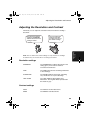
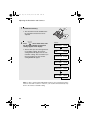
Adjusting the Resolution and Contrast . . . . . . . . . . . . . . . . . . . . . . . 69
5
all.book
Page 6
Tuesday, March 29, 2005
9:08 AM
Table of Contents
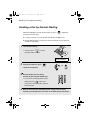
Sending a Fax by Normal Dialling. . . . . . . . . . . . . . . . . . . . . . . . . . . 72
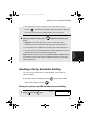
Sending a Fax by Automatic Dialling . . . . . . . . . . . . . . . . . . . . . . . . 73
Using the Speakerphone to Make a Phone Call . . . . . . . . . . . . . . . . 82
Batch Page Numbering. . . . . . . . . . . . . . . . . . . . . . . . . . . . . . . . . . . 83
Sending a Fax From Memory . . . . . . . . . . . . . . . . . . . . . . . . . . . . . . 84
5. Receiving Faxes
87
Using TEL/FAX Mode . . . . . . . . . . . . . . . . . . . . . . . . . . . . . . . . . . . . 87
Using A.M. Mode . . . . . . . . . . . . . . . . . . . . . . . . . . . . . . . . . . . . . . . 88
Using FAX Mode. . . . . . . . . . . . . . . . . . . . . . . . . . . . . . . . . . . . . . . . 89
Using TEL Mode . . . . . . . . . . . . . . . . . . . . . . . . . . . . . . . . . . . . . . . . 90
Optional Reception Settings . . . . . . . . . . . . . . . . . . . . . . . . . . . . . . . 93
Substitute Reception to Memory . . . . . . . . . . . . . . . . . . . . . . . . . . . . 95
6. Making Copies
96
7. Special Functions
99
Caller ID (Requires Subscription to Service) . . . . . . . . . . . . . . . . . . 99
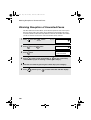
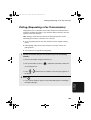
Blocking Reception of Unwanted Faxes . . . . . . . . . . . . . . . . . . . . . 104
Polling (Requesting a Fax Transmission) . . . . . . . . . . . . . . . . . . . . 105
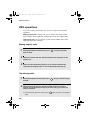
PBX operations . . . . . . . . . . . . . . . . . . . . . . . . . . . . . . . . . . . . . . . . 106
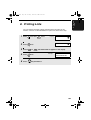
8. Printing Lists
107
9. Maintenance
111
Cleaning the Machine . . . . . . . . . . . . . . . . . . . . . . . . . . . . . . . . . . . 111
Improving Print Quality . . . . . . . . . . . . . . . . . . . . . . . . . . . . . . . . . . 114
10. Troubleshooting
119
Problems and Solutions . . . . . . . . . . . . . . . . . . . . . . . . . . . . . . . . . 119
Messages and Signals . . . . . . . . . . . . . . . . . . . . . . . . . . . . . . . . . . 125
Clearing Paper Jams . . . . . . . . . . . . . . . . . . . . . . . . . . . . . . . . . . . 128
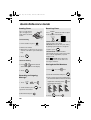
Quick Reference Guide
130
Index
131
6
all.book
Page 7
Tuesday, March 29, 2005
9:08 AM
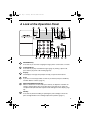
A Look at the Operation Panel
1
2
3
4
5
6
REC/MEMO
RESOLUTION/
RECEPTION
PLAY/HOLD
INK
7
Z
8
A
R
REPEAT
9
10
SKIP
11
DELETE
12
DIGITAL
SPEAKERPHONE
13
14 15 16
17
18
1
REC/MEMO key
Press this key to record an outgoing message, phone conversation, or memo.
2
PLAY/HOLD key
Press this key to play recorded messages (page 51). During a phone call,
press this key to put the call on hold (page 92).
3
Display
This displays messages and prompts to help you operate the machine.
4
R key
If you are on a Flash-type PBX, use this key to dial out (first press the R key
and then dial the number; page 72).
5
RESOLUTION/RECEPTION key
When a document is in the feeder, press this key to adjust the resolution for
faxing or copying (page 70). At any other time, press this key to select the
reception mode (the selected reception mode will appear in the display; page
29).
6
INK key
Press this key before installing or replacing the print cartridge to move the
print cartridge holder to the cartridge replacement position (page 17).
7
all.book
Page 8
Tuesday, March 29, 2005
9:08 AM
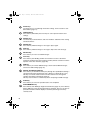
7
Arrow keys
Use these keys to scroll through and select settings, and to search for autodial numbers (page 77).
8
FUNCTION key
Press this key followed by the arrow keys to select special functions and
settings.
9
Number keys
Use these keys to dial numbers, and enter numbers and letters when storing
auto-dial numbers.
10
REPEAT key
Press this key while listening to a message to play it again.
11
SKIP key
Press this key while listening to a message to skip to the next message.
12
DELETE key
Press this key to erase recorded messages.
13
POLL key
Press this key after dialling another fax machine to receive a document
(previously loaded in the other machine’s feeder) without assistance from the
operator of the other machine (page 105).
14
SMS key
Press this key to send an SMS message, check received SMS messages,
and access SMS settings (page 35).
15
DIGITAL SPEAKERPHONE key
Press this key to talk with the other party through the speakerphone during a
call (speak facing the operation panel at a distance of about 50 cm to 1m).
This key can also be used to listen to the line and fax tones through the
speaker when faxing a document (page 72).
This key also functions as a delete key when composing an SMS message.
16
STOP key
Press this key to cancel an operation before it is completed.
17
START/MEMORY key
Press this key after dialling to begin fax transmission (page 73). Press this key
before dialling to send a fax through memory (page 84). The key can also be
pressed in the date and time display to show the percentage of memory
currently used.
8
all.book
18
Page 9
Tuesday, March 29, 2005
9:08 AM
COPY/HELP key
When a document is in the feeder, press this key to make a copy of the
document (page 97). At any other time, press this key to print out the Help
List, a quick reference guide to the operation of your fax machine.
Icons in the display
The envelope icon appears
while an SMS message is
being received.
The exclamation point icon appears when the
inbox is full. When checking the messages in
your outbox, this appears if the message
being viewed was not sent successfully.
01-JAN 10:30
01-JAN 12:00
!
TEL
TEL
TEL
FAX
Note: Both the TEL and
FAX icons appear when
the reception mode is
set to TEL/FAX.
This appears when This appears when the This appears when
the reception mode reception mode is set the reception mode
to A.M. (the answering is set to FAX.
is set to TEL.
system is turned on).
Microphone location
The microphone is located here. Speak facing this
location when using the speakerphone.
9
all.book
Page 10 Tuesday, March 29, 2005
9:08 AM
1. Installation
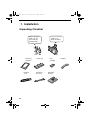
Unpacking Checklist
Before setting up,
make sure you
have all of the
following items.
Paper tray
extension
Handset
cord
10
Paper tray
Telephone
line cord
If any are missing,
contact your
dealer or retailer.
Print
cartridge
Operation
manual
Handset
Page 11 Tuesday, March 29, 2005
9:08 AM
Attachments
Attachments
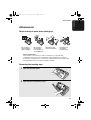
Points to keep in mind when setting up
Do not place
the machine in
direct sunlight.
Do not place
the machine
near heaters or
air conditioners.
Keep dust away
from the machine.
Keep the area
around the
machine clear.
About condensation
If the machine is moved from a cold to a warm place, it is possible that
condensation may form on the scanning glass, preventing proper scanning of
documents for transmission. To remove the condensation, turn on the power and
wait approximately two hours before using the machine.
Removing the packing tape
1
Open the operation panel.
2
Open the print compartment cover.
11
1. Installation
all.book
all.book
Page 12 Tuesday, March 29, 2005
9:08 AM
Attachments
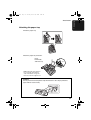
3
4
Remove the tape.
Close the print compartment cover and
then the operation panel.
Connecting the handset
Connect the handset as shown and place it on the handset rest.
♦ The ends of the handset cord are identical, so they will go into either
socket.
Make sure the handset
cord goes into the
socket marked with a
handset symbol on the
side of the machine!
Use the handset to make ordinary phone calls,
or to transmit and receive faxes manually.
12
Page 13 Tuesday, March 29, 2005
9:08 AM
Attachments
Attaching the paper tray
Attach the paper tray.
Attach the paper tray extension.
Insert
horizontally
and rotate up
Click!
Note: The paper tray extension
has a top side and a bottom
side. If the tabs do not go into
the holes, turn the support over.
Caution!
Do not pull out the black plastic strip shown below. If the strip is pulled out,
paper will not feed correctly.
13
1. Installation
all.book
all.book
Page 14 Tuesday, March 29, 2005
9:08 AM
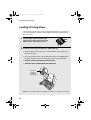
Loading Printing Paper
Loading Printing Paper
You can load up to 50 sheets of A4-size paper (60 - 80 g/m2) in the paper tray
(at room temperature; maximum stack height should not be higher than the
line on the tray).
1
2
Fan the paper, and then tap the edge
against a flat surface to even the stack.
Make sure the stack edges are even.
Insert the stack of paper into the tray, PRINT SIDE UP.
• If paper remains in the tray, take it out and combine it into a single stack
with the new paper.
• Be sure to load the paper so that printing takes place on the print side of
the paper. Printing on the reverse side may result in poor print quality.
• GENTLY LOAD PAPER INTO THE PAPER TRAY.
• DO NOT FORCE IT DOWN INTO THE FEED SLOT.
The stack
should not
be higher
than this line
Note: Do not use paper that has already been printed on, or paper that is curled.
14
Page 15 Tuesday, March 29, 2005
9:08 AM
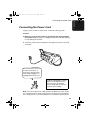
Connecting the Power Cord
Connecting the Power Cord
Plug the power cord into a 230 V, 50 Hz, earthed AC (3-prong) outlet.
Caution!
♦ Make sure you have removed all of the packing tape before plugging
in the power cord (see page 11). Plugging in the power cord without doing
so may damage the machine.
♦ The power outlet must be installed near the equipment and must be easily
accessible.
The machine does not have
a power on/off switch, so
the power is turned on and
off by simply plugging in or
unplugging the power cord.
“CHECK CARTRIDGE” normally
appears in the display the first
time you plug in the machine.
This message appears until you
install the print cartridge.
Note: If your area experiences a high incidence of lightning or power surges,
we recommend that you install surge protectors for the power and telephone
lines. Surge protectors can be purchased at most telephone specialty stores.
15
1. Installation
all.book
all.book
Page 16 Tuesday, March 29, 2005
9:08 AM
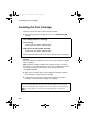
Installing the Print Cartridge
Installing the Print Cartridge
Follow these steps to install or replace the print cartridge.
♦ When replacing the print cartridge, be sure to use a SHARP UX-C70B
cartridge.
Print cartridge yield (at 4% coverage)
Initial cartridge
Quality mode OFF: Approx. 300 A4 pages
Quality mode ON: Approx. 200 A4 pages
Replacement cartridge (SHARP UX-C70B)
Quality mode OFF: Approx. 600 A4 pages
Quality mode ON: Approx. 400 A4 pages
Quality mode is initially turned off. To turn on Quality mode, see page 21.
Caution!
Do not open the print compartment cover or insert your hand in the machine
while it is printing.
Note: Keep print cartridges sealed in their packages until you are ready to
install them. It is recommended that you do not use a cartridge that has been
left unused for a long time after opening, as the print quality may be
considerably degraded.
♦ Make sure the machine’s power cord is plugged in and paper is loaded
before installing or replacing the print cartridge.
♦ If a document is inserted in the feeder, remove the document before
installing or replacing the print cartridge (see page 68).
If PRINTER ERROR or PRINTER ERROR/CHECK PAPER appears...
In the event that the display shows either of the above messages, you must clear the
error before installing the print cartridge. The error can usually be cleared by pressing
, or if a paper jam has occurred, by removing the paper jam (see page 129).
16
Page 17 Tuesday, March 29, 2005
9:08 AM
Installing the Print Cartridge
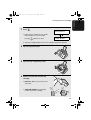
1
Press
INK
Display:
.
29-MAY 12:00
REPLACE INK &
• Make sure the handset is on its cradle.
If the handset is not on the cradle,
pressing
INK
will have no effect.
29-MAY 12:00
PRESS INK KEY
• The print cartridge holder moves to the cartridge replacement position.
2
Open the operation panel.
3
Open the print compartment cover.
4
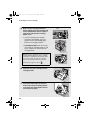
Remove only the tape from the new
cartridge.
• Important: Make sure you remove all
of the tape.
• CAUTION! DO NOT touch the gold
contact area on the cartridge.
17
1. Installation
all.book
all.book
Page 18 Tuesday, March 29, 2005
9:08 AM
Installing the Print Cartridge
5
Make sure the cartridge holder has
moved slightly away from the right side
of the compartment, and then pull the
green lever and open the cartridge
holder cover.
Cable
• If you are replacing the cartridge,
remove the old cartridge. If you are
going to use the old cartridge again,
place it in an air-tight container.
• CAUTION! DO NOT touch the contact
area inside the cartridge holder, or pull
on the cable that is connected to the
cartridge holder.
Gold contact area
Note: If the print compartment cover is left open
for approximately 30 minutes with a cartridge
installed, the cartridge will automatically return
to its home position. To make the cartridge
return to the cartridge replacement position
INK
when this has happened, press
6
7
18
.
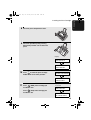
Insert the new print cartridge into the
cartridge holder.
Place your index finger on the tab as
shown and close the cartridge holder
cover with your thumb. Make sure the
cover clicks into place.
Page 19 Tuesday, March 29, 2005
9:08 AM
Installing the Print Cartridge
8
9
Close the print compartment cover.
Close the operation panel, pressing
down firmly to make sure it clicks into
place.
Display:
29-MAY 12:00
REPLACE INK &
29-MAY 12:00
PRESS INK KEY
10
Press
INK
to make the print cartridge
29-MAY 12:00
CHANGE CARTRIDGE
holder return to its home position.
29-MAY 12:00
1=NEW, 2=OLD
11
Press
(NEW) if the cartridge you
installed is new.
Press
Display when “NEW”
is selected:
29-MAY 12:00
NEW CART. OK?
(OLD) if the cartridge you
installed is old.
29-MAY 12:00
OK: PRESS START
19
1. Installation
all.book
all.book
Page 20 Tuesday, March 29, 2005
9:08 AM
Installing the Print Cartridge
12
Press
START/
MEMORY
Display when “NEW”
is selected:
.
If you selected “OLD” in the previous
step, this completes the installation
procedure. (Note: If you find that print
quality is not satisfactory after
reinstalling the old cartridge, align the
cartridge as explained on page 114.)
29-MAY 12:00
ALIGN CARTRIDGE
29-MAY 12:00
1=PRINT, 2=SET
If you selected “NEW”, the display will
show the alternating messages at
right. Continue with the following steps
to align the print cartridge.
13
Press
to print an alignment page. (To enter an alignment value
without printing an alignment page, press
14
.)
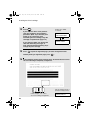
In the alignment page that the machine prints, locate the line that comes
closest to forming a completely straight line.
After the alignment page is
printed, the display shows:
In this example, “15” comes
closest to forming a straight line.
20
29-MAY 12:00
ENTER (0-30) 15
Page 21 Tuesday, March 29, 2005
9:08 AM
Installing the Print Cartridge
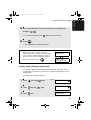
15
Press the number keys to enter the number of the straightest line.
Example:
• If you make a mistake, press
16
Press
START/
MEMORY
and then repeat the entry.
.
• This completes the alignment procedure.
Note: If at any time the display shows the
alternating messages at right, check the printing
paper. If the tray is empty, add paper. If there is
paper in the tray, take it out and then reinsert it.
When you are finished, press
START/
MEMORY
29-MAY 12:00
ADD PAPER &
29-MAY 12:00
PRESS START KEY
.
Quality mode (using more/less ink)
If you prefer a higher quality image when printing faxes and copies, turn on
Quality mode. If you wish to use less ink or speed up ink drying time, turn off
Quality mode.
♦ Quality mode is initially turned off.
1
Press
2
Press
once and
3
Press
once.
once and
twice.
Display:
PRINT SET-UP
QUALITY MODE
twice.
QUALITY MODE
1=ON, 2=OFF
21
1. Installation
all.book
all.book
Page 22 Tuesday, March 29, 2005
9:08 AM
Installing the Print Cartridge
4
Press
The display briefly shows
your selection, then:
to turn on Quality mode, or
to turn it off.
5
Press
HQ FAX PRINT
to return to the date and time display.
High-quality fax print setting (fast/slow printing of faxes)
The high-quality fax print setting controls the speed at which faxes are printed.
If you prefer a higher quality image at a slower printing speed, turn on this
setting. If you prefer a faster printing speed over image quality, turn off the
setting.
Important: This setting is only effective when Quality mode (page 21) is
turned on.
Note: This setting only affects the printing speed. It does not affect the
amount of ink used.
♦ The high-quality fax print setting is initially turned on.
1
Press
2
Press
once and
3
Press
once.
4
Press
print, or
5
22
Press
once and
twice.
Display: PRINT SET-UP
3 times.
to turn on high quality fax
to turn it off.
to return to the date and time display.
HQ FAX PRINT
HQ FAX PRINT
1=YES, 2=NO
The display briefly shows
your selection, then:
HQ COPY
Page 23 Tuesday, March 29, 2005
9:08 AM
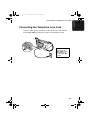
Connecting the Telephone Line Cord
Connecting the Telephone Line Cord
Insert one end of the line cord into the socket on the back of the machine
marked TEL. LINE. Insert the other end into a wall telephone socket.
TE
L.S
ET
TE
L.L
INE
Be sure to insert
the line into the
TEL. LINE socket.
Do not insert it
into the TEL. SET
socket!
23
1. Installation
all.book
all.book
Page 24 Tuesday, March 29, 2005
9:08 AM
Connecting the Telephone Line Cord
Extension phone (optional)
If desired, you can connect an extension phone to the TEL. SET socket on the
fax machine.
1
2
Remove the seal covering the TEL. SET socket.
Connect the extension phone line to the TEL. SET socket using the
appropriate adapter (please purchase an adapter separately).
• Eire: Insert the extension phone line directly into the TEL. SET socket.
TEL
.SET
24
TEL
.LIN
E
Page 25 Tuesday, March 29, 2005
9:08 AM
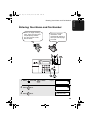
Entering Your Name and Fax Number
]Entering
Your Name and Fax Number
Before you begin sending
faxes, enter your name and
fax (telephone) number.
You also need to set the
date and time.
Once you enter this
information, it will
automatically appear at
the top of each fax page
you send.
REC/MEMO
RESOLUTION/
RECEPTION
PLAY/HOLD
INK
Z
A
R
REPEAT
SKIP
DELETE
DIGITAL
SPEAKERPHONE
START/
MEMORY
1
Press
2
Press
once.
3
Press
once.
once and
3 times.
Display: ENTRY MODE
OWN NUMBER SET
ENTER TEL/FAX #
25
1. Installation
all.book
all.book
Page 26 Tuesday, March 29, 2005
9:08 AM
Entering Your Name and Fax Number
4
Enter your fax number by pressing the number keys (max. 20 digits).
• To insert a space between digits, press
• To clear a mistake, press
5
6
Press
START/
MEMORY
. To enter “+”, press
.
.
DIGITAL
SPEAKERPHONE
.
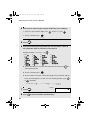
Enter your name by pressing number keys for each letter as shown in
the chart below. Up to 24 characters can be entered.
Example: SHARP = 7777 44 2 777
7
G=
N=
A=
H=
O=
V=
B=
I =
P=
W=
SPACE =
U=
C=
J=
Q=
X=
D=
K=
R=
Y=
E=
L=
S=
Z=
F=
M=
T=
♦ To enter two letters in succession that require the same key, press
after
entering the first letter.
♦ To clear a mistake, press
.
DIGITAL
SPEAKERPHONE
♦ To enter a lower case letter, continue pressing the key for the letter until the
lower case letter appears. To enter one of the following symbols, press
or
repeatedly:
./!"#$%& ( )
26
7
Press
8
Press
START/
MEMORY
+,-:;<=>?@[
] ^_`{|}
Display:
.
to return to the date and time display.
DATE&TIME SET
Page 27 Tuesday, March 29, 2005
9:08 AM
Setting the Date and Time
Setting the Date and Time
The date and time appear in the
display and are printed at the top
of every page you fax. Set the
date and time as shown below.
REC/MEMO
RESOLUTION/
RECEPTION
PLAY/HOLD
INK
Z
A
R
REPEAT
SKIP
DELETE
DIGITAL
SPEAKERPHONE
START/
MEMORY
1
Press
2
Press
once and
3
Press
once.
4
Enter a two-digit number for the day (“01” to “31”).
once and
3 times.
Display: ENTRY MODE
DATE&TIME SET
once.
The currently set date
appears (example):
Example: the 5th
• To correct a mistake, press
DATE&TIME SET
DATE 15-08-2005
DATE&TIME SET
DATE 05-08-2005
to move the cursor back to the mistake and
then enter the correct number.
27
1. Installation
all.book
all.book
Page 28 Tuesday, March 29, 2005
9:08 AM
Setting the Date and Time
5
6
Enter a two-digit number for the month (“01” for January, “02” for
February, “12” for December, etc.).
Example: January
DATE&TIME SET
DATE 05-01-2005
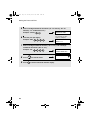
Enter the year (four digits).
The currently set time
appears (example):
Example: 2005
7
Enter a two-digit number for the hour (“00” to “23”) and a two-digit
number for the minute (“00” to “59”).
Example: 9:25
28
DATE & TIME SET
TIME 12:19
8
Press
9
Press
START/
MEMORY
05-JAN 09:25
PRESS START KEY
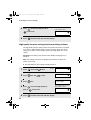
ANTI JUNK #
to start the clock.
to return to the date and time display.
Page 29 Tuesday, March 29, 2005
9:08 AM
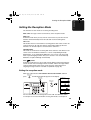
Setting the Reception Mode
Setting the Reception Mode
The machine has four modes for receiving incoming faxes.
Note: SMS messages can be received in any of the reception modes.
FAX mode:
Select this mode when you only want to receive faxes on your line. The fax
machine will automatically answer all calls and receive incoming faxes.
TEL mode:
This mode is the most convenient for receiving phone calls. Faxes can also be
received; however, all calls must first be answered by picking up the fax's
handset or an extension phone connected to the same line.
TEL/FAX mode:
This mode is convenient for receiving both faxes and voice calls. When a call
comes in, the fax will detect whether it is a voice call (including manually
dialled faxes), or an automatically dialled fax. If it is a voice call, the fax will
make a special ringing sound to alert you to answer. If it is an automatically
dialled fax, reception will begin automatically.
A.M. (
) mode:
Select this mode when you go out and want the built-in answering machine to
answer all calls. Voice messages will be recorded, and fax messages will be
received automatically. (Note: A.M. mode cannot be selected unless an
outgoing message has been recorded as explained on page 48.)
Setting the reception mode
Make sure a document is not loaded in the document feeder, and then
press
RESOLUTION/
RECEPTION
until the desired mode appears in the display.
02-JAN 10:30
RESOLUTION/
RECEPTION
FAX
RESOLUTION/
RECEPTION
REC/MEMO
RESOLUTION/
RECEPTION
PLAY/HOLD
INK
02-JAN 10:30
TEL
Z
FAX
A
02-JAN 10:30
R
02-JAN 10:30
REPEAT
SKIP
DELETE
DIGITAL
SPEAKERPHONE
TEL
For more information on receiving faxes in FAX, TEL and TEL/FAX modes,
see Chapter 5. For more information on using A.M. mode, see Chapter 3.
29
1. Installation
all.book
all.book
Page 30 Tuesday, March 29, 2005
9:08 AM
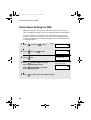
Flash Select Setting for PBX
Flash Select Setting for PBX
Note: This setting is normally only used in Germany. In other countries, you
can try changing the setting if you encounter difficulty with the default setting.
If your fax machine is connected to a PBX and the PBX uses the “Flash”
method to connect to an outside line, you must select the appropriate Flash
Select setting depending on whether your PBX line is a normal telephone line
or a high-speed line.
1
Press
2
Press
once and
3
Press
once.
4
once and
3 times.
Display: OPTION SETTING
5 times.
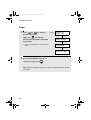
Select
(SHORT TIME) if your PBX
line is a normal telephone line.
Select
(LONG TIME) if your PBX
line is a high-speed line.
5
30
Press
to return to the date and time display.
FLASH SELECT
FLASH SELECT
1: SHORT TIME
The display briefly shows
your selection, then:
FAX SIGNAL RX
Page 31 Tuesday, March 29, 2005
9:08 AM
Volume Adjustment
Volume Adjustment
You can adjust the volume of the speaker and ringer using the up and down
arrow keys.
REC/MEMO
RESOLUTION/
RECEPTION
PLAY/HOLD
INK
Z
A
R
REPEAT
SKIP
DELETE
DIGITAL
SPEAKERPHONE
DIGITAL
SPEAKERPHONE
Speaker
1
2
Press
DIGITAL
SPEAKERPHONE
.
Press
or
to select the
desired volume level.
• Press
again to turn off the
DIGITAL
SPEAKERPHONE
speaker.
31
1. Installation
all.book
all.book
Page 32 Tuesday, March 29, 2005
9:08 AM
Volume Adjustment
Ringer
1
Press
or
to select the
desired volume level.
(Make sure
has not been
DIGITAL
SPEAKERPHONE
pressed and a document is not loaded
in the feeder.)
• The ringer will ring once at the selected
level.
Display:
29-MAY 12:00
RINGER: HIGH
29-MAY 12:00
RINGER: MIDDLE
29-MAY 12:00
RINGER: LOW
29-MAY 12:00
RINGER: OFF OK ?
2
If you selected RINGER: OFF OK ? to
turn off the ringer, press
START/
MEMORY
.
Note: When the reception mode is set to TEL, the ringer will still ring at LOW
if turned off.
32
Page 33 Tuesday, March 29, 2005
9:08 AM
Volume Adjustment
Error beep off
The machine normally sounds three beeps to alert you when an error occurs
during transmission, reception, or copying. The machine also sounds a
double-beep when you press an invalid key on the operation panel. If you wish
to turn off the error beep, follow the steps below.
1
Press
once and
3 times.
2
Press
once and
3 times.
3
Press
once.
4
Press
Display: OPTION SETTING
ERROR BEEP
ERROR BEEP
1=YES, 2=NO
The display briefly shows
your selection, then:
to turn on the error beep or
END BEEP
to turn off the error beep.
5
Press
to return to the date and time display.
End beep off
The fax machine normally sounds one long beep when transmission,
reception, or copying ends normally (for an SMS message, the end beep only
sounds when a message is received, not when a message is sent). If you
wish to turn off the end beep, follow the steps below.
1
Press
once and
3 times.
2
Press
once and
twice.
Display: OPTION SETTING
END BEEP
33
1. Installation
all.book
all.book
Page 34 Tuesday, March 29, 2005
9:08 AM
Volume Adjustment
3
Press
4
Press
END BEEP
1=YES, 2=NO
once.
The display briefly shows
your selection, then:
to turn on the end beep or
KEY TONE
to turn off the end beep.
5
Press
to return to the date and time display.
Key tone off
The fax machine normally sounds a beep (key tone) each time you press a
key on the operation panel. If you wish to turn off the key tone, follow the steps
below.
1
Press
once and
3 times.
2
Press
once and
once.
3
Press
once.
4
Press
Display: OPTION SETTING
to turn on the key tone or
to turn off the key tone.
5
34
Press
to return to the date and time display.
KEY TONE
KEY TONE
1=YES, 2=NO
The display briefly shows
your selection, then:
FINE PRIORITY
all.book
Page 35 Tuesday, March 29, 2005
9:08 AM
2. SMS Text Messaging
2. SMS Text
Messages
Your fax machine can be used to send and receive SMS (Short Message
Service) text messages.
Requirements:
To use this feature, you must:
♦ Subscribe to British Telecom SMS service. The telephone number of the
British Telecom SMS Center has been preset in the machine. To subscribe,
simply send an SMS message and you will be automatically registered for
SMS service. For further information regarding the BT SMS service, please
refer to the BT website at www.bt.com/text.
Note: Registration for SMS service is free of charge.
Note: As the British Telecom service requires recognition of your telephone
number to provide the SMS service, 1470 (release number withheld) is
automatically dialled before the number programmed into the Center
Outbox. You can still withhold your number for normal telephone or fax
calls.
♦ Have Caller ID service activated on your telephone line.
Important:
This machine is designed for use with British Telecom SMS service and may
not operate correctly with other services. As of the printing of this manual, this
machine is not capable of sending or receiving e-mail over the Internet.
Note: SMS Messaging cannot be used from within a PBX.
Printing the SMS Quick Reference Sheet
For a quick reference to the SMS functions, press
and
to print the
SMS Quick Reference Sheet.
35
all.book
Page 36 Tuesday, March 29, 2005
9:08 AM
Sending an SMS Message
Sending an SMS Message
This section explains how to write and send an SMS message. A maximum of
160 characters can be entered in one message.
♦ When sending a message, you can manually enter the full phone number
of the recipient, or select the number from your list of auto-dial numbers.
Sending an SMS message (entering the number manually)
1
Press
once and
twice.
Display:
WRITE MESSAGE
• Note: If you have an unread received message, the message will appear
when you press
. Read the message first (see page 41) and then
perform this procedure.
2
Press
.
3
Press
.
4
ENTER #
MANUAL DIAL
ENTER #
Enter the number of the recipient. Up to 20 digits can be entered. (Note
that a space cannot be entered.)
Important: The number must include the area code.
• To clear a mistake, press
.
DIGITAL
SPEAKERPHONE
• If a pause is required between any of the digits, press
. The pause
appears as a hyphen. Several pauses can be entered in a row.
5
36
Press
START/
MEMORY
.
all.book
Page 37 Tuesday, March 29, 2005
9:08 AM
Sending an SMS Message
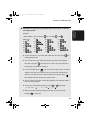
Enter the message by pressing number keys for each letter as shown in
the following chart.
2. SMS Text
Messages
6
Example:
I WILL COME. = 444 1 9 444 555
555 1 222 666
6 33
G=
N=
U=
A=
H=
O=
V=
B=
SPACE =
I =
P=
W=
C=
J=
Q=
X=
D=
K=
R=
Y=
E=
L=
S=
Z=
F=
M=
T=
♦ To enter two letters in succession that require the same key, press
after
entering the first letter.
♦ You can move the cursor with the arrow keys (up, down, left, and right).
Note that if you press
when the cursor is at the very first character of
the message, you will return to Step 4.
♦ To clear a mistake, press
. You can also move the cursor to a mistake
DIGITAL
SPEAKERPHONE
and then enter the correct character. The new character will replace the
mistake. If you wish to insert a character between characters, press
first and then enter the character you wish to insert.
♦ To enter a lower case letter, continue pressing the key for the letter until the
lower case letter appears.
♦ To enter one of the following symbols, press
./!"#$%& ( )
+,-:;<=>?@[
or
] ^_{|}
repeatedly:
£
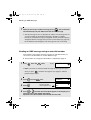
♦ When you have finished entering your message, you can check it by
pressing
to print it out.
37
all.book
Page 38 Tuesday, March 29, 2005
9:08 AM
Sending an SMS Message
7
When you are ready to send the message, press
START/
MEMORY
. The fax machine
will automatically call your SMS center and send the message.
• After the message is sent, it is placed in the outbox. If the message was not
sent successfully, the fax machine will make 3 attempts at 5-minute
intervals to resend the message (see page 80), and an exclamation point (!)
will appear with the message when you view it in the outbox (see page 43).
No exclamation point will appear if the message was sent successfully.
Sending an SMS message using an auto-dial number
If the number of the recipient has been stored as an auto-dial number, you
can use the auto-dial number to send an SMS message.
♦ The procedure for storing auto-dial numbers is explained on page 73.
1
Press
once and
twice.
Display:
WRITE MESSAGE
• Note: If you have an unread received message, the message will appear
when you press
. Read the message first (see page 41) and then
perform this procedure.
2
Press
3
Press
.
4
Press
(or
once and
once.
Your first auto-dial
number appears here
ENTER #
AUTO DIAL
ENTER #
AAA
) until the desired recipient appears in the display (if no
name was stored, the number will appear).
Important: The stored number must include the area code.
38
all.book
Page 39 Tuesday, March 29, 2005
9:08 AM
Sending an SMS Message
6
Press
START/
MEMORY
.
Enter the message by pressing number keys for each letter as shown in
the following chart.
Example:
I WILL COME. = 444 1 9 444 555
555 1 222 666
6 33
G=
N=
U=
A=
H=
O=
V=
B=
I =
P=
W=
C=
J=
Q=
X=
D=
K=
R=
Y=
E=
L=
S=
Z=
F=
M=
T=
SPACE =
♦ To enter two letters in succession that require the same key, press
after
entering the first letter.
♦ You can move the cursor with the arrow keys (up, down, left, and right).
Note that if you press
when the cursor is at the very first character of
the message, you will return to Step 4.
♦ To clear a mistake, press
. You can also move the cursor to a mistake
DIGITAL
SPEAKERPHONE
and then enter the correct character. The new character will replace the
mistake. If you wish to insert a character between characters, press
first and then enter the character you wish to insert.
♦ To enter a lower case letter, continue pressing the key for the letter until the
lower case letter appears.
♦ To enter one of the following symbols, press
./!"#$%& ( )
+,-:;<=>?@[
or
] ^_{|}
repeatedly:
£
39
2. SMS Text
Messages
5
all.book
Page 40 Tuesday, March 29, 2005
9:08 AM
Sending an SMS Message
♦ When you have finished entering your message, you can check it by
pressing
7
to print it out.
When you are ready to send the message, press
START/
MEMORY
. The fax machine
will automatically call your SMS center and send the message.
• After the message is sent, it is placed in the outbox. If the message was not
sent successfully, the fax machine will make 3 attempts at 5-minute
intervals to resend the message (see page 80), and an exclamation point (!)
will appear with the message when you view it in the outbox (see page 43).
No exclamation point will appear if the message was sent successfully.
If a message is cancelled before being sent...
If a message is cancelled due to interruption by fax reception or because you
pressed
before sending it, the text that was entered prior to cancellation
will appear again the next time you write a message.
40
all.book
Page 41 Tuesday, March 29, 2005
9:08 AM
Receiving SMS Messages
Receiving SMS Messages
2. SMS Text
Messages
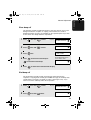
Each time you receive an SMS message, your SMS center will call the fax
machine and send the message. The envelope in the display appears while
the message is being received.
The envelope appears
while a message is
being received
01-JAN 12:00
TEL
Viewing unread messages
When you have unread messages, you can go directly to the most recent
unread message by pressing
once. To read the message, press
(Note that when there are no unread messages, pressing
.
once displays
the SMS menu.)
♦ For more information on viewing messages in the inbox, see the following
procedure.
Viewing messages in the inbox
Follow the steps below to view messages in the inbox.
1
Press
. Your most recently
Example display
received unread message appears in
the display.
Number of sender
• If you have no unread messages, the
display will show INBOX. Press
show your most recently received
message.
01-234-5678
■ 10 31MAR 09:25
to
A black square
appears if the
message is
unread
Message Date and time
message was
number
received
41
all.book
Page 42 Tuesday, March 29, 2005
9:08 AM
Receiving SMS Messages
2
Press
display.
or
• You can press
until the message you wish to read appears in the
and then
in the display, or press
3
To read the message, press
START/
MEMORY
to delete a message when it appears
to print the message.
. The text of the message appears in the
display.
• Press
4
or
as needed to scroll through the message.
When you have finished reading the message, you can do any of the
following:
• Reply: To reply to the sender, press
twice. The number of the sender
appears in the display. Continue from Step 5 on page 36.
• Delete: To delete the message, press
• Print: To print the message, press
and then
START/
MEMORY
.
.
• Read other messages: To return to the message list, press
• Exit: To return to the date and time display, press
.
.
Note: If a received message uses fonts or image formats not supported by
the fax machine, those characters or images will appear as blanks.
42
all.book
Page 43 Tuesday, March 29, 2005
9:08 AM
Viewing the Outbox
If the inbox is full...
01-JAN 12:00
2. SMS Text
Messages
The inbox can hold a maximum of 10 messages. When the inbox is full, an
exclamation point will appear in the date and time display.
“!” appears when the
inbox is full.
!
TEL
When you press
, the following
message briefly appears:
INBOX IS FULL
DELETE MESSAGE
While the inbox is full, you will not be able to receive any new messages.
Delete one or more messages as explained in the preceding procedure, or
delete all messages as explained on page 45.
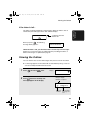
Viewing the Outbox
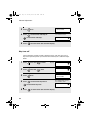
You can view the most recent 10 messages that you have sent in the outbox.
♦ If a message appears in the outbox with an exclamation point (!), it was not
sent successfully and will need to be resent.
1
Press
2
Press
once and
once.
Display:
OUTBOX
Example display
. Your most recently sent
message appears in the display.
Number of recipient
01-234-5678
10 31MAR 09:25
Message Date and time
message was
number
sent
43
all.book
Page 44 Tuesday, March 29, 2005
9:08 AM
Viewing the Outbox
3
Press
or
to scroll through your sent messages.
• If an exclamation point (!) appears with a message, the message was not
sent successfully. If you press
, UNSENT appears followed by E0 or
FE. E0 indicates that there was no Caller ID service. FE indicates that an
error occurred during transmission. The fax machine will make 3 attempts
at 5-minute intervals to resend the message.
• You can press
and then
in the display, or press
4
to delete a message when it appears
to print the message.
If you wish to read or resend a message that appears in the display,
press
• Press
5
START/
MEMORY
. The text of the message appears.
or
as needed to scroll through the message.
When you have finished reading the message, you can do any of the
following:
• Edit/resend: To resend (and edit if needed) the message, press
twice.
The number of the recipient appears in the display. Continue from Step 5
on page 36.
• Delete: To delete the message, press
• Print: To print the message, press
and then
START/
MEMORY
.
.
• Read other messages: To return to the message list, press
• Exit: To return to the date and time display, press
44
.
.
all.book
Page 45 Tuesday, March 29, 2005
9:08 AM
Printing or Deleting all Messages
Printing or Deleting all Messages
2. SMS Text
Messages
Printing all messages
Follow these steps to print all messages in the inbox or outbox.
1
Press
2
Press
3
Press
once and
Press
Display:
ALL PRINT
1:INBOX 2:OUTBOX
.
to print all messages in the
inbox, or
the outbox.
4
3 times.
START/
MEMORY
ALL PRINT OK ?
to print all messages in
.
Deleting all messages
Follow these steps to delete all messages from the inbox or outbox.
1
Press
2
Press
3
Press
once and
twice.
Display:
ALL DELETE
1:INBOX 2:OUTBOX
.
to delete all messages from
ALL DELETE OK ?
the inbox, or
to delete all
messages from the outbox.
4
Press
START/
MEMORY
.
45
all.book
Page 46 Tuesday, March 29, 2005
9:08 AM
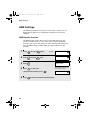
SMS Settings
SMS Settings
The following settings have been preset at the factory to allow you to use
British Telecom SMS service. Normally the settings do not need to be
changed.
SMS Receive function
The SMS Receive function allows you to receive SMS messages. This
function is initially turned on. If you wish to refuse reception of all SMS
messages, you can turn this function off. (Note: Turning off this setting only
turns off SMS message reception. SMS message transmission is still
possible.)
1
Press
2
Press
3
Press
4
Press
once and
once and
46
Press
SMS SETTING
SMS RECEIVE
once.
SMS RECEIVE
1=ON, 2=OFF
.
The display briefly shows
your selection, then:
to select ON.
(To turn off the function, press
5
Display:
once.
.)
to return to the date and time display.
SMS CENTER #
all.book
Page 47 Tuesday, March 29, 2005
9:08 AM
SMS Settings
The numbers for the British Telecom SMS center have been pre-stored in your
fax machine. Normally these numbers do not need to be changed. In the
event that a change is necessary, use the following procedure. Two numbers
must be entered:
♦ Outgoing number: This number is used to send SMS messages. Your fax
machine automatically dials this number when sending an SMS message.
♦ Incoming number: This number is used to receive SMS messages. When
your SMS center calls your fax machine to send an SMS message, your fax
machine checks the caller’s number (transmitted to your fax machine by
Caller ID) against this stored number. This allows your fax machine to verify
that the SMS center is sending a message.
1
Press
2
Press
.
3
Press
.
4
Press
and
Display:
.
SMS SETTING
SMS CENTER #
SMS CENTER #
1=OUT,2=IN
to enter the outgoing number, or
to enter the incoming
number.
5
Enter the number (maximum of 32 digits).
• To clear a mistake, press
.
DIGITAL
SPEAKERPHONE
• To enter a pause between any of the digits, press
. The pause appears
as a hyphen.
6
Press
7
Press
START/
MEMORY
SMS RECEIVE
.
to exit.
47
2. SMS Text
Messages
SMS center numbers
all.book
Page 48 Tuesday, March 29, 2005
9:08 AM
3. Using the Answering Machine
The built-in answering machine allows you to receive both voice messages
and faxes while you are out.
To use the answering machine, you
will first need to record an outgoing
message. When you go out, turn
on the answering machine by
setting the reception mode to A.M.
Recording an Outgoing Message
The outgoing message (OGM) is the greeting that the machine plays after
answering a call to inform callers that they can leave a message or send a fax.
Follow the steps below to record a message.
Example:
“Hello. You've reached ______ . No one is available to take your call right now.
Please leave a message after the beep or press your facsimile Start key to
send a fax. Thank you for calling.”
1
Press
REC/MEMO
once and
once.
Display:
01-JAN 10:30
OGM1(GENERAL)
2
Press
once.
01-JAN 10:30
LIFT HANDSET OR
01-JAN 10:30
PLAY: PLAYBACK
3
48
Lift the handset.
all.book
Page 49 Tuesday, March 29, 2005
9:08 AM
Operating the Answering Machine
4
Press
START/
MEMORY
and speak into the handset to record a message.
• The outgoing message can be up to 60 seconds long. While recording, the
display will show the time left to record.
When finished, replace the handset or press
.
3. Answering
Machine
5
To listen to the outgoing message
To listen to the outgoing message, follow Steps 1 and 2 of the above
procedure and then press
PLAY/HOLD
. Note that the general outgoing message
cannot be erased. If you need to change it, simply repeat the recording
procedure.
Operating the Answering Machine
Activating the answering machine
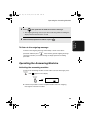
To turn on the answering machine so that callers can leave messages, press
RESOLUTION/
RECEPTION
until
appears in the display.
RESOLUTION/
RECEPTION
01-JAN 12:00
♦ It will not be possible to set the reception mode to A.M. if an outgoing
message has not been recorded.
49
all.book
Page 50 Tuesday, March 29, 2005
9:08 AM
Operating the Answering Machine
Note: In A.M. mode, the machine will automatically switch to fax reception if it
detects six seconds of silence after answering a call. For this reason, if a
caller pauses for this length of time while leaving a message, they will be cut
off.
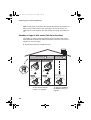
Number of rings in A.M. mode (Toll Saver function)
The number of rings on which the machine answers incoming calls in A.M.
mode depends on whether the Toll Saver function is turned on, and if it is on,
whether you have messages.
♦ The Toll Saver function is initially turned on.
Toll Saver
No received messages
Hello!
Hi!
ing Ring R
g R
ing
Rin
Hi!
2 Rings
Ring
To turn off the Toll Saver
function, see page 60.
50
OFF
Received messages
NOTHING
4 Rings
Toll Saver
ON
Ring
(Answer according to
NUMBER OF RINGS setting)
ing Ring R
g R
ing
Rin
To adjust the NUMBER
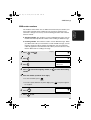
OF RINGS setting, see
page 89.
all.book
Page 51 Tuesday, March 29, 2005
9:08 AM
Operating the Answering Machine
Listening to received messages
If you have received messages, the display will show the number of messages
received. Follow the steps below to listen to your messages.
1
Press
PLAY/HOLD
.
listened to), continue to hold
2
PLAY/HOLD
3. Answering
Machine
• If you only want to listen to new messages (messages not previously
down for at least two seconds.
The messages will play.
• As each message plays, the date and time of recording will appear briefly in
the display. If no messages were received, NO MESSAGES will appear.
• Repeat: To listen to a message a second time, press
before
REPEAT
playback of that message ends. To move back to the previous message,
press
within 3 seconds of the beginning of the current message.
REPEAT
• Skip: To skip forward to the next message, press
.
SKIP
Note: Playback will stop if you receive a call, lift the handset, or press
.
♦ You can print out a list of your received messages that shows the date and
time that each was received. See page 107.
51
all.book
Page 52 Tuesday, March 29, 2005
9:08 AM
Operating the Answering Machine
Erasing received messages
It is important to erase received messages after you listen to them to ensure
that the memory does not become full.
♦ Erasing all messages: To erase all messages, press
then
START/
MEMORY
,
, and
DELETE
.
♦ Erasing a single message: To erase a single message, press
DELETE
while the message is being played.
Recording memos
You can record memos for yourself and other users of the machine. These will
be played back together with incoming messages when the
PLAY/HOLD
key is
pressed.
1
Press
REC/MEMO
once and
once.
• The machine begins beeping.
2
3
Pick up the handset, press
speak into the handset.
START/
MEMORY
(the machine stops beeping), and then
When you have finished speaking, replace the handset or press
.
Recording phone conversations (2-way recording)
To record a phone conversation, hold down the
REC/MEMO
key during the
conversation you wish to record. When you are finished, release the key. The
conversation will be played back when the
52
PLAY/HOLD
key is pressed.
all.book
Page 53 Tuesday, March 29, 2005
9:08 AM
Optional Answering Machine Settings
Optional Answering Machine Settings
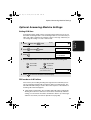
Setting ICM time
1
Press
2
Press
3
Press
4
once and
once and
once.
Display:
A.M. SETTING
RECORDING TIME
once.
RECORDING TIME
1=15 SECONDS
.
Press a number from 1 to 4 to select the desired ICM recording time
.
15 seconds
60 seconds
30 seconds
4 minutes
The display briefly shows
your selection, then:
5
3. Answering
Machine
Incoming messages (ICMs) are the messages which callers leave for you on
the built-in answering machine. The answering machine is set at the factory to
allow each caller a maximum of 4 minutes to leave a message. If desired, you
can change this setting to 15, 30, or 60 seconds.
Press
REMOTE CODE
to return to the date and time display.
FAX mode on A.M. failure
If the memory for recording incoming messages becomes full while you are
out, the answering machine will no longer be able to record messages. The
ON A.M. FAILURE setting is used to choose the response of the machine to
incoming calls when this happens:
♦ YES (switch to FAX mode): The reception mode will switch to FAX mode,
allowing the machine to continue to receive faxes automatically. With this
setting, you can still use the remote commands to listen to your messages
and then erase them (see Remote Operations on page 60).
53
all.book
Page 54 Tuesday, March 29, 2005
9:08 AM
Optional Answering Machine Settings
♦ NO (do not switch to FAX mode): The machine will answer after 19 rings,
after which it will wait to receive a remote command. Most callers will hang
up before it answers; however, when you call the machine from a remote
location, you can wait until it answers, listen to your messages, and then
erase them (see Remote Operations on page 60).
The initial setting is NO. If you want to change the setting to YES, press the
panel keys as follows:
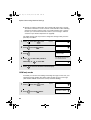
1
Press
2
Press
once and
3
Press
.
4
Press
once and
Press
Display:
A.M. SETTING
ON A.M.FAILURE
twice.
ON A.M.FAILURE
1=YES, 2=NO
The display briefly shows
your selection, then:
to select YES (switch to
FAX mode), or
5
once.
OGM ONLY MODE
to select NO.
to return to the date and time display.
OGM only mode
If needed, you can turn off recording of incoming messages. In this case, your
outgoing message will play, but callers will not be able to leave a message.
(The machine will still receive faxes sent by automatic dialling.)
54
1
Press
2
Press
once and
once.
Display:
A.M. SETTING
OGM ONLY MODE
once and
once.
all.book
Page 55 Tuesday, March 29, 2005
9:08 AM
Transfer Function
Press
4
Press
or
5
OGM ONLY MODE
1=YES, 2=NO
.
The display briefly shows
your selection, then:
to turn on OGM only mode,
TOLL SAVER
to turn it off.
Press
3. Answering
Machine
3
to return to the date and time display.
Transfer Function
The Transfer function is used to have the machine automatically call you at a
specified number every time it receives an incoming message. This lets you
hear your messages immediately after they come in, even when you are at a
remote location.
To use the Transfer function, you must first program the number that you wish
the machine to call (the transfer number), and record the transfer message
that plays when you answer the phone at the remote location.
When you go out and wish to use the transfer function, turn it on. When you
return and no longer wish to use the transfer function, turn it off.
Programming the transfer number
To use the Transfer function, you must first program the number to call (the
transfer number).
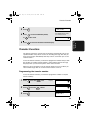
1
Press
2
Press
once and
3
Press
.
once and
once.
4 times.
Display:
A.M. SETTING
TRANSFER TEL #
ENTER TEL #
55
all.book
Page 56 Tuesday, March 29, 2005
9:08 AM
Transfer Function
4
Press the number keys to enter the transfer number.
• To insert a pause between any two digits of the number, press
5
Press
6
Press
START/
MEMORY
.
TRANSFER FUNK
.
to return to the date and time display.
Recording the transfer message
The transfer message plays when you answer the telephone, and informs you
that the call is a transfer call. It can be up to 15 seconds long. To record a
transfer message, follow the steps below. The following is an example:
“Hello. This is a transfer call for (YOUR NAME). Enter your remote code
number now.”
1
Press
2
Press
3
Lift the handset.
4
Press
REC/MEMO
once and
twice.
Display:
01-JAN 10:30
OGM2 (TRANSFER)
once.
START/
MEMORY
and speak into the handset to record the message.
• The transfer message can be up to 15 seconds long. While recording, the
display will show the time left to record.
56
all.book
Page 57 Tuesday, March 29, 2005
9:08 AM
Transfer Function
5
When finished, replace the handset or press
.
Checking or erasing the transfer message
procedure, and then press
PLAY/HOLD
to check the message, or
to erase
DELETE
the message.
Turning the Transfer function on and off
When you go out and wish to use the Transfer function, turn it on as follows:
1
Press
2
Press
3
Press
4
Press
once and
once and
once.
Display:
3 times.
5
Press
TRANSFER FUNC
TRANSFER FUNC
1=YES, 2=NO
.
to turn on the Transfer
function.
(Press
A.M. SETTING
The display briefly shows
your selection, then:
ON A.M.FAILURE
to turn the function off.)
to return to the date and time display.
57
3. Answering
Machine
To check or erase the transfer message, follow Steps 1 and 2 of the above
all.book
Page 58 Tuesday, March 29, 2005
9:08 AM
Override Ringing
6
Each time the machine receives an incoming message, it will call your
programmed transfer number. When you answer, you will hear your
recorded message telling you that the call is a transfer call. On the dial
pad of your phone, enter
and
, your remote code number (see page 60),
. The machine will play back your messages.
• You can also perform any of the remote operations described in Remote
Operations later in this chapter (see page 60).
Note: When you hang up after a transfer call, the machine will not
immediately resume normal operation. If you want the machine to accept calls
immediately after a transfer call, enter
twice before hanging up (if you
want to hang up during message playback, first enter
playback, then enter
and
to stop
twice).
Override Ringing
This function allows selected callers using a touch-tone telephone to override
the answering machine's outgoing message and cause the machine to make
a special ringing sound, alerting you that they are calling. This is useful when
you are near the machine but only want to talk with certain callers, taking all
other calls on the answering machine.
Programming the override code
To override the answering machine, your callers must enter a 3-digit override
code from their telephone. This code has been set to "009" at the factory. If
you wish to change the code, press the panel keys as shown below.
Important! Make sure the override code is different from the remote code
used for remote operations.
1
58
Press
once and
once.
Display:
A.M. SETTING
all.book
Page 59 Tuesday, March 29, 2005
9:08 AM
Override Ringing
Press
once and
3
Press
.
4
Press the number keys to enter a 3-digit override code.
5
Press
START/
MEMORY
3 times.
to store the override code, and then
3. Answering
Machine
OVERRIDE CODE
2
to return to the
date and time display.
Overriding the answering machine
Your callers should follow the steps below to override the answering machine.
1
The caller calls your machine from a tone dial telephone. When the
outgoing message begins, they should press the
key on their
telephone.
• The caller will hear a short beep, and the outgoing message will stop.
2
The caller should enter the override code and
by pressing the
appropriate keys on their telephone.
• If an incorrect code is entered, the caller will hear four beeps. He or she
must re-enter the correct code within 10 seconds or the line will be
disconnected.
3
Your machine will make a special ringing sound. Pick up the handset to
answer the call.
• If you do not answer within 30 seconds, the outgoing message will play
again and the caller can leave a message.
59
all.book
Page 60 Tuesday, March 29, 2005
9:08 AM
Remote Operations
Remote Operations
When you are out, you can call the machine from any tone dial telephone and
play back your messages using the remote commands. You can also use
these commands to change the reception mode and other settings.
Remote code number
To access the machine to perform remote operations, you must first enter your
remote code number. The remote code number has been set to "001" at the
factory. If you wish to use a different number, follow these steps:
Display:
1
Press
2
Press
once and
3
Press
.
4
Press the number keys to enter a 3-digit remote code number.
5
once and
once.
twice.
A.M. SETTING
REMOTE CODE
REMOTE CODE=
SELECT 3 DIGITS
START/
Press MEMORY to store the remote number, and then
date and time display.
to return to the
Toll Saver
When you call the machine to listen to your messages, it will answer after two
rings if it has received at least one message, or after four rings if it has not
received any messages.
This allows you to save money on telephone charges, particularly if you are
calling long distance. If the machine does not answer after two rings, you can
simply hang up before it answers, saving yourself the cost of that call.
If you do not want to use the Toll Saver function, you can turn it off by following
the steps below. In this case, the machine will answer after the number of
rings set with the NUMBER OF RINGS setting (see Changing the number of
rings on page 89).
60
all.book
Page 61 Tuesday, March 29, 2005
9:08 AM
Remote Operations
Press
2
Press
once.
3
Press
once.
4
Press
once and
Press
Display:
A.M. SETTING
TOLL SAVER
TOLL SAVER
1=YES, 2=NO
to turn on the Toll Saver
function, or
5
once.
to turn it off.
3. Answering
Machine
1
The display briefly shows
your selection, then:
RECORDING TIME
to return to the date and time display.
Retrieving your messages
1
Call the machine from a tone dial telephone. When your outgoing
message begins, press
on the telephone.
• You will hear a short beep, and the outgoing message will stop.
2
Enter your remote code number and then press
.
• You will hear a series of beeps equal to the number of messages recorded,
or one long beep if four or more messages have been received. The
machine will then play back the messages, beeping once at the end of each
message. When all messages have been played back, you will hear a long
beep.
• If no messages have been received, you will hear a short beep. You can
either hang up, or perform any of the operations described in the following
section, Other remote operations.
61
all.book
Page 62 Tuesday, March 29, 2005
9:08 AM
Remote Operations
3
While the messages are playing, you can do any of the following:
• Repeat: To listen to a message a second time, press 2 and
on the
telephone before that message ends. To move back to the previous
message, press
2
and
during the first 3 seconds of the current
message.
• Skip forward: To skip forward to the next message, press 5 and
on the telephone.
• Stop: To stop playback, press 0 and
on the telephone. After this,
you can enter any of the commands described in the following section,
Other remote operations.
• Play new messages: To listen to only your new messages, first stop
playback by pressing
0
and
, and then press
6
and
.
• Erase a message: To erase the message you are currently listening to,
press
4
3
and
before it ends.
When you have finished listening to your messages, you can do any of
the following:
• Erase all messages: Press 3 , 3 , and
• Repeat playback: Press 7 and
.
.
• Perform other operations: You can enter any of the commands described
in the following section, Other remote operations.
• Hang up: If you do not erase your messages first, they will be saved and
any new messages will be recorded after them. If you want the machine to
resume normal operation immediately, press
twice before hanging up
(in some cases, particularly when the Transfer function is used, the
machine may not accept new calls for one or two minutes after you hang up
unless you press
62
twice).
all.book
Page 63 Tuesday, March 29, 2005
9:08 AM
Remote Operations
Note: You can also call the machine and perform remote operations when the
reception mode is set to FAX. In this case, when you call the machine, press
immediately after it answers (before you hear the fax tone), and then
continue from Step 2 above.
Comments:
beep. If an incorrect command is entered, you will hear four beeps. In the
latter case, re-enter the correct command.
♦ When entering a command, do not pause longer than 10 seconds between
each digit. If you do, you will hear a 4-beep error signal and the digits
entered up to that point will be cleared. In this case, re-enter the command
from the beginning.
♦ If you pause for longer than 10 seconds before entering a command, or
make two errors while entering your remote code number, the line will be
disconnected. (This prevents unauthorized people from attempting to
guess your remote code number.)
Other remote operations
After listening to your messages, you can perform any of the following
operations by pressing the appropriate keys on the telephone.
Note: The following commands cannot be entered while messages are being
played back. If you do not want to wait until playback ends to enter a
command, first stop playback by pressing
0
and
, and then enter the
command.
Changing the fax reception mode
Select a new reception mode by pressing the keys as follows:
♦ A.M. mode: 8 , 1 , and
.
♦ FAX mode: 8 , 2 , and
.
♦ TEL mode: 8 , 3 , and
.
Caution: If you select TEL mode, you will not be able to change the
reception mode again.
♦ TEL/FAX mode: 8 , 4 , and
.
63
3. Answering
Machine
♦ When a remote command is accepted by the machine, you will hear one
all.book
Page 64 Tuesday, March 29, 2005
9:08 AM
Remote Operations
Recording a new outgoing message
1
2
Press
4
and
on the telephone.
When you hear a short beep, speak into the telephone to record the new
message.
• The message can be up to 15 seconds long. After 15 seconds (or earlier if
the machine detects silence after you finish speaking), you will hear a beep,
and the new message will be played back.
Turning the Transfer function on or off
To turn Transfer on: Press
9 ,
1 , and
on the telephone.
To turn Transfer off: Press
9 ,
2 , and
on the telephone.
Changing the transfer telephone number
1
Press
2
After you hear a short beep, enter the new telephone number. When
9 ,
0 , and
finished, press
on the telephone.
.
• To insert a pause between any two digits of the number, press
64
.
all.book
Page 65 Tuesday, March 29, 2005
9:08 AM
Remote Operations
Recording a new transfer message
2
Press
9 ,
3 , and
on the telephone.
When you hear a short beep, speak into the telephone to record the new
message.
• The time for the transfer message is fixed at 15 seconds. After 15 seconds
(or earlier if the machine detects silence after you finish speaking), you will
hear a beep, and the new message will be played back automatically.
Recording a memo
You can record a memo for yourself or other users of the machine. The memo
will be played back when incoming messages are listened to.
1
2
3
Press
and
on the telephone.
When you hear a short beep, speak into the telephone to record the
memo.
When you are finished, press
0
and
on the telephone.
• If the machine detects silence, it will stop recording automatically.
OGM only mode
To turn on OGM only mode: Press
1 ,
1 , and
on the telephone.
(Your outgoing message will play, but callers will not be able to record a
message. Faxes sent by automatic dialling will be received)
To turn off OGM only mode: Press
1 ,
2 , and
on the telephone.
65
3. Answering
Machine
1
all.book
Page 66 Tuesday, March 29, 2005
9:08 AM
4. Sending Faxes
Transmittable Documents
Size and weight
Minimum document size:
Minimum size
Minimum weight
148 mm
52 g/m²
140 mm
Maximum document size:
The maximum size and weight of documents that you can load in the
document feeder depend on how many sheets you load.
10 sheets at once:
1 sheet at a time (manual feeding):
Size: A4
(210 x 297 mm)
Weight: 80 g/m2
Size: 210 x 600 mm
Weight: 157 g/m2
4 mm
Letters or graphics
within 4 mm of the top
and bottom edges of a
document will not be
scanned.
Letters in the
shaded area will
not be scanned.
210 mm
4 mm
66
all.book
Page 67 Tuesday, March 29, 2005
9:08 AM
Loading the Document
Other restrictions
♦ The scanner cannot recognise yellow, greenish yellow, or light blue ink.
♦ Ink, glue, and correcting fluid on documents must be dry before they pass
through the document feeder.
♦ All clips, staples, and pins must be removed from documents before loading
in the feeder. If these are not removed, they may damage the machine.
♦ Documents which are patched, taped, torn, smaller than the minimum size,
carbon backed, easily smudged, or have a slick coated surface should be
photocopied, and the copy loaded in the feeder.
Up to 10 A4-size sheets can be placed in the feeder at once. The sheets will
automatically feed into the machine starting from the bottom sheet.
♦ If you need to send or copy more than the maximum number of sheets,
place the additional sheets gently and carefully in the feeder just before the
last sheet is scanned. Do not try to force them in, as this may cause doublefeeding or jamming.
♦ If your document consists of several large or thick sheets which must be
loaded one at a time, insert each sheet into the feeder as the previous
sheet is being scanned. Insert gently to prevent double-feeding.
1
2
Adjust the document guides to the
width of your document.
Insert the document face down in the
document feeder. The top edge of the
document should enter the feeder first.
• READY TO SEND will appear in the
display.
67
4. Sending
Faxes
Loading the Document
all.book
Page 68 Tuesday, March 29, 2005
9:08 AM
Loading the Document
3
Adjust the resolution and/or contrast settings as explained on page 69,
then dial the receiving machine as explained on page 72.
Removing a document from the feeder
If you need to remove
a document from the
feeder, open the
operation panel.
Important!
Do not try to remove a document without opening the operation panel. This
may damage the feeder mechanism.
1
Open the operation panel.
2
Remove the document.
3
68
Close the operation panel, pressing
down firmly on both front corners to
make sure it clicks into place.
all.book
Page 69 Tuesday, March 29, 2005
9:08 AM
Adjusting the Resolution and Contrast
Adjusting the Resolution and Contrast
If desired, you can adjust the resolution and contrast before sending a
document.
You must adjust the
settings each time
you don’t want to use
the default settings.
4. Sending
Faxes
The default resolution
setting is STANDARD
and the default contrast
setting is AUTO.
Note: The resolution and contrast settings are only effective for sending a
document. They are not effective for receiving a document.
Resolution settings
STANDARD
Use STANDARD for ordinary documents. This
setting gives you the fastest and most
economical transmission.
FINE
Use FINE for documents containing small letters
or fine drawings.
SUPER FINE
Use SUPER FINE for documents containing
very small letters or very fine drawings.
HALF TONE
Use HALF TONE for photographs and
illustrations. The original will be reproduced in
64 shades of gray.
Contrast settings
AUTO
Use AUTO for normal documents.
DARK
Use DARK for faint documents.
69
all.book
Page 70 Tuesday, March 29, 2005
9:08 AM
Adjusting the Resolution and Contrast
1
Load the document(s).
• The document must be loaded before
the resolution and contrast can be
adjusted.
2
Press
RESOLUTION/
RECEPTION
one or more times until
the desired resolution and contrast
settings appear in the display.
• The first time you move through the list
of resolution settings, the contrast
setting AUTO will appear next to each
resolution setting. The second time you
move through the list, the contrast
setting DARK will appear.
Display:
29-MAY 12:00
STANDARD :AUTO
29-MAY 12:00
FINE
:AUTO
29-MAY 12:00
SUPER FINE :AUTO
29-MAY 12:00
HALF TONE :AUTO
29-MAY 12:00
STANDARD :DARK
29-MAY 12:00
HALF TONE :DARK
Note: In order to transmit in SUPER FINE resolution, the receiving fax machine
must also have that resolution. If it doesn’t, your machine will automatically step
down to the next best available setting.
70
all.book
Page 71 Tuesday, March 29, 2005
9:08 AM
Adjusting the Resolution and Contrast
Changing the default resolution
If desired, you can change the default resolution for faxing documents to
FINE. Follow the steps below.
1
Press
once and
2
Press
once.
FINE PRIORITY
3
Press
once.
FINE PRIORITY
1=YES, 2=NO
4
Press
5
Press
Display: OPTION SETTING
to set the default resolution
to set it to STANDARD.
4. Sending
Faxes
to FINE, or
3 times.
The display briefly shows
your selection, then:
NUMBER OF RING
to return to the date and time display.
71
all.book
Page 72 Tuesday, March 29, 2005
9:08 AM
Sending a Fax by Normal Dialling
Sending a Fax by Normal Dialling
With Normal Dialling, you pick up the handset (or press
DIGITAL
SPEAKERPHONE
) and dial by
pressing the number keys.
♦ If a person answers, you can talk with them before sending the fax.
♦ Normal Dialling allows you to listen to the line and make sure the other fax
machine is responding.
1
Load the document(s).
• If desired, press
RESOLUTION/
RECEPTION
to set the
resolution and/or contrast.
29-MAY 12:00
READY TO SEND
2
Pick up the handset or press
.
or
DIGITAL
SPEAKERPHONE
DIGITAL
SPEAKERPHONE
Listen for the dial tone.
3
Dial the number of the receiving
machine by pressing the number keys.
• If you are on a Flash-type PBX and are
dialing out, press
R
, wait for the
REPEAT
SKIP
DELETE
connection to the outside line, and then
dial the number.
4
72
Wait for the connection. Depending on the setting of the receiving
machine, you will either hear a fax tone or the other person will answer.
all.book
Page 73 Tuesday, March 29, 2005
9:08 AM
Sending a Fax by Automatic Dialling
• If the other person answers, ask them to press their Start key (if you
pressed
, speak facing the operation panel at a distance of about 50
DIGITAL
SPEAKERPHONE
cm to 1m). This causes the receiving machine to issue a fax tone.
5
When you hear the fax tone, press
START/
MEMORY
. Replace the handset if you
use it.
• Important: Remove the document as soon as it exits the machine.
Otherwise, ink from received faxes and copies may soil the document.
• If the transmission is completed successfully, the machine will beep once.
Report to inform you of the problem (see page 109).
Note: If the transmission is unsuccessful and DOCUMENT JAMMED appears
in the display, remove the document as explained on page 128. (This may
occur if the other fax machine doesn’t respond properly when you attempt to
send the document.)
Sending a Fax by Automatic Dialling
You can store up to 30 fax, phone, or SMS numbers in the machine for
automatic dialling.
♦ Auto-dial numbers are dialled by pressing
appears in the display, and then
START/
MEMORY
until the desired number
.
Storing fax, phone, and SMS numbers for auto dialling
1
Display:
Press
once and
once.
<NEW NUMBER>
73
4. Sending
Faxes
• If an error occurs, the machine will beep three times and print a Transaction
all.book
Page 74 Tuesday, March 29, 2005
9:08 AM
Sending a Fax by Automatic Dialling
2
3
Press
once.
ENTER TEL/FAX #
Enter the fax or phone number by pressing the number keys. Up to 32
digits can be entered (only 20 digits can be stored for an SMS number).
(Note: A space cannot be entered.)
Important: An SMS number must include the area code.
• To clear a mistake, press
.
DIGITAL
SPEAKERPHONE
• If a pause is required between any of the digits to access a special service
or an outside line, press
. The pause appears as a hyphen. Several
pauses can be entered in a row.
• If you are on a Flash-type PBX and are storing a number for an outside line,
press
R
, press
to insert a pause, and then enter the fax or voice
number. (When you dial the auto-dial number, you will automatically dial out
without the need to press the
R
key.)
• If you are on a PBX that requires dialing a number to dial out and are
storing a number for an outside line, enter the number, press
to insert
a pause, and then enter the number of the receiving machine. (When you
dial the auto-dial number, you will automatically dial out without the need to
dial the number for an outside line.)
4
74
Press
START/
MEMORY
.
all.book
Page 75 Tuesday, March 29, 2005
9:08 AM
Sending a Fax by Automatic Dialling
Enter a name by pressing number keys for each letter as shown in the
chart below. Up to 15 characters can be entered. (If you do not wish to
enter a name, go directly to Step 6.)
Example: SHARP = 7777 44 2 777
7
G=
N=
A=
H=
O=
V=
B=
I =
P=
W=
C=
J=
Q=
X=
D=
K=
R=
Y=
E=
L=
S=
Z=
M=
T=
SPACE =
F=
U=
♦ To enter two letters in succession that require the same key, press
after
entering the first letter.
♦ To enter a lower case letter, continue pressing the key for the letter until the
lower case letter appears.
♦ To enter one of the following symbols, press
./!"#$%& ( )
START/
MEMORY
+,-:;<=>?@[
or
repeatedly:
] ^_`{|}
Display: <NEW NUMBER>
6
Press
7
Return to Step 2 to store another number, or press
.
to return to the
date and time display.
• To confirm that an auto-dial number has been stored correctly, print out the
Telephone Number List as explained on page 107.
75
4. Sending
Faxes
5
all.book
Page 76 Tuesday, March 29, 2005
9:08 AM
Sending a Fax by Automatic Dialling
Editing and clearing auto-dial numbers
If you need to make changes to a previously stored auto-dial number, or clear
a number, follow these steps:
1
2
Press
once and
once.
Display: <NEW NUMBER>
Press
or
until the number that you wish to edit or clear
appears in the display.
3
Press
4
Press
The selected name
(or number) appears
here.
.
for EDIT or
SHARP
1=EDIT, 2=CLEAR
for CLEAR.
• If you selected CLEAR, go to Step 8.
5
If you selected EDIT, make the desired changes to the number.
• Press
or
to move the cursor to the digit or digits you wish to
change, and then enter the new digit. The new digit will replace the old
digit.
• If you do not wish to change the number, go directly to Step 6.
6
76
Press
START/
MEMORY
.
all.book
Page 77 Tuesday, March 29, 2005
9:08 AM
Sending a Fax by Automatic Dialling
7
Make the desired changes to the name.
• Press
or
to move the cursor to the letter or letters you wish to
change, and then press the appropriate number key repeatedly until the
desired letter appears (see Step 5 on page 75). The new letter will replace
the old letter.
• If you do not wish to change the name, go directly to Step 8.
Press
9
Return to Step 2 to edit or clear another number, or press
.
to return
4. Sending
Faxes
START/
MEMORY
8
to the date and time display.
Using an auto-dial number
Once you have stored a fax or phone number, you can use it to send a fax or
make a phone call. (To use an auto-dial number to send an SMS message,
see page 38.)
1
If you are sending a fax, load the
document(s).
• If desired, press
RESOLUTION/
RECEPTION
to set the
resolution and/or contrast.
29-MAY 12:00
READY TO SEND
77
all.book
Page 78 Tuesday, March 29, 2005
9:08 AM
Sending a Fax by Automatic Dialling
2
Press
(or
) until the name of the other party appears in the
display (if no name was stored, the number will appear).
3
If you are sending a fax, press
START/
MEMORY
. Dialling and transmission begin.
• Important: Remove the document as soon as it exits the machine.
Otherwise, ink from received faxes and copies may soil the document.
• If the transmission is completed successfully, the machine will beep once.
• If an error occurs, the machine will beep three times and print a Transaction
Report to inform you of the problem (see page 109).
If you are making a phone call, lift the handset. Dialling begins. (If you
lifted the handset before searching for the number, press
START/
MEMORY
to
begin dialling.)
Sending a fax by Direct Keypad Dialling
You can also enter a full number with the number keys and then press the
START/
MEMORY
key to begin dialling. You can use this method to dial a full number
when you don't need to speak to the other party before faxing.
1
Load the document(s).
• If desired, press
RESOLUTION/
RECEPTION
to set the
resolution and/or contrast.
29-MAY 12:00
READY TO SEND
78
all.book
Page 79 Tuesday, March 29, 2005
9:08 AM
Sending a Fax by Automatic Dialling
2
Enter the number of the receiving machine by pressing the number
keys.
• If a pause is required between any of the digits to access a special service
or an outside line, press
. The pause will appear as a hyphen. Several
pauses can be entered in a row.
• If you are on a Flash-type PBX and are dialing out, press
R
, press
to insert a pause, and then enter the number of the receiving machine.
• If you are on a PBX and must dial a number to dial out, enter the number,
press
to insert a pause, and then enter the number of the receiving
3
4. Sending
Faxes
machine.
Check the display. If the number of the receiving machine shown is
correct, press
START/
MEMORY
.
• If the number is not correct, press
to backspace and clear one digit at
a time, and then re-enter the correct digit(s).
79
all.book
Page 80 Tuesday, March 29, 2005
9:08 AM
Sending a Fax by Automatic Dialling
Redial
You can automatically redial the last number dialled on the fax machine. This
procedure can be used to send a fax or make a phone call.
1
If you are sending a fax, load the
document(s).
• If desired, press
RESOLUTION/
RECEPTION
to set the
resolution and/or contrast.
29-MAY 12:00
READY TO SEND
2
Press
once. <REDIAL> appears in the display, followed by the last
number dialled. Make sure the number that appears is the number you
wish to dial.
3
If you are sending a fax, press
START/
MEMORY
. Dialling begins.
If you are making a phone call, lift the handset. Dialling begins.
Note: If the transmission is unsuccessful and DOCUMENT JAMMED appears
in the display, remove the document as explained on page 128. (This may
occur if the other fax machine doesn’t respond properly when you attempt to
send the document.)
Automatic redialling
If you use automatic dialling (including Direct Keypad Dialling) to send a fax
and the line is busy, the fax machine will automatically redial the number. The
fax machine will make three redial attempts at intervals of five minutes. During
this time, RECALLING will appear in the display, followed by a two-digit
number assigned to the fax job. You will not be able to dial any other locations
while the message appears.
80
all.book
Page 81 Tuesday, March 29, 2005
9:08 AM
Sending a Fax by Automatic Dialling
♦ You can press
to clear the message and stop automatic redialling.
♦ Under certain conditions (for example if a person answers the call on a
telephone), automatic redialling may stop before three redialling attempts
are made.
Error Correction Mode
The fax machine is set to automatically correct any distortions in a
transmission due to noise on the telephone line before printing at the
receiving end. This function is called Error Correction Mode (ECM). ECM is
effective for both transmissions and receptions, and is only effective when the
other fax machine has ECM as well.
1
Press
once and
3 times.
2
Press
once and
4 times.
3
Press
once.
4
Press
to select YES, or
Display: OPTION SETTING
Press
ECM MODE
ECM MODE
1=YES, 2=NO
to
select NO.
5
4. Sending
Faxes
When there is considerable noise on the line, you may find that transmission
with ECM turned on takes longer than normal. If you prefer a faster
transmission time, you can try turning ECM off.
The display briefly shows
your selection, then:
ERROR BEEP
to return to the date and time display.
81
all.book
Page 82 Tuesday, March 29, 2005
9:08 AM
Using the Speakerphone to Make a Phone Call
Using the Speakerphone to Make a Phone
Call
You can use the speakerphone to make a phone call.
1
Press
.
DIGITAL
SPEAKERPHONE
2
Dial using one of the following methods:
• Press the number keys.
3
4
• Press
repeatedly to select an auto-dial number and then press
• Press
once to select the last number dialled and then press
START/
MEMORY
When the other party answers, speak facing the operation panel at a
distance of about 50 cm to 1m.
When you are ready to end the call, press
.
DIGITAL
SPEAKERPHONE
82
START/
MEMORY
.
.
all.book
Page 83 Tuesday, March 29, 2005
9:08 AM
Batch Page Numbering
Batch Page Numbering
1
Load the document(s).
2
Press
once and
3
Press
once.
4
once.
Display:
4. Sending
Faxes
You can change the page numbering of the transmitted document from simple
numbering ("P.01", "P.02", etc.) to batch numbering, which means that a slash
and the total number of pages being sent are added after each page number
(for example, "P. 01/05", "P.02/05", etc.). This allows the recipient to check for
missing pages.
PAGE COUNTER
PAGE COUNTER
ENTER # (01 - 99)
Enter the total number of pages (“01” to “99”) by pressing the numeric
keys.
Example: 5 pages
RESOLUTION/
RECEPTION
5
If desired, press
6
Dial the receiving machine and send the fax.
to set the resolution and/or contrast.
♦ If you need to cancel a batch number entry, remove the document from the
feeder or press
.
♦ If the number of pages actually transmitted does not coincide with the batch
number entered, the alarm will sound and PAGE COUNT ERROR will
appear in the display. PAGE E. will also appear in the NOTE column of the
Transaction Report if printed.
83
all.book
Page 84 Tuesday, March 29, 2005
9:08 AM
Sending a Fax From Memory
Sending a Fax From Memory
You can scan a document into the fax’s memory and send the document from
memory. This increases transmission speed and allows you to send a fax to
multiple destinations in a single operation. After transmission, the document is
automatically cleared from memory.
Note: If a power failure occurs while sending a fax from memory, you will need
to repeat the operation.
Broadcasting (sending a fax to multiple destinations)
This function allows you to send the same fax to as many as 20 different
destinations in just one operation.
♦ When sending to multiple destinations, only auto-dial numbers can be used
to dial the numbers of the receiving machines.
1
Load the document(s).
• If desired, press
RESOLUTION/
RECEPTION
to set the
resolution and/or contrast.
29-MAY 12:00
READY TO SEND
2
Press
3
Press
START/
MEMORY
or
.
until the name of the destination appears in the display
(if no name was stored, the number will appear).
4
84
Press
to store the destination.
all.book
Page 85 Tuesday, March 29, 2005
9:08 AM
Sending a Fax From Memory
5
Repeat Steps 3 and 4 for each of the other destinations to which you
wish to send the fax (maximum of 20).
• To check your selected destinations, press
to scroll through them. To
delete a destination, scroll to the destination and then press
6
When you are ready to begin transmission, press
START/
MEMORY
.
.
• A Transaction Report is automatically printed out after Broadcasting is
4. Sending
Faxes
completed. Check the "Note" column of the report to see if any of the
destinations are marked "Busy" or have a communication error code. If so,
send the document to those destinations again.
Memory transmission
You can also send a fax through memory when sending to a single
destination. This is convenient when sending to destinations where the line is
often busy, as it saves you from waiting to pick up the original document and
frees the feeder for other operations.
To send a fax through memory, load the document, press
START/
MEMORY
, and then
dial using one of the following methods:
♦ Press the number keys to enter the fax number and then press
START/
MEMORY
♦ Press
repeatedly to select an auto-dial number and then press
♦ Press
once to select the last number dialled and then press
.
START/
MEMORY
START/
MEMORY
.
.
85
all.book
Page 86 Tuesday, March 29, 2005
9:08 AM
Sending a Fax From Memory
If the memory becomes full...
If the memory becomes full while the document is being scanned, FAX
MEMORY FULL will appear in the display.
♦ Press
START/
MEMORY
if you want to transmit the pages which have been stored up
to that point in memory. The remaining pages will be ejected from the
feeder. After transmission, the memory will be cleared and you can transmit
the remaining pages. You will also need to transmit the page which was
being scanned when the memory filled up.
♦ Press
86
if you want to cancel the entire transmission.
all.book
Page 87 Tuesday, March 29, 2005
9:08 AM
5. Receiving Faxes
Using TEL/FAX Mode
To select TEL/FAX mode, press
RESOLUTION/
RECEPTION
until both TEL and FAX
appear in the display
RESOLUTION/
RECEPTION
01-JAN 12:00
TEL
FAX
5. Receiving
Faxes
When the reception mode is set to TEL/FAX, your fax machine automatically
answers all calls on one ring (the number of rings can be changed as
explained on page 89). After answering, your fax monitors the line for about
five seconds to see if a fax tone is being sent.
♦ If your fax machine detects a fax tone (this means that the call is an
automatically dialled fax), it will automatically begin reception of the
incoming document.
♦ If your fax machine doesn't detect a fax tone (this means that the call is a
voice call or manually dialled fax), it will make a ringing sound (called
pseudo ringing) for 15 seconds to alert you to answer (the duration of
pseudo ringing can be changed as explained on the following page). If you
don't answer within this time, your fax will send a fax tone to the other
machine to allow the calling party to send a fax manually if they desire.
Note: Only the fax will alert you to voice calls or manually dialled faxes by
pseudo ringing. An extension phone connected to the same line will not ring
after the connection has been established. The handset of a parallel
extension telephone can, however, be picked up to answer the call. If pseudo
ringing does not stop when the handset is lifted, press
on the dial pad of
the phone (this is only possible from a tone dial phone). If pseudo ringing is
not cancelled in this way, the fax machine will send fax tones down the line,
rendering conversation impossible.
87
all.book
Page 88 Tuesday, March 29, 2005
9:08 AM
Using A.M. Mode
Pseudo Ring Duration for Tel/Fax Mode
If desired, you can change the duration of pseudo ringing in Tel/Fax mode.
1
Press
once and
3 times.
2
Press
once and
4 times.
3
Press
once.
4
Enter a number as follows for the desired duration:
Display: OPTION SETTING
PSEUDO RING
PSEUDO RING
1=15 SECONDS
15 seconds
30 seconds
The display briefly shows
your selection, then:
60 seconds
FLASH SELECT
120 seconds
5
Press
to return to the date and time display.
Using A.M. Mode
To select A.M. mode, press
RESOLUTION/
RECEPTION
RESOLUTION/
RECEPTION
until
appears in the display.
01-JAN 12:00
In A.M. mode, your fax machine will automatically receive voice messages
and faxes. See Chapter 3 for more details.
88
all.book
Page 89 Tuesday, March 29, 2005
9:08 AM
Using FAX Mode
Using FAX Mode
To select FAX mode, press
RESOLUTION/
RECEPTION
until FAX appears
in the display.
RESOLUTION/
RECEPTION
01-JAN 12:00
FAX
When the reception mode is set to FAX, the fax machine will automatically
answer all calls on one ring (the number of rings can be changed as explained
below) and receive incoming faxes.
Fax reception
5. Receiving
Faxes
1 ring
♦ If you pick up the handset before the machine answers, you can talk to the
other party and/or receive a fax as explained in Using TEL Mode on page
90.
♦ Make sure the operation panel is closed, or the paper may jam when
received faxes are printed.
Changing the number of rings
If desired, you can change the number of rings on which the fax machine
answers incoming calls in FAX and TEL/FAX mode. Any number from 1 to 4
can be selected.
1
Press
once and
3 times.
Display: OPTION SETTING
89
all.book
Page 90 Tuesday, March 29, 2005
9:08 AM
Using TEL Mode
2
Press
once and
3
Press
once.
4
NUMBER OF RING
once.
NUMBER OF RING
ENTER (1-4) (1)
The display briefly shows
your selection, then:
Enter the desired number of rings (any
number from 1 to 4).
FAX REMOTE #
Example: 3 rings
5
Press
to return to the date and time display.
Using TEL Mode
To select TEL mode, press
RESOLUTION/
RECEPTION
until TEL appears in
the display.
RESOLUTION/
RECEPTION
01-JAN 12:00
TEL
When the reception mode is set to TEL, you must answer all calls (even faxes)
by picking up the fax machine’s handset or an extension phone connected to
the same line.
90
all.book
Page 91 Tuesday, March 29, 2005
9:08 AM
Using TEL Mode
Answering with the fax’s handset
Important: If a document is loaded in the machine’s feeder, remove it before
performing the steps below. (Fax reception is not possible when a document
is in the feeder.)
1
2
When the fax machine rings, pick up
the handset.
Beep
If you hear a fax tone, wait until the
display shows FAX RECEIVING and
then replace the handset.
FAX RECEIVING
If FAX RECEIVING does not appear (or if you have set the Fax
3
If the other party first speaks with you
and then wants to send a fax, press
START/
MEMORY
START/
MEMORY
to begin reception.
5. Receiving
Faxes
Signal Receive setting to NO), press
START/
MEMORY
FAX RECEIVING
after speaking. (Press before
the sender presses their Start key.)
• When FAX RECEIVING appears in the
display, hang up.
91
all.book
Page 92 Tuesday, March 29, 2005
9:08 AM
Using TEL Mode
Answering on an extension phone connected to the
same line
Important: If a document is loaded in the machine’s feeder, remove it before
performing the steps below. (Fax reception is not possible when a document
is in the feeder.)
1
2
Answer the extension phone when it
rings.
If you hear a soft fax tone, wait until your fax responds (the extension
phone will go dead), then hang up.
Beep
Phone goes dead
3
If the fax doesn't respond, or if the other party first talks to you and then
wants to send a fax, press
once and
twice on the extension
phone (only on a tone dial phone). This signals the fax to begin
reception. Hang up.
• The above step is necessary if you have set the Fax Signal Receive setting
to NO.
Putting a call on hold
To put the other party on hold during a phone conversation, press
PLAY/HOLD
.
When this is done, they cannot hear you. You can put the handset back in the
cradle without breaking the connection. When you are ready to speak with the
other party again, pick up the handset. If you did not put the handset back in
the cradle, press
92
PLAY/HOLD
again to resume conversation.
all.book
Page 93 Tuesday, March 29, 2005
9:08 AM
Optional Reception Settings
Optional Reception Settings
Fax Signal Receive
The machine will automatically begin reception if you hear a soft fax tone after
answering a call on your fax or an extension phone. If you use a computer fax
modem to send documents on the same line, you must turn this function off in
order to prevent the machine from mistakenly attempting to receive
documents from the computer fax modem. Follow the steps below to change
the setting.
Press
once and
2
Press
once and
3
Press
once.
4
Press
3 times.
Display: OPTION SETTING
FAX SIGNAL RX
6 times.
FAX SIGNAL RX
1=YES, 2=NO
The display briefly shows
your selection, then:
to turn on the function, or
CALLER-ID
to turn it off.
5
Press
5. Receiving
Faxes
1
to return to the date and time display.
Changing the number for remote fax activation
If desired, you can use a number other than 5 to activate fax reception from an
extension telephone. You can select any number from 0 to 9.
1
Press
once and
3 times.
Display: OPTION SETTING
93
all.book
Page 94 Tuesday, March 29, 2005
9:08 AM
Optional Reception Settings
2
Press
once and
3
Press
once.
4
FAX REMOTE #
twice.
FAX REMOTE #
ENTER (0-9) (5)
The display briefly shows
your selection, then:
Enter the desired number (any number
from 0 to 9).
TRANSACTION
Example:
5
Press
to return to the date and time display.
Reception Ratio
The machine has been set at the factory to automatically reduce the size of
received documents to fit the size of the printing paper. This ensures that data
on the edges of the document are not cut off. If desired, you can turn this
function off and have received documents printed at full size.
♦ If a document is too long to fit on the printing paper, the remainder will be
printed on a second page. In this case, the cut-off point may occur in the
middle of a line.
♦ Automatic reduction may not be possible if the received document is too
large, contains too many fine graphics or images, or is sent at high
resolution. In this case, the remainder of the document will be printed on a
second page.
94
1
Press
once and
2
Press
once.
twice.
Display: PRINT SET-UP
RECEIVE RATIO
all.book
Page 95 Tuesday, March 29, 2005
9:08 AM
Substitute Reception to Memory
3
Press
4
Press
RECEIVE RATIO
1=AUTO, 2=100%
once.
to select AUTO, or
to
select 100%.
5
Press
The display briefly shows
your selection, then:
COPY CUT-OFF
to return to the date and time display.
Substitute Reception to Memory
When you have received a document in memory, FAX RX IN MEMORY will
appear in the display, alternating with ADD PAPER & PRESS START KEY,
PAPER JAMMED, OUT OF INK, or PRINTER ERROR / CHECK PAPER.
When you add paper (and press
START/
MEMORY
), or clear the jam, or replace the print
cartridge, the stored documents will automatically print out.
♦ If you received documents in memory because the fax ran out of paper, be
sure to add paper which is the same size as the paper previously used. If
not, the document print-out size may not match the size of the printing
paper.
Caution!
♦ When documents are stored in memory, do not turn the power off. This will
erase all of the contents.
95
5. Receiving
Faxes
In situations where printing is not possible, such as when your fax runs out of
paper, the print cartridge needs replacement, or the paper jams, incoming
faxes will be received to memory.
all.book
Page 96 Tuesday, March 29, 2005
9:08 AM
6. Making Copies
Your fax machine can also be used to make copies. Single and multiple copies
(up to 99 per original) can be made, enabling your fax to double as a
convenience office copier.
1
Load the document(s) face down.
(Maximum of 10 sheets.)
• If desired, press RESOLUTION/
RECEPTION to set the
resolution and/or contrast.
(The default resolution setting for
copying is FINE.)
2
29-MAY 12:00
READY TO SEND
Select any of the following copy settings as needed:
• Enlarge/reduce: Press
or
until the desired setting appears in
the display. Settings are 100%, 125%, 135%, 200%, 70%, 88%, 94%, and
AUTO (automatic adjustment to match the size of the paper). The default
setting is 100%.
Example: Press
29-MAY 12:00
COPY RATIO: 125%
twice
• Number of copies per original: Press the number keys to enter a number
from 1 to 99. The default setting is 1.
Example: Press
29-MAY 12:00
2
for two copies
• Sorted copies: To sort the copies as shown below under “Sorted”, first set
the number of copies per original (at least “2” copies must be set), and then
press
INK
.
29-MAY 12:00
2
[SORT]
Example: Two
copies each of
three originals
A
Sorted (SORT COPY)
A
96
B C
A
B C
B C
Originals
Not sorted (MULTI COPY)
A
A
B
B
C
C
all.book
Page 97 Tuesday, March 29, 2005
9:08 AM
Making Copies
3
When you are ready to begin copying, press
.
• Important: Remove the document as soon as it exits the machine.
Otherwise, ink from the copy may soil the document.
If MEMORY IS FULL appears...
If you place a large number of originals in the feeder, the memory may
become full before all pages can be scanned (the display will show FAX
MEMORY FULL). If this happens, only the pages that were scanned will be
copied and the remaining pages will automatically feed out. Repeat the copy
procedure for the remaining pages, including the page that was being
scanned when the memory became full.
Note: It may not be possible to make a copy of an original if a high resolution
setting is used and/or the original contains so much detailed content that the
memory becomes full before scanning finishes.
Copy Cut-off
When making a copy of a document that is longer than the printing paper, use
the copy cut-off setting to select whether the remaining part of the document
will be cut off or printed on a second page. The initial setting is YES (cut off
the remainder). To change the setting, follow the steps below.
Press
2
Press
once and
3
Press
once.
once and
twice.
once.
Display: PRINT SET-UP
6. Making
Copies
1
COPY CUT-OFF
COPY CUT-OFF
1=YES, 2=NO
97
all.book
Page 98 Tuesday, March 29, 2005
9:08 AM
Making Copies
4
The display briefly shows
your selection, then:
Press
to set copy cut-off to YES
(the remaining part of the document
QUALITY MODE
will not be printed), or
to set copy
cut-off to NO (the remaining part will
be printed on a second page).
5
Press
to return to the date and time display.
High-quality copy setting (fast/slow printing of copies)
The high-quality copy setting controls the speed at which copies are printed. If
you prefer a higher quality image at a slower printing speed, turn on this
setting. If you prefer a faster printing speed over image quality, turn off the
setting.
Important: This setting is only effective when Quality mode (page 21) is
turned on.
Note: This setting only affects the printing speed. It does not affect the
amount of ink used.
♦ The high-quality copy setting is initially turned off.
1
Press
2
Press
once and
3
Press
once.
4
Press
or
5
98
Press
once and
twice.
Display: PRINT SET-UP
3 times.
to turn on high-quality copy,
to turn it off.
to return to the date and time display.
HQ COPY
HQ COPY
1=YES, 2=NO
The display briefly shows
your selection, then:
ALIGN CART.
all.book
Page 99 Tuesday, March 29, 2005
9:08 AM
7. Special Functions
Caller ID (Requires Subscription to Service)
If you subscribe to a caller identification service from your telephone
company, you can have the fax machine display the name and number of the
caller when you receive a call.
Important:
To use this function, you must subscribe to a caller identification service from
your telephone company. Note that your fax may not be compatible with some
caller identification services.
1
Press
2
Press
once and
3
Press
once.
4
Press
once and
3 times.
5 times.
ECM MODE
.)
Press
to return to the date and
time display.
7. Special
Functions
5
CALLER-ID
CALLER-ID
1=YES, 2=NO
(YES) to turn on Caller ID.
(To turn off Caller ID, press
Display: OPTION SETTING
99
all.book
Page 100
Tuesday, March 29, 2005
9:08 AM
Caller ID (Requires Subscription to Service)
How Caller ID operates
When you receive a call, the name and phone number of the caller will appear
in the display, beginning just before the first ring. The information will continue
to be displayed until the line is disconnected.
Display example
5258693
JOHN DOE
Caller’s number
Caller’s name
Note: Some caller ID services may not provide the name of the caller. In this
case, only the phone number will appear.
Display messages
One of the following messages will appear while the fax rings if caller
information is not available.
NO SERVICE
No caller information was received from your telephone
company. Make sure that the telephone company has
activated your service. This message will also appear
instead of Caller ID information if a call comes in while
you are recording an OGM or memo, or are playing
back recorded messages. If the call happens to be
from your SMS center, SMS message reception will not
be possible at this time.
CALLER-ID ERROR Noise on the telephone line prevented reception of
caller information.
100
OUT OF AREA
The call was made from an area which does not have a
caller identification service, or the caller’s service is not
compatible with that of your local phone company.
WITHHELD
Caller information was not provided by the telephone
company at the caller’s request.
all.book
Page 101
Tuesday, March 29, 2005
9:08 AM
Caller ID (Requires Subscription to Service)
Viewing the Caller ID list
If you subscribe to a Caller ID service and have turned on the Caller ID
function, your fax machine will keep information on the most recent 30 calls
and faxes you have received. You can view this information, which consists of
the name and number of each caller, in the Caller ID List.
♦ After you have received 30 calls, each new call will delete the oldest call.
♦ All calls will be erased if you unplug the fax or a power failure occurs.
Follow the steps below to view the Caller ID List in the display. If desired, you
can immediately dial a number when it appears.
1
Press
twice.
2
Press
or
3
29-MAY 12:00
<REVIEW CALLS>
to scroll through the list.
If you wish to dial one of the numbers in the list, scroll through the list
until the number appears in the display.
• Fax: If you wish to send a fax, load the
document and then press
START/
MEMORY
.
Fax:
START/
MEMORY
Dialling and transmission begin.
• Voice call: If you wish to make a voice
call, pick up the handset (or press
). Dialling begins automatically.
DIGITAL
SPEAKERPHONE
, speak facing
7. Special
Functions
(If you pressed
Voice
call:
DIGITAL
SPEAKERPHONE
the operation panel at a distance of
about 50 cm to 1m when the other party
answers.)
4
Press
when you have finished viewing the list.
101
all.book
Page 102
Tuesday, March 29, 2005
9:08 AM
Caller ID (Requires Subscription to Service)
To delete calls from the Caller ID list
If you want to delete a single call from the caller list, press
while the
DELETE
call appears in the display. If you want to delete all calls from the list, hold
down for at least 3 seconds while you are viewing any number in the
DELETE
list.
Priority Call
If you have turned on Caller ID, you can set the machine to make a special
ringing sound when you receive a call from a designated phone number. This
lets you know immediately who is calling without having to look at the display.
To use this function, enter the desired phone number by following the steps
below (only one phone number can be entered).
1
Press
2
Press
once and
3
Press
once.
4
Press
once and
3 times.
Display: ENTRY MODE
once.
PRIORITY #
PRIORITY #
1=SET, 2=CLEAR
to store a number.
(To clear a previously stored number, press
and go to Step 6.)
5
Enter the number by pressing the number keys (max. 20 digits).
6
Press
7
Press
102
START/
MEMORY
OWN NUMBER SET
to store (or clear) the number.
to return to the date and time display.
all.book
Page 103
Tuesday, March 29, 2005
9:08 AM
Caller ID (Requires Subscription to Service)
Blocking voice calls
If you have turned on Caller ID, you can use the Anti Junk Fax function
described in Blocking Reception of Unwanted Faxes in this chapter to block
voice calls as well as faxes from your specified Anti Junk Number.
In this case, when a voice call or a fax transmission comes in from the number
you have specified as a "Junk Number", your fax will break the connection as
soon as it receives the calling phone number from the caller ID service (before
the second ring).
7. Special
Functions
To use this function, enter the number that you wish to block as explained in
Blocking Reception of Unwanted Faxes (see page 104). Only one number can
be blocked.
103
all.book
Page 104
Tuesday, March 29, 2005
9:08 AM
Blocking Reception of Unwanted Faxes
Blocking Reception of Unwanted Faxes
The Anti Junk Fax function allows you to block reception of faxes from a party
that you specify. This saves paper by not printing out unwanted "junk" faxes.
To use this function, follow the steps below to enter the fax number from which
you do not wish to receive faxes. One fax number can be entered.
1
Press
2
Press
once and
3
Press
once.
4
once and
3 times.
twice.
Display: ENTRY MODE
ANTI JUNK #
ANTI JUNK #
1=SET, 2=CLEAR
Press
to store an Anti Junk number, or
to clear a previously
stored number (if you are clearing a number, go to Step 6).
5
Enter the fax number by pressing the number keys (max. 20 digits).
6
Press
104
START/
MEMORY
and then press
to return to the date and time display.
all.book
Page 105
Tuesday, March 29, 2005
9:08 AM
Polling (Requesting a Fax Transmission)
Polling (Requesting a Fax Transmission)
Polling allows you to call another fax machine and have it send a document
(previously loaded in its feeder) to your machine without assistance from the
operator of the other machine.
Hint: Polling is useful when you want the receiving fax machine, not the
transmitting fax machine, to bear the cost of the call.
♦ To use the polling function, the other machine must be capable of being
polled.
♦ Before polling, make sure the other machine is set up to receive your
polling request.
♦ Your machine is not capable of being polled.
1
Dial the fax machine that you wish to poll using one of the following
methods:
• Enter the full number using the numeric keys.
• Pick up the handset (or press
) and dial the full number. Wait for the
DIGITAL
SPEAKERPHONE
fax answerback tone.
• Press
or
until the name (or number) of the other party appears in
the display.
Press
.
• If you used the handset, replace it when POLLING appears in the display.
Reception will begin.
7. Special
Functions
2
105
all.book
Page 106
Tuesday, March 29, 2005
9:08 AM
PBX operations
PBX operations
If your fax is connected to a PBX, you can use it to perform the following
operations:
Making enquiry calls: During a call, you can put the other party on hold,
make a further call to a third party, and then go back to your original caller.
Transferring calls: You can transfer a call to another number on the same
PBX without operator assistance.
Making enquiry calls
1
2
3
During the telephone conversation, press
party on hold.
R
. This puts the other
When you hear the dial tone, dial the number of the third party for the
enquiry call.
When you have finished the enquiry call, you will be automatically
returned to the original caller as soon as the third party hangs up.
Transferring calls
1
2
During the telephone conversation, press
on hold.
. This puts the other party
When you hear the dial tone, dial the number to which you want to
transfer the call. When the other party answers, hang up, and the call
will be transferred.
• If the other party does not answer, press
caller.
106
R
R
again to return to the original
Page 107
Tuesday, March 29, 2005
9:08 AM
8. Printing
Lists
all.book
8. Printing Lists
You can print lists showing settings and information entered in the fax
machine. The lists are described below. To print a list, follow these steps.
1
Press
once and
2
Press
once.
3
Press
or
4
Press
once.
5
Press
twice.
Display: LISTING MODE
TEL # LIST
until the desired list appears in the display.
Example:
START/
MEMORY
TEL # LIST
PRESS START KEY
to print the list.
107
all.book
Page 108
Tuesday, March 29, 2005
9:08 AM
Printing Lists
Telephone Number List
This list shows the fax and phone numbers that have been stored for
automatic dialling.
Setup List
This list shows your current selections for the FUNCTION key settings. The
list also shows your name and fax/telephone number as entered in the
machine, and a sample of the header printed at the top of every page you
transmit (HEADER PRINT).
Message List
This list shows information about the messages currently recorded in the
answering machine, including the date and time each messages was
recorded, the length, and the type.
Caller-ID List
This list shows information on your 30 most recently received calls and faxes.
(This list is only available if you are using the Caller ID function.)
Help List
This list provides a brief guide to the operation of the machine. Press
whilst no document is loaded in the feeder to print this list.
108
all.book
Page 109
Tuesday, March 29, 2005
9:08 AM
8. Printing
Lists
Printing Lists
Transaction Report
This report is printed out automatically after an operation is completed to
allow you to check the result. Your fax machine is set at the factory to print out
the report only when an error occurs.
♦ The Transaction report cannot be printed on demand.
Headings in the Transaction Report
SENDER/
RECEIVER
The name or fax number of the other machine involved in the
transaction. If that machine does not have an ID function, the
communication mode will appear (for example, "G3").
START
The time at which transmission/reception started.
TX/RX TIME
Total time taken for transmission/reception.
PAGES
Number of pages transmitted/received.
NOTE
(One of the following notes will appear under NOTE in the
report to indicate whether the transaction was successful,
and if not, the reason for the failure.)
OK - Transmission/reception was successful.
P.FAIL - A power failure prevented the transaction.
JAM - The printing paper or document jammed, preventing
the transaction.
BUSY - The fax was not sent because the line was busy.
COM.E-X - (Where “X” is a number.) A telephone line error
prevented the transaction. See Line error on page 119.
CANCEL - The transaction was cancelled because the
STOP key was pressed, no document was in the feeder, or
the other machine requested transmission using a function
which your fax machine does not have. If you were
attempting to fax, make sure a document is in the feeder. If
you were receiving, contact the faxing party to see how they
are trying to send to you.
109
all.book
Page 110
Tuesday, March 29, 2005
9:08 AM
Printing Lists
Transaction Report print condition
You can change the condition under which a Transaction Report is printed out.
Follow the steps below.
1
Press
once and
3 times.
2
Press
once and
3 times.
3
Press
once.
Display: OPTION SETTING
TRANSACTION
TRANSACTION
1:ALWAYS PRINT
(Selections appear alternately)
4
Press a number from
to
to select the condition for printing.
ALWAYS PRINT
A report will be printed after each
transmission, reception, or error.
ERROR/MEMORY
A report will be printed after an error or a
memory operation.
SEND ONLY
A report will be printed after each
transmission.
ERROR ONLY
A report will be printed only when an error
occurs.
NEVER PRINT
A report will never be printed.
The display briefly shows
your selection, then:
5
110
Press
to return to the date and time display.
PSEUDO RING
all.book
Page 111
Tuesday, March 29, 2005
9:08 AM
9. Maintenance
9. Maintenance
Cleaning the Machine
Cleaning the scanning glass and rollers
Clean the scanning glass and rollers frequently to ensure the quality of
transmitted images and copies.
1
2
3
Open the operation panel.
Push the green lever at the side of the white roller slightly to the right,
and then pull it forward and down.
Pull the left side of the white roller up
and then pull the roller to the left and
out of the machine.
2
1
• Place the roller in a stable position
where it will not accidentally fall to the
ground.
111
all.book
Page 112
Tuesday, March 29, 2005
9:08 AM
Maintenance
4
Wipe the scanning glass (exposed by
removing the white roller) and rollers
with a clean cloth.
• Make sure that all dirt and stains (such
as correcting fluid) are removed. Dirt
and stains will cause vertical lines on
transmitted images and copies.
If the scanning glass is difficult to clean
If you find it difficult to remove dirt from the scanning glass, you can try moistening
the cloth with isopropyl alcohol or denatured alcohol. Take care that no alcohol
gets on the rollers.
5
Replace the white roller, inserting the right end first.
• When re-inserting the roller do not use excessive force to locate the right
hand end. This may result in damage to the machine.
1
2
6
112
Push the green lever up and back. Make sure that the small knob on the
lever goes into the hole on the side of the compartment.
all.book
Page 113
Tuesday, March 29, 2005
9:08 AM
Maintenance
Close the operation panel, pressing
down firmly to make sure it clicks into
place.
9. Maintenance
7
Cleaning the paper feed roller
A dirty paper feed roller will prevent the paper from feeding correctly. To clean
the roller, first remove the paper tray. The roller will be visible in the opening in
the rear of the machine. Hold the roller by pressing down on the white part
with your finger and wipe the black part with a clean, dry cloth. Rotate the
roller as needed to wipe the entire surface of the black part.
♦ If you find it difficult to remove dirt from the roller, moisten the cloth with
water and then wring it out thoroughly before wiping. Do not use alcohol,
benzene, thinner, or other solvents.
Wipe here
Cleaning the housing
Wipe the external parts and surface of the machine with a dry cloth.
Caution!
Do not use benzene or thinner. These solvents may damage or discolor the
machine.
113
all.book
Page 114
Tuesday, March 29, 2005
9:08 AM
Maintenance
Improving Print Quality
Aligning the print cartridge
If print quality is not satisfactory, first try aligning the print cartridge.
Note: Make sure that paper is loaded before beginning this procedure.
1
Press
once and
twice.
2
Press
once and
twice.
3
Press
once.
4
Press
Display: PRINT SET-UP
ALIGN CART.
1=PRINT,2=SET
to print an alignment page. (To enter an alignment value
without printing an alignment page, press
5
ALIGN CART.
.)
In the alignment page that the machine prints, locate the line that comes
closest to forming a completely straight line.
In this example, “15”
comes closest to
forming a straight line.
After printing the alignment
page the display shows:
29-MAY 12:00
ENTER (0-30) 15
114
all.book
Page 115
Tuesday, March 29, 2005
9:08 AM
Maintenance
Press the number keys to enter the number of the straightest line.
9. Maintenance
6
Example:
• If you make a mistake, press
7
Press
8
Press
START/
MEMORY
and then repeat the entry.
CLEAN NOZZLES
.
to return to the date and time display.
Cleaning the print cartridge nozzles
If print quality is still not satisfactory after aligning the print cartridge, follow
these steps to clean the print cartridge nozzles.
1
Press
once and
twice.
2
Press
once and
once.
3
Press
once.
4
Press
START/
MEMORY
Display: PRINT SET-UP
CLEAN NOZZLES
CLEAN NOZZLES
PRESS START KEY
.
• The machine prints a test pattern similar to the one shown in the following
step.
115
all.book
Page 116
Tuesday, March 29, 2005
9:08 AM
Maintenance
5
Compare the diagonal line above the printed bars to the diagonal line
below the printed bars.
• Look for a break in the diagonal line above the bars. A break indicates
clogged nozzles.
Breaks in the
diagonal line at
the top of the
page indicate
clogged nozzles.
Unbroken lines at the bottom of the page
indicate the nozzles were cleaned.
6
If the bottom diagonal line still has breaks, repeat Steps 1 through 4 to
run the nozzle test again. Run the test a third time if necessary.
• If the print quality is satisfactory after running the nozzle test three times,
the nozzles are clean.
• If the print quality is still not satisfactory after running the test a third time,
continue with Step 7.
7
Press
INK
, open the operation panel, open the print compartment cover,
and remove and then reinstall the print cartridge (see the procedure
beginning on page 17).
8
116
Repeat the nozzle test. If the lines are still broken, wipe the nozzles as
explained in the following section.
all.book
Page 117
Tuesday, March 29, 2005
9:08 AM
Maintenance
If you have cleaned the print nozzles as explained in the previous section at
least three times and print quality is still not satisfactory, try wiping the print
nozzles and contacts.
1
Press
INK
, open the operation panel, open the print compartment cover,
and remove the print cartridge (see the procedure beginning on page
17).
• CAUTION! DO NOT touch the gold contact area of the cartridge or the
contact area of the cartridge carriage with your fingers.
2
Dampen a clean cloth with water, and
gently wipe the nozzles and the goldcoloured area around the nozzles.
Wipe in one direction only.
• To dissolve dried ink, hold the damp
cloth against the nozzles for about
three seconds. Gently blot and wipe
dry.
• When finished, allow the gold-coloured
area to dry.
3
Dampen another section of clean cloth
with water, and gently wipe the
contacts and the gold-coloured area
around the contacts.
• To dissolve dried ink, hold the damp
cloth against the contacts for about
three seconds. Gently blot and wipe
dry.
• When finished, allow the gold-coloured
area to dry.
4
Reinstall the print cartridge and repeat the nozzle test as explained in
the previous section.
117
9. Maintenance
Wiping the print nozzles and contacts
all.book
Page 118
Tuesday, March 29, 2005
9:08 AM
Maintenance
Cleaning the cartridge holder
A dirty print cartridge holder may cause smudges on your printed pages. To
clean the print cartridge holder, press
INK
, open the operation panel, open the
print compartment cover, and remove the print cartridge (see the procedure
beginning on page 17). Wipe ➊ on the holder with a damp cloth.
1
About the lithium battery:
The fax machine uses a lithium battery to retain settings and information
programmed in the machine when the power is turned off. Battery power is
consumed primarily when the power is off. With the power kept continuously off,
the life of the battery is about 5 years. If the battery dies, have your dealer or
retailer replace it. Do not try to replace it yourself.
118
all.book
Page 119
Tuesday, March 29, 2005
9:08 AM
10. Troubleshooting
Problems and Solutions
Line error
LINE ERROR appears in
the display.
Solution
A line error occurs when your fax machine cannot
communicate correctly with the other fax machine.
The error is usually due to a problem on the phone
line.
10. Troubleshooting
Problem
Try the transaction again. If the error persists, check
the following:
• Check the connection. The cord from the TEL.
LINE socket to the wall socket should be no longer
than two meters.
• Make sure there are no modem devices sharing the
same telephone line.
• Check with the other party to make sure their fax
machine is functioning properly.
• Have your telephone line checked for line noise.
• Try connecting the fax machine to a different
telephone line.
• If the problem still occurs, your fax machine may
need service.
119
all.book
Page 120
Tuesday, March 29, 2005
9:08 AM
Problems and Solutions
Dialling and transmission problems
Problem
No dial tone when you
pick up the handset or
press the DIGITAL
SPEAKERPHONE key.
Solution
• Make sure the handset cord is connected to the
correct socket. See Connecting the handset on page
12.
• Make sure that the telephone line is properly
connected to both the TEL. LINE socket and the wall
socket (see page 23).
• Make sure that the telephone line is good.
Dialling is not possible.
• Make sure the power cord is properly plugged into a
power outlet.
• Make sure that the telephone line is properly
connected to both the TEL. LINE socket and the wall
socket (see page 23).
The power is on, but no
transmission takes place.
• Make sure that the receiving machine has paper.
• Make sure that the telephone line cord is plugged into
the TEL. LINE socket, and not the TEL. SET socket.
• If the receiving machine is in manual mode with no
attendant, reception will not be possible.
• Check the display for error messages.
• Pick up the handset and check for a dial tone. Dial the
receiving machine manually and make sure that it is
responding (you should hear a fax tone).
Nothing is printed at the
receiving end.
• Make sure that the document for transmission is
placed face down in the feeder.
A distorted image is
received at the other end.
• Noise on the telephone line may cause distortion. Try
sending the document again.
• Make a copy of the document on your fax machine. If
the copy is also distorted, your fax machine may need
service.
120
all.book
Page 121
Tuesday, March 29, 2005
9:08 AM
Problems and Solutions
Reception and copying problems
Solution
The power is on, but no
reception takes place.
• Make sure that the telephone line cord is plugged into
the TEL. LINE socket, and not the TEL. SET socket.
The printing paper comes
out blank when you try to
receive a document.
• Make sure that the document is loaded properly in the
feeder of the transmitting machine. Make a copy or
print a report to confirm the printing ability of your
machine.
Print quality is poor.
• The print cartridge may need alignment or cleaning.
See page 114.
The received document is
faint.
• Ask the other party to send higher contrast
documents.
• The print cartridge may need replacement. Make a
copy or print a report to check your machine’s printing
ability.
Received images are
distorted.
• Noise on the telephone line may cause distortion.
Have the other party try sending the document again.
• Make a copy or print a report on your fax machine. If
the copy or report is also distorted, your fax machine
may need service.
The quality of copies is
poor and/or dark vertical
lines appear.
• Any dirt or material on the scanning glass will cause
spots to appear on copies and transmitted faxes.
Clean the scanning glass as explained on page 111.
121
10. Troubleshooting
Problem
all.book
Page 122
Tuesday, March 29, 2005
9:08 AM
Problems and Solutions
General problems
Problem
Nothing appears in the
display.
Solution
• Make sure the power cord is properly plugged into a
power outlet.
• Connect another electrical appliance to the outlet to
see if it has power.
The machine does not
respond when you press
any of its keys.
• If a beep sound is not made when you press the keys,
unplug the power cord and then plug it in again
several seconds later.
Automatic document
feeding does not work for
transmission or copying.
• Check the size and weight of the document (see
Transmittable Documents on page 66).
122
all.book
Page 123
Tuesday, March 29, 2005
9:08 AM
Problems and Solutions
SMS messaging problems
Problem
You cannot send SMS
messages.
Solution
• Have you registered for SMS service?
You cannot receive SMS
messages.
• Make sure that the correct center number is
entered (see page 47) .
When your SMS center calls your fax machine, the
machine checks to see if the SMS center number
sent by Caller ID matches the center incoming
number entered as explained on page 47. If the
numbers don’t match, the fax machine does not
begin SMS reception and simply rings instead. If
you have turned on the Caller ID function (see page
99), the correct center number sent by Caller ID will
appear in the display (and in the Caller ID list).
Check this number against your entered center
number and correct the latter if needed.
• To receive SMS messages, you must subscribe to
a Caller ID service.
• Is the inbox full? If so delete one or more messages
(see page 45).
• Is the SMS Receive function turned on? This
function must must turned on to receive SMS
messages (see page 46).
When sending an SMS
message, OVER 20
DIGITS appears when you
enter the number of the
recipient.
• The maximum number of digits that can be entered
for the number of an SMS message recipient is 20.
A number longer than 20 digits cannot be used
when redialing, using an auto-dial number, or using
the Caller ID list.
OVER DIGITS appears
while you are writing a
message and no further
characters can be
entered.
• The maximum number of characters that can be
entered when writing an SMS message is 160.
Less characters can be entered if the message
includes special symbols or characters that require
more memory space.
123
10. Troubleshooting
• Make sure that the correct center number is
entered (see page 47).
all.book
Page 124
Tuesday, March 29, 2005
9:08 AM
Problems and Solutions
You receive a voice
message from your SMS
center.
• This may happen if you attempt to send an SMS
message without subcribing to an SMS service.
• If the sender selected an SMS to Voice function,
you will receive the message by voice.
• If your inbox is full, the SMS server will send a voice
message after several attempts to send a text
message. Delete one or more messages from your
inbox to allow text messages to be received.
124
all.book
Page 125
Tuesday, March 29, 2005
9:08 AM
Messages and Signals
Messages and Signals
Display messages
Note: If you have turned on the Caller ID function, see page 100 for display
messages related to Caller ID.
Check the printing paper. If the tray is empty, add
paper and then press
START/
MEMORY
10. Troubleshooting
ADD PAPER & /
PRESS START KEY
(alternating messages)
. If there is paper in the
tray, make sure it is inserted correctly (take out the
stack, align the edges evenly, and then reinsert it in
the tray) and then press
START/
MEMORY
.
A.M. MEMORY FULL
The answering machine’s message memory is full.
Erase recorded messages as explained on page 52.
A.M. TRANSFER
The answering machine's transfer function has been
turned on (see page 55).
CHANGE CARTRIDGE
This message appears after you install or replace the
print cartridge (see page 19).
CHECK CARTRIDGE
The print cartridge is missing and must be installed,
or is not installed correctly.
DOCUMENT JAMMED
The original document is jammed. See the following
section, Clearing Paper Jams. Document jams will
occur if you load more than 10 pages at once or load
documents that are too thick (see page 66). The
document may also jam if the receiving machine
doesn’t respond properly when you attempt to send a
fax.
FAX MEMORY FULL
The document memory is full. If faxes have been
received to memory because printing is not possible
(an additional message will indicate the problem),
resolve the problem so that printing can continue (see
Substitute Reception to Memory on page 95).
If you are attempting to transmit from memory, see If
the memory becomes full on page 86.
If you are copying, see If MEMORY IS FULL appears
on page 97.
125
all.book
Page 126
Tuesday, March 29, 2005
9:08 AM
Messages and Signals
FAX RX IN MEMORY
FUNCTION MODE
A fax has been received in memory because the print
cartridge needs replacement, you have run out of
printing paper, or the paper is jammed. The fax will
print out automatically when the problem is fixed.
has been pressed.
INK NEAR EMPTY
The cartridge is nearly empty (approximately one
eighth of the ink remains).
LINE ERROR
Transmission or reception was not successful. Press
to clear the message and then try again. If the
error persists, see Line error on page 119.
LOW INK
The cartridge is low on ink (approximately one
quarter of the ink remains).
MEMORY PRINTING
The fax is preparing to or printing out a document
from memory.
MESSAGES RCVD:XX
This indicates that you have received messages in
the answering machine. “XX” is the number of
messages.
NO # STORED
This appears if you attempt to search for an auto-dial
number when none have been stored.
OFF HOOK
This appears if you forgot to replace the handset after
using it to dial and send a fax. Replace the handset or
press
to clear the message.
OUT OF INK
The cartridge is out of ink and must be replaced.
Faxes will be received to memory.
PAPER JAMMED
The printing paper is jammed. See page 129.
PRINTER ERROR
A printer error has occurred. Open the printer
compartment cover, make sure the print cartridge is
installed correctly, and then close the cover. Press
to clear the message.
126
all.book
Page 127
Tuesday, March 29, 2005
9:08 AM
PRINTER ERROR/
CHECK PAPER
A paper jam may have occurred. Follow the
procedure on page 129 to clear the jam.
READY TO SEND
A document has been loaded and the fax machine is
waiting for you to begin faxing or copying.
RECALLING
This appears if you attempt to send a fax by
automatic dialling and the line is busy or the receiving
fax machine does not answer. Your fax machine will
automatically reattempt the call. (See Automatic
redialling on page 80.)
SPEAKER PHONE
has been pressed and the fax machine is
DIGITAL
SPEAKERPHONE
waiting for you to dial.
TOTAL PAGE(S) 01
Number of pages transmitted, received, or copied.
UNSENT E0/FE
When viewing messages in the outbox, this appears if
you press
after scrolling to a message with an
exclamation point next to it. E0 indicates that there
was no Caller ID service. FE indicates that an error
occurred during transmission.
Audible signals
Continuous tone
3 seconds
Indicates the end of transmission,
reception, or copying.
Intermittent tone
(3 beeps)
5 seconds
(1 second on, 1
second off)
Indicates incomplete transmission,
reception, or copying.
Rapid intermittent
tone
35 seconds
(0.7 seconds on,
0.3 seconds off)
Indicates that the handset is off hook.
127
10. Troubleshooting
Messages and Signals
all.book
Page 128
Tuesday, March 29, 2005
9:08 AM
Clearing Paper Jams
Clearing Paper Jams
Clearing a jammed document
If the original document doesn’t feed properly during transmission or copying,
or DOCUMENT JAMMED appears in the display, first try pressing
the document doesn't feed out, remove it as explained below.
START/
MEMORY
. If
Important:
Do not try to remove a jammed document without releasing it as explained
below. This may damage the feeder mechanism.
1
Open the operation panel.
2
Gently remove the document.
• Be careful not to tear the document.
3
128
Close the operation panel, pressing
down firmly to make sure it clicks into
place.
all.book
Page 129
Tuesday, March 29, 2005
9:08 AM
Clearing Paper Jams
Clearing jammed printing paper
Gently pull the jammed paper out of the machine, taking care not to tear it.
After removing the jammed paper, press
(PAPER JAMMED) from the display.
to clear the error message
♦ Normal operation cannot be resumed until you press
to clear the error
10. Troubleshooting
message.
129
all.book
Page 130
Tuesday, March 29, 2005
9:08 AM
Quick Reference Guide
Sending Faxes
Receiving Faxes
Place your document
(up to 10 pages) face
down in the document
feeder.
Press
RESOLUTION/
RECEPTION
until the desired reception
mode appears in the display.
02-JAN 10:30
FAX
RESOLUTION/
RECEPTION
02-JAN 10:30
TEL
FAX
02-JAN 10:30
Normal Dialling
02-JAN 10:30
TEL
1. Lift the handset or press
.
DIGITAL
SPEAKERPHONE
2. Dial the fax number.
3. Wait for the reception tone (if a person
answers, ask them to press their Start
key).
4. Press
START/
MEMORY
.
or
reception, press
START/
MEMORY
.
TEL/FAX mode: The fax machine
automatically answers and receives faxes.
Voice calls are signalled by a special
ringing sound.
A.M. (
) mode: Select this mode
when you go out to receive both voice
messages and faxes.
Automatic Dialling
1. Press
FAX mode: The fax machine automatically
answers and receives faxes.
TEL mode: Answer all calls (even faxes)
by picking up the handset. To begin fax
until the desired
Storing Auto Dial Numbers
destination appears in the display.
2. Press
START/
MEMORY
1. Press
once and
twice.
.
2. Enter the fax number and press
Recording an Outgoing
Message
1. Press
REC/MEMO
,
, and
(To enter two letters in succession that
.
require the same key, press
entering the first letter.)
2. Lift the handset, press
speak into the handset.
G=
N=
A=
H=
O=
V=
B=
I =
P=
W=
, and
U=
C=
J=
Q=
X=
D=
K=
R=
Y=
E=
L=
S=
Z=
F=
M=
T=
3. When finished, press
5. Press
130
.
4. Enter a name by pressing number keys.
SPACE =
START/
MEMORY
START/
MEMORY
START/
MEMORY
and then
.
after
all.book
Page 131
Tuesday, March 29, 2005
9:08 AM
Index
A
F
A.M. reception mode, 29, 49
Anti Junk Fax, 104
Audible signals, 127
Auto-dial numbers
Storing, 73
Using, 77
Fax mode on A.M. failure, 53
FAX reception mode, 29, 89
Fax Signal Receive, 93
Fine resolution priority, 71
Flash Select setting, 30
B
Batch page numbering, 83
Broadcasting, 84
C
Caller ID, 99-103
Caller ID List, 108
Contrast, 69
Copies, 96
Copy cut-off setting, 97
D
Date, setting, 27-28
Dialing
Automatic, 77
Direct Keypad, 78
Normal, 72
Direct Keypad Dialing, 78
Display messages, 100, 125
Document feeder, 67
Document guides, 67
Document restrictions, 67
Document sizes, 66
Document, maximum scanning size, 66
E
ECM (Error Correction Mode), 81
End beep off, 33
Error beep off, 33
Extension telephone
Connecting, 24
Using, 92
H
Halftone setting, 69
Handset, 12
High quality copy setting, 98
High quality fax print setting, 22
Hold, 92
Housing, cleaning, 113
J
Jams, clearing, 128
K
Key tone off, 34
L
Letters, entering, 26, 37, 75
Line error, 119
Loading paper, 14
Loading the document, 67
M
Memory transmission, 85
Memory, substitute reception to, 95
Message List, 108
Messages
Erasing, 52
Listening to, 51
Listening to remotely, 61
Setting allowed time, 53
N
Normal Dialing, 72
131
all.book
Page 132
Tuesday, March 29, 2005
9:08 AM
Index
Number of rings in A.M. mode, 50
Number of rings in FAX reception mode,
89
O
OGM only mode, 54
Outgoing message, 48
Override Ringing, 58
P
Page numbering, batch, 83
Paper feed roller, cleaning, 113
Paper jams, clearing, 128
Paper trays, 13
Paper, loading, 14
Polling, 105
Power cord, 15
Print cartridge
Aligning, 114-115
Cleaning nozzles, 115
Installing, 16-21
Wiping nozzles, 117
Print cartridge holder, wiping, 118
Priority Call, 102
Pseudo Ring Duration, 88
R
Reception mode
A.M. mode, 29, 49
FAX mode, 29, 89
TEL mode, 29, 90
TEL/FAX mode, 29, 87
Reception Ratio setting, 94
Redialing, 80
132
Remote code number, 60
Remote operations, 60
Removing original document, 68
Resolution, 69
Ringer volume, 32
S
Scanning glass, cleaning, 111
Sender’s name and number, entering,
25-26
Setup List, 108
SMS messaging
Inbox, 41
Outbox, 43
Receiving messages, 41
Sending a message, 36-40
SMS center numbers, 47
SMS Receive setting, 46
Speaker volume, 31
Speakerphone, using, 82
T
TEL reception mode, 29, 90
TEL. LINE socket, 23
TEL. SET socket, 24
TEL/FAX reception mode, 29, 87
Tel/Fax Remote Number, 93
Telephone line cord, 23
Telephone Number List, 108
Time, setting, 27-28
Toll Saver function, 50, 60
Transaction Report, 109
Setting print condition, 110
Transfer Function, 55
all.book
Page 133
Tuesday, March 29, 2005
9:08 AM
all.book
Page 134
Tuesday, March 29, 2005
9:08 AM
all.book
Page 135
Tuesday, March 29, 2005
9:08 AM
REMOTE OPERATION CARD
The card below is provided as a quick guide to remote operation. Cut it out
and carry it with you when you go out.
Remote Operation Guide
1. Call your fax from a touch-tone telephone, and
press # when the outgoing message begins.
2. Enter your remote code:
.
3. Press # .
4. After listening to your messages, you can either
hang up to save them, or enter one of the
commands on the reverse side.
all.book
Page 136
Tuesday, March 29, 2005
9:08 AM
REMOTE COMMANDS
• PLAYBACK
Play messages ................. 7
Move backward/repeat...... 2
Skip forward ...................... 5
Stop .................................. 0
Play new messages only .. 6
(first stop playback)
• ERASING MESSAGES
Erase single message ...... 3
Erase all messages .......... 3
• RECORDING A MEMO
Start .................................. *
End ................................... 0
• RECORDING A NEW OGM
Start .................................. 4
#
#
#
#
#
#
3 #
#
#
*
• FAX RECEPTION MODES
A.M. mode ........................
FAX mode.........................
TEL mode.........................
TEL/FAX mode .................
• TRANSFER FUNCTION
Turn on .............................
Turn off .............................
New transfer number ........
8
8
8
8
1
2
3
4
#
#
#
#
9 1 #
9 2 #
9 0 #
(Tel. No.) #
Record transfer OGM
9 3 #
To quickly disconnect........ * *
• OGM ONLY MODE
Turn on ............................. 1 1 #
Turn off ............................. 1 2 #
all.book
Page 1
Tuesday, March 29, 2005
9:08 AM
A. Information on Disposal for Users (private households)
1. In the European Union
Attention: If you want to dispose of this equipment, please do not use the ordinary dust bin!
Used electrical and electronic equipment must be treated separately and in accordance with
legislation that requires proper treatment, recovery and recycling of used electrical and
electronic equipment.
Following the implementation by member states, private households within the EU states may
return their used electrical and electronic equipment to designated collection facilities free of
charge*. In some countries* your local retailer may also take back your old product free of
charge if you purchase a similar new one.
*) Please contact your local authority for further details.
If your used electrical or electronic equipment has batteries or accumulators, please dispose of
these separately beforehand according to local requirements.
By disposing of this product correctly you will help ensure that the waste undergoes the
necessary treatment, recovery and recycling and thus prevent potential negative effects on the
environment and human health which could otherwise arise due to inappropriate waste handling.
2. In other Countries outside the EU
If you wish to discard this product, please contact your local authorities and ask for the correct
method of disposal.
For Switzerland: Used electrical or electronic equipment can be returned free of charge to the
dealer, even if you don’t purchase a new product. Further collection facilities are listed on the
homepage of www.swico.ch or www.sens.ch.
B. Information on Disposal for Business Users.
1. In the European Union
If the product is used for business purposes and you want to discard it:
Please contact your SHARP dealer who will inform you about the take-back of the product. You
might be charged for the costs arising from take-back and recycling. Small products (and small
amounts) might be taken back by your local collection facilities.
For Spain: Please contact the established collection system or your local authority for take
back of your used products.
2. In other Countries outside the EU
If you wish to discard of this product, please contact your local authorities and ask for the
correct method of disposal.
Attention: Your product is marked with this symbol. It means that used electrical
and electronic products should not be mixed with general household waste. There
is a separate collection system for these products.
all.book
Page 474
Tuesday, March 29, 2005
9:08 AM
SHARP ELECTRONICS (UK) LTD.
Sharp House, Thorp Road, Newton Heath, Manchester, M40 5BE
SHARP CORPORATION
PRINTED IN THAILAND
(TINSE4448XHTA)