1
5
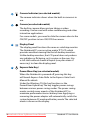
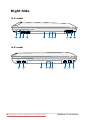
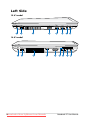
Optical Drive
The Notebook PC comes in various models with different
optical drives. The Notebook PC’s optical drive may support
compact discs (CD) and/or digital video discs (DVD) and
may have recordable (R) or re-writable (RW) capabilities.
See the marketing specifications for details on each model.
6
7
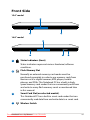
Optical Drive Electronic Eject
The optical drive eject has an electronic eject button for
opening the tray. You can also eject the optical drive tray
through any software player or by right clicking the optical
drive in Windows “Computer” and selecting Eject.
8
9
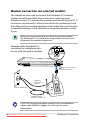
Modem Port (on selected models)
The RJ-11 modem port with two pins is smaller than the
RJ-45 LAN port and supports a standard telephone cable.
The internal modem supports up to 56K V.90 transfers. The
built-in connector allows convenient use without additional
adapters.
Optical Drive Activity Indicator
The optical drive activity indicator shows when data is
being transferred by the optical disk drive. This indicator
will light in proportion to the data size transferred.
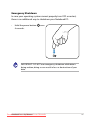
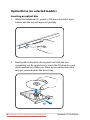
Optical Drive Emergency Eject
The emergency eject is used to eject the optical drive tray
in case the electronic eject does not work. Do not use the
emergency eject in place of the electronic eject.
IMPORTANT! The built-in modem does not support the
voltage used in digital phone systems. Do not connect the
modem port to a digital phone system or else damage will
occur to the Notebook PC.
24
Downloaded from LpManual.com Manuals
Notebook PC User Manual