1
EASE OF USE
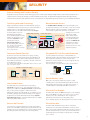
7.0-Inch Touchscreen LCD
Thumbnail Display and Previews*
The MX-2314N features a logically designed control panel with a
wide, clear, WVGA-resolution touchscreen LCD. Easy-to-follow
guidance puts step-by-step instructions on the LCD to guide you
through all the necessary procedures for staple/sort finishing,
pamphlet making, and other functions. Pushing the Home button,
even in the middle of an operation, takes you back to the Start
screen. Programming the most frequently used functions and
settings into My Menu gives you quick and easy access to them.
And using the included stylus pen provides controlled, accurate
touchscreen operation.
Making the search for files easier and more convenient than ever,
thumbnails and up-close previews of Document Filing data files, as
well as conventional file names, can be displayed on the
MX-2314N’s LCD control panel. And to help users decide which
documents to print out or forward to others, the LCD can also
display thumbnails and previews of incoming faxes and Internet
faxes. The MX-2314N even prevents errors in copying, scanning,
or saving documents to its hard disk by showing previews of those
jobs on the LCD before actually executing them, making it easy to
confirm finishing options, scan settings, and other such items.
* Requires optional MX-EB16.
Retractable Keyboard (option)
A full-size retractable QWERTY
keyboard slides out from beneath
the control panel to make text input
fast and easy: convenient for typing
things like e-mail addresses and
messages, as well as passwords for
user authentication.
Job Status Screen
Whether printing or copying, the control panel displays a list of all
jobs, showing you at a glance the jobs in progress and the position
of your job in the queue. And, with a few quick touches of the
LCD screen, the Priority Printing function lets you easily change
the job queue order or delete jobs that are no longer needed.
Easy-Grip Handles
Easy-grip handles on the MX-2314N
reflect a universal design that allows
the paper drawers to be grasped
from the top as well as the bottom
for easy opening and closing.
Job status
ENVIRONMENT-FRIENDLY
Outstanding Energy Efficiency
To reduce power consumption, Sharp has applied its advanced
technologies across all areas of this MFP, including the hardware,
software, electrical system, and supplies. As a result, the
MX-2314N boasts one of the lowest power consumption rates in
its class.
• Based on prior usage patterns, the MX-2314N automatically
determines the optimal length of time to let elapse before going
into auto power shut-off mode, helping reduce overall power
consumption. Shortly before auto power shut-off mode begins, a
message appears* on the LCD indicating that the MFP will soon
shut down and giving users the option to continue operation.
* Contact a Sharp customer representative to activate this pop-up
message function.
• Sharp’s belt fusing system
shortens the MX-2314N’s
warm-up time to 19 seconds,
contributing to reduced overall
energy consumption.
• Eco Scan function saves energy by keeping the fusing system
shut down during jobs that don’t require the use of the fusing
system, such as Image Sending and Document Filing.
Sharp’s belt fusing system
• Power ON/OFF Schedule function automatically turns the
MX-2314N on or off according to time schedules set by the
administrator.
Power off
Power on
9:00
Start of day
9
Off
12:00
13:00
Lunch break
On
Off
17:00
End of day
• Second-generation Mycrostoner-HG has a lower melting point
than conventional toner, allowing fusing to be carried out with
less energy. It also offers a significantly lower consumption rate
than conventional toner.
• For further energy savings, energy-efficient LED lamps are
employed in the scan unit in
place of conventional xenon
lamps. A new ASIC
(application-specific integrated
circuit) also helps the MX-2314N
deliver excellent performance
and energy efficiency.