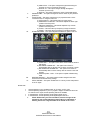
1
Dear Sceptre Customer,
Congratulations on your new SCEPTRE E46 LED 3D HDTV purchase. Thank
you for your support. To ensure safety and many years of trouble free
operation of your TV, please read the manual carefully before making any
adjustments, and keep them in a safe place for future references. We hope
you enjoy your new SCEPTRE HDTV.
For technical assistance, please call 1800-788-2878 and select option 3 or
email our tech support group at [email protected].
For all other inquiries, please call 1800-788-2878 and select option 4 or
email our customer service group at [email protected].
We recommend you register your SCEPTRE HDTV with the enclosed
registration card and mail it in. For peace of mind and to protect your
investment beyond the standard warranty, SCEPTRE offers a two year
extended warranty service for your HDTV. This plan gives additional
coverage once your standard warranty period runs out. Please call our
customer service group to purchase the extended warranty.
Sceptre wants to help you save energy! This HDTV meets the ENERGY
STAR® guidelines under the default picture setting called POWER
SAVING. Changing this setting or enabling other options will increase
power consumption which could possibly exceed the guidelines of
ENERGY STAR®.
-1www.SCEPTRE.com
SCEPTRE E46 LED HDTV User Manual
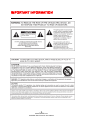
IMPORTANT INFORMATION
-2www.SCEPTRE.com
SCEPTRE E46 LED HDTV User Manual
SAFETY INSTRUCTIONS
Electricity is used to perform many useful functions, but it can also cause
personal injuries and property damage if improperly handled. This product
has been engineered and manufactured with the highest priority on safety.
However, improper use can result in electric shock and / or fire. In order to
prevent potential danger, please observe the following instructions when
installing, operating and cleaning the product. To ensure your safety and
prolong the service life of your Liquid Crystal Television, please read the
following precautions carefully before using the product.
1.
2.
3.
4.
5.
6.
7.
8.
9.
10.
11.
12.
13.
14.
Read these instructions.
Keep these instructions.
Heed all warnings.
Follow all instructions.
Do not use this apparatus near water.
Clean only with dry cloth.
Do not block any ventilation openings. Install in accordance with the
manufacturer’s instructions.
Do not install near any heat sources such as radiators, heat registers,
stoves, or other apparatus (including amplifiers) that produce heat.
Do not defeat the safety purpose of the polarized or grounding-type plug.
A polarized plug has two blades with one wider than the other. A
grounding type plug has two blades and a third grounding prong. The
wide blade and the third prong are provided for your safety. If the
provided plug does not fit into your outlet, consult an electrician for
replacement of the obsolete outlet.
Protect the power cord from being walked on or pinched particularly at
the plugs, convenience receptacles, and the point where they exit from
the apparatus.
Only use attachments/accessories specified by the manufacturer.
Use only with the cart, stand, tripod, bracket, or table specified by the
manufacturer, or sold with the apparatus. When a cart is used, use
caution when moving the cart/apparatus combination to avoid injury from
tip-over.
Unplug this apparatus during lightening storms or when unused for long
periods of time.
Refer all servicing to qualified service personnel. Servicing is required
when the apparatus has been damaged in any way, such as powersupply cord or plug is damaged, liquid has been spilled or objects have
fallen into the apparatus, the apparatus has been exposed to rain or
moisture, does not operate normally, or has been dropped.
-3www.SCEPTRE.com
SCEPTRE E46 LED HDTV User Manual
SAFETY INSTRUCTIONS
This product is designed and manufactured to operate within defined design limits, and
misuse may result in electric shock or fire. To prevent the product from being damaged,
the following rules should be observed for the installation, use and maintenance of the
product. Read the following safety instructions before operating the display. Keep these
instructions in a safe place for future reference.
•
•
•
•
•
•
•
To avoid the risk of electric shock or
component damage, switch off the
power before connecting other
components to the TV.
Unplug the power cord before
cleaning the TV. Please use the
included custom bezel cleaning cloth
for cleaning the bezel of the TV only.
Do not use a liquid or a spray cleaner
for cleaning the product. Do not use
abrasive cleaners.
Always use the accessories
recommended by the manufacturer to
insure compatibility.
When moving the TV from an area of
low temperature to an area of high
temperature, condensation may form
on the housing. Do not turn on the TV
immediately after this to avoid causing
fire, electric shock or component
damage.
Do not place the TV on an unstable
cart, stand, or table. If the TV falls, it
can injure a person and cause serious
damage to the appliance. Use only a
cart or stand recommended by the
manufacturer or sold with the TV.
Any heat source should maintain a
distance of at least 5 feet away from
the TV, i.e. radiator, heater, oven,
amplifier etc. Do not install the product
too close to anything that produces
smoke or moisture. Operating the
product close to smoke or moisture
may cause fire or electric shock.
Slots and openings in the back and
bottom of the cabinet are provided for
ventilation. To ensure reliable
•
•
•
•
•
operation of the TV and to protect it
from overheating, be sure these
openings are not blocked or covered.
Do not place the TV in a bookcase or
cabinet unless proper ventilation is
provided.
Never push any object into the
ventilation slots of the TV. Do not
place any objects on the top of the
Product. It could short circuit parts
causing a fire or electric shock. Never
spill liquids on the TV.
Do not use the TV in a portrait format
(by rotating 90 degrees) under high
temperature environment (25°C or
higher), since this would retard heat
dissipation and would eventually
damage the TV.
The TV should be operated only from
the type of power source indicated on
the label. If you are not sure of the
type of power supplied to your home,
consult your dealer or local power
company.
The power cable must be replaced
when using different voltage from that
specified in the User Manual. For
more information, contact your dealer.
The TV is equipped with a threepronged grounded plug, a plug with a
third (grounding) pin. This plug will fit
only into a grounded power outlet as a
safety feature. If your outlet does not
accommodate the three-wire plug,
have an electrician install the correct
outlet, or use an adapter to ground the
appliance safely. Do not defeat the
safety purpose of the grounded plug.
-4www.SCEPTRE.com
SCEPTRE E46 LED HDTV User Manual
•
•
•
•
•
•
•
•
•
Do not overload power strips and
extension cords. Overloading can
result in fire or electric shock.
The wall socket should be installed
near the equipment and should be
easily accessible.
Only the marked power source can be
used for the product. Any power
source other than the specified one
may cause fire or electric shock.
Do not touch the power cord during
thunderstorms. To avoid electric shock,
avoid handling the power cord during
electrical storms.
Unplug the unit during a lightning
storm or when it will not be used for a
long period of time. This will protect
the TV from damage due to power
surges.
Do not attempt to repair or service the
product yourself. Opening or removing
the back cover may expose you to
high voltages, the risk of electric shock,
and other hazards. If repair is required,
please contact your dealer and refer
all servicing to qualified service
personnel.
Keep the product away from moisture.
Do not expose this appliance to rain or
moisture. If water penetrates into the
product, unplug the power cord and
contact your dealer. Continuous use in
this case may result in fire or electric
shock.
Do not use the product if any
abnormality occurs. If any smoke or
odor becomes apparent, unplug the
power cord and contact your dealer
immediately. Do not try to repair the
product yourself.
Avoid using dropped or damaged
appliances. If the product is dropped
and the housing is damaged, the
•
•
•
•
•
•
internal components may function
abnormally. Unplug the power cord
immediately and contact your dealer
for repair. Continued use of the
product may cause fire or electric
shock.
Do not install the product in an area
with heavy dust or high humidity.
Operating the product in environments
with heavy dust or high humidity may
cause fire or electric shock.
Hold the power connector when
removing the power cable. Pulling the
power cable itself may damage the
wires inside the cable and cause fire
or electric shocks. When the product
will not be used for an extended
period of time, unplug the power
connector.
To avoid risk of electric shock, do not
touch the connector with wet hands.
Insert batteries in accordance with
instructions while using the remote
control. Incorrect polarities may cause
damage and leakage of the batteries,
operator injury and contamination the
remote control.
If any of the following occurs please
contact the dealer:
o
The power connector fails
or frays.
o
Liquid sprays or any object
drops into the TV.
o
The Display is exposed to
rain or other moisture.
o
The Display is dropped or
damaged in any way.
The performance of the
o
Display changes
substantially.
Operating environment: Temperature:
5°C ~ 35°C, Humidity: 10% to 90%
non-condensing, Altitude: 0~10,000 ft.
-5www.SCEPTRE.com
SCEPTRE E46 LED HDTV User Manual
IMPORTANT INFORMATION
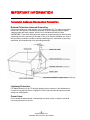
Television Antenna Connection Protection
External Television Antenna Grounding
If an outside antenna or cable system is to be connected to the TV, make sure that the
antenna or cable system is electrically grounded to provide some protection against
voltage surges and static charges. Article 810 of the National Electrical Code,
ANSI/NFPSA 70, provides information with regard to proper grounding of the mast and
supporting structure, grounding of the lead-in wire to an antenna discharge unit, size of
the grounding conductors, location of antenna discharge unit, connection to grounding
electrodes, and requirements of the grounding electrode.
Lightning Protection
For added protection of the TV during a lightning storm or when it is left unattended or
unused for long periods of time, unplug the TV from the wall outlet and disconnect the
antenna or cable system.
Power Lines
Do not locate the antenna near overhead light or power circuits, or where it could fall
into such power lines or circuits.
-6www.SCEPTRE.com
SCEPTRE E46 LED HDTV User Manual
3D IMPORTANT SAFETY INFORMATION
IMPORTANT SAFETY INFORMATION. READ THE FOLLOWING WARNINGS
BEFORE YOU OR YOUR CHILD USE THE 3D FUNCTION
WARNING
Parents’ careful supervision is required particularly when children or teenagers view 3D
images.
Photosensitive Seizure Warning and Other Health Risks
•
•
•
•
Some viewers may experience an epileptic seizure or stroke when exposed to
certain flashing images or lights contained in certain television pictures or
video games. If you or any of your relatives has a history of epilepsy or
strokes, please consult with a medical specialist before using the 3D function.
Do not watch 3D pictures when you feel incoherent, sleepy, tired or sick.
Avoid watching 3D pictures for long hours.
Even those without a personal or family history of epilepsy or stroke may
have an undiagnosed condition that can cause “photosensitive epileptic
seizures.”
If you experience any of the following symptoms immediately stop watching
3D pictures and consult a medical specialist: (1) altered vision; (2)
lightheadedness; (3) dizziness; (4) involuntary movements such as eye or
muscle twitching; (5) confusion; (6) nausea; (7) loss of awareness; (8)
convulsions; (9) cramps; and/or (10) disorientation. Parents should monitor
and ask their children about the above symptoms-children and teenagers may
be more likely than adults to experience these symptoms.
Note that watching TV while sitting too close to the screen for an extended period of
time may weaken your eyesight.
Note that watching TV while wearing 3D Active Glasses for an extended period of time
may cause a headache or fatigue. If you feel headache, fatigue or dizziness, stop
watching TV and rest.
Some 3D pictures may startle viewers. The pregnant, elderly, epileptic and those
suffering from serious physical conditions are advised to avoid utilizing the unit’s 3D
functionality.
We don’t recommend watching 3D if you are in bad physical condition, need sleep or
have been drinking liquor.
Please take care to be aware of the world around you. This product is designed to be
immersive. DO NOT use this product near open stairwells, cables, balconies, or other
objects that can be tripped over, run into, knocked down, broken or fallen over. Being
startled or deluding yourself into thinking that the 3D images are real may cause you to
crush a nearby object or get injured trying to move your body.
-7www.SCEPTRE.com
SCEPTRE E46 LED HDTV User Manual
Do not use the 3D Active Glasses for any other purpose than for which it was designed.
Wearing the 3D Active Glasses for any other purpose (as general spectacles,
sunglasses, protective goggles, etc.) may physically harm you or weaken your eyesight.
Immersive video can potentially have adverse effects on the user including motion
sickness, perceptual after effects, disorientation, eye strain, and decreased postural
stability. Take frequent breaks to lessen the potential of these effects, as is commonly
suggested for other items, such as keyboards and computer monitors, that you may
tend to fixate or concentrate on. If your eyes show signs of fatigue or dryness or if you
have any of the above symptoms, immediately discontinue use of this device and do not
resume using it for at least thirty minutes after the symptoms have subsided.
The ideal viewing distance should be three times or more the height of the screen. We
recommend sitting with viewer’s eyes on a level with the screen
-8www.SCEPTRE.com
SCEPTRE E46 LED HDTV User Manual
Opening the Package
The SCEPTRE TV is packaged in a carton. Any standard accessories are packed
separately in another carton. The weight of the TV is approximately 38.5 lbs. Due to the
size and weight of the product, it is suggested that it must be handled by a minimum of
2 or more persons. Since the glass can be easily scratched or broken, please handle
the product gently. Never place the unit on a surface with the glass facing downwards
unless it is on protective padding. When opening the carton, check that the product is in
good condition and that all standard accessories and items are included. Save the
original box and all packing materials for future shipping needs.
Package Contents
SCEPTRE TV Display x 1
TV Stand x 1
User Manual x 1
Quick Start Guide x 1
Screw x 6
Screw Driver x 1
Passive 3D Glasses x 3
Chip-On Passive Lens x 1
Power Cord x 1
Warranty / Registration Card x 1
TV Remote Control (AAA Batteries included) x 1
Installation
Please read the user manual carefully before performing the installation. The power
consumption of the display is approximately 94 watts. Please use the power cord
designated for the product. When an extension cord is required, use one with the
correct power rating. The cord must be grounded and the grounding feature must not be
defeated. The product should be installed on a flat surface to avoid tipping. Space
should be maintained between the back of the product and the wall for proper
ventilation. If you would like to mount the TV onto the wall, please see page 8, and 10
for additional information. Avoid installing the product in the kitchen, bathroom or other
places with high humidity dust or smoke, so as not to shorten the service life of the
electronic components. Please ensure the product is installed with the screen in
landscape orientation. Any 90° clockwise or counterclockwise installation may induce
poor ventilation and successive component damage.
-9www.SCEPTRE.com
SCEPTRE E46 LED HDTV User Manual
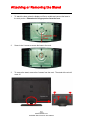
Attaching or Removing the Stand
1.
To attach the base, place the display unit flat on a table and connect the base to
the neck portion. Remember the longer portion faces the front.
2.
Screw in the 6 screws to secure the base to the neck.
3.
To remove the stand, remove the 6 screws from the neck. The stand with neck will
come off.
- 10 www.SCEPTRE.com
SCEPTRE E46 LED HDTV User Manual
Table of Contents
IMPORTANT INFORMATION.............................................................................................................. 2
SAFETY INSTRUCTIONS.................................................................................................................... 3
SAFETY INSTRUCTIONS.................................................................................................................... 4
IMPORTANT INFORMATION.............................................................................................................. 6
Television Antenna Connection Protection .............................................................................. 6
3D IMPORTANT SAFETY INFORMATION......................................................................................... 7
Opening the Package ......................................................................................................................... 9
Package Contents............................................................................................................................... 9
Installation ........................................................................................................................................... 9
Attaching or Removing the Stand................................................................................................... 10
Table of Contents.............................................................................................................................. 11
Identifying Front and Rear Panel .................................................................................................... 12
Front View.................................................................................................................................... 12
Rear View Mounting Pattern ..................................................................................................... 12
Side Control Buttons .................................................................................................................. 13
Rear View Connections ............................................................................................................. 14
Installing Batteries to the Remote Control.............................................................................. 15
SCEPTRE TV Remote Control ......................................................................................................... 16
Connection Suggestions.................................................................................................................. 18
If You Have Digital Cable without Cable Box or Antenna… .................................................. 18
Connecting DVD Player with Component YPbPr… ................................................................ 19
Connecting Wii™ with Composite… ........................................................................................ 20
Connecting Cable or Satellite boxes with HDMI… ................................................................. 21
Connecting to a PC with VGA and 3.5 mm minijack … .......................................................... 22
Connecting a Digital Audio Receiver with Coax SPDIF… ..................................................... 23
Switching Sources............................................................................................................................ 24
Ready to Watch Some TV?............................................................................................................... 25
If You’ve Connected Antenna or Cable to the TV… ............................................................... 25
OSD (On Screen Display) Controls................................................................................................. 27
Via Remote Control .................................................................................................................... 27
Via TV Side Panel Buttons ......................................................................................................... 27
OSD (On Screen Display) Options .................................................................................................. 28
PICTURE ...................................................................................................................................... 28
AUDIO........................................................................................................................................... 31
TIME.............................................................................................................................................. 33
SETUP .......................................................................................................................................... 34
LOCK ............................................................................................................................................ 36
CHANNEL..................................................................................................................................... 38
Detailed Explanations....................................................................................................................... 39
USB Connection Explained ....................................................................................................... 39
Closed Captioning (digital and analog) Explained ................................................................. 40
Rating Explained ......................................................................................................................... 40
Aspect Ratio Explained.............................................................................................................. 42
Shortcuts to Browsing Channels.............................................................................................. 43
3D Settings Explained ................................................................................................................ 44
How do I clean the TV ?.............................................................................................................. 46
Troubleshooting ................................................................................................................................ 47
Call Us If You Need Help! ................................................................................................................. 50
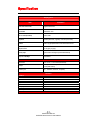
Specification...................................................................................................................................... 51
LIMITED PRODUCT WARRANTY..................................................................................................... 53
Disclaimer, Trademarks, & Copyright Information...................................................................... 55
FCC Compliance Statement ............................................................................................................ 56
- 11 www.SCEPTRE.com
SCEPTRE E46 LED HDTV User Manual
Identifying Front and Rear Panel
Front View
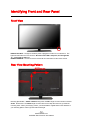
INDICATOR LIGHT – The light is red when power is plugged in but the TV is not turned on. The
light turns blue when the TV is turned on. Because of the LED in the panel, the TV might take
10 – 12 seconds to power on.
REMOTE SENSOR – The remote sensor receives all the commands from the remote control.
Rear View Mounting Pattern
Mounting Specification : 400mm x 400mm using screw size M6. Length of screw should not exceed
22mm. Please Note : The 22mm length of screw refers to how deep the screw can go inside the
mounting holes. When you’re buying screws, you should add the original 22mm to the thickness of
your mounting plate in order to get the total screw length.
- 12 www.SCEPTRE.com
SCEPTRE E46 LED HDTV User Manual
Side Control Buttons
1.
2.
3.
4.
5.
6.
7.
VOL(+) – This button increases the TV’s volume. If a sub-menu is active, pressing
this button will move the select right.
VOL(-) – This button decreases the TV’s volume. If a sub-menu is active, pressing
this button will move the selection left.
CH(▲) – This button changes the TV channel up. If the OSD is active, this button
functions as up for the menu.
CH(▼) – This button changes the TV channel down. If the OSD is active, this
button functions as down for the menu.
MENU – This button activates the On Screen Display (OSD). If a sub-menu is
active, pressing this button will exit the OSD.
SOURCE – This button switches between all the different sources of the TV.
When the OSD is active, this button acts as the enter button and confirms the
menu selection.
POWER – Turn on the TV by pressing the button once. Press the button again to
turn off the TV.
- 13 www.SCEPTRE.com
SCEPTRE E46 LED HDTV User Manual
Rear View Connections
1.
2.
3.
4.
5.
HDMI1-3 – HDMI connects to devices that use HDMI cable, such as Blu-ray
or HD DVD player, or HD cable / satellite set-top box. This connection port
receives pure digital audio and high definition signal through one single cable.
This port also can accept a HDCP video device for video.
HEADPHONE – This connection is for headphones to be attached to the TV.
SPDIF - This connection port is used for sending out digital audio signals to
digital surround sound receivers. The orange (COAX SPDIF OUT) connector
sends out either bit-stream or PCM digital sound signal to a home theater
receiver with digital coax input.
Video – Video connects to devices that use composite video cables such as
VCR or DVD player or Wii™. Connect the yellow for video and the red / white
for audio. This port shares the audio jacks with YPbPr.
USB – USB connects to USB flash drives for playing music and picture. The
- 14 www.SCEPTRE.com
SCEPTRE E46 LED HDTV User Manual
USB port is also used for updating the TV’s firmware.
HDMI4-5 – HDMI connects to devices that use HDMI cable, such as Blu-ray
or HD DVD player, or HD cable / satellite set-top box. This connection port
receives pure digital audio and high definition signal through one single cable.
This port also can accept a HDCP video device for video.
7. Audio In - This connection port is for people who want to provide audio to the
TV when using a PC or a DVI video device. The sources use 3.5mm mini-jack
audio cable.
8. VGA - This connection port connects to a PC for video using VGA cable. Be
sure to connect your audio cable to the VGA Stereo input if you want sound
out of VGA video source.
9. TV – This connection is for digital or analog cable without the cable box or
over-the-airwave antennas. The tuner is a hybrid tuner that tunes to both
analog and digital channels. This connection uses coaxial RF cable. For
over-the airwave digital stations please check http://www.antennaweb.org.
10. YPbPr – This connection port is for DVD players or satellite / cable set-top
boxes that use component cables. From left to right, connect green, blue,
and red for video, and then connect white for left channel audio, and red for
right channel audio. This port shares the audio jacks with Video.
11. Analog Audio Out – This connection is for connecting to analog audio
receivers using RCA red and white connection.
6.
Please Note:
•
This TV features a power saving function which will turn off the TV
automatically after 10 minutes of idling on a connection with no signal.
This feature is present on all connection.
Installing Batteries to the Remote Control
Please insert the AAA batteries into the remote control. Make sure the (+) side and the (-) side
are installed correctly. When you are installing the battery, the remote’s backside should be
facing up. Afterwards, re-attach the battery cover.
Please note:
•
•
•
•
•
•
Only use AAA batteries.
Inserting the batteries incorrectly may also result in cracking or leakage that may pose a fire
risk or lead to personal injury.
Dispose the batteries in accordance with local laws and regulations.
Keep the batteries away from children and pets.
If the remote control is not used for a long time, remove the batteries.
Keep the remote control away from moisture, sunlight, and high temperatures.
- 15 www.SCEPTRE.com
SCEPTRE E46 LED HDTV User Manual
SCEPTRE TV Remote Control
- 16 www.SCEPTRE.com
SCEPTRE E46 LED HDTV User Manual
For universal remotes, this TV follows SONY’s universal remote code.
You need to find the actual code from your cable or satellite or universal
remote provider.
1.
2.
3.
4.
5.
6.
7.
8.
9.
10.
11.
12.
13.
14.
15.
16.
17.
18.
19.
20.
21.
22.
23.
24.
25.
26.
27.
28.
29.
30.
POWER – Turns the TV on or off.
FREEZE – Freezes the TV picture.
SLEEP – Sets the Sleep timer.
CC – Cycles between different closed captioning modes.
MTS – Selects stereo, mono, or second audio programming.
FAVORITE – Gives you your list of favorite channels.
ADD/DEL – Adds or Deletes the current channel from the favorites list.
FAV(-) – Channels down from your favorite channel list.
FAV(+) – Channels up from your favorite channel list.
0~9 – Sets the channels.
Dash (-) – Inserts the dash for selecting digital channels directly.
R – Returns to the previous channel.
PICTURE – Selects various preset picture settings
CH(+)/ CH(-)/ VOL(-)/ VOL(+) – CH(+) / CH(-) functions as channel up
and down. VOL(-) / VOL(+) functions as volume up and down.
MUTE – Mutes the TV’s audio.
SOUND – Selects various preset sound settings
ASPECT – Selects different viewing modes of the TV.
GUIDE – Opens the current digital channel information guide.
▲ / ▼ / ◄ / ► – These buttons selects and moves the selection on the
screen.
↵ – ↵ acts as enter button for OSD menu and changing channels in
conjunction with number buttons.
SOURCE – Gives you a list of your port connections to switch to.
MENU – Opens / Exits the TV menu.
EXIT – Exits the TV menu.
TV – Changes source to TV Tuner.
USB – Launches USB reader function for pictures and music.
INFO – Shows the TV info.
A – This is the hotkey for the TV to change from 3D to 2D mode.
B – This is the hotkey for the TV to change from 2D to 3D mode.
C – This is the hotkey for the TV to change the option L R Swap.
D – This is the hotkey for displaying the TV’s channel list under the
source TV.
- 17 www.SCEPTRE.com
SCEPTRE E46 LED HDTV User Manual
Connection Suggestions
If You Have Digital Cable without Cable Box or Antenna…
1.
2.
3.
4.
Make sure the power of HDTV is turned off.
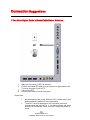
Connect the Coaxial RF cable from your antenna or digital cable to the
TV port on the back of your HDTV.
Turn on the HDTV.
Follow the first time on screen instructions.
Please Note :
•
•
Not all broadcasts are in High Definition (HD). Please refer to your
local broadcasting stations for more information.
The HDTV’s tuner is designed for HDTV therefore requires a
stronger signal than normal TVs. If you cannot achieve that signal
level with your antenna or cable, your HDTV might lose picture or
sound.
- 18 www.SCEPTRE.com
SCEPTRE E46 LED HDTV User Manual
Connecting DVD Player with Component YPbPr…
1.
2.
3.
4.
5.
6.
7.
8.
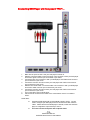
Make sure the power of HDTV and your DVD player is turned off.
Obtain a Component Cable. Connect the green color connector to both your DVD player
and YPbPr’s green connector port on the back of your HDTV.
Connect the blue color connector to both your DVD player and YPbPr’s blue connector
port on the back of your HDTV.
Connect the red color connector to both your DVD player and YPbPr’s red connector
port on the back of your HDTV.
Obtain a RCA Audio Cable. Connect the white color connector to both your DVD player
and YPbPr’s white connector port on the back of your HDTV.
Connect the red color connector to both your DVD player and YPbPr’s red connector
port on the back of your HDTV.
Turn on the HDTV and your DVD player.
Use the remote control’s source button or the source button on the TV to switch to
YPbPr.
Please Note :
•
•
Sometimes DVD players will not automatically output to YPbPr. You will
need to configure your DVD player with AV connection first then switch to
YPbPr. Please reference the DVD player’s manual, to make sure the DVD
player is configured to output correctly to the TV.
This source shares audio jacks with composite video.
- 19 www.SCEPTRE.com
SCEPTRE E46 LED HDTV User Manual
Connecting Wii™ with Composite…
1.
2.
3.
4.
5.
6.
Make sure the power of HDTV and your Wii™ is turned off.
Obtain a Yellow Video Cable. Connect the Yellow Video connector to both
your Wii™ and AV’s Yellow Video connector port on the back side of your
HDTV.
Obtain a RCA Audio Cable. Connect the white color connector to both your
Wii™ and AV’s white connector port on the back side of your HDTV.
Connect the red color connector to both your Wii™ and AV’s red connector
port on the back side of your HDTV.
Turn on the HDTV and your Wii™.
Use the remote control’s source button or the source button on the TV to
switch to AV.
Please Note :
•
•
Make sure to read your Wii™ installation guide for further
information.
This source shares audio jacks with YPbPr.
- 20 www.SCEPTRE.com
SCEPTRE E46 LED HDTV User Manual
Connecting Cable or Satellite boxes with HDMI…
1.
2.
3.
4.
Make sure the power of HDTV and your set-top box is turned off.
Connect a HDMI cable to the HDMI output of your set-top box and the other
end to the HDMI port on the back of your HDTV.
Turn on the HDTV and your set-top box.
Use the remote control’s source button or the source button on the TV to
switch to HDMI.
Please Note :
•
•
Please reference the set-top box’s manual, to make sure the settop box is configured to output correctly to the TV.
Sceptre’s HDTV supports SONY’s universal remote code.
Please look up SONY’s codes in your universal remote’s hand
book.
- 21 www.SCEPTRE.com
SCEPTRE E46 LED HDTV User Manual
Connecting to a PC with VGA and 3.5 mm minijack …
1.
2.
3.
4.
5.
6.
7.
8.
9.
Make sure the power of HDTV and your PC is turned off.
Obtain a 15-pin D-Sub VGA cable; connect to the VGA output of your PC and the
other end to the VGA port on the back of your HDTV.
Obtain a 3.5 mm Mini-jack, connect to the audio out of your PC and the other end
to the VGA Stereo Input port.
Turn on the power of the HDTV and your PC.
Use the remote control’s source button or the source button on the TV to switch to
VGA.
Change your PC resolution to 1920x1080 at 60hz refresh rate.
Press MENU to use the OSD’s SETUP option.
Under the SETUP option select PC function.
Under VGA function use AUTO ADJUST to adjust the screen.
Please Note :
•
•
•
For the best results, please set your PC resolution to 1920x1080 at 60
Hz. Please refer to the PC or graphic card’s manual for further
instructions on how to set your resolution and refresh rate.
Please refer to your PC manual for video output requirements of the
video card.
The VGA port of the TV features a power saving mode which will
automatically turn off the TV, if there’s no signal provided for more than
10 minutes.
- 22 www.SCEPTRE.com
SCEPTRE E46 LED HDTV User Manual
Connecting a Digital Audio Receiver with Coax SPDIF…
1.
2.
3.
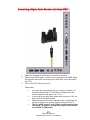
Make sure the power of HDTV and your receiver is turned off.
Obtain a coax SPDIF cable, connect it to your receiver’s coax SPDIF digital
input and the coax SPDIF connection on the LINE OUT port on the back of
the HDTV.
Turn on the HDTV and your receiver.
Please Note :
•
•
•
•
If you want pure digital stream for your receiver to decode, you
must also configure the TV’s OSD Sound->Digital Audio Out
function. Make sure the option is on 5.1CH.
If your receiver is making static noises when receiving 5.1CH, you
must use the PCM option instead.
Please reference the receiver’s manual as well, to make sure the
receiver is configured to receive signals correctly from the TV.
The TV’s SPDIF out for 5.1CH is ONLY used for antenna/cable
connection. Any other incoming audio signal will be passed
out of SPDIF in PCM format.
- 23 www.SCEPTRE.com
SCEPTRE E46 LED HDTV User Manual
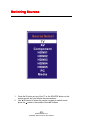
Switching Sources
1.
2.
Press the S button on top of the TV or the SOURCE button on the
remote control and you will see the picture above.
Use ▲▼ buttons to select the source you want to switch to and
press the ↵ button in the middle of the ▲▼ buttons.
- 24 www.SCEPTRE.com
SCEPTRE E46 LED HDTV User Manual
Ready to Watch Some TV?
Starting up the HDTV
1.
2.
3.
4.
Make sure your power cable is connected and the standby red light in the
front of the TV is lit up.
Check all your connection cables off the side or the back of your TV and also
your AV devices. Make sure they are all connected securely.
Turn on your TV and other AV devices if necessary.
Select the correct source according to the Connecting pages.
If You’ve Connected Antenna or Cable to the TV…
If an antenna or cable (without a cable box) is connected to your TV’s tuner, you will
need to go through an INITIAL SETUP process in order to watch the TV. The setup
wizard will automatically start when you first turn on the TV.
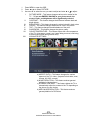
1.
Use the ◄ or ► button to select the menu language preference.
2.
Use the ▲ or ▼ buttons to select the options you want to adjust and use the
◄ or ► button to change its value.
a.
b.
c.
Time Zone – Selects the time zone difference.
Daylight Savings – Toggles daylight savings time which adds or
subtracts one hour from the time.
Time Format – Toggles between 24 hour or 12 hour display format
(ie. 1:00 pm would be 13:00 under 24 hour format).
- 25 www.SCEPTRE.com
SCEPTRE E46 LED HDTV User Manual
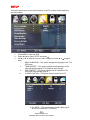
3.
Use the ◄ or ► buttons to select your connection type between AIR (antenna)
or CABLE and press ↵ to scan for channels.
4.
Once the scanning finishes, you can begin to watch TV.
Please Note:
•
•
•
•
The time setting on the TV will only keep accurate time if you
do not unplug or turn off standby power from the TV.
Not all broadcasts are in High Definition (HD). Please refer to your
local broadcasting stations for more information.
The HDTV’s tuner is designed for HDTV therefore requires a
stronger signal than normal TVs. If you cannot achieve that signal
level with your antenna or cable, your HDTV might lose picture or
sound.
Sceptre wants to help you save energy! This HDTV meets
the ENERGY STAR® guidelines under the default
picture setting called POWER SAVING. Changing this
setting or enabling other options will increase power
consumption which could possibly exceed the
guidelines of ENERGY STAR®.
- 26 www.SCEPTRE.com
SCEPTRE E46 LED HDTV User Manual
OSD (On Screen Display) Controls
Via Remote Control
In order to adjust most of the options inside the On Screen Display (OSD), the picture
below shows all the buttons used on the remote control.
◄ – This button decreases the
volume and also functions as left
direction in the OSD.
► – This button increases the
volume and also functions as right
direction in the OSD.
↵ – This button changes the channel
in conjunction with the number pad
and also functions as ENTER for
selecting options in the OSD.
MENU - – This button opens the OSD
and also exits the OSD by going to the
previous level of the OSD.
EXIT – This button exits the OSD
entirely.
▲ – This button changes the channel
to a higher number and also
functions as up direction in the OSD.
▼ – This button changes the channel
to a lower number and also functions
as down direction in the OSD.
Via TV Side Panel Buttons
In order to provide more than one type of OSD control buttons, the side panel’s buttons
have also been made functional for adjusting the OSD.
1.
2.
3.
4.
VOL(+/-) – These buttons functions as left/right direction in the OSD or
increases/decreases the value of an option.
CH(◄/►) – These buttons functions as up/down direction in the OSD.
MENU – This button opens the OSD and also exits out of menus.
SOURCE – This button acts as the enter button to enter each function or
option.
- 27 www.SCEPTRE.com
SCEPTRE E46 LED HDTV User Manual
OSD (On Screen Display) Options
PICTURE – This main option has functions for changing the picture settings for all ports,
such as tint, contrast, sharpness.
SOUND – This main option has functions for changing sound settings for all ports, such
as SPDIF Type, AVL, SRS, and equalizer….etc.
TIME – This main option has functions for changing the TV’s time display, time format,
and sleep timer.
SETUP – This main option has functions for closed captioning, OSD settings, PC
settings and other settings.
LOCK – This main options has functions for parental filter / blocking.
CHANNEL – This main option has functions for the tuner port, such as scanning
channels, editing channels, and tuner mode….etc.
PICTURE
This option allows users to adjust the TV’s picture sharpness, color, tint, and other
various functions.
- 28 www.SCEPTRE.com
SCEPTRE E46 LED HDTV User Manual
1.
2.
3.
Press MENU to open the OSD.
Press ◄ or ► to select PICTURE.
Use ▲ or ▼ to select the one you want to adjust and ◄ or ► or ↵ to adjust
I.
II.
III.
IV.
V.
VI.
VII.
VIII.
PICTURE MODE – This feature changes various color modes for the
TV. ** If you use ENERGY SAVING as your picture mode, the
screen’s color, and brightness will be significantly reduced.
CONTRAST – This feature changes the difference between dark and
bright objects.
BRIGHTNESS – This feature changes the picture’s detail in dark colors.
COLOR – This feature changes the amount of color in the picture.
TINT – This feature changes the white balance of the color.
SHARPNESS – This feature changes the picture quality.
COLOR TEMPERATURE – This feature adjusts the color temperature
of the TV, giving warm, normal, cool, (warm being more red, cool being
more blue and normal being neutral color).
ADVANCED SETTINGS
a) ASPECT RATIO – This feature changes the various
aspects of the TV’s video. (Aspects include wide, zoom,
cinema, full 100%, normal).
b) NOISE REDUCTION – This feature reduces general
pixilation by blurring them.
c) DYNAMIC CONTRAST – This feature allows the TV to
automatically adjust the contrast of the TV depending on
the picture you are viewing.
d) MPEG NOISE REDUCTION – This feature reduces
general pixilation for DVD discs.
- 29 www.SCEPTRE.com
SCEPTRE E46 LED HDTV User Manual
IX.
3D SETTINGS
a) 3D TYPE – This option sets the 3D displaying style (frame
packing, side by side, top and bottom, 2D to 3D). Frame Packing
will be automatically detected, but side by side or top and bottom
videos need s the user to manually switch them.
b) 3D_LR – This option changes the 3D depth panning to the left or
the right.
c) DEPTH – This option adjusts the gap between the double images
giving you a more pronounced 3D effect. The larger the value,
the farther you must sit away to see the effect.
d) 3D TO 2 D SETTINGS – This option changes any 3D video to 2D.
i.
3D to 2D Mode – To switch 3D videos to 2D you need
to identify which method the 3D movie is using to
produce the 3D effects. There are currently 3
methods (frame packing, side by side, and top and
bottom). Select the correct method and the video will
be correctly changed to 2D.
Please Note:
•
•
•
•
•
Turning on Dynamic Contrast disables brightness and contrast settings.
This TV only detects 3D Frame Packing technique, for DVD/Blu-ray DVDs that use
side by side or top and bottom methods you will need to manually switch them.
As Depth adjustments increase, you need to sit further away from the TV to
experience the effects.
3D is only available under digital or HD content and sources such as digital TV
channels, HDMI1-HDMI5 and YPbPr.
YOU NEED TO WEAR THE PASSIVE 3D GLASSES included in the package to
experience 3D. Without the glasses you will see blurry images.
- 30 www.SCEPTRE.com
SCEPTRE E46 LED HDTV User Manual
AUDIO
This option allows users to adjust the TV’s sound functions.
1.
2.
3.
Press MENU to open the OSD.
Press ◄ or ► to select AUDIO and press ↵.
Use ▲ or ▼ to select the one you want to adjust and ◄ or ► or ↵ to adjust
them.
I.
EQUALIZER SETTINGS – This feature enables the internal
equalizer of the speakers. You can adjust the settings individually
or use the presets (standard, music, movie, sports, user).
II.
III.
MTS / SAP – This feature adjusts the second audio programming in
analog channels.
AUDIO LANGUAGE – This feature adjusts the digital second audio
programming in digital channels.
- 31 www.SCEPTRE.com
SCEPTRE E46 LED HDTV User Manual
IV.
V.
VI.
DIGITAL AUDIO OUTPUT – This feature adjusts the digital audio
output.
AVL – This feature adjusts the auto volume leveler enabling volume
protection from overly loud commercials.
SRS SETTINGS – This feature adjusts the options for SRS sound
effects.
i.
ii.
iii.
iv.
TRUSURROUNDHD – This option enables the user to
turn on or off the surround sound effect.
DIALOGCLARITY – This option enhances the sound of
human voices on TV.
TRUBASS – This option enhances the bass effects of the
TV.
DEFINITION – This option adjusts the level of surround
effect on the TV.
is a trademark of SRS Labs, Inc. TruSurround HD
technology is incorporated under license from SRS Labs, Inc.
Please Note:
•
•
AUTO VOLUME only adjusts at a certain level of the volume so you will still
hear a difference in most commercials.
AUDIO LANGUAGE and MTS/SAP are dependent on the broadcasting
station’s support and are only available under the source TV.
- 32 www.SCEPTRE.com
SCEPTRE E46 LED HDTV User Manual
TIME
This option allows users adjust the TV’s system time.
1.
2.
3.
Press MENU to open the OSD.
Press ◄ or ► to select TIME and press ↵.
Use ▲ or ▼ to select the one you want to adjust and ◄ or ► or ↵ to adjust
them.
I.
SLEEP TIMER – This timer automatically turns off the TV at the
designated time.
II.
TIME ZONE – This option adjusts the global time zone for the TV.
III.
DAYLIGHT SAVING TIME – This option toggles the daylight saving
time feature.
IV.
TIME FORMAT – This option adjusts the display format for the time.
(IE. Under 24 hour format 1PM would display as 13:00).
V.
AUTOCLOCK – This option enables the TV to sync time with the
antenna. (Put it on AUTO if you have an antenna attached to the
TV. If you have CABLE or SATELLITE or anything else please use
make sure AUTOCLOCK is turned off)
VI.
CLOCK – This option adjusts the time and date of the TV. You
need to disable AUTOCLOCK in order to use this function.
Please Note:
•
The TIME function will only keep accurate time if the TV is plugged into a
power source. If the TV is unplugged or the power strip is turned off, the TV’s
time will not be accurate.
- 33 www.SCEPTRE.com
SCEPTRE E46 LED HDTV User Manual
SETUP
This option allows users to set various features of the TV such as closed captioning,
and source label.
1.
2.
3.
Press MENU to open the OSD.
Press ◄ or ► to select SETUP and press ↵.
Use ▲ or ▼ to select the one you want to adjust and ◄ or ► or ↵ to adjust
them.
I.
MENU LANGUAGE – This option changes the language of the TV’s
OSD menu.
II.
TRANSPARENT – This option changes the transparency of the
menu allowing background TV images to show through.
III.
OSD TIMEOUT – This option changes the time which the TV’s
OSD menu automatically goes off.
IV.
CLOSED CAPTION – This option displays words on the TV.
a) CC MODE – This option toggles closed captioning off
and on or on when the TV is muted.
- 34 www.SCEPTRE.com
SCEPTRE E46 LED HDTV User Manual
V.
VI.
VII.
VIII.
IX.
b) ANALOG CC – This option changes through all the analog CC
channels (cc1 thru cc4 and text1 thru text4).
c) DIGITAL CC – This option changes through the digital cc
channels (cs1 thru cs6).
d) OPTION – This option changes the styles of the digital caption.
SOURCE LABEL – This option changes the source names to your personal
preference.
PC SETTINGS – This option changes the sync properties when a PC is
connected to the TV using the VGA cord.
a) AUTO ADJUST – This function auto syncs the picture.
b) HORIZONTAL POSITION – This feature adjusts the left or right
position of the PC picture.
c) VERTICAL POSITION – This feature adjusts the up or down
position of the PC picture.
d) CLOCK – This tunes the sync frequency in large increments.
e) PHASE – This tunes the sync frequency in small increments.
OTHER SETTINGS – This option adjusts miscellaneous options of the TV.
a) AUDIO ONLY – This option turns off the screen while the audio is
still playing.
b) NO SIGNAL POWER OFF – This option turns off the TV
automatically after 10 minutes if the TV does not receive a signal.
c) NO OPERATION POWER OFF – This option turns off the TV
automatically after 2 hours if nobody uses the remote or the side
keypad.
d) Software Update(USB)–This option to update software using
USB.
RESTORE DEFAULT – This option restores all the changes in the OSD
menu back to the default factory settings.
SETUP WIZARD – This option enables the TV to show you the setup wizard
of the TV again.
Please Note:
•
•
•
•
Closed captioning is only available under AV, S-Video, and TV ports.
Closed captioning depends on your TV program’s support. Sometimes due to the
TV channel or the signal, closed captioning will not be available.
In United States, closed captioning under analog signals is CC1.
In United States, closed captioning under digital signal is Service1.
X.
TEXT1-TEXT4 offers you local information; however it might not be
support by your local broadcasting station. When no information is
offered, you will see a large black box in the middle of the screen.
- 35 www.SCEPTRE.com
SCEPTRE E46 LED HDTV User Manual
LOCK
This option adjusts the parental control of the TV.
1.
2.
3.
4.
Press MENU to open the OSD.
Press ◄ or ► to select LOCK and press ↵.
Press “0000” for the lock password.
Use ▲ or ▼ to select the one you want to adjust and ◄ or ► or ↵ to adjust
them.
I.
CHANGE PASSWORD – This option allows you to change the
LOCK menu password.
II.
SYSTEMLOCK – This option enables parental locking and filtering
for the TV.
III.
INPUTBLOCK – This option disables the connection ports of your
choice. IE. If the DVD player is connected to HDMI and you use
INPUTBLOCK to block HDMI, you will not be able to see anything
from HDMI.
- 36 www.SCEPTRE.com
SCEPTRE E46 LED HDTV User Manual
IV.
US – This option filters US TV programming and movies.
V.
a) TV – This option filters TV programming via TV ratings. (Refer to
Ratings Explained for more information)
b) MPAA – This option filters movies via movie ratings. (Refer to
Ratings Explained for more information)
CANADA – This option filters CANADA TV ratings.
VI.
VII.
a) CANADA ENG – This filters Canadian TV programs in English.
b) CANADA FRE – This filters Canadian TV programs in French.
RRT SETTING - This feature is a downloadable rating filter based on TV
broadcasts. With the transition of TV broadcasts to digital, future changes,
and enhancements in how TV shows are rated for content are possible.
RESET RRT – This option resets the RRT5 settings.
Please Note:
•
•
•
Please refer to RATINGS EXPLAINED for more information on ratings definitions.
Downloadable rating and clear downloadable data might be grayed out
depending on the TV stations support.
RRT5 options are based on TV broadcasts, if it is grayed out, then it is not
available in your region.
- 37 www.SCEPTRE.com
SCEPTRE E46 LED HDTV User Manual
CHANNEL
This option allows user to adjust the TV’s tuner functions.
1.
2.
3.
Press MENU to open the OSD.
Press ◄ or ► to select CHANNEL and press ↵.
Use ▲ or ▼ to select the one you want to adjust and ◄ or ► or ↵ to adjust
them.
I.
AIR / CABLE – This feature allows you to switch between air (such
as using antenna) and cable.
II.
AUTO SCAN – This feature searches channels automatically for
you.
III.
FAVORITE – This feature gives the favorite list of channels added
by you.
IV.
CHANNEL LISE – This feature gives the channel list for you.
V.
SHOW / HIDE – This feature tells you if you have chosen for
channel to be skipped.
VI.
CHANNEL NUMBER – This feature tells you what channel you are
currently on.
VII.
CHANNEL LABEL – This feature changes the name of the channel.
Please Note:
•
The channel options are only available when you select TV as your SOURCE.
When you open the OSD menu on other sources (HDMI, AV, YPBPR, PC,
USB) these options will be grayed out.
- 38 www.SCEPTRE.com
SCEPTRE E46 LED HDTV User Manual
Detailed Explanations
USB Connection Explained
The TV is a widescreen TV with an USB port. With the USB port the TV can access USB flash
drives (up to 2GB) and display pictures or play MP3 files. To use this feature connect a USB flash
drive to the USB port of the TV and press the USB button to start browsing for music and pictures.
Once you press the USB button the USB menu will come up. Select either the music or picture you
want to browse using the arrow buttons. Press the ↵ button to select the file you want.
Browsing Music and Photo
In the USB function, select Music or Photo. Use the ▲ or ▼ button to select the folder or file you
want and use the ↵ to play the file. Use the EXIT button to exit a folder.
Technical Limitation
1.
2.
3.
4.
5.
6.
The USB port does not support USB hubs.
The USB flash drive supports FAT32 and FAT16 file system only.
The biggest file size is 4 gigabyte (FAT32).
The picture function only supports JPEG file (baseline only, progressive is not
supported).
The music function only supports MP3 that is from 32-48khz using a data rate of
32-320 kbps.
All USB functions are operated by the remote control. None of the buttons physically
located on the TV will respond to USB functions.
- 39 www.SCEPTRE.com
SCEPTRE E46 LED HDTV User Manual
Closed Captioning (digital and analog) Explained
Your TV is equipped with an internal Closed Caption decoder. It allows you to view conservations,
narration and sound effects as subtitles on your TV. Closed Captions are available on most TV
program, and on some VHS home video tapes, at the election of the program provider.
CC – Press this button to enable the CC function. You can then use the ▲▼ buttons to select if you
want CC off or CC on. You can use the ◄► buttons to select between different CC channels.
Please Note:
•
•
•
•
•
Digital Closed Caption service is a new caption service available on digital TV programs
(also at the election of the service provider). It is a more flexible system than the original
Closed Caption system, because it allows a variety of caption sizes and font styles.
Not all programs and VHS video tapes offer closed caption. Please look for the CC
symbol to ensure that captions will be shown.
In the Closed Caption system, there can be more than one caption service provided.
Each is identified by its own number. The CC1 and
CC2 services display subtitles of TV programs superimposed over the program’s picture.
In the Closed Caption system, the TEXT1 or TEXT2 services display text that is
unrelated to the program being viewed (e.g., weather or news). These services are also
superimposed over the program currently being viewed.
Closed Captioning for this TV only works under sources TV, and VIDEO.
Rating Explained
General Operation
To block channels you don’t want your children to watch, you can filter them with the ratings function.
MPAA lets you control ratings for movies. For regular TV programs you can use USTV settings.
USTV settings lets you filter what content you want at each age level, TV-Y, to TV-MA (refer to
definitions below). Below are definitions for each setting.
USTV Rating
TV-Y (USTV) – For All Children
This program is designed to be appropriate for all children. Whether animated or live-action, the
themes and elements in this program are specifically designed for
a very young audience, including children from ages 2-6. This program is not expected to frighten
younger children.
TV-Y7 (USTV) – Directed to Older Children
This program is designed for children age 7 and above. It may be more appropriate for children who
have acquired the developmental skills needed to distinguish between make-believe and reality.
Themes and elements in this program may include mild fantasy violence or comedic violence, or
may frighten children under the age of 7. Therefore, parents may want to consider the suitability of
this program for their very young children. Note: For those programs where fantasy violence may be
more intense or more combative than other programs in this category, such programs will be
designated TV-Y7-FV.
- 40 www.SCEPTRE.com
SCEPTRE E46 LED HDTV User Manual
TV-G (USTV) – General Audience
Most parents would find this program suitable for all ages. Although this rating does not signify a
program designed specifically for children, most parents may let younger children watch this
program unattended. It contains little or no violence, no strong language and little or no sexual
dialogue or situations.
TV-PG (USTV) – Parental Guidance Suggested
This program contains material that parents may find unsuitable for younger children. Many parents
may want to watch it with their younger children. The theme itself may call for parental guidance
and/or the program contains one or more of the following: moderate violence (V), some sexual
situations (S), infrequent coarse language (L), or some suggestive dialogue (D).
TV-14 (USTV) – Parents Strongly Cautioned
This program contains some material that many parents would find unsuitable for children less than
14 years of age. Parents are strongly urged to exercise greater care in monitoring this program and
are cautioned against letting children under the age of 14 watches unattended. This program
contains one or more of the following: intense violence (V), intense sexual situations (S), strong
coarse language (L), or intensely suggestive dialogue (D).
TV-MA (USTV) – Mature Audience Only
This program is specifically designed to be viewed by adults and therefore may be unsuitable for
children under 17. This program contains one or more of the following: graphic violence (V), explicit
sexual activity (S), or crude indecent language (L).
TV program description
FV - Fantasy Violence
V - Violence
S - Sexual Situations
L - Adult Language
D - Sexually Suggestive Dialog
MPAA Rating
G (MPAA)
General audiences. All ages admitted.
PG (MPAA)
Parental guidance suggested. Some material may not be suitable for children.
PG-13 (MPAA)
Parents strongly cautioned. Some material may be inappropriate for children under 13.
R (MPAA)
Restricted. Under 17 requires accompanying parent or adult guardian (age varies in some
juridictions).
NC-17 (MPAA)
No one 17 and under admitted.
X (MPAA)
X is an older rating that is unified with NC-17 but may be encoded in the data of older movies.
- 41 www.SCEPTRE.com
SCEPTRE E46 LED HDTV User Manual
Aspect Ratio Explained
The TV is a widescreen TV, but most TV programs are still broadcasting in a square format,
therefore the TV is offering multiple ways of viewing videos. There are mainly two types of signal
format, Full (16:9 format), Normal (4:3 format), while others offer a novelty ways to view the TV.
Simply use the ASPECT button on the TV’s remote control to cycle between the multiple modes.
1.
NORMAL
Most analog TV channels have 4:3 signal formats. If the original 4:3 aspect ratio (1.33:1
source) is preserved, black bars are added to the left and right of the display image. This
aspect keeps that aspect ratio and shows you the black bars on the side.
2.
WIDE
This mode will stretch the picture to a widescreen ratio. If you have a perfect 16:9 ratio picture
you will not see any black bars. If you are watching a widescreen movie in 1.85:1 or 2.35:1
ratio, you will still get black bars on the top and bottom of the screen. If you use this mode on
4:3 pictures they will be stretched and distorted horizontally.
3.
ZOOM
When watching a 4:3 aspect ratio TV or movie, this mode zooms in to cut off most of the black
bars on the side while preserving the 16:9 ratio. Because of the zoom, the top and bottom are
cut off as well.
4.
CINEMA
This mode cuts off all 4 sides to try to make a widescreen movie fit better on the TV screen.
5.
FULL 100% (only available under antenna or cable while being fed a 1080i signal)
This mode is only available when the TV tuner source is shown a true 1080i signal. This will
show 100% of the screen without any type of cropping.
- 42 www.SCEPTRE.com
SCEPTRE E46 LED HDTV User Manual
Shortcuts to Browsing Channels
Browsing through the entire channel list on the TV can be tedious. This TV features a favorite
channel list, where you can add in channels that you always want to watch
TO ADD TO THE FAVORITE LIST
1.
2.
Go to any channel you would like to include in your favorites list.
Press the ADD/DEL button on the remote control. You will see a heart on the INFO
banner denoting that this channel is in the favorites list.
TO DELETE FROM THE FAVORITE LIST
1.
2.
Go to any channel you would like to remove from your favorites list.
Press the ADD/DEL button on the remote control. You will then see the heart disappear
on the INFO banner denoting that this channel is no longer in the favorites list.
BROWSING CHANNELS WITH THE FAVORITE LIST
1.
Press the FAVORITE button, and the list of channels you have added will be in a
window or press the BLUE D button.
2.
Use the ▲ or ▼ buttons to select the channel you want to jump to and press ↵ to
confirm.
You can also use the FAV- or FAV+ buttons to browse the favorite channels directly.
3.
- 43 www.SCEPTRE.com
SCEPTRE E46 LED HDTV User Manual
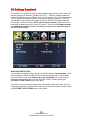
3D Settings Explained
This Sceptre TV is capable of producing stereoscopic images which with the help of 3D
passive glasses give the effect of depth to the 2D TV. There are multiple methods to
achieve 3D effect because of different movie / TV companies. This TV incorporates the
3 major methods used (side by side, top and bottom, and frame packing). This TV is
also capable of using existing 2D images to produce 3D effects, but they will be less
pronounced. At this current time 3D TV show content is scarce, please consult your
local cable or satellite provider for more 3D content. Please note: YOU NEED TO WEAR
THE PASSIVE 3D GLASSES included in the package to experience 3D. Without the glasses
you will see blurry images.
WHEN PLAYING BLU-RAY
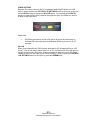
Your Sceptre will only auto detect one type of 3D effect which is frame packing. If this
effect is present in the Blu-ray DVD then y it will automatically revert to the 3D mode.
However if the movie is using side by side or top and bottom then you will need to
manually switch the 3D mode to get the desired 3 D effect. Please consult your
PICTURE > 3D SETTINGS menu for the option.
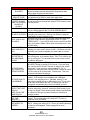
Certain 3D movies use the left image as the main image instead of the right. With the
wrong main image your 3D effects will not be as pronounced or smooth. Please consult
your PICTURE > 3D SETTINGS menu for the option.
- 44 www.SCEPTRE.com
SCEPTRE E46 LED HDTV User Manual
OTHER OPTIONS
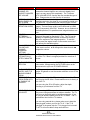
Because 3D content is scarce, this TV is capable of producing 3D effects out of 2D
videos. Please consult your PICTURE > 3D SETTINGS menu for the option or you can
use the RED A hotkey to change the 2D to 3D option. You can change the DEPTH
option to increase the 3D effect, however the higher the value, the farther you have to
sit away to enjoy the effect.
Please note:
•
3D effects produced by the 2D to 3D option will not be as pronounced as
dedicated 3D content produced by dedicated 3D Blu-ray movies or 3D TV
channels.
3D to 2D
When you purchase Blu-ray DVDs that are dedicated to 3D, all images will be in a 3D
format. If you do not want to watch the movie in 3D, you can use the 3D to 2D option to
convert the movie into a 2D format. Please remember to select the correct 3D effects
method to convert or the video will not convert correctly. Please consult your PICTURE
> 3D SETTINGS menu for the option or press the GREEN B key.
- 45 www.SCEPTRE.com
SCEPTRE E46 LED HDTV User Manual
How do I clean the TV ?
IMPORTANT
1.
2.
The power cable has to be removed from the socket before cleaning the
TV.
Do not use volatile solvent (alcohol, rosin, and toluene) to clean the TV.
These types of chemicals might damage the housing and the LCD glass.
Cleaning the bezel and remote control
1.
2.
Use a 100% cotton cloth or micro-fiber cloth for cleaning.
If the remote control or bezel is dirty to the point where you cannot
simply dry wipe it, please lightly dampen the wiping material (the wiping
material cannot be dripping wet, because if water drips into the
panel it will cause malfunction and possible permanent damage to
the panel which will not be covered under the warranty) with clean
water and wipe again. Wipe the display with a dry micro-fiber cloth or
100% cotton cloth afterwards.
Please Note :
•
Make sure you wring the water out of the cloth before
cleaning the bezel or remote in order to prevent water
from penetrating into the electronics.
Cleaning the Screen
1. Use a 100% cotton cloth or micro-fiber cloth for cleaning.
2. The LCD screen glass is extremely fragile. Do not scrape it with any
material. Do not press or tap the screen to avoid cracking. When the
screen is dirty to the point where you cannot simply dry wipe it, please
lightly dampen the wiping material with clean water and wipe again.
Wipe the display with a dry micro-fiber cloth or 100% cotton cloth
afterwards.
- 46 www.SCEPTRE.com
SCEPTRE E46 LED HDTV User Manual
Troubleshooting
The following table contains the common problems and the solutions to these
problems. Please check this list before you contact the technicians.
Problems
Solutions
Connect power cord correctly.
Turn on power.
NO PICTURE
Connect video cable correctly.
Select the input signal source with proper cable connection with
the source button.
ABNORMAL
Match the colors on the cables to the ports off the back of the
COLORS
television. I.E. red cable to red colored port.
PICTURE IS TOO Adjust your contrast, brightness and lamp settings from the
DARK
OSD Menu. For adjust controls, refer to page 27.
AUDIO ONLY NO Make sure you have connected both your video and audio
PICTURE
cables.
The TV’s tuner signal must not be lower than 65 %.
PICTURE ONLY NO Make sure the audio cable is connected.
AUDIO
Readjust your volume via the remote control.
The TV’s tuner signal must not be lower than 65 %.
Turn off the TV, unplug it from the socket. Remove the
batteries out of the remote for 30 minutes. Press the remote
REMOTE CONTROL buttons and the power button randomly for a good 2 seconds,
DOES NOT WORK and then reinstall the batteries. Try the remote to see if it
works. For battery removal instructions, refer to page 13.
The TV’s remote sensor is also housed in the same place as
the power indicator light. Please make sure there is line of sight
from the remote control’s front sensor to the remote sensor of
the TV.
CANNOT RECEIVE The TV’s tuner signal must not be lower than 65 %. Change
the direction of your antenna and rescan your channels. If you
SUFFICIENT
have cable call up your cable company and ask about signal
CHANNELS
strength of your local cable.
THROUGH THE
ATSC/NTSC TUNER
Please adjust your picture setup and make sure the saturation
NO COLOR
and the RGB are not turned all the way down. For adjustment
controls refer to page 27.
The TV’s tuner signal must not be lower than 65 %. Check your
signal.
WEAK SIGNAL OR The TV’s tuner signal must not be lower than 65 %. Change
NO PROGRAM
the direction of your antenna and rescan your channels. If you
SYMBOL ON
have cable call up your cable company and ask about signal
SCREEN
strength of your local cable.
TV’S UNIVERSAL
This television follows SONY’s universal remote code. To
find the actual code you must read through your own
REMOTE CODE
universal remote’s guide book.
- 47 www.SCEPTRE.com
SCEPTRE E46 LED HDTV User Manual
Problems
Solutions
TV CHANNELS ARE Check your auto lock function’s settings inside the OSD. You
BLOCKED
may have locked up some channels but forgot about them.
Refer to page 34 for more instructions.
UNIVERSAL
This TV follows SONY’s universal remote code. Please check
REMOTE CODE
your hand book for SONY’s codes then apply them.
THE TV TURNS ON This TV is a High Definition liquid crystal display panel TV. It
OR OFF SLOWLY requires a few more seconds than normal TVs to power up and
AND THE SCREEN show the picture.
SHOWS UP
SLOWLY
NO SOUND ON PC Make sure you have a 3.5 mm mini-jack cable connected from
your pc’s sound output to the TV’s VGA STEREO INPUT.
HDCP VIDEO SAYS Reboot your HDCP video device but turning them off and
NO HDCP SUPPORT unplugging the power cord. Wait up to 8 minutes to plug the
power back in to see if it works or not.
Make sure you have a 3.5 mm mini-jack cable connected from
HDCP VIDEO HAS
your HDCP video device’s sound output to the TV’s VGA
NO AUDIO
STEREO INPUT. If your HDCP video device uses RCA AUDIO
jacks, you’ll need to obtain a RCA audio converted into 3.5 mm
mini-jack cable.
CANNOT GET
Make sure the TV is recognized as plug and play monitor. Try
1920X1080 ON PC
updating your video card’s drivers as well. If that does not help,
VGA
most likely you’ll need to upgrade your video card to a newer
one.
PICTURE IS
This might be from interference from large electrical appliances,
DISTORTED OR
cars, motorcycles, or fluorescent lights. If the TV is close to the
HAS ABNORMAL
wall, try moving the TV to another room in your house to see if
SOUND
the problem still occurs.
If you’re using HDMI or a TV digital channel make sure you use
the ASPECT button to switch to 16:9 format. If you are using
VGA, use the AUTO ADJUST function to adjust to the screen.
PICTURE DOES
Please Note : If you are using regular analog TV, AV, or
NOT COVER THE
component in 480i resolution, use the ASPECT button to switch
ENTIRE SCREEN
to 16:9 in order to fill up the screen. Please Note : This note
this feature will distort the picture.
For best image quality, view HD widescreen programs where
possible. If HD content is not available view “Standard
PICTURE QUALITY Definition” from a digital source. Standard, analog TV will
IS HORRIBLE!!
always be noticeable inferior to HD because your TV has video
that is many times better than old TV’s and so you can see
interference and deficiencies you did not KNOW you had.
PICTURE HAS
Your TV is manufactured using an extremely high level of
PIXELS THAT ARE precision technology, however, sometimes some pixels of your
ALWAYS
TV may not display. Pixels defects within industry specifications
DISPLAYING THE
are inherent to this type of product and do not constitute a
SAME COLOR
defective product.
I CANNOT CHANGE Your TV syncs time automatically according to your local TV
THE TIME
channel. This function only works while the TV’s tuner is
MANUALLY
connected to an ANTENNA.
BIG BLACK BOX IN You have turned on closed captioning and are using TEXT1 –
THE MIDDLE OF
TEXT4. Change the setting to CC1 or turn off closed captioning
SCREEN
and the box will disappear. Refer to page 40 for more
information.
- 48 www.SCEPTRE.com
SCEPTRE E46 LED HDTV User Manual
Problems
SWITCHING A
CHANNEL OR
SOURCE CHANGES
THE VOLUME
Solutions
Different channels and inputs will sometimes have this effect
because the channel signal’s own volume is already loud.
There is no way remove this completely. The TV has an
AUTO VOLUME LEVEL function that can combat this type of
effect. Please make sure that function is turned on.
THERE IS NOISE OR When your TV’s resolution is higher than the digital channel’s
TRASH PIXELS ON
broadcast resolution, the signal is up-converted to match your
THE SCREEN
TV’s resolution. Up-converting can cause this type of effect.
TIPS FOR HIGH
The TV is an ideal platform for viewing High Definition
DEFINITION USERS Content. The best image quality can be achieved by HDMI,
YPbPr (Component), then VGA. However, due to variances in
broadcast practices, it is possible some image distortions can
occur.
TIPS FOR
Letterboxed (Widescreen) versions of DVD movies are most
LETTERBOX
commonly formatted for standard 4:3 TVs. The TV has the
CONTENT USERS
capability of expanding this content so the entire screen is
filled at the expense of the image proportion. To use this
function press the aspect button on the remote control and
cycle among the available options.
I CANNOT FIND THE The buttons are represented by the ▲▼◄► buttons located
on the remote control. ▲▼ changes the channels and ◄►
VOLUME AND
changes the volume.
CHANNEL
CHANGING
BUTTONS
TV TURNS OFF
The TV features a power saving mode which will automatically
AUTOMATICALLY
turn off the TV, if there’s no signal provided for more than 5
AFTER 5 MINUTES
minutes.
MY TV PICTURE IS
VERY DIM
Check to see if you are under POWER SAVING mode for your
picture mode. Keep pressing the PICTURE button on the
remote control to cycle out of POWER SAVING.
MY TV PICTURE IS
BLURRY LIKE IT IS
HAVING DOUBLE
VISION
I SEE DOUBLE
VISION EVEN WITH
MY PASSIVE 3D
GLASSES
The TV is currently under 3D effects mode, please wear your
passive 3D glasses or use the remote red button to turn off the
3D effect.
Sitting from the side of the TV or standing in front of the TV
does not give the 3D effect. Please make sure to sit directly in
front of the TV.
If you are using the 2D to 3D option, adjust the depth
according to your distance from the TV.
THE TV TIME IS NOT If you are using AUTO as your time function, check to make
ACCURATE
sure you are using an antenna not cable or satellite. The TV
does not sync time with cable or satellite companies. If you
are using an antenna please consult the TV station. The TV
synchronizes time from the TV stations.
If you are using manual time, please make sure to keep the
power plugged in when you turn the TV off. If the TV is
unplugged or the power strip the TV is plugged into is turned
off, the TV will not be able to keep accurate time.
- 49 www.SCEPTRE.com
SCEPTRE E46 LED HDTV User Manual
Call Us If You Need Help!
Products are often returned due to a technical problem rather than a defective
product that may result in unnecessary shipping charges billed to you. Our
trained support personnel can often resolve the problem over the phone or
email. For more information on warranty services or repairs after the warranty
period, please contact our support department at the number below.
For technical help, contact our Sceptre Technical Support Group via email or
phone. Please have your Sceptre p/n number, serial number, and date of
purchase available before you call.
Tech Support E-mail : [email protected]
Customer Service Email : [email protected]
TEL : 1800-788-2878
Operation Hours : Mon - Fri at 8:30 AM – 5:30 PM (PST)
16800 East Gale Ave.
City of Industry, CA 91745
TEL : 626-369-3698
FAX : 626-855-5711
Website : www.SCEPTRE.com
- 50 www.SCEPTRE.com
SCEPTRE E46 LED HDTV User Manual
Specification
Display panel
Illustration
Item
Active Area / Screen Size
Diagonal 46 inches
Aspect Ratio
Widescreen 16:9
Max. of Pixels (Resolution)
1920 x 1080
Brightness
360 nits (2D mode, Typical) / 160 nits (3D mode)
Contrast
3,500: 1(Typical)with Auto Contrast Enhancement
Response Time
6.5 ms (gray to gray)
Viewing Angle
Typical 178/178 Degree (Horizontal/Vertical)
Lamp Life of Backlight
> 50,000hrs
TV DISPLAY
42.5 × 25.3 × 2.6 inches (without stand)
42.5 × 27.6 × 11.5 inches (with stand)
34.6 lb (without stand)
38.5 lb (with stand)
Dimension
Weight
Power input
100 – 240VAC, 60/50 Hz, 3A (Max.)
Function
(1)Video
De-interlace
Frame recover
Noise reducing core technology
Aspect ratio
Gamma
Lamp adjust
Picture mode
Video adjust
(2)Audio
3D
3:2
3D
Full, Normal, Zoom
Fixed Gamma
Yes
Vivid / Standard / Mild / Custom
Brightness / Contrast / Color / Tint / Sharpness
- 51 www.SCEPTRE.com
SCEPTRE E46 LED HDTV User Manual
Sound Mode
Auto Volume Control
Tone
SPDIF Out
Dynamic / Standard / Soft / User
Yes
Bass / Treble / Balance
Yes (coax)
Speakers
10 watt per channel
(3) General
Hybrid TV Tuner
Channel auto scan
Sleep timer
Standby power
Timing support-Video
NTSC / ATSC / Clear QAM
Yes
Off / 10mins / 20mins / 30mins / 40mins / 50mins /
60mins / 90mins / 120mins
Under 1W
480i / 480p / 720p / 1080i / 1080p
PC timing
1920*1080@60 Hz (NATIVE)
1024*768@60, 70, 75Hz
800*600@60, 75Hz
640*480@60, 75Hz
Multimedia Format
Audio: MP3 (32-48Khz)
Picture: JPEG (Baseline) up to 5000x5000
USB file system: FAT32/FAT16
(4)NTSC/ATSC
NTSC
ATSC
Sound: Mono / Stereo / SAP
Favorite Channel
V-chip
Closed caption
(CC1-CC4, Text 1-Text 4)
Favorite Channel
V-chip
Video input format: 1080i, 720p, 480p, 480i
Analog closed caption:
(CC1-CC4, Text 1-Text 4)
Digital closed caption:
(Service 1-Service 6)
(5)I/O
1 input x TV Tuner (NTSC/ATSC),
1 input x AV(audio shared with YPbPr),
1 input x YPbPr,
5 inputs x HDMI/HDCP (optional, HDCP audio
shared with VGA Audio In),
1 input x VGA,
1 input x VGA Audio In,
1 input x USB
1 output x SPDIF (digital audio) out,
1 output x Audio Left/Right out
1 output x Headphone out,
*The product’s specifications may change without notice or obligation.
**This manual’s pictures and words are for references only and are subject to change without notice
or obligation. Sceptre Inc is not liable for the misuse or misinterpretation of this manual.
- 52 www.SCEPTRE.com
SCEPTRE E46 LED HDTV User Manual
LIMITED PRODUCT WARRANTY
Please read this warranty card carefully, it is a “ONE-YEAR LIMITED WARRANTY” on parts
and labor (90 days for commercial use) and is only valid when purchased from an Authorized
Reseller, only on new and non-refurbished product, and available to customers in the
Continental US, Alaska, Hawaii and Puerto Rico. See below for the SCEPTRE Extended
Service warranty.
SCEPTRE’s Responsibility
SCEPTRE units purchased from an authorized SCEPTRE U.S. Reseller in the United States
and that are used in the fifty (50) United States or Puerto Rico and Canada are warranted to
be free from manufacturing defects in materials and workmanship for a period of one (1) year
from the date of their original retail purchase (or a period of ninety (90) days for commercial
use). If the unit fails to conform to this warranty, we will service the units using new or
refurbished parts. In the event that the part required for replacement is no longer in
production and/or is obsolete, SCEPTRE will repair or replace the unit with similar or like
parts of equal value. If a similar or like part is not available, a charge may be incurred to the
owner, for any upgraded parts substituted.
Service Labor
During a period of one (1) year from the effective warranty date (or a period of ninety (90)
days for commercial use), SCEPTRE will provide, when needed, service labor to repair a
manufacturing defect at its designated Service Center. To obtain warranty service in the
United States, you must first call our Customer Support at (800) 788-2878. The determination
of service will be made by SCEPTRE Customer Support. PLEASE DO NOT RETURN YOUR
UNIT TO SCEPTRE WITHOUT PRIOR AUTHORIZATION.
Parts
New or remanufactured parts will be used for repairs by SCEPTRE at its designated Service
Center for one (1) year (or ninety (90) days for commercial use) from the effective warranty
date. Such replacement parts are warranted for the remaining portion of the original warranty
period.
Service
During the one (1) year (or ninety (90) days for commercial use) warranty period, SCEPTRE
will, at its option and sole discretion, repair or replace defective parts, including replacement
of the entire Panel. The Customer will be required to ship the unit to the Service Center
indicated at the time Customer Support is contacted to make the necessary repairs, you are
responsible for all transportation charges to the service facility. SCEPTRE is not responsible
for the de-installation or re-installation of the unit.
Packaging and Shipping Instruction
When you send the product to an authorized SCEPTRE service facility you must use the
original carton box and packing material or an equivalent as designated by SCEPTRE. If you
no longer have them please contact Sceptre’s Customer Support.
Not Covered
This warranty does not cover the following: cosmetic defects; damage, malfunctions, or
failures resulting from shipping or transit accidents, abuse, misuse, operation contrary to
furnished instructions, operation on incorrect power supplies, operation with faulty associated
equipment, modification, alteration, improper servicing, tampering and or, damage from fire,
water, lightning, power surges, abnormal environmental conditions, or other acts of nature;
normal wear and tear (SCEPTRE reserves the right to determine “wear and tear” on any and
all products); unsatisfactory visual or audio performance not caused by a manufacturing
defect; or displays on which the serial number has been removed or defaced. Image Sticking
caused by operating at excessive brightness levels for extended periods or mishandling are
not covered by this warranty. Installation, removal, transportation and reinstallation of a
- 53 www.SCEPTRE.com
SCEPTRE E46 LED HDTV User Manual
display and routine maintenance and cleaning, are not covered by this warranty. Any
hardware, components, and/or software bundled with the display are not covered by this
warranty. Any damages caused directly or indirectly by Buyer’s or Reseller’s “Value Added
Feature” are not covered by this warranty or Sceptre, Inc. Any damages of any kind including,
but not limited to, direct or indirect damages, lost profits, lost savings, or other special
incidental, exemplary or consequential damages whether for breach of contract, tort, or
otherwise, or whether arising out of the use of or inability to use the product, even if
SCEPTRE, INC. or any dealer, distributor of authorized service provider/partner has been
advised of the possibility of such damages, or any claim by any other warranty are not
covered by this warranty or Sceptre Inc.
ANY IMPLIED WARRANTIES, INCLUDING ANY IMPLIED WARRANTY OF
MERCHANTABILITY AND FITNESS FOR A PARTICULAR PURPOSE SHALL BE LIMITED
IN DURATION TO THE PERIOD OF TIME SET FORTH ABOVE. OUR LIABILITY FOR ANY
AND ALL LOSSES AND DAMAGES RESULTING FROM ANY CAUSE WHATSOEVER,
INCLUDING OUR NEGLIGENCE, ALLEGED DAMAGE OR DEFECTIVE GOODS,
WHETHER SUCH DEFECTS ARE DISCOVERABLE OR LATENT, SHALL IN NO EVENT
EXCEED THE PURCHASE PRICE OF THE DISPLAY. WE SHALL NOT BE RESPONSIBLE
FOR LOSS OF USE, COMMERCIAL LOSS OR OTHER INCIDENTAL OR
CONSEQUENTIAL DAMAGES. SOME STATES DO NOT ALLOW LIMITATIONS ON HOW
LONG AN IMPLIED WARRANTY LASTS OR THE EXCLUSION OR LIMITATION OF
INCIDENTAL OR CONSEQUENTIAL DAMAGES, SO THE ABOVE LIMITATIONS OR
EXCLUSIONS MAY NOT APPLY TO YOU. This warranty gives you specific legal rights, and
you may also have other rights which vary from state to state. This is the only warranty
applicable; no one is authorized to extend or modify it or to grant any other warranty.
SCEPTRE retains the right to assess all warranty claims and to determine if damages are
covered by the warranty. In case of a claim that is not covered by the warranty, you will be
contacted to determine whether SCEPTRE should repair the damage for a fee or whether the
product should be returned to you as received by the repair center.
Dead Pixel Policy
SCEPTRE sets limit on the LCD at 3 dead pixels in a cluster adjacent to each other, or 5
dead pixels in a combination of color and brightness. Any number of dead or bad pixels under
the limit is considered to be within normal performance specification of the LCD and is not
considered defective.
Owner’s Responsibility
Effective Warranty Date
Warranty begins on the date of sale to the end user. To ensure warranty service, keep the
dated bill or sale receipt as evidence of the purchase date. If you can no longer obtain your
receipt, the warranty will revert to the unit’s manufacture date according to the serial number
of the unit. This limited warranty applies only to the original purchaser and is non-transferable.
Warranty Service
For warranty service information, contact SCEPTRE Technical Support at email address
[email protected], via phone at (800) 788-2878, or via World Wide Web chatting
service at www.Sceptre.com. SCEPTRE Technical Support is available Monday to Friday
8:30 AM to 5:30 PM Pacific Time. Parts and service labor that are SCEPTRE’s responsibility
(see above) will be provided without charge. Other services or services not covered by the
warranty are at the owner’s expense. You must provide the model, serial number and date of
purchase. Before you ask for warranty service, read your User Manual. You might avoid a
service call.
Warranty conditions are subject to change, for latest Warranty Terms and Conditions and
additional information regarding your warranty, please see complete details online at
www.SCEPTRE.com.
- 54 www.SCEPTRE.com
SCEPTRE E46 LED HDTV User Manual
Disclaimer, Trademarks, & Copyright
Information
•
“HDMI, the HDMI logo and High-Definition
Multimedia Interface are trademarks or registered trademarks of HDMI
Liscensing LLC.”
•
Xbox 360 ™ is a registered trademark or trademark of Microsoft
Corporation in the United States and other countries.
•
Playstation® 3 is a registered trademark or trademark of Sony Computer
Entertainment Inc. in the United States and other countries.
•
Wii™ is a registered trademark or trademark of Nintendo of America, Inc.
in the United States and other countries.
•
•
is trademarks of SRS Lab, Inc.
This HDTV meets the ENERGY STAR® guidelines under
the default picture setting called POWER SAVING.
Changing this setting or enabling other options will
increase power consumption which could possibly exceed
the guidelines of ENERGY STAR®.
•
SCEPTRE is a trademark or registered trademark of Sceptre Group.
•
Sceptre, Inc. shall not be liable for technical or editorial errors or
omissions contained herein; nor for incidental or consequential damages
resulting from furnishing this material, or the performance or use of this
product.
•
In the interest of continuing product improvement, Sceptre, Inc. reserves
the right to change product specifications without notice. Information in
this document may change without notice.
•
No part of this document may be copied, reproduced, or transmitted by
any means, for any purpose without prior written permission from
Sceptre, Inc..
- 55 www.SCEPTRE.com
SCEPTRE E46 LED HDTV User Manual
FCC Compliance Statement
This device complies with Part 15 of the FCC Rules.
Operation is subject to the following conditions:
This device may not cause harmful interference
This device must accept any interference received, including interference that my cause undesired
operation.
Please Note: This equipment has been tested and found to comply with the limits for a Class B
digital device, pursuant to part 15 of the FCC Rules. These limits are designed to provide reasonable
protection against harmful interference in a residential installation. This equipment generates uses
and can radiate radio frequency energy and, if not installed and used in accordance with the
instructions, may cause harmful interference to radio communications. However, there is no
guarantee that interference will not occur in a particular installation. If this equipment does cause
harmful interference to radio or television reception, which can be determined by turning the
equipment off and on, the user is encouraged to try to correct the interference by one or more of the
following measures:
•
•
•
Reorient or relocate the receiving antenna.
Increase the separation between the equipment and the receiver.
Connect the equipment into an outlet on a circuit different from that to which
the receiver is connected.
Caution: To comply with the limits for an FCC Class B computing device, always use the
signal cord and power cord supplied with this unit.
The Federal communications Commission warns that changes or modifications to the unit not
expressly approved by the party responsible for compliance could void the user’s authority to
operate the equipment.
European Notice
Products with the CE marking comply with both the EMC Directive (89/336/EEC), (93/68/EEC) and
the Low Voltage Directive (72/23/EEC) issued by the Commission of the European Community.
- 56 www.SCEPTRE.com
SCEPTRE E46 LED HDTV User Manual