1
Application Note: Kintex®-7 Family
XAPP1178 (v2.0) January 23, 2015
DisplayPort Transmit Reference Design
for SST and MST Modes
Authors: Dinesh Kumar, Siva Rajesh Jarugula
Summary
This reference design demonstrates the implementation of the Vivado® design tools IP
DisplayPort (DP) system that includes policy maker features and a DisplayPort controller. There
are two hardware designs (Tcl files) provided with this reference design separately for single
stream transport (SST) and multi-stream transport (MST) modes of operation. Video pattern
generators are used to generate the traffic for testing. The reference design is created and built
using the Vivado Design Suite. Instructions are included for building the hardware, building the
software with local drivers for DisplayPort, and testing the design on the Xilinx KC705 board
with the generated bitstream and Executable Linker format (ELF) files. In addition, the
ready_for_download folder in the package contains the ready-made tested bitstreams and
elf files for both SST and MST modes.
The Tcl file provided under the hw folder can be executed in the Vivado design tools to create
the project and generate the bitstream. The Software Development Kit (SDK) workspace that
contains the source code and BSP folder that can be re-built to create the elf file is provided
under the sw directory.
IMPORTANT: This reference design does not demonstrate the audio functionality of DisplayPort.
Objective
This application note describes how to implement a DisplayPort core transmit system and how
to bring up the source core through the initialization steps such as training the main link,
setting up the source core registers and monitoring and taking appropriate action on Hot Plug
Detect (HPD) assertion. It showcases a system transporting video data from the Xilinx
DisplayPort transmit core to a DisplayPort capable monitor for both SST and MST modes of
operation. A DisplayPort source policy maker is implemented on the KC705 Evaluation Board,
which includes the MicroBlaze™ processor, and DisplayPort core, as well as video pattern
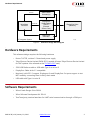
generators. The block diagram of the reference design is shown in Figure 1.
XAPP1178 (v2.0) January 23, 2015
www.xilinx.com
1
Hardware Requirements
X-Ref Target - Figure 1
y/ϰͲ>ŝƚĞ
'LVSOD\3RUW
9LYDGR'HVLJQ
7RROV,3
7UDQVPLW
6RXUFH&RUH
$;,/LWH
9LGHR&ORFN
*HQHUDWRU
y/ϰͲ>ŝƚĞ
'LVSOD\3RUW6LQNV
0RQLWRUV
ddžͺǀŝĚͺĐůŬ
0LFUR%OD]H
3URFHVVRU
9LGHR3DWWHUQ
*HQHUDWRUV
,3,QWHJUDWRU6\VWHP
;
Figure 1:
Reference Design Block Diagram
Hardware Requirements
This reference design requires the following hardware:
•
Kintex-7 KC705, revision 1.2 board and power supply
•
Tokyo Electron Device Limited FMCH DP2-1 module (Contact Tokyo Electron Device Limited
for FMC updates. Also referred as the TB-FMCH-DP2 card.)
•
JTAG USB Platform cable or USB cable Type-A to micro-B
•
DisplayPort Cable with v1.2 compatible
•
Monitor(s) with DP 1.2 support, Displayport In and DisplayPort Out ports support to test
MST mode by connecting them in daisy-chain mode
•
USB cable with Type A to mini B
Software Requirements
•
Xilinx Vivado Design Suite 2014.4
•
Xilinx Software Development Kit 2014.4
•
Tera Term/putty terminal emulator for UART serial communication through a COM port.
XAPP1178 (v2.0) January 23, 2015
www.xilinx.com
2
Package Details
Package Details
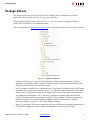
This section shows the directory structure of the design files provided along with the
application note. All files are in the DP_Tx_Xapp directory.
The user directory path under which this DP_Tx_Xapp is copied to is being referred as
"XAPP1178" in the rest of this application note.
You can download the Reference Design Files for this application note from the Xilinx website.
X-Ref Target - Figure 2
Figure 2:
Directory Structure
•
common: This directory contains the IP repository folder (pattern generator, DP clock
generator), DisplayPort drivers repository folder and the top-level system constraint file.
These are used for both SST and MST designs.
•
mst: This folder contains the hw (hardware) and sw (software) sub directories for MST mode
operation. The hw directory contains the mst.tcl file that can be sourced from the Vivado
design tools Tcl Console to create the Vivado project, run synthesis and implementation,
and generate the bitstream. The sw directory contains the already exported software
project workspace that can be opened using SDK. This workspace will have an exported
hardware definition file, board support package created with the local DP drivers
repository, and source code to test the DisplayPort design.
•
ready_for_download: This folder contains the bit and elf files that are already generated for
SST and MST designs and can be readily downloaded on a Xilinx KC705 board.
XAPP1178 (v2.0) January 23, 2015
www.xilinx.com
3
Description
•
sst: This folder contains the hw and sw sub directories for SST mode operation. The hw
directory contains the mst.tcl file that can be sourced from the Vivado design tools to
create the bitstream. The sw directory contains the already exported software project
workspace that can be opened using SDK. This workspace will have an exported hardware
definition file, board support package created with a local DP drivers repository, and
source code to test the DP design.
Description
The reference design includes the following features:
•
Designed with the VESA DisplayPort Specification v1.2
•
Dynamic, switchable lane rates: 1.62, 2.7 or 5.4 Gb/s
•
Variable lanes: 1, 2 or 4 lanes
•
A wide range of resolutions
•
Flexibility to change the source patterns
•
Flexibility to change the bits per color
•
Displaying Extended Display Identification Data (EDID), DisplayPort Configuration Data
(DPCD), Main Stream Attributes (MSA) values of TX for debugging, options for reading
auxiliary interface registers, and reading of link configuration registers to know the link and
lane status.
XAPP1178 (v2.0) January 23, 2015
www.xilinx.com
4
Description
Hardware Block Diagram
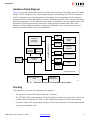
Figure 3 shows the hardware architecture of the reference design. The design uses the Vivado
Design Suite IP integrator tool, a block-based design, and assembly tool. The IP integrator is
used to integrate many of the key blocks of the design into a subsystem. The IP integrator
subsystem consists of the MicroBlaze processor, AXI interconnect IP, MIG 7 series IP and other
AXI4-Lite peripherals. The IP integrator sub-system is integrated in the top module along with
DisplayPort IP and custom design sources for video pattern generator and video clock
generator. The MicroBlaze processor changes the DisplayPort core configuration over the
AXI4-Lite interface based on the user application.
X-Ref Target - Figure 3
0,*
0LFUR%OD]H
3URFHVVRU
6XE6\VWHP
9LGHR&ORFN
*HQHUDWRU
ƚdžͺǀŝĚͺĐůŬ
*75HI
'LIIHUHQFH
&ORFN
'LVSOD\3RUW
6RXUFH,3
ůŶŬͺĐůŬͺƉ
ůŶŬͺĐůŬͺŶ
$;,,17(5&211(&7,3
9LGHR
3DWWHUQ
*HQHUDWRUV
$;,$3%
%ULGJH
$;,7LPHU
,QWHUUXSW
&RQWUROOHU
0'0
$;,8$57/LWH
$;,,,&
3URF6\V
5HVHW
&ORFNLQJ
,3,QWHJUDWRU6\VWHP
6DPWHF)0&+'3
&DUG
'LVSOD\3RUW
6LQNV0RQLWRU
;
Figure 3:
Hardware Architecture for both MST and SST Modes
Clocking
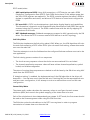
The DisplayPort core uses the following clock domains:
•
The processor and the AXI domain operate at 50 MHz.
•
The TED FMCH DP2 card provides a 135 MHZ reference clock for the transceivers. This clock
is then used to derive the link clock for the DisplayPort based on the link rate selected.
•
A transmit video clock is generated using the Video Clock generator IP which takes the link
clock as the reference clock.
XAPP1178 (v2.0) January 23, 2015
www.xilinx.com
5
Description
Pattern Generators
The video pattern generator has an advanced peripheral bus (APB) bus interface that is
connected to the AXI APB Bridge for processor communication. The registers available in the
video pattern generator are listed in Table 1. The video timing information is programmed by
writing into the registers. Eight standard pixel patterns can be generated by the module.
•
Vesa logical link control (LLC) pattern
•
Vesa pattern three bars
•
Vesa color squares
•
Flat red
•
Flat blue
•
Flat green
•
Flat yellow
•
Color bars
Table 1:
Pattern Generator Registers
Address Read/Write
0x000
R/W
Description
Bit 0 = Enable video output.
Bit 1 = SW reset of the pattern generator.
0x004
R/W
Bit 0 = VSYNC polarity.
0x008
R/W
Bit 0 = HSYNC polarity.
0x00C
R/W
Bit 0 = DE polarity.
0x010
R/W
Bits 8:0 = VSYNC width.
0x014
R/W
Bits 8:0 = Vertical back porch.
0x018
R/W
Bits 8:0 = Vertical front porch.
0x01C
R/W
Bits 10:0 = Vertical resolution.
0x020
R/W
Bits 8:0 = HSYNC width.
0x024
R/W
Bits 8:0 = Horizontal back porch.
0x028
R/W
Bits 8:0 = Horizontal front porch.
0x02C
R/W
Bits 10:0 = Horizontal resolution.
0x104
R/W
Bits 7:0 = TX Video clock M value. Used for video clock synthesis.
Video_clock = lnk_clk * M/D.
0x108
R/W
Bits 7:0 = TX Video clock D value. Used for video clock synthesis.
Video_clock = lnk_clk * M/D.
0x200
R
Bits 11:0 = VSYNC counter current count.
0x204
R
Bits 11:0 = HSYNC counter current count.
0x208
R
Bits 11:0 = Data enable counter current count.
XAPP1178 (v2.0) January 23, 2015
www.xilinx.com
6
Description
DisplayPort Transmit Core Customization
The MicroBlaze processor interfaces with the DisplayPort core through the AXI4-Lite interface.
This enables the software application and policy maker to do the TX initialization, initiate and
maintain the main link through register writes and reads. This reference design customizes the
DisplayPort core to work as transmit source code with DP v1.2 enabled, Max Bits per color of 16,
Quad pixel enable, Max number of lanes as 4, and Max Link rate of 5.4 Gb/s.
The DisplayPort physical layer (PHY) is customized to use the bidirectional AUX channel
interface signals: aux_tx_io_p and aux_tx_io_n. The four transceivers for the four
high-speed lanes are mapped to the four GTX transceivers in the FMC HPC (MGT_BANK_118) on
the KC705 board. The software application gives you the option to select fewer numbers of
lanes (1 or 2 lanes) to be used.
Software Application
The reference design includes a software application running on a MicroBlaze processor to
initialize and maintain the DisplayPort link. The software application uses the DisplayPort
drivers v3.0 provided with this package under the common folder. This application provides an
interactive UART console through which you can test the system at different modes of
operation. You are given the flexibility to debug the application by reading the DisplayPort AUX
registers.
XAPP1178 (v2.0) January 23, 2015
www.xilinx.com
7
Description
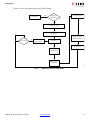
Figure 4 shows the application flow for SST mode.
X-Ref Target - Figure 4
067
+DUGZDUHLVLQ
667067PRGH"
*RWR067IORZ
667
,QLWLDOL]H'37;FRUH
*HW5;FDSDELOLWLHV
EK
'HFLGHRQUHVROXWLRQEDVHGRQ(','
z^
8VHULQSXWUHFHLYHG"
$GMXVWOLQNFRQILJXUDWLRQ
EDVHGRQXVHULQSXW
(VWDEOLVKOLQN
6HW06$YDOXHVIRUHQDEOHGVWUHDP
&RQILJXUHYLGHRVWUHDPVRXUFH
(QDEOHPDLQOLQN
;
Figure 4:
XAPP1178 (v2.0) January 23, 2015
Application Flow for SST Mode
www.xilinx.com
8
Description
Figure 5 shows the application flow for MST mode.
X-Ref Target - Figure 5
667
*RWR667IORZ
+DUGZDUHLVLQ
667067PRGH"
&RQILJXUHYLGHRVWUHDPV
067
,QLWLDOL]H'37;FRUH
*HW067&DSDELOLW\RI5;DQG
5;FDSDELOLWLHV
EK
6WUHDPWRVLQNPDSSLQJ
$OORFDWHSD\ORDGWDEOHV
z^
8VHULQSXWUHFHLYHG"
$GMXVWOLQNFRQILJXUDWLRQ
EDVHGRQXVHULQSXW
(VWDEOLVKOLQN
(QDEOHPDLQOLQN
5XQWRSRORJ\GLVFRYHU\
6HW06$YDOXHVIRU
HQDEOHGVWUHDPV
;
Figure 5:
XAPP1178 (v2.0) January 23, 2015
Application Flow for MST Mode
www.xilinx.com
9
Description
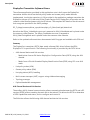
Initialization
In the first stage, from the Vivado tools exported hardware parameter definition file
(xparameters.h), the application finds if the hardware design has MST enabled or not. The
application executes the corresponding sub-routines.
The DisplayPort source core is set up and initialized in the following sequence.
1. Keep the physical layer (PHY) in reset.
2. Disable transmitter.
3. Set clock divider.
4. Set DisplayPort clock speed.
5. Bring the PHY out of reset.
6. Wait for PHY to be ready.
7. Enable transmitter.
8. Enable the interrupt mask for HPD.
HPD Event Handling
There are two types of HPD events that can occur. One is a connection/disconnection event and
the other is the pulse detection event. The interrupt handler in the application determines the
kind of interrupt by reading the INTERRUPT_STATUS register and INTERRUPT_MASK registers.
The main handler will then arbitrate accordingly for HPD events and HPD pulses to their
respective handlers as determined by the application. On detecting a hot-plug event, the
software initiates link training. When a hot-unplug event is detected, the main link is disabled
and the software continues to poll the registers for any change in HPD status. On an occurrence
of the HPD interrupt, the link status is checked and retraining is performed, if required. Upon
detection of any HPD event, the interrupts are masked while the corresponding event handler
function is being run.
Upon plugging the sink device or on an HPD interrupt, the source core starts to check the link
status and re-train it if necessary with the preserved user configured link rate and lane count
values. Video displayed with the preserved user selected resolution, patterns, and BPC values
before the HPD event happened. The video timing format is determined by checking the
capability of the sink device through a DisplayPort Configuration Data (DPCD) read.
Link Training
Refer to the "Link Training" section under "Designing with core" in the LogiCORE IP DisplayPort
Product Guide (PG064) [Ref 4] for detailed steps on link training. On the successful link training,
the main link is enabled.
XAPP1178 (v2.0) January 23, 2015
www.xilinx.com
10
Description
DisplayPort Transmitter Software Drivers
The software application provided in this application note is built upon the DisplayPort
transmitter drivers which has the link policy maker and stream policy maker features
implemented. Local driver repository (v3.0) provided in the application package overwrites the
DisplayPort drivers (v2.0) that exist in the Vivado Design Suite. DisplayPort drivers also use the
common video libraries present with the DP drivers. The complete API details of the drivers and
their usage are provided in the XAPP package:
DP_Tx_Xapp/common/driver_repo/drivers/dptx_v3_0/doc/html/api/index.html
Note that the XDptx_VideoMode structure is renamed to XVid_VideoMode and is placed under
the common video libraries. The XDptx_DmtMode structure is renamed to
XVid_VideoTimingMode and is placed under the common video libraries.
Refer to the updated software drivers documented with Doxygen and available with SDK tool.
Summary
The DisplayPort transmitter (DPTX) bare-metal software (SW) driver follows the VESA
DisplayPort 1.2a specification. The following functionality is provided by the DPTX driver:
•
AUX channel device and link services:
°
Read/writes from an RX device DisplayPort Configuration Data (DPCD) using the AUX
channel.
°
Reads from a RX sink Extended Display Identification Data (EDID) using I2C-over-AUX
reads.
•
Link policy maker (LPM)
•
Stream policy maker (SPM)
•
Hot-plug-detect (HPD) handling
•
Multi-stream transport (MST) support using sideband messaging
•
Topology manager
•
Payload bandwidth management
AUX Channel Device and Link Services
The auxiliary (AUX) channel communication allows communication between the DPTX and a DP
receiver (DPRX) without needing the main link to be trained. This allows the DPTX to determine
a DPRX capabilities and status, and to configure and control it.
The SW driver allows the following AUX channel and device link services:
XAPP1178 (v2.0) January 23, 2015
www.xilinx.com
11
Description
DPCD reads/writes:
•
AUX reads/writes to DPCD: Using AUX transactions, a DPTX device can read a DPRX
DisplayPort Configuration Data (DPCD). Each DPRX device has a 20-bit address space that
the 8-bit DPCD registers are mapped to. The DPCD contains registers that allow a DPRX to
declare its capabilities and status, and allows a DPTX device to control and configure the
DPRX.
•
I2C-over-AUX: A DPTX can also determine a sink device display identity and capabilities.
This information is located in a sink Extended Display Identification Data (EDID) that can be
accessed using the I2C protocol. The DPRX communicates with the sink by mapping I2C
transactions to AUX ones.
•
MST sideband messages: Sideband messages are mapped to AUX transactions by the SW
driver. This allows the DPTX to access remote DPRX devices in an MST topology.
Link Policy Maker
The SW driver implements the link policy maker (LPM). When run, the LPM algorithm will train
the main link connecting a DPTX with a DPRX. Upon successful link training, stream data can be
sent over the main link.
The driver attempts to train the link based on the configured link rate and lane count set in the
user application.
The link training process consists of two sequences:
•
The clock recovery sequence: where the clocks are recovered and PLLs are locked.
•
The channel equalization sequence: where all lanes achieve channel equalization, symbol
locked, and interlane alignment.
The status of running these sequences are checked on all the lanes by the SW driver using AUX
reads from the DPRX DPCD.
If "adaptive training" is enabled, the implementation of the LPM algorithm in the driver will
downshift — first the lane count, then the link rate. If training fails on the requested link rate
and lane count configuration, it will attempt to train at a reduced lane count and link rate
configuration.
Stream Policy Maker
The stream policy maker calculates the necessary values to configure the main stream
attributes (MSA) and controls the symbol mapping of the video data to be sent.
Each of the calculations is done independently per stream. In SST mode, the first stream should
be used as the Stream argument when using the SPM functions.
The SW driver writes the calculations to the DPTX core registers in order to program
transmission of stream data over the main link.
XAPP1178 (v2.0) January 23, 2015
www.xilinx.com
12
Setup Details
Hot-plug-detect (HPD) handling
HPD events can be detected in the form of connection/disconnection or pulse events. The
events can be polled for, or interrupts can be enabled in the system and handlers can be set in
the application.
When the HPD signal is connected to an interrupt controller in the system, the SW driver steers
the flow of software to run an HPD pulse handler if an HPD pulse occurs, or an HPD event
handler if an HPD event occurs.
Multi-stream Transport (MST) Support
The SW driver handles MST mode functionality, including sideband messaging, topology
discovery, virtual channel payload ID table management, and directing streams to different sink
(leaf) nodes in the MST topology, up to a limitation of four streams.
Refer to Sections 2.5, 2.6 and 2.11 of the DP v1.2a specifications for a detailed explanation on
topology management, link count total, relative addressing, and side band messaging of MST
functionality.
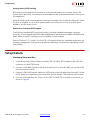
Setup Details
Hardware Setup and Run
1. Connect the Tokyo Electron Device Limited (TED) TB-FMCH-DP2 module to the HPC FMC
connector on the KC705 board.
2. Connect a USB cable (Type A to mini B) from the host PC to the USB UART port on the KC705
for serial communication.
3. Connect a JTAG USB Platform cable or a USB Type A to Micro B cable from the host PC to the
KC705 board for programming bit and elf files. (In this setup a JTAG Platform cable is used.)
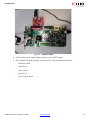
4. Connect a DP cable from the TX port of the TED TB-FMCH-DP-2 module to a monitor, as
shown in Figure 6.
XAPP1178 (v2.0) January 23, 2015
www.xilinx.com
13
Setup Details
X-Ref Target - Figure 6
Figure 6:
Hardware Setup
5. Connect the power supply cable and turn on the KC705 board.
6. Start a Hyper Terminal program on the host PC with the following settings:
°
Baud rate: 9600
°
Data Bits: 8
°
Parity: None
°
Stop Bits: 1
°
Flow Control: None
XAPP1178 (v2.0) January 23, 2015
www.xilinx.com
14
How to Run
How to Run
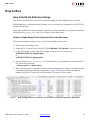
How to Build the Reference Design
This section describes how to build the reference design for both hardware and software.
Before beginning, unzip the reference design into a local directory (referred to as XAPP1178 in
the rest of the steps).
If you want to build the hardware design and SDK workspace instead of using the bitstream and
elf files from the ready_for_download folder, follow these steps.
Create a Vivado Design Tools Project and Generate Bitstream
This section details the steps to start a new Vivado design tools project.
1. Open the Vivado Design Suite.
2. Open the Tcl Console in the Vivado IDE (Click Window->Tcl Console if you do not see it.)
3. In the Tcl Console of the Vivado IDE, change to the mst or sst hw directory:
cd XAPP1178/DP_Tx_Xapp/mst/hw
or
cd XAPP1178/DP_Tx_Xapp/sst/hw
4. Source the given mst.tcl or sst.tcl file based on your requirement to test the MST or
SST protocol respectively.
> source mst.tcl or source sst.tcl
5. Wait until the project is created, output products are generated, design is synthesized and
implemented and the bitstream is generated. Figure 7 and Figure 8 show the address
mapping of all the IP cores with the MicroBlaze™ processor in the system.
X-Ref Target - Figure 7
Figure 7:
Base and High Addresses of the IP Cores Present in IP Integrator System for MST Mode
XAPP1178 (v2.0) January 23, 2015
www.xilinx.com
15
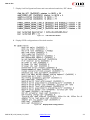
How to Run
X-Ref Target - Figure 8
Figure 8:
Base and High Addresses of the IP Cores Present in IP Integrator System for SST Mode
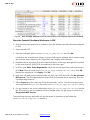
Open the Exported Hardware Workspace in SDK
1. After the bitstream generation is complete, open the already exported hardware workspace
in SDK.
2. Open the xsdk GUI.
3. Give the workspace path as XAPP1178/DP_Tx_Xapp/sst/sw and click OK.
It will show the sst application folder, sst_bsp board support package that is created using
the software driver repository for DisplayPort and common video libraries.
4. Reload the driver repository from the common directory of the xapp package that is present
in the local directory (XAPP1178) as explained in the next steps.
5. In XSDK, open Xilinx Tools>Repositories. Select the existing repository path and remove it.
Click New. Select the path XAPP1178/DP_Tx_Xapp/common/driver_repo. Click OK.
Rescan the repositories. Click Apply. Click OK.
6. Now from the xsdk project Explorer, select sst_bsp, right click, and then click Re-generate
BSP sources. This will regenerate the drivers from the selected driver repository from the
copied package location.
7. Select Project and then check the "Build automatically" option. This re-builds the project
and re-generates the sst.elf file under XAPP1178/DP_Tx_Xapp/sst/sw/sst/Debug.
8. For any change in the source code under XAPP1178/DP_Tx_Xapp/sst/sw/src, rebuild
the SDK project to get the updated elf file. Click Yes, when you get a pop up window for
Re-generate BSP sources.
The preceding steps are applicable for the mst mode of operation as well under the
XAPP1178/DP_Tx_Xapp/mst/sw directory.
XAPP1178 (v2.0) January 23, 2015
www.xilinx.com
16
How to Run
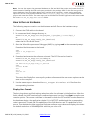
Note: You can also export the generated hardware to SDK and build the project and create the elf file
afresh instead of loading the SDK work space provided in the package. Refer to the SDK user guide to
export hardware from the Vivado design tools, load the driver repository, create empty application,
import the source code provide under the XAPP1178/DP_Tx_Xapp/sst/sw/src folder, build the
project and create the elf file. The same steps can be followed for the MST application that exists under
the XAPP1178/DP_Tx_Xapp/mst/sw/mst folder.
How to Run on Hardware
The following steps are used to run the bitstream and elf files on the hardware setup.
1. Connect the JTAG cable to the board.
2. In a command shell, change directory to
XAPP1178/DP_Tx_Xapp/sst/hw/project_1/project_1.runs/impl_1
or
XAPP1178/DP_Tx_Xapp/ready_for_download,
where the bit file can be found.
3. Start the Xilinx Microprocessor Debugger (XMD) by typing xmd in the command prompt.
Download the bitstream to the board.
%xmd
%fpga -f sst_wrapper.bit
%exit
4. Download and execute the software on board. The ELF file can be found in
XAPP1178/DP_Tx_Xapp/sst/sw/Debug or
XAPP1178/DP_Tx_Xapp/ready_for_download.
%cd XAPP1178/DP_Tx_Xapp/ready_for_download
%xmd
%connect mb mdm
%rst
%stop
%dow sst.elf
%run
This starts the DisplayPort source policy maker software and the user menu options can be
seen on the com port.
5. Use the same steps to download the mst_wrapper.bit and mst.elf files from the
corresponding locations.
Display User Console
The hot-plug-detect and link training take place after the software is initialized/run. After the
link is trained, the UART terminal input command processor is active. Press Enter to see the user
console options. The source code base is the same for both the SST and MST modes. Based on
the hardware design, the application checks if it is MST/SST enabled and the corresponding
code is executed. It reads the RX capabilities of the Sink Monitor and TX capabilities of the
source. Then decides the Max supported link rate and lane count values and displays the video
for default resolution of 640x480@60Hz with bits per color of 8.
XAPP1178 (v2.0) January 23, 2015
www.xilinx.com
17
How to Run
For MST mode, the application finds the number of sinks connected (the maximum will be 4)
and displays video on all the sink monitors.
IMPORTANT: Ensure that you are selecting the resolution and BPC values that are not beyond the sink
monitor max supported values. The display shows fine only if a) the resolution and BPC values that you
selected are within the supported values of the sink monitor b) the combination of resolution and BPC
values does not exceed the bandwidth availability of the maximum supported link rate and maximum
supported lane count values.
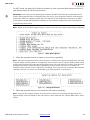
Note: Based on the SST/MST design being run, some of the sub menu options might display differently
X-Ref Target - Figure 9
Figure 9:
Main Menu Options
S
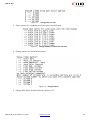
1. Select the required resolution based on the monitor capability.
Note: Give only the supported values of the monitor on which you are testing this application. Only few
monitors display a warning when an unsupported video resolution source is given. Read the EDID values
to know the supported resolution and preferred resolution of the sink monitor. For MST, all the monitors
will display the same selected resolution. Depending on the number of monitors connected, the
resolution being selected must be adjusted. For example, if four monitors are connected, the maximum
resolution that you can have is HD (1920x1080_60_P) with eight BPC on all monitors.
X-Ref Target - Figure 10
Figure 10:
Change Resolution
2. Select the required bits per color based on the monitor capability.
Note: Give only the supported values of the monitor on which you are testing this application. The
Supported BPC (color bit depth) for the sink monitor can be read from the "Display EDID values" menu
option.
XAPP1178 (v2.0) January 23, 2015
www.xilinx.com
18
How to Run
X-Ref Target - Figure 11
Figure 11:
: Change bits per color
3. Select options for combinations of lane count and link rates.
X-Ref Target - Figure 12
Figure 12:
Change Number of Lanes and Link Rate
4. Change pattern for the selected stream.
X-Ref Target - Figure 13
Figure 13:
Change Pattern
5. Display MSA (Multi Stream Attribute) Values for TX.
XAPP1178 (v2.0) January 23, 2015
www.xilinx.com
19
How to Run
X-Ref Target - Figure 14
Figure 14:
XAPP1178 (v2.0) January 23, 2015
MSA Values for TX
www.xilinx.com
20
How to Run
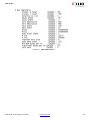
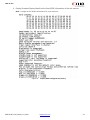
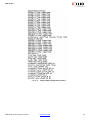
6. Display Extended Display Identification Data (EDID) information of the sink monitor.
Note: It might not be reliable information for some monitors.
X-Ref Target - Figure 15
Figure 15:
XAPP1178 (v2.0) January 23, 2015
Display EDID Configurations (Part 1)
www.xilinx.com
21
How to Run
X-Ref Target - Figure 16
Figure 16:
XAPP1178 (v2.0) January 23, 2015
Display EDID Configurations (Part 2)
www.xilinx.com
22
How to Run
7. Display Link Configuration Status and user selected resolution, BPC values.
X-Ref Target - Figure 17
Figure 17:
Link and Lane Status
8. Display DPCD configurations of the sink monitor.
X-Ref Target - Figure 18
Figure 18:
XAPP1178 (v2.0) January 23, 2015
Display DPCD Configurations
www.xilinx.com
23
Results
9. Perform AUX read for the set of registers by giving a 4-bit Hex offset address of the first
register.
X-Ref Target - Figure 19
Figure 19:
Auxiliary Read
Results
The display should come on the connected sink monitor. Similarly for MST, the display should
come on all the sink monitors that are connected in daisy-chain mode by DisplayPort cables
(Limited to four displays).
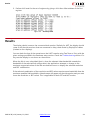
You can check the logs of the operation on the UART console using Tera Term or Putty with the
given settings provided in the hardware setup section. Check the Troubleshooting section if in
any case the display is not shown on the monitor.
When the link is over-subscribed (that is, when the selected video bandwidth exceeds the
bandwidth of the selected link configuration) the application attempts to change to the
maximum supported values of the link rate and lane count to display the selected resolution
and BPC combination.
If the selected combination of the resolution and BPC values requires more bandwidth than the
maximum possible link bandwidth, a blank screen will appear on the sink monitor and you must
lower the resolution or BPC values. This is applicable for both SST and MST modes.
XAPP1178 (v2.0) January 23, 2015
www.xilinx.com
24
Results
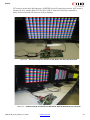
SST mode is tested with the Samsung- U28D590D ultra HD resolution monitor. MST mode is
tested with four streams Dell U2713H, DELL U3014T, and Asus-PQ321Q connected in
daisy-chain mode with HD video on all four displays.
X-Ref Target - Figure 20
Figure 20:
Hardware Setup and Results for SST Mode with Ultra HD Resolution
X-Ref Target - Figure 21
Figure 21:
Hardware Setup and Results for MST Mode with HD Resolution on 4 Streams
XAPP1178 (v2.0) January 23, 2015
www.xilinx.com
25
Troubleshooting
Troubleshooting
This section provides debugging steps for issues in the policy maker software.
There are help menu options provided to read MSA values, EDID information, Link and Lane
status, and DPCD status. There is also another option to enter the four-digit hexadecimal
register offset and the number of registers to read the DPCD register values through the aux
interface. Enter the four-digit hexadecimal register offset for any DPCD registers, to know the
exact status of the system.
Check the following if the design does not work with the provided ready_for_download
files:
1. Ensure the quality of the DisplayPort cables.
2. Check if DisplayPort mode is selected in the sink monitor.
3. Ensure the capability of the DisplayPort supported monitor, that is, if it is v1.2a compatible,
if it supports MST, and if the SST or MST mode is selected for monitors that support both
the modes.
4. Check that the DP cables are connected properly if you are testing the MST mode with daisy
chained monitors. Ensure proper connections for DPin and DPout ports.
5. Check the support for the possible resolutions and bits per color (BPC) options for the
monitor that you are testing.
6. Try changing the resolution and BPC from serial port.
References
1. VESA DisplayPort Standard Specification
2. KC705 MIG Design Creation with Vivado (XTP196) (Link to access Sign in to Xilinx)
3. Vivado Design Suite Tutorial: Embedded Processor Hardware Design (UG940)
4. LogiCORE IP DisplayPort Product Guide (PG064)
XAPP1178 (v2.0) January 23, 2015
www.xilinx.com
26
Revision History
Revision History
The following table shows the revision history for this document.
Date
Version
Description of Revisions
01/23/2015
2.0
Updated the Reference Design Files link on page 3.
12/19/2014
2.0
Updated the application note to test the latest DisplayPort version of 5.0
with Vivado design tools 2014.4. The application tests both MST and SST
modes of the DisplayPort core and uses the DisplayPort drivers that
implement the policy maker features.
09/13/2013
1.0
Initial Xilinx release.
Please Read: Important Legal Notices
The information disclosed to you hereunder (the “Materials”) is provided solely for the selection and use of Xilinx products. To the
maximum extent permitted by applicable law: (1) Materials are made available "AS IS" and with all faults, Xilinx hereby DISCLAIMS ALL
WARRANTIES AND CONDITIONS, EXPRESS, IMPLIED, OR STATUTORY, INCLUDING BUT NOT LIMITED TO WARRANTIES OF
MERCHANTABILITY, NON-INFRINGEMENT, OR FITNESS FOR ANY PARTICULAR PURPOSE; and (2) Xilinx shall not be liable (whether in
contract or tort, including negligence, or under any other theory of liability) for any loss or damage of any kind or nature related to,
arising under, or in connection with, the Materials (including your use of the Materials), including for any direct, indirect, special,
incidental, or consequential loss or damage (including loss of data, profits, goodwill, or any type of loss or damage suffered as a result
of any action brought by a third party) even if such damage or loss was reasonably foreseeable or Xilinx had been advised of the
possibility of the same. Xilinx assumes no obligation to correct any errors contained in the Materials or to notify you of updates to the
Materials or to product specifications. You may not reproduce, modify, distribute, or publicly display the Materials without prior written
consent. Certain products are subject to the terms and conditions of Xilinx’s limited warranty, please refer to Xilinx’s Terms of Sale which
can be viewed at http://www.xilinx.com/legal.htm#tos; IP cores may be subject to warranty and support terms contained in a license
issued to you by Xilinx. Xilinx products are not designed or intended to be fail-safe or for use in any application requiring fail-safe
performance; you assume sole risk and liability for use of Xilinx products in such critical applications, please refer to Xilinx’s Terms of
Sale which can be viewed at http://www.xilinx.com/legal.htm#tos.
© Copyright 2013 – 2015 Xilinx, Inc. Xilinx, the Xilinx logo, Artix, ISE, Kintex, Spartan, Virtex, Vivado, Zynq, and other designated brands
included herein are trademarks of Xilinx in the United States and other countries. All other trademarks are the property of their
respective owners.
XAPP1178 (v2.0) January 23, 2015
www.xilinx.com
27