1
8520.book Page 1 Friday, December 2, 2005 2:59 PM
Model 8520
User Guide
8520.book Page 2 Friday, December 2, 2005 2:59 PM
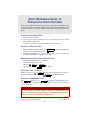
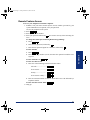
QUICK REFERENCE GUIDE TO
FREQUENTLY-USED FEATURES
These are the basic instructions for the most frequently-used telephone and
voice mail features for Inter-Tel endpoints. For detailed information about these
and other features, refer to the complete instructions in the appropriate user
guide.
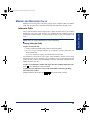
PLACING AN INTERCOM CALL
1. Dial an extension number.
2. If your call goes through handsfree to the called endpoint’s speaker, speak
after you hear a double tone.
If you hear continuous ringing, wait for the call to be answered.
PLACING AN OUTSIDE CALL
1. With or without the handset lifted, press
OUTGOING or dial the Outgoing Call
feature code (the default feature code is 8 ).
2. Dial the desired number. (If you hear a single progress tone, you must dial
an account code before you can place your call.)
ANSWERING AN INTERCOM OR OUTSIDE CALL
EITHER, Respond handsfree (if enabled).
OR, Lift the handset for privacy.
OR, Press , SPKR , or ANSWER .
OR, Press the flashing IC
(Intercom) button.
PLACING A CALL ON HOLD
While on a call, press
or HOLD . Hang up or place another call. To return to
the call, lift the handset an then press
, HOLD , or the flashing button.
PLACING AN EMERGENCY CALL
Dial 9 1 1 (in the U.S.) or 9 9 9 (in Europe) to automatically place a
call to the system’s programmed emergency number. You do not have to select
an outside line first.
CAUTION
If you are using an IP or SIP endpoint, consult your system administrator
and your local Inter-Tel servicing company for important information about
dialing emergency services before you begin using it.
© Inter-Tel, Inc. January 2005 printed in US
Part no. 835.2449-4
1
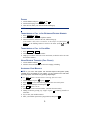
PLACING A CONFERENCE CALL
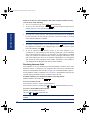
1. While on the first call, press CNF . The call is now on hold.
2. Place an intercom or outside call, then press the flashing CNF
button to
place the call on hold. (If necessary, repeat this step to place a third call on
hold.)
3. Press the flashing CNF button to join all of the calls together in the conference.
NOTE: Conference calls are limited to three parties on SIP endpoints.
FORWARDING CALLS
1. Press
FWD
. (Six-line display model users must then select a menu button.)
2. Do one of the following:
•
To forward to an outside telephone number: Select an outside line
and dial a telephone number.
• To forward to an extension number: Dial the extension number.
• To forward to your voice mailbox: Dial the voice mail extension.
To cancel call forwarding:
1. Press FWD .
2. If you have a six-line display endpoint, press the FWD OFF menu button.
If you have a non-display or two-line display endpoint, press , SPKR , or
lift and replace the handset.
RESPONDING TO A WAITING CALL
If you hear a “call waiting” tone through your handset or headset, either end
your current call or place it on hold. Then press , SPKR , ANSWER , or the
flashing button.
CHANGING VOLUME LEVELS
EITHER, Press the high (
) or low ( )end of the Volume button.
OR, Press the Up or Down arrow on the Volume button.
OR, Press the VOL UP or VOL DN button.
To save your change:
EITHER, Press both ends of the Volume button at the same time.
OR, Press the middle of the Volume button.
OR, Press both VOL UP and VOL DN buttons at the same time.
REDIALING A NUMBER
Select an outside line and press
matically dialed.
REDIAL
or dial
2
3
8
0
. The number is auto-
PAGING
1. Lift the handset and press PAGE or dial 7 .
2. Dial the desired page zone number (0-9).
3. After the tone, make your announcement and hang up.
NOTE: The Page feature is not supported in SIP mode.
TRANSFERRING A CALL TO AN EXTENSION/OUTSIDE NUMBER
1. Press TRANSFER or XFR .
2. Dial the desired extension or telephone number.
3. Wait for an answer, announce the call, and then hang up.
If the number is busy, there is no answer, or the transfer is refused, press ,
SPKR , or the flashing button to return to the caller. (Press
for SIP
mode.)
TRANSFERRING A CALL TO VOICE MAIL
1. Press TRANSFER or XFR .
2. Dial the voice mail extension number.
3. Hang up to send the call to the voice mail menu (so that the caller can enter
the mailbox number).
USING REVERSE TRANSFER (CALL PICKUP)
1. Lift the handset and dial 4 .
2. Dial the extension number where the call is ringing or holding.
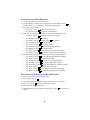
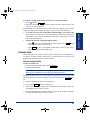
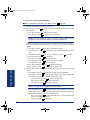
ACCESSING YOUR MAILBOX
NOTE: If your voice mail system has Automatic Speech Recognition (ASR)
capability and it is enabled for your mailbox, you can complete voice mail tasks
by issuing spoken commands or by pressing dialpad digits.
If your
MSG
button is lit and you have a message from voice mail:
1. Lift the handset or press
or press SPKR .
2. Press MSG . A call is automatically placed to the voice mail system.
3. Enter your personal password and press # .
If your
MSG
button is not lit:
1. Dial the voice mail extension number. (You hear the main menu.)
2. During or after the greeting, say “Login” or press
to identify yourself as a
subscriber.
3. Say or enter your mailbox number.
4. Enter your mailbox password (if programmed). Then press
3
#
.
ACCESSING VOICE MAIL MESSAGES
1. Access your mailbox as described on page 3.
2. If E-Mail Reader is enabled for your mailbox, say “Voice Mail” or press
1
.
If E-Mail Reader is not enabled for your mailbox, skip this step.
3. Select one of the following:
• Say “New” or press 1 to listen to new messages.
• Say “Saved” or press 3 to listen to saved messages.
4. While you are listening to a message, you can use the following options:
• Say “Skip” or press # to skip to the end of the recording.
• Say “Backup” or press 1 to back up.
• Say “Pause” or press 2 to pause. (Press # to continue.)
• Say “Forward” or press 3 to skip ahead.
• Say “Lower” or press 4 to lower the volume.
• Say “Envelope” or press 5 to play the message envelope.
• Say “Higher” or press 6 to raise the volume.
• Say “Save” or press 7 to save the new message in your mailbox.
• Say “Delete” or press 9 to delete the message from your mailbox.
5. When the message has finished playing, you have the following options:
• Say “Replay” or press 1 to replay the message from the beginning.
• Say “Reply” or press 2 to reply to the message.
• Say “Forward” or press 3 to forward a copy of the message.
• Say “Previous” or press 4 to listen to the previous message.
• Say “Envelope” or press 5 to play the introductory message envelope.
• Say “Next” or press 6 to listen to the next message.
• Say “Save” or press 7 to save the new message in your mailbox.
• Say “Delete” or press 9 to delete the message from your mailbox.
RECORDING AND SENDING VOICE MAIL MESSAGES
1. Access your mailbox as described on page 3.
2. Say “Record” or press
2
.
3. Say or enter the mailbox number where you want to leave the message.
4. Say “Yes” or press
#
to accept the subscriber’s name.
5. Record your message after the tone.
6. When finished, hang up to deliver the message or press
options.
4
#
to access more
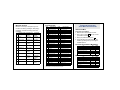
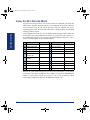
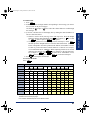
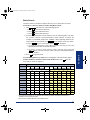
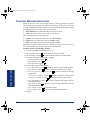
MESSAGE OPTIONS*
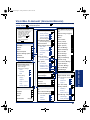
FEATURE CODES*
Below is a summary of the options you can
use when accessing messages, after playing
messages, and when recording voice mail
messages.
324
Hunt Group Remove/Replace
Account Code – Optional
303
LCD Contrast Control
326
ACD Agent Log In
365
Message
327
ACD Agent Log Out
366
Message - Cancel Msg Left
328
ACD Agent Log In/out
368
Message -Cancel Msg On Endpt.
329
ACD Agent Wrap-up Term.
367
Message - Silent
375
Agent Help Request
314
Microphone Mute
376
Agent Help Reject
361
Automatic Intercom Access
325
Page Remove/Replace
Forward a copy Erase and
re-record
360
Automatic Line Access
397
Program Buttons
350
Automatic Line Answer
392
Program Station Password
313
Background Music
6
Queue (Callback) Request
355
Call Forward All Calls
385
Record-A-Call
357
Call Forward If Busy
380
Redial
356
Call Forward If No Answer
331
Redirect Call
358
Call Fwd. If No Answer/Busy
305
Reminder Message
Conference
306
Reminder Message Cancel
Default Station
359
Remote Programming
Back Up
Skip forward
LEAVING MSG
Replay the
message
Replay the
message
Reply to the
message
Append the
message
4
Lower volume
Listen to previous msg
—
5
Play envelope
Play envelope
—
6
7
Increase volume
—
FEATURE NAME
Account Code – All Calls
1
3
CODE
390
LISTENING TO MSG AFTER MSG PLAYS
Pause
FEATURE NAME
391
#
2
CODE
Listen to next
message
—
Save the
message
—
5
394
7
4
Page
307
Directory
300
Display Time And Date
396
Reverse Transfer
Review Buttons
372
Do-Not-Disturb On/Off
377
Ring Intercom Always On/off
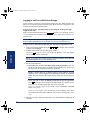
TELEPHONE SYSTEM AND
VOICE MAIL FEATURE GUIDE
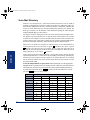
USING VOICE MAIL
To access your mailbox:
1. Dial the voice mail extension number.
2. Say “Login” or press
and say or enter
your mailbox number.
3. Enter your password and press # .
4. Voice mail plays the main menu for your
mailbox type and guides you through the
available options.
STANDARD VOICE MAILBOX MAIN MENU:
TO...
Access new voice mail messages
SAY
PRESS
“New”
1
Record voice mail messages
“Record”
2
Access saved voice mail messages
“Saved”
3
Access personal mailbox options
“Personal”
4
Access message options
“Options”
5
Disable Automatic Speech Recognition
“Disable”
8
8
—
—
—
373
Do-Not-Disturb Override
398
Ring Tone Selection
9
—
Delete the
message
Access delivery options
395
Feature Button Default
382
Station Speed Dial
SAY
PRESS
312
Group Listen
383
Station Speed Dial Program
Access voice mail messages
“Voice mail”
1
—
Cancel
319
Handsfree On/Off
354
System Forward On/Off
Record voice mail messages
“Record”
2
317
Headset On/Off
381
System Speed Dial
Access e-mail messages
“E-mail”
3
336
Hold – Individual
399
Switch Keymap
“Personal”
4
335
Hold – System
346
Transfer To Hold
330
Hookflash (Recall in Europe)
345
Transfer To Ring
“Options”
5
*
#
—
Skip to end
—
*Message options vary based on media type.
Send message
and exit
*Some feature codes may not apply to your endpoint. For a list of feature
codes specific to your endpoint, consult the user guide.
ADVANCED MAILBOX MAIN MENU:
TO...
Access personal mailbox options
Access message options
Access faxes
Disable Automatic Speech Recognition
“Facsimile”
6
“Disable”
8
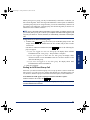
REMOTE FEATURE ACCESS
Remote Feature Access allows you to change
your station password, place your endpoint in
Do-Not-Disturb mode, and forward calls from
another endpoint or through a special dial-up
line.
If you do not hear a tone after each step, or if
you hear repeating tones, you have made a
mistake or the feature is restricted. Start over.
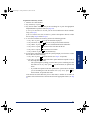
To use Remote Feature Access:
1. EITHER, call _______________ (number
provided by your system administrator). If
required, enter your password.
OR, use any endpoint on the system.
2. Enter 3 5 9 .
3. Enter your extension number.
4. Enter your password and press # . You
can now use the features described below
and at right.
To change the station password:
1. Enter 3 9 2 .
2. Enter your current password and press # .
3. Enter the new password and press # .
4. Enter the new password again for verification and press # .
To turn on Do-Not-Disturb:
1. Enter 3 7 0 .
2. Enter message number 01-20 (see the
default DND message list below).
3. If desired, enter the optional second-line
message text (see the dialpad character
chart on the next page).
4. Hang up.
To turn off Do-Not-Disturb:
Enter 3
7
1 and hang up.
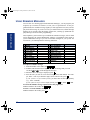
DO-NOT-DISTURB MESSAGES
01 DO-NOT-DISTURB
11 OUT OF TOWN ’TIL
02 LEAVE A MESSAGE
12 OUT OF OFFICE
03 IN MEETING UNTIL
13 OUT UNTIL
04 IN MEETING
14 WITH A CLIENT
05 ON VACATION* ’TIL
15 WITH A GUEST
06 ON VACATION*
16 UNAVAILABLE
07 CALL ME AT
17 IN CONFERENCE
08 AT THE DOCTOR
18 AWAY FROM DESK
09 ON A TRIP
19 GONE HOME
10 ON BREAK
20 OUT TO LUNCH
*VACATION is replaced by HOLIDAY in European systems.
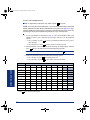
DIALPAD CHARACTERS
NUMBER OF TIMES BUTTON IS PRESSED
BUTTON
1
2
3
4
5
1
-
&
(
)
1
2
A
B
C
'
2
3
D
E
F
!
3
4
G
H
I
*
4
5
J
K
L
# or /
5
6
M
N
O
Ñ or #
6
7
P
Q
R
S
7
8
T
U
V
?
8
9
W
X
Y
Z
9
NOTE: The characters associated with the 5 and 6 dialpad
digits are dependent on the software version.
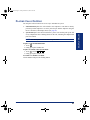
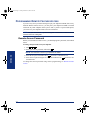
To turn on Call Forward:
1. Enter one of the following Call Forward feature codes:
All Calls
If No Answer
If Busy
If No Answer/Busy
355
356
357
358
2. Enter an extension number or enter a line
access code followed by an outside telephone number.
3. Hang up.
To turn off Call Forward:
1. Enter 3 5 5 .
2. Press # and hang up.
8520.book Page 1 Friday, December 2, 2005 2:59 PM
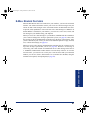
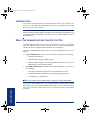
Notice
This Inter-Tel® user guide is released by Inter-Tel, Inc. as a guide for end-users. It provides information necessary to use the Model 8520 endpoint. The contents of this user
guide, which reflect current Inter-Tel standards, are subject to revision or change without
notice. Some features or applications mentioned may require a future release and are not
available in the initial release. Future product features and applications are subject to
availability and cost. Some features or applications may require additional hardware and/
or specific software.
Some system features can only be accessed by an
administrator. For information about these features, see the
Frequently Asked Questions on page 95.
For sales, service, or technical support,
contact your local authorized Inter-Tel provider.
Comments about this user guide or other
technical documentation should be directed to
Inter-Tel’s Technical Publications Department at:
[email protected]
All products and services mentioned in this publication are the trademarks, service marks,
registered marks, or registered service marks of their respective owners.
Inter-Tel®, Axxess®, and Enterprise® are registered trademarks of Inter-Tel, Incorporated.
Microsoft® and Outlook® are registered trademarks of Microsoft Corporation.
8520.book Page 2 Friday, December 2, 2005 2:59 PM
8520.book Page iii Friday, December 2, 2005 2:59 PM
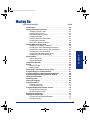
CONTENTS
PAGE
FINDING YOUR WAY . . . . . . . . . . . . . . . . . . . . . . . . . . . . . . . . . . . . . . . . . . . . . . . . . . . 1
Welcome. . . . . . . . . . . . . . . . . . . . . . . . . . . . . . . . . . . . . . . . . . . . . . . . . . . . . . . . . . . . . . . . . 2
FINDING YOUR WAY
Table of Contents
About This Guide . . . . . . . . . . . . . . . . . . . . . . . . . . . . . . . . . . . . . . . . . . . . . . . . . . . . . . . . . 2
About Voice Mail . . . . . . . . . . . . . . . . . . . . . . . . . . . . . . . . . . . . . . . . . . . . . . . . . . . . . . . . . . 7
What You See and Hear . . . . . . . . . . . . . . . . . . . . . . . . . . . . . . . . . . . . . . . . . . . . . . . . . . . 11
Software Compatibility . . . . . . . . . . . . . . . . . . . . . . . . . . . . . . . . . . . . . . . . . . . . . . . . . . . . 12
GETTING STARTED . . . . . . . . . . . . . . . . . . . . . . . . . . . . . . . . . . . . . . . . . . . . . . . . . . 13
Introduction . . . . . . . . . . . . . . . . . . . . . . . . . . . . . . . . . . . . . . . . . . . . . . . . . . . . . . . . . . . . . 14
Adjusting Your Endpoint’s Viewing Angle . . . . . . . . . . . . . . . . . . . . . . . . . . . . . . . . . . . . 14
GETTING STARTED
About Your Endpoint . . . . . . . . . . . . . . . . . . . . . . . . . . . . . . . . . . . . . . . . . . . . . . . . . . . . . . 3
Adjusting Your Endpoint’s LCD Contrast . . . . . . . . . . . . . . . . . . . . . . . . . . . . . . . . . . . . . 15
Setting Up Voice Mail . . . . . . . . . . . . . . . . . . . . . . . . . . . . . . . . . . . . . . . . . . . . . . . . . . . . . 16
Making and Receiving Calls . . . . . . . . . . . . . . . . . . . . . . . . . . . . . . . . . . . . . . . . . . . . . . . . 19
Placing Conference Calls . . . . . . . . . . . . . . . . . . . . . . . . . . . . . . . . . . . . . . . . . . . . . . . . . . 24
Transferring Calls . . . . . . . . . . . . . . . . . . . . . . . . . . . . . . . . . . . . . . . . . . . . . . . . . . . . . . . . 25
Using Reverse Transfer . . . . . . . . . . . . . . . . . . . . . . . . . . . . . . . . . . . . . . . . . . . . . . . . . . . 26
MOVING ON
Placing Calls On Hold . . . . . . . . . . . . . . . . . . . . . . . . . . . . . . . . . . . . . . . . . . . . . . . . . . . . . 23
Forwarding Calls . . . . . . . . . . . . . . . . . . . . . . . . . . . . . . . . . . . . . . . . . . . . . . . . . . . . . . . . . 27
Redialing a Number . . . . . . . . . . . . . . . . . . . . . . . . . . . . . . . . . . . . . . . . . . . . . . . . . . . . . . 28
Using a Headset . . . . . . . . . . . . . . . . . . . . . . . . . . . . . . . . . . . . . . . . . . . . . . . . . . . . . . . . . 30
Using the Speaker and Microphone . . . . . . . . . . . . . . . . . . . . . . . . . . . . . . . . . . . . . . . . . 31
Using the Message Button . . . . . . . . . . . . . . . . . . . . . . . . . . . . . . . . . . . . . . . . . . . . . . . . . 33
Accessing Your Mailbox . . . . . . . . . . . . . . . . . . . . . . . . . . . . . . . . . . . . . . . . . . . . . . . . . . . 34
Disabling and Enabling ASR . . . . . . . . . . . . . . . . . . . . . . . . . . . . . . . . . . . . . . . . . . . . . . . 35
Accessing Voice Mail Messages . . . . . . . . . . . . . . . . . . . . . . . . . . . . . . . . . . . . . . . . . . . . 36
Using Do-Not-Disturb Mode . . . . . . . . . . . . . . . . . . . . . . . . . . . . . . . . . . . . . . . . . . . . . . . . 42
Using Reminder Messages . . . . . . . . . . . . . . . . . . . . . . . . . . . . . . . . . . . . . . . . . . . . . . . . 44
iii
LEARNING MORE
©Inter-Tel, Inc. December 2005 printed in US
USING E-MAIL READER
Displaying Information on Your Endpoint . . . . . . . . . . . . . . . . . . . . . . . . . . . . . . . . . . . . 29
8520.book Page iv Friday, December 2, 2005 2:59 PM
CONTENTS
PAGE
MOVING ON . . . . . . . . . . . . . . . . . . . . . . . . . . . . . . . . . . . . . . . . . . . . . . . . . . . . . . . . . 45
Introduction . . . . . . . . . . . . . . . . . . . . . . . . . . . . . . . . . . . . . . . . . . . . . . . . . . . . . . . . . . . . . 46
Setting Endpoint Preferences . . . . . . . . . . . . . . . . . . . . . . . . . . . . . . . . . . . . . . . . . . . . . . 46
Setting Mailbox Preferences . . . . . . . . . . . . . . . . . . . . . . . . . . . . . . . . . . . . . . . . . . . . . . . 49
Speed Dialing. . . . . . . . . . . . . . . . . . . . . . . . . . . . . . . . . . . . . . . . . . . . . . . . . . . . . . . . . . . . 56
Using Record-A-Call . . . . . . . . . . . . . . . . . . . . . . . . . . . . . . . . . . . . . . . . . . . . . . . . . . . . . . 59
Paging . . . . . . . . . . . . . . . . . . . . . . . . . . . . . . . . . . . . . . . . . . . . . . . . . . . . . . . . . . . . . . . . . 60
Performing a “Hookflash” During a Call . . . . . . . . . . . . . . . . . . . . . . . . . . . . . . . . . . . . . . 61
Programming Your Feature Buttons . . . . . . . . . . . . . . . . . . . . . . . . . . . . . . . . . . . . . . . . . 61
Programming Direct Station Selection Buttons . . . . . . . . . . . . . . . . . . . . . . . . . . . . . . . . 62
Programming Secondary Extension Buttons. . . . . . . . . . . . . . . . . . . . . . . . . . . . . . . . . . 63
Using Account Codes . . . . . . . . . . . . . . . . . . . . . . . . . . . . . . . . . . . . . . . . . . . . . . . . . . . . . 64
Screening Calls . . . . . . . . . . . . . . . . . . . . . . . . . . . . . . . . . . . . . . . . . . . . . . . . . . . . . . . . . . 65
Using Call Logging . . . . . . . . . . . . . . . . . . . . . . . . . . . . . . . . . . . . . . . . . . . . . . . . . . . . . . . 66
Using Directories . . . . . . . . . . . . . . . . . . . . . . . . . . . . . . . . . . . . . . . . . . . . . . . . . . . . . . . . 67
Programming Remote Feature Access . . . . . . . . . . . . . . . . . . . . . . . . . . . . . . . . . . . . . . . 72
Requesting Agent Help. . . . . . . . . . . . . . . . . . . . . . . . . . . . . . . . . . . . . . . . . . . . . . . . . . . . 74
Working in Hunt Groups. . . . . . . . . . . . . . . . . . . . . . . . . . . . . . . . . . . . . . . . . . . . . . . . . . . 75
USING E-MAIL READER . . . . . . . . . . . . . . . . . . . . . . . . . . . . . . . . . . . . . . . . . . . . . . . 79
Introduction . . . . . . . . . . . . . . . . . . . . . . . . . . . . . . . . . . . . . . . . . . . . . . . . . . . . . . . . . . . . . 80
E-Mail Reader Features . . . . . . . . . . . . . . . . . . . . . . . . . . . . . . . . . . . . . . . . . . . . . . . . . . . 81
Using Your Advanced Mailbox. . . . . . . . . . . . . . . . . . . . . . . . . . . . . . . . . . . . . . . . . . . . . . 82
Setting Up Your E-Mail Password . . . . . . . . . . . . . . . . . . . . . . . . . . . . . . . . . . . . . . . . . . . 83
Accessing E-Mail Messages . . . . . . . . . . . . . . . . . . . . . . . . . . . . . . . . . . . . . . . . . . . . . . . 85
Using Main Menu E-Mail Reader Count . . . . . . . . . . . . . . . . . . . . . . . . . . . . . . . . . . . . . . 87
Accessing Fax Messages. . . . . . . . . . . . . . . . . . . . . . . . . . . . . . . . . . . . . . . . . . . . . . . . . . 88
Recovering Deleted Messages . . . . . . . . . . . . . . . . . . . . . . . . . . . . . . . . . . . . . . . . . . . . . 89
Changing Message Envelopes . . . . . . . . . . . . . . . . . . . . . . . . . . . . . . . . . . . . . . . . . . . . . 90
Voice Mail Flowchart (Advanced Mailbox) . . . . . . . . . . . . . . . . . . . . . . . . . . . . . . . . . . . . 91
LEARNING MORE . . . . . . . . . . . . . . . . . . . . . . . . . . . . . . . . . . . . . . . . . . . . . . . . . . . . 93
Introduction . . . . . . . . . . . . . . . . . . . . . . . . . . . . . . . . . . . . . . . . . . . . . . . . . . . . . . . . . . . . . 94
What the Administrators Can Do for You . . . . . . . . . . . . . . . . . . . . . . . . . . . . . . . . . . . . . 94
Frequently Asked Questions (FAQs). . . . . . . . . . . . . . . . . . . . . . . . . . . . . . . . . . . . . . . . . 95
Default Feature Codes . . . . . . . . . . . . . . . . . . . . . . . . . . . . . . . . . . . . . . . . . . . . . . . . . . . . 98
INDEX . . . . . . . . . . . . . . . . . . . . . . . . . . . . . . . . . . . . . . . . . . . . . . . . . . . . . . . . . . . . . 103
iv
8520.book Page 1 Friday, December 2, 2005 2:59 PM
FINDING YOUR WAY
Finding Your Way
SECTION CONTENTS
PAGE
Welcome . . . . . . . . . . . . . . . . . . . . . . . . . . . . . . . . . . . . . . . . . . . . . 2
About This Guide . . . . . . . . . . . . . . . . . . . . . . . . . . . . . . . . . . . . . . 2
About Your Endpoint . . . . . . . . . . . . . . . . . . . . . . . . . . . . . . . . . . . 3
Feature Button Functions . . . . . . . . . . . . . . . . . . . . . . . . . . . . . 4
Display . . . . . . . . . . . . . . . . . . . . . . . . . . . . . . . . . . . . . . . . . . . 5
Message Indicator Lamp . . . . . . . . . . . . . . . . . . . . . . . . . . . . . 5
DSS/BLF and Mini-DSS . . . . . . . . . . . . . . . . . . . . . . . . . . . . . . 6
About Voice Mail . . . . . . . . . . . . . . . . . . . . . . . . . . . . . . . . . . . . . . 7
Enterprise Messaging. . . . . . . . . . . . . . . . . . . . . . . . . . . . . . . . 9
Automatic Speech Recognition (ASR) . . . . . . . . . . . . . . . . . . 10
What You See and Hear. . . . . . . . . . . . . . . . . . . . . . . . . . . . . . . . 11
Software Compatibility . . . . . . . . . . . . . . . . . . . . . . . . . . . . . . . . 12
Inter-Tel® Model 8520 User Guide
1
FINDING YOUR WAY
8520.book Page 2 Friday, December 2, 2005 2:59 PM
WELCOME
Your new Model 8520 provides access to several features, each of which is described
in this guide. The About This Guide section below lists the different sections in this
user guide and describes the type of information you can find there. If you need to
access information quickly, refer to the Quick Reference Guide attached to the front of
this guide. You can also tear out the pocket guide to keep as a handy reference for features you are likely to use while away from the office (Remote Feature Access and
Voice Mail).
ABOUT THIS GUIDE
This guide contains instructions for using the Model 8520 on the Inter-Tel® telephone
system. To help you find information more quickly, this guide is divided into five separate sections, as indicated by the tabs.
These sections include the following:
•
Finding Your Way: This section provides you with a picture of the Model 8520
and includes general information designed to help you find what you need.
•
Getting Started: This section includes basic endpoint and voice mail information, and provides instructions on how to perform everyday tasks, such as
answering calls, making calls, and using voice mail.
•
Moving On: In this section you’ll learn how to use advanced endpoint and voice
mail features.
•
Using E-Mail Reader: This section includes information on how to use the
advanced messaging features available with E-Mail Reader.
•
Learning More: This section outlines how your administrators can help if you
experience a problem with your endpoint. It also provides you with a list of Frequently Asked Questions (FAQs) so you can troubleshoot problems and learn
more about the system.
In addition, this guide contains a list of default feature codes (see page 98) and an
index (see page 103) for easy reference.
NOTE: Because the telephone system is very flexible and programmable, the procedures for using the features might vary slightly from the descriptions in this guide. If so,
your trainer or system administrator can tell you how your system differs and how to
use the features.
2
Inter-Tel® Model 8520 User Guide
8520.book Page 3 Friday, December 2, 2005 2:59 PM
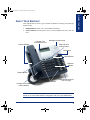
Your endpoint has two basic types of buttons in addition to a display and a Message
Indicator lamp.
•
Dialpad buttons: Allow you to enter numbers and letters.
•
Feature buttons: Provide quick access to various telephone and voice mail features.
LCD With Two
16-Character Lines
Message Indicator Lamp
Ring and Voice
Volume Control
Internal Speaker
Hold Button
Special Button
12-Button
Dialpad
Speaker Button
Handsfree Microphone
Feature Buttons
(Underneath Edge)
Hearing Aid-Compatible
(HAC) Handset
NOTE: This is the default configuration. Your buttons may have been programmed differently. If you are uncertain about the configuration, ask your system administrator.
Inter-Tel® Model 8520 User Guide
3
FINDING YOUR WAY
ABOUT YOUR ENDPOINT
FINDING YOUR WAY
8520.book Page 4 Friday, December 2, 2005 2:59 PM
Feature Button Functions
The feature buttons are designed to automate some of the commonly-used functions,
such as dialing an outside number. Each of these is described in the table below.
BUTTON
ANSWER
OUTGOING
CALL
IC
IF YOU...
Press
ANSWER
Press OUTGOING and dial the number
Press an unlit CALL
button
Press
button or the flashing
IC
YOU CAN...
PG.
Answer a call.
22
Place an outgoing call.
21
Select an outside line or answer a call.
21, 22
Access an intercom call.
19
DND
Press unlit or lit DND
Enable/disable Do-Not-Disturb mode.
42
CNF
and dial the numbers you
Press CNF
would like to add to the conference
Place a conference call.
24
Press
Put a call on hold.
23
Press TRANSFER and dial the destination
number
Transfer a call.
25
SYS SPDL
Press SYS SPDL
View or access System Speed-Dial numbers.
58
STN SPDL
Press STN SPDL
View or dial Station Speed-Dial numbers.
56
PAGE
Press PAGE
Choose a page zone to place a page.
60
REDIAL
Press REDIAL
Redial a telephone number or save the
last number dialed.
28
Put a call on the speaker.
31
TRANSFER
Press
(International Hold Symbol)
and hang up
MSG
Press MSG
Leave or listen to a message.
33
MUTE
Press MUTE
Mute the microphone.
31
FWD
Press FWD
ber
and dial the destination num- Forward calls to the specified number.
Press the high or low end of the volume button
Adjust volume during a call.
27
43
In addition to the buttons identified in the preceding table, your endpoint has a Special button ( ). Depending on how your telephone system is configured, you may
need to press this button before you dial a feature code.
NOTE: Because the telephone system allows customized feature buttons, your endpoint may have been reprogrammed so that the feature buttons do not match those
described in this guide.
4
Inter-Tel® Model 8520 User Guide
8520.book Page 5 Friday, December 2, 2005 2:59 PM
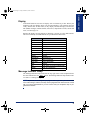
Your Model 8520 has two lines of display with 16 characters per line. When your
endpoint is idle, this display shows your extension number, your username, the time
of day, and the date. At other times, it may display reminder messages, Do-Not-Disturb (DND) messages, numbers dialed, call sources, elapsed time of calls, current call
costs, error messages, etc.
Because the display can only support 16 characters, you may see a few abbreviations.
The most commonly used abbreviations are provided in the table below.
ABBREVIATION
ACCT CODE
CNF
DEST
DIR
DND
EXT
MSG
RCL
SPKR
SPKRPHN
STN SPD
SYS SPD
TFR
TG
TRNK
WORD/PHRASE
Account Code
Conference
Destination
Directory
Do-Not-Disturb
Extension
Message
Recall
Speaker
Speakerphone
Station Speed Dial
System Speed Dial
Transfer
Trunk Group (a group of outside lines)
Trunk (an outside line)
Message Indicator Lamp
The Message Indicator lamp (located at the top, right corner of the endpoint) shows
the same indications as the MSG button. The Message Indicator lamp flashes whenever there is a waiting message.
NOTE: By default, the message lamp is programmed to light when you receive a new
voice mail message. However, this lamp can be programmed for other functions. Check
with your system administrator if you are unsure what your endpoint’s lamp is programmed to indicate.
Inter-Tel® Model 8520 User Guide
5
FINDING YOUR WAY
Display
FINDING YOUR WAY
8520.book Page 6 Friday, December 2, 2005 2:59 PM
DSS/BLF and Mini-DSS
Generally, the Model 8450 Direct Station Selection/Busy Lamp Field (DSS/BLF) unit
is used by individuals that handle a high volume of incoming calls, such as receptionists. The DSS/BLF provides one-button access to up to 50 extension numbers or a
programmable feature. For more information about programming and using the DSS,
refer to the current Administrator’s Guide (part no. 550.8001).
The Model 8416 Mini-DSS unit is a scaled-down version of the full-sized DSS/BLF
unit. This optional unit adds 16 user-programmable buttons to your endpoint. These
buttons can be programmed as any of the following:
•
DSS buttons: Provide one-button access to extension numbers and display the
status of the extension associated with the button (see page 62).
•
Feature buttons: Provide quick access to frequently-used features (see page 61).
•
Secondary extensions: Allow one-button access to calls ringing or holding at
another station (see page 63).
NOTE: Instructions for attaching the Mini-DSS to your endpoint are included with the
unit.
The DSS/BLF and Mini-DSS lamps indicate the status of the extension or feature
assigned to the button. These indications are shown in the table below.
If the lamp is...
6
Then...
Solidly lit
The associated extension is busy, or the associated feature is enabled.
Flashing slowly
The extension is in Do-Not-Disturb.
Flashing rapidly
The extension has a call ringing in.
Fluttering continuously
The extension is causing a STATION OFF-HOOK system alarm.
Inter-Tel® Model 8520 User Guide
8520.book Page 7 Friday, December 2, 2005 2:59 PM
Voice mail is an application that is part of the Inter-Tel voice processing system.
Using voice mail, you and other callers can send and receive recorded messages from
any supported endpoint on the system. To use voice mail features, each user (or subscriber) is assigned a mailbox, which usually corresponds to the extension number
assigned to your endpoint. You can, however, have an unassociated mailbox that does
not correspond to an extension. (Unassociated mailboxes are typically used for agents
or other personnel who don’t have a permanent office.)
With your mailbox, you can use personal or system greetings to let callers know if
you are out of town, on a call, etc. If a caller reaches your mailbox, they can leave a
message, hang up, or access an attendant. In addition, if your voice mail administrator
sets up one or more “group lists” of mailboxes, you can send a message to a group of
people by entering one number instead of everyone’s individual mailbox number.
Inter-Tel voice mail systems support the following types of mailboxes:
•
Advanced Mailbox: If E-Mail Reader is enabled for your mailbox, you have
access to voice mail, e-mail, and fax messages in your mailbox. You can also customize your personal mailbox options, and access advanced messaging features.
See page 79 for information and instructions about using E-Mail Reader features.
For a voice mail flowchart for advanced mailbox users, see page 91.
•
Standard Voice Mailbox: This type of mailbox allows you to send and receive
voice mail messages, record personal greetings, and allows you to customize personal mailbox options. A standard voice mailbox does not allow you to access email and fax messages. For a voice mail flowchart for standard mailbox users,
see page 109.
NOTE: If you have the Enterprise® Messaging (EM) voice mail system, you also have
access to advanced communication and messaging features such as E-Mail Reader
and Automatic Speech Recognition (ARS). For more information about EM, see page 9.
Inter-Tel® Model 8520 User Guide
7
FINDING YOUR WAY
ABOUT VOICE MAIL
FINDING YOUR WAY
8520.book Page 8 Friday, December 2, 2005 2:59 PM
The instructions for many voice mail tasks are identical for standard voice mailbox
and advanced mailbox users. The instructions for the following common mailbox
tasks are included in the Getting Started and Moving On sections of this guide:
•
•
•
•
•
•
•
•
•
•
•
•
•
•
•
8
Initializing your mailbox (see page 16)
Recording your personal greetings (see page 17)
Recording your voice mail directory name (see page 18)
Accessing your mailbox (see page 34)
Disabling and enabling ASR (see page 35)
Accessing voice mail messages (see page 36)
Recording and sending voice mail messages (see page 39)
Canceling unheard voice mail messages (see page 41)
Changing your mailbox password (see page 49)
Changing the call screening transfer method (see page 51)
Programming a fax destination (see page 52)
Changing the message search order (see page 53)
Programming remote messaging (see page 54)
Screening calls (see page 65)
Using the voice mail directory (see page 70)
Inter-Tel® Model 8520 User Guide
8520.book Page 9 Friday, December 2, 2005 2:59 PM
Enterprise Messaging (EM) is the Inter-Tel messaging system that uses industry-standard protocols for communication and messaging. EM unifies communication and
messaging by providing access to voice mail, fax, and e-mail messages in your mailbox. The EM system provides voice mail users with the following advanced messaging features:
•
Automatic Speech Recognition (ASR): ASR can be enabled for the entire system or it can be enabled for specific applications (like voice mail) or mailboxes.
When ASR is enabled for your mailbox, you can issue spoken commands to navigate the voice mail menus. ASR also allows subscribers and non-subscribers to
navigate automated attendant menus, call routing applications, and search the
directories. ASR can be enabled for standard voice mailboxes and advanced mailboxes (see page 7). For more information about ASR, see page 10.
•
E-Mail Reader: E-Mail Reader allows you to access voice, e-mail, and fax messages from your mailbox. For e-mail messages, E-mail Reader uses Text-toSpeech (TTS) capabilities included with EM to convert the text in an e-mail message to a .wav file. For fax messages, E-Mail Reader announces the fax envelope. If E-Mail Reader has been enabled for your mailbox, your voice mail, email, and fax messages are unified in one convenient location. For more information and instructions about how to use E-Mail Reader features, see the Using EMail Reader section, starting on page 79.
Consult your voice mail administrator to see if ASR and/or E-Mail Reader is enabled
for your mailbox.
NOTE: EM also includes Unified Messaging inbound and outbound faxing capabilities.
For information and instructions about Unified Messaging features, see Issue 2.3 of the
Unified Messaging User Guide, part number 550.8121.
Inter-Tel® Model 8520 User Guide
9
FINDING YOUR WAY
Enterprise Messaging
FINDING YOUR WAY
8520.book Page 10 Friday, December 2, 2005 2:59 PM
Automatic Speech Recognition (ASR)
Automatic Speech Recognition (ASR) is a feature available for systems using EM.
Because ASR is a very flexible feature, it can be enabled or disabled on several different levels. When ASR is enabled for your mailbox, you can issue spoken commands
to navigate the voice mail menus. ASR also allows subscribers and non-subscribers to
navigate automated attendant menus, call routing applications, and search the directories using voice commands.
When you access voice mail, if you are given the option to say a command or press a
dialpad digit to complete a task, then ASR is enabled for your mailbox. If you are
only prompted to press a dialpad digit, ASR is not enabled for your mailbox. If your
mailbox is not ASR-enabled, you can still navigate the menus and perform tasks by
pressing the appropriate dialpad digits when prompted by the system.
When using ASR, follow these guidelines for best results:
•
•
•
•
•
•
•
•
10
When completing a mailbox-related task, either say the command each time or
press the dialpad digits each time.
Use the handset when issuing spoken commands. Your endpoint’s speaker can
pick up background noise and other sounds, which may cause the system to misinterpret a command.
Voice mail command words are shown on display endpoints. If your endpoint has
a display and you don’t hear the command word when the prompt is announced,
look at the display for the appropriate voice command.
When you use the dialpad digits to complete a task, you are sometimes prompted
to press # to indicate to the system that you have finished entering digits. It is
not necessary to say “Pound” or “Hash” when using ASR. The silence that follows your voice command replaces the # digit.
While you are recording a message, ASR is temporarily disabled, therefore you
cannot issue spoken commands to access options like pause and erase. If you
attempt to issue a spoken command while you are recording, your recording will
include the command you issued. To access the pause and erase options, you
must press the appropriate dialpad digits.
You cannot use ASR to set up your e-mail password (see page 83). For security
reasons, you must enter your e-mail password characters by pressing the appropriate dialpad digits. Entering passwords this way prevents others from overhearing your password.
If the system cannot interpret your voice commands for three consecutive
attempts, ASR is temporarily disabled by the system for the current call. You can
still complete tasks using the dialpad digits; however, you will no longer be
prompted to say a command.
You can temporarily disable ASR for the current call by selecting option eight
from the main menu.
Inter-Tel® Model 8520 User Guide
8520.book Page 11 Friday, December 2, 2005 2:59 PM
As you can see, your Model 8520 and telephone system come equipped with many
features. To help you understand what everything means, it is recommended that you
read the following information before you use your endpoint:
•
Your telephone system may be programmed for one or two dial tones. Systems
with two dial tones have one for intercom calls and one for outside calls.
•
Many features “time out” if you wait too long before performing the next step. If
this happens, you must hang up and start over.
•
If you hear four fast tones or repeating fast tones, you have pressed an invalid
button combination, tried to select a restricted line, dialed a restricted or invalid
number, dialed too slowly between digits, or waited too long before performing
the next step. Hang up and try again.
•
Some endpoint models have red/green lamps in the feature buttons. Green indicates a call is ringing, holding, or active on your endpoint. Red means the call is
on another endpoint. If the buttons only light red, either your endpoint does not
have the green lamps, or the system is not programmed to support the two lamp
colors.
NOTE: Your endpoint may be programmed to always use red lamps for calls ringing directly to your endpoint. If you are uncertain about the configuration, ask your
system administrator.
•
The button lamps may be solidly lit or flashing to indicate the status of a call or
feature. To avoid confusion, this guide uses different icons to signify that a lamp
is unlit ( CNF ), lit, ( CNF ), or flashing ( CNF ).
•
“Off-hook” means that either the handset is lifted or the speakerphone is on ( is
lit). “On-hook” indicates that the handset is in the cradle or the speakerphone is
off. For example, you must first go “off-hook” to make a call, but you must go
“on-hook” to end a call.
•
If the MSG button and Message Indicator lamp are lit when using a directory or
entering a message, you are in alphanumeric mode, which allows you to enter letters. If the MSG button and the Message Indicator lamp are unlit, you are in
numeric mode and can only enter numbers and special characters.
•
“Handsfree” mode indicates that a call is connected through the speakerphone
(i.e., you don’t have to lift the handset to speak). While in handsfree mode, you
can make or receive calls.
Inter-Tel® Model 8520 User Guide
11
FINDING YOUR WAY
WHAT YOU SEE AND HEAR
FINDING YOUR WAY
8520.book Page 12 Friday, December 2, 2005 2:59 PM
SOFTWARE COMPATIBILITY
Depending upon which software version your telephone system is using, some of the
features included in this guide may not be available for your endpoint. Check with
your system administrator to see which software version your telephone system currently uses and if there are any features restrictions for your system.
The Model 8520 is compatible with Axxess® system software versions 7.0 and later,
and Inter-Tel® 5000 system software versions 1.1 and later.
Endpoints using Axxess software versions 3.0 to 6.x have limited functionality in the
following areas:
•
The STN SPDL button will not work; however, you can still use this feature by dialing the Station Speed-Dial feature code (see page 56).
•
The PAGE button will not work; however, you can still use this feature by dialing the Page feature code (see page 60).
•
The Message Indicator lamp will not work; however, the
function properly (see page 33).
•
The dedicated headset audio jack will not work; however, you can still use the
headset by plugging the headset into the handset jack and dialing the Headset On/
Off feature code (see page 30).
•
The optional Mini-DSS will not work.
•
The TRANSFER ,
light.
ANSWER
,
OUTGOING
,
SYS SPDL ,
and
MSG
REDIAL
button will still
lamps will not
The Model 8520 endpoint is not supported by software Axxess versions 3.0 and earlier.
NOTE: This information about compatibility applies to endpoints programmed to use
the default button locations. Your buttons may have been programmed differently. If you
are uncertain about the configuration, ask your system administrator.
12
Inter-Tel® Model 8520 User Guide
8520.book Page 13 Friday, December 2, 2005 2:59 PM
Getting Started
Inter-Tel® Model 8520 User Guide
GETTING STARTED
SECTION CONTENTS
PAGE
Introduction . . . . . . . . . . . . . . . . . . . . . . . . . . . . . . . . . . . . . . . . . 14
Adjusting Your Endpoint’s Viewing Angle . . . . . . . . . . . . . . . . 14
Adjusting Your Endpoint’s LCD Contrast . . . . . . . . . . . . . . . . . 15
Setting Up Voice Mail. . . . . . . . . . . . . . . . . . . . . . . . . . . . . . . . . . 16
Initializing Your Mailbox . . . . . . . . . . . . . . . . . . . . . . . . . . . . . 16
Recording Your Personal Greetings. . . . . . . . . . . . . . . . . . . . 17
Recording Your Voice Mail Directory Name. . . . . . . . . . . . . . 18
Making and Receiving Calls . . . . . . . . . . . . . . . . . . . . . . . . . . . . 19
Intercom Calls . . . . . . . . . . . . . . . . . . . . . . . . . . . . . . . . . . . . 19
Outside Calls . . . . . . . . . . . . . . . . . . . . . . . . . . . . . . . . . . . . . 21
Emergency Calls . . . . . . . . . . . . . . . . . . . . . . . . . . . . . . . . . . 22
Call Waiting . . . . . . . . . . . . . . . . . . . . . . . . . . . . . . . . . . . . . . 22
Placing Calls On Hold . . . . . . . . . . . . . . . . . . . . . . . . . . . . . . . . . 23
Placing Conference Calls . . . . . . . . . . . . . . . . . . . . . . . . . . . . . . 24
Transferring Calls . . . . . . . . . . . . . . . . . . . . . . . . . . . . . . . . . . . . 25
To Another Extension. . . . . . . . . . . . . . . . . . . . . . . . . . . . . . . 25
To Voice Mail . . . . . . . . . . . . . . . . . . . . . . . . . . . . . . . . . . . . . 25
To an Outside Number . . . . . . . . . . . . . . . . . . . . . . . . . . . . . . 25
Using Reverse Transfer. . . . . . . . . . . . . . . . . . . . . . . . . . . . . . . . 26
Forwarding Calls . . . . . . . . . . . . . . . . . . . . . . . . . . . . . . . . . . . . . 27
Manual Call Forwarding . . . . . . . . . . . . . . . . . . . . . . . . . . . . . 27
Automatic System Forwarding . . . . . . . . . . . . . . . . . . . . . . . . 27
Redirect Call. . . . . . . . . . . . . . . . . . . . . . . . . . . . . . . . . . . . . . 28
Redialing a Number . . . . . . . . . . . . . . . . . . . . . . . . . . . . . . . . . . . 28
Displaying Information on Your Endpoint . . . . . . . . . . . . . . . . . 29
Date, Time, Name, and Extension Number . . . . . . . . . . . . . . 29
Outside Party’s Name/Number. . . . . . . . . . . . . . . . . . . . . . . . 29
Using a Headset . . . . . . . . . . . . . . . . . . . . . . . . . . . . . . . . . . . . . . 30
Using the Speaker and Microphone . . . . . . . . . . . . . . . . . . . . . . 31
Mute Button . . . . . . . . . . . . . . . . . . . . . . . . . . . . . . . . . . . . . . 31
Group Listen Using the Speaker . . . . . . . . . . . . . . . . . . . . . . 31
Enhanced Speakerphone Mode. . . . . . . . . . . . . . . . . . . . . . . 32
Using the Message Button . . . . . . . . . . . . . . . . . . . . . . . . . . . . . 33
Leaving Messages . . . . . . . . . . . . . . . . . . . . . . . . . . . . . . . . . 33
Retrieving Messages . . . . . . . . . . . . . . . . . . . . . . . . . . . . . . . 33
Accessing Your Mailbox . . . . . . . . . . . . . . . . . . . . . . . . . . . . . . . 34
Disabling and Enabling ASR. . . . . . . . . . . . . . . . . . . . . . . . . . . . 35
Accessing Voice Mail Messages . . . . . . . . . . . . . . . . . . . . . . . . 36
Listening to Voice Mail Messages . . . . . . . . . . . . . . . . . . . . . 36
Recovering Deleted Voice Mail Messages. . . . . . . . . . . . . . . 38
Recording and Sending Voice Mail Messages. . . . . . . . . . . . 39
Canceling Unheard Voice Mail Messages . . . . . . . . . . . . . . . 41
Using Do-Not-Disturb Mode . . . . . . . . . . . . . . . . . . . . . . . . . . . . 42
Using Reminder Messages . . . . . . . . . . . . . . . . . . . . . . . . . . . . . 44
13
8520.book Page 14 Friday, December 2, 2005 2:59 PM
INTRODUCTION
Now that you know what your endpoint can do, it’s time to start using it. In this section, you’ll learn how to make and receive calls, transfer calls, retrieve voice mail
messages, and much more.
ADJUSTING YOUR ENDPOINT’S VIEWING ANGLE
GETTING STARTED
Your Model 8520 has an adjustable base that allows you to tilt your endpoint to
enhance the viewing angle. There are two types of bases available on the endpoint,
each of which allow you to adjust the angle of the endpoint. Use the appropriate
instructions (listed below) to adjust the angle of your endpoint.
If your endpoint has a support mechanism that fits into holes on the base:
1. Position the bottom of the endpoint’s base on a flat surface.
2. Tilt the endpoint to the desired angle.
3. Place the “feet” of the support mechanism in the holes on the base to secure the
position of the endpoint.
If your endpoint has buttons located on the back to release the locking base:
1. Position the bottom of the endpoint’s base on a flat surface.
2. Press both buttons on the back of the endpoint to disengage the base’s locking
mechanism.
3. Tilt the endpoint to the desired angle.
4. Release both buttons to lock the base in place.
NOTE: If you position your endpoint’s viewing angle to 60 degrees or greater, it is recommended that you flip the handset hanger down to the horizontal position.
14
Inter-Tel® Model 8520 User Guide
8520.book Page 15 Friday, December 2, 2005 2:59 PM
ADJUSTING YOUR ENDPOINT’S LCD CONTRAST
Some endpoints have a contrast control wheel that allows you to manually adjust the
Liquid Crystal Display (LCD) contrast. This wheel is located on the back of the endpoint and can be adjusted while viewing the LCD screen.
For endpoints that do not have a contrast control wheel, you can use a feature code
and the volume buttons to adjust the contrast on the LCD.
To adjust your endpoint’s LCD contrast: (using the contrast control wheel):
1. While viewing the LCD screen, locate the contrast control wheel on the back,
upper-right section of the endpoint.
2. Adjust the contrast of the LCD screen by turning the wheel clockwise (lighter)
or counterclockwise (darker).
To adjust your endpoint’s LCD contrast: (using a feature code):
1. With the handset in the cradle, dial 3 0 3 .
2. Adjust the contrast level of the LCD screen by one of the following methods:
EITHER, Use the volume button (
= darker,
= lighter).
OR, Press a number on the dialpad (1=lightest through 8=darkest) that corresponds to your desired contrast level.
3. Accept and save the contrast level by one of the following methods:
EITHER, Press .
OR, Lift and replace the handset.
Inter-Tel® Model 8520 User Guide
15
GETTING STARTED
Depending on the type of display your endpoint has, you can adjust the contrast on
your LCD using one of the following methods. When you adjust the contrast on the
LCD, the endpoint must be in an idle state.
8520.book Page 16 Friday, December 2, 2005 2:59 PM
SETTING UP VOICE MAIL
To begin using your mailbox you will need to complete a few basic set-up procedures
to initialize your mailbox, customize your personal greetings, and record your voice
mail directory name.
GETTING STARTED
NOTE: If your telephone system uses Enterprise Messaging (EM), your mailbox may
have the Automatic Speech Recognition (ASR) feature enabled. When ASR is enabled
for your mailbox, you have the option of issuing a spoken command or pressing a dialpad button. See page 10 for ASR guidelines.
ALSO: If your mailbox has E-Mail Reader enabled, you have an advanced mailbox.
See page 79 for information and instructions about using E-Mail Reader features.
Initializing Your Mailbox
To access voice mail, the first thing you need to do is initialize your mailbox. This
allows you to change the default password for your mailbox, record your name for the
company directories, and listen to the voice mail introduction.
To initialize your mailbox:
1. Dial the voice mail extension number. (You hear the main menu.)
NOTE: If you do not know the voice mail extension number, check with your voice
mail administrator.
to identify yourself as a subscriber.
2. Say “Login” or press
3. Enter your mailbox number using the dialpad digits.
4. Enter your default password using the dialpad digits.
NOTE: Your mailbox number is your default password.
If you want a password, enter a new password using digits 0-9 (up to 12 digits),
and then press # when you are done. The messaging system plays back your
password.
If you do not want to use a password, just say “Skip” or press # .
5. Say “Accept” or press # to accept the entry or say “Erase” or press 3 to erase
and re-enter your password. The system prompts you to record your directory
name.
16
Inter-Tel® Model 8520 User Guide
8520.book Page 17 Friday, December 2, 2005 2:59 PM
6. After the tone, record your first and last names.
7. When prompted, do one of the following:
•
•
•
•
Say “Accept” or press # again to accept the name.
Say “Replay” or press 1 to replay the name you just recorded.
Say “Append” or press 2 to add to your name.
Say “Re-record” or press 3 to erase and re-record your name.
Recording Your Personal Greetings
You can store two different personal greetings in your voice mailbox: a primary and
an alternate. You may change or choose to use either greeting at any time. You can
then select which greeting you want played when a caller reaches your voice mailbox.
Because the purpose of this greeting is to tell callers why they have reached your
voice mailbox, you should include the following information:
•
•
•
Whether or not you are in the office and where you can be reached
When you will be returning calls
For callers who do not wish to leave a message, how to exit voice mail (say
“Operator” or press 0 to return to the operator)
The following are some sample greetings to help you plan your message:
•
Primary Greeting: Hello, this is __________. I am either on another line or
away from my desk and cannot take your call at this time. If you need to speak to
someone immediately, please dial zero now. Otherwise, leave a detailed message,
and I will return your call as soon as possible. Thank you.
•
Alternate Greeting: Hello, this is __________. I will be away from the office
from day/date until day/date. If you need to speak to someone immediately,
please dial zero now. Otherwise, leave a detailed message, and I will return your
call when I return. Thank you.
You can also select the System Greeting if you do not want to record a primary or
alternate greeting. The system greeting states, “Mailbox number (xxxxx) is not available.” Depending on how your system is programmed, the system greeting may also
include, “After the tone, please record your message. When finished, you may hang
up to deliver the message or press pound for more options.”
Inter-Tel® Model 8520 User Guide
17
GETTING STARTED
NOTE: The system then plays a prompt that introduces you to the basic voice mail
system features. You can skip this introduction by saying “Skip” or by pressing # ,
if desired.
8520.book Page 18 Friday, December 2, 2005 2:59 PM
GETTING STARTED
To record/change your personal greeting:
1. Access your mailbox as described on page 34.
2. Say “Personal” or press 4 to select the Personal Options Menu.
3. Say “Greeting” or press 1 to record or change your personal greeting.
4. Do one of the following:
• Say “Primary” or press 1 to record and/or enable your primary greeting.
• Say “Alternate” or press 2 to record and/or enable your alternate greeting.
• Say “System” or press 3 to enable the system default mailbox greeting.
5. If you selected the system greeting option, hang up.
If you selected the primary or alternate greeting option, record your greeting
when prompted, then press # .
If you already have a primary or alternate greeting, it is played when you select
primary or alternate.
You can then do one of the following:
• Say “Accept” or press # to accept the greeting.
• Say “Replay” or press 1 to replay the greeting.
• Say “Append” or press 2 , add to the greeting, and then press # .
• Say “Erase” or press 3 to erase and re-record the greeting.
• Say “Cancel” or press
to exit without changing your greeting.
6. Hang up.
Recording Your Voice Mail Directory Name
Your recorded name is used to identify you in the voice mail directory and to verify
your mailbox number when messages are addressed to you. Although you record your
name when you first initialize your mailbox, you can change it at any time.
To record your directory name:
1. Access your mailbox as described on page 34.
2. Say “Personal” or press 4 to select the Personal Options Menu.
3. Say “Name” or press 2 . Your recorded name is played.
4. Do one of the following:
• Say “Accept” or press # to accept your recorded name.
• Say “Replay” or press 1 to replay your recorded name.
• Say “Append” or press 2 to add to your name.
• Say “Erase” or press 3 to erase and re-record your name. When you hear a
tone, record your first and last name. Then say “Accept” or press # to
accept your recorded name.
5. Hang up.
18
Inter-Tel® Model 8520 User Guide
8520.book Page 19 Friday, December 2, 2005 2:59 PM
MAKING AND RECEIVING CALLS
Making and receiving calls is the basic purpose of any endpoint. With your Model
8520, you can make/receive intercom and outside calls and make emergency calls.
Intercom Calls
NOTE: Ask your system administrator for a list of extensions.
Placing Intercom Calls
To place an intercom call:
1. With or without the handset lifted, dial an extension number.
2. If your call goes through handsfree to an endpoint’s speaker, speak after you
hear a double tone.
If you hear continuous ringing, wait for the call to be answered.
The telephone system allows you to place a non-handsfree call that will override
handsfree mode on the extension you are calling. If you use the Ring Intercom
Always feature to always send non-handsfree calls, the called party must pick up the
handset to answer the call.
To place a non-handsfree call that will ring at the other endpoint until answered:
Press # before dialing the extension number.
To program your endpoint to always send non-handsfree calls using the Ring
Intercom Always feature:
With the handset in the cradle, dial 3 7 7 .The current status is shown.
Inter-Tel® Model 8520 User Guide
19
GETTING STARTED
Your extension number allows other people to place intercom calls to you, without
dialing any extra codes. And, because every endpoint in your telephone system is
assigned an extension number, you can call other people in your system quickly and
easily.
8520.book Page 20 Friday, December 2, 2005 2:59 PM
If there is no answer or if the endpoint is busy when you place an intercom call,
you can do any of the following:
• To leave a station message: Press MSG and then hang up.
• To leave a voice mail message: Press MSG and wait for the message center to
answer. (See page 33 for more message options.)
NOTE: This option is only available if the called endpoint has a voice mailbox.
GETTING STARTED
•
To camp onto a busy extension: Stay on the line and wait for the endpoint to
become available. Do not hang up. After the system timer expires, you hear
music until the endpoint is available.
NOTE: You cannot camp on to an endpoint if it is in DND mode.
•
•
To request a callback (queue on to the endpoint): Press 6 and hang up. When
the endpoint is available, your endpoint rings. (To cancel the queue request
before the callback, press 6 .)
To use the Off-Hook Voice Announce feature (if the called endpoint is programmed for it): Do not hang up. After the busy signals stop, you are automatically connected and may speak. (If you hear music or if the endpoint is in DND
mode, your off-hook voice announce call will not go through.) This allows you to
talk to the endpoint user on his or her handsfree speakerphone, even though the
user already has a call in progress on the handset. This feature is not available if
your endpoint has the Ring Intercom Always feature enabled.
Receiving Intercom Calls
Your endpoint can receive both intercom and non-handsfree intercom calls. If the
handsfree feature is enabled on your endpoint, intercom calls are automatically
answered. Non-handsfree intercom calls (see page 19) override the handsfree option.
If your handsfree feature is disabled, or if you receive a non-handsfree intercom call,
you must pick up the handset or press a button to answer the call.
To enable or disable your endpoint’s handsfree answering feature:
With the handset in the cradle, dial 3 1 9 .
To receive an intercom call:
If the handsfree feature is enabled, respond handsfree.
If the handsfree feature is disabled, press
or
IC
or lift the handset for privacy.
To receive a non-handsfree intercom call:
EITHER, Lift the handset for privacy.
OR, Press
or
IC
to answer the call.
NOTE: You must lift the handset if the caller has the Ring Intercom Always feature
enabled.
20
Inter-Tel® Model 8520 User Guide
8520.book Page 21 Friday, December 2, 2005 2:59 PM
To redirect a ringing call to another extension or to an outside number:
1. Press
and dial 3 3 1 .
2. Enter the extension or outside number to which you want to redirect the call. See
page 28 for more information.
If the Off-Hook Voice Announce feature is enabled for your endpoint, when you hear
a single tone and see an incoming call display, you can do one of the following:
To accept the call on the speakerphone without ending your current call:
When you hear a double tone, you may talk handsfree with the caller through the
speakerphone. (The caller on the handset will be able to hear both you and the
party on the speakerphone.)
•
To block the call from coming through the speaker:
— Press to allow the incoming intercom call to camp on. The
flashes, and the call is placed on hold.
IC
button
— Press DND to place your endpoint in DND mode, if desired. (See page 42
for more information about DND mode.)
Outside Calls
With outside calls, you can talk to people who aren’t members of your telephone system. When you make an outside call, however, you must dial any area codes or long
distance digits that your telephone company requires.
Placing Outside Calls
To place an outside call:
1. With or without the handset lifted, press
2. Dial the desired number.
OUTGOING
.
NOTE: If you see a request for an account code and hear a single beep, you must
dial an account code before you can place your call (see page 64).
Depending on how your system is programmed, you may be able to use one of the
following methods to select an outgoing line, instead of pressing the OUTGOING button:
•
Dial the Outgoing Call feature code (default is 8).
•
Press an unlit
•
Dial a Select Line Group feature code (the defaults are 92001-92208 but may differ depending on the software version).
•
Dial the Automatic Route Selection (ARS) feature code (the default is 92000 but
may differ depending on the software version).
Inter-Tel® Model 8520 User Guide
CALL
button, if you have one.
21
GETTING STARTED
•
8520.book Page 22 Friday, December 2, 2005 2:59 PM
To request a callback (queue on to the line) if all outgoing lines are busy when
you try to call out:
When you hear busy signals, press 6 and hang up. When the line is available, your
endpoint rings.
To cancel the queue request before your endpoint rings:
Press 6 .
GETTING STARTED
When dialing the number, you can do one of the following:
• Use the speed-dial directory. See page 70.
•
Use the Station Speed-Dial feature. See page 56.
•
Use the System Speed-Dial feature. See page 58.
•
Redial the last number you dialed. See page 28.
Receiving Outside Calls
To receive an outside call:
EITHER, Lift the handset.
OR, Press ANSWER . Depending on how your system is programmed, you may be
able to press the flashing CALL button instead.
To redirect a ringing call to another extension or to an outside number:
1. Press
and dial 3 3 1 .
2. Enter the extension or outside number to which you want to redirect the call. See
page 28 for more information.
Emergency Calls
With the telephone system, you do not have to access an outside line (press
OUTGOING ) to dial an emergency number.
To make an emergency call:
Dial 9 1 1 . A call is automatically placed to the preset emergency number.
NOTE: Dial
9
9
9
in Europe for emergency services.
Call Waiting
If you receive a call while you are already on another call, you will hear a “call waiting” tone and/or you will see a display.
To respond to a waiting call (you hear a single tone and a button is flashing):
• To end the current call: Hang up. The waiting call rings in.
22
•
To place the current call on hold: Press
answer the waiting call.
. Then press the flashing button to
•
To have the caller hear DND signals: Press
mation about DND mode.)
DND
. (See page 42 for more infor-
Inter-Tel® Model 8520 User Guide
8520.book Page 23 Friday, December 2, 2005 2:59 PM
PLACING CALLS ON HOLD
You can place calls on hold in one of two ways: individual or system.
Individual Hold places the call on hold at one endpoint. It can then be directly
picked up at that endpoint or it can be picked up at another endpoint using the
Reverse Transfer (Call Pickup) feature (see page 26).
•
System Hold places the call on hold in the system. You can then pick up the call
at any endpoint that has a flashing button for the call, including the endpoint that
placed it on hold.
NOTE: You cannot place intercom calls on system hold.
To place a call on Individual Hold:
1. Press
.
2. Hang up or place another call.
To place an outside call on System Hold:
1. Press
and dial 3 3 5 .
2. Hang up or place another call.
To return to a call that is on hold:
Lift the handset and press the flashing button.
Inter-Tel® Model 8520 User Guide
23
GETTING STARTED
•
8520.book Page 24 Friday, December 2, 2005 2:59 PM
PLACING CONFERENCE CALLS
With the Conference feature, you can establish a conference call with up to three
intercom and/or outside parties (four, including you).
GETTING STARTED
To place a conference call:
1. While on the first call, press CNF to put the call on hold.
2. Place another intercom or outside call.
3. Press CNF to place the call on hold. (If necessary, repeat this step to place one
more call on hold.)
4. Press CNF to join all of the calls together in the conference.
During the conference call, you can do the following:
• To place the conference on hold: Press
. This places the conference on hold
without disconnecting the parties. To return to the conference, press CNF .
•
To drop out of the conference: Press CNF and hang up. This removes your
endpoint from the conference, but leaves the other parties connected.
•
To add parties to the conference: Do the following:
a. Press
CNF
. This leaves the conference parties connected.
b. Place a call to the party to be added to the conference.
c. Press
24
CNF
twice to put yourself and the new party into the conference.
•
To end the conference and place all parties on individual hold: Press CNF and
then press
to place all of the parties on individual hold. You can then speak to
one party at a time by pressing
or a flashing button.
•
To mute your microphone: Press MUTE . This turns your microphone on or off
during the conference. If mute is enabled, you can hear the conferenced parties,
but they cannot hear you.
•
To transfer the conference to another extension or to voice mail: Press TRANSFER
and dial the desired extension number. Then hang up when you are ready to complete the transfer.
Inter-Tel® Model 8520 User Guide
8520.book Page 25 Friday, December 2, 2005 2:59 PM
TRANSFERRING CALLS
Although transferring calls is considered a basic function of an endpoint, your Model
8520 has many advanced options for this feature. With your endpoint, you can transfer a call to another extension, voice mail, or even an outside line.
To Another Extension
OR, Press
TRANSFER .
and dial
3
4
6
to place the call on hold at the other endpoint.
2. Dial the desired extension number.
3. Wait for an answer, announce the call, and then hang up.
If the number is busy, there is no answer, or the transfer is refused, press the
flashing button to return to the caller.
NOTE: If you are receiving a transferred call and the Transfer-To-Connect option is
enabled for your endpoint, you are automatically connected to the transferred caller
once the transferring party hangs up. If this option is disabled, you must press a CALL
button to answer the transferred call.
To Voice Mail
1. Press TRANSFER .
2. Dial the voice mail extension number.
3. EITHER, Dial the desired mailbox number and hang up.
OR, Hang up to send the call to the voice mail menu (so that the caller can select
the mailbox number).
To an Outside Number
1. Press TRANSFER .
2. Select an outgoing line and dial the desired telephone number.
3. Wait for an answer, announce the call, and then hang up.
If the number is busy, there is no answer, or the transfer is refused, press the
flashing button to return to the caller.
Inter-Tel® Model 8520 User Guide
25
GETTING STARTED
1. EITHER, Press
8520.book Page 26 Friday, December 2, 2005 2:59 PM
USING REVERSE TRANSFER
The Reverse Transfer (Call Pick Up) feature allows you to answer a call that is ringing or holding at another endpoint. For example, if the attendant transfers a call to you
but you have stepped away from your endpoint, you can pick up the call using another
endpoint.
GETTING STARTED
To answer a call ringing or holding at another endpoint:
1. Lift the handset and dial 4 .
2. Dial the extension or hunt group number (see page 75) where the call is ringing
or holding. The call is transferred to the endpoint you are using and you are connected to the caller.
NOTE: If the Group Call Pickup feature is enabled, you can pick up a call ringing at
any station in a hunt group by dialing the hunt group’s extension number.
26
Inter-Tel® Model 8520 User Guide
8520.book Page 27 Friday, December 2, 2005 2:59 PM
FORWARDING CALLS
With the Forwarding feature, you can have calls follow you (e.g., forwarded to a cell
phone), or you can redirect calls to a voice mail or other extension.
Manual Call Forwarding
To forward calls:
1. EITHER, Press FWD .
OR, Dial one of the following feature codes:
• 3 5 5 (Call Forward All Calls): All incoming calls are forwarded without ringing at your endpoint.
• 3 5 6 (Call Forward If No Answer): All incoming calls are forwarded if
they are not answered before a timer expires.
NOTE: Only the installer or system administrator can adjust this timer.
•
3
5
7 (Call Forward If Busy): When your endpoint is busy, all incoming calls are forwarded without ringing at your endpoint.
• 3 5 8 (Call Forward If No Answer or Busy): All incoming calls are forwarded if your endpoint is busy or if you do not answer, as described above.
2. Do one of the following:
• To forward to an outside telephone number: Select an outgoing line and dial
a telephone number.
• To forward to an extension number: Dial the extension number.
• To forward to your message center: Press MSG .
To cancel any call forward request:
EITHER, Press FWD and then .
OR, Dial any one of the feature codes listed above and then press
.
Automatic System Forwarding
Automatic System Forwarding allows your system administrator to route calls based
on the type of call and the status of your telephone. Although you cannot program the
path of a system forward, you can enable or disable this feature on your endpoint.
To enable or disable System Forwarding:
Dial 3 5 4 .
Inter-Tel® Model 8520 User Guide
27
GETTING STARTED
Manual call forwarding allows you to send incoming calls to another extension number. You can even forward calls to outside numbers, if your endpoint is programmed
to allow this.
8520.book Page 28 Friday, December 2, 2005 2:59 PM
Redirect Call
The Redirect Call feature allows you to forward any call that is ringing on your endpoint without having to answer the call.
NOTE: You cannot redirect calls to an extension that is in DND or to a restricted out-
GETTING STARTED
side number.
To redirect a call to an extension number:
1. Press
and dial 3 3 1 .
2. Dial the extension number.
To redirect a call to an outside telephone number:
1. Press
and dial 3 3 1 .
2. Enter the outside telephone number.
3. Press # .
REDIALING A NUMBER
The Redial feature allows you to quickly redial the last outside number you dialed.
Although most endpoints redial the last number dialed, your system administrator can
program your endpoint to redial the last number saved.
To use the Last Number Dialed feature (if enabled):
With or without the handset lifted, press REDIAL . A line is selected automatically, and
the number is dialed.
To use the Last Number Saved feature (if enabled):
• To save the last number dialed: While the endpoint is idle or while listening to
intercom dial tone, press REDIAL .
•
28
To redial the saved number: After selecting a line, press
dialed automatically.
REDIAL
. The number is
Inter-Tel® Model 8520 User Guide
8520.book Page 29 Friday, December 2, 2005 2:59 PM
DISPLAYING INFORMATION ON YOUR ENDPOINT
Your Model 8520 has two lines of display where you can view information, such as
the date and time or the outside party’s name/number.
Date, Time, Name, and Extension Number
To show the date and time display (while on a call, in DND, etc.):
Press
and dial 3 0 0 .
Outside Party’s Name/Number
If you are currently connected to an outside caller with Caller ID, you can toggle
between displaying the caller’s name and number.
To show the outside party’s name/number:
Press
and dial 3 7 9 .
NOTE: If there is no outside party name available, the display shows CANNOT
ACCESS FEATURE.
Inter-Tel® Model 8520 User Guide
29
GETTING STARTED
You can temporarily display the system date and time, your username, and your
extension number at any time.
8520.book Page 30 Friday, December 2, 2005 2:59 PM
USING A HEADSET
With an electret headset, you can talk on the endpoint handsfree, without using your
speaker and microphone.
NOTE: If your headset has a power-saver mode, make sure the system administrator
GETTING STARTED
has the Headset Connect Tone flag enabled in the telephone system. If this flag is not
enabled, you may miss the first few seconds of incoming calls.
To connect a headset:
1. Insert the headset plug into the headset jack.
2. With the handset in the cradle, dial 3 1 5 (Headset On feature code) or dial
3
7 (Headset On/Off feature code). The display shows HEADSET
1
MODE ON.
NOTE: If using a headset, press
to connect and disconnect calls.
To disconnect a headset:
1. Unplug the headset cord from the headset jack.
2. With the handset in the cradle, dial 3 1 6 (Headset Off feature code) or dial
3
7 (Headset On/Off feature code). The display shows HEADSET
1
MODE OFF.
NOTE: If you have both a headset and a handset connected to your endpoint and you
are using the headset, you can quickly transfer audio to the handset by lifting the handset from the cradle. Press
to transfer the call back to the headset before replacing
the handset in the cradle.
30
Inter-Tel® Model 8520 User Guide
8520.book Page 31 Friday, December 2, 2005 2:59 PM
USING THE SPEAKER AND MICROPHONE
If you are not using a headset, you can talk handsfree using your speaker and microphone. You can also use the speakerphone for on-hook dialing, call monitoring, and
background music.
Mute Button
To return to the call:
Press MUTE .
Group Listen Using the Speaker
With the Group Listen feature, you can transmit a conversation over the speaker while
you use the handset or headset to continue speaking. This allows other people to hear
the caller while the caller can only hear you.
NOTE: You cannot use this feature on a handsfree call. You must be on a call using
the handset or a headset before entering the feature code.
To turn the group listen feature on or off during a call:
Press
and dial 3 1 2 . You hear a confirmation tone (the other party does not
hear this tone).
NOTE: If you are using the handset, the button lamp will remain unlit, even though
the speaker is on. This allows you to place the call into handsfree mode at any time during the call by pressing and hanging up. If you are using a headset, however, the
button lamp is lit. Pressing will disconnect the call.
Inter-Tel® Model 8520 User Guide
31
GETTING STARTED
To mute the microphone so that you can hear the other party, but they cannot
hear you (this does not put them on hold):
Press MUTE .
8520.book Page 32 Friday, December 2, 2005 2:59 PM
Enhanced Speakerphone Mode
The Enhanced Speakerphone Mode improves transmission quality while on a speakerphone call over a limited volume level range (typically the range is 1 to 3).
NOTE: To use this feature, the system administrator or installer must program your
endpoint for Enhanced Speakerphone Mode.
GETTING STARTED
To enable enhanced speakerphone mode while on a call:
EITHER, Press
and then .
OR, Press
and dial
when you end the call.
3
1
0
. The speakerphone will return to standard mode
There will be about one second of white noise while the speakerphone circuitry is calibrated to the call. (Both parties should avoid speaking during this white noise.) If the
speakerphone cannot be calibrated correctly, displays show CANNOT ENABLE
ENHANCED MODE.
NOTE: Two display endpoints cannot be in enhanced mode while on a call together;
one endpoint must be off-hook to allow the other endpoint to enter enhanced speakerphone mode.
ALSO: On some long-distance calls, the outside party may hear his or her own echo
when speaking. If the amount of echo is objectionable, do not use the Enhanced
Speakerphone Mode.
32
Inter-Tel® Model 8520 User Guide
8520.book Page 33 Friday, December 2, 2005 2:59 PM
USING THE MESSAGE BUTTON
In today’s busy world, it’s almost guaranteed that you will call someone that is on
another call, does not answer, or is in DND. But, with the MSG button, you can let
the other person know you called.
When you leave a message, you can:
Have the called party return your call. When the party you called responds to
the message indication, a call is automatically placed to your endpoint.
•
Leave a message with the called party’s message center (which can be a person or voice mail). When the party you called responds to the message, a call is
automatically placed to his or her message center instead of your endpoint.
To indicate that a message is waiting, your endpoint’s
display shows the number of waiting messages.
MSG
button flashes, and the
Leaving Messages
To leave a station message while on an intercom call, press
MSG
and hang up.
To leave a voice mail message while on an intercom call, press MSG and wait for
the message center to answer.
To leave a silent message without placing an intercom call:
1. Dial 3 6 7 .
2. Dial the desired extension number and hang up to leave a station message.
To cancel a message that you left at another endpoint:
1. Dial 3 6 6 .
2. Dial the extension number of the endpoint where you left the message.
Retrieving Messages
To retrieve a message (Message button and lamp are flashing):
Lift the handset and press MSG . A call is automatically placed to the endpoint or
message center that left the message. (See the following section for information about
entering your mailbox.)
To select the message you want to answer first:
1. With the handset in the cradle, press MSG repeatedly to view your waiting
messages.
2. When the desired message is displayed, press # or lift the handset for privacy
and then press # to respond.
To cancel a waiting message:
1. Press MSG repeatedly to view your waiting messages.
2. Press
to cancel the desired message when it is displayed.
Inter-Tel® Model 8520 User Guide
33
GETTING STARTED
•
8520.book Page 34 Friday, December 2, 2005 2:59 PM
ACCESSING YOUR MAILBOX
If you have a message waiting in your mailbox, you must access your mailbox to
retrieve it.
GETTING STARTED
NOTE: If your telephone system uses Enterprise Messaging (EM), your mailbox may
have the Automatic Speech Recognition (ASR) feature enabled. When ASR is enabled
for your mailbox, you have the option of issuing a spoken command or pressing a dialpad button. See page 10 for ASR guidelines.
ALSO: If your mailbox has E-Mail Reader enabled, you have an advanced mailbox.
See page 79 for information and instructions about using the advanced mailbox.
When you access your mailbox, depending on the voice processing system, enabled
features, and mailbox status, you may hear one of the following messages:
•
Mailbox almost full or full: If your mailbox is full, no new messages can be
received until you delete waiting or saved messages.
• Quota grace limit reached: The quota grace limit is an EM feature. If this feature is enabled, it allows a mailbox to “overfill” beyond normal capacity. When
the quota grace limit has been reached, this announcement is played.
• Message count and type: The system announces the number of new and/or
saved messages that are in your mailbox. The system also informs you if the messages are priority messages. If E-Mail Reader is enabled for your mailbox, the
media type is indicated.
• Remote Messaging: The system indicates if the Remote Messaging feature is
enabled (see page 54). It also alerts you if a programming error has been detected
when attempting to place a Remote Messaging call.
To access your mailbox:
1. Dial the voice mail extension number. (You hear the main menu.)
2. During or after the greeting, say “Login” or press
to identify yourself as a
subscriber.
3. Say or enter your mailbox number.
4. Enter your mailbox password (if programmed), then press # . If you do not
have a password, press # to bypass the password prompt. See page 49 for
information on programming passwords.
NOTE: Generally, saying “Skip” or pressing
# during any voice mail operation will
advance you to the next step. For example, when leaving a voice mail message for
another voice mail user, you can say “Skip” or press # to skip the person’s introductory message and proceed directly to the recording phase. Similarly, while listening to
messages, you can say “Skip” or press # to skip the system-generated voice prompts
and proceed directly to the playback phase. Also, at any menu level, you can say “Cancel” or press
to cancel or return to the previous menu.
34
Inter-Tel® Model 8520 User Guide
8520.book Page 35 Friday, December 2, 2005 2:59 PM
DISABLING AND ENABLING ASR
If your telephone system uses Enterprise Messaging (EM), your mailbox may have
the Automatic Speech Recognition (ASR) feature enabled. When ASR is enabled for
your mailbox, you have the option of issuing a spoken command or pressing a dialpad
button.
Option number eight is used as a toggle, and you can re-enable ASR by pressing the
number eight again on the main subscriber menu only. Also, if you press a dialpad
digit at the main subscriber menu to access mailbox functions, ASR is automatically
turned off and will remain off for the rest of the call.
For ASR guidelines, see page 10.
NOTE: If your mailbox has E-Mail Reader enabled, you have an advanced mailbox.
See page 79 for information and instructions about using E-Mail Reader features.
To temporarily disable ASR:
1. Access your mailbox as described on page 34.
2. Say “Disable” or press 8 to disable ASR for the call.
NOTE: To enable ASR after disabling it, press
Press
8
until you are back at the main menu.
to enable ASR.
Inter-Tel® Model 8520 User Guide
35
GETTING STARTED
If your environment prevents you from using ASR, you can temporarily disable it by
accessing option number eight on the main subscriber menu. This option disables
ASR for that particular call only.
8520.book Page 36 Friday, December 2, 2005 2:59 PM
ACCESSING VOICE MAIL MESSAGES
When you access your mailbox, you can listen to new and saved voice mail messages.
After listening to your voice mail messages you can access the associated options.
GETTING STARTED
NOTE: If your telephone system uses Enterprise Messaging (EM), your mailbox may
have the Automatic Speech Recognition (ASR) feature enabled. When ASR is enabled
for your mailbox, you have the option of issuing a spoken command or pressing a dialpad button. See page 10 for ASR guidelines.
ALSO: If your mailbox has E-Mail Reader enabled, you have an advanced mailbox.
See page 79 for information and instructions about using E-Mail Reader features.
Listening to Voice Mail Messages
To listen to voice mail messages:
1. Access your mailbox as described on page 34.
2. If E-Mail Reader is enabled for your mailbox, say “Voice Mail” or press 1 .
If E-Mail Reader is not enabled for your mailbox, skip this step.
3. Select one of the following:
• Say “New” or press 1 to listen to new messages.
• Say “Saved” or press 3 to listen to saved messages.
4. While you are listening to a voice mail message, you can use the following
options:
• Say “Skip” or press # to skip to the end of the recording.
• Say “Back up” or press 1 to “rewind” a few seconds and replay the message.
• Say “Pause” or press 2 to pause. (Say “Continue” or press # to continue.)
• Say “Forward” or press 3 to skip ahead.
• Say “Lower” or press 4 to lower the volume.
• Say “Envelope” or press 5 to play the message envelope.
• Say “Higher” or press 6 to raise the volume.
• Say “Save” or press 7 to save the new message in your mailbox.
• Say “Delete Message” or press 9 to delete the message.
NOTE: You may be prompted to confirm deleting the message. Say “Yes” to
delete the message or “No” to cancel the request to delete the message.
36
Inter-Tel® Model 8520 User Guide
8520.book Page 37 Friday, December 2, 2005 2:59 PM
5. When the message has finished playing, you have the following options:
NOTE: You may be prompted to confirm deleting the message. Say “Yes” to
delete the message or “No” to cancel the request to delete the message.
6. Hang up.
Inter-Tel® Model 8520 User Guide
37
GETTING STARTED
• Say “Replay” or press 1 to replay the message from the beginning.
• Say “Reply” or press 2 to reply to the message. You have the following
options:
– Say “Voice Mail” or press 1 to leave a voice mail message for the
caller.
If the caller has a mailbox number, you are prompted to verify the destination by saying “Yes” or by pressing # .
If the number was not associated with a mailbox, the prompt requests a
mailbox number.
If the message was from an outside caller, you cannot leave a voice mail
message.
– Say “Call Back” or press 2 to make a return call. Your call will be
transferred automatically to the caller’s extension or telephone number,
if the number is available.
If the user is not available, you will have the option of leaving a voice
mail message.
If the telephone number is not available, you cannot reply to the message.
• Say “Forward” or press 3 to forward a copy of the message to another subscriber. If you want to include an introduction, say “Record” or press 1 .
Otherwise, say “Accept” or press # to forward the message without additional comments.
• Say “Previous” or press 4 to listen to the previous message.
• Say “Envelope” or press 5 to play the introductory message envelope (see
page 49 for information on envelope options).
• Say “Next” or press 6 to listen to the next message.
• Say “Save” or press 7 to save the new message in your mailbox.
• Say “Delete Message” or press 9 to delete the message.
8520.book Page 38 Friday, December 2, 2005 2:59 PM
Recovering Deleted Voice Mail Messages
If you accidently delete a voice mail message, you can retrieve it within a specific
time frame (programmed by your system administrator). Any retrieved messages are
then restored to your saved-message queue. Messages that are not undeleted within
the programmed time (up to 24 hours) are automatically erased.
NOTE: If E-Mail Reader is enabled for your mailbox, you can also recover deleted eGETTING STARTED
mail and fax messages. See page 89 for instructions about how to recover deleted
voice mail, e-mail, and fax messages.
To recover deleted voice mail messages:
1. Access your mailbox as described on page 34.
2. Say “Options” or press 5 for Message Options.
3. Say “Recover” or press 2 to access undelete options.
4. EITHER, Say “Listen” or press 1 to listen to your deleted messages and choose
which ones to recover. After each message you can:
• Say “Replay” or press 1 to replay the message.
• Say “Reply” or press 2 to reply to the message.
• Say “Forward” or press 3 to forward the message.
• Say “Previous’ or press 4 to listen to the previous message.
• Say “Envelope” or press 5 to play the message envelope.
• Say “Next” or press 6 to listen to the next message.
• Say “Recover” or press 7 to recover the message.
OR, say “Recover” or press 2 to recover all deleted messages.
OR, Say “Purge” or press 3 to permanently delete all deleted messages.
5. Hang up.
38
Inter-Tel® Model 8520 User Guide
8520.book Page 39 Friday, December 2, 2005 2:59 PM
Recording and Sending Voice Mail Messages
You can record and send voice mail messages by accessing the record option on the
main menu.
NOTE: If E-Mail Reader is enabled for your mailbox, a reply to an e-mail message (see
page 85) is a recorded voice message that is attached to the e-mail as a .wav file.
Inter-Tel® Model 8520 User Guide
39
GETTING STARTED
To record and send voice mail messages:
1. Access your mailbox as described on page 34.
2. Say “Record” or press 2 .
3. Say or enter the desired mailbox number or group list number. The system
announces the name assigned to the mailbox number or group list number. You
have the following options:
• Say “Yes” or press # to accept the subscriber’s name.
• Say “No” or press
to start over.
4. Record your message after the tone. While recording, you have the following
options:
• Press 2 to pause while recording. (Say “Continue” or press # to continue.)
• Press 3 to erase and re-record your message.
5. When finished recording, you can press # to access the following options:
• Say “Send” or press # to send the message and return to the voice mail
options.
• Say “Cancel” or press
to cancel the recording.
• Say “Replay” or press 1 to replay your message.
• Say “Append” or press 2 to add to your message.
• Say “Erase” or press 3 to erase and re-record your message.
• Say “Copy” or press 4 to copy your message to other mailboxes. Say or
enter the desired mailbox number or group list number. The system
announces the name assigned to the mailbox number or group list number.
You have the following options:
– Say “Yes” or press # to accept the subscriber’s name.
– Say “No” or press
to start over.
Press
when you are done adding mailboxes.
8520.book Page 40 Friday, December 2, 2005 2:59 PM
GETTING STARTED
• Say “Options” or press 9 to use the special delivery options. You can then
use one or more of the following options:
– Say “Private” or press 1 to mark the message “private.” (This prevents
the recipient from forwarding it to other subscribers.)
– Say “Certified” or press 2 to mark the message “certified.” (When the
recipient listens to the message, you will receive a receipt notice.)
– Say “Priority” or press 3 to mark the message “priority.” (This will
place your message ahead of all other waiting messages in the receiving
mailbox.)
– Say “Send” or press # to send the message and return to the voice mail
options.
– Say “Cancel” or press
to cancel delivery options.
NOTE: If you select the copy or special delivery options and then do not respond
to the prompts, the system will time out and deliver your message to the original
recipient.
6. Hang up.
40
Inter-Tel® Model 8520 User Guide
8520.book Page 41 Friday, December 2, 2005 2:59 PM
Canceling Unheard Voice Mail Messages
You can cancel unretrieved messages that you have sent to individuals, but not messages that you sent to group lists.
NOTE: You may be prompted to confirm deleting the message. Say “Yes” to
delete the message or “No” to cancel the request to delete the message.
6. Hang up.
Inter-Tel® Model 8520 User Guide
41
GETTING STARTED
To cancel unheard voice mail messages:
1. Access your mailbox as described on page 34.
2. While listening to the voice mail main menu, say “Options” or press 5 for
Message Options.
3. Say “Unheard” or press 1 .
4. When prompted, say or enter the number of the mailbox containing the unheard
message.
5. Say “Yes” or press # to confirm the mailbox you are selecting. Voice mail will
tell you how many messages you have waiting at the mailbox and play them for
you. After each message, you can:
• Say “Replay” or press 1 to replay the message.
• Say “Append” or press 2 to add to the message.
• Say “Forward” or press 3 to forward the message to another mailbox.
• Say “Previous” or press 4 to listen to the previous message.
• Say “Envelope” or press 5 to play the message envelope.
• Say “Next” or press 6 to listen to the next message.
• Say “Save” or press 7 to save the message in your mailbox.
• Say “Delete Message” or press 9 to delete the message.
8520.book Page 42 Friday, December 2, 2005 2:59 PM
USING DO-NOT-DISTURB MODE
If you are away from your desk, or if you do not want to be disturbed, you can use the
DND feature. This halts all pages and calls to your endpoint, except queue callbacks,
recalls, and direct ring-in calls. When other users call your endpoint, they hear a
repeating signal of four fast tones and, if they have a display endpoint, see the DND
message you have selected.
GETTING STARTED
Your telephone system can have up to 20 different DND messages, each of which can
be changed by the system administrator, installer, or programmer. Your trainer or system administrator will give you a list of the programmed DND messages. For convenience, you should update the following default list.
DEFAULT MESSAGE
NEW MESSAGE
DEFAULT MESSAGE
01
DO-NOT-DISTURB
11
OUT OF TOWN ’TIL
02
LEAVE A MESSAGE
12
OUT OF OFFICE
03
IN MEETING UNTIL
13
OUT UNTIL
04
IN MEETING
14
WITH A CLIENT
05
ON VACATION/
HOLIDAY ’TIL
15
WITH A GUEST
06
ON VACATION/
HOLIDAY
16
UNAVAILABLE
07
CALL ME AT
17
IN CONFERENCE
08
AT THE DOCTOR
18
AWAY FROM DESK
09
ON A TRIP
19
GONE HOME
10
ON BREAK
20
OUT TO LUNCH
NEW MESSAGE
Because the system DND message only uses one line of your display, you can enter a
second line of text, up to 16 characters. For example, if you select 03 (IN MEETING
UNTIL) as your first line of text, you can enter “3:30” as your second line. Callers
with a display endpoint will then see, “IN MEETING UNTIL 3:30.”
42
Inter-Tel® Model 8520 User Guide
8520.book Page 43 Friday, December 2, 2005 2:59 PM
NUMBER OF TIMES BUTTON IS PRESSED
BUTTON
1
2
3
1
-
&
(
2
A
B
C
4
5
6
)
1
A
I
U
E
O
a
'
2
KA
KI
KU
KE
KO
i
ENGLISH CHARACTERS
7
8
9
10
11
JAPANESE CHARACTERS*
3
D
E
F
!
3
SA
SHI
SU
SE
SO
u
4
G
H
I
*
4
TA
CHI
TSU
TE
TO
e
5
J
K
L
#or / *
5
NA
NI
NU
NE
NO
o
6
M
N
O
N or # *
6
HA
HI
FU
HE
HO
tsu
7
P
Q
R
S
7
MA
MI
MU
ME
MO
ya
8
T
U
V
?
8
YA
YU
YO
.
,
yu
9
W
X
Y
Z
9
RA
RI
RU
RE
RO
yo
0
@
:
.
,
0
WA
WO
N
pa
ba
long
*The Japanese characters are only available if the Multilingual feature is enabled and Japanese is
installed as the secondary language.
**The character available depends on the software version.
Inter-Tel® Model 8520 User Guide
43
GETTING STARTED
To enable DND:
1. Press DND .
2. EITHER, Dial the two-digit number corresponding to the message you want to
use (see table on the previous page).
OR, Press the
(high) or
(low) end of the volume button to scroll through
the messages.
3. If desired, customize the second display line by dialing the desired numbers or
letters as described below:
• Remain in numeric mode (Message button and lamp unlit): Press the dialpad
buttons to dial the desired numbers. Press # for a hyphen (-),
for a colon
(:), FWD to leave a space, or MUTE to backspace.
• Change to alphanumeric mode (Message button and lamp lit): Press MSG
and then press the dialpad buttons to enter the desired characters. (Note that
letters correspond to the letters printed on the buttons.) The number of times
a button is pressed determines which character is entered. For example,
33377744432999 enters “FRIDAY.” When adjoining characters are located
under the same button, press FWD once to advance to the next character.
For example, 6 FWD 666 FWD 6632999 enters “MONDAY.” Press
FWD
twice to leave a space or press MUTE if you need to backspace.
4. Press or lift and replace the handset.
To cancel DND mode:
Press DND .
8520.book Page 44 Friday, December 2, 2005 2:59 PM
USING REMINDER MESSAGES
GETTING STARTED
Never be late for a meeting again! With Reminder Messages, you can program your
endpoint, up to 24 hours in advance, to alert you at a specified time. At the programmed time, the reminder message signals you with eight short tones, and your display shows the message. If you are on a call, you still hear the tones, and the message
displays for ten seconds. Then the display returns after you hang up. (Reminder displays interrupt, but do not affect, programming.)
Your telephone system can have up to 20 different reminder messages, each of which
can be changed by the system administrator, installer, or programmer. Your trainer or
system administrator will give you a list of reminder messages for your system. For
convenience, you should update the following default list.
DEFAULT MESSAGE
01
NEW MESSAGE
DEFAULT MESSAGE
MEETING
11
CALL ENGINEERING
02
STAFF MEETING
12
CALL MARKETING
03
SALES MEETING
13
CALL ACCOUNTING
04
CANCEL MEETING
14
CANCEL DND
05
APPOINTMENT
15
CANCEL CALL FWD
06
PLACE CALL
16
TAKE MEDICATION
07
CALL CLIENT
17
MAKE RESERVATION
08
CALL CUSTOMER
18
REVIEW SCHEDULE
09
CALL HOME
19
LUNCH
10
CALL CORPORATE
20
REMINDER
NEW MESSAGE
To request a reminder message:
1. With the handset in the cradle, dial 3 0 5 .
2. EITHER, Dial the desired two-digit number for the message that you want.
OR, Press
or
to scroll through the messages.
3. While the desired message is displayed, press # .
4. Enter the time you wish to receive the message in hours and minutes. For example, 0900 = 9:00. If you dial three digits, such as 900 for 9:00, press # .
If your system is set for 24-hour format, you must enter the time appropriately
(e.g., 1400 = 2:00PM).
If your system is set for 12-hour display format, press 1 for AM or 2 for PM.
To cancel all reminder message requests before they signal you:
With the handset in the cradle, dial 3 0 6 .
To clear a received reminder message:
With the handset in the cradle, press .
44
Inter-Tel® Model 8520 User Guide
8520.book Page 45 Friday, December 2, 2005 2:59 PM
Moving On
SECTION CONTENTS
PAGE
Inter-Tel® Model 8520 User Guide
MOVING ON
Introduction . . . . . . . . . . . . . . . . . . . . . . . . . . . . . . . . . . . . . . . . . 46
Setting Endpoint Preferences. . . . . . . . . . . . . . . . . . . . . . . . . . . 46
Changing Volume Levels . . . . . . . . . . . . . . . . . . . . . . . . . . . . 46
Selecting a Ring Tone . . . . . . . . . . . . . . . . . . . . . . . . . . . . . . 46
Enabling Background Music. . . . . . . . . . . . . . . . . . . . . . . . . . 47
Changing Keymaps . . . . . . . . . . . . . . . . . . . . . . . . . . . . . . . . 47
Enabling Automatic Call Answer . . . . . . . . . . . . . . . . . . . . . . 47
Changing the Language . . . . . . . . . . . . . . . . . . . . . . . . . . . . . 48
Returning to Default Operation. . . . . . . . . . . . . . . . . . . . . . . . 48
Setting Mailbox Preferences . . . . . . . . . . . . . . . . . . . . . . . . . . . . 49
Changing Your Mailbox Password . . . . . . . . . . . . . . . . . . . . . 49
Changing the Voice Mail Message Envelope. . . . . . . . . . . . . 50
Changing the Call Screening Transfer Method . . . . . . . . . . . 51
Programming a Fax Destination. . . . . . . . . . . . . . . . . . . . . . . 52
Changing the Message Search Order . . . . . . . . . . . . . . . . . . 53
Programming Remote Messaging . . . . . . . . . . . . . . . . . . . . . 54
Speed Dialing . . . . . . . . . . . . . . . . . . . . . . . . . . . . . . . . . . . . . . . . 56
Station Speed Dial . . . . . . . . . . . . . . . . . . . . . . . . . . . . . . . . . 56
System Speed Dial. . . . . . . . . . . . . . . . . . . . . . . . . . . . . . . . . 58
Using Record-A-Call . . . . . . . . . . . . . . . . . . . . . . . . . . . . . . . . . . 59
Paging . . . . . . . . . . . . . . . . . . . . . . . . . . . . . . . . . . . . . . . . . . . . . . 60
Enabling Paging . . . . . . . . . . . . . . . . . . . . . . . . . . . . . . . . . . . 60
Making Pages. . . . . . . . . . . . . . . . . . . . . . . . . . . . . . . . . . . . . 60
Performing a “Hookflash” During a Call . . . . . . . . . . . . . . . . . . 61
Programming Your Feature Buttons . . . . . . . . . . . . . . . . . . . . . 61
Programming Direct Station Selection Buttons . . . . . . . . . . . . 62
Programming Secondary Extension Buttons . . . . . . . . . . . . . . 63
Using Account Codes . . . . . . . . . . . . . . . . . . . . . . . . . . . . . . . . . 64
Screening Calls . . . . . . . . . . . . . . . . . . . . . . . . . . . . . . . . . . . . . . 65
Using Call Logging . . . . . . . . . . . . . . . . . . . . . . . . . . . . . . . . . . . 66
Using Directories . . . . . . . . . . . . . . . . . . . . . . . . . . . . . . . . . . . . . 67
Telephone Directory . . . . . . . . . . . . . . . . . . . . . . . . . . . . . . . . 67
Voice Mail Directory . . . . . . . . . . . . . . . . . . . . . . . . . . . . . . . . 70
Programming Remote Feature Access . . . . . . . . . . . . . . . . . . . 72
Remote Access Password . . . . . . . . . . . . . . . . . . . . . . . . . . . 72
Remote Feature Access. . . . . . . . . . . . . . . . . . . . . . . . . . . . . 73
Requesting Agent Help . . . . . . . . . . . . . . . . . . . . . . . . . . . . . . . . 74
Working in Hunt Groups . . . . . . . . . . . . . . . . . . . . . . . . . . . . . . . 75
Hunt Group Calls Enabled/Disabled. . . . . . . . . . . . . . . . . . . . 75
ACD Hunt Groups . . . . . . . . . . . . . . . . . . . . . . . . . . . . . . . . . 75
45
8520.book Page 46 Friday, December 2, 2005 2:59 PM
INTRODUCTION
Now that you’ve mastered the basics, it’s time to move on to the advanced features. In
this section, you’ll learn how to program your endpoint, use directories, access your
mailbox remotely, and perform various other functions.
SETTING ENDPOINT PREFERENCES
Your endpoint is automatically set to specific defaults. You can, however, configure
many of these settings at any time. Customizable features on your endpoint include
changing volume levels, enabling background music, selecting a ring tone, and others.
Changing Volume Levels
The telephone system has eight volume settings: handset intercom, handset outside
call, speakerphone intercom, speakerphone outside call, background music, ringing,
handset intercom dial tone, and speakerphone intercom dial tone.
MOVING ON
NOTE: To change each of these levels, you must be using that feature. For example, if
you want to change the speakerphone level for an intercom call, you must be on a
handsfree intercom call.
To change a volume level:
Press
(the high end of the volume button) to increase the volume. Press
low end of the volume button) to decrease the volume.
(the
To save your change:
EITHER, Press both ends of the volume button.
OR, Press the middle of the volume button.
Selecting a Ring Tone
The ability to change your ring tone is helpful in close-quartered environments. If
your ring tone is unique, you can quickly identify when a call is ringing on your endpoint.
To select the type of ring tone for your endpoint:
1. With the handset in the cradle, dial 3 9 8 .
2. Do one of the following to select your ring tone:
• EITHER, Press 0 for no ringing.
• OR, Press
or
to scroll to the desired tone.
• OR, Dial 1-9 to select a specific tone.
3. When you hear the tone you want, press # or , or lift and replace the handset.
46
Inter-Tel® Model 8520 User Guide
8520.book Page 47 Friday, December 2, 2005 2:59 PM
Enabling Background Music
If your telephone system is equipped with a music source, you can listen to music
through your speaker.
To enable or disable background music:
Dial 3 1 3 .
Changing Keymaps
Keymaps identify where feature buttons appear on your endpoint. While all endpoints
are programmed with a standard keymap, some endpoints have alternate keymaps
(ask your system administrator). If you have an alternate keymap, you can switch
between the keymaps by dialing a specific feature code.
To switch between keymaps when your endpoint is idle:
With the handset in the cradle, dial 3 9 9 .
To switch between keymaps during a call:
Press
and dial 3 9 9 .
Enabling Automatic Call Answer
To enable/disable this feature for ringing outside calls:
With the handset in the cradle, dial 3 6 0 .
To enable/disable this feature for ringing (non-handsfree) intercom calls:
With the handset in the cradle, dial 3 6 1 .
Inter-Tel® Model 8520 User Guide
47
MOVING ON
The Automatic Call Answer feature determines whether or not you are automatically
connected to a caller when you lift the handset (or press ). If this feature is enabled,
you are automatically connected when you go off-hook. If it is disabled, you must
first lift the handset (or press ) and then press the flashing button.
8520.book Page 48 Friday, December 2, 2005 2:59 PM
Changing the Language
When your telephone system is installed, the system administrator can choose two of
four different languages (American English, British English, Japanese, or Spanish) as
the primary and secondary languages. You can then change the display and voice mail
prompts on your endpoint by toggling between the primary and secondary languages.
For example, if the system’s primary language is American English, and your endpoint is programmed for the primary language, all displays appear in American
English, and your voice mail prompts are played in American English (unless
changed, as outlined below). If the secondary language is Japanese, and your endpoint
is programmed for the secondary language, all displays appear in Japanese (Katakana)
characters, and your voice mail prompts are played in Japanese.
NOTE: You can only use the secondary language voice mail prompts if they are
loaded on the system. By default, all endpoints are set for the primary language. See
your system administrator to determine which languages are programmed for your telephone system.
MOVING ON
You can also program messages using English/Spanish or Japanese characters, or a
combination of both (see page 69 for a list of characters). In displayed lists, such as
directories, the English/Spanish characters are alphabetized before the Japanese characters.
To change the assigned language for your endpoint:
Dial 3 0 1 to change between your system’s primary and secondary languages,
as desired. Your display shows the current language.
Returning to Default Operation
You can return your endpoint to default levels at any time. This feature returns volumes to default levels; cancels DND, manual call forwarding, background music, and
queue requests; and restores handsfree mode, pages, hunt group calls, and system forwarding all at once.
To return your endpoint to default:
Dial 3 9 4 .
48
Inter-Tel® Model 8520 User Guide
8520.book Page 49 Friday, December 2, 2005 2:59 PM
SETTING MAILBOX PREFERENCES
Your mailbox contains personal options to allow you to customize voice mail functions. However, before you change your voice mail options, you must first initialize
your mailbox (see page 16).
NOTE: If your telephone system uses Enterprise Messaging (EM), your mailbox may
have the Automatic Speech Recognition (ASR) feature enabled. When ASR is enabled
for your mailbox, you have the option of issuing a spoken command or pressing a dialpad button. See page 10 for ASR guidelines.
ALSO: If your mailbox has E-Mail Reader enabled, you have an advanced mailbox.
See page 79 for information and instructions about using E-Mail Reader features.
Changing Your Mailbox Password
Your password prevents unauthorized access to your mailbox. When you first initialize your mailbox, you are prompted to change your password from the default (your
mailbox number).
To change your mailbox password:
1. Access your mailbox as described on page 34.
2. Say “Personal” or press 4 to select the Personal Options Menu.
3. Say “Password” or press 3 .
If you want a password, enter a new password using digits 0-9 (up to 12 digits),
and then press # when you are done. The messaging system plays back your
password.
If you do not want to use a password, just say “Skip” or press # .
4. Say “Accept” or press # to accept the password as entered or say “Re-enter” or
press 3 to erase and re-enter your password.
5. Hang up.
Inter-Tel® Model 8520 User Guide
49
MOVING ON
You can change your mailbox password at any time. The new password can be up to
12 digits long and must be numeric.
8520.book Page 50 Friday, December 2, 2005 2:59 PM
Changing the Voice Mail Message Envelope
When you receive a voice mail message, the voice mail system plays an “envelope”
that can include the time and date the message was left, the source of the message,
and/or the message length. By default, the envelope contains all of this information,
but you can change your envelope, as described below.
NOTE: If E-Mail Reader is enabled for your mailbox, you can also change your e-mail
and fax message envelopes. See page 90 for instructions about how to change your
voice mail, e-mail, and fax message envelopes.
To change your voice mail message envelope:
1. Access your mailbox as described on page 34.
2. Say “Personal” or press 4 to select the Personal Options Menu.
3. Say “Envelope” or press 4 to select the Message Envelope Options Menu.
You can then do any of the following:
•
•
•
•
MOVING ON
Say “Time, Date” or press 1 to enable or disable the time and date options.
Say “Source” or press 2 to enable or disable the message source option.
Say “Length” or press 3 to enable or disable the message length option.
Say “All Options” or press 4 to enable all options and return to the Personal Options Menu.
• Say “None” or press 5 to disable the entire envelope and return to the Personal Options Menu.
• Say “Accept” or press # to accept the changes.
• Say “Cancel” or press
to return to the Personal Options Menu.
4. Hang up.
50
Inter-Tel® Model 8520 User Guide
8520.book Page 51 Friday, December 2, 2005 2:59 PM
Changing the Call Screening Transfer Method
NOTE: The Call Screening feature is available only if it is enabled for your mailbox.
Contact your voice mail administrator to see if this feature is enabled for your mailbox.
Depending on the transfer method you select, calls that are transferred from your
mailbox may be one of the following:
•
Unannounced Calls: Calls are sent directly to your extension.
•
Announce-Only Calls: Before voice mail transfers a call to you, a prompt asks
the caller to record his or her name. When you answer, you hear “You have a call
from (caller’s name).” Then the call is sent to your extension.
•
Screened Calls: Before voice mail transfers a call to you, a prompt asks the
caller to record his or her name. When you answer, you hear “You have a call
from (caller’s name).” You can choose whether or not to accept the call.
See page 65 for instructions about using the call screening feature.
Inter-Tel® Model 8520 User Guide
51
MOVING ON
To change your transfer method (if enabled):
1. Access your mailbox as described on page 34.
2. Say “Personal” or press 4 to select the Personal Options Menu.
3. Say “More” or press 9 for More Options.
4. Say “Transfer” or press 5 . The system tells you what your current transfer
method is. You can then select the desired transfer method, as follows:
• Say “Unannounced” or press 1 to select unannounced transfers.
• Say “Screened” or press 2 to select screened transfers.
• Say “Announce” or press 3 to select announce-only transfers.
• Say “Cancel” or press
to return to the Personal Options Menu without
making changes.
5. Hang up.
8520.book Page 52 Friday, December 2, 2005 2:59 PM
Programming a Fax Destination
With the Inter-Tel voice processing system, when you specify a fax destination number for your mailbox, callers can access your mailbox to send a fax to your fax
machine.
To change your fax destination number:
1. Access your mailbox as described on page 34.
2. Say “Personal” or press 4 to select the Personal Options Menu.
3. Say “More” or press 9 for More Options.
4. Say “Number” or press 1 .
5. Say or enter the number of your fax destination. (If you entered the letters using
the dialpad, press # when you are done.)
6. EITHER, say “Accept” or press # to accept the number.
OR, say “Re-enter” and press 3 to erase and re-enter the number.
MOVING ON
7. Hang up.
52
Inter-Tel® Model 8520 User Guide
8520.book Page 53 Friday, December 2, 2005 2:59 PM
Changing the Message Search Order
You can change the order in which you retrieve your messages based on the date and
time you receive them. When more than one message is left in your mailbox, they are
available for you to access in the order you specify. The search order, can be configured as first in/first out, or last in/first out.
NOTE: If E-Mail Reader is enabled for your mailbox, when you change the message
search order, your changes apply to your voice mail, e-mail, and fax messages.
Inter-Tel® Model 8520 User Guide
53
MOVING ON
To change the message search order:
1. Access your mailbox as described on page 34.
2. Say “Personal” or press 4 to select the Personal Options Menu.
3. Say “More” or press 9 for More Options.
4. Say “Order” or press 2 for the Message Search Order.
5. Select one of the following options:
• Say “New” or press 1 to change the search order for new messages.
• Say “Saved” or press 2 to change the search order for saved messages.
6. Your current message search order is played. Select one of the following
options:
• Say “First” or press 1 to retrieve the earliest-received messages first (First
In/First Out).
• Say “Last” or press 2 to retrieve the latest-received messages first (Last In/
First Out).
• Say “Cancel” or press
to return to the Personal Options Menu without
making changes.
7. Hang up.
8520.book Page 54 Friday, December 2, 2005 2:59 PM
Programming Remote Messaging
NOTE: The Remote Messaging feature is available only if it is enabled for your mailbox. Contact your voice mail administrator to see if this feature is enabled for your mailbox.
ALSO: The remote messaging feature is supported for voice mail messages only. If EMail Reader is enabled for your mailbox, you cannot use remote messaging for e-mail
and fax messages.
With Remote Messaging, you can program voice mail to call you when your mailbox
receives new voice mail messages. Using a “cascade” (a series of up to nine telephone
numbers), voice mail will call each number until it successfully connects to a device
(e.g., pager, answering machine, etc.).
MOVING ON
Because your mailbox can have a primary and an alternate cascade of numbers, you
can program a cascade to be used during specific days and times. For example, if you
want to be paged when you receive a voice mail message from 5-10 PM on weekdays,
you can set up a primary cascade. If you also want to receive pages for messages
marked “priority” on the weekends, you could set your alternate cascade for all day
on Saturdays and Sundays.
54
Inter-Tel® Model 8520 User Guide
8520.book Page 55 Friday, December 2, 2005 2:59 PM
To set up remote messaging for voice mail messages (if enabled):
1. Access your mailbox as described on page 34.
2. Say “Personal” or press 4 to select the Personal Options Menu.
3. Say “Remote” or press 5 . You have the following options:
• Say “Primary” or press 1 to set up a primary cascade.
• Say “Alternate” or press 2 to set up an alternate cascade.
4. Say “Level” or press 1 and then say or enter the number (1-9) of the level you
wish to program. You then have the following options:
• To set up or change an extension or outside number:
– Say “Number” or press 2 .
– EITHER, say “Internal” or press 1 for an extension number.
OR, say “Outside” or press 2 for an outside number.
– Say or enter the number.
• To set up or change pager notification:
– Say “Pager” or press 1 .
– Say “Personal” or press 2 .
Say “Change” or press 1 to enable or disable the number.
. Then select one of the following:
• Say “Weekdays” or press 1 for Monday-Friday.
• Say “Days” or press 2 for all days.
• Say “Day” or press 3 to select individual days. You are prompted to say or
press numbers 1-7 which correspond to the days Sunday through Saturday.
6. Say “Time” or press 2 . Then say or enter the times you want the message notification to start and stop. Enter or say the times with two digits for the hour and
two digits for the minutes (e.g., 0900 = 9:00). If entering the time in 12-hour format:
• Say “AM” or press 1 for AM.
• Say “PM” or press 2 for PM.
3
NOTE: For 24-hour notification, program the starting and ending times to be
the same.
7. Say “Category” or press
. You have the following options:
• Say “All Messages” or press 1 for all messages.
• Say “Priority” or press 2 for priority messages only.
8. Hang up or press # to save the settings and exit.
4
NOTE: If for some reason voice mail is not able to use your remote notification, your
mailbox will receive a message stating that notification could not be completed.
Inter-Tel® Model 8520 User Guide
55
MOVING ON
5. Say “Days” or press
8520.book Page 56 Friday, December 2, 2005 2:59 PM
SPEED DIALING
Speed dialing allows you (and your system administrator) to store and access frequently dialed numbers. Each number is stored in your endpoint (Station Speed Dial)
or in the telephone system (System Speed Dial) and is identified by a location number. Once programmed, you can quickly dial these numbers by entering a feature code
and dialing the desired location number. Because the system supports both Station and
System Speed-Dial numbers, you can have access to over 1000 stored numbers.
Station Speed Dial
You can program and use up to ten personal speed-dial numbers on your endpoint. In
addition, if you have programmable feature buttons, you can program them as speeddial buttons for one-touch dialing. To use a speed-dial button, you must:
•
Store the number in a speed-dial location.
•
Program an available feature button as a speed-dial button.
•
Associate a speed-dial location with the new speed-dial button.
NOTE: You can use the Speed-Dial feature even if your endpoint does not have
MOVING ON
programmable feature buttons.
Programming Station Speed-Dial Numbers
To store a speed-dial number, use the Station Speed-Dial Programming feature code
to program the number in a speed-dial location. Use the following table to list the
numbers that you store in speed-dial locations 0-9.
56
0 _______________________
5 _______________________
1 _______________________
6 _______________________
2 _______________________
7 _______________________
3 _______________________
8 _______________________
4 _______________________
9 _______________________
Inter-Tel® Model 8520 User Guide
8520.book Page 57 Friday, December 2, 2005 2:59 PM
To store a number in a Speed-Dial location:
1. With the handset in the cradle, dial 3 8 3 .
2. Dial the speed-dial location (0-9) you want to program.
3. Enter the desired name for the speed-dial number, as described below:
• Alphanumeric mode (Message button and lamp lit): Press the dialpad buttons
to enter the desired characters. (Refer to the chart on page 69.) The number
of times a button is pressed determines which character is entered. For example, 533266 would enter “JEAN.” When adjoining characters are located
under the same button, press FWD once to advance to the next character.
For example, 66 FWD 6667776 would enter “NORM.” (Note that letters
correspond to the letters printed on dialpad buttons 2-9.) Press FWD twice
to leave a space. Press MUTE if you need to backspace.
• Press # to save the name.
4. Dial the extension number or telephone number to be stored, as described below:
• Numeric mode (Message button and lamp unlit): Enter the number.
NOTE: You cannot use hyphens or colons in the number. If your number
• Press
#
to save the number.
NOTE: To dial outside telephone numbers without first selecting an outgoing
line, enter the Outgoing access code (default is 8 ) before the outside telephone number.
To erase a Station Speed-Dial name and/or number:
1. With the handset in the cradle, dial 3 8 3 .
2. Dial the desired location code (0-9) or press the desired Station Speed-Dial button.
3. Press MUTE repeatedly until the name is erased.
4. Press # to continue.
5. Press MUTE repeatedly until the number is erased.
6. Press # to exit.
Inter-Tel® Model 8520 User Guide
57
MOVING ON
includes an asterisk, pound, a hookflash (a quick hang up and release), or a
pause, press
once for an asterisk, twice for a pound, three times for a
hookflash, or four times for a pause. (Each pause or hookflash counts as one
digit.) You can enter more than one special character in a row by pressing
FWD
between the characters.
8520.book Page 58 Friday, December 2, 2005 2:59 PM
Creating Station Speed-Dial Buttons
If your endpoint has programmable buttons, you can program one or more as speeddial buttons. After the button is programmed, you must select a speed-dial location to
associate with the button.
NOTE: Before you program a speed-dial button, you need to store a number in a
speed-dial location (see the previous instructions).
MOVING ON
To program a speed-dial button:
1. With the handset in the cradle, dial 3 9 7 .
2. Press the feature button you want to program as a speed-dial button.
3. Dial 3 8 2 .
4. Dial the speed-dial location (0-9) that contains the number you want to associate
with the button.
To view how your Station Speed-Dial buttons are programmed:
1. With the handset in the cradle, dial 3 9 6 .
2. Press the desired Station Speed-Dial button. The name or number is displayed.
3. Press # to exit.
Dialing Station Speed-Dial Numbers
To dial a Station Speed-Dial number:
If necessary, select an outgoing line. You have the following options:
•
To use a location number: Press STN SPDL or dial
desired Station Speed-Dial location number (0-9).
•
To use a Station Speed-Dial button: Press the desired Station Speed-Dial button.
3
8
2
and then enter the
System Speed Dial
Your system administrator can store several speed dial numbers in the system speed
dial locations. Depending on the size of your system, you can access up to 1000 or up
to 5000 system speed dial locations, if they have been programmed.
To dial System Speed-Dial numbers:
1. Press SYS SPDL or dial 3 8 1 .
2. Dial the location code (000-999 or 0000-4999) for the desired number.
3. Press # to dial the number.
58
Inter-Tel® Model 8520 User Guide
8520.book Page 59 Friday, December 2, 2005 2:59 PM
USING RECORD-A-CALL
If your telephone system is equipped with a Voice Processor (voice mail), you may
have access to the Record-A-Call feature. If so, you can record an ongoing call as a
mailbox message. You can then retrieve the message, just as you would any other
mailbox message.
NOTE: The Record-A-Call feature remains active after the other party hangs up. This
allows you to append the recorded call with your own message.
To use the Record-A-Call feature while on a call:
1. Press
and dial 3 8 5 .
2. If required, dial the desired mailbox number. (Your endpoint may be programmed to select the mailbox, or you may be required to dial it.)
You hear a confirmation tone when the Record-A-Call feature is activated.
To turn off Record-A-Call:
EITHER, Press
and dial
3
8
5
.
OR, Hang up.
MOVING ON
Inter-Tel® Model 8520 User Guide
59
8520.book Page 60 Friday, December 2, 2005 2:59 PM
PAGING
The Paging feature allows you to make an announcement through endpoint speakers
or external speakers (if your system is equipped with external paging equipment). To
prevent announcements from transmitting through every endpoint in the system, this
feature uses page zones. Each zone contains a different combination of extensions and
external paging equipment, and is programmed by your system administrator. Ask
your trainer or system administrator how the zones are programmed, and list them
below for your convenience.
0 _______________________
5 _______________________
1 _______________________
6 _______________________
2 _______________________
7 _______________________
3 _______________________
8 _______________________
4 _______________________
9 _______________________
NOTE: The Model 8520 endpoint has a
MOVING ON
PAGE
button, which is programmed to a specific page zone. If you do not know which page zone is programmed for this button, ask
your system administrator.
Enabling Paging
You can enable or disable page receiving for your endpoint by using the Page
Remove/Replace feature code. If your endpoint is assigned to more than one page
zone, all zones are removed or replaced at once (you cannot turn off individual
zones).
To turn paging on and off for your endpoint:
Dial 3 2 5 .
Making Pages
To make pages:
1. Press PAGE or dial 7 .
2. Dial the desired zone number (0-9).
3. After the tone, make your announcement and hang up.
60
Inter-Tel® Model 8520 User Guide
8520.book Page 61 Friday, December 2, 2005 2:59 PM
PERFORMING A “HOOKFLASH” DURING A CALL
Certain telephone service companies may require a timed hookflash (a quick hang up
and release).
To generate a hookflash while using a line:
Press
and dial 3 3 0 .
NOTE: This features is known as a “Recall” in European systems.
PROGRAMMING YOUR FEATURE BUTTONS
Depending on how your system is programmed, some of your feature buttons may be
“user-programmable.” If so, you can program them with any of the feature codes
listed in the back of this user guide. The buttons on the Mini-DSS can also be programmed as feature buttons. In addition, you can combine the feature button and Station Speed-Dial functions to program a feature button to dial an outside number.
NOTE: You cannot program secondary extension buttons as feature buttons (see Programming Secondary Extension Buttons on page 62).
To display the current feature button values:
1. With the handset in the cradle, dial 3 9 6 .
2. Press the feature button(s) you want displayed.
3. Press to exit.
Inter-Tel® Model 8520 User Guide
61
MOVING ON
To program a user-programmable feature button:
1. With the handset in the cradle, dial 3 9 7 .
2. Press the feature button you want to program.
3. Dial the feature code or extension number you want to store under that button.
(Refer to page 98 for default feature codes.)
To return all feature buttons to their original default values:
With the handset in the cradle, dial 3 9 5 .
8520.book Page 62 Friday, December 2, 2005 2:59 PM
PROGRAMMING DIRECT STATION SELECTION BUTTONS
A button programmed as a Direct Station Selection/Busy Lamp Field (DSS/BLF) button provides a way to dial the associated extension with one touch. In addition, if the
button is equipped with a lamp, you can visually monitor the status of the associated
extension.
MOVING ON
To assign an extension to a DSS/BLF button:
1. With the handset in the cradle, dial 3 9 7 .
2. Press the DSS button(s) and dial the desired extension number.
Once programmed, you can use your DSS button as follows:
•
You can place an intercom call to the extension that the DSS button is programmed for by pressing the button once.
•
You can transfer a call to the extension that the DSS button is programmed for by
pressing the button once and hanging up. (For transferred calls that are forwarded
to voice mail you will hear repeating double tones, and the display will show
DEST FORWARDED TO VOICE MAIL.)
•
You can visually monitor the status of the extension. The DSS/BLF lamps indicate the status of the extension or feature assigned to the button. These indications are shown in the table below.
If the lamp is...
Then...
Solidly lit
The associated extension is busy, or the associated feature is
enabled.
Flashing slowly
The extension is in Do-Not-Disturb.
Flashing rapidly
The extension has a call ringing in.
Fluttering continuously
The extension is causing a STATION OFF-HOOK system alarm.
NOTE: For the DSS buttons to work as described above, your system administrator
must define them as user-programmable in Database Programming.
62
Inter-Tel® Model 8520 User Guide
8520.book Page 63 Friday, December 2, 2005 2:59 PM
PROGRAMMING SECONDARY EXTENSION BUTTONS
With the Secondary Extension Appearances feature, you can program various buttons
on your endpoint (and on the Mini-DSS) to indicate the call activity at a different
extension (primary extension). In addition to being able to see when a call is ringing,
answered, or on hold, you can use your secondary extension button to answer a call
that is ringing at the primary extension. Your endpoint may also be programmed to
ring automatically when a given number of calls are waiting at the primary extension
(ask your system administrator).
There are two possible types of secondary extension buttons: programmable and nonprogrammable. If you have a non-programmable secondary extension button, only the
system administrator can change the associated extension. If you have a programmable button, you can change the extension, as described below.
NOTE: You can only assign the extension for a secondary extension button. You cannot create or change the secondary extension button (e.g., make it a feature button).
MOVING ON
To display the current secondary extension button assignment(s):
1. With the handset in the cradle, dial 3 9 6 .
2. Press the secondary extension button(s) you want displayed.
To assign a primary extension to a secondary extension button (if enabled):
1. With the handset in the cradle, dial 3 9 7 .
2. Press the secondary extension button and dial the desired extension number.
Once programmed, you can use your secondary extension button as follows:
•
You can press your flashing secondary extension button to answer a call that is
ringing or holding on any CALL button at the primary extension.
•
You can press your unlit secondary extension button to place an intercom call to
the primary extension.
NOTE: If the secondary button is flashing (i.e., a call is ringing at the primary extension), you can press # before pressing the flashing button to place an intercom call to
the primary extension without answering the call. Or, you can just dial the primary
extension’s number.
To transfer a call back to the extension after you have answered it on your endpoint:
• To transfer to hold: Press the secondary extension button, announce the call (if
desired), and then hang up.
•
To transfer to ring: Press TRANSFER and then the secondary extension button.
You can announce the call, if desired, before hanging up to complete the transfer.
Inter-Tel® Model 8520 User Guide
63
8520.book Page 64 Friday, December 2, 2005 2:59 PM
USING ACCOUNT CODES
If your telephone system is programmed to use the Station Message Detail Recording
(SMDR) feature, you might be required to enter account codes when you place a call.
These codes add information to telephone record reports that the system will periodically print.
There are three types of account codes:
•
Standard account codes are automatically entered into the SMDR report whenever you place a call.
•
Forced account codes must be dialed before you can place an outside call.
•
Optional account codes can be entered at any time during a call.
NOTE: Your system administrator can tell you which types of account codes are used
on your telephone system.
MOVING ON
To enter an optional account code:
1. Press
and dial 3 9 0 .
2. Enter the optional account code. If the account code is not immediately
accepted, press # .
To set an account code for all calls placed from your endpoint:
Dial 3 9 1 and then the account code. If the account code is not immediately
accepted, press # . This code will be used for all calls made from your endpoint until
it is disabled.
To disable the code:
Dial 3 9 1 and press
64
#
.
Inter-Tel® Model 8520 User Guide
8520.book Page 65 Friday, December 2, 2005 2:59 PM
SCREENING CALLS
If desired, you can screen calls that are transferred from voice mail. This allows you
to accept and/or refuse specific calls. Depending on the call screening transfer method
you select (see page 51), calls from voice mail may be unannounced, announce only,
or screened.
When your mailbox is programmed for screened calls, you have the following options
when you receive a transfer:
•
Say “Accept” or press
#
to accept the call.
•
Say “Replay” or press
1
to replay the announcement.
•
Say “Voice Mail” or press
•
Say “Forward” or press
call to another extension.
3
•
Say “Refuse” or press
to refuse the call.
2
to send the call to voice mail.
and then enter the extension number to forward the
MOVING ON
Inter-Tel® Model 8520 User Guide
65
8520.book Page 66 Friday, December 2, 2005 2:59 PM
USING CALL LOGGING
NOTE: Call Logging may or may not be available depending on your software version
and system settings.
The Call Logging feature stores a record of your missed, received, and dialed calls. A
maximum of 20 entries can be stored in each of the three call logs. Use Call Logging
to:
• View missed, received, and dialed calls.
• View caller ID information.
• Return or redial intercom calls.
To use Call Logging:
NOTE: At any menu level, you can press
or press
#
to cancel or return to the previous menu,
to accept the menu option.
MOVING ON
1. Dial 3 3 3 .
2. Select one of the following options:
• Press 1 (MISS) for missed calls.
• Press 2 (RCV) for recieved calls.
• Press 3 (DL) for dialed calls.
• Press 4 (CLR) to clear all Call Logging entries.
3. Press the high/low end of the Volume button to scroll through the entries.
Call Logging displays the intercom party’s extension number and name (or outside number and as much of name as possible) on the first line, followed by the
date and time on the second line (see the following examples).
INTERCOM CALL
OUTSIDE CALL
67890 JOHN SMIT
TU OCT 23 08:23A
4809619000 SUSA
WE OCT 24 10:30A
To redial an intercom number listed in a call log: Press
number is displayed.
To return an intercom call listed in a call log: Press
is displayed.
To delete an entry from a call log: Press
66
0
#
#
while the intercom
while the intercom number
while the entry is displayed.
Inter-Tel® Model 8520 User Guide
8520.book Page 67 Friday, December 2, 2005 2:59 PM
USING DIRECTORIES
With directories, you can use the dialpad to find names and numbers. You can then
use the directory information to make calls, access features, or leave voice mail messages. There are two types of system directories:
•
•
Telephone directory: Search for and connect to contacts or access features.
Voice Mail directory: Search for voice mail contacts and leave voice mail messages (see page 70).
Telephone Directory
There are three subdirectories available in the Telephone directory:
• Intercom: Find (and dial) intercom extensions.
• Outside: Find (and dial) outside numbers listed in the company directory.
• Feature: Find (and activate) system features.
The Telephone directory uses one of two search methods to find contacts or features:
Intelligent Directory Search (IDS) or Basic Search (see page 69). Enter a full or partial name with the dialpad buttons to search for a contact or feature. You can then contact the person or access the feature by dialing the number or pressing a button.
ware version.
Intelligent Directory Search (IDS)
IDS simplifies searching for entries in a directory by allowing you to press a dialpad
button once rather than several times to enter a character. As you enter characters,
IDS displays the entry that best matches the characters entered (see the following
examples).
NOTE: The Intercom directory may display two similar entries, one without an asterisk
and one with an asterisk (for example, “John Smith” and “*John Smith”). The entry without an asterisk is a primary extension; the entry with an asterisk is a secondary extension.
INTERCOM DIRECTORY
OUTSIDE DIRECTORY
*JOHN SMITH
67890
EEE_STORE
4809619000
FEATURE DIRECTORY
AGENT HELP
375
Inter-Tel® Model 8520 User Guide
67
MOVING ON
NOTE: The search method used for your system (IDS or Basic) depends on your soft-
8520.book Page 68 Friday, December 2, 2005 2:59 PM
To search for a directory name or feature using IDS:
1. Dial 3 0 7 and select one of the following options:
• Press 1 for the Intercom directory.
• Press 2 for the Outside directory.
• Press 3 for the Feature directory.
2. Press the dialpad buttons to enter characters (up to 16 characters). (See the following table for dialpad button character descriptions.) Each dialpad button represents several characters. As you press the dialpad buttons, the system connects
the character sequence to possible directory matches. For example, to enter
JONES, press 5 6 6 3 7 . This data entry method is similar to the “text
on nine keys (T9)” feature found on cell phones.
3. Press the high/low end of the Volume button to move alphabetically (or numerically) through the directory.
4. Press # to dial a number or activate a feature code while the entry is displayed.
MOVING ON
BUTTON
0
0
1
1
2
2ABCabcÇâäàåçÄÅá
3
3DEFdeféêëèÉ
4
4GHIghiïîìí
5
5JKLjkl
6
6MNOmnoôöòÖóñÑ
7
7QPRSqprs
8
8TUVtuvüûùÜú
9
9WXYZwxyzÿ
Volume Up
Volume Down
Moves to the next entry (ignored if no entry is found)
Moves to the previous entry (ignored if no entry is found)
*
Returns endpoint to the state before entering IDS
#
Activates the selection
MUTE
68
CHARACTERS REPRESENTED
Moves the cursor to the preceding space, deleting existing characters
Inter-Tel® Model 8520 User Guide
8520.book Page 69 Friday, December 2, 2005 2:59 PM
Basic Search
Use Basic Search to search the Telephone directory for a contact name or feature.
To scroll through directory entries: Press the high/low end of the Volume button.
To dial a number or activate a feature from the directory: Press
entry name or feature is displayed.
#
while the
NUMBER OF TIMES BUTTON IS PRESSED
BUTTON
1
2
3
1
-
&
(
2
A
B
C
4
5
6
)
1
A
I
U
E
O
a
'
2
KA
KI
KU
KE
KO
i
ENGLISH CHARACTERS
7
8
9
10
11
JAPANESE CHARACTERS*
3
D
E
F
!
3
SA
SHI
SU
SE
SO
u
4
G
H
I
*
4
TA
CHI
TSU
TE
TO
e
5
J
K
L
#or /**
5
NA
NI
NU
NE
NO
o
6
M
N
O
N or # **
6
HA
HI
FU
HE
HO
tsu
7
P
Q
R
S
7
MA
MI
MU
ME
MO
ya
8
T
U
V
?
8
YA
YU
YO
.
,
yu
9
W
X
Y
Z
9
RA
RI
RU
RE
RO
yo
0
@
:
.
,
0
WA
WO
N
pa
ba
long
*The Japanese characters are only available if the Multilingual feature is enabled and Japanese is
installed as the secondary language.
*The character available depends on the software version.
Inter-Tel® Model 8520 User Guide
69
MOVING ON
To search for a directory name or feature using Basic Search:
1. Dial 3 0 7 and select one of the following options:
• Press 1 for the Intercom directory.
• Press 2 for the Outside directory.
• Press 3 for the Feature directory.
2. Press the dialpad buttons to enter characters (see the following table). The number of times a button is pressed determines which character is entered. For
example, 77776444844 would enter “SMITH.” When adjoining characters are
located under the same button, press FWD once to advance to the next character. Press FWD twice to enter a space. Press MUTE to backspace.
• To remain in alphanumeric mode (Message button and lamp lit): Press the
dialpad buttons to enter the desired characters.
• To change to numeric mode (Message button and lamp unlit): Press the
MSG
button to switch to numeric mode. Then press the dialpad buttons to
enter the number.
3. Press # to begin the search.
8520.book Page 70 Friday, December 2, 2005 2:59 PM
Voice Mail Directory
With the voice mail directory, subscribers and non-subscribers can use ASR (if
enabled) or dialpad digits to search for names in the directory. Subscriber names are
automatically added to the directory when their mailbox is initialized. ASR may not
be able to locate names that are pronounced differently than they are spelled. For
these types of names, use the alternate search method of spelling the name using the
endpoint dialpad digits (see table below).
You begin a search by dialing the system voice mail extension and selecting the directory option. You are prompted to say or spell the name of the mailbox user you want
to search for. For example, if you say the name John, the system locates all of the subscribers with the first or last name of John. The list of names returned might include
the names John Smith, John Jones, John Nielson, David John, Robert John, etc.
When one to 10 matches are located, you can browse the list of returned names by
selecting the Previous (say “Previous” or press 1 ) and Next (say “Next” or press
3 ) options. The directory lists are circular. That is, when the end of the list is
reached, the next name played will be the first name in the directory. When the correct
name is played say “Yes” or press # to select it.
MOVING ON
If the system locates more than 10 matches, you can either browse the list using the
options mentioned above, or filter the list by responding to the filtering questions generated by the system. Based on your responses, the system filters the list to include
first or last name matches only. If the system cannot locate an exact match, it returns
the closest match found.
To use the dialpad buttons to spell a name: When prompted, press the appropriate
dialpad buttons to spell the name. The number of times a button is pressed determines
which character is entered, as shown in the table below. When adjoining characters
are under the same button, press FWD to advance to the next character. For example, 5666 FWD 66337777 enters “Jones.”
NUMBER OF TIMES BUTTON IS PRESSED
70
BUTTON
1
2
3
4
5
1
-
&
(
)
1
2
A
B
C
‘
2
3
D
E
F
!
3
4
G
H
I
*
4
5
J
K
L
#
5
6
M
N
O
ñ
6
7
P
Q
R
S
7
8
T
U
V
?
8
9
W
X
Y
Z
9
0
@
:
.
,
0
Inter-Tel® Model 8520 User Guide
8520.book Page 71 Friday, December 2, 2005 2:59 PM
To perform a directory search:
1. Dial the voice mail number.
2. Say “Directory” or press # .
3. Say the last name of the person you are searching for or press the appropriate
dialpad buttons to spell the name (see page 70).
If 10 or fewer matches are located, you can access and browse the list immediately (see step 4.)
If the list contains more than 10 matches, you have the option to browse or filter
the list. (skip step 4. and see step 5.)
4. If 10 or fewer matches are located, you have the following options:
Inter-Tel® Model 8520 User Guide
71
MOVING ON
• Say “Yes” or press # to accept the name that is played.
• Say “Previous” or press 1 to browse to the previous name in the list.
• Say “More” or press 2 to hear more information about the subscriber.
• Say “Next” or press 3 to browse to the next name in the list.
• Say “New” or press 4 to search for a new name.
• Say “Cancel” or press * to exit the directory.
5. If more than 10 matches are located, the system prompts you to browse or filter
the list. Do one of the following:
• Say “Yes” or press 1 to browse the list. (See step 4. for options).
• Say “No” or press 2 to select the filter option and then respond to one of
the following filter questions:
– The system begins by asking you if the name you are searching for is the
last name. If it is, say “Yes,” press 1 , say the last name, or spell the last
name.
– If you did not respond to the first question, the system asks if the name
you are searching for is the first name. If it is, say “Yes,” press 1 , say
the first name, or spell the first name.
After the list has been filtered by first or last name, a smaller list of names is
returned. You can then browse the list and select the appropriate name (see step
4.)
8520.book Page 72 Friday, December 2, 2005 2:59 PM
PROGRAMMING REMOTE FEATURE ACCESS
If you are away from your desk and forgot to put your endpoint in DND, don’t worry.
With the Remote Feature Access, you can place your endpoint in DND or forward
calls from any other endpoint on the system. And, if you have a special dial-up line,
you can access your endpoint features from an outside line.
NOTE: For your convenience, a pocket-sized guide of the Remote Feature Access is
located in the front of this guide.
Remote Access Password
Before you use Remote Feature Access, you should program a password, as described
below.
To change the password from your endpoint:
1. Dial 3 9 2 .
2. Enter your current password, followed by
#
.
MOVING ON
NOTE: Your extension number is your password at default.
3. Enter the new password followed by # . You hear a confirmation tone.
4. Enter the new password again for verification followed by # . You hear a con-
firmation tone.
To change the station password using remote programming, see Remote Feature
Access.
72
Inter-Tel® Model 8520 User Guide
8520.book Page 73 Friday, December 2, 2005 2:59 PM
Remote Feature Access
To access your endpoint from another endpoint:
1. EITHER, Call your Direct Inward System Access number (provided by your
system administrator). If required, enter your password.
OR, Use any endpoint on the system.
2. Enter 3 5 9 .
3. Enter your extension number.
4. Enter your password followed by
# . You can now use any of the following features.
To change the station password using Remote Programming:
a. Enter
3
9
2
.
b. Enter the new password, followed by
#
.
c. Enter the new password again for verification, followed by
#
.
To turn on DND:
a. Enter
3
7
0
.
sage text.
To turn off DND: Enter
3
7
1
.
To turn on Call Forward:
a. Enter one of the following Call Forward feature codes.
All Calls .......................
3
5
5
If No Answer ................
3
5
6
If Busy .........................
3
5
7
If No Answer or Busy .....
3
5
8
b. Enter an extension number or enter an outside line access code followed by a
telephone number.
To turn off Call Forward: Enter
3
5
5
.
5. Hang up.
Inter-Tel® Model 8520 User Guide
73
MOVING ON
b. Enter the message number (01-20) and enter the optional second-line mes-
8520.book Page 74 Friday, December 2, 2005 2:59 PM
REQUESTING AGENT HELP
Your telephone system may be programmed to support the Agent Help feature, which
allows you to request help from a designated “Agent Help Extension” (usually your
supervisor) during a call. When your request call rings at the Agent Help Extension,
the supervisor can choose to join the call or reject the request.
If the Agent Help Extension is a digital endpoint, the endpoint’s microphone is automatically muted so that the supervisor cannot be heard unless he or she presses
MUTE . If the Agent Help Extension is a single-line endpoint, however, the supervisor can be heard as soon as the conference is established. In either case, the supervisor can hear all other parties on the call.
MOVING ON
To use the Agent Help feature while on a call:
1. Press
and dial 3 7 5 . If you hear repeating tones, the Agent Help feature is not available at your endpoint, you already have four parties in your call,
not enough system circuits are currently available, or the Agent Help Extension
is in DND.
2. Dial the Agent Help Extension number, if required. (Your endpoint may be programmed to automatically dial the number, or you may be required to dial it.)
If the Agent Help Extension accepts the call, you hear the Agent Help tone, if it is
enabled, and the supervisor can monitor or join your call.
If the Agent Help Extension rejects the call, you hear a confirmation tone, and the
display shows AGENT HELP REJECTED.
To respond to an Agent Help request:
When you receive an Agent Help request, your display shows <name> REQUESTS
HELP. You can do one of the following:
74
•
To accept the call: Answer as usual. Your microphone is muted and you cannot
be heard by either party unless you press MUTE .
•
To reject the call: Dial
3
7
6
.
Inter-Tel® Model 8520 User Guide
8520.book Page 75 Friday, December 2, 2005 2:59 PM
WORKING IN HUNT GROUPS
Your system may be programmed with “hunt groups.” Hunt groups are groups of endpoints that share a common extension number in addition to having individual extension numbers. This allows someone to call anyone in the group (using the common
extension) or a specific member (using the individual extension). The members of
these groups and the common extension(s) are programmed by your system administrator.
Hunt Group Calls Enabled/Disabled
If you are a member of a hunt group, you can enable or halt hunt group calls to your
extension.
To turn on or off hunt group calls:
Dial 3 2 4 .
ACD Hunt Groups
Distributing Calls
Calls are distributed through an ACD hunt group based on Agent IDs or extensions,
as described below.
•
Agent IDs: If the hunt group is programmed to use ACD Agent IDs, each agent
is assigned an Agent ID number to enter during the login procedure (see Logging
In and Out of ACD Hunt Groups). The hunt group calls are routed to logged-in
agents, according to their Agent ID number instead of their extension number.
Because the Agent ID is not associated with any extension, the agent can use any
endpoint in the system to log in.
•
Members: If the hunt group is not programmed to use Agent IDs, it will have a
pre-programmed list of endpoints and will send calls to the endpoints where
agents are logged in.
Inter-Tel® Model 8520 User Guide
75
MOVING ON
Some hunt groups use a special feature called Automatic Call Distribution (ACD) that
distributes the hunt group calls equally among the available members. These hunt
group members are referred to as “agents,” who log in to the ACD hunt group to
receive calls and log out to halt ACD hunt group calls.
8520.book Page 76 Friday, December 2, 2005 2:59 PM
Logging In and Out of ACD Hunt Groups
Agents can log in to and out of the ACD hunt group at any time. While logged in, the
agent receives calls through the ACD hunt group. When the agent is logged out, calls
to that ACD hunt group bypass the agent.
To log in to all of your ACD hunt groups at once using the ACD Agent Login/
Logout feature code:
With or without the handset lifted, dial 3 2 8 and enter your Agent ID, if necessary. The display shows AGENT LOGGED IN TO ALL ACDS, and you hear a confirmation tone.
NOTE: This feature code acts as a toggle. If you were already logged in, the display
shows AGENT LOGGED OUT OF ALL ACDS, and you hear a confirmation tone.
MOVING ON
To log in to one or more hunt groups using the ACD Agent Login feature code:
1. With or without the handset lifted, dial 3 2 6 . The display shows AGENT
LOGIN ACD NUMBER.
2. EITHER, Enter the desired ACD hunt group number.
OR, Press # to log in to all of your ACD hunt groups at once. The display
shows AGENT LOGIN AGENT ID.
NOTE: If you entered an invalid hunt group number, the display shows NOT AN
ACD HUNT GROUP, and you hear repeating tones.
3. Do one of the following:
• To log into one or more ACD hunt groups using Agent IDs: Enter your
Agent ID. The display shows AGENT LOGGED INTO ALL ACDS. You
are logged into the ACD hunt group using Agent IDs.
NOTE: If another Agent ID is already logged in at this endpoint, you hear
repeating tones, and the display shows DIFFERENT AGENT ID ALREADY
USED. You must have the other agent log out before you can use that endpoint.
• To log into one or more ACD hunt groups that do not use Agent IDs:
Press # . The display shows AGENT LOGGED INTO ALL ACDS. You are
logged into the ACD hunt group that does not use Agent IDs.
If you were already logged in, the display shows ALREADY LOGGED
INTO <hunt group>.
If you are not a member of the entered hunt group, the display shows NOT
AN AGENT IN THIS HUNT GROUP, and you hear repeating tones. Start
over.
4. Hang up if off-hook. Repeat this procedure to log into additional ACD groups, if
necessary.
76
Inter-Tel® Model 8520 User Guide
8520.book Page 77 Friday, December 2, 2005 2:59 PM
When you log in to a group, you may be automatically connected to a call after you
hear a short ring burst. If the ACD Agent ID Automatic Connect option is enabled for
your hunt group and you are using a headset, you will be automatically connected. If
this option is not enabled for your hunt group, the call will ring until you answer it or
until it times out to another extension.
NOTE: Even if the ACD Agent ID Automatic Connect option is enabled, the first call
you receive (after you log in or remove your endpoint from DND while logged in) will
ring until you answer it. You will, however, be automatically connected to subsequent
calls.
To log out of one or more ACD hunt group:
1. EITHER, Dial 3 2 8 to log out of all of your ACD hunt groups at once. The
display shows AGENT LOGGED OUT OF ALL ACDS, and you hear a confirmation tone.
OR, With or without the handset lifted, dial 3 2 7 . One of the following displays will appear:
Ending an ACD Hunt Group Call
Each time you end an ACD hunt group call, a wrap-up timer is started. Until this
timer expires, you will not receive another call through any ACD hunt group. You
can, however, end the wrap-up session before this timer expires, as described below.
To terminate the ACD Agent wrap-up period before the timer expires:
With the handset in the cradle, dial 3 2 9 .
NOTE: If you were not logged in to an ACD hunt group, the display shows CANNOT
ACCESS RESERVED FEATURE.
Inter-Tel® Model 8520 User Guide
77
MOVING ON
• If you were logged in to only one hunt group, the display shows AGENT
LOGGED OUT OF <hunt group>. The procedure is complete.
• If you were logged in to more than one hunt group, the display shows
AGENT LOGOUT ACD NUMBER. Dial the extension number of the
desired ACD hunt group.
• If you were not logged in to any hunt group, the display shows NOT
LOGGED INTO ANY ACD GROUP.
2. Hang up if off-hook.
MOVING ON
8520.book Page 78 Friday, December 2, 2005 2:59 PM
78
Inter-Tel® Model 8520 User Guide
8520.book Page 79 Friday, December 2, 2005 2:59 PM
Using E-Mail Reader
SECTION CONTENTS
PAGE
Introduction . . . . . . . . . . . . . . . . . . . . . . . . . . . . . . . . . . . . . . . . .
E-Mail Reader Features . . . . . . . . . . . . . . . . . . . . . . . . . . . . . . . .
Using Your Advanced Mailbox . . . . . . . . . . . . . . . . . . . . . . . . . .
Setting Up Your E-Mail Password . . . . . . . . . . . . . . . . . . . . . . .
Accessing E-Mail Messages . . . . . . . . . . . . . . . . . . . . . . . . . . . .
Using Main Menu E-Mail Reader Count . . . . . . . . . . . . . . . . . . .
Accessing Fax Messages . . . . . . . . . . . . . . . . . . . . . . . . . . . . . .
Recovering Deleted Messages . . . . . . . . . . . . . . . . . . . . . . . . . .
Changing Message Envelopes . . . . . . . . . . . . . . . . . . . . . . . . . .
Voice Mail Flowchart (Advanced Mailbox). . . . . . . . . . . . . . . . .
80
81
82
83
85
87
88
89
90
91
USING E-MAIL READER
Inter-Tel® Model 8520 User Guide
79
8520.book Page 80 Friday, December 2, 2005 2:59 PM
INTRODUCTION
Enterprise Messaging (EM) is the voice processing system that provides advanced
messaging features with the E-mail Reader feature. This section provides information
and instructions about advanced mailbox tasks for users who have E-Mail Reader
enabled for their mailbox.
If your mailbox does not have E-Mail Reader enabled, you have a standard voice
mailbox (see page 7). The instructions for many voice mail tasks are identical for
standard voice mailbox and advanced mailbox users, therefore, the instructions for
these common mailbox tasks are not repeated in this section.
See the following pages for common mailbox tasks:
USING E-MAIL READER
•
•
•
•
•
•
•
•
•
•
•
•
•
•
•
Initializing your mailbox (see page 16)
Recording your personal greetings (see page 17)
Recording your voice mail directory name (see page 18)
Accessing your mailbox (see )
Disabling and enabling ASR (see page 35)
Accessing voice mail messages (see page 36)
Recording and sending voice mail messages (see page 39)
Canceling unheard voice mail messages (see page 41)
Changing your mailbox password (see page 49)
Changing the call screening transfer method (see page 51)
Programming a fax destination (see page 52)
Changing the message search order (see page 53)
Programming remote messaging (see page 54)
Screening calls (see page 65)
Using the voice mail directory (see page 70)
NOTE: For a voice mail flowchart for standard mailbox users, see page 109.
80
Inter-Tel® Model 8520 User Guide
8520.book Page 81 Friday, December 2, 2005 2:59 PM
E-MAIL READER FEATURES
When E-Mail Reader has been enabled for your mailbox, you have the advanced
mailbox. The advanced mailbox unifies your local voice mail messages and your
remote fax and e-mail messages in one convenient location. E-mail Reader uses Textto-Speech (TTS) capabilities to convert the text in an e-mail message to a.wav file. If
E-Mail Reader is enabled for your mailbox, you can access voice mail, e-mail, and
fax messages in your mailbox using your endpoint.
When you access an e-mail message in your mailbox, E-Mail Reader first announces
your e-mail according to the envelope options that you set (see page 90). Then, after
the envelope is played, E-Mail Reader reads the text in the body of the message. Once
you have listened to your e-mail, you can access additional options to reply, forward,
save, or delete the message (see page 85).
When you access a fax message, E-Mail Reader announces the fax envelope according to the envelope options that you set (see page 90). Because a fax message is
received by your e-mail account as an attachment to an e-mail message in the form of
a .tiff file, E-Mail Reader cannot read the text in the body of the fax. To view the
fax and read it, you must access it from your e-mail account. With your advanced
mailbox you can save, delete, and forward a fax (to another fax machine) using the
available menu options, when prompted (see page 88).
USING E-MAIL READER
Inter-Tel® Model 8520 User Guide
81
8520.book Page 82 Friday, December 2, 2005 2:59 PM
USING YOUR ADVANCED MAILBOX
After you set up your mailbox (see page 16), you can use personal or system greetings
to let callers know if you are out of town, on a call, etc. You can send messages to
individuals and to a group of people if your voice mail administrator has programmed
a name for the group. In addition, various options allow you to customize your mailbox, manage your messages, and screen your calls. To allow the system to retrieve email and fax messages from your e-mail account, you must first set up your e-mail
password (see page 83).
When you access your mailbox (see page 34), the system announces how many new
and saved voice mail, fax, and e-mail messages you have in your mailbox. You can
choose which type of message you want to access by selecting voice mail, fax, or email from the main subscriber menu.
Main menu options include the following:
•
To access voice mail messages: Say “Voice Mail” or press
•
To record voice mail messages: Say “Record” or press
•
To access e-mail messages: Say “E-Mail or press
•
To access personal mailbox options: Say “Personal” or press
•
To access message options: Say “Options” or press
•
To access facsimile messages: Say “Facsimile” or press
3
2
1
.
.
.
5
4
.
.
6
.
USING E-MAIL READER
• To disable ASR (for that call only): Say “Disable” or press 8 .
At any menu level, you can say “Cancel” or press
to cancel or return to the previous menu or say “Accept” or press # to accept. For a voice mail flowchart for
advanced mailbox users, see page 91.
NOTE: All of the menu options and instructions for using the advanced mailbox are
presented as voice commands and numeric entries.
82
Inter-Tel® Model 8520 User Guide
8520.book Page 83 Friday, December 2, 2005 2:59 PM
SETTING UP YOUR E-MAIL PASSWORD
When E-Mail Reader is enabled for your mailbox, the EM system prompts you to
enter your e-mail password after you or your voice mail administrator does one of the
following:
• Set up your mailbox (see page 16)
• Change your e-mail password for your e-mail client
To access your e-mail and fax messages from your advanced mailbox, you must set
up your e-mail password. While completing the setup, you cannot use Automatic
Speech Recognition (ASR) if it is enabled for your voice mail system. To prevent others from overhearing your password, you must use the dialpad digits on your endpoint
to set up your e-mail password.
When setting up your password, the number of times you press a button determines
which character is entered, as shown in the table on the following page. Notice that
the capital letters and lower case letters require different button presses. As you press
the buttons, the system announces the current character to you. For security reasons, it
is recommended that you use the handset and not the speakerphone when you set up
your e-mail password.
E-mail passwords are case-sensitive and your entry must match your e-mail password
exactly. Also, your e-mail password cannot include any characters that are not
included in the table on the following page and cannot exceed 40 characters. Check
with your administrator if you encounter any difficulties setting up your e-mail password.
USING E-MAIL READER
Inter-Tel® Model 8520 User Guide
83
8520.book Page 84 Friday, December 2, 2005 2:59 PM
To enter your e-mail password:
NOTE: To repeat menu instructions, say “Help” or press
0
at any time.
ALSO: If you enter an incorrect password, or if you choose to skip setting a new E-Mail
Reader password, the Main Menu E-Mail Reader Count option (see page 87) is automatically disabled to prevent having to hear the invalid password prompt for each subsequent login and to protect against being locked out of your e-mail account.
1. Access your mailbox as described on page 34. The system announces that it was
unable to retrieve your e-mail and fax messages, and gives you the following
options:
• Say “Continue” or press # to access your mailbox without access to your email messages.
• Say “Password” or press 1 to enter your new e-mail password.
2. When prompted, enter your e-mail password using the dialpad digits, and then
press # . (Refer to the table below for dialpad digit descriptions.)
NOTE: For a description of special character locations, press
2
.
3. Your new password is played. You have the following options:
• Say “Accept” or press # to accept the password.
• Say “Re-enter” or press 3 to erase and re-enter the password.
NUMBER OF TIMES BUTTON IS PRESSED
USING E-MAIL READER
BUTTON
1
2
3
4
5
6
7
8
1
1
-
&
(
)
_
space*
2
a
b
c
2
‘
A
B
C
3
d
e
f
3
!
D
E
F
4
g
h
i
4
*
G
H
I
5
j
k
l
5
#
J
K
L
6
m
n
o
6
M
N
O
7
p
q
r
s
7
P
Q
R
8
t
u
v
8
?
T
U
V
9
w
x
y
z
9
W
X
Y
0
0
@
:
.
,
/
+
9
S
Z
*Press 1 seven times for a blank space.
84
Inter-Tel® Model 8520 User Guide
8520.book Page 85 Friday, December 2, 2005 2:59 PM
ACCESSING E-MAIL MESSAGES
NOTE: By default, the message lamp on your endpoint lights when you receive a new
voice mail message. Although the lamp can be programmed for other functions, it cannot be programmed to indicate that you have received a new e-mail message.
E-Mail Reader does not distinguish between conventional e-mail messages and meeting invitations and responses. Therefore, e-mail messages and meeting messages
(including invitations, cancellations, and responses) can all be accessed by selecting
option three from the main menu.
When you access your e-mail messages, E-Mail Reader first announces the message
according to the envelope options you select (see page 90). Then E-Mail Reader reads
the text in the body of the message. Then you can replay the message, listen to the
next or previous message, replay the message envelope, save the message, or delete
the message. In addition, you can reply to the message or forward a copy to another
recipient.
When you select the reply option, you are prompted to record a message and your
reply is sent as an attachment in the form of a.wav file. If the e-mail has multiple
recipients, you have the option of replying to just the sender, or to all of the recipients.
When you forward an e-mail message, the e-mail is converted to a fax and forwarded
to the fax destination telephone number you specify.
NOTE: The body of Outlook meeting messages contain links that E-Mail Reader interprets as text. These links are displayed if you are using a third-party mail application or
Outlook Express, but they are hidden in Outlook.
look and sends it to Sally. Sally accepts the meeting and in the body of her acceptance
e-mail she writes, “I’m looking forward to attending.” When Sally’s supervisor access
Sally’s meeting acceptance using E-Mail Reader, the e-mail is announced according to
the supervisor’s e-mail envelope preferences. Then E-Mail Reader reads Sally’s written
response followed by the hidden link inserted by Outlook, “I’m looking forward to attending. Microsoft Outlook Web Access: http://TMS-NT-EVS01/Exchange/Sally_User/Inbox/
Accepted%3A%20Sales%20Team%20Meeting-5.EML.”
Inter-Tel® Model 8520 User Guide
85
USING E-MAIL READER
EXAMPLE: Sally User’s supervisor creates a Sales Team meeting invitation in Out-
8520.book Page 86 Friday, December 2, 2005 2:59 PM
To access your e-mail with E-Mail Reader:
NOTE: To repeat menu instructions, say “Help” or press
0
at any time.
1. Access your mailbox as described on page 34.
2. Say “E-Mail” or press 3 to listen to your e-mail messages. Then select one of
the following:
• Say “New” or press 1 to listen to new messages.
• Say “Saved” or press 3 to listen to saved messages.
NOTE: You may experience a delay if you have a large number of e-mail
messages in your in-box (for example, more than 500 messages).
3. After the e-mail envelope is played, E-Mail Reader reads the body text of the e-
USING E-MAIL READER
mail message. While you are listening to a message, you can use the following
options:
• Say “Skip” or press # to skip to the end of the recording.
• Say “Back up” or press 1 to “rewind” a few seconds and replay the message.
• Say “Pause” or press 2 to pause. Say “Continue” or press # to continue.
• Say “Forward” or press 3 to skip ahead.
• Say “Lower” or press 4 to lower the volume.
• Say “Envelope” or press 5 to play the message envelope.
• Say “Higher” or press 6 to raise the volume.
• Say “Delete Message” or press 9 to delete the message.
• Say “Cancel” or press
to return to the previous menu.
4. When E-Mail Reader has finished reading the e-mail you have the following
options:
• Say “Replay” or press 1 to replay the message from the beginning.
• Say “Reply” or press 2 to reply to the message. If the e-mail message had
more than one recipient, you have the following options:
– Say “Everyone” or press 1 to reply to all recipients.
– Say “Sender” or press 2 to reply to the sender.
– Say “Hear” or press 3 to hear all recipients.
NOTE: See page 39 for recording and delivery options.
• Say “Forward” or press 3 to forward a copy of the message to a fax destination. Then say or enter the fax destination number. The system plays the
fax destination number. Select one of the following:
– Say “Yes” or press # to verify the number. The system announces that
the fax is scheduled for delivery.
– Say “No” or press
to start over.
86
Inter-Tel® Model 8520 User Guide
8520.book Page 87 Friday, December 2, 2005 2:59 PM
NOTE: You cannot forward an e-mail message to a mailbox or group list.
When you forward an e-mail message, the e-mail is converted to a fax and forwarded to the fax destination telephone number that you specify.
• Say “Previous” or press 4 to listen to the previous message.
• Say “Envelope” or press 5 to play the introductory message envelope (see
page 90 for programming instructions).
• Say “Next” or press 6 to listen to the next message.
• Say “Save” or press 7 to save the message.
• Say “Delete Message” or press 9 to delete the message.
NOTE: You may be prompted to confirm deleting the message. Say “Yes” to
delete the message or “No” to cancel the request to delete the message.
5. Hang up.
USING MAIN MENU E-MAIL READER COUNT
After you set up your E-Mail Reader account, the system announces the number of
voice mail, e-mail, and fax messages you have each time you access your mailbox
before you can listen to your messages. The voice prompt that indicates the number of
e-mail and fax messages is the “Main Menu E-Mail Reader Count” option. (Voice
mail message prompts are not included in Main Menu E-Mail Reader Count and will
always be played when you access your mailbox.)
To disable or enable the Main Menu E-Mail Reader Count option:
1. Access your mailbox as described on page 34.
2. Say “Personal” or press 4 to select the Personal Options menu.
3. Say “More” or press 9 to select More Options.
4. Say “E-Mail Reader Count” or press 4 to select the E-Mail Reader Count toggle option.
5. If E-Mail Reader Count is enabled, say “Disable” or press 1 to disable.
If E-Mail Reader Count is disabled, say “Enable” or press 1 to enable.
6. Hang up.
Inter-Tel® Model 8520 User Guide
87
USING E-MAIL READER
You can disable the Main Menu E-Mail Reader Count option in your mailbox.
Disabling the Main Menu E-Mail Reader Count option defers e-mail and fax prompts
until you select the E-Mail or Fax message option from the main menu. Disabling
Main Menu E-Mail Reader Count does not disable E-Mail Reader. It only defers the
voice prompts until the appropriate option is selected.
8520.book Page 88 Friday, December 2, 2005 2:59 PM
ACCESSING FAX MESSAGES
NOTE: By default, the message lamp lights when you receive a new voice mail message. Although the lamp can be programmed for other functions, it cannot be programmed to indicate that you have received a new fax message.
When you access a fax message using option six on the main menu, E-Mail Reader
announces the fax message according to the envelope options that you selected (see
page 90). E-Mail Reader does not have the capability to read the text in a fax. You
can, however, save, delete, and forward a fax (to the fax number that you specify)
using the associated options.
USING E-MAIL READER
To access fax messages and the associated options:
1. Access your mailbox as described on page 34.
2. Say “Facsimile” or press 6 to access your fax messages. Then select one of the
following:
• Say “New” or press 1 to listen to new messages.
• Say “Saved” or press 3 to listen to saved messages.
3. After the fax envelope is played, you have the following options:
• Say “Forward” or press 3 to forward a copy of the message to another destination. Then say or enter the fax destination number. The system plays the
fax destination number. Select one of the following:
– Say “Yes” or press # to verify the number. The system announces that
the fax is scheduled for delivery.
– Say “No” or press
to start over.
• Say “Previous” or press 4 to listen to the previous message.
• Say “Envelope” or press 5 to play the introductory message envelope (see
page 90 for programming instructions).
• Say “Next” or press 6 to listen to the next message.
• Say “Save” or press 7 to save the message.
• Say “Delete Message” or press 9 to delete the message.
NOTE: You may be prompted to confirm deleting the message. Say “Yes” to
delete the message or “No” to cancel the request to delete the message.
4. Hang up.
88
Inter-Tel® Model 8520 User Guide
8520.book Page 89 Friday, December 2, 2005 2:59 PM
RECOVERING DELETED MESSAGES
Recovering deleted messages varies based on media type. If you delete a voice mail
message, you can retrieve it within a specific time frame (up to 24 hours, programmed
by your voice mail administrator). The specified time frame for retrieving deleted email and fax messages is determined by the Exchange administrator. Once you
recover a deleted message, it is then restored to your saved-message queue. Deleted
voice mail, e-mail, and fax messages that are not recovered within the specified time
frames are automatically erased.
NOTE: Contact your system administrator if you want to know how long you have to
recover deleted messages.
Inter-Tel® Model 8520 User Guide
89
USING E-MAIL READER
To recover deleted messages:
1. Access your mailbox as described on page 34.
2. Say “Options” or press 5 for Message Options.
3. Say “Recover” or press 2 to access undelete options.
4. Specify which media type you would like to recover. Your options are:
• Say “Voice Mail” or press 1 to recover a voice mail message.
• Say “E-Mail” or press 2 to recover an e-mail message.
• Say “Facsimile” or press 3 to recover a fax message.
5. EITHER, Say “Listen” or press 1 to listen to your deleted messages and choose
which ones to recover. After each message you can:
• Say “Replay” or press 1 to replay the message.
• Say “Reply” or press 2 to reply to the message.
• Say “Forward” or press 3 to forward the message.
• Say “Previous’ or press 4 to listen to the previous message.
• Say “Envelope” or press 5 to play the message envelope.
• Say “Next” or press 6 to listen to the next message.
• Say “Recover” or press 7 to recover the message.
OR, say “Recover” or press 2 to recover all deleted messages.
OR, Say “Purge” or press 3 to permanently delete all deleted messages.
6. Hang up.
8520.book Page 90 Friday, December 2, 2005 2:59 PM
CHANGING MESSAGE ENVELOPES
When you receive a voice, fax, or e-mail message, a message “envelope” is played.
The envelope can include the time and date the message was left, the source of the
message, and additional information that is associated with the media type. Common
envelope options for voice mail, e-mail, and fax include:
• Time and Date: The time and date the message was received.
• Source: The source of the voice, e-mail, or fax message.
These envelope options vary by media type:
• Length: The recorded time, in minutes, for voice messages.
• Subject: The text in the subject field for e-mail messages.
• Pages: The number of pages included in the fax attachment.
By default, all of the envelope options are enabled for each type of message. However, you can change your envelope options, as described below.
USING E-MAIL READER
To change and save your message envelope:
1. Access your mailbox as described on page 34.
2. Say “Personal” or press 4 to select the Personal Options Menu.
3. Say “Envelope” or press 4 to select the Message Envelope Options Menu.
4. Select the media type you would like to change:
• Say “Voice Mail” or press. 1 .
• Say “E-Mail” or press 2 .
• Say “Facsimile” or press 3 .
5. You can then do any of the following:
• Say “Time, Date” or press 1 to enable or disable the time and date options.
• Say “Source” or press 2 to enable or disable the message source option.
• For voice mail, say “Length” or press 3 to enable or disable the message
length option.
For e-mail, say “Subject” or press 3 to enable or disable the subject option.
For faxes, say “Pages” or press 3 to enable or disable the pages option.
• Say “All Options” or press 4 to enable all options and return to the Personal Options Menu.
• Say “None” or press 5 to disable the entire envelope and return to the Personal Options Menu.
• Say “Accept” or press # to accept the changes.
• Say “Cancel” or press
to return to the Personal Options Menu.
6. Hang up.
90
Inter-Tel® Model 8520 User Guide
8520.book Page 91 Friday, December 2, 2005 2:59 PM
VOICE MAIL FLOWCHART (ADVANCED MAILBOX)
NOTE: In most menus, you can say “Cancel” or press
“Accept” or press
#
to return to the previous menu. Say
*
to accept the option.
MAILBOX ACCESS
• EITHER, Press the Message button to respond to a
message from voice mail.
OR, Call the voice mail
extension number, say
“Login” or press
, and
say or enter your mailbox
number.
• Enter your password
(press # ).
PERSONAL OPTIONS
“Primary” Greeting
1
2
“Record”
3
“E-Mail”
4
“Personal” Options
While the message is playing:
1
“Alternate” Greeting 2
SUBSCRIBER MAILBOX MENU
“Voice Mail”
1
Record “Greeting”
“Options” Message Options 5
“Facsimile”
6
“Disable” ASR
8
“System” Greeting 3
(See Recording Options)
2
Record Directory “Name”
(See Recording Options)
3
Record “Password”
Change “Envelope” Settings 4
2
“Continue”
#
Erase
3
“Replay”
1
“Append”
2
“Erase,” re-record
3
“Copy”
4
Delivery “Options”
7
“Delete” the Message
9
“Skip” to the End
#
“Length/Subj./Pages” 3
“All Options”
4
“None”
5
“Remote” Messaging
“Primary” Cascade
After the message:
5
1
1
“Replay” Message
“Reply” to the Message
2
“Forward” a Copy
3
Go to “Previous” Message
4
Fax “Number”
1
Play the “Envelope”
5
Message “Order”
2
Go to “Next” Message
6
“Save” the Message
7
“Delete Message”
9
9
5
REMOTE MESSAGING
“New” Messages
1
Note: Applies to voice mail only.
“Saved” Messages
2
1
Program Cascade “Level”
Enter cascade level number, then:
“Unannounced”
1
“Screened”
2
“Announce” Only
3
MESSAGE OPTIONS
1
Note: Options vary by media
type.
“Certified”
2
Cancel “Unheard” Messages 1
“Priority”
3
“Recover”DeletedMessages 2
“Send”
#
Inter-Tel® Model 8520 User Guide
5
“Save” the Message
TRANSFER METHOD
Hang Up
4
Play the “Envelope”
2
“Private”
Send and Exit
3
“Lower” (volume)
“Source”
MESSAGE ORDER
DELIVERY OPTIONS
Move “Forward”
“Higher” (volume)
“Transfer” Method
9
2
1
“E-Mail Rdr. Count” 4
• After recording:
“Pause”
“Voice Mail”
1
“E-Mail”
2
“Facsimile”
3
“Change”
1
“Personal” #
2
“Pager” #
3
Enter “Time” of Day
2
Set “Days” of Week
3
“Weekdays”
1
All “Days”
2
Individual “Day” 1-7 3
Select Message “Category” 4
“All Messages”
1
“Priority” Messages 2
91
USING E-MAIL READER
Pause
1
“Time, Date”
“More” Options
• Dial the mailbox number,
reply to a message, or forward a message.
• “Record” your message.
“Back Up”
6
“Alternate” Cascade 2
RECORDING A MESSAGE
ACCESSING MESSAGES
Note: Options vary by media
type.
USING E-MAIL READER
8520.book Page 92 Friday, December 2, 2005 2:59 PM
92
Inter-Tel® Model 8520 User Guide
8520.book Page 93 Friday, December 2, 2005 2:59 PM
Learning More
SECTION CONTENTS
PAGE
Introduction . . . . . . . . . . . . . . . . . . . . . . . . . . . . . . . . . . . . . . . . .
What the Administrators Can Do for You . . . . . . . . . . . . . . . . .
Frequently Asked Questions (FAQs) . . . . . . . . . . . . . . . . . . . . .
Default Feature Codes . . . . . . . . . . . . . . . . . . . . . . . . . . . . . . . . .
93
LEARNING MORE
Inter-Tel® Model 8520 User Guide
94
94
95
98
8520.book Page 94 Friday, December 2, 2005 2:59 PM
INTRODUCTION
If you want to know more about your endpoint and voice mail system, this is the section for you. With additional information and an FAQ, you should be able to find
answers to most of your questions.
NOTE: Because the telephone system is very flexible and programmable, the procedures for using the features might vary slightly from the descriptions in this guide. If so,
your trainer or system administrator can tell you how your system differs and how to
use the features.
WHAT THE ADMINISTRATORS CAN DO FOR YOU
The administrators are the people to whom you should turn if you have any problems
with your endpoint and/or voice mail. They have access to advanced programming
features and can reset certain settings associated with your endpoint.
The types of administrators that can help you with your endpoint/voice mail are as
follows:
•
System Administrator: Performs certain telephone system functions, including:
— Setting the date and time
— Programming System Speed-Dial numbers
— Making database changes, such as programming usernames, toll restriction,
DND messages, and extension numbers
•
Voice Mail Administrator: Performs tasks associated with the voice mail system, including:
— Recording a broadcast message that is sent to all mailboxes at once
— Performing mailbox maintenance (such as changing your password)
— Customizing voice mail prompts
NOTE: For problems that are network-related, contact your network administrator.
LEARNING MORE
If you are a system administrator or if you need additional information not available
in this guide, refer to your system’s administrator guide. If you are a network administrator, refer to the latest version of the IP Devices Installation Manual (part number
835.2195).
94
Inter-Tel® Model 8520 User Guide
8520.book Page 95 Friday, December 2, 2005 2:59 PM
FREQUENTLY ASKED QUESTIONS (FAQS)
This section includes some of the most frequently asked questions. If you have problems with your endpoint or mailbox, refer to this section before you contact your system, voice mail, or network administrator or your local Inter-Tel provider.
How can I retrieve messages if I don’t know the password for my voice mail?
A1.
Try using your extension number, which is your default password. Or, maybe you
don’t have a password, in which case pressing # is all you need to do. If these
options don’t work, contact your system administrator, who can change or erase the
password for you. You can then retrieve your messages and reset the password, if
desired (see page 49).
Q2.
How do I change the time and date on my endpoint?
A2.
Only your system administrator can change the time and date. Contact your system
administrator if you notice that the date and time are incorrect.
Q3.
How do I program System Speed-Dial numbers?
A3.
Only your system administrator can program System Speed-Dial numbers. You can,
however, program up to ten Station Speed-Dial numbers (see page 56).
Q4.
How can I set the number of rings that are allowed before the call is sent to voice
mail?
A4.
Only your system administrator can change the number of rings.
Q5.
How can I change the name displayed on my endpoint?
A5.
Only your system administrator can change the usernames assigned to extensions.
Q6.
Why can’t I retrieve deleted messages?
A6.
The system may have erased your message. After a programmed amount of time has
lapsed, up to 24 hours, the system automatically erases all deleted voice mail messages (see page 38). If you attempted to recover a deleted voice mail message within
this time frame but you were still unsuccessful, your voice mail system may not have
sufficient space programmed to store deleted messages. Or, your telephone system
may not be using a software version that supports this feature. If you are attempting to
recover a deleted e-mail or fax message (E-Mail Reader enabled) contact your voice
mail administrator to see how long you have to recover deleted e-mail and fax messages.
Q7.
How do I scroll the display screen?
A7.
Press
(the low end of the volume button) to scroll down or
volume button) to scroll up.
Inter-Tel® Model 8520 User Guide
(the high end of the
95
LEARNING MORE
Q1.
8520.book Page 96 Friday, December 2, 2005 2:59 PM
Q8.
Why can’t I program a Station Speed-Dial number to the button I want? It keeps saying that the button is non-programmable.
A8.
Your system administrator has programmed that button as a non-programmable button. Because you cannot override system programming from your endpoint, you must
choose another button.
Q9.
Why don’t the local telephone company star codes (i.e.*82, *69, etc.) work when I
press OUTGOING or use the Outgoing Call feature code ( 8 by default) to call an outside number?
A9.
Rather than pressing OUTGOING or 8 to access an outside line, you must dial a
Select Line Group number before you can use the star codes. For example, if your
system is using the default Select Line Group numbers, dial 92001 to access that line.
Once you have dial tone, you can dial the star code and the number.
Q10.
Why can’t I use ASR to enter my e-mail password?
To prevent others from overhearing your password, you must enter it using the dialpad buttons on your endpoint. See page 83 for additional information about entering
your e-mail password if E-Mail Reader is enabled for your mailbox.
A10.
Q11.
A11.
Q12.
A12.
Q13.
LEARNING MORE
A13.
96
If my e-mail password expires for my e-mail client and I have to change it, do I also
have to update it for my mailbox?
Yes. Whenever you change your e-mail password, you will be prompted to update it
for E-Mail Reader. See page 83 for additional information about entering your e-mail
password.
Why don’t I have e-mail and fax messages in my mailbox?
If your mailbox is the standard voice mailbox (see page 7), you will not receive email and fax messages in your mailbox. To receive these types of messages, E-Mail
Reader must be enabled for your mailbox. Check with your voice mail administrator
to see if E-Mail Reader is enabled for your mailbox.
Why do I get the wrong response when I try to complete a task by saying a command?
Several things affect the system’s response to voice commands. One reason the system may not be responding to voice commands is that Automatic Speech Recognition
(ASR) may not be enabled on your system. If your system’s voice prompts do not
include the option to “say” a command, then ASR is not enabled. See page 10 for
additional guidelines for using ASR.
Q14.
Sometimes I experience audio problems on my endpoint such as echo, distorted
sound, or choppiness. To whom do I report this?
A14.
The system has an audio diagnostics feature that users can access to diagnose audio
problems. Contact your system administrator if you are having audio problems. If the
Audio Diagnostics feature is enabled on your system, your administrator can provide
you with instructions about how to use the audio diagnostics feature.
Inter-Tel® Model 8520 User Guide
8520.book Page 97 Friday, December 2, 2005 2:59 PM
Q15.
Why can’t I use one of the features described in this guide?
A15.
There are a few reasons why you might not be able to access the feature. Some possible reasons include:
•
Your system software version may not support the feature. Check with your system administrator to see which software version your telephone system currently
uses and if there are any features restrictions for your system.
•
Your system administrator may not have enabled the feature for your endpoint.
•
Your system administrator may have programmed your endpoint to block the feature.
Q16.
If I need further assistance, how do I get technical support?
A16.
First, contact the appropriate administrator (system, voice mail, or network) if you
have a question that is not covered in this user guide. If you need further assistance,
contact your local authorized Inter-Tel provider. Providers can be located using the
Inter-Tel Web site at www.inter-tel.com. All Inter-Tel sales, service, and support are
handled at the local level.
97
LEARNING MORE
Inter-Tel® Model 8520 User Guide
8520.book Page 98 Friday, December 2, 2005 2:59 PM
DEFAULT FEATURE CODES
Use the blank spaces below to enter custom feature codes, if necessary.
OUTSIDE LINE ACCESS CODES
ACCESS CODE NAME
Select Line Group 1-208
Automatic Route Selection
Emergency Call
Outgoing Call
ACCESS CODE
NEW CODE
92001-92208*
92000*
911 (999 in Europe)
8
*These defaults may differ depending on the software version.
EXTENSION NUMBERS
EXTENSION NAME
1000-1999
Hunt Groups
2000-2299
LEARNING MORE
Attendant
98
EXTENSION NUMBER
Endpoint Extensions
NEW NUMBER
0
Inter-Tel® Model 8520 User Guide
8520.book Page 99 Friday, December 2, 2005 2:59 PM
GENERAL FEATURE CODES
FEATURE NAME
FEATURE CODE
Account Code – Following Calls
391
Account Code – Optional
390
ACD Agent Log In
326
ACD Agent Log Out
327
ACD Agent Log In/Out
328
ACD Agent Wrap-Up Terminate
329
Agent Help Request
375
Agent Help Reject
376
Answer (Ringing Call)
351
Audio Diagnostics
320
Automatic Intercom Access On/Off
361
Automatic Line Access On/Off
360
Automatic Line Answer
350
Background Music On/Off
313
Call Forward All Calls
355
Call Forward If Busy
357
Call Forward If No Answer
356
Call Forward No Answer/Busy
358
Call Logging
333
Conference
Change Language
5
301
Data
340
Default Station
394
Directory (IDS and Basic)
307
Display Time And Date
300
Do-Not-Disturb
370
Do-Not-Disturb Cancel
371
Do-Not-Disturb On/Off
372
Do-Not-Disturb Override
373
Enhanced Speakerphone Enable
310
Feature Button Default
395
Group Listen
312
319
Headset On
315
Headset Off
316
Headset On/Off
317
Hold – Individual
336
Hold – System
335
Hookflash (Recall in Europe)
330
Hunt Group Remove
322
Hunt Group Replace
323
99
LEARNING MORE
Handsfree On/Off
Inter-Tel® Model 8520 User Guide
NEW CODE
8520.book Page 100 Friday, December 2, 2005 2:59 PM
FEATURE NAME
Hunt Group Remove/Replace
324
Message
365
LCD Contrast Control
303
Message – Cancel Message Left
366
Message – Cancel Message On Endpt.
368
Message – Silent Message
367
Microphone Mute On/Off
314
Page
Page Receive On/Off
393
397
Program Station Password
392
6
385
Redial
380
Redirect Call
331
Reminder Message
305
Reminder Message Cancel
306
Remote Programming
359
Reverse Transfer (Call Pick-Up)
Review Buttons
LEARNING MORE
7
Program Buttons
Record-A-Call
NEW CODE
325
Program Baud Rate
Queue (Callback) Request
100
FEATURE CODE
4
396
Ring Intercom Always On/Off
377
Ring Tone Selection
398
Routing Off
304
Station Speed Dial
382
Station Speed-Dial Programming
383
System Forward Enable
352
System Forward Disable
353
System Forward On/Off
354
System Speed Dial
381
Switch Keymap
399
Transfer To Hold
346
Transfer To Ring
345
Inter-Tel® Model 8520 User Guide
8520.book Page 101 Friday, December 2, 2005 2:59 PM
NOTES
101
LEARNING MORE
Inter-Tel® Model 8520 User Guide
LEARNING MORE
8520.book Page 102 Friday, December 2, 2005 2:59 PM
102
Inter-Tel® Model 8520 User Guide
8520.book Page 103 Friday, December 2, 2005 2:59 PM
Index
A
Abbreviations 5
About This Guide 2
About Voice Mail 9
About Your Endpoint 3
Accessing
e-mail messages 85
fax messages 88
voice mail messages 36
your mailbox 34
Account Codes 64
ACD Hunt Groups 75
Adding Parties to a Conference 24
Adjusting
your endpoint’s LCD contrast 15
your endpoint’s viewing angle 14
Administrators 94
Advanced Mailbox
using 82
voice mail flowchart 91
Agent Help 74
Agent IDs 75
Alphanumeric Mode 11
Alternate Greeting 17
Assigning Secondary Extension Buttons 62
Automatic Call Answer 47
Automatic Call Distribution (ACD) 75
Automatic Speech Recognition (ASR) 9
Automatic System Forwarding 27
B
Background Music 47
Basic Search 70
Buttons
DSS/BLF 62
feature 4
lamps 5, 11
message 33
mute 31
secondary extension 62
special 4
C
Call Logging, using 70
Call Pick Up (Reverse Transfer) 26
Inter-Tel® Model 8520 User Guide
Call Waiting 22
Callbacks 20
Calls
enabling/disabling hunt groups 75
forwarding 27
making conference 24
placing on hold 23
receiving non-handsfree 20
receiving off-hook voice announce 20
redirecting 21
transferring 25
waiting for called endpoint 20
Camp On 20
Canceling
call forwarding 27
callback requests 20
do-not-disturb 43
messages 33
queue requests 22
reminder messages 44
unheard voice mail messages 41
waiting messages 33
Cascade Levels 54
Changing
call screening transfer method 51
directory name 18
e-mail password 84
fax destination number 52
keymaps 47
language 48
message search order 53
personal greeting 18
remote access password 72
transfer method 51
voice mail message envelope 50
voice mail password 49
voice mail, e-mail, and fax message envelope 90
volume levels 46
Clearing Reminder Messages 44
Conference Calls 24
Connecting a Headset 30
D
Date, Time, Name, and Extension Number 29
Default Feature Codes 91, 98
Defaults
do-not-disturb message chart 42
mailbox password 16
outgoing call feature code 21
reminder message chart 44
103
8520.book Page 104 Friday, December 2, 2005 2:59 PM
Deleting Station Speed-Dial Numbers 57
Delivery Options 40
Dial Tones 11, 46
Dialing Options 19
Dialing Station/System Speed-Dial Numbers 58
Dialpad Buttons 3
Direct Station Selection/Busy Lamp Field 6, 62
Directories
Basic Search 70
Basic Search dialpad button descriptions 69
IDS dialpad button character descriptions 68
Intelligent Directory Search 67
Telephone 67
using 67
voice mail 70
Disabling
account codes 64
automatic call answer 47
background music 47
cascade levels 55
group listen feature 31
hunt group calls 75
message envelope options 50
paging 60
record-a-call 59
system forwarding 27
time/date option 50
Disconnecting a Headset 30
Display 5
Displaying Information 29
date, time, name, and extension number 29
feature button current values 61
outside party’s name 29
secondary extension button assignments 62
speed-dial assignments 58
speed-dial button assignments 58
Distributing Calls 75
Do-Not-Disturb 42
Dropping Out of a Conference 24
DSS buttons 62
DSS/BLF 6
E
E-Mail Messages 85
E-Mail Reader 9, 83
Emergency Calls 22
Enabling
automatic call answer 47
background music 47
call forwarding 27
cascade levels 55
104
do-not-disturb 43
enhanced speakerphone 32
group listen feature 31
hunt group calls 75
paging 60
record-a-call 59
system forwarding 27
enabling and disabling 87
Ending a Conference Call 24
Endpoint Configuration
changing language selection 48
changing volume levels 46
enabling automatic call answer 47
enabling background music 47
returning to default operation 48
selecting a ring tone 46
Enhanced Speakerphone Mode 32
Entering Account Codes 64
Enterprise Messaging 9
Erasing Station Speed-Dial Numbers 57
Exiting a Conference Call 24
F
Fax Destination Number 52
Fax Messages 88
Feature Button Functions 4
Feature Buttons 3
Features
agent help 74
Automatic Speech Recognition (ASR) 10
E-Mail Reader 83
group listen 31
handsfree 19
hold 23
last number dialed/saved 28
off-hook voice announce 20
record-a-call 59
redial 28
redirect calls 21
reverse transfer (call pick up) 26
ring intercom always 19
SMDR 64
speed dialing 56
Flowchart
advanced mailbox 91
standard voice mailbox 109
Forced Account Codes 64
Forwarding Calls 27
automatic system forwarding 27
manual call forwarding 27
Inter-Tel® Model 8520 User Guide
8520.book Page 105 Friday, December 2, 2005 2:59 PM
redirecting calls 28
Frequently Asked Questions 95
Full Mailbox 34
G
Generating a Hookflash 61
Green Lamps 11
Greetings 17
Group Listen Using the Speaker 31
H
Handsfree Mode 11
Headset 30
Hold 23
Hookflash 61
Hunt Groups 75
I
Individual Hold 23
Initializing Your Mailbox 16
Intelligent Directory Search 67
Intercom Calls 19
K
Keymaps 47
L
Lamps 5, 11
Language 48
Last Number Dialed/Saved 28
LCD 5
LCD Contrast 15
LCD Contrast Adjustment 15
Leaving Messages 33
Listening to Messages 36
Logging In and Out of ACD Hunt Groups 76
M
Mailbox 34
Mailbox Almost Full/Full 34
Mailbox Preferences 49
Main Menu E-Mail Reader Count 87
Making and Receiving Calls 19
Making Pages 60
Manual Call Forwarding 27
Members, Hunt Group 75
Message
Inter-Tel® Model 8520 User Guide
button 33
center 33
indicator lamp 5
search order 53
Message Count and Type 34
Messages
recording and sending voice mail messages 39
recovering deleted 89
using do-not-disturb 42
using reminder 44
Messaging, Remote 34, 54
Microphone 31
Mini-DSS 6
Multilingual Capability 48
Mute Button 31
N
Non-Handsfree Calls 20, 47
Numeric Mode 11
O
Off-Hook 11
Off-Hook Voice Announce 20
Optional Account Codes 64
Outside
enable/disable automatic call answer 47
party’s name 29
receiving calls 22
P
Paging 60
Performing a Hookflash During a Call 61
Placing
calls on hold 23
conference calls 24
intercom calls 19
Primary Greeting 17
Primary Language 48
Programming
cascade levels 54
date and time notification 55
Direct Station Selection buttons 6
fax destination 52
feature buttons 61
remote feature access 72
remote messaging 54
ring intercom always 19
secondary extension buttons 62, 63
station speed-dial numbers 56
105
8520.book Page 106 Friday, December 2, 2005 2:59 PM
Q
Queue Feature 20
Queue the Line 20
R
Recall 57
Receiving
intercom calls 19
outside calls 22
Record-A-Call 59
Recording
and sending voice mail messages 39
voice mail directory name 18
Recording and Sending Voice Mail Messages 39
Recovering Deleted Messages 38, 89
Red Lamps 11
Redial 28
Redialing a Number 28
Redirect Calls 21, 28
Reminder Messages 44
Remote Access Password 72
Remote Feature Access 73
Remote Messaging 34, 54
Requesting
a callback 20
a reminder message 44
Agent Help 74
Responding to
a waiting call 22
Agent Help 74
Retrieving Messages 33
Returning
endpoint to default 48
feature buttons to default 61
Reverse Transfer (Call Pick Up) 23
Ring Intercom Always 19
Ring Types 46
S
Saving Last Number Dialed 28
Saving Volume Levels 46
Screening Calls 65
Search Order 53
Secondary Extension Buttons 62
Secondary Language 48
Selecting a Message Order 33
Selecting a Ring Tone 46
Sending Calls to Voice Mail 25
Sending Messages 39
106
Setting
account codes 64
mailbox preferences 49
personal options 90
preferences 46
remote messaging 54
voice mail preferences 49
your e-mail password 83
SMDR (Station Message Detail Recording) 64
Speaker 31
Speed Dialing 56
Standard Account Codes 64
Standard Voice Mailbox Flowchart 109
Station Message 20
Station Speed Dial 56
System Administrator 94
System Hold 23
System Speed Dial 58
T
Telephone Directory 67
Timers 11, 77
Tones, Dial 11
Transferring Calls 25
U
Using
account codes 64
advanced mailbox 82
defaults 16, 21, 42, 44
directories 70
do-not-disturb mode 42
feature buttons 61
group listen 31
headset 30
message button 33
mute button 31
off-hook voice announce 20
record-a-call 59
reminder messages 44
secondary extension buttons 62
speaker and microphone 31
V
Viewing Angle Adjustment 14
Viewing Speed-Dial Numbers 58
Voice Mail
administrator 7
messages 20
Inter-Tel® Model 8520 User Guide
8520.book Page 107 Friday, December 2, 2005 2:59 PM
options 49
Voice Mail Flowchart
advanced mailbox 91
standard mailbox 109
Voice Mail Messages
canceling unheard messages 41
recording and sending 39
recovering deleted 38
Volume Levels 46
Inter-Tel® Model 8520 User Guide
W
Waiting Calls 22
What the Administrators Can Do for You 94
What You See and Hear 11
Working in Hunt Groups 75
Wrap-Up Timer 77
Z
Zones, Page 60
107
8520.book Page 108 Friday, December 2, 2005 2:59 PM
108
Inter-Tel® Model 8520 User Guide
8520.book Page 109 Friday, December 2, 2005 2:59 PM
VOICE MAIL FLOWCHART (STANDARD VOICE MAILBOX)
NOTE: At any menu level, you can say “Cancel” or press
menu or say “Accept” or press
#
to cancel or return to the previous
to accept.
MAILBOX ACCESS
• EITHER, Press the Message button to respond to a
message from voice mail.
OR, Call the voice mail
extension number, say
“Login” or press
, and
say or enter your mailbox
number.
• Enter your password
(press # ).
“Back Up”
1
“Pause”
2
“Alternate” Greeting 2
Move “Forward”
3
“System” Greeting 3
(See Recording Options)
“Lower” (volume)
4
1
Record “Greeting”
“Primary” Greeting
SUBSCRIBER MAILBOX MENU
1
“New” Message
“Record”
2
“Saved” Messages
3
“Personal” Options
4
“Message” Options
5
“Disable” ASR
8
1
2
Record Directory “Name”
(See Recording Options)
3
Record “Password”
Change “Envelope” Settings 4
“Time, Date”
1
“All Options”
4
“Reply” to the Message
2
“None”
5
1
9
“More” Options
1
Message “Order”
2
Erase
3
“Transfer” Method
5
“Copy”
4
Delivery “Options”
9
MESSAGE ORDER
“Private”
1
“Certified”
2
“Priority”
3
“Send”
#
Hang Up
“Call Back”
2
3
“Forward” a Copy
(See Recording Options)
Go to “Previous” Message 4
Play the “Envelope”
5
Go to “Next” Message
6
“Save” the Message
7
“Delete Message”
9
REMOTE MESSAGING
“New” Messages
1
“Saved” Messages
2
TRANSFER METHOD
DELIVERY OPTIONS
Send and Exit
“VoiceMail”Message 1
5
#
3
#
1
“Continue”
“Erase,” re-record
9
“Skip” to the End
“Replay” Message
2
2
7
“Delete” the Message
After the message:
Pause
“Append”
“Save” the Message
2
Fax “Number”
1
“Higher” (volume
3
“Alternate” Cascade 2
• After recording:
5
6
Message “Length”
“Primary” Cascade
• Dial the mailbox number,
reply to a message, or forward a message.
• “Record” your message.
Play the “Envelope”
Message “Source”
“Remote” Messaging
RECORDING A MESSAGE
“Replay”
LISTENING TO MESSAGES
While the message is playing:
PERSONAL OPTIONS
“Unannounced”
1
“Screened”
2
“Announce” Only
3
MESSAGE OPTIONS
1
Program Cascade “Level”
Enter cascade level number, then:
“Change”
1
“Personal” #
2
“Pager” #
3
Enter “Time” of Day
2
Set “Days” of Week
3
“Weekdays”
1
Cancel “Unheard” Messages 1
All “Days”
2
“Recover”Deleted Messages 2
Individual “Day” 1-7 3
Select Message “Category” 4
“Listen”
1
“Recover” All
2
“All Messages”
“Purge” All
3
“Priority” Messages 2
1
8520.book Page 110 Friday, December 2, 2005 2:59 PM
Part No. 550.8112
Issue 10, December 2005
A661/9223A