1
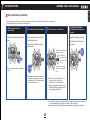
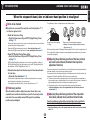
TROUBLESHOOTING ASTRON 8X82 GPS SOLAR CONTENTS 7 How to manually set the time • When using the watch again under a condition in which the watch is able to receive GPS signals, receive GPS signals to set the time. • When adjusting the time, the date will be accordingly adjusted. 1 Pull out the crown to the second click The small second hand stops at that place. 2 Press Button A and then release it 3 Turn the crown to set the time The second hand moves to stop at the 0-second position. Operation has been completed. The watch resumes its normal movement. The watch enters the manual time setting mode. 0 1 2 Turn the crown clockwise to advance the time. Turn quickly to move continuously. Turn again to stop moving. Pull the crown to the second click If the stopwatch is being used, it will be reset. 4 Push the crown back in (simultaneously with a time signal) Push back in 0 1 2 Turn the crown counter clockwise to set back the time. Button A When the watch enters the manual time setting mode, the reception result will be displayed as “N,” since the reception results data will be lost. When it has moved continuously for 12 hours worth, it will stop at once. Turn the crown to continue setting. The point in which the date changes is at 0:00 AM (12:00 PM). Set the time taking into consideration AM or PM. Even if GPS signals cannot be received, the watch can be used with the same accuracy as a normal quartz watch. (at loss/gain ±15 seconds per month on average) If the watch receives GPS signals after manual time setting, it displays the received time. 43