1
USB Record
USB RECORD - DIGITAL/FREEVIEW MODE
USB RECORD – DIGITAL/FREEVIEW MODE
Built into this television is a USB record facility. This function is available in Digital/Freeview mode when
used in conjunction with a compatible USB memory stick or USB Hard drive. The benefits of this are as
follows:
• Pause live TV and then playback, fast forward and rewind (up to live TV)
• One button record, if you decide you want to record the current programme
• Easy programmable recording from the 7 day TV Guide
• Record TV and watch/listen back on your computer/laptop
Due to the nature of the product, it is necessary to use a high speed USB memory stick (as the TV reads
from and writes to the memory stick at the same time, some memory sticks may not be suitable)
You can purchase high speed memory sticks from some computer stores, alternatively, we have a selection
of tested and compatible memory sticks available to purchase directly from the helpline/web site.
Minimum Specification - USB Memory Stick
Read Speed
20 MB/s (Mega Byte Per Second)
Write Speed
6 MB/s (Mega Byte Per Second)
If you wish to use a USB portable hard drive larger than 32GB, please refer to the FAQ section at the rear
of this user guide.
Pause Live TV (Time Shift)
Pausing Live TV is very simple.
- Press the play/pause button and the television will pause and the live
content will be recorded. To resume watching press play/pause again.
- Press fast forward to go forward in a recording (i.e. to skip adverts)
- Press fast rewind to go back in a recording (i.e. if you fast forwarded too
far)
Tip: When you switch the TV to standby or change channel the Time Shift memory is wiped. To restart
time shift you must press play/pause button.
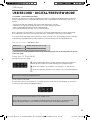
One Button Record
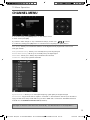
At any point in time you may decide to record the current channel that you are watching. To do this you
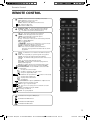
need to press the red button highlighted below.
Tip: This television contains one TV tuner, therefore it can only record the channel you are watching or
record one channel while the television is in standby mode.
Note: USB record function is only avilable in Digital/Freeview TV mode. Due to copyright laws and
illegal copying/recording it is not possible to record to/from any other input/output source.
29
User Guide - Blaupunkt - 32-147I-GB-5B-HBKUP - 32-147I-GB-5B-HBCDUP - BLA-MAN-0177.indd Sec1:29
12/11/2013 4:04:35 PM