1
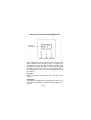
To change the “Set Point” (i.e. temperature requested), press
and hold the “SET” key and at the same time press “+” or “-”
to select the temperature setting. The display will show the
“Set Point” until the “SET” button is released. The display will
then show the ambient temperature.
When the DigiMax 210 instructs your heating system to switch
on, a small flame symbol appears at the bottom right of the
display.
3) Installation :
DigiMax 210 Technical Data
Temperature Range :
Differential :
Ambient temperature :
Power Supply :
Battery Life :
Maintenance :
RF range :
5°C to 35°C in 1°C steps
16°C to 35°C selectable
<1°C at 4K per Hour
Operating 0°C to 45°C
2 type AA 1.5 v alkaline cells
2 years Typical
no user maintenance required
30 meters
Please read all installation instructions before proceeding.
The RF DigiMax 210 works with batteries. It does not need
any wire. If you wish it to replace an old cable thermostat,
isolate and secure the old wires, which are useless now. Do
not forget to cut the power when you take off the old thermostat.
Page 3