1
B E F O R E O P E R AT I N G
• Before operating your new microwave oven make
sure you read and understand this operation manual
completely.
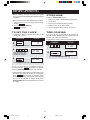
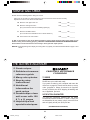
STOP/CLEAR
Touch the STOP/CLEAR pad to:
1. Erase if you make a mistake during programming.
2. Cancel timer.
3. Stop the oven temporarily during cooking.
4. Return the time of day to the display.
5. Cancel a program during cooking, touch twice.
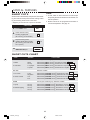
• Before the oven can be used, follow these procedures:
1. Plug in the oven. The oven display will then begin
flashing 8 8 : 8 8 .
2. Touch the STOP/CLEAR pad.
:
will appear.
3. Set clock.
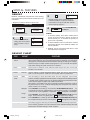
TO SET THE CLOCK
TIME COOKING
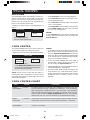
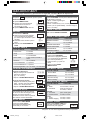
• Suppose you want to enter the correct time of day
12:30 (A.M. or P.M.).
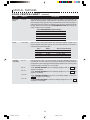
Your oven can be programmed for 99 minutes 99
seconds (99.99). Always enter the seconds after the
minutes, even if they are both zeros.
• Suppose you want to cook for 5 minutes at 100%.
PROCEDURE
1
D I S P L AY
TIMER
CLOCK
PROCEDURE
: 0
1
Touch TIMER/CLOCK pad.
5
0
0
Enter cooking time.
2 1 2 3 0
12:30
Enter the correct time
of day by touching the
numbers in sequence.
2
START
MINUTE PLUS
D I S P L AY
15.00
15.00
COOK DEFROST
Touch START/MINUTE PLUS pad.
3
TIMER
CLOCK
12:30
Touch TIMER/CLOCK pad again.
This is a 12 hour clock. If you attempt to enter an
incorrect clock time, ERROR will appear in the display.
Touch the STOP/CLEAR pad and re-enter the time.
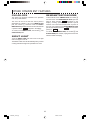
• If the electrical power supply to your microwave oven
should be interrupted, the display will intermittently
show 8 8 : 8 8 after the power is reinstated. If this
occurs during cooking, the program will be erased.
The time of day will also be erased. Simply touch
STOP/CLEAR pad and reset the clock for the correct
time of day.
8
1.408JK/W_376 24 pgs
8
2/18/04, 2:29 PM