1
Setting External Hostname
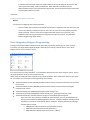
Under the ‘File’ menu choose ‘System Properties’. On the Android/iOS/Virtual Panel tab, find the ‘Remote Access’
section. Enter the hostname provided by your DNS account. You can also enter the IP address directly but we do
not recommend that.
Setting External Gateway
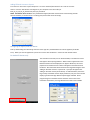
If you have more than one XP series processor in your file, you can
designate which processor will act as the gateway for Apple®
iOS/Android™ communications.
NOTE: All RTiPanel licenses should be on the same XP processor.
Troubleshooting
Here is a list of the top reasons the RTiPanel is not loading/functioning:
1.
2.
3.
4.
5.
XP-6/XP-8 control processor needs the latest firmware installed.
Download firmware: http://www.rticorp.com/dealers/downloads.html#firmware
XP-8 Control Processor needs an SD Flash memory card installed. - The SD card provides additional
file space needed to store RTiPanel data files.
NOTE: It must be an SD card no larger than 2GB and formatted as Fat or Fat32. Flash memory cards
with more memory, are actually considered SDHC and will not work.
Apple® iOS/Android™ device needs to be rebooted. – Reset power on device using power switch.
RTiPanel needs to be reset or “Reconfigured”. – See instructions on page 6 of this guide.
Verify the Apple® iOS/Android™ device in your system file matches the actual device you have. - The
programming for each device type is specific to that type and cannot be downloaded into another
type. For example you cannot download iPad system file into an iPhone.
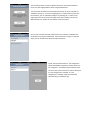
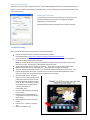
iOS5 downloading issue – RTiPanel
appears to load or loading progress bar
jumps/hops across the screen and the
RTiPanel app shows up either blank or
not at all. This is corrected by “closing”
the RTiPanel app in the Apple device
“recently used apps” bar.
Follow these steps:
Press the iPad hard button to go back
to main screen.
Double tap the iPad hard button to
bring up the list of apps in the bottom
of the screen
Hold the RTiPanel button till it shows
the red “-“
Press the red “-“ button to close the
app.
Reopen the RTiPanel app.