1
2.5
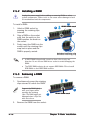
Installing a DIMM
The system motherboard comes with four Double Data Rate 2 (DDR2) Dual
Inline Memory Module (DIMM) sockets.
A DDR2 module has the same physical dimensions as a DDR DIMM but has a
240-pin footprint compared to the 184-pin DDR DIMM. DDR2 DIMMs are
notched differently to prevent installation on a DDR DIMM socket.
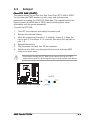
DIMM_B2
DIMM_B1
DIMM_A2
®
DIMM_A1
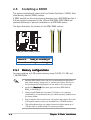
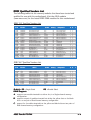
The figure illustrates the location of the DDR2 DIMM sockets.
240-pin DDR2 DIMM sockets
Channel
Sockets
Channel A
DIMM_A1 and DIMM_A2
Channel B
DIMM_B1 and DIMM_B2
2.5.1
Memory configurations
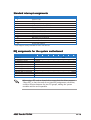
You may install up to 4 GB system memory using 256 MB, 512 MB, and
1 GB DDR DIMMs.
2-8
•
Installing DDR DIMMS other than the recommended configurations
may cause memory sizing error or system boot failure. Use any of
the recommended configurations in the table on the next page.
•
Install only i d e n t i c a l (the same type and size) DDR DIMM in
DIMM_A and DIMM_B.
•
Always install DIMMs with the same CAS latency. For optimum
compatibility, we recommend that you obtain memory modules from
the same vendor.
•
Due to chipset resource allocation, the system may detect less than
4 GB system memory when you installed four 1 GB DDR memory.
•
This motherboard does not support memory modules made up of
128 Mb chips or double-sided x16 memory modules.
Chapter 2: Basic installation