1
MITEL
NuPoint Unified Messenger
Messaging User Guide
Release 3.0
NOTICE
The information contained in this document is believed to be accurate in all respects but is not warranted
by Mitel Networks™ Corporation (MITEL®). The information is subject to change without notice and should
not be construed in any way as a commitment by Mitel or any of its affiliates or subsidiaries. Mitel and its
affiliates and subsidiaries assume no responsibility for any errors or omissions in this document. Revisions
of this document or new editions of it may be issued to incorporate such changes.
No part of this document can be reproduced or transmitted in any form or by any means - electronic or
mechanical - for any purpose without written permission from Mitel Networks Corporation.
Trademarks
Mitel and NuPoint Messenger are trademarks of Mitel Networks Corporation.
Microsoft Outlook is a trademark of Microsoft Corporation.
Other product names mentioned in this document may be trademarks of their respective companies and
are hereby acknowledged.
Mitel NuPoint Unified Messenger
Messaging User Guide
Release 3.0
December 2008
®,™ Trademark of Mitel Networks Corporation
© Copyright 2008, Mitel Networks Corporation
All rights reserved
ii
Table of Contents
Introduction. . . . . . . . . . . . . . . . . . . . . . . . . . . . . . . . . . . . . . . . . . . . . . . . . . . . . . . . . . . . . . . . . . 1
About Your Voice Mail . . . . . . . . . . . . . . . . . . . . . . . . . . . . . . . . . . . . . . . . . . . . . . . . . . . . . . . . . 1
About This Document . . . . . . . . . . . . . . . . . . . . . . . . . . . . . . . . . . . . . . . . . . . . . . . . . . . . . . . . . 1
Your Telephone . . . . . . . . . . . . . . . . . . . . . . . . . . . . . . . . . . . . . . . . . . . . . . . . . . . . . . . . . . . . . . 1
Preparing to Access Your Mailbox . . . . . . . . . . . . . . . . . . . . . . . . . . . . . . . . . . . . . . . . . . . . . . . . 2
Accessing Your Mailbox . . . . . . . . . . . . . . . . . . . . . . . . . . . . . . . . . . . . . . . . . . . . . . . . . . . . . . . 3
Inside Your Company . . . . . . . . . . . . . . . . . . . . . . . . . . . . . . . . . . . . . . . . . . . . . . . . . . . . . . . . . 3
From your own extension . . . . . . . . . . . . . . . . . . . . . . . . . . . . . . . . . . . . . . . . . . . . . . . . . . . . 3
From another extension . . . . . . . . . . . . . . . . . . . . . . . . . . . . . . . . . . . . . . . . . . . . . . . . . . . . . 3
Outside Your Company . . . . . . . . . . . . . . . . . . . . . . . . . . . . . . . . . . . . . . . . . . . . . . . . . . . . . . . . 3
From an outside line . . . . . . . . . . . . . . . . . . . . . . . . . . . . . . . . . . . . . . . . . . . . . . . . . . . . . . . . 3
From an outside line to the automated receptionist . . . . . . . . . . . . . . . . . . . . . . . . . . . . . . . . 3
Setting Up Your Mailbox . . . . . . . . . . . . . . . . . . . . . . . . . . . . . . . . . . . . . . . . . . . . . . . . . . . . . . . 4
Menu Overview . . . . . . . . . . . . . . . . . . . . . . . . . . . . . . . . . . . . . . . . . . . . . . . . . . . . . . . . . . . . . . 4
Greetings . . . . . . . . . . . . . . . . . . . . . . . . . . . . . . . . . . . . . . . . . . . . . . . . . . . . . . . . . . . . . . . . . . . 4
Name . . . . . . . . . . . . . . . . . . . . . . . . . . . . . . . . . . . . . . . . . . . . . . . . . . . . . . . . . . . . . . . . . . . . . . 4
Passcode . . . . . . . . . . . . . . . . . . . . . . . . . . . . . . . . . . . . . . . . . . . . . . . . . . . . . . . . . . . . . . . . . . . 5
Playing Messages. . . . . . . . . . . . . . . . . . . . . . . . . . . . . . . . . . . . . . . . . . . . . . . . . . . . . . . . . . . . . 6
Accessing the Voice Mail and Email Menus . . . . . . . . . . . . . . . . . . . . . . . . . . . . . . . . . . . . . . . . 6
Playing Your Messages . . . . . . . . . . . . . . . . . . . . . . . . . . . . . . . . . . . . . . . . . . . . . . . . . . . . . . . . 6
While Listening to a Message . . . . . . . . . . . . . . . . . . . . . . . . . . . . . . . . . . . . . . . . . . . . . . . . . . . 7
When You Have Finished Listening to a Message . . . . . . . . . . . . . . . . . . . . . . . . . . . . . . . . . . . 7
Making Messages . . . . . . . . . . . . . . . . . . . . . . . . . . . . . . . . . . . . . . . . . . . . . . . . . . . . . . . . . . . . . 9
Making a Voice Message . . . . . . . . . . . . . . . . . . . . . . . . . . . . . . . . . . . . . . . . . . . . . . . . . . . . . . . 9
Recording a voice message . . . . . . . . . . . . . . . . . . . . . . . . . . . . . . . . . . . . . . . . . . . . . . . . . . 9
Sending a message when you have finished recording . . . . . . . . . . . . . . . . . . . . . . . . . . . . . 9
User Options . . . . . . . . . . . . . . . . . . . . . . . . . . . . . . . . . . . . . . . . . . . . . . . . . . . . . . . . . . . . . . . . 11
Accessing User Options and User Tutorial . . . . . . . . . . . . . . . . . . . . . . . . . . . . . . . . . . . . . . . . 11
Greetings, Name and Passcode . . . . . . . . . . . . . . . . . . . . . . . . . . . . . . . . . . . . . . . . . . . . . . . . 11
Distribution Lists . . . . . . . . . . . . . . . . . . . . . . . . . . . . . . . . . . . . . . . . . . . . . . . . . . . . . . . . . . . . 12
Creating or modifying a distribution list . . . . . . . . . . . . . . . . . . . . . . . . . . . . . . . . . . . . . . . . . 12
Using a distribution list . . . . . . . . . . . . . . . . . . . . . . . . . . . . . . . . . . . . . . . . . . . . . . . . . . . . . 12
Call Schedule Options . . . . . . . . . . . . . . . . . . . . . . . . . . . . . . . . . . . . . . . . . . . . . . . . . . . . . . . . 12
Record-A-Call Optional Feature . . . . . . . . . . . . . . . . . . . . . . . . . . . . . . . . . . . . . . . . . . . . . . . . 13
Recording while on a Two-Party Call . . . . . . . . . . . . . . . . . . . . . . . . . . . . . . . . . . . . . . . . . . . . . 13
iii
Messaging User Guide
Recording using softkeys . . . . . . . . . . . . . . . . . . . . . . . . . . . . . . . . . . . . . . . . . . . . . . . . . . . 13
Recording using hard keys . . . . . . . . . . . . . . . . . . . . . . . . . . . . . . . . . . . . . . . . . . . . . . . . . . 14
Placing a call on hold while recording . . . . . . . . . . . . . . . . . . . . . . . . . . . . . . . . . . . . . . . . . . 14
Listening to a Recording . . . . . . . . . . . . . . . . . . . . . . . . . . . . . . . . . . . . . . . . . . . . . . . . . . . . . . 14
Fax Optional Feature . . . . . . . . . . . . . . . . . . . . . . . . . . . . . . . . . . . . . . . . . . . . . . . . . . . . . . . . . 15
Fax Delivery Options . . . . . . . . . . . . . . . . . . . . . . . . . . . . . . . . . . . . . . . . . . . . . . . . . . . . . . . . . 15
Playing and Printing Fax Messages . . . . . . . . . . . . . . . . . . . . . . . . . . . . . . . . . . . . . . . . . . . . . . 15
From a Telephone . . . . . . . . . . . . . . . . . . . . . . . . . . . . . . . . . . . . . . . . . . . . . . . . . . . . . . . . 15
From a Fax Phone . . . . . . . . . . . . . . . . . . . . . . . . . . . . . . . . . . . . . . . . . . . . . . . . . . . . . . . . 16
When You Have Finished Listening to a Fax Message . . . . . . . . . . . . . . . . . . . . . . . . . . . . . . . 16
Making a Fax Message (Without Voice) . . . . . . . . . . . . . . . . . . . . . . . . . . . . . . . . . . . . . . . . . . 16
From Your Company Fax System . . . . . . . . . . . . . . . . . . . . . . . . . . . . . . . . . . . . . . . . . . . . 17
From Your Own Mailbox . . . . . . . . . . . . . . . . . . . . . . . . . . . . . . . . . . . . . . . . . . . . . . . . . . . . 17
Making a Fax Message (With Voice) . . . . . . . . . . . . . . . . . . . . . . . . . . . . . . . . . . . . . . . . . . . . . 18
From Your Company Fax System . . . . . . . . . . . . . . . . . . . . . . . . . . . . . . . . . . . . . . . . . . . . 18
From Your Own Mailbox . . . . . . . . . . . . . . . . . . . . . . . . . . . . . . . . . . . . . . . . . . . . . . . . . . . . 18
Using Your PC for Fax Messages . . . . . . . . . . . . . . . . . . . . . . . . . . . . . . . . . . . . . . . . . . . . . . . 19
Downloading and installing Fax Printer . . . . . . . . . . . . . . . . . . . . . . . . . . . . . . . . . . . . . . . . . . . 19
To download and install the Fax Printer driver: . . . . . . . . . . . . . . . . . . . . . . . . . . . . . . . . . . 19
Sending a Fax . . . . . . . . . . . . . . . . . . . . . . . . . . . . . . . . . . . . . . . . . . . . . . . . . . . . . . . . . . . . . . 20
To Send a Fax from the Web View interface: . . . . . . . . . . . . . . . . . . . . . . . . . . . . . . . . . . . . 20
To Send a Fax from the NuPoint Fax Printer: . . . . . . . . . . . . . . . . . . . . . . . . . . . . . . . . . . . . 20
Viewing and Forwarding Fax Messages . . . . . . . . . . . . . . . . . . . . . . . . . . . . . . . . . . . . . . . . . . 22
To View a Fax Message: . . . . . . . . . . . . . . . . . . . . . . . . . . . . . . . . . . . . . . . . . . . . . . . . . . . 22
To Forward a Fax Message: . . . . . . . . . . . . . . . . . . . . . . . . . . . . . . . . . . . . . . . . . . . . . . . . . 22
Using Your PC for Voice Messages . . . . . . . . . . . . . . . . . . . . . . . . . . . . . . . . . . . . . . . . . . . . . 23
Install the Outlook Client Plug-in . . . . . . . . . . . . . . . . . . . . . . . . . . . . . . . . . . . . . . . . . . . . . . . . 23
Enable Additional Outlook Plug-in Users on a PC . . . . . . . . . . . . . . . . . . . . . . . . . . . . . . . . . . . 25
Set Up Message Playback . . . . . . . . . . . . . . . . . . . . . . . . . . . . . . . . . . . . . . . . . . . . . . . . . . . . . 25
Configure Access to the Unified Messaging Profile . . . . . . . . . . . . . . . . . . . . . . . . . . . . . . . . . . 26
Unified Messaging Toolbar . . . . . . . . . . . . . . . . . . . . . . . . . . . . . . . . . . . . . . . . . . . . . . . . . . . . 26
QuickPlay Toolbar . . . . . . . . . . . . . . . . . . . . . . . . . . . . . . . . . . . . . . . . . . . . . . . . . . . . . . . . . . . 27
Play a Voice Message in Outlook . . . . . . . . . . . . . . . . . . . . . . . . . . . . . . . . . . . . . . . . . . . . . . . 28
Reply to a Voice Message in Outlook . . . . . . . . . . . . . . . . . . . . . . . . . . . . . . . . . . . . . . . . . . . . 28
Forward a Voice Message in Outlook . . . . . . . . . . . . . . . . . . . . . . . . . . . . . . . . . . . . . . . . . . . . 29
Send a New Voice Message in Outlook . . . . . . . . . . . . . . . . . . . . . . . . . . . . . . . . . . . . . . . . . . . 29
Navigate Voice Messages in Outlook . . . . . . . . . . . . . . . . . . . . . . . . . . . . . . . . . . . . . . . . . . . . 29
iv
Table of Contents
Launch Web View from Outlook . . . . . . . . . . . . . . . . . . . . . . . . . . . . . . . . . . . . . . . . . . . . . . . . 29
Text-to-Speech (TTS) Optional Feature . . . . . . . . . . . . . . . . . . . . . . . . . . . . . . . . . . . . . . . . . . 30
Playing a Text-to-Speech Message . . . . . . . . . . . . . . . . . . . . . . . . . . . . . . . . . . . . . . . . . . . . . . 31
Speech Auto Attendant Optional Feature . . . . . . . . . . . . . . . . . . . . . . . . . . . . . . . . . . . . . . . . 32
Speaking Tips . . . . . . . . . . . . . . . . . . . . . . . . . . . . . . . . . . . . . . . . . . . . . . . . . . . . . . . . . . . . . . 33
Universal Voice Commands . . . . . . . . . . . . . . . . . . . . . . . . . . . . . . . . . . . . . . . . . . . . . . . . . . . 33
Making Calls . . . . . . . . . . . . . . . . . . . . . . . . . . . . . . . . . . . . . . . . . . . . . . . . . . . . . . . . . . . . . . . 34
Placing a Call with Voice Commands . . . . . . . . . . . . . . . . . . . . . . . . . . . . . . . . . . . . . . . . . . 34
Placing a Call with Digit Dialing . . . . . . . . . . . . . . . . . . . . . . . . . . . . . . . . . . . . . . . . . . . . . . 34
Cancelling a Call . . . . . . . . . . . . . . . . . . . . . . . . . . . . . . . . . . . . . . . . . . . . . . . . . . . . . . . . . . 35
Calling the Operator . . . . . . . . . . . . . . . . . . . . . . . . . . . . . . . . . . . . . . . . . . . . . . . . . . . . . . . 35
v
Messaging User Guide
vi
Introduction
Introduction
About Your Voice Mail
Mitel® NuPoint Unified Messenger™ allows you to manage your voice mail, Record-A-Call
(RAC), fax, and Microsoft® Outlook® email messages from a touch-tone phone as well as from
your PC.
Voice mail, Record-A-Call, fax, and email are all "messages" that are accessible through your
voice mailbox and that you access using a menu system. The Voice Mail menu provides access
to most of the voice mailbox features and options including fax messages. Any voice mail user
can access this menu. The Email menu only provides access to emails and is available only
to users with the Advanced Unified Messaging feature with Text-to-Speech option.
In addition to accessing your messages over the phone, you can now play and manage your
voice messages from your Microsoft Outlook inbox. You install a plug-in player that allows you
to play voice messages from your email inbox over your PC speakers or over the phone. To
use this feature, you must have the Advanced Unified Messaging feature. For more information,
see “Using Your PC for Fax Messages” on page 19.
A Speech Auto Attendant (SAA) is also available to place calls to people by using voice
commands. The SAA is a speech-enabled application that allows you to place calls to people
quickly and efficiently by speaking their names. In addition to placing calls by name, you can
say a department name or telephone number. A tutorial introduces you to the system features,
and voice-based help is available to answer questions. See “Speech Auto Attendant Optional
Feature” on page 32 for more information.
Note: Depending on how your mailbox is configured, you may not have all of the options
described in this guide. Refer to your System Administrator for more information.
About This Document
This guide provides instructions on the functionality of the Mitel® telephone user interface (TUI),
Mitel Outlook Client Plug-in, and Speech Auto Attendant. If you use another supported email
client, please refer to the Web View Help for more information. Also refer to the NuPoint Unified
Messenger Mitel TUI Quick Reference Guide on http://edocs.mitel.com/UG/Index.html.
Your Telephone
Before using the voice mail features of your system, familiarize yourself with your telephone.
•
Message key - Used to call the NP-UM Voice system and access your mailbox.
•
Keypad - Used to make menu selections within the voice mail system.
•
Message light - Used to indicate when you have new voice messages in your mailbox.
1
Messaging User Guide
•
Softkeys - Used to select many of the voice mail menu options. To select a menu option
that appears in the telephone display, you can press either the associated context-sensitive
softkey that appears in your phone’s digital display or the keypad digit for the option.
Note: The softkey names used in this guide may differ slightly depending on your
telephone. For example, the Del (delete) softkey may appear as the Discard softkey, on
specific phones.
Preparing to Access Your Mailbox
Before accessing your mailbox, be sure to get the following information from your System
Administrator:
•
the NP-UM Receptionist number (optional)
•
the NP-UM Voice system access extension
•
your mailbox number
•
your default passcode.
If you have any problems or questions about procedures, consult your System Administrator.
2
Accessing Your Mailbox
Accessing Your Mailbox
All of your voice messages will reside in your personal "mailbox", which is passcode protected.
Your System Administrator will assign you a temporary passcode to use the first time you access
your mailbox. How you log into your mailbox will depend on whether you’re calling from inside
or outside your company.
Inside Your Company
From your own extension
1. Dial the internal NP-UM Voice access number.
2. Enter your passcode when prompted.
From another extension
1. Dial the internal NP-UM Voice access number.
2. Press the
key when prompted to enter a passcode
3. Enter your mailbox number followed by the
key.
4. Enter your passcode when prompted.
Outside Your Company
From an outside line
1. Dial the external NP-UM Voice access number.
2. Enter your mailbox number followed by the
key.
3. Enter your passcode when prompted.
From an outside line to the automated receptionist
1. Dial the NP-UM Receptionist number.
2. Press the
key to access the NP-UM Voice system.
3. Enter your mailbox number followed by the
key.
4. Enter your passcode when prompted.
3
Messaging User Guide
Setting Up Your Mailbox
When you access your mailbox for the first time, a user tutorial automatically activates. This
tutorial guides you through your first mailbox session, explains how to record a greeting and
your name, and prompts you to change your temporary passcode.
Tip: After playing or sending messages, the system may return you to a previous menu
with different options than the menu you were just using.
Menu Overview
For an illustration of the menu overview, refer to the NuPoint Unified Messenger Mitel TUI Quick
Reference Guide (http://edocs.mitel.com/UG/Index.html).
Greetings
After opening your mailbox, you will be asked to record one or more greetings that callers will
hear when they call your mailbox. For example, you may record one greeting that callers hear
when your line is busy (such as, "I’m currently on the phone and unable to take your call") and
a different one when you’re not at your phone (such as, "I’m currently away from my desk").
If your System Administrator has enabled the Extended Absence Greeting feature for your
mailbox, you can also record an Extended Absence Greeting. This greeting allows you to inform
callers of an extended absence. Callers cannot press a key to skip the greeting. At the end of
the greeting, callers can either transfer to the attendant or leave a message.
Note: Once recorded, the Extended Absence Greeting is effectively enabled. This means
that all callers being forwarded to your mailbox will hear the extended absence greeting.
Once you log into your voicemail, you will be prompted to press 1 to retain your Extended
Absence Greeting, or to press 2 to disable the Extended Absence Greeting.
If your System Administrator has disabled message delivery for the Extended Absence
Greeting, then after the greeting, callers will only be able to transfer to the attendant. See
“Greetings, Name and Passcode” on page 11.
Name
You will be prompted to record your name so that the system can:
4
•
Address you when you call into the system (for example, "Hello, Jane Smith").
•
Inform other users when a message comes from you (for example, "4:45 p.m., from Jane
Smith").
•
State your name to other users when they address messages to your mailbox (for example,
"Jane Smith").
Setting Up Your Mailbox
Passcode
You will always be prompted for your passcode before accessing your mailbox. The first time
you access your mailbox, you will use the temporary passcode assigned by the System
Administrator. During the tutorial, you will be prompted to change your passcode to a number
containing 4 to 10 digits. Define a passcode that you can easily remember, but do not select
an obvious code like "1234".
Note: Passcodes are required only if you wish to protect your privacy; you can choose
not to have a passcode by pressing 0000 when prompted during the tutorial.
When your mailbox is set up, you’re ready to start using the NP-UM Voice features.
5
Messaging User Guide
Playing Messages
When you access your mailbox to retrieve your messages, the system tells you how many
messages you have ("You have 2 urgent messages and 2 unplayed messages.") For Advanced
Unified Messaging (UM) users with the Text-to-Speech (TTS) option, the system tells you how
many voice mails and emails you have ("You have 2 unplayed messages, 1 saved message,
3 unplayed emails, and 1 saved email).
You access voice mails and emails from separate menus. After the message summary,
Advanced UM with TTS users can access either the voice mail or the email menu. You can exit
either menu to access the other one.
Note: Advanced UM users who do not have the TTS option cannot access the email
menu.
Accessing the Voice Mail and Email Menus
After you access your mailbox
•
If you are a regular voice mail user, you are already in the Voice Mail menu.
•
If you have the Advanced UM with TTS feature, you press
menu or
to access the Email menu.
to access the Voice Mail
Playing Your Messages
After accessing either the Voice Mail menu or the Email menu, press
•
or the Play (or Play Message) softkey. Your urgent messages will automatically be
played first. Then, depending on your mailbox settings, you may have the option to play
unplayed or saved messages first; otherwise, your unplayed messages will be played first.
Note: If the date and time option is enabled on your voice mail system, the system will
automatically play this information at the beginning of each message. Refer to your
System Administrator for more information.
6
Playing Messages
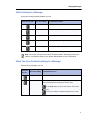
While Listening to a Message
At any time during message playback you can
Press this key, OR
Press this softkey
To perform this action
More then Pause
Pause the message for 30 seconds.
←
Move back five seconds within the message.
Æ
Move forward five seconds within the message.
Skip
Skip to your next message.
More then Play
Return to the beginning of your previous message.
Note: You may not have access to all of the options above, depending on how your
mailbox is configured. Refer to your System Administrator for more information.
When You Have Finished Listening to a Message
At the end of a message, you can
Press this
key, OR
Press this softkey To perform this action
Play (or Restart)
Play the message again.
Answer
Answer the person who sent the message.
When you are finished recording your answer, press
or the Send softkey to send it and continue your session.
Then press
to send your answer to additional mailboxes if you wish.
7
Messaging User Guide
Press this
key, OR
Press this softkey To perform this action
Give
Give the message to another mailbox, distribution list, or off-system
telephone number.
The system will also give you the opportunity to record additional
comments before sending the message to someone else.
When you have added your comments, press
or the Send (or Exit) softkey and continue your session.
Then press
to give the message to additional mailboxes if you wish.
Keep
Keep the message.
Kept messages can be accessed only after you have skipped
through your unplayed messages and message receipt queues.
Del (or Discard)
Discard the message.
Note: If you accidentally discard a message, you can retrieve it by immediately pressing
or the Undelete softkey. If you press any key other than the
key immediately
after discarding the message, you will not be able to retrieve the discarded message.
Note: You may not have access to all of the options above, depending on how your
mailbox is configured. Refer to your System Administrator for more information.
8
Making Messages
Making Messages
To make a message, you must first access your mailbox by calling the system access number
and entering your passcode. You can then make a voice message before or after listening to
any unplayed messages in your mailbox. Remember that you can address your messages to
other mailboxes, distribution lists, and off-system telephone numbers.
Making a Voice Message
Recording a voice message
1. Press
or the Make Message softkey to make a message.
2. Enter the recipient's number or, to dial by name, press the specific key assigned to this
feature on your voice mail system, and then dial the recipient's last name and first name
until the system recognizes the name.
Note: The system will automatically announce the specific key to press to dial by name.
This is a configurable feature and thus the key to press will vary for each voice mail
system.
3. After the system confirms the recipient's name, enter the names or numbers of any other
intended recipients (for example, you may wish to send a single message to all members
of a certain committee, telling them the time and place of the next committee meeting).
4. When you have finished addressing your message, press
or the Record softkey.
5. Begin recording your message after the tone. (You may press
to pause during
recording and then any key to resume recording, or you may use the Pause/Resume
softkeys.)
Sending a message when you have finished recording
Once you have finished recording, you may choose to send, review, modify, cancel, or specify
special delivery for your voice message, by selecting from the following options:
Press this
key, OR
Press this
softkey
To perform this action
Send
Send the message and exit to the main menu.
Append
Add to the recording.
Del
Delete the recording and start over.
9
Messaging User Guide
Press this
key, OR
Press this
softkey
To perform this action
Review
Replay the message.
End Record
Access message addressing options such as urgent delivery, future
delivery, confidential, and return receipt.
Once you have selected from these options, press
or the Send (or Exit) softkey to send your message and exit
to the main menu.
Note: If you regularly send messages to multiple users, consider creating personal
distribution lists to make addressing your messages even easier (see “Distribution Lists”
on page 12).
10
User Options
User Options
The user options menu allows you to listen to the user tutorial, change your greetings, record
your name, and define your password, create voice mail distribution lists, and select call
scheduling options.
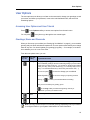
Accessing User Options and User Tutorial
Press
or the Options softkey to access user options from the main menu.
You can press
at any time to go through the user tutorial again.
Greetings, Name and Passcode
When you first set up your mailbox (see “Setting Up Your Mailbox” on page 4), you recorded a
greeting and your name and selected a passcode. The user options menu allows you to change
these at any time. You should update your greeting(s) regularly — for example, to let callers
know whether you're in or out of the office.
From the user options menu, you can
Press this Press this
key, OR
Softkey
Greetings
To perform this action
Change your greeting(s). You can record a Primary greeting and one or
more Conditional greetings. Record Conditional greetings you want callers
to hear when your line is busy (e.g., "I’m currently on the phone and unable
to take your call"), when you’re not there (e.g., "I’m currently away from my
desk"), or for extended absences ("I will be away until October 15th,...").
You can now press
personal greeting,
greeting, or
to record or change your conditional
to record or change your primary personal
to enable your Extended Absence Greeting.
After you have recorded your greeting, press
or the Chng softkey to select which greeting—Primary or
Conditional—you want your callers to hear.
Change
Name
Re-record your name.
Passcode
Change your passcode.
Note: You may not have access to Conditional greetings, depending on how your mailbox
is configured. Refer to your System Administrator for more information.
11
Messaging User Guide
Distribution Lists
A distribution list allows you to record a single message and then send it to a large number of
people without addressing them each individually. You can use distribution lists whenever you
make a message, or give a message to someone else.
Creating or modifying a distribution list
1. Press
or the Dist Lists softkey from the user options menu.
2. Enter the number of the distribution list, ensuring the first digit is always zero (0).
3. Press
to record a name for the distribution list (e.g., "product planning committee").
The system will play this name each time you address messages to this distribution list.
4. Press
to add members to the list; press
to drop members.
5. Enter the numbers or names of users you wish to add or drop.
6. Press
if you would like the system to play back the list of members you have selected.
7. Press
to exit to the main menu.
Note: All personal distribution lists must begin with the number 0.
Using a distribution list
•
Instead of entering a mailbox number, enter the number of the distribution list you want to
use. The system reads back the number of the distribution list.
Call Schedule Options
12
•
NP-UM WakeUp allows you to program NP-UM Voice to call you at a specific telephone
number at a specific time. You can schedule wakeup calls for Monday through Friday,
weekends, every day, or as needed.
•
Message Delivery allows you to define a schedule so that if a message arrives in your
mailbox, NP-UM Voice will call you at a specific telephone number at a specific time so that
you can retrieve the message.
•
Paging allows you to define a schedule so that when a message arrives in your mailbox,
NP-UM Voice notifies your pager.
•
Future Delivery Audit allows you to audit any message scheduled for future delivery. You
can schedule delivery of any message up to 365 days in the future using the message
addressing options menu (see “Sending a message when you have finished recording” on
page 9).
Record-A-Call Optional Feature
Record-A-Call Optional Feature
The Record A Call feature allows you to use your NP-UM Voice system to record your telephone
conversations.
Note: You may be required by law to inform the other party that you are recording the
conversation. For specific instructions, consult your System Administrator.
Recording while on a Two-Party Call
Your system may be programmed to automatically begin recording external calls when you or
the other party answers. Contact your System Administrator for details.
If your system does not automatically record conversations, you must press a Record key to
begin recording while you are on a two-party call. What key you press depends on whether the
Softkey feature is available on your phone. The following phones support softkeys:
•
Superset 4150
•
5140 IP
•
5240 IP
Recording using softkeys
•
To begin recording while you are on a two-party call, press the Record softkey that appears
on your phone’s digital display screen.
Pausing or resuming recording during a call
•
To pause the recording press the Pause softkey.
•
To resume recording after pausing, press the Resume softkey.
Stopping the recording
•
To stop the recording without saving the recorded conversation, press the Stop and Erase
softkeys.
•
To stop and save a recording, press the Stop and Save softkeys.
Note: Your administrator may configure your Record A Call settings to automatically
save a recorded conversation when you hang up the phone. If auto-save is enabled, you
can save the recorded call simply by hanging up the phone at the end of your
conversation.
13
Messaging User Guide
Recording using hard keys
•
To begin recording a call using hard keys, press the Record key that your System Administrator has programmed on your phone.
Note: Using hard keys with Record A Call, you can only start a recording session. Your
System Administrator must enable auto-save in order for your conversations to be saved
automatically when you hang up the phone. Consult your System Administrator for more
information.
Placing a call on hold while recording
•
Putting a call on hold during the recording saves the recording, and sends it to your mailbox.
•
Taking the call off hold starts a new recording session.
Note: Depending on system programming, hanging up, or pressing TRANS/CONF or a
line appearance key, may also save the recording. Consult your System Administrator
for details.
Listening to a Recording
To listen to a recorded conversation after the call has ended
1. Lift your handset.
2. Access your voice mailbox.
3. Follow the prompts to retrieve the recording, as you would to retrieve any regular voice
message.
14
Fax Optional Feature
Fax Optional Feature
The Fax feature allows you to manage fax messages that are sent to your mailbox, using the
TUI. You can retrieve unplayed fax messages, play a voice message that accompanies a fax,
send a fax to a fax machine, and deliver a fax (with or without a voice message) to another user.
Fax Delivery Options
You can access Fax delivery options from the User Options menu. From the Main menu, press
and then
to access the following Fax Delivery options:
Press this key
To perform this action
To send all unplayed fax messages in your mailbox to your default fax number.
To define a default fax delivery number. All your faxes will be automatically sent to
this number when you press
from while you are in the Fax delivery
menu.
To fax into your mailbox a cover page that will become your Personal Cover Page.
This page will be automatically included with all faxes that you send from your
mailbox.
From a fax phone
To toggle between enabling and disabling automatic fax delivery to your default fax
number. Automatic fax delivery immediately sends all fax messages that arrive in
your mailbox to your default fax number.
Playing and Printing Fax Messages
Fax messages are treated just like voice messages in your mailbox. When you access your
mailbox to retrieve messages, the system will first tell you how many messages you have, for
example, "You have 2 urgent messages and 4 unplayed messages with fax".)
From a Telephone
To play a fax message:
1. After accessing your mailbox, press
or the Play (or Play Message) softkey. Your
urgent messages will automatically be played first.
2. For any fax messages, the system will prompt you to press
From this menu, you can:
for fax delivery options.
15
Messaging User Guide
•
Press
to dial the number of a fax machine where you want the fax to be printed. Dial the
number when prompted.
•
The system will confirm the number. Press
to accept the number, or press
to dial a new number.
•
After you press
to accept the number, press
to that number, or press
to deliver the fax immediately
to schedule a time for future delivery.
3. If you have additional fax messages, you can send them to the same fax number you
entered for the first number simply by pressing
and then
.
Note: You can also use the fax delivery options under the User Options menu (refer to
the Mitel TUI Quick Reference Guide). Using this menu, you can set up a default fax
delivery number. After you program that number, you can simply press
delivery options (after playing the message with fax), and then press
for fax
to print your
fax message.
From a Fax Phone
To retrieve and print a fax message from a fax phone:
1. After accessing your mailbox, press
press
2. Press
or the Play (or Play Message) softkey, and then
to access the Fax Delivery Options menu.
to receive a fax message print out from that fax machine.
3. When prompted, press the Start button on the fax machine.
4. Once you receive the fax print-out, you can stay on the line to resume your mailbox session.
When You Have Finished Listening to a Fax Message
See “When You Have Finished Listening to a Message” on page 7.
Making a Fax Message (Without Voice)
You can send a fax message to a recipient’s mailbox, using a fax phone. You can send the
message directly from your company’s fax system or from your own mailbox. If you send a fax
from your company’s fax system, your name is not included in the message header; and if you
send a fax from your own mailbox, your name is included in the message header.
16
Fax Optional Feature
From Your Company Fax System
Note: Your name will not be included in the recipient’s message header.
1. From a fax phone, dial your company Fax system access number.
2. When you hear the system greeting, enter the recipient’s mailbox number, or to dial by
name, press the appropriate keys to dial the recipient’s last name followed by their first
name until the system recognizes the name.
3. You will hear the recipient’s personal greeting. At the tone, press the Start button on the
fax machine to send your fax.
4. After the fax has been sent, you can press
press
to mark the message urgent, or you can
to leave a message for another mailbox.
From Your Own Mailbox
Note: Your name will be included in the recipient’s message header.
1. Access your mailbox, and when you hear your own greeting, press
.
2. Enter your passcode.
3. Press
to make a message.
4. Enter the recipient’s mailbox number, or to dial by name, press the appropriate keys to dial
the recipient’s last name followed by their first name until the system recognizes the name.
5. Once the system confirms the recipient’s name, enter the names or numbers of any other
intended recipients.
6. When you are finished addressing your fax message, press
to leave a fax, and then
press the Start button on your fax machine to send your fax, or press
7. After the fax has been sent, you can press
for more options.
to send the message; or press
to
access message addressing options such as urgent delivery, future delivery, confidential,
and return receipt. Once you have selected from these options, press
to send
your message and exit to the main menu.
17
Messaging User Guide
Making a Fax Message (With Voice)
You can send a combined voice and fax message to a recipient’s mailbox, using a fax phone.
You can send the message directly from your company’s fax system or from your own mailbox.
If you send a fax from your company’s fax system, your name is not included in the message
header; and if you send a fax from your own mailbox, your name is included in the message
header.
From Your Company Fax System
Note: Your name will not be included in the recipient’s message header.
1. From a fax phone, dial your company’s Fax system access number.
2. When you hear the system greeting, enter the recipient’s mailbox number, or to dial by
name, press the appropriate keys to dial the recipient’s last name followed by their first
name until the system recognizes the name.
3. You will hear the recipient’s personal greeting. At the tone, record a voice message.
4. When you are finished recording your voice message, press the Start button on your fax
machine to send your fax.
5. After the fax has been sent, you can press
press
to mark the message urgent, or you can
to leave a message for another mailbox.
From Your Own Mailbox
Note: Your name will be included in the recipient’s message header.
1. From a fax phone, dial your company’s Fax system access number.
2. When you hear the system greeting, enter your own mailbox number.
3. When you hear your own greeting, press
.
4. Enter your passcode.
5. Press
to make a message, and then follow the instructions for sending a voice-only
message from your mailbox (including addressing).
6.
At the tone, record a voice message.
7. When you are finished recording, press
to leave a fax, and then press the Start button
on your fax machine to send your fax, or press
18
for more options.
Using Your PC for Fax Messages
Using Your PC for Fax Messages
You can also use your PC to manage fax messages. The Fax feature allows you to add the
Fax Printer driver to your Printers folder. Using Fax Printer, you can send faxes from any
application with a Print function.
Faxes can also be sent from the Web View interface. For information about sending faxes from
the Web View interface, refer to the Web View Help.
Note: Cover sheets must be in TIFF format.
Downloading and installing Fax Printer
To use the Fax Printer for fax messages, you must first download and install it from the Web
View interface.
To download and install the Fax Printer driver:
Note: To install the Fax Printer driver, you must have local administrator rights on the PC.
1. If you have Fax Printer previously installed, remove the application with Add/Remove
Programs in Control Panel:
- Click Start > Control Panel, and then open Add or Remove Programs.
- Select Mitel NuPoint Fax Printer Driver, and then click Change/Remove.
- Restart your computer once the removal has been completed.
2. Log in to the Web View interface and click on the Downloads tab.
3. Click on Download Fax Printer.
4. In the Security Warning window, click Run to run FaxPrinter.exe. The installation will start
automatically.
5. Click Next on each dialog. When prompted, accept the Terms of Use.
The Fax Printer driver is now installed.
19
Messaging User Guide
Sending a Fax
Faxes can be sent using the NuPoint Fax Printer using any software with a Print function.If you
wish, you can set up a Personal Cover Page (see Fax Delivery Options) or create Custom
Cover Pages. If you have a Personal Cover Page, it will be the default cover page for faxes
you send.
Any file in TIFF format can be used as a Custom Cover Page. You can save multiple Custom
Cover Pages to customize your faxes for their recipients.
To Send a Fax using the NuPoint Fax Printer:
Note: Before sending a fax for the first time, obtain the fully qualified domain name or
IP address of the NP-UM server from your System Administrator.
1. Open the document and select Print. In the print menu, select NuPoint Fax Printer from
the list of available printers.
OR
If NuPoint Fax Printer has been set up as your default printer, right click on the document
in Windows Explorer and select Print.
When the document is ready to be sent to the server, the NuPoint Fax Client window will
appear.
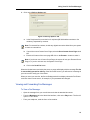
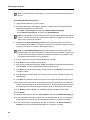
If you have never sent a fax before or the client could not connect to the server, the Server
Settings tab will display:
Figure 1: Server Settings Tab
Note: If your mailbox password changes, you will need to update the Server Settings
tab with the new password the next time you send a fax.
2. Enter your credentials to connect to the server.
20
a.
In the NuPoint Server field, enter the fully qualified domain name (FQDN) of the server.
b.
In the Mailbox field, enter your NP-UM mailbox number.
c.
In the Passcode field, enter your NP-UM mailbox passcode.
d.
Click Connect. The Status will update to Connected.
Using Your PC for Fax Messages
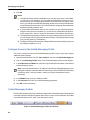
3. Click on the Delivery Options tab. .
Figure 2: Delivery Options Tab
a.
In the Recipients field, enter the list of recipients (NP-UM mailbox numbers or fax
numbers), separated by commas.
Note: For external fax numbers, include any digits that must be dialed from your system
to reach an external line.
b.
If you wish to use a Custom Cover Page, select the Use a Custom Cover Page check
box.
c.
Enter the full name of the cover page OR click on the Browse... button to select it
Note: If you do not use a Custom Cover Page, the server will use your Personal Cover
Page, or, if you do not have one, the System Cover Page.
d.
Click on the Send Fax button.
When the fax has been received by the server, a popup will display with the message The fax
is successfully queued for delivery. If the fax cannot be sent, you will receive a message in
your voice mail to notify you of the failure.
When you send your next fax, the Server Settings tab will not display unless the Fax Printer
could not connect to the server, for example, if your password has changed.
Viewing and Forwarding Fax Messages
To View a Fax Message:
•
Open the message from your e-mail inbox and view the attached document.
•
From the Messages tab in the Web View interface, click on the Play button. The fax will
open in a TIFF viewer.
•
From your telephone, send the fax to a fax machine.
21
Messaging User Guide
To Forward a Fax Message:
•
From the Messages tab in the Web View interface, click on the Forward Fax button to
forward the message as a fax.
OR
•
22
From the Messages tab in the Web View interface, click on the Forward button to forward
the message as an attachment to an e-mail.
Using Your PC for Voice Messages
Using Your PC for Voice Messages
You can install the Mitel Outlook Client Plug-in to use Microsoft Outlook 2007 to manage your
voice mails. The plug-in installs the Mitel Networks QuickPlay player and the Unified Messaging
toolbar in your Microsoft Outlook email client (see below). The QuickPlay player allows you to
use the phone or your PC speakers to listen to your voice messages, while the toolbar enables
you to reply to, forward, and manage your voice messages as well as create and send new
voice messages with either voice mail or email. The toolbar also enables you to launch the
Web View from Outlook.
Note: Microsoft Outlook has an Explorer and an Inspector window. The Explorer window
is the main window that displays the list of messages for the user, while the Inspector
window is the window that displays a message when it is opened.
There are four types of NP-UM messages supported by the Mitel Outlook Client Plug-in: voice
messages, confidential voice messages, Record-A-Call messages, and fax messages. Each
of these messages has unique icons to identify the specific message type.
Note: If a voicemail message is moved from the Inbox to a personal folder, the message
is deleted from the telephone user interface (TUI). If the message is then moved back
to the Inbox, it is deleted since the associated TUI message has been deleted. The
message may reside in the Deleted folder if the permanent delete configuration
parameter is disabled. See your System Administrator for more information.
You must be a NuPoint Unified Messenger Advanced Unified Messaging user to install and
use the Outlook Client Plug-in.
Notes:
1. You can reply to emails with email messages only.
2. The Outlook Client Plug-in requires Microsoft® Outlook 2000, XP, 2003, or 2007.
3. The plug-in works with the Microsoft® Windows 2000, XP, 2003, or Vista operating
systems. For Windows Vista, only the following versions are supported: Vista
Business, Vista Enterprise, and Vista Ultimate.
4. PC sound cards and PC speakers are optional since you can use the Call Me/Meet
Me feature to listen to messages.
Install the Outlook Client Plug-in
Note: Once you have installed the plug-in, Outlook takes slightly longer to open and
close. Avoid restarting Outlook immediately after closing it.
Before You Begin
Obtain the following information from your System Administrator before you begin this
procedure:
•
The location of the OutlookClientPlugin.exe file;
•
The NuPoint Unified Messenger platform fully qualified domain name (FQDN).
23
Messaging User Guide
Note: To install the Outlook Client Plug-in, you must have local administrator rights on
the PC.
To install the Outlook Client Plug-in
1. Close Microsoft Outlook if you have it open.
2. If you have the Outlook Client Plug-in previously installed, remove the application with
Add/Remove Programs in Control Panel:
- Click Start > Control Panel, and then open Add or Remove Programs.
- Select Outlook Client Plug-in, and then click Change/Remove.
Note: Prior to Release 12.0, the Outlook Client Plug-in was called "Multimedia Outlook
Plug-in". You may see this name under the Add or Remove Programs list if you have an
older version of the plug-in installed.
3. Navigate to the OutlookClientPlugin.exe file for the Outlook Client Plug-in, then double-click the file and click Run. You may have to click Run a second time if you get a security
warning. The Outlook Client Plug-in Setup window opens.
Note: The OutlookClientPlugin.exe file can be installed from either the CD or the
Downloads tab in the Web View interface. This tab may not be available to all users as
you need to have the Outlook Client Plug-in download enabled on your mailbox. See
your System Administrator for more information.
4. If you are asked to remove the existing application, click OK.
5. Click Next. The User Settings window opens.
6. Enter the fully qualified domain name (FQDN) of the NuPoint Unified Messenger platform,
and click Next. The Choose Destination Location window opens.
7. Click Next to accept the default setting for the location or click Browse to place the files
in another location.
8. Click Yes when the system asks you if it should create a folder. The Start Copying Files
window opens.
9. Click Next. The software installs, and then the User Profiles Information window opens.
10. Select the Logon User Names for the people using the PC who require the customized
Outlook security settings for the Outlook Client Plug-in. Enabling a user name will prevent
the appearance of security warnings for that user when the Outlook Plug-in is opened.
11. Click Enable, and then Close. The InstallShield Wizard Complete window opens.
12. Click Finish.
13. Open Microsoft Outlook, and click Tools, Options, and then the Unified Messaging tab.
14. In the Automatic Play section, select the type of automatic play for the voice messages.
These settings are optional. See “Set Up Message Playback” on page 25 for details.
15. In the Phone section, enter the phone number or extension in the Phone number or
extension field. See “Set Up Message Playback” on page 25 for details.
24
Using Your PC for Voice Messages
16. In the Unified Messaging Profile section, click Messaging Profile to enter your Mailbox
and Passcode numbers. These numbers let you access your Personal Web Page from
the Profile button on the Outlook plug-in toolbar and also provide identification for the
playback of your voice messages.
17. Click OK.
18. Click OK again.
Enable Additional Outlook Plug-in Users on a PC
You can enable additional Outlook Client Plug-in users on a PC where the plug-in is installed,
using an account with administrator privileges on that PC.
To enable additional user(s)
1. Log in to the client PC, using an account with administrator privileges on that PC.
2. Navigate to the following file: C:\Program Files\Mitel Networks\Outlook Client
Plug-in\EnableMOPonOutlookXP.exe.
Note: You can also navigate to this file from the Start menu. The path to the file is as
follows: Start>All Programs>Mitel>Outlook Client Plug-in>Outlook
Security>EnableMOPonOutlookXP.exe.
3. Open the EnableMOPonOutlookXP.exe file, select the new user(s) from the User Profiles
Information list, and then click Enabled.
Set Up Message Playback
You can set up your message playback to play messages when you open (double-click) the
message or when you highlight (single-click) the message in the inbox. The following procedure
enables you to set up both kinds of playback as well as configure message play over the phone
and through the PC speakers.
1. Open Microsoft Outlook, and click Tools, Options, and then the Unified Messaging tab.
2. In the Automatic Play section, select the type of automatic play for the voice messages.
- If you want the voice message to be played over the PC speakers or the phone when the
voice message file is opened (that is, after double-clicking the voice message in the Inbox),
click Auto-play when opening.
- If you want to automatically hear the voice message over the PC speakers when the voice
message is highlighted (that is, by a single click on the voice message in the Inbox), click
Auto-play when previewing.
3. In the Phone section, ensure that the phone number or extension is entered. If it is not
entered, you will only be able to listen to your voice messages via the Meet Me feature by
calling into your voicemail.
Note: The phone number or extension entered in this field is the one that will be used
by the Call Me feature to listen to voice mail messages and to record greetings and
distribution list names.
25
Messaging User Guide
4. Click OK.
Notes:
1. The Mitel QuickPlay toolbar is available so you can stop, play, pause, fast forward,
or review your voice messages. You can toggle the Playback Device button to on or
off and change your auto-play options with the "Auto-play when previewing" check
box. If you need to launch the Mitel QuickPlay toolbar, click on the QuickPlay button
on the Microsoft Outlook toolbar. The QuickPlay button will appear depressed when
the Mitel QuickPlay toolbar is open.
2. If you have Microsoft Outlook open on a PC and then you open Microsoft Outlook
using the same account on another PC, you will have to restart Microsoft Outlook
on the original PC in order to receive full functionality of the Outlook Client Plug-in.
3. The Mitel QuickPlay toolbar provides an "Auto-play when previewing" check box so
you can change your auto-play preference there as well. This setting will also change
your auto-play setting in Tools/Options.
4. The Mitel QuickPlay toolbar provides a Playback Device button that temporarily turns
the telephone playback on or off
Configure Access to the Unified Messaging Profile
You need to configure access to the Unified Messaging profile in order to login and configure
additional mailbox settings.
1. Open Microsoft Outlook, and click Tools, Options, and then the Unified Messaging tab.
2. Click on the Messaging Profile button. The Unified Messaging Profile window appears.
3. In the NuPoint Server FQDN field, enter the Fully Qualified Domain Name of the NuPoint
Unified Messenger server.
Note: If you provided the name or IP address of the NuPoint Unified Messenger server
during the installation of the Mitel Outlook Client Plug-in, then the FQDN field will already
contain this value. If the field is blank, contact your System Administrator for this
information.
4. In the Mailbox field, enter your mailbox number.
5. In the Passcode field, enter your Unified Messaging password.
6. Click OK to save the settings.
Unified Messaging Toolbar
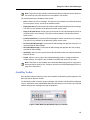
Once the Mitel Outlook Client Plug-in has been installed, the Unified Messaging Toolbar appears
in the Microsoft Outlook Explorer window. Menu items for some of these tasks are also added
to the Microsoft Outlook File, View, Tools and Actions menus.
Figure 3: Unified Messaging Toolbar (in Outlook)
26
Using Your PC for Voice Messages
Note: This toolbar is also available in the Microsoft Outlook Inspector window. However,
the QuickPlay and Profile buttons are not available in this window.
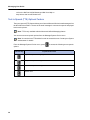
The following buttons are available on the toolbar:
•
New: Creates a new voice message. This option is also available in the Microsoft Outlook
File and Actions menus, as well as the standard toolbar.
•
Reply (with Voice): Sends a reply to the sender of a NP-UM message with a voice message.
This option is also available in the Microsoft Outlook Actions menu.
•
Reply to All (with Voice): Sends a reply to the sender of a NP-UM message and all of its
recipients with a voice message. This option is also available in the Microsoft Outlook
Actions menu.
•
Forward (with Voice): Forwards a NP-UM message to another user with a voice message.
This option is also available in the Microsoft Outlook Actions menu.
•
Previous (NP-UM message): Locates the NP-UM message that appears before the currently selected NP-UM message.
•
Next (NP-UM message): Locates the NP-UM message that appears after the currently
selected NP-UM message.
•
QuickPlay: Allows a user to open and close the QuickPlay toolbar in the Microsoft Outlook
Explorer window.
•
Profile: Allows a user to login to the Unified Messaging profile to configure additional
mailbox settings. This option is also available in the Microsoft Outlook Tools menu.
Note: This button is only available when the Unified Messaging profile is configured in
Microsoft Outlook options. See “Configure Access to the Unified Messaging Profile” on
page 26 for instructions.
QuickPlay Toolbar
Once the Mitel Outlook Client Plug-in has been installed, the QuickPlay toolbar appears in the
Microsoft Outlook Explorer window.
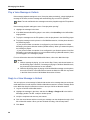
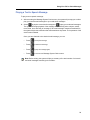
The QuickPlay toolbar is used for playing messages and consists of the QuickPlay multimedia
controls, a status bar, and a Call Me/Meet Me button that allows you to connect to your NP-UM
mailbox and play back messages through the telephone.
Figure 4: Mitel Networks QuickPlay Player (in Outlook)
27
Messaging User Guide
Play a Voice Message in Outlook
If the message playback settings are set to "Auto-play when previewing", simply highlight the
message in the inbox, and the message will automatically play over the PC speakers.
Note: Fax and confidential voice messages cannot be played through the PC speakers.
If the message playback settings are set to "Auto-play when opening"
1. Highlight the message in the inbox.
2. If the Mitel Networks QuickPlay player is not visible, click QuickPlay in the Unified Messaging toolbar.
3. To play the message over the PC speakers, click the play button in the QuickPlay player.
4. To play the message over the phone in a Call Me/Meet session, click the phone button in
the QuickPlay player.
- If your phone number or extension is configured in your Outlook options for Unified
Messaging, the system dials the number (Call Me session). When you answer the phone,
the message is played.
- If your phone number or extension is not configured in your Outlook options for Unified
Messaging, you must now call in to your voice mailbox and log in (Meet Me session). Once
you are logged in, the message is played.
For more information about the Call Me/Meet Me feature, refer to the Web View Help.
Notes:
1. While a message is playing, you can use the Stop, Pause, and volume buttons on
the QuickPlay player. However, if a message is playing in Call Me or Meet Me mode,
the pause and volume buttons are not available.
2. While the QuickPlay player is playing a Call Me /Meet Me message over the phone,
do not click "Profile" in the UM toolbar to launch the Web View OR click any button
in the Web View since the Call Me/Meet Me session will close.
Reply to a Voice Message in Outlook
You can reply to a voice message in Outlook with another voice message that you send as an
email attachment. You will require a Call Me or Meet Me connection to record a message. Refer
to the Web View Help for instructions on how to set up a Call Me or Meet Me session.
1. Log into a Call Me or Meet Me session.
2. Highlight the message in the inbox, and then click Reply or Reply to All in the Unified
Messaging toolbar. The RE: <subject> window opens.
3. Verify the recipients and enter any new names.
4. Click the record button and then record your message over the telephone through a Call
Me or Meet Me session. When you have finished recording, click the stop button.
5. Click Send.
28
Using Your PC for Voice Messages
Forward a Voice Message in Outlook
You can forward a voice message that you received in Outlook as an attachment to an email.
You can record a new voice message attachment to send with the email. You will require a Call
Me or Meet Me connection to record a message. Refer to the Web View Help for instructions
on how to set up a Call Me or Meet Me session.
1. Log into a Call Me or Meet Me session.
2. Highlight the message in the inbox, and then click Forward in the Unified Messaging
toolbar. The FW: <subject> message window opens.
3. Enter the message recipients.
4. Click the record button and then record your message over the telephone through a Call
Me or Meet Me session. When you have finished recording, click the stop button.
5. Click Send.
Send a New Voice Message in Outlook
You can create a new voice message and send it as an email attachment. You will require a
Call Me or Meet Me connection to record a message. Refer to the Web View Help for instructions
on how to set up a Call Me or Meet Me session.
Note: You can only open one new voice recording form in Outlook at a time. If you try to
open more than one new voice recording form, an error message will appear.
1. Log into a Call Me or Meet Me session.
2. In the Unified Messaging toolbar, click New.
3. Enter the message recipients and subject.
4. Click the record button and then record your message over the telephone through a Call
Me or Meet Me session. When you have finished recording, click the stop button.
5. Click Send.
Navigate Voice Messages in Outlook
To navigate the voice messages in Outlook, use the Previous and Next buttons in the Unified
Messaging toolbar.
Launch Web View from Outlook
To launch the Web View interface from Outlook
1. In the Unified Messaging toolbar, click Profile.
2. If you see a Security Warning, click Yes to continue. The login page for the Web View is
displayed. You can now log in to the Web View. For more information on the Web View,
29
Messaging User Guide
refer to the NuPoint Unified Messenger Web View Help on
http://edocs.mitel.com/UG/Index.html
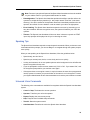
Text-to-Speech (TTS) Optional Feature
The text-to-speech (TTS) feature allows you to listen to Microsoft Outlook email messages from
the NP-UM Voice mailbox. The text of the email message is converted to speech and played
back over the phone.
Note: TTS is only available with the Advanced Unified Messaging feature.
You can access text-to-speech options from the Message System Choice menu.
Note: You need to have TTS enabled in order to access this menu. Contact your System
Administrator for details.
From the Message System Choice menu, press
options:
Press this key
To perform this action
Play text-to-speech message again.
Keep text-to-speech message.
Delete text-to-speech message.
Exit the menu.
30
to access the following text-to-speech
Using Your PC for Voice Messages
Playing a Text-to-Speech Message
To play a text-to-speech message:
1. After accessing the Message System Choice menu, the system will prompt you to either
play your unread email messages or your read email messages.
2. Select
to play the unread email messages or
to play your read email messages.
The system will begin playback of the message in the following order: subject, sender
name, date, time, and body of message. If the email message contains an attached file,
the system will provide notification that a file attachment is present. The importance of the
email is also indicated.
Once you have listened to the desired email message, you can:
•
Press
to keep the message;
•
Press
to delete the message;
•
Press
to play the message again;
•
Press
to exit from the Message System Choice menu.
Note: Before exiting, the system will play a summary of the total number of voicemail
and email messages remaining in the mailbox.
31
Messaging User Guide
Speech Auto Attendant Optional Feature
The NuPoint Unified Messenger Speech Auto Attendant (SAA) is a speech-enabled application
that allows you to place calls to people quickly and efficiently by speaking their names. In
addition to placing calls by name, you can say a department name or telephone number. An
online tutorial introduces you to the system features, and voice-based help is available to answer
questions.
The Speech Auto Attendant routes incoming calls based on spoken commands. Typically, you
say the name of the person you want to speak to and the system transfers your call to the
requested party. The Speech Auto Attendant also supports up to 15 departments and allows
you to call any of the department numbers or names. See “Making Calls” on page 34 for detailed
calling instructions.
The SAA has the ability to store four numbers per person and provides you with the option to
select which of your phone numbers will be the default Speech Auto Attendant number. Refer
to the Web View Help for instructions on how to configure your default phone number.
The following features are available with the Speech Auto Attendant application:
•
Call by Name: You can place calls to any person in the company directory by saying a
person’s name.
•
Call by Number: You can place calls to any number in the company directory by saying a
phone number (extension).
•
Call by Department: You can place calls to any department in the company directory by
saying a department name.
•
Touchtone (DTMF) Dialing: You can place calls to any number in the company directory
by using the keypad to enter the digits.
•
Universal Commands: You can use several generic voice commands (such as "help" or
"operator") to navigate through the system. See “Universal Voice Commands” on page 33
for more information.
•
Barge-in: You can interrupt a system prompt with a speech or keystroke command. The
Speech Auto Attendant will stop playing the prompt and responds to the command.
Note: Barge-in is an optional feature of the Speech Auto Attendant and must be enabled
on your mailbox. Refer to your System Administrator for details.
32
•
Tutorial: The Speech Auto Attendant provides a tutorial which allows you to record your
name (if you are a new user), or use the existing recorded name from your voice mail
system. It also introduces you to the system features.
•
Presence: The Speech Auto Attendant provides the ability to determine and playback the
current presence state of the matched person prior to transferring your call. Presence refers
to the person’s availability in relation to the telephone (ie. busy, away, do not disturb etc.).
The presence status information is for reference only, and thus a call will be transferred no
matter what the presence status of the called party may be.
Speech Auto Attendant Optional Feature
Note: Presence is an optional feature of the Speech Auto Attendant and must be enabled
on your mailbox. Refer to your System Administrator for details.
•
Disambiguation: The Speech Auto Attendant provides the ability to transfer calls to the
operator for multiple directory matches (i.e. two people named "John Doe" in the same
directory). You will be notified of the duplicate names and immediately transferred to the
operator, who will ask for more details in order to transfer your call to the right person.
•
Error Handling: The Speech Auto Attendant responds to an error by instructing you to
retry the command. After two recognition errors, the system will transfer your call to the
operator.
•
Timeout: The Speech Auto Attendant will time out when it detects no speech or DTMF
input. Help prompts will be played to aid you in choosing an action.
Speaking Tips
The Speech Auto Attendant responds to natural speech commands. When you become more
comfortable with the prompts, you can use Barge-in to navigate through the system prompts
more quickly.
When you are speaking to the Speech Auto Attendant, follow the guidelines below:
•
Speak clearly, but don’t shout.
•
Speak at your normal pace, that is, not too slowly and not too quickly.
•
In noisy environments, do not use speaker phones as the background noise will affect the
speech recognition success rate.
•
If you are prompted to confirm a name, answer only "Yes" or "No". If you answer "No", wait
for the system prompt before you state the name again.
•
If the system does not recognize a name, it may be because the name is not programmed
into the system or because your pronunciation of the name is not in the system. Contact
your System Administrator to have the name added or to have the pronunciation corrected.
Universal Voice Commands
The following voice commands are available from anywhere within the Speech Auto Attendant
system:
•
Cancel or Stop: Terminates the current operation.
•
Operator: Transfers your call to the operator.
•
Repeat: Replays the most recent prompt.
•
Help: Plays the list of available help commands.
•
Tutorial: Starts the system tutorial.
•
Auto Attendant: Transfers the call to the Speech Auto Attendant.
33
Messaging User Guide
Making Calls
You can use the Speech Auto Attendant to place calls either with voice commands or digit
dialing.
Placing a Call with Voice Commands
The Speech Auto Attendant can call contact names or departments that are programmed in
the company directory by responding to your voice commands.
To place a call using voice commands:
1. Dial the Speech Auto Attendant access number.
2. When the Auto Attendant answers, say one of the following:
•
the first and last name of the person that you want to call;
•
a department name; or
Note: You can listen to all the department names that are programmed in the system by
speaking the "department" command.
•
a phone number (speak the number one digit at a time).
3. The system confirms the requested name and then dials the number associated with your
spoken command.
Note: If, after two attempts, the Speech Auto Attendant cannot recognize the name of
the person or department that you are trying to call, you will be routed to the operator.
4. If the Presence feature is enabled, the system will also indicate the presence state of the
called party. The presence status information is for reference only, and thus the call will be
transferred no matter what the presence status may be.
Placing a Call with Digit Dialing
The Speech Auto Attendant can call contact names or departments that are programmed in
the company directory by responding to the digits that you press on the keypad.
To place a call using digit dialing:
1. Dial the Speech Auto Attendant access number.
2. When the Auto Attendant answers, enter the digits to dial on the keypad.
3. The system confirms the requested number and then dials the digits that you selected.
Note: If, after two attempts, the Speech Auto Attendant cannot recognize the number of
the person or department that you are trying to call, you will be routed to the operator.
4. If the Presence feature is enabled, the system will also indicate the presence state of the
called party. The presence status information is for reference only, and thus the call will be
transferred no matter what the presence status may be.
34
Speech Auto Attendant Optional Feature
Cancelling a Call
You can cancel a call in progress in one of two ways.
To cancel a call:
•
Say "Cancel" or "No" before the Speech Auto Attendant says "Dialing"; or
•
Press 0 (zero) before the Auto Attendant says "Dialing". This command will cancel the call
and the system will automatically route your call to the operator.
Calling the Operator
You can call the operator from anywhere in the system.
To call the operator:
•
Say "Operator" or "Zero" at any time; or
•
Dial 0 at any time.
35