1
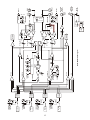
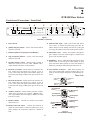
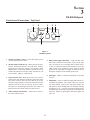
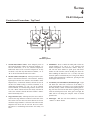
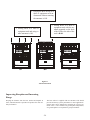
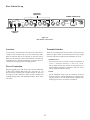
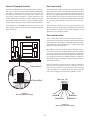
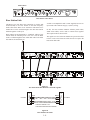
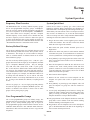
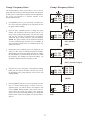
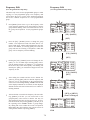
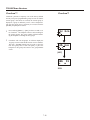
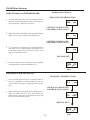
Keep the distance between the base station and the beltpacks
as short as possible. The greater the distance, the weaker the
signal. Make sure the “signal paths” between the base station
and beltpacks are unobstructed. You should be able to visibly
locate the base station antennas at all times for best performance.
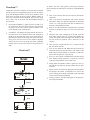
Attempting to operate the wireless intercom system through or
around walls, ceilings, metal objects, etc. will reduce system
range and performance.
VOL
OFF
SA
WTA
Te le x
B
A
BAT/OM
TALK
RadioComTM
TR-800
VOL
OFF
SA
WTA
Te le x
BAT/OM
B
A
TALK
MENU
RadioComä
BTR-800
UP
IN
COPY
DOWN
2
3
4
PORTABLE STATION CONNECT
OUT
OUT
INTERCOM A
ON/O.M.
VOLUME
IN
OUT
MIC GAIN
B
ON/OFF
SELECT
INTERCOM B
TALK/O.M.
A
4 WIRE
4 WIRE
1
SELECT
SET
2 WIRE
2 WIRE
IN
ClearScan
AUXILIARY
SELECT
TALK
VOL
OFF
BAT/OM
TALK
Te le x
RadioComTM
TR-800
700 FEET
RadioComTM
TR-700
100 FEET
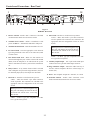
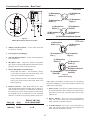
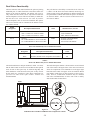
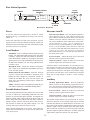
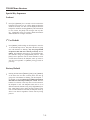
Figure 16
Operating System Near Obstructions
RadioComä
MENU
BTR-800
UP
IN
IN
ClearScan
1
COPY
DOWN
2
3
4
PORTABLE STATION CONNECT
OUT
IN
OUT
INTERCOM A
VOLUME
OUT
MIC GAIN
B
ON/OFF
SELECT
INTERCOM B
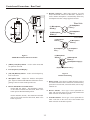
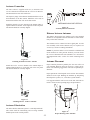
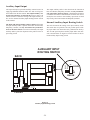
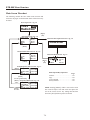
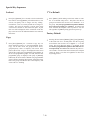
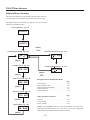
DO NOT - mount the base station 1/2-wave antennas on, or
next to metal, such as beams, walls with metal studs, equipment racks, etc. This also applies to the antennas when assembled directly to the Base Station. This will “detune” the
antennas which can result in noise or loss of RF signal at the
Base Station, see Figure 17.
TALK/O.M.
A
4 WIRE
4 WIRE
TM
SELECT
SET
ON/O.M.
2 WIRE
2 WIRE
SELECT
AUXILIARY
TALK
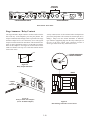
Figure 14
Distance Between base station and beltpack
VOL
SA
OFF
WTA
Te le x
A
B
BAT/OM
TALK
RadioComTM
TR-800
RadioComä
MENU
BTR-800
UP
ON/O.M.
2 WIRE
2 WIRE
VOL
IN
IN
OFF
ClearScan
1
COPY
DOWN
2
3
4
PORTABLE STATION CONNECT
OUT
OUT
INTERCOM A
VOLUME
IN
OUT
MIC GAIN
B
ON/OFF
SELECT
INTERCOM B
TALK/O.M.
A
4 WIRE
4 WIRE
TM
SA
WTA
Te le x
A
B
BAT/OM
TALK
SELECT
SET
AUXILIARY
SELECT
TALK
RadioComTM
TR-800
Figure 15
Keeping Site Clear to Antenna
5-3