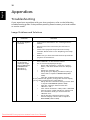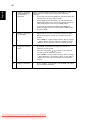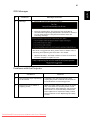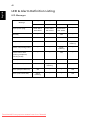
1
23
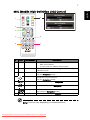
The projector has multilingual OSD that allow you to make image adjustments
and change a variety of settings.
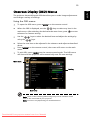
Using the OSD menus
•
To open the OSD menu, press "MENU" on the remote control.
•
When the OSD is displayed, use the
keys to select any item in the
main menu. After selecting the desired main menu item, press
submenu for feature setting.
•
Use the
using the
to enter
keys to select the desired item and adjust the settings by
keys.
•
Select the next item to be adjusted in the submenu and adjust as described
above.
•
Press "MENU" on the remote control, the screen will return to the main
menu.
•
To exit OSD, press "MENU" on the remote control again. The OSD menu
will close and the projector will automatically save the new settings.
Main menu
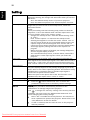
Setting
Sub menu
Note: Some of the following OSD settings may not be available. Please
refer to the actual OSD of your projector.
Note: Functions vary depending on model definition.
Downloaded From projector-manual.com Acer Manuals
English
Onscreen Display (OSD) Menus