1
VP-11S2_U_01_ENG 07.8.27 10:47 AM ページ18
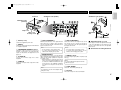
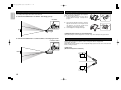
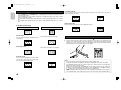
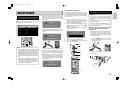
Selecting the Aspect Mode
ENGLISH
BASIC OPERATIONS
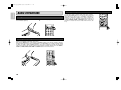
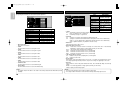
You can select 5 kinds of ASPECT mode using remote controller.
Pressing the ASPECT button on the remote control rotates the
aspect ratio in the order of FULL ➔ NORMAL ➔ ZOOM ➔ VSTRETCH ➔ THROUGH, allowing you to select an aspect ratio.
An aspect ratio can also be directly selected by pressing one of
the FULL, NORMAL, ZOOM or THROUGH buttons on the remote
controller. A selection can also be made from the menu. (
P.26)
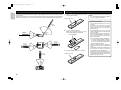
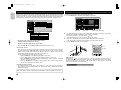
Turning on the Power
Press the ON button on the remote controller or the
The ON indicator lights up.
/ I button on the projector.
☞
BLANKING
B1
B2
V-MUTE
B3
OFF
MENU
M
INPUT
ENTER
A
I
ASPECT
CINEMA
INFO.
VCR MODE
BLACK LEVEL
PATTERN
BLACK
STANDBY
FULL
ON
IRIS
LAMP
C.TEMP
GAMMA
COMP.1
COMP.2
S-VIDEO
USER
G1
C1
C2
S
HDMI 1
HDMI 2
VIDEO
H1
H2
V
G2
AUX 1
AUX 2
A1
A2
RGB
G3
THTR
STD
DYN
G4
Selecting the Input Signal Source
Switch to the equipment connected to the projector.
Every time the INPUT button of the projector or the INPUT 3 button of the remote controller is pressed,
the input signal rotates in the order of COMPONENT 1 ➔ COMPONENT 2 ➔ S-VIDEO ➔ VIDEO ➔ RGB
➔ HDMI 1 ➔ HDMI 2. When the INPUT 4 button of the remote controller is pressed, the input signal
rotates in the opposite order. An input signal can also be directly selected by pressing one of the COMP.1,
COMP.2, S-VIDEO, VIDEO, RGB, HDMI 1 and HDMI 2 buttons on the remote control.
IRIS
LAMP
C.TEMP
GAMMA
COMP.1
COMP.2
S-VIDEO
USER
C1
C2
S
HDMI 1
HDMI 2
VIDEO
H1
H2
V
AUX 1
AUX 2
G1
G2
A1
A2
RGB
G3
THTR
STD
DYN
G4
B1
B2
BLANKING
V-MUTE
B3
OFF
MENU
M
INPUT
ENTER
18
A
I
ASPECT
INFO.
NOR
ZOOM
THRU