1
RouteFinder RF500S Quick Start Guide
Contents
Introduction ................................................................................................................... 1
Related Documentation ................................................................................................ 1
Hardware Installation .................................................................................................... 2
Safety Warnings ........................................................................................................... 2
Unpacking Your RouteFinder ....................................................................................... 2
Requirements ............................................................................................................... 2
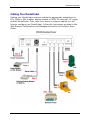
Cabling Your RouteFinder ............................................................................................ 3
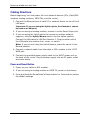
Cabling Directions ........................................................................................................ 4
Application Examples ................................................................................................... 5
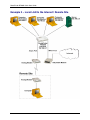
Example 1 – Connecting a Local LAN to the Internet ................................................... 5
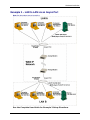
Example 2 – Local LAN to the Internet / Remote Site .................................................. 6
Example 3 – LAN to LAN via an Async Port ................................................................. 7
Configuration and Management .................................................................................. 8
Configure and Manage Using a Web Browser............................................................ 9
Setup Wizard .............................................................................................................. 10
Device Information...................................................................................................... 16
Device Status ............................................................................................................. 17
Advanced Settings...................................................................................................... 18
System Tools.............................................................................................................. 27
Multi-Tech Systems, Inc. Warranty ............................................................................ 35