1
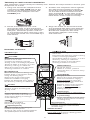
Voicemail indicators
If you subscribe to voicemail service offered by your telephone service provider,
NEW VOICEMAIL and
appear on the handset when you have new voicemail
messages. Contact your telephone service provider for more information and
assistance about using your voicemail service. Refer to Clear voicemail
indicators in the online user’s manual on how to clear the voicemail indicators.
Telephone operation
Make a call
• Press
or
then dial the telephone number.
Answer a call
• Press
,
or any dialing key.
End a call
• Press OFF or put the handset to the telephone base or charger.
Speakerphone
• During a call, press
to switch between speakerphone and normal handset use.
Volume
• During a call, press
/VOLUME or
/VOLUME to adjust the listening volume.
The handset earpiece volume setting and speakerphone volume setting are
independent.
Mute
The mute function allows you to hear the other party but the other
party cannot hear you.
. During a call, press MUTE. The handset displays MUTE.
2. Press MUTE again to resume the conversation.
Call waiting
When you subscribe to call waiting service from your telephone service provider,
you hear an alert tone if there is an incoming call while you are on another call.
• Press FLASH to put the current call on hold and take the new call.
• Press FLASH at any time to switch back and forth between calls.
Temporary ringer silencing
When the telephone is ringing, you can temporarily silence the ringer of the handset
without disconnecting the call. The next call rings normally at the preset volume.
• To silence the handset ringer, press OFF or MUTE on the handset.
RINGER MUTED and
display.
Temporary tone dialing
If you have pulse (rotary) service only, you can switch from pulse
to tone dialing temporarily during a call.
. During a call, press TONE .
2. Use the dialing keys to enter the relevant number. The
telephone sends touch-tone signals.
3. The telephone automatically returns to pulse dialing mode after you end the call.
Find handset
Use this feature to find all system handsets.
To start paging:
• Press /FIND HANDSET on the telephone base once and
then release. All idle handsets ring and their screens
show ** PAGING **.
To end paging:
• Press /FIND HANDSET again on the telephone base once and then release.
• Press
, or any dialing key on the handset.
• Place the handset in the telephone base or charger.
Do not press and hold /FIND HANDSET for more than four seconds. It may lead
to handset deregistration.
Redial list
Each handset stores the last 10 telephone numbers dialed.
To review and dial a number from the redial list:
. Press REDIAL when the handset is not in use.
2. Press� , , or
��� REDIAL repeatedly until the desired entry displays.
3. Press
to dial.
To delete a redial entry:
When the desired redial entry displays, press DELETE.